
Código QR de Square Up: Cómo funciona y las mejores alternativas de software

Los pagos con códigos QR se están convirtiendo rápidamente en la norma. Con miles de millones de usuarios de billeteras digitales y una adopción creciente de pagos sin contacto, los clientes ahora esperan experiencias rápidas de escaneo y pago en todas partes.
Pero aquí está el problema: mientras que los códigos QR de Square, Inc. son fáciles de configurar, muchas empresas rápidamente se encuentran con limitaciones cuando necesitan más flexibilidad, seguimiento o personalización.
Eso es donde entra esta guía. Aprende cómo funcionan los códigos QR de Square, cómo configurarlos para pagos y pedidos, y cuándo actualizar a herramientas más avanzadas para una mayor flexibilidad y seguimiento.
Tabla de Contenidos
- ¿Cómo funciona un código QR cuadrado?
- ¿Por qué es importante el pago con código QR?
- ¿Cómo utilizan las empresas un código QR de Square?
- Limitaciones del código QR de Square Up
- Mejor software de códigos QR para aplicaciones amplias de códigos QR
- Tabla de comparación: Square vs. QR TIGER vs. MENU TIGER
- Cómo elegir el proveedor adecuado de códigos QR para tu negocio
- Códigos QR para transacciones sin contacto y sin problemas
- Preguntas frecuentes
¿Cómo funciona un código QR cuadrado?
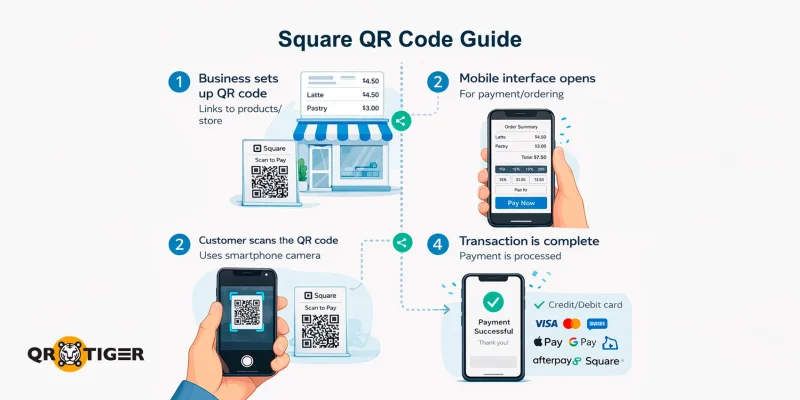
Un código QR cuadrado conecta directamente a los usuarios con una interfaz digital de pago, reserva u ordenación.
Las empresas pueden habilitar el Código QR para el pago o ordenar transacciones alojando sus productos o vinculándolos a una tienda en línea existente de Squareup.
El código QR de Square admite todos los principales métodos de pago, incluidas las tarjetas de crédito y débito, Apple Pay, Google Pay, Square Pay y Afterpay, lo que permite transacciones sin contacto y sin problemas desde cualquier teléfono inteligente.
Está diseñado principalmente para:
- Proporcionar una forma rápida para que los clientes completen transacciones
- Habilitar pagos sin contacto mediante códigos QR para interacciones más seguras
- Ofrezca una experiencia amigable para los clientes de todas las edades
- Proporcione a las empresas una herramienta sencilla para agilizar los pagos y pedidos
Esta solución de código QR de Square permite a las tiendas y negocios en línea y físicos reducir el contacto físico, acelerar el proceso de pago y simplificar la experiencia de pago en general.
¿Por qué es importante el pago con código QR?
- Reducen la fricción en el proceso de pago, acortan las colas y disminuyen la dependencia del manejo de efectivo o terminales físicos.
- Facilitan la escalabilidad de las operaciones en el servicio en el local, pop-ups y servicios, manteniendo la experiencia del cliente simple: escanear, pagar y listo.
- También desbloquean datos y optimización, permitiendo el seguimiento, integraciones e informes simplificados para tomar decisiones más inteligentes y flujos de trabajo más eficientes.
En resumen, los pagos con códigos QR no son solo una actualización tecnológica: son una forma práctica de aumentar la velocidad, mejorar la satisfacción del cliente y proteger los pagos para el futuro.
¿Cómo utilizan las empresas un código QR de Square?
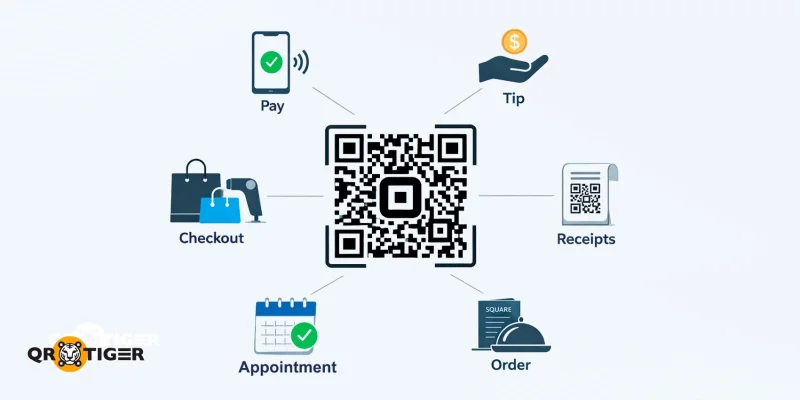
Aquí hay algunas formas comunes en que tu negocio puede usar los códigos QR de Square:
- Pagos sin contacto: Implemente un método de escaneo para pagar con código QR que permita a los clientes finalizar transacciones en sus teléfonos inteligentes en lugar de pagar con efectivo o tarjeta.
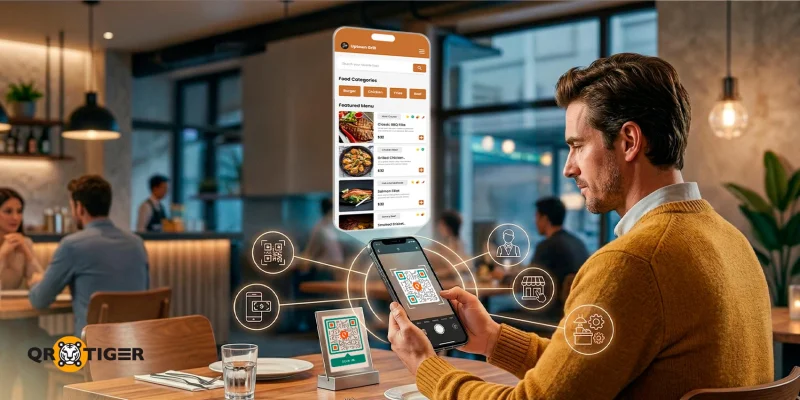
- Pedidos rápidos en cafeterías y restaurantes: Coloca un menú sin contacto Código QR en mesas o mostradores para que los clientes puedan ver los menús y hacer pedidos de forma digital, agilizando el servicio y reduciendo los tiempos de espera.
- Propinas y gratificaciones: Usa códigos QR para aceptar propinas de forma instantánea y conveniente.
- Punto de venta minorista: Implementa un código QR para el pago en tiendas. Colócalo en los mostradores o cerca de los productos para que los clientes puedan escanearlo y completar las compras sin tener que esperar en la fila.
- Código QR de pago en recibos o empaques: Incluya códigos QR en recibos, facturas o empaques de productos para brindar a los clientes una forma más rápida de pagar o acceder a servicios adicionales.
- Reserva de cita: Agrega un código QR que enlace directamente a tu página de reservas, permitiendo a los clientes programar citas al instante sin idas y vueltas.
Limitaciones del código QR de Square Up
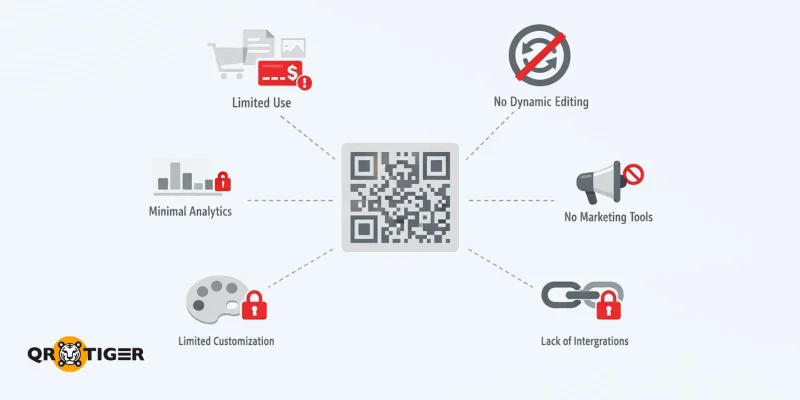
Cuadrarse proporciona códigos QR que funcionan bien como códigos QR de pago sin contacto, pero hay algunas limitaciones que las empresas deben considerar al usar la plataforma:
- Diseñado solo para fines de pedido y pago: Las herramientas de código QR de Square funcionan mejor para transacciones como el pago y las propinas. Esto limita su utilidad para propósitos que no sean de pago, como el marketing o compartir información.
- Carece de herramientas de marketing: Square ofrece soluciones y funciones limitadas de códigos QR para promociones e integración en redes sociales, lo que lo hace menos adecuado para uso en marketing.
- Sin edición dinámica: El destino o contenido del código QR no se puede actualizar. Esto significa que las empresas deben crear un nuevo código cada vez que se necesiten actualizaciones.
- Seguimiento básico de códigos QR y análisis: El software proporciona información mínima, lo que dificulta medir la participación o mejorar las campañas basadas en datos.
- Restricciones de diseño y personalización: Square ofrece opciones para personalizar la marca, pero los códigos QR en sí tienen opciones de estilo limitadas, como la personalización de colores o la adición de logotipos.
- Dependencia del ecosistema Square: Las empresas deben usar la plataforma de Square, la cual puede no integrarse perfectamente con otras herramientas o flujos de trabajo.
Mejor software de códigos QR para aplicaciones amplias de códigos QR
Para las empresas que necesitan soluciones de códigos QR más versátiles para marketing, compromiso con los clientes, pedidos y otras necesidades operativas, recomendamos estos principales generadores de códigos QR:
QR TIGER: Ideal para casos de uso flexibles de códigos QR
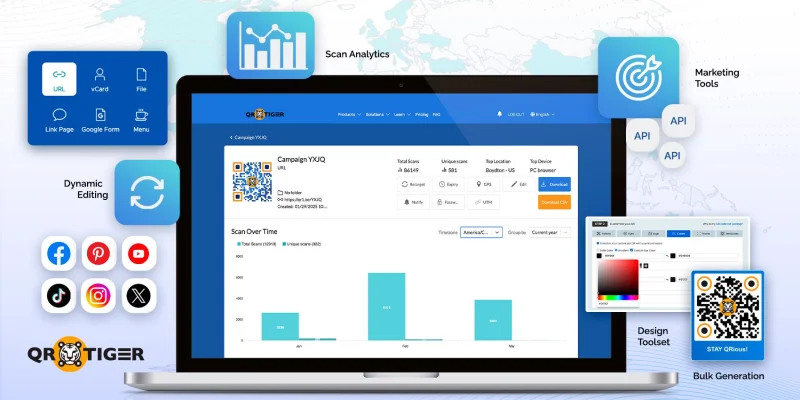
QR TIGER es un multiusos generador avanzado de códigos QR para empresas, ofreciendo una variedad de soluciones y herramientas para satisfacer una amplia gama de necesidades.
A diferencia de Square, Inc., que se enfoca en pagos y pedidos, QR TIGER prioriza la flexibilidad de marketing y la optimización de campañas, lo que lo hace ideal para impulsar la participación y conversiones.
Características clave
- Múltiples tipos de códigos QR: Desde URLs y archivos hasta compartir ubicaciones, acceso a Wi-Fi y enlaces de redes sociales.
- Códigos QR dinámicos: Actualizar destinos sin cambiar el código QR en sí mismo.
- Analíticas de escaneo: Seguir el rendimiento, monitorear la participación y obtener información accionable.
- Herramientas de marketing: Accede a herramientas como el retargeting, geofencing, etiquetado UTM, configuración de caducidad y más.
- Integraciones: Conecta campañas de códigos QR con correo electrónico, redes sociales y otros canales de marketing y flujos de trabajo.
- Opciones de diseño personalizado: Personaliza códigos QR con colores, logotipos y branding para que coincidan con la identidad de tu negocio.
- Generación masiva de códigos QR: Producir múltiples códigos QR a la vez para campañas, eventos y despliegues a gran escala.
Esto hace que QR TIGER sea una excelente opción para las empresas que buscan ir más allá de simples transacciones y utilizar códigos QR como una herramienta de crecimiento y compromiso en marketing y puntos de contacto con los clientes.
Cons
- Sin pagos integrados
- No proporciona integración a nivel de POS
- No admite pedidos de autoservicio
MENU TIGER: Lo mejor para menús digitales y branding de restaurantes
MENÚ TIGRE se enfoca en la industria de servicios de alimentos, ofreciendo códigos QR dinámicos para restaurantes para agilizar operaciones.
Permite a las empresas cargar artículos, organizarlos en categorías, agregar fotos y personalizar el aspecto para que coincida con su marca.
Las actualizaciones de los elementos del menú, los precios y la disponibilidad se pueden hacer al instante, y los cambios aparecen inmediatamente cuando los clientes escanean el mismo código QR.
MENU TIGER ofrece una amplia personalización del diseño del menú y herramientas de venta adicional, que Square no tiene.
Características clave
- Menús de códigos QR: Menús digitales accesibles a través del teléfono inteligente, reduciendo la necesidad de copias impresas.
- Ordenar sin contacto: Los clientes pueden realizar pedidos directamente desde su dispositivo, mejorando la seguridad y conveniencia.
- Sistemas de pedidos en mesa: Habilitar el pedido y el pago en la mesa sin intervención del personal.
- Integración de pedidos en línea: Conecta códigos QR a plataformas de pedidos en línea para un servicio sin interrupciones.
- Gestión del flujo de trabajo en un restaurante: Simplificar el seguimiento de pedidos, la coordinación de la cocina y el procesamiento de pagos.
En su totalidad, MENU TIGER es una excelente opción para empresas en las industrias de restaurantes y servicios que buscan migrar a una solución de software de menú digital que ya incluye herramientas de pago y enrutamiento de flujo de trabajo en la cocina.
Cons
- Integraciones de POS limitadas
- Depende de procesadores de terceros para los pagos
- Análisis limitado de datos de clientes
Tabla de comparación: Square vs. QR TIGER vs. MENU TIGER
Esta es la comparación lado a lado de las características y casos de uso principales de las tres plataformas.
| Característica | Cuadrado | QR TIGER | MENÚ TIGRE |
Casos de uso | Pagos | Marketing, compromiso y operaciones | Menús digitales, pedidos y gestión de restaurantes |
| Integración de pagos | Integrado con pagos de Square | Opcional, compatible con múltiples integraciones | Integrado con sistemas de pedidos y pagos |
| Códigos QR de marketing | Limitado | Amplio, incluyendo promociones, campañas y redes sociales | Limitado, enfocado en menús y pedidos |
| Códigos QR dinámicos | Limitado | Disponible, permite actualizaciones sin necesidad de reimprimir | Disponible para actualizaciones de menú y pedidos |
| Analítica | Información basada en transacciones, como datos de compra y comportamiento del cliente | Datos avanzados, incluyendo seguimiento de escaneo, ubicación y dispositivo | Seguimiento de pedidos y comportamiento del cliente |
| Personalización | Opciones de diseño minimalista | Alto, incluyendo logotipos, colores y marca | Personalización moderada centrada en el menú |
| Generación a granel | No disponible | Disponible para campañas y uso a gran escala | No es una característica principal |
Cómo elegir el proveedor adecuado de códigos QR para tu negocio
Seleccionar la solución adecuada de código QR depende de tu industria, tus objetivos comerciales y el tipo de experiencia de cliente que deseas ofrecer.
Aquí hay algunos puntos a considerar al elegir un software de códigos QR:
- Propósito del código QR: Si tu objetivo es estrictamente pagos sin contacto Para propinas, los códigos QR de Square son suficientes. Para marketing, compromiso o usos operativos, un generador avanzado de códigos QR, como QR TIGER, ofrece más flexibilidad.
- Necesidad de actualizaciones dinámicas: Plataformas de códigos QR dinámicos, como QR TIGER y MENU TIGER, te permiten cambiar los destinos o el contenido del código QR incluso después de imprimirlo, lo cual es útil para campañas o menús.
- Análisis e información: Si el seguimiento de las interacciones y el compromiso de los clientes es importante, las plataformas avanzadas proporcionan datos de escaneo detallados para informar las decisiones comerciales.
- Diseño y marca: Las empresas que desean colores personalizados, logotipos o códigos QR de marca se beneficiarán de plataformas como QR TIGER y MENU TIGER, que ofrecer personalización de diseño herramientas.
- Volumen de códigos necesarios: Si necesitas varios códigos QR para promociones, eventos o menús, las funciones de generación masiva pueden ahorrar tiempo y esfuerzo.
- Integración con sistemas existentes: Considera si la solución de código QR funciona con tus plataformas de POS, pedidos o marketing para optimizar las operaciones.
- Necesidades específicas de la industria: Los restaurantes pueden priorizar el pedido de mesas y menús digitales, mientras que los negocios minoristas o de servicios pueden enfocarse en herramientas de marketing y compromiso.
Al evaluar estos factores, puedes elegir la solución de software de código QR que se alinee con tus objetivos y flujo de trabajo operativo, asegurando que tu negocio obtenga el máximo valor de ello. 
Códigos QR para transacciones sin contacto y sin problemas
Un código QR cuadrado es una herramienta útil para implementar pagos sin contacto y agilizar pedidos, especialmente en negocios que priorizan la rapidez y la comodidad.
Para aquellos que necesitan marketing, compromiso y eficiencia operativa más allá de los pagos, recomendamos utilizar un generador avanzado de códigos QR para acceder a códigos dinámicos, análisis y herramientas de personalización.
Al comprender las fortalezas y limitaciones de cada opción, puedes elegir la solución de código QR que brinde experiencias eficientes, seguras e interactivas para los clientes.
Listo para mejorar tu estrategia de códigos QR? Explora una plataforma de códigos QR flexible para crear campañas de códigos QR con marca, rastreables y orientadas a la conversión que van más allá de los pagos. 
Preguntas frecuentes
¿Cómo obtengo un código QR para Square?
Para obtener un código QR cuadrado, inicia sesión en tu cuenta en Square. A continuación, ve a la sección de pago o de compra, y genera un código QR vinculado a tu página de pago o artículo. Descarga, imprime o muestra el código digitalmente para que los clientes lo escaneen y paguen.
¿Cuánto cobra Square por los códigos QR?
Square no cobra una tarifa separada por crear códigos QR. Sin embargo, se aplica una tarifa de transacción estándar cuando se realizan pagos a través de un código QR, generalmente como un porcentaje del monto de la transacción más una tarifa fija, dependiendo de tu región y tipo de pago. 

