HTML का उपयोग करके QR कोड कैसे उत्पन्न करें: एक सरल मार्ग

द्वारा Ashley P.
सार्वजनिकस्थल: Feb 26, 2026•अपडेट: Oct 17, 2026- 11 मिनट पढ़ें
HTML का उपयोग करके QR कोड कैसे उत्पन्न करें: एक सरल मार्ग

क्या HTML (हाइपर टेक्स्ट मार्कअप भाषा) का उपयोग करके QR कोड उत्पन्न किया जा सकता है?

छोटा जवाब है हां, लेकिन केवल HTML से QR कोड नहीं बना सकता। QR कोड इसे उत्पन्न करने के लिए जावास्क्रिप्ट या किसी अन्य QR कोड सॉफ़्टवेयर की आवश्यकता है।

इस लेख में, आप सीखेंगे कि HTML का उपयोग करके जावास्क्रिप्ट के साथ QR कोड कैसे बनाया जाता है और कब एक उन्नत QR कोड जेनरेटर का उपयोग करना व्यापारिक दृष्टिकोण से ज्यादा समझदार होता है जैसे संपादन, ट्रैकिंग, और स्केलेबिलिटी की सुविधाओं के लिए।

सामग्री सूची

    1. क्या है QR कोड HTML जेनरेटर?
    2. HTML और JavaScript का उपयोग करके QR कोड कैसे उत्पन्न करें
    3. HTML आधारित क्यूआर कोड उत्पादन में कहाँ कमी होती है
    4. आपको HTML के लिए एक उन्नत QR कोड जेनरेटर क्यों चाहिए
    5. लैंडिंग पेज क्यूआर कोड: एक नो-कोड समाधान
    6. HTML QR कोड (कोडिंग नहीं) कैसे बनाएं
    7. क्यों QR टाइगर सबसे अच्छा QR कोड जेनरेटर HTML कोड के साथ है
    8. संक्षेपित करना
    9. सामान्य प्रश्न

क्या है QR कोड HTML जेनरेटर?

एक HTML क्यूआर कोड जेनरेटर एक वेब-आधारित समाधान है जो HTML और JavaScript या एक API का उपयोग करता है एक वेब पृष्ठ पर QR कोड बनाने और प्रदर्शित करने के लिए।

फ़ॉर त्वरित, आसान QR कोड उत्पादन के लिए, QR TIGER जैसे ऑनलाइन प्लेटफ़ॉर्म आपको HTML कोडिंग के बिना एक बनाने देते हैं।

HTML और JavaScript का उपयोग करके QR कोड कैसे उत्पन्न करें

आप HTML का उपयोग करके एक छोटी सी JavaScript पुस्तकालय के साथ मिलाकर QR कोड बना सकते हैं।

याद रखें, हाइपर टेक्स्ट मार्कअप भाषा एचटीएमएल आपकी वेबपेज बनाता है, और जावास्क्रिप्ट क्यूआर कोड जनरेशन को संभालता है।

अब, चलिए देखते हैं कि आप इन उपकरणों का उपयोग करके एक HTML QR कोड कैसे बना सकते हैं।

चरण 1: एक HTML फ़ाइल बनाएं
Create HTML file

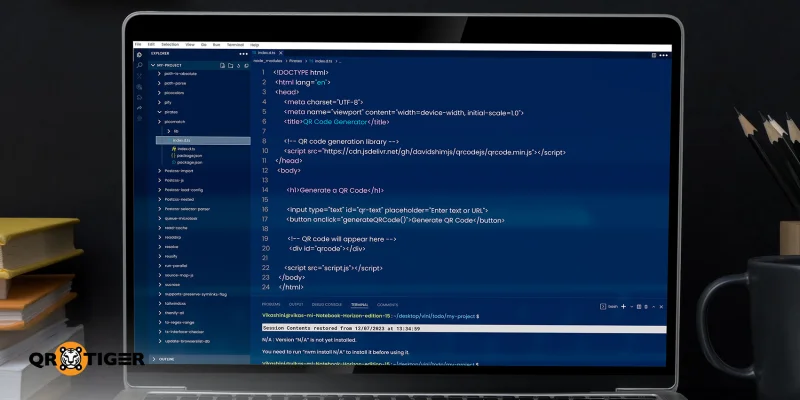
पहले, आपको एक HTML की आवश्यकता है QR कोड बनाने के लिए। index.html नाम की एक फ़ाइल बनाकर शुरू करें। यह फ़ाइल QR कोड जेनरेटर की संरचना को धारित करेगी।

अगले, अपने फ़ाइल में, एक पाठ इनपुट जोड़ें जहाँ उपयोगकर्ता एक URL या पाठ दर्ज कर सकते हैं, एक बटन जो QR कोड उत्पन्न करेगा, और एक खाली जगह जहाँ QR कोड दिखाई देगा। यहाँ, आप उस पुस्तकालय से भी लिंक कर सकते हैं जो वास्तव में काम करता है।

अंत में, आपका HTML फ़ाइल इस तरह दिखेगी:

    <मेटा चारसेट="यूटीएफ-8">

QR कोड जेनरेटर

<शरीर>

जेनरेट करें एक क्यूआर कोड


चरण 2: जावास्क्रिप्ट जोड़ें

Add the JavaScript

एक दूसरी फ़ाइल बनाएं जिसका नाम script.js है। यह फ़ाइल उपयोगकर्ता इनपुट पढ़ती है और क्यूआर कोड उत्पन्न करती है।

जब यह दूसरी फ़ाइल बनाई जाती है, स्क्रिप्ट द्वारा दर्ज किया गया पाठ लेता है, मौजूदा किसी भी QR कोड को साफ करता है, और एक नया कोड बनाता है।

यह आपके स्क्रिप्ट फ़ाइल का दिखाई देगा:

कार्य generateQRCode() {

const text = document.getElementById("qr-text").value.trim();

अगर (!टेक्स्ट) {

अलर्ट("कृपया कुछ पाठ या यूआरएल दर्ज करें");

वापस;

}

दस्तावेज़.getElementById("क्यूआरकोड").innerHTML = "";

नया QRCode(document.getElementById("qrcode"), {

टेक्स्ट: टेक्स्ट,

चौड़ाई: 150,

ऊचाई: 150

    });

चरण 3: फ़ाइल को सहेजें और खोलें

अब आपको पहले जितने भी फ़ाइलें हमने उत्पन्न की हैं, उन्हें एक ही फ़ोल्डर में सहेजना चाहिए। अगले कदम में, किसी भी वेब ब्राउज़र में index.html फ़ाइल खोलें।

अब, एक URL या पाठ दर्ज करें, फिर पीढ़ी बटन पर क्लिक करें।

यह HTML का उपयोग करके एक क्यूआर कोड उत्पन्न करते हैं।

HTML आधारित क्यूआर कोड उत्पादन में कहाँ कमी होती है

Disadvantages of HTML-based code

HTML और JavaScript का उपयोग करके QR कोड उत्पन्न करने की जटिलता को ध्यान में रखते हुए, यह महत्वपूर्ण है कि समझें कि यह दृष्टिकोण कहाँ कमजोर है। यह आपको आपकी आवश्यकताओं के लिए सबसे अच्छा काम क्या करेगा, इसे तेजी से और विश्वसनीयता से निर्धारित करने में मदद करेगा।

HTML अकेले QR कोड उत्पन्न नहीं कर सकता

एक HTML फ़ाइल अकेले एक QR कोड उत्पन्न नहीं कर सकती क्योंकि यह केवल एक मार्कअप भाषा है। आपको HTML को जावास्क्रिप्ट लाइब्रेरी या थर्ड-पार्टी एपीआई (एप्लिकेशन प्रोग्रामिंग इंटरफेस) के साथ मिलाकर HTML फ़ाइल को QR कोड में बदलने की आवश्यकता है।

जावास्क्रिप्ट का ज्ञान एक आवश्यकता है

जावास्क्रिप्ट में, स्क्रिप्ट में छोटी सी गलतियाँ भी पूरी प्रक्रिया को टूटा सकती हैं। इससे जावास्क्रिप्ट का अच्छा काम करने के लिए जानकारी अत्यंत आवश्यक है।

सीमित कस्टमाइज़ेशन विकल्प

HTML और JavaScript का उपयोग करके उत्पन्न QR कोड में बहुत ही सीमित customization विकल्प होते हैं। इसका परिणाम है कि आप अपनी ब्रांड पहचान से मेल खाने के लिए डिज़ाइन को आसानी से अनुकूलित नहीं कर सकते।

कोई विश्लेषण या ट्रैकिंग नहीं

जब आप HTML का उपयोग करके QR कोड उत्पन्न करते हैं, तो आप एनालिटिक्स या ट्रैकिंग सुविधाओं तक पहुंच नहीं पा सकते। बड़े पैमाने पर ब्रांड अभियानों के लिए, ये अंदाज फुल कंट्रोल बनाए रखने और प्रदर्शन को प्रभावी ढंग से मापने के लिए आवश्यक हैं।

HTML केवल स्थैतिक क्यूआर कोड बना सकता है

विशेषित QR कोड जेनरेटर की तुलना में, जो डायनामिक QR कोड्स प्रदान करते हैं, HTML केवल आपको स्थैतिक कोड बनाने की अनुमति देता है। इसलिए, यदि आप बाद में परिवर्तन करने की आवश्यकता होती है, तो आपको QR कोड को पुनः शुरू से उत्पन्न करना होगा।

सुरक्षा सीमाएं

HTML आधारित क्यूआर कोड एन्क्रिप्शन, एक्सेस नियंत्रण, पासवर्ड सुरक्षा या आईएसओ प्रमाणीकरण जैसी सुविधाएं प्रदान नहीं करते। इसलिए, आपके संबोधित डेटा की सुरक्षा की कोई गारंटी नहीं है।

रखरखाव में कठिनाई

यदि आप कोडिंग या प्रोग्रामिंग के साथ पूरी तरह से अवगत नहीं हैं, तो HTML से बनाए गए QR कोड का प्रबंधन अत्यधिक कठिन हो सकता है, क्योंकि प्रत्येक अपडेट कोड परिवर्तन, पुनः डिप्लॉयमेंट, और परीक्षण की आवश्यकता होती है।

आपको HTML के लिए एडवांस्ड QR कोड जेनरेटर क्यों चाहिए

विशेषीकृत क्यूआर कोड सॉफ़्टवेयर का उपयोग करने से आप कोडिंग या तकनीकी विशेषज्ञता के बिना एक क्यूआर कोड बना सकते हैं।

यह ऑटोमेशन प्लेटफॉर्म के साथ संगत है और प्रदान करता है। QR कोड API दस्तावेज़ीकरण जिन डेवलपर्स का उपयोग सॉफ़्टवेयर एप्लिकेशन में सीधे QR कोड उत्पन्न करने के लिए किया जा सकता है।

कुछ लोग तुरंत एक HTML कोड प्रदान करते हैं, ताकि आप बिना कोडिंग के किसी भी वेबसाइट या किसी वेब पृष्ठ पर जिस QR कोड को आपने बनाया है, आसानी से एम्बेड कर सकें।

एक प्रतिबद्ध QR कोड जेनरेटर भी पूर्ण अनुकूलन विकल्प उपलब्ध कराता है, जिससे ब्रांड पहचान के साथ मेल खाते QR कोड डिज़ाइन करना आसान होता है।

इसके अतिरिक्त, यह डायनामिक क्यूआर कोड का समर्थन करता है, जिससे आप उनकी सामग्री को डिप्लॉयमेंट के बाद अपडेट कर सकते हैं और उनके प्रदर्शन को वास्तविक समय में मॉनिटर कर सकते हैं।

ये विशेष रूप से लंबे समय तक चलने वाले अभियानों और चल रही प्रचार गतिविधियों के लिए मूल्यवान हैं, जहां लचीलापन और नियंत्रण आवश्यक हैं।

लैंडिंग पेज क्यूआर कोड: एक नो-कोड समाधान

Landing page QR code

ए लैंडिंग पेज क्यूआर कोड एक लचीला और व्यावहारिक तरीका है मोबाइल-ऑप्टिमाइज़ कंटेंट को एक ही स्कैन के माध्यम से साझा करने के लिए। यह एक समाधान है जो एडवांस्ड क्यूआर कोड सॉफ़्टवेयर जैसे क्यूआर टाइगर में उपलब्ध है।

यह QR कोड एक लैंडिंग पेज खोलता है जो QR कोड प्लेटफॉर्म के अंदर होस्ट और प्रबंधित किया जाता है।

आप पृष्ठ को अपनी इच्छित पाठ, छवियाँ, वीडियो, लिंक, बटन और अन्य इंटरैक्टिव तत्वों के साथ डिज़ाइन कर सकते हैं बिना किसी कोड की एक भी पंक्ति लिखे। यदि आप कुछ कोडिंग खुद करना चाहते हैं तो "कोड दृश्य" विकल्प भी है।

यह विपणनकर्ताओं, व्यावसायिक व्यक्तियों, और अभियान प्रबंधकों के लिए एक आदर्श समाधान बनाता है जो अपने क्यूआर कोड को अपने ब्रांड की छवि और संचार लक्ष्यों के साथ मेल खाना चाहते हैं।

HTML QR कोड (कोडिंग नहीं) कैसे बनाएं

एक नो-कोड QR कोड बनाने के लिए एक लैंडिंग पेज के लिए, इन सरल कदमों का पालन करें:

1. एक दौरा करें गतिशील क्यूआर कोड जेनरेटर ऑनलाइन

समाधान डैशबोर्ड से H5 क्यूआर कोड विकल्प का चयन करें।

3. उपलब्ध वेब डिज़ाइन तत्वों का उपयोग करके अपने H5 पेज को जोड़ें और डिज़ाइन करें।

4. वैकल्पिक: सीधे कोडिंग या प्रोग्रामिंग के लिए, कोड दृश्य पर स्विच करें ।

जब आपका पेज तैयार हो जाए, तो HTML को QR कोड में बदलने के लिए जनरेट पर क्लिक करें।

6. उच्च गुणवत्ता वाले छवि प्रारूपों में PNG, SVG या EPS जैसे QR कोड को अनुकूलित करें और डाउनलोड करें।

HTML कोड देखने के लिए, क्लिक करें QR कोड एम्बेड करें और कॉपी करें।

याद दिलाने वाला संदेश: अपनी प्रचार-प्रसार या वेबपेज में QR कोड का उपयोग करने से पहले हमेशा यह सुनिश्चित करें कि यह उपकरणों पर सहजता से काम करता है।

क्यों QR टाइगर सबसे अच्छा QR कोड जेनरेटर HTML कोड के साथ है

कई उन्नत जनरेटर्स हैं जो आपको क्यूआर कोड बनाने की अनुमति देते हैं। लेकिन जब बात उनमें से एक जिनमें HTML कोड सहित होते हैं, तो हम QR TIGER की ऊर्जावान सिफारिश करते हैं।

यह व्यवसायों और डेवलपर्स के लिए एक पसंदीदा विकल्प है क्योंकि इसके कुछ कारण हैं:

  • सच्ची प्लेटफ़ॉर्म निर्माण: यह आपको एक कस्टम क्यूआर कोड लैंडिंग पेज बनाने की अनुमति देता है जो प्लेटफ़ॉर्म के भीतर पूरी तरह से बनाया जा सकता है, अलग वेबसाइट, सीएमएस या होस्टिंग प्रदाता पर निर्भर नहीं करता।
  • प्रिंट के बाद भी संपादनीय इसके डायनामिक क्यूआर कोड लैंडिंग पेज के लिए आपको किसी भी समय लैंडिंग पेज की सामग्री को अपडेट करने की अनुमति देता है, यहां तक कि क्यूआर कोड को प्रिंट किया गया या वितरित किया गया हो।
  • कोई तकनीकी विशेषज्ञता की आवश्यकता नहीं है: एक दृश्यात्मक, खंड-आधारित संपादक गैर-तकनीकी उपयोगकर्ताओं को सरलता से लैंडिंग पेज QR कोड बनाने और प्रबंधित करने की अनुमति देता है।
  • सरल API एकीकरण: एपीआई दस्तावेज़ीकरण अन्य सॉफ़्टवेयर एप्लिकेशन में QR कोड जेनरेट करना तेज़, सुविधाजनक और और विस्तारयुक्त बनाता है, पूरी प्रक्रिया को स्वचालित करके।
  • यात्रा पर एचटीएमएल कोड: QR TIGER स्वचालित रूप से HTML कोड उत्पन्न करता है आपके QR कोड के लिए, जिससे आप इसे मैन्युअल कोडिंग के परेशानी के बिना सीधे अपनी वेबसाइट पर समाहित कर सकते हैं।
  • बड़ी ब्रांडिंग नियंत्रण: यह आपको अपने ब्रांड पहचान के साथ मेल खाते हुए रंग, लेआउट और सीटीए टैग्स सहित लैंडिंग पेज और क्यूआर कोड डिज़ाइन पर पूरा नियंत्रण प्रदान करता है।
  • सुरक्षित और विश्वसनीय होस्टिंग: QR TIGER को प्राथमिकता देता है। डेटा सुरक्षा ISO 27001, GDPR, CCPA और SSO मानकों का पालन करके, यह बड़े पैमाने पर लंबे समय तक चलने वाले अभियानों के लिए विश्वसनीय प्लेटफ़ॉर्म बनाता है।

संक्षेपित करना

आप पहले से ही जानते हैं कि HTML और JavaScript का उपयोग करके QR कोड कैसे उत्पन्न किया जाता है, और यह किस तरह की सुविधाओं और स्केलेबिलिटी में कमी होती है।

हम एक उन्नत QR कोड जेनरेटर का सुझाव देते हैं जिसमें HTML कोड का उपयोग करके आपके कोड बनाना और प्रबंधित करना सरल और तनावमुक्त हो।

आपको अपने QR कोड पर पूरा नियंत्रण मिलता है, चाहे वह सामग्री अपडेट करना हो, डिज़ाइन को अपने ब्रांड से मेल खाने के लिए कस्टमाइज़ करना हो, प्रदर्शन को समय के साथ ट्रैक करना हो, या उन्हें वेबसाइट पर एम्बेड करना हो। Free ebooks for QR codes

सामान्य प्रश्न

मुझे HTML के लिए कौन सा सॉफ़्टवेयर चाहिए?

HTML के लिए, आपको केवल एक सरल पाठ संपादक जैसे Notepad या TextEdit, या अधिक सुविधायुक्त संपादक जैसे VS Code की आवश्यकता है। जब फ़ाइल को .html एक्सटेंशन के साथ सहेजा जाता है, तो आप इसे किसी भी वेब ब्राउज़र में खोल सकते हैं, जैसे Chrome, Firefox, या Safari, ताकि आप देख सकें कि यह कैसा दिखता है।

HTML के 7 मूल टैग क्या हैं?

कुछ सबसे मूल और सामान्य टैग्स में , , शामिल हैं </p><p><शरीर>, <ह1>, <पी> और <ए>। </p><h3 id="toc_definition_of_terms"><b>तर्कों की परिभाषा </b></h3><p><b>एचटीएमएल </b>हाइपर टेक्स्ट मार्कअप भाषा के लिए खड़ा है। यह एक मानक भाषा है जो एक वेब ब्राउज़र को बताती है कि कौन सा सामग्री दिखाना है और यह कैसे संगठित है, जैसे पाठ, छवियाँ, लिंक, बटन और फॉर्म। </p><p><b>जावास्क्रिप्ट </b>एक प्रोग्रामिंग भाषा जो वेब पेज को उपयोगकर्ता क्रियाओं का प्रतिक्रिया देने, वास्तविक समय में सामग्री को अपडेट करने और पृष्ठ को पुनः लोड किए बिना तर्क करने की अनुमति देती है। </p><p><b>एपीआई </b>एप्लिकेशन प्रोग्रामिंग इंटरफेस का मतलब है। यह नियमों और उपकरणों का एक सेट है जो एक एप्लिकेशन को दूसरी एप्लिकेशन से सुविधाओं या डेटा का उपयोग करने की अनुमति देता है बिना यह जानने की आवश्यकता है कि यह कैसे बनाया गया था। <a class="blog-company-banner" href="https://www.qrcode-tiger.com" target="_blank"><img loading="lazy" decoding="async" src="https://qrtiger-banners.s3.amazonaws.com/blog-banner-company-logo.jpg" style="width: 100%;" alt="Brands using QR codes" width height title></a></p> <div class="article-disclaimer"> <span>अस्वीकृति</span> <p> यह लेख केवल सामान्य सूचना के उद्देश्यों के लिए है और किसी भी कानूनी, वित्तीय, या अन्य पेशेवर सलाह का प्रतिनिधित्व नहीं करता है। QR TIGER के उत्पादों या सेवाओं के बारे में सवाल के लिए कृपया हमारी समर्थन टीम से संपर्क करें <a href='mailto:it@qrtiger.com'>it@qrtiger.com</a>. </p> </div> </div></section><div class="blog-article-extras"><section class="blog-faq"><h2 class="blog-section-heading">सामान्य प्रश्न (FAQ)</h2><div class="blog-faq-list"><details class="blog-faq-item"><summary class="blog-faq-question"><span>What software do I need for HTML?</span><span class="blog-faq-icon" aria-hidden="true">+</span></summary><div class="blog-faq-answer">For HTML, all you need is a simple text editor such as Notepad or TextEdit, or more feature-rich editors like VS Code. Once the file is saved with an .html extension, you can open it in any web browser, such as Chrome, Firefox, or Safari, to see how it looks.</div></details><details class="blog-faq-item"><summary class="blog-faq-question"><span>What are the 7 basic tags of HTML?</span><span class="blog-faq-icon" aria-hidden="true">+</span></summary><div class="blog-faq-answer">Some of the most basic and commonly used tags include <html>, <head>, <title> <body>, <h1>, <p> and <a> .</div></details></div></section><section class="blog-feedback"><h3>क्या यह लेख मददगार था?</h3><div class="blog-feedback-actions"><button type="button">हां, बहुत मददगार</button><button type="button">नहीं, काम की आवश्यकता है</button></div></section><section class="blog-enterprise-cta"><span class="blog-enterprise-badge">उद्यम तैयार</span><h2>सर्वश्रेष्ठ क्यूआर कोड जेनरेटर के साथ स्कैन को अधिकतम करें।</h2><p>हजारों वैश्विक ब्रांड्स जुड़ें जो गहरी योजना, थोक निर्माण, और गहरी प्रायोजन विश्लेषण का प्रबंधन करने के लिए QR TIGER का उपयोग कर रहे हैं।</p><a class="blog-cta-btn blog-cta-btn--lg" href="/hi/register?signup_source=blog_cta_btn">मुफ्त शुरू करें</a></section><div class="blog-share"><span class="blog-share-label">इस गाइड को साझा करें:</span><div class="blog-share-icons"><a href="https://www.linkedin.com/sharing/share-offsite/?url=https%3A%2F%2Fwww.qrcode-tiger.com%2Fhi%2Fhow-to-generate-a-qr-code-using-html" target="_blank" rel="noopener noreferrer" class="blog-share-icon" aria-label="LinkedIn"><i class="qr-linkedin" aria-hidden="true"></i></a><a href="https://www.facebook.com/sharer/sharer.php?u=https%3A%2F%2Fwww.qrcode-tiger.com%2Fhi%2Fhow-to-generate-a-qr-code-using-html" target="_blank" rel="noopener noreferrer" class="blog-share-icon" aria-label="Facebook"><i class="qr-facebook" aria-hidden="true"></i></a><a href="https://twitter.com/intent/tweet?url=https%3A%2F%2Fwww.qrcode-tiger.com%2Fhi%2Fhow-to-generate-a-qr-code-using-html&text=HTML%20%E0%A4%95%E0%A4%BE%20%E0%A4%89%E0%A4%AA%E0%A4%AF%E0%A5%8B%E0%A4%97%20%E0%A4%95%E0%A4%B0%E0%A4%95%E0%A5%87%20QR%20%E0%A4%95%E0%A5%8B%E0%A4%A1%20%E0%A4%95%E0%A5%88%E0%A4%B8%E0%A5%87%20%E0%A4%89%E0%A4%A4%E0%A5%8D%E0%A4%AA%E0%A4%A8%E0%A5%8D%E0%A4%A8%20%E0%A4%95%E0%A4%B0%E0%A5%87%E0%A4%82%3A%20%E0%A4%8F%E0%A4%95%20%E0%A4%B8%E0%A4%B0%E0%A4%B2%20%E0%A4%AE%E0%A4%BE%E0%A4%B0%E0%A5%8D%E0%A4%97" target="_blank" rel="noopener noreferrer" class="blog-share-icon" aria-label="X"><i class="qr-twitter" aria-hidden="true"></i></a></div></div><section class="blog-author-bio"><img class="blog-author-bio-avatar" src="https://media.qrtiger.com/blog/2026/10/ashleyjpg_800_71.jpeg" alt="Ashley P." width="72" height="72"/><div class="blog-author-bio-content"><a class="blog-author-bio-name" href="/hi/blog/author/ashley">Ashley P.</a><p class="blog-author-bio-role">QR TIGER पर कंटेंट लेखक</p><p class="blog-author-bio-text">एश्ले व्यापार और सामाजिक विज्ञान अध्ययन में डबल डिग्री रखती है, साथ ही सामग्री विपणन और कॉपीराइटिंग में प्रमाणपत्र हैं। उसके पास अधिकतम आठ साल प्रकाशन अनुभव और तीन साल डिजिटल मार्केटिंग और क्यूआर कोड प्रौद्योगिकी में विशेषज्ञता है। उसका काम जटिल डेटा और तकनीकी अवधारणाओं को स्पष्ट, कार्यगत सूचनाएँ में अनुभव और मापनीय परिणाम देने वाले व्यावहारिक समाधान विकसित करने पर केंद्रित है।</p></div></section></div></article><aside class="blog-sidebar" aria-busy="true"></aside></div></div></div><div class="footer"><div class="container"><div class="social-section"><div class="subscribe"><section>लूप में रहें।</section><span class="footer-text footer-subscribe__desc">हमारे न्यूजलेटर के लिए साइन अप करें और पहले सुनें प्रमोशन, अपडेट और सुझाव।</span><div class="input-group footer-subscribe__input"><input class="form-control" type="email" placeholder="आपका पता" name="email"/><div class="input-group-append"><span class="input-group-text pointer"><i class="qr-icons qr-send" aria-hidden="true"></i></span></div></div></div><div class="social-community"><span class="footer-text mb-2">समुदाय में शामिल हों।</span><div class="social-icons"><a target="_blank" rel="noopener noreferrer" class="icon linkedin-icon" aria-label="हमें फ़ॉलो करें।: LinkedIn" href="https://www.linkedin.com/company/qrtiger/"><i class="qr-icons qr-linkedin" aria-hidden="true"></i></a><a target="_blank" rel="noopener noreferrer" class="icon" aria-label="हमें फ़ॉलो करें।: YouTube" href="https://www.youtube.com/c/QRTiger"><i class="qr-icons qr-youtube" aria-hidden="true"></i></a><a target="_blank" rel="noopener noreferrer" class="icon" aria-label="हमें फ़ॉलो करें।: Instagram" href="https://www.instagram.com/qrtiger"><i class="qr-icons qr-instagram" aria-hidden="true"></i></a><a target="_blank" rel="noopener noreferrer" class="icon" aria-label="हमें फ़ॉलो करें।: Facebook" href="https://www.facebook.com/QRTIGERS/"><i class="qr-icons qr-facebook" aria-hidden="true"></i></a><a target="_blank" rel="noopener noreferrer" class="icon" aria-label="हमें फ़ॉलो करें।: X" href="https://x.com/qrtigers"><i class="qr-icons qr-x-logo" aria-hidden="true"></i></a></div></div><div class="social-community download-app"><h4 class="footer-text">QR TIGER ऐप डाउनलोड करें।</h4><span class="footer-text mb-2">यात्रा के दौरान क्यूआर कोड बनाएं और स्कैन करें।</span><div class="download-buttons"><a href="https://apps.apple.com/us/app/qr-tiger-qr-code-generator/id1509675463"><img src="https://qrtiger-fe.nyc3.cdn.digitaloceanspaces.com/static/img/MainFooter/appStore.webp" alt="Download on the App Store" width="139" height="46" loading="lazy" decoding="async"/></a><a href="https://play.google.com/store/apps/details?id=com.qrtiger&pli=1"><img src="https://qrtiger-fe.nyc3.cdn.digitaloceanspaces.com/static/img/MainFooter/googlePlay.webp" alt="Get it on Google Play" width="155" height="46" loading="lazy" decoding="async"/></a></div></div></div><div class="resources-wrapper mt-5 mb-5"><div class="resources-header">संसाधन</div><div class="row"><div class="col-md-6 col-lg-3 mb-1 mt-1"><div class="resource-item"><a class="text-white text-center" href="https://www.qrcode-tiger.com/hi/how-do-dynamic-qr-codes-work">डायनामिक क्यूआर कोड कैसे काम करते हैं</a></div></div><div class="col-md-6 col-lg-3 mb-1 mt-1"><div class="resource-item"><a class="text-white text-center" href="https://www.qrcode-tiger.com/hi/how-does-a-multi-url-qr-code-works-and-can-benefit-your-business-smart-qr-code">मल्टी यूआरएल क्यूआर कोड</a></div></div><div class="col-md-6 col-lg-3 mb-1 mt-1"><div class="resource-item"><a class="text-white text-center" href="https://www.qrcode-tiger.com/hi/digital-business-card-qr-code">डिजिटल व्यवसाय कार्ड क्यूआर कोड</a></div></div><div class="col-md-6 col-lg-3 mb-1 mt-1"><div class="resource-item"><a class="text-white text-center" href="https://www.qrcode-tiger.com/hi/bulk-qr-code-generator">थोक QR कोड उत्पन्नकर्ता</a></div></div><div class="col-md-6 col-lg-3 mb-1 mt-1"><div class="resource-item"><a class="text-white text-center" href="https://www.qrcode-tiger.com/hi/how-to-make-a-qr-code-of-an-image">किसी छवि के लिए एक क्यूआर कोड कैसे बनाएं</a></div></div><div class="col-md-6 col-lg-3 mb-1 mt-1"><div class="resource-item"><a class="text-white text-center" href="https://www.qrcode-tiger.com/hi/how-to-create-a-video-qr-code-">वीडियो के लिए एक क्यूआर कोड कैसे बनाएं</a></div></div><div class="col-md-6 col-lg-3 mb-1 mt-1"><div class="resource-item"><a class="text-white text-center" href="https://www.qrcode-tiger.com/hi/how-to-make-a-qr-code-for-a-google-form">कैसे एक क्यूआर कोड बनाएं Google Form के लिए</a></div></div><div class="col-md-6 col-lg-3 mb-1 mt-1"><div class="resource-item"><a class="text-white text-center" href="https://www.qrcode-tiger.com/hi/qr-code-with-logo">लोगो के साथ एक क्यूआर कोड कैसे बनाएं</a></div></div><div class="col-md-6 col-lg-3 mb-1 mt-1"><div class="resource-item"><a class="text-white text-center" href="https://www.qrcode-tiger.com/hi/track-qr-code-with-google-analytics">Google Analytics के साथ QR कोड को कैसे ट्रैक करें</a></div></div><div class="col-md-6 col-lg-3 mb-1 mt-1"><div class="resource-item"><a class="text-white text-center" href="https://www.qrcode-tiger.com/hi/how-to-make-your-qr-code-in-restaurant">रेस्टोरेंट मेनू के लिए क्यूआर कोड कैसे बनाएं</a></div></div><div class="col-md-6 col-lg-3 mb-1 mt-1"><div class="resource-item"><a class="text-white text-center" href="https://www.qrcode-tiger.com/hi/file-qr-code-converter">File क्यूआर कोड कनवर्टर</a></div></div></div></div><div class="main-menu"><div class="section text-lg-left text-left"><div><label class="text-white">मार्गदर्शिकाएँ</label><ul><li class="faq"><a class="text-white" target="_blank" href="https://www.qrcode-tiger.com/hi/faq">सामान्य प्रश्न</a></li><li class="contactUs"><a class="text-white" target="_blank" href="https://www.qrcode-tiger.com/hi/contact">हमसे संपर्क करें</a></li><li class="helpCenter"><a class="text-white" target="_self" href="https://www.qrcode-tiger.com/hi/blog/help-center">सहायता केंद्र</a></li></ul></div></div><div class="section text-lg-left text-right text-lg-left"><div><label class="text-white">समर्थन</label><ul><li class="mailTo"><a class="text-white" target="_self" href="mailto:it@qrtiger.com">it@qrtiger.com</a></li></ul></div></div><div class="section text-lg-left text-left"><div><label class="text-white">कंपनी</label><ul><li class="aboutUs"><a class="text-white" target="_blank" href="https://www.qrcode-tiger.com/hi/about">हमारे बारे में</a></li><li class="status"><a class="text-white" target="_blank" href="https://qrtiger.statuspage.io/">स्थिति</a></li><li class="enterpriseSolutions"><a class="text-white" target="_blank" href="https://enterprise.qrcode-tiger.com/">उद्यम समाधान</a></li><li class="pricing"><a class="text-white" target="_self" href="https://www.qrcode-tiger.com/hi/payment">मूल्य निर्धारण</a></li></ul></div></div><div class="section text-lg-left text-right text-lg-left"><div><label class="text-white">अवधारणाएँ</label><ul><li class="termsAgreements"><a class="text-white" target="_blank" href="https://www.qrcode-tiger.com/hi/terms-and-conditions">शर्तें और नियम</a></li><li class="termsOfAcceptableUse"><a class="text-white" target="_blank" href="https://www.qrcode-tiger.com/hi/term-acceptable-use">प्रयोग की स्वीकृति की शर्तें</a></li><li class="privacyPolicy"><a class="text-white" target="_blank" href="https://www.qrcode-tiger.com/hi/privacy-policy">गोपनीयता नीति</a></li><li class="cookiesPolicy"><a class="text-white" target="_blank" href="https://www.qrcode-tiger.com/hi/cookies-policy">कुकीज़ नीति</a></li></ul></div></div></div><div class="vtline"></div><div class="d-flex justify-content-center m-3"><a class="main-logo" href="/hi"><img src="https://qrtiger-fe.nyc3.cdn.digitaloceanspaces.com/static/img/MainHeader/qrtiger_logo_s.svg" alt="qr code generator" width="200" height="59" loading="lazy" decoding="async"/></a></div><div class="text-center copy-right">यह QR कोड जेनरेटर QR TIGER INCORPORATED LIMITED का एक पंजीकृत ट्रेडमार्क है। <br/>'क्यूआर कोड' DENSO WAVE INCORPORATED का एक ट्रेडमार्क है। © 2026 www.qrcode-tiger.com</div></div></div></div></div></div></div><script src="/_next/static/chunks/webpack-d70282bc4c82f720.js" crossorigin="" async=""></script><script>(self.__next_f=self.__next_f||[]).push([0]);self.__next_f.push([2,null])</script><script>self.__next_f.push([1,"1:I[12846,[],\"\"]\n4:I[4707,[],\"\"]\n7:I[36423,[],\"\"]\n8:I[59152,[\"1781\",\"static/chunks/app/%5Blocale%5D/(site)/layout-9ebccaf4a00b26a0.js\"],\"default\"]\nc:I[61060,[],\"\"]\n5:[\"locale\",\"hi\",\"d\"]\n6:[\"slug\",\"how-to-generate-a-qr-code-using-html\",\"d\"]\nd:[]\n"])</script><script>self.__next_f.push([1,"0:[\"$\",\"$L1\",null,{\"buildId\":\"2ie17S_ah5dahdEoWdqSo\",\"assetPrefix\":\"\",\"urlParts\":[\"\",\"hi\",\"how-to-generate-a-qr-code-using-html\"],\"initialTree\":[\"\",{\"children\":[[\"locale\",\"hi\",\"d\"],{\"children\":[\"(cms)\",{\"children\":[[\"slug\",\"how-to-generate-a-qr-code-using-html\",\"d\"],{\"children\":[\"__PAGE__\",{}]}]}]}]},\"$undefined\",\"$undefined\",true],\"initialSeedData\":[\"\",{\"children\":[[\"locale\",\"hi\",\"d\"],{\"children\":[\"(cms)\",{\"children\":[[\"slug\",\"how-to-generate-a-qr-code-using-html\",\"d\"],{\"children\":[\"__PAGE__\",{},[[\"$L2\",\"$L3\",null],null],null]},[null,[\"$\",\"$L4\",null,{\"parallelRouterKey\":\"children\",\"segmentPath\":[\"children\",\"$5\",\"children\",\"(cms)\",\"children\",\"$6\",\"children\"],\"error\":\"$undefined\",\"errorStyles\":\"$undefined\",\"errorScripts\":\"$undefined\",\"template\":[\"$\",\"$L7\",null,{}],\"templateStyles\":\"$undefined\",\"templateScripts\":\"$undefined\",\"notFound\":\"$undefined\",\"notFoundStyles\":\"$undefined\"}]],null]},[[null,[[[\"$\",\"link\",null,{\"rel\":\"preload\",\"href\":\"/static/assets/styles/bundles/site.bundle.css?v=1791956706693\",\"as\":\"style\"}],[\"$\",\"link\",null,{\"rel\":\"stylesheet\",\"href\":\"/static/assets/styles/bundles/site.bundle.css?v=1791956706693\",\"precedence\":\"default\"}],[\"$\",\"$L8\",null,{\"href\":\"/static/assets/styles/bundles/site.bundle.css?v=1791956706693\"}]],[[\"$\",\"link\",null,{\"rel\":\"preload\",\"href\":\"/static/assets/styles/bundles/blog.bundle.css?v=1791956706693\",\"as\":\"style\"}],[\"$\",\"link\",null,{\"rel\":\"stylesheet\",\"href\":\"/static/assets/styles/bundles/blog.bundle.css?v=1791956706693\",\"precedence\":\"default\"}],[\"$\",\"$L8\",null,{\"href\":\"/static/assets/styles/bundles/blog.bundle.css?v=1791956706693\"}]],[\"$\",\"$L4\",null,{\"parallelRouterKey\":\"children\",\"segmentPath\":[\"children\",\"$5\",\"children\",\"(cms)\",\"children\"],\"error\":\"$undefined\",\"errorStyles\":\"$undefined\",\"errorScripts\":\"$undefined\",\"template\":[\"$\",\"$L7\",null,{}],\"templateStyles\":\"$undefined\",\"templateScripts\":\"$undefined\",\"notFound\":\"$undefined\",\"notFoundStyles\":\"$undefined\"}]]],null],null]},[[null,\"$L9\"],null],null]},[[null,\"$La\"],null],null],\"couldBeIntercepted\":false,\"initialHead\":[null,\"$Lb\"],\"globalErrorComponent\":\"$c\",\"missingSlots\":\"$Wd\"}]\n"])</script><script>self.__next_f.push([1,"f:I[6034,[\"2653\",\"static/chunks/2653-2c7d73a5b4d8fd48.js\",\"7774\",\"static/chunks/7774-b0a5d2d28f2682a5.js\",\"9441\",\"static/chunks/9441-6e162664b08a40d1.js\",\"8322\",\"static/chunks/8322-438db9bcf24bc73e.js\",\"3426\",\"static/chunks/3426-c2abb27e049260f9.js\",\"2420\",\"static/chunks/2420-6b15e0904dc5e4d4.js\",\"4281\",\"static/chunks/4281-df9a22eaa52cf3cd.js\",\"5124\",\"static/chunks/5124-85248a3cffe36581.js\",\"9708\",\"static/chunks/9708-d1b49845002480bf.js\",\"6851\",\"static/chunks/6851-7a3483c090d054ac.js\",\"6773\",\"static/chunks/6773-3e2bd4b98aff02a6.js\",\"4412\",\"static/chunks/4412-30315123d872f27c.js\",\"1629\",\"static/chunks/1629-d60dd2c128c78c82.js\",\"4613\",\"static/chunks/4613-14d82ab156e1d01f.js\",\"39\",\"static/chunks/39-62057ba9d3a0659e.js\",\"7322\",\"static/chunks/7322-39c70f38352e1e56.js\",\"3500\",\"static/chunks/app/%5Blocale%5D/(site)/page-a9dc76348c5c3686.js\"],\"default\"]\n10:I[34238,[\"2653\",\"static/chunks/2653-2c7d73a5b4d8fd48.js\",\"7774\",\"static/chunks/7774-b0a5d2d28f2682a5.js\",\"2420\",\"static/chunks/2420-6b15e0904dc5e4d4.js\",\"8003\",\"static/chunks/8003-01df224e05286a2d.js\",\"108\",\"static/chunks/108-b89c441db37c7d30.js\",\"4412\",\"static/chunks/4412-30315123d872f27c.js\",\"3185\",\"static/chunks/app/layout-02efb43790863941.js\"],\"default\"]\n11:I[74196,[\"2653\",\"static/chunks/2653-2c7d73a5b4d8fd48.js\",\"7774\",\"static/chunks/7774-b0a5d2d28f2682a5.js\",\"2420\",\"static/chunks/2420-6b15e0904dc5e4d4.js\",\"8003\",\"static/chunks/8003-01df224e05286a2d.js\",\"108\",\"static/chunks/108-b89c441db37c7d30.js\",\"4412\",\"static/chunks/4412-30315123d872f27c.js\",\"3185\",\"static/chunks/app/layout-02efb43790863941.js\"],\"default\"]\n12:I[88003,[\"2653\",\"static/chunks/2653-2c7d73a5b4d8fd48.js\",\"7774\",\"static/chunks/7774-b0a5d2d28f2682a5.js\",\"2420\",\"static/chunks/2420-6b15e0904dc5e4d4.js\",\"8003\",\"static/chunks/8003-01df224e05286a2d.js\",\"108\",\"static/chunks/108-b89c441db37c7d30.js\",\"4412\",\"static/chunks/4412-30315123d872f27c.js\",\"3185\",\"static/chunks/app/layout-02efb43790863941.js\"],\"\"]\n13:I[37187,[\"2653\",\"static/chunks/2653-2c7d73a5b4d8fd48.js\",\"7774\",\"static/chunks/7774-b0a5d2d28f2682a5.j"])</script><script>self.__next_f.push([1,"s\",\"9441\",\"static/chunks/9441-6e162664b08a40d1.js\",\"8322\",\"static/chunks/8322-438db9bcf24bc73e.js\",\"3426\",\"static/chunks/3426-c2abb27e049260f9.js\",\"2420\",\"static/chunks/2420-6b15e0904dc5e4d4.js\",\"4281\",\"static/chunks/4281-df9a22eaa52cf3cd.js\",\"5124\",\"static/chunks/5124-85248a3cffe36581.js\",\"9708\",\"static/chunks/9708-d1b49845002480bf.js\",\"6851\",\"static/chunks/6851-7a3483c090d054ac.js\",\"6773\",\"static/chunks/6773-3e2bd4b98aff02a6.js\",\"4412\",\"static/chunks/4412-30315123d872f27c.js\",\"1629\",\"static/chunks/1629-d60dd2c128c78c82.js\",\"4613\",\"static/chunks/4613-14d82ab156e1d01f.js\",\"39\",\"static/chunks/39-62057ba9d3a0659e.js\",\"7322\",\"static/chunks/7322-39c70f38352e1e56.js\",\"3500\",\"static/chunks/app/%5Blocale%5D/(site)/page-a9dc76348c5c3686.js\"],\"default\"]\n14:I[84704,[\"2653\",\"static/chunks/2653-2c7d73a5b4d8fd48.js\",\"7774\",\"static/chunks/7774-b0a5d2d28f2682a5.js\",\"9441\",\"static/chunks/9441-6e162664b08a40d1.js\",\"8322\",\"static/chunks/8322-438db9bcf24bc73e.js\",\"3426\",\"static/chunks/3426-c2abb27e049260f9.js\",\"4412\",\"static/chunks/4412-30315123d872f27c.js\",\"1629\",\"static/chunks/1629-d60dd2c128c78c82.js\",\"7968\",\"static/chunks/app/%5Blocale%5D/(cms)/%5Bslug%5D/page-047743a06f571c27.js\"],\"default\"]\n15:I[84393,[\"2653\",\"static/chunks/2653-2c7d73a5b4d8fd48.js\",\"9441\",\"static/chunks/9441-6e162664b08a40d1.js\",\"8322\",\"static/chunks/8322-438db9bcf24bc73e.js\",\"1449\",\"static/chunks/1449-f5cc50f5784ef500.js\",\"1203\",\"static/chunks/app/%5Blocale%5D/layout-a1736618a1bbbbd1.js\"],\"default\"]\n16:\"$Sreact.suspense\"\n17:I[26766,[\"2653\",\"static/chunks/2653-2c7d73a5b4d8fd48.js\",\"9441\",\"static/chunks/9441-6e162664b08a40d1.js\",\"8322\",\"static/chunks/8322-438db9bcf24bc73e.js\",\"1449\",\"static/chunks/1449-f5cc50f5784ef500.js\",\"1203\",\"static/chunks/app/%5Blocale%5D/layout-a1736618a1bbbbd1.js\"],\"default\"]\n18:I[96743,[\"2653\",\"static/chunks/2653-2c7d73a5b4d8fd48.js\",\"9441\",\"static/chunks/9441-6e162664b08a40d1.js\",\"8322\",\"static/chunks/8322-438db9bcf24bc73e.js\",\"1449\",\"static/chunks/1449-f5cc50f5784ef500.js\",\"1203\",\"static/chunks/app/%5Blocale%5D/layout-a1736618a1bbb"])</script><script>self.__next_f.push([1,"bd1.js\"],\"default\"]\ne:T3eb4,"])</script><script>self.__next_f.push([1,"@font-face {\n font-family: 'Poppins';\n font-style: normal;\n font-weight: 600;\n font-display: swap;\n src: url(/static/assets/fonts/Poppins/Poppins-SemiBold.woff2) format('woff2');\n unicode-range: U+0000-00FF, U+0131, U+0152-0153, U+02BB-02BC, U+02C6, U+02DA, U+02DC, U+2000-206F, U+2074, U+20AC, U+2122, U+2191, U+2193, U+2212, U+2215, U+FEFF, U+FFFD;\n}\n\n@font-face {\n font-family: 'Poppins';\n font-style: normal;\n font-weight: 500;\n font-display: swap;\n src: url(/static/assets/fonts/Poppins/Poppins-Medium.woff2) format('woff2');\n unicode-range: U+0000-00FF, U+0131, U+0152-0153, U+02BB-02BC, U+02C6, U+02DA, U+02DC, U+2000-206F, U+2074, U+20AC,\n U+2122, U+2191, U+2193, U+2212, U+2215, U+FEFF, U+FFFD;\n}\n\n@font-face {\n font-family: 'Poppins';\n font-style: normal;\n font-weight: 400;\n font-display: swap;\n src: url(/static/assets/fonts/Poppins/Poppins-Regular.woff2) format('woff2');\n unicode-range: U+0000-00FF, U+0131, U+0152-0153, U+02BB-02BC, U+02C6, U+02DA, U+02DC, U+2000-206F, U+2074, U+20AC, U+2122, U+2191, U+2193, U+2212, U+2215, U+FEFF, U+FFFD;\n}\n\n@font-face {\n font-family: 'Poppins';\n font-style: normal;\n font-weight: 700;\n font-display: swap;\n src: url(/static/assets/fonts/Poppins/Poppins-Bold.woff2) format('woff2');\n unicode-range: U+0000-00FF, U+0131, U+0152-0153, U+02BB-02BC, U+02C6, U+02DA, U+02DC, U+2000-206F, U+2074, U+20AC, U+2122, U+2191, U+2193, U+2212, U+2215, U+FEFF, U+FFFD;\n}\n\n@font-face {\n font-family: 'Lato';\n font-style: normal;\n font-weight: 400;\n font-display: swap;\n src: url(https://fonts.gstatic.com/s/lato/v23/S6uyw4BMUTPHjx4wXg.woff2) format('woff2');\n unicode-range: U+0000-00FF, U+0131, U+0152-0153, U+02BB-02BC, U+02C6, U+02DA, U+02DC, U+2000-206F, U+2074, U+20AC, U+2122, U+2191, U+2193, U+2212, U+2215, U+FEFF, U+FFFD;\n}\n\n@font-face {\n font-family: 'QrTiger';\n src: url('/static/assets/fonts/QrTiger/fonts/QrTiger.eot?3rhkpx');\n src: url('/static/assets/fonts/QrTiger/fonts/QrTiger.eot?3rhkpx#iefix') format('embedded-opentype'),\n url('/static/assets/fonts/QrTiger/fonts/QrTiger.ttf?3rhkpx') format('truetype'),\n url('/static/assets/fonts/QrTiger/fonts/QrTiger.woff?3rhkpx') format('woff'),\n url('/static/assets/fonts/QrTiger/fonts/QrTiger.svg?3rhkpx#QrTiger') format('svg');\n font-weight: normal;\n font-style: normal;\n font-display: swap;\n ascent-override: 90%;\n descent-override: 10%;\n line-gap-override: 0%;\n}\n\n[class^=\"qr-\"], [class*=\" qr-\"] {\n /* use !important to prevent issues with browser extensions that change fonts */\n font-family: 'QrTiger' !important;\n speak: never;\n font-style: normal;\n font-weight: normal;\n font-variant: normal;\n text-transform: none;\n line-height: 1;\n\n /* Better Font Rendering =========== */\n -webkit-font-smoothing: antialiased;\n -moz-osx-font-smoothing: grayscale;\n}\n\n.qr-warning:before {\n content: \"\\e900\";\n}\n.qr-stoplight_logo:before {\n content: \"\\e901\";\n}\n.qr-email:before {\n content: \"\\e902\";\n}\n.qr-instagram:before {\n content: \"\\e903\";\n}\n.qr-pdf:before {\n content: \"\\e904\";\n}\n.qr-html:before {\n content: \"\\e905\";\n}\n.qr-facebook-thin:before {\n content: \"\\e906\";\n}\n.qr-email1:before {\n content: \"\\e907\";\n}\n.qr-app-store:before {\n content: \"\\e908\";\n}\n.qr-facebook-like:before {\n content: \"\\e909\";\n}\n.qr-pinterest:before {\n content: \"\\e90a\";\n}\n.qr-mp3:before {\n content: \"\\e90b\";\n}\n.qr-vcard:before {\n content: \"\\e90c\";\n}\n.qr-url:before {\n content: \"\\e90d\";\n}\n.qr-text:before {\n content: \"\\e90e\";\n}\n.qr-event:before {\n content: \"\\e90f\";\n}\n.qr-youtube:before {\n content: \"\\e910\";\n}\n.qr-star-inside-circle:before {\n content: \"\\e911\";\n}\n.qr-open-menu:before {\n content: \"\\e912\";\n}\n.qr-twitter:before {\n content: \"\\e913\";\n}\n.qr-caret-up:before {\n content: \"\\e914\";\n}\n.qr-caret-down:before {\n content: \"\\e915\";\n}\n.qr-sns:before {\n content: \"\\e916\";\n}\n.qr-wechat:before {\n content: \"\\e917\";\n}\n.qr-multi:before {\n content: \"\\e918\";\n}\n.qr-search:before {\n content: \"\\e919\";\n}\n.qr-alipay:before {\n content: \"\\e91a\";\n}\n.qr-social-media:before {\n content: \"\\e91b\";\n}\n.qr-forms:before {\n content: \"\\e91c\";\n}\n.qr-check-circle:before {\n content: \"\\e91d\";\n}\n.qr-more:before {\n content: \"\\e91e\";\n}\n.qr-line:before {\n content: \"\\e91f\";\n}\n.qr-tiktok:before {\n content: \"\\e920\";\n}\n.qr-close:before {\n content: \"\\e921\";\n}\n.qr-question-circle:before {\n content: \"\\e922\";\n}\n.qr-angle-down:before {\n content: \"\\e923\";\n}\n.qr-angle-up:before {\n content: \"\\e924\";\n}\n.qr-plus:before {\n content: \"\\e925\";\n}\n.qr-user:before {\n content: \"\\e926\";\n}\n.qr-qrcode:before {\n content: \"\\e927\";\n}\n.qr-double-arrow-left:before {\n content: \"\\e928\";\n}\n.qr-double-arrow-right:before {\n content: \"\\e929\";\n}\n.qr-question:before {\n content: \"\\e92a\";\n}\n.qr-paint-brush:before {\n content: \"\\e92b\";\n}\n.qr-trash:before {\n content: \"\\e92c\";\n}\n.qr-linkedin:before {\n content: \"\\e92d\";\n}\n.qr-wechat-main:before {\n content: \"\\e92e\";\n}\n.qr-whatsapp:before {\n content: \"\\e92f\";\n}\n.qr-tumblr:before {\n content: \"\\e930\";\n}\n.qr-messenger:before {\n content: \"\\e931\";\n}\n.qr-reddit:before {\n content: \"\\e932\";\n}\n.qr-qq:before {\n content: \"\\e933\";\n}\n.qr-medium:before {\n content: \"\\e934\";\n}\n.qr-yelp:before {\n content: \"\\e935\";\n}\n.qr-quora:before {\n content: \"\\e936\";\n}\n.qr-meetup:before {\n content: \"\\e937\";\n}\n.qr-snapchat:before {\n content: \"\\e938\";\n}\n.qr-check:before {\n content: \"\\e939\";\n}\n.qr-exchange:before {\n content: \"\\e93a\";\n}\n.qr-facebook:before {\n content: \"\\e93b\";\n}\n.qr-play:before {\n content: \"\\e93c\";\n}\n.qr-kakao-talk:before {\n content: \"\\e93d\";\n}\n.qr-viber:before {\n content: \"\\e93e\";\n}\n.qr-high-signal:before {\n content: \"\\e93f\";\n}\n.qr-telegram:before {\n content: \"\\e940\";\n}\n.qr-twitch:before {\n content: \"\\e941\";\n}\n.qr-phone-call:before {\n content: \"\\e942\";\n}\n.qr-global:before {\n content: \"\\e943\";\n}\n.qr-postmates:before {\n content: \"\\e944\";\n}\n.qr-foodpanda:before {\n content: \"\\e945\";\n}\n.qr-ebay:before {\n content: \"\\e946\";\n}\n.qr-rakuten:before {\n content: \"\\e947\";\n}\n.qr-menulog:before {\n content: \"\\e948\";\n}\n.qr-podcast:before {\n content: \"\\e949\";\n}\n.qr-zomato:before {\n content: \"\\e94a\";\n}\n.qr-shopify:before {\n content: \"\\e94b\";\n}\n.qr-ubereats:before {\n content: \"\\e94c\";\n}\n.qr-etsy:before {\n content: \"\\e94d\";\n}\n.qr-bilibili:before {\n content: \"\\e94e\";\n}\n.qr-streamlabs:before {\n content: \"\\e94f\";\n}\n.qr-soundcloud:before {\n content: \"\\e950\";\n}\n.qr-patreon:before {\n content: \"\\e951\";\n}\n.qr-grubhub:before {\n content: \"\\e952\";\n}\n.qr-doordash:before {\n content: \"\\e953\";\n}\n.qr-kuaishou:before {\n content: \"\\e954\";\n}\n.qr-douban:before {\n content: \"\\e955\";\n}\n.qr-account:before {\n content: \"\\e956\";\n}\n.qr-settings:before {\n content: \"\\e957\";\n}\n.qr-refresh:before {\n content: \"\\e958\";\n}\n.qr-swiggy:before {\n content: \"\\e959\";\n}\n.qr-justeat:before {\n content: \"\\e95a\";\n}\n.qr-deliveroo:before {\n content: \"\\e95b\";\n}\n.qr-glovo:before {\n content: \"\\e95c\";\n}\n.qr-time:before {\n content: \"\\e95d\";\n}\n.qr-notification:before {\n content: \"\\e95e\";\n}\n.qr-lock:before {\n content: \"\\e95f\";\n}\n.qr-zhihu:before {\n content: \"\\e960\";\n}\n.qr-xiao-hongsu:before {\n content: \"\\e961\";\n}\n.qr-weibo:before {\n content: \"\\e962\";\n}\n.qr-wechat-mini:before {\n content: \"\\e963\";\n}\n.qr-soul:before {\n content: \"\\e964\";\n}\n.qr-himalaya:before {\n content: \"\\e965\";\n}\n.qr-meituan:before {\n content: \"\\e966\";\n}\n.qr-eleme:before {\n content: \"\\e967\";\n}\n.qr-pingduoduo:before {\n content: \"\\e968\";\n}\n.qr-jingdong:before {\n content: \"\\e969\";\n}\n.qr-taobao:before {\n content: \"\\e96a\";\n}\n.qr-xuexi:before {\n content: \"\\e96b\";\n}\n.qr-qq-music:before {\n content: \"\\e96c\";\n}\n.qr-k-song:before {\n content: \"\\e96d\";\n}\n.qr-hibixin:before {\n content: \"\\e96e\";\n}\n.qr-dianping:before {\n content: \"\\e96f\";\n}\n.qr-wechat-channel:before {\n content: \"\\e970\";\n}\n.qr-amazon:before {\n content: \"\\e971\";\n}\n.qr-applemusic:before {\n content: \"\\e972\";\n}\n.qr-yogiyo:before {\n content: \"\\e973\";\n}\n.qr-send:before {\n content: \"\\e974\";\n}\n.qr-open-box:before {\n content: \"\\e975\";\n}\n.qr-left-arrow:before {\n content: \"\\e976\";\n}\n.qr-xianyu:before {\n content: \"\\e977\";\n}\n.qr-tick-inside-circle:before {\n content: \"\\e978\";\n}\n.qr-reward:before {\n content: \"\\e979\";\n}\n.qr-template:before {\n content: \"\\e97a\";\n}\n.qr-location:before {\n content: \"\\e97b\";\n}\n.qr-fax:before {\n content: \"\\e97c\";\n}\n.qr-brief-case:before {\n content: \"\\e97d\";\n}\n.qr-phone:before {\n content: \"\\e97e\";\n}\n.qr-form:before {\n content: \"\\e97f\";\n}\n.qr-add-user:before {\n content: \"\\e980\";\n}\n.qr-documentation:before {\n content: \"\\e981\";\n}\n.qr-kesong:before {\n content: \"\\e982\";\n}\n.qr-cloud-computing:before {\n content: \"\\e983\";\n}\n.qr-rise:before {\n content: \"\\e984\";\n}\n.qr-box:before {\n content: \"\\e985\";\n}\n.qr-bolt:before {\n content: \"\\e986\";\n}\n.qr-shield:before {\n content: \"\\e987\";\n}\n.qr-circle-check-thin:before {\n content: \"\\e988\";\n}\n.qr-share:before {\n content: \"\\e989\";\n}\n.qr-link:before {\n content: \"\\e98a\";\n}\n.qr-hot-coffee:before {\n content: \"\\e98b\";\n}\n.qr-speech-bubble:before {\n content: \"\\e98c\";\n}\n.qr-shopping-bag:before {\n content: \"\\e98d\";\n}\n.qr-music:before {\n content: \"\\e98e\";\n}\n.qr-wifi:before {\n content: \"\\e98f\";\n}\n.qr-paper:before {\n content: \"\\e990\";\n}\n.qr-user-profile:before {\n content: \"\\e991\";\n}\n.qr-facebook-circle:before {\n content: \"\\e992\";\n}\n.qr-frame:before {\n content: \"\\e993\";\n}\n.qr-layout:before {\n content: \"\\e994\";\n}\n.qr-sliders:before {\n content: \"\\e995\";\n}\n.qr-image:before {\n content: \"\\e996\";\n}\n.qr-two-arrows-pointing-right-and-left:before {\n content: \"\\e997\";\n}\n.qr-lock-no-key-hold:before {\n content: \"\\e998\";\n}\n.qr-arrow-down-in-circle:before {\n content: \"\\e999\";\n}\n.qr-scan:before {\n content: \"\\e99a\";\n}\n.qr-star:before {\n content: \"\\e99b\";\n}\n.qr-embed-other:before {\n content: \"\\e99c\";\n}\n.qr-embed-video:before {\n content: \"\\e99d\";\n}\n.qr-meta-tags:before {\n content: \"\\e99e\";\n}\n.qr-store-hours:before {\n content: \"\\e99f\";\n}\n.qr-eyes:before {\n content: \"\\e9a0\";\n}\n.qr-pattern:before {\n content: \"\\e9a1\";\n}\n.qr-template-frame:before {\n content: \"\\e9a2\";\n}\n.qr-angle-right:before {\n content: \"\\e9a3\";\n}\n.qr-angle-left:before {\n content: \"\\e9a4\";\n}\n.qr-uber:before {\n content: \"\\e9a5\";\n}\n.qr-exclamation-circle:before {\n content: \"\\e9a6\";\n}\n.qr-circle-check-regular:before {\n content: \"\\e9a7\";\n}\n.qr-plus-circle:before {\n content: \"\\e9a8\";\n}\n.qr-colors:before {\n content: \"\\e9a9\";\n}\n.qr-logo:before {\n content: \"\\e9aa\";\n}\n.qr-close-circle:before {\n content: \"\\e9ab\";\n}\n.qr-trashcan:before {\n content: \"\\e9ac\";\n}\n.qr-arrow:before {\n content: \"\\e9ad\";\n}\n.qr-location-solid:before {\n content: \"\\e9ae\";\n}\n.qr-lock-circle:before {\n content: \"\\e9af\";\n}\n.qr-show-more:before {\n content: \"\\e9b0\";\n}\n.qr-register:before {\n content: \"\\e9b1\";\n}\n.qr-login:before {\n content: \"\\e9b2\";\n}\n.qr-user-add:before {\n content: \"\\e9b3\";\n}\n.qr-dashboard:before {\n content: \"\\e9b4\";\n}\n.qr-logout:before {\n content: \"\\e9b5\";\n}\n.qr-sms:before {\n content: \"\\e9b6\";\n}\n.qr-event2:before {\n content: \"\\e9b7\";\n}\n.qr-padlock:before {\n content: \"\\e9b8\";\n}\n.qr-profile-stack:before {\n content: \"\\e9b9\";\n}\n.qr-huawei:before {\n content: \"\\e9ba\";\n}\n.qr-apple:before {\n content: \"\\e9bb\";\n}\n.qr-android:before {\n content: \"\\e9bc\";\n}\n.qr-billing:before {\n content: \"\\e9bd\";\n}\n.qr-x-logo:before {\n content: \"\\e9be\";\n}\n.qr-micro:before {\n content: \"\\e9bf\";\n}\n.qr-pieces:before {\n content: \"\\e9c0\";\n}\n.qr-ebook:before {\n content: \"\\e9c1\";\n}\n.qr-edit-comment:before {\n content: \"\\e9c2\";\n}\n.qr-tiger:before {\n content: \"\\e9c3\";\n}\n.qr-group:before {\n content: \"\\e9c4\";\n}\n.qr-clound:before {\n content: \"\\e9c5\";\n}\n.qr-stacks:before {\n content: \"\\e9c6\";\n}\n.qr-frame-code:before {\n content: \"\\e9c7\";\n}\n.qr-audio:before {\n content: \"\\e9c8\";\n}\n.qr-facebook-solid:before {\n content: \"\\e9c9\";\n}\n.qr-share-link:before {\n content: \"\\e9ca\";\n}\n.qr-building:before {\n content: \"\\e9cb\";\n}\n.qr-gs1-link:before {\n content: \"\\e9cc\";\n}\n.qr-multi-url-v2:before {\n content: \"\\e9cd\";\n}\n.qr-url-v2:before {\n content: \"\\e9ce\";\n}\n.qr-event-v2:before {\n content: \"\\e9cf\";\n}\n.qr-text-v2:before {\n content: \"\\e9d0\";\n}\n.qr-menu-v2:before {\n content: \"\\e9d1\";\n}\n.qr-link-page:before {\n content: \"\\e9d2\";\n}\n.qr-email-v2:before {\n content: \"\\e9d3\";\n}\n.qr-file-v2:before {\n content: \"\\e9d4\";\n}\n.qr-landing-page:before {\n content: \"\\e9d5\";\n}\n.qr-wifi-v2:before {\n content: \"\\e9d6\";\n}\n.qr-sms-v2:before {\n content: \"\\e9d7\";\n}\n.qr-youtube-v2:before {\n content: \"\\e9d8\";\n}\n.qr-mp3-v2:before {\n content: \"\\e9d9\";\n}\n.qr-google-form:before {\n content: \"\\e9da\";\n}\n.qr-appstore-v2:before {\n content: \"\\e9db\";\n}\n.qr-location-v2:before {\n content: \"\\e9dc\";\n}\n.qr-vcard-v2:before {\n content: \"\\e9dd\";\n}\n.qr-pinterest-v2:before {\n content: \"\\e9de\";\n}\n.qr-tiktok-v2:before {\n content: \"\\e9df\";\n}\n.qr-instagram-v2:before {\n content: \"\\e9e0\";\n}\n.qr-facebook-v2:before {\n content: \"\\e9e1\";\n}\n.qr-x-logo-v2:before {\n content: \"\\e9e2\";\n}\n.qr-sms1:before {\n content: \"\\e9e3\";\n}\n.qr-gs1:before {\n content: \"\\e9e4\";\n}\n.qr-url1:before {\n content: \"\\e9e5\";\n}\n.qr-text-v3:before {\n content: \"\\e9e6\";\n}\n.qr-app-store-v3:before {\n content: \"\\e9e7\";\n}\n.qr-email-v3:before {\n content: \"\\e9e8\";\n}\n.qr-event-v3:before {\n content: \"\\e9e9\";\n}\n.qr-facebook-v3:before {\n content: \"\\e9ea\";\n}\n.qr-file:before {\n content: \"\\e9eb\";\n}\n.qr-google-form-v3:before {\n content: \"\\e9ec\";\n}\n.qr-instagram-v3:before {\n content: \"\\e9ed\";\n}\n.qr-landing-page-v3:before {\n content: \"\\e9ee\";\n}\n.qr-link-page-v3:before {\n content: \"\\e9ef\";\n}\n.qr-location-v3:before {\n content: \"\\e9f0\";\n}\n.qr-hot-coffee-v3:before {\n content: \"\\e9f1\";\n}\n.qr-music-v3:before {\n content: \"\\e9f2\";\n}\n.qr-murl:before {\n content: \"\\e9f3\";\n}\n.qr-pinterest-v3:before {\n content: \"\\e9f4\";\n}\n.qr-code:before {\n content: \"\\e9f5\";\n}\n.qr-tiger-v3:before {\n content: \"\\e9f6\";\n}\n.qr-sepa:before {\n content: \"\\e9f7\";\n}\n.qr-tiktok1:before {\n content: \"\\e9f8\";\n}\n.qr-vcard-v3:before {\n content: \"\\e9f9\";\n}\n.qr-wifi-v3:before {\n content: \"\\e9fa\";\n}\n.qr-x:before {\n content: \"\\e9fb\";\n}\n.qr-youtube-v3:before {\n content: \"\\e9fc\";\n}\n.qr-setting-v2:before {\n content: \"\\e9fd\";\n}\n.qr-video:before {\n content: \"\\e9fe\";\n}\n.qr-scan-check:before {\n content: \"\\e9ff\";\n}\n.qr-scan-chart:before {\n content: \"\\ea00\";\n}\n.qr-scan-settings:before {\n content: \"\\ea01\";\n}\n.qr-spotify:before {\n content: \"\\ea02\";\n}\n.qr-rounded-plus:before {\n content: \"\\ea03\";\n}\n.qr-rounded-minus:before {\n content: \"\\ea04\";\n}\n.qr-versus:before {\n content: \"\\ea05\";\n}\n.qr-neutral:before {\n content: \"\\ea06\";\n}\n.qr-dislike:before {\n content: \"\\ea07\";\n}\n.qr-like:before {\n content: \"\\ea08\";\n}\n.qr-color-picker:before {\n content: \"\\ea09\";\n}\n.qr-bulb:before {\n content: \"\\ea0a\";\n}\n.qr-eye:before {\n content: \"\\ea0b\";\n}\n.qr-print:before {\n content: \"\\ea0c\";\n}\n.qr-gift:before {\n content: \"\\ea0d\";\n}\n.qr-scissors:before {\n content: \"\\ea0e\";\n}\n.qr-diamond:before {\n content: \"\\ea0f\";\n}\n.qr-secure-shield:before {\n content: \"\\ea10\";\n}\n.qr-insecure-shield:before {\n content: \"\\ea11\";\n}\n.qr-email-notify:before {\n content: \"\\ea12\";\n}\n.qr-speed-meter:before {\n content: \"\\ea13\";\n}\n.qr-check-shield:before {\n content: \"\\ea14\";\n}\n.qr-slash-user:before {\n content: \"\\ea15\";\n}\n.qr-increase:before {\n content: \"\\ea16\";\n}\n.qr-ar:before {\n content: \"\\ea17\";\n}\n.qr-building-v2:before {\n content: \"\\ea18\";\n}\n.qr-business-report:before {\n content: \"\\ea19\";\n}\n.qr-bar-chart:before {\n content: \"\\ea1a\";\n}\n.qr-offer:before {\n content: \"\\ea1b\";\n}\n.qr-plug:before {\n content: \"\\ea1c\";\n}\n.qr-store:before {\n content: \"\\ea1d\";\n}\n.qr-grabfood:before {\n content: \"\\ea1e\";\n}\n.qr-card:before {\n content: \"\\ea1f\";\n}\n.qr-canvas-pencil:before {\n content: \"\\ea20\";\n}\n.qr-microscope:before {\n content: \"\\ea21\";\n}\n.qr-measuring-tape:before {\n content: \"\\ea22\";\n}\n.qr-touch:before {\n content: \"\\ea23\";\n}\n.qr-arrow-choose:before {\n content: \"\\ea24\";\n}\n.qr-shapes:before {\n content: \"\\ea25\";\n}\n.qr-outlined-star:before {\n content: \"\\ea26\";\n}\n.qr-checklist:before {\n content: \"\\ea27\";\n}\n.qr-circle:before {\n content: \"\\ea28\";\n}\n.qr-google-review:before {\n content: \"\\ea29\";\n}\n.qr-pip:before {\n content: \"\\ea2a\";\n}\n.qr-mcp:before {\n content: \"\\ea2b\";\n}"])</script><script>self.__next_f.push([1,"a:[\"$\",\"html\",null,{\"lang\":\"hi\",\"children\":[[\"$\",\"head\",null,{\"children\":[[\"$\",\"link\",null,{\"rel\":\"manifest\",\"href\":\"/static/favicon/manifest.json\"}],[\"$\",\"link\",null,{\"rel\":\"shortcut icon\",\"href\":\"/static/favicon/favicon.ico\"}],[\"$\",\"meta\",null,{\"name\":\"mobile-web-app-capable\",\"content\":\"yes\"}],[\"$\",\"meta\",null,{\"httpEquiv\":\"X-UA-Compatible\",\"content\":\"IE=edge\"}],[\"$\",\"meta\",null,{\"name\":\"apple-itunes-app\",\"content\":\"app-id=id1509675463\"}],[\"$\",\"meta\",null,{\"name\":\"google-play-app\",\"content\":\"app-id=com.qrtiger\"}],[\"$\",\"link\",null,{\"rel\":\"apple-touch-icon\",\"href\":\"/static/favicon/icon.png\"}],[\"$\",\"link\",null,{\"rel\":\"android-touch-icon\",\"href\":\"/static/favicon/icon.png\"}],[\"$\",\"link\",null,{\"rel\":\"preconnect\",\"href\":\"https://qrtiger-fe.nyc3.cdn.digitaloceanspaces.com\",\"crossOrigin\":\"\"}],[\"$\",\"link\",null,{\"rel\":\"preconnect\",\"href\":\"https://fonts.gstatic.com\",\"crossOrigin\":\"anonymous\"}],[[\"$\",\"link\",\"preload-/static/assets/fonts/Poppins/Poppins-Regular.woff2\",{\"rel\":\"preload\",\"href\":\"/static/assets/fonts/Poppins/Poppins-Regular.woff2\",\"as\":\"font\",\"type\":\"font/woff2\",\"crossOrigin\":\"anonymous\"}],[\"$\",\"link\",\"preload-/static/assets/fonts/Poppins/Poppins-Bold.woff2\",{\"rel\":\"preload\",\"href\":\"/static/assets/fonts/Poppins/Poppins-Bold.woff2\",\"as\":\"font\",\"type\":\"font/woff2\",\"crossOrigin\":\"anonymous\"}]],[\"$\",\"style\",null,{\"id\":\"critical-fonts-inline\",\"dangerouslySetInnerHTML\":{\"__html\":\"$e\"}}],[\"$\",\"link\",null,{\"rel\":\"stylesheet\",\"href\":\"/static/assets/fonts/fontface.css\",\"media\":\"print\",\"id\":\"extended-fontface-css\",\"suppressHydrationWarning\":true}],[\"$\",\"script\",null,{\"dangerouslySetInnerHTML\":{\"__html\":\"\\n (function () {\\n function activateDeferredStylesheet(id) {\\n var link = document.getElementById(id);\\n if (!link) return;\\n link.onload = function () { this.media = \\\"all\\\"; };\\n if (link.sheet) link.media = \\\"all\\\";\\n }\\n activateDeferredStylesheet(\\\"extended-fontface-css\\\");\\n })();\\n \"}}],[\"$\",\"noscript\",null,{\"children\":[\"$\",\"link\",null,{\"rel\":\"stylesheet\",\"href\":\"/static/assets/fonts/fontface.css\"}]}],[[\"$\",\"meta\",null,{\"name\":\"subject\",\"content\":\"Qrtiger\"}],[\"$\",\"meta\",null,{\"name\":\"copyright\",\"content\":\"Qrtiger\"}],[\"$\",\"meta\",null,{\"name\":\"language\",\"content\":\"EN\"}],[\"$\",\"meta\",null,{\"name\":\"author\",\"content\":\"Benjamin Claeys, info@qrtiger.com\"}],[\"$\",\"meta\",null,{\"name\":\"url\",\"content\":\"https://qrcode-tiger.com\"}],false,[\"$\",\"meta\",null,{\"name\":\"facebook-domain-verification\",\"content\":\"tctmbaunwrxf1ru5bbwf8c85wcmpbl\"}]],[\"$\",\"script\",null,{\"dangerouslySetInnerHTML\":{\"__html\":\"\\n window.dataLayer = window.dataLayer || [];\\n \"}}]]}],[\"$\",\"body\",null,{\"children\":[[\"$\",\"$Lf\",null,{}],[\"$\",\"$L10\",null,{\"children\":[\"$\",\"$L11\",null,{\"children\":[\"$\",\"$L4\",null,{\"parallelRouterKey\":\"children\",\"segmentPath\":[\"children\"],\"error\":\"$undefined\",\"errorStyles\":\"$undefined\",\"errorScripts\":\"$undefined\",\"template\":[\"$\",\"$L7\",null,{}],\"templateStyles\":\"$undefined\",\"templateScripts\":\"$undefined\",\"notFound\":[[\"$\",\"title\",null,{\"children\":\"404: This page could not be found.\"}],[\"$\",\"div\",null,{\"style\":{\"fontFamily\":\"system-ui,\\\"Segoe UI\\\",Roboto,Helvetica,Arial,sans-serif,\\\"Apple Color Emoji\\\",\\\"Segoe UI Emoji\\\"\",\"height\":\"100vh\",\"textAlign\":\"center\",\"display\":\"flex\",\"flexDirection\":\"column\",\"alignItems\":\"center\",\"justifyContent\":\"center\"},\"children\":[\"$\",\"div\",null,{\"children\":[[\"$\",\"style\",null,{\"dangerouslySetInnerHTML\":{\"__html\":\"body{color:#000;background:#fff;margin:0}.next-error-h1{border-right:1px solid rgba(0,0,0,.3)}@media (prefers-color-scheme:dark){body{color:#fff;background:#000}.next-error-h1{border-right:1px solid rgba(255,255,255,.3)}}\"}}],[\"$\",\"h1\",null,{\"className\":\"next-error-h1\",\"style\":{\"display\":\"inline-block\",\"margin\":\"0 20px 0 0\",\"padding\":\"0 23px 0 0\",\"fontSize\":24,\"fontWeight\":500,\"verticalAlign\":\"top\",\"lineHeight\":\"49px\"},\"children\":\"404\"}],[\"$\",\"div\",null,{\"style\":{\"display\":\"inline-block\"},\"children\":[\"$\",\"h2\",null,{\"style\":{\"fontSize\":14,\"fontWeight\":400,\"lineHeight\":\"49px\",\"margin\":0},\"children\":\"This page could not be found.\"}]}]]}]}]],\"notFoundStyles\":[]}]}]}],[\"$\",\"$L12\",null,{\"id\":\"ahrefs-analytics\",\"strategy\":\"lazyOnload\",\"src\":\"https://analytics.ahrefs.com/analytics.js\",\"data-key\":\"kV0BskPB0ph96ZxJ/l9ygg\"}],[\"$\",\"$L13\",null,{\"containerId\":\"GTM-M753FHX\"}]]}]]}]\n"])</script><script>self.__next_f.push([1,"9:[\"$\",\"$L14\",null,{\"locale\":\"hi\",\"messages\":{\"common\":{\"app\":{\"containers\":{\"LocaleToggle\":{\"af\":\"af\",\"afName\":\"Afrikaans\",\"ar\":\"ar\",\"arName\":\"العربية\",\"bn\":\"bn\",\"bnName\":\"বাংলা\",\"cn\":\"cn\",\"cnName\":\"简体中文\",\"cs\":\"cs\",\"csName\":\"Czech\",\"da\":\"da\",\"daName\":\"Dansk\",\"de\":\"de\",\"deName\":\"Deutsch\",\"el\":\"el\",\"elName\":\"Ελληνικά\",\"en\":\"en\",\"enName\":\"Eng\",\"es\":\"es\",\"esName\":\"Español\",\"fi\":\"fi\",\"fiName\":\"Suomi\",\"fr\":\"fr\",\"frName\":\"Français\",\"hi\":\"hi\",\"hiName\":\"हिन्दी\",\"hu\":\"hu\",\"huName\":\"Magyar\",\"id\":\"id\",\"idName\":\"Indonesia\",\"it\":\"it\",\"itName\":\"Italiano\",\"ja\":\"ja\",\"jaName\":\"日本語\",\"jv\":\"jv\",\"jvName\":\"Basa Jawa\",\"ko\":\"ko\",\"koName\":\"한국어\",\"ms\":\"ms\",\"msName\":\"Melayu\",\"nb\":\"nb\",\"nbName\":\"Norsk\",\"nl\":\"nl\",\"nlName\":\"Nederlands\",\"pa\":\"pa\",\"paName\":\"ਪੰਜਾਬੀ\",\"pl\":\"pl\",\"plName\":\"Polski\",\"pt\":\"pt\",\"ptName\":\"Português\",\"ro\":\"ro\",\"roName\":\"Română\",\"ru\":\"ru\",\"ruName\":\"Русский\",\"selectLanguage\":\"Select your language\",\"sv\":\"sv\",\"svName\":\"Svenska\",\"ta\":\"ta\",\"taName\":\"தமிழ்\",\"th\":\"th\",\"thName\":\"ไทย\",\"tr\":\"tr\",\"trName\":\"Türkçe\",\"ur\":\"ur\",\"urName\":\"اردو\",\"vi\":\"vi\",\"viName\":\"Tiếng Việt\",\"zh\":\"zh\",\"zhName\":\"简体中文\",\"zh-cn\":\"zh-cn\",\"zh-cnName\":\"简体中文\",\"zh-tw\":\"zh-tw\",\"zh-twName\":\"繁體中文\"},\"global\":{\"400\":\"खराब अनुरोध\",\"404\":\"लिंक नहीं मिला\",\"500\":\"कुछ गलत हो गया है।\",\"bookDemo\":\"एक डेमो बुक करें।\",\"faq\":\"अक्सर पूछे जाने वाले प्रश्न\",\"more\":\"अधिक\",\"less\":\"कम\",\"eventMenu\":\"घटना\",\"scanMe\":\"Scan me\",\"success\":\"सफलता\",\"needPaidToUseFeature\":\"इस सुविधा का उपयोग करने के लिए आपको एक भुगतान योजना की आवश्यकता है।\",\"needPremiumToUseFeature\":\"यह सुविधा केवल प्रीमियम खाते के साथ काम करती है।\",\"noMoreFreeTrial\":\"आपके पास और कोई मुफ्त परीक्षणात्मक क्यूआर कोड उपयोग करने के लिए नहीं है। जारी रखने के लिए, आप एक नया योजना खरीद सकते हैं या अपनी योजना को नवीनीकरण कर सकते हैं।\",\"getNow\":\"अब प्राप्त करें।\",\"removeWatermark\":\"वॉटरमार्क हटाएं\",\"requireField\":\"आवश्यक फ़ील्ड\",\"min\":\"स्कैन मान {number} से अधिक या उसके बराबर होना चाहिए।\",\"invalidUrl\":\"अमान्य URL\",\"invalidGoogleReviewUrl\":\"कृपया एक मान्य Google समीक्षा लिंक दर्ज करें।\",\"invalidEmail\":\"अमान्य email\",\"invalidNumber\":\"अमान्य संख्या\",\"invalidFileSize\":\"आपका file बहुत बड़ा है, यदि लोग इसे स्कैन करेंगे तो उनके फोन पर लोड होने में बहुत समय लगेगा, कृपया अपना file आकार छोटा करें या अपग्रेड करें!\",\"invalidImageSize\":\"आपकी छवि बहुत बड़ी है! कृपया सुझाई गई छवि आकार का प्रयोग करें।\",\"invalidFile\":\"अमान्य file\",\"uploadFileSuccess\":\"आपका file सफलतापूर्वक अपलोड किया गया था!\",\"showDemo\":\"डेमो देखें\",\"pleaseVerifyEmail\":\"कृपया इस सुविधा का उपयोग करने के लिए अपनी email सत्यापित करें।\",\"qrCode\":\"क्यूआर कोड\",\"editUrl\":\"URL संपादित करें\",\"trackData\":\"डेटा ट्रैक करें\",\"learnMore\":\"और जानिए\",\"vCard\":\"वीकार्ड\",\"event\":\"घटनाएँ\",\"file\":\"फ़ाइल\",\"menu\":\"मेनू\",\"video\":\"वीडियो\",\"settings\":\"सेटिंग्स\",\"socialMedia\":\"Link Page\",\"socialMediaProfile\":\"सामाजिक मीडिया\",\"dashboard\":\"डैशबोर्ड\",\"titleH5Editor\":\"आपके पेज का शीर्षक\",\"descH5Editor\":\"आपके पेज का संक्षिप्त विवरण\",\"htmlCategory\":\"Landing page\",\"smedia\":\"Link Page\",\"googleFormUrl\":\"Google Form\",\"googleReviewUrl\":\"गूगल समीक्षा\",\"googleReviewUrlDesc\":\"एक स्कैन करने योग्य QR कोड के साथ गूगल समीक्षाएँ प्राप्त करें।\",\"multiUrl\":\"Smart URL\",\"wechatMiniApp\":\"वीचैट मिनी ऐप\",\"wechatTaobao\":\"वीचैट/ताओबाओ\",\"wechatAlipayPayment\":\"वीचैट/एलीपे\",\"appStores\":\"App stores\",\"mp3\":\"MP3\",\"instagram\":\"इंस्टाग्राम\",\"pinterest\":\"पिंटरेस्ट\",\"tiktok\":\"टिकटॉक\",\"youtube\":\"यूट्यूब\",\"wifi\":\"वाईफ़ाई\",\"gs1DigitalLink\":\"जीएस1 डिजिटल\",\"yourUrl\":\"आपका Url\",\"yourUrlDesc\":\"किसी भी लिंक या संसाधनों को आसान साझा करने के लिए ऑनलाइन स्टोर करें।\",\"vCardDesc\":\"अपनी संपर्क जानकारी एक स्कैन करने योग्य डिजिटल व्यापार कार्ड के साथ साझा करें।\",\"fileDesc\":\"एक PDF, JPEG, PNG, MP4, Excel और Word file स्कैन के साथ साझा करें।\",\"socialMediaProfileDesc\":\"सोशल मीडिया पर अपने दर्शक, व्याप्ति और प्रभाव बढ़ाएं।\",\"googleFormUrlDesc\":\"Google फॉर्म को क्यूआर कोड में बदलकर अधिक प्रतिक्रियाएँ प्राप्त करें।\",\"gs1DigitalLinkDesc\":\"GTIN, GCN, SSCC, GLN, GDTI, GSRN, और अधिक के लिए QR आसानी से बनाएं।\",\"menuDesc\":\"अपने डिजिटल मेन्यू को QR में बदलें ताकि संपर्करहित विकल्प हो सके।\",\"appStoresDesc\":\"Google Play, App Store, और AppGallery पर ऐप डाउनलोड को बढ़ावा दें।\",\"htmlCategoryDesc\":\"किसी भी अभियान के लिए सर्वश्रेष्ठ नो-कोड पेज निर्माता\",\"multiUrlDesc\":\"एक QR कोड में कई लिंक एम्बेड करें ताकि विभिन्न स्कैनर्स को निशाना लगाया जा सके।\",\"emailDesc\":\"अपना email पता और पूर्व-तैयार email स्टोर करें।\",\"wifiDesc\":\"स्कैन के साथ नेटवर्क साझा करें। वाई-फाई पासवर्ड, एसएसआईडी, और एन्क्रिप्शन को स्टोर करें।\",\"mp3Desc\":\"60MB तक WAV या MP3 प्रारूप में ऑडियो फ़ाइलें अपलोड करें।\",\"videoDesc\":\"एक एमपी 4 या रिच मीडिया को साझा करने के लिए सरलता से कन्वर्ट करें।\",\"eventDesc\":\"घटना विवरण दर्ज करें - शीर्षक, स्थल, और अवधि\",\"facebookDesc\":\"अपना प्रोफ़ाइल, पेज, समूह, पोस्ट, रील, और इवेंट साझा करें।\",\"youtubeDesc\":\"अपने YouTube चैनल का लिंक, वीडियो, शॉर्ट्स, और अन्य संपत्तियों को स्टोर करें।\",\"instagramDesc\":\"अपने प्रोफ़ाइल, पेज, पोस्ट, या रील को साझा करके पहुंच बढ़ाएं।\",\"pinterestDesc\":\"अपने प्रोफ़ाइल और ध्यानपूर्वक बनाए गए पिन्स को साझा करके दृश्यता बढ़ाएं।\",\"tiktokDesc\":\"अपने प्रोफ़ाइल को साझा करके अपने दर्शकों और भागीदारी को बढ़ाएं।\",\"twitterDesc\":\"अपना X प्रोफ़ाइल, पेज, या ट्वीट साझा करें और अपनी समुदाय को बढ़ाएं।\",\"locationDesc\":\"सटीक, यथार्थ स्थान साझा करने के लिए अक्षांश और देशांतर दर्ज करें।\",\"textDesc\":\"उद्धरण, निर्देश, कोड, सादा पाठ और अधिक साझा करें।\",\"smsDesc\":\"पूर्व-भरी हुई पाठ संदेश के साथ अपना मोबाइल नंबर स्टोर करें।\",\"organizationDescription\":\"QR TIGER एक उन्नत ऑनलाइन QR कोड जनरेटर है जो दुनिया भर के व्यक्तियों और व्यवसायों के लिए स्थिर और डायनामिक QR कोड समाधान प्रदान करता है।\",\"webApplicationName\":\"QR TIGER QR कोड जनरेटर\",\"webApplicationDescription\":\"लोगो के साथ मुफ्त QR कोड बनाएं, या संपादन योग्य गंतव्य और रीयल-टाइम स्कैन ट्रैकिंग वाले डायनामिक QR कोड बनाएं। एक साथ 3,000 तक कोड जनरेट करें और API, Zapier, HubSpot, Canva और Google Analytics से कनेक्ट करें।\",\"webApplicationOperatingSystem\":\"कोई भी (वेब-आधारित)\",\"webApplicationBrowserRequirements\":\"JavaScript और एक आधुनिक वेब ब्राउज़र आवश्यक है\",\"webApplicationOfferFree\":\"मुफ्त प्लान\",\"webApplicationFeature1\":\"QR कोड प्रकार: URL, vCard, फ़ाइल, लिंक पेज, Google Form, Google Review, मेनू, ऐप स्टोर, लैंडिंग पेज, स्मार्ट URL, GS1 Digital, MP3, वीडियो, WiFi, ईमेल, WhatsApp, इवेंट, लोकेशन, टेक्स्ट, SMS\",\"webApplicationFeature2\":\"Facebook, YouTube, Instagram, Pinterest, TikTok, Twitter के लिए सोशल मीडिया QR कोड\",\"webApplicationFeature3\":\"संपादन योग्य गंतव्य और रीयल-टाइम स्कैन ट्रैकिंग वाले डायनामिक QR कोड\",\"webApplicationFeature4\":\"समय, स्थान और डिवाइस के अनुसार स्कैन एनालिटिक्स\",\"webApplicationFeature5\":\"लोगो, रंग, पैटर्न, आंखें और फ्रेम के साथ QR कोड अनुकूलन\",\"webApplicationFeature6\":\"एक बैच में 3,000 तक बल्क QR कोड जनरेशन\",\"webApplicationFeature7\":\"Sena AI कैंपेन इनसाइट्स\",\"webApplicationFeature8\":\"व्हाइट-लेबल लिंक और कस्टम डोमेन\",\"webApplicationFeature9\":\"पासवर्ड सुरक्षा, समाप्ति और स्कैन सूचनाएं\",\"webApplicationFeature10\":\"जियोलोकेशन ट्रैकिंग और जियोफेंसिंग\",\"webApplicationFeature11\":\"QR कोड API\",\"webApplicationFeature12\":\"इंटीग्रेशन: Zapier, HubSpot, Canva, Google Analytics 4, Google Tag Manager, monday.com\",\"seoOgTitle\":\"सबसे अच्छा क्यूआर कोड जेनरेटर - QR Tiger - जो एक विशेषक लोगो के साथ कस्टम क्यूआर कोड बनाता है।\",\"seoOgDescription\":\"पेशेवर उपयोग और विपणन के लिए डायनेमिक QR कोड और लोगो के साथ डेटा ट्रैक करने के लिए सर्वश्रेष्ठ क्यूआर कोड जेनरेटर, मुफ्त कस्टमाइज़्ड क्यूआर कोड जेनरेटर।\",\"home\":\"घर\",\"about\":\"के बारे में\",\"acceptAll\":\"सभी को स्वीकार करें\",\"acceptAllNote\":\"\\\"सभी कुकी स्वीकार करने\\\" पर क्लिक करके आप हमारे {link} में स्पष्ट किए गए सभी कुकी का उपयोग स्वीकार करते हैं।\",\"advertisingCookies\":\"विज्ञापन कुकीज़ को सक्षम करें।\",\"advertisingCookiesDesc\":\"ये आपको उसी विज्ञापन को दिखाने में मदद करते हैं जो अधिक संबंधित हैं और हमें यह मापने में मदद करते हैं कि हमारे विज्ञापन कितने अच्छे काम कर रहे हैं।\",\"applyChanges\":\"परिवर्तन लागू करें।\",\"bulkQR\":\"थोक QR कोड\",\"cookieCategories\":\"कुकी श्रेणियाँ\",\"cookieDeclaration\":\"कुकी घोषणा\",\"cookieNote\":\"ध्यान दें: महत्वपूर्ण कुकी हमारी वेबसाइट को सही तरीके से चलाने में मदद करती हैं और इन्हें बंद नहीं किया जा सकता।\",\"cookiePolicy\":\"कुकी नीति\",\"cookieSettings\":\"कुकी सेटिंग्स\",\"essentialCookies\":\"आवश्यक कुकीज़ (हमेशा सक्रिय)\",\"essentialCookiesDesc\":\"ये हमेशा चालू रहते हैं। हमारी साइट को काम करने के लिए इनकी आवश्यकता होती है, सुरक्षा, लॉगिन, और मूल कार्यों जैसी चीजें।\",\"functionalCookies\":\"कार्यात्मक कुकी सक्षम करें\",\"functionalCookiesDesc\":\"ये आपकी सेटिंग्स को याद रखते हैं, जैसे आपकी भाषा, स्थान, या लॉगिन विवरण, ताकि आपको एक सुविधाजनक अनुभव मिले।\",\"manageYourCookie\":\"नीचे अपनी कुकी पसंदों को प्रबंधित करें। अधिक विवरण के लिए, कृपया हमारे {link} की जाँच करें।\",\"performanceCookies\":\"प्रदर्शन कुकी सक्षम करें।\",\"performanceCookiesDesc\":\"ये हमें समझने में मदद करते हैं कि लोग हमारी साइट का कैसे उपयोग करते हैं ताकि हम इसे बेहतर बना सकें।\",\"rejectCookies\":\"गैर-आवश्यक कुकीज़ को अस्वीकार करें।\",\"whichCookies\":\"यदि आप सटीक रूप से देखना चाहते हैं कि हम कौन से कुकीज़ उपयोग करते हैं, तो हमारे {link} पृष्ठ पर जाएं। वहां, आपको कुकीज़ की पूरी सूची मिलेगी, जो इन्हें प्रदान करता है, वे क्या करते हैं, और आपके उपकरण पर कितने समय तक रहते हैं।\",\"whyCookies\":\"हम आपको इस पृष्ठ की समीक्षा करने की सिफारिश करते हैं ताकि आप हमारी वेबसाइट पर कुकीज़ का उपयोग कैसे और क्यों किया जाता है, इसे समझ सकें।\",\"whyUseCookie\":\"हम कुकीज़ का उपयोग आपके अनुभव को बेहतर बनाने, हमें यह समझने में मदद करने और आपको महत्वपूर्ण सामग्री और विज्ञापन दिखाने में मदद करने के लिए करते हैं।\",\"twitter\":\"ट्विटर\",\"bulkSolution\":\"थोक समाधान\",\"login\":\"लॉग इन\",\"longLogin\":\"अपने खाते में लॉग इन करें।\",\"loginWithSAML\":\"SAML का उपयोग करके लॉग इन करें।\",\"backToLogin\":\"लॉगिन पेज पर वापस जाएं\",\"back\":\"वापस\",\"logout\":\"लॉग आउट\",\"emailAddress\":\"पता\",\"phoneNumber\":\"फ़ोन नंबर\",\"password\":\"पासवर्ड\",\"enterCaptcha\":\"कोड दर्ज करें\",\"confirmPassword\":\"पासवर्ड की पुष्टि करें\",\"passwordNotMatch\":\"पासवर्ड मेल नहीं खाता\",\"rememberMe\":\"मुझे याद करें\",\"signin\":\"साइन इन करें\",\"forgotPassword\":\"पासवर्ड भूल गए\",\"dontHaveAnAccount\":\"खाता नहीं है?\",\"signUp\":\"साइन अप करें।\",\"register\":\"रजिस्टर करें\",\"save\":\"बचाना\",\"generateQRCode\":\"क्यूआर कोड उत्पन्न करें।\",\"CreateQRCode\":\"क्यूआर कोड बनाएं।\",\"generateDynamicQRCode\":\"गतिशील क्यूआर कोड उत्पन्न करें।\",\"logoFormat\":\"300 x 300 पिक्सेल, 72 डीपीआई।\",\"noImage\":\"कोई छवि नहीं\",\"removeLogo\":\"लोगो हटाएं\",\"removeImage\":\"छवि हटाएं\",\"downloadSampleImage\":\"नमूना छवि डाउनलोड करें\",\"logoCodeGuide\":\"आप बाद में इन टेम्पलेट को अपने ब्रांड से मेल खाने के लिए कस्टमाइज़ कर सकते हैं।\",\"logoCodeGuide2\":\"हमेशा स्कैन करें ताकि आपका क्यूआर कोड काम करता है\",\"logoCodeHint\":\"जांचें कि आपका क्यूआर कोड काम नहीं कर रहा है\",\"noLogo\":\"कोई लोगो नहीं\",\"uploadImage\":\"अपलोड\",\"downloadSVG\":\"SVG डाउनलोड करें\",\"downloadPNG\":\"PNG डाउनलोड करें।\",\"downloadEbook\":\"ई-बुक डाउनलोड करें।\",\"singleColor\":\"ठोस रंग\",\"colorGradient\":\"ढलान\",\"backgroundImage\":\"छवि\",\"backgroundImageFormat\":\"320 x 640 पिक्सेल, 72 डीपीआई।\",\"backgroundImageFormat1\":\"(320 x 320 px, 72dpi)\",\"customEyeColor\":\"कस्टम आई कलर\",\"background\":\"पृष्ठभूमि\",\"pleaseSelect\":\"कृपया चुनें\",\"leftRight\":\"बाएं - दाएं\",\"topBottom\":\"ऊपर - नीचे\",\"bottomTop\":\"नीचे - ऊपर\",\"NWSE\":\"उत्तर पश्चिम - दक्षिण पूर्व\",\"SWNE\":\"उत्तर पूर्व - दक्षिण पश्चिम\",\"radial\":\"रेडियल\",\"eyeColor\":\"नेत्र रंग\",\"color\":\"रंग\",\"transparentBackground\":\"पारदर्शी पृष्ठभूमि\",\"frameText\":\"पाठ फ्रेम (15 वर्णों तक)\",\"frameTextFont\":\"फ्रेम पाठ फ़ॉन्ट\",\"name\":\"आपका नाम\",\"username\":\"उपयोगकर्ता नाम\",\"usernamePlaceholder\":\"उपयोगकर्ता नाम\",\"title\":\"शीर्षक\",\"organization\":\"संगठन\",\"here\":\"यहाँ\",\"fullName\":\"आपका पूरा नाम\",\"phone\":\"फ़ोन\",\"firstName\":\"पहला नाम\",\"lastName\":\"उपनाम\",\"email\":\"Email\",\"whatsapp\":\"hi\",\"website\":\"वेबसाइट\",\"appstoreHeading\":\"एक ही क्यूआर कोड बनाएं जो एंड्रॉइड और आईओएस उपकरणों के लिए हो।\",\"appstoreBody\":\"एक QR कोड जो स्वचालित रूप से सही app store या play store लिंक पर जुड़ता है। आपके स्कैनर उपकरण का ऑपरेटिंग सिस्टम जो भी हो, वे सही एप्लिकेशन पर पहुंचेंगे।\",\"fileHeading\":\"तुरंत फ़ाइलें और फोटो साझा करें।\",\"fileBody\":\"जहां भी हो, केवल एक क्यूआर कोड के माध्यम से अपनी सभी डिजिटल संपत्तियाँ साझा करें और वह बिक्री प्राप्त करें!\",\"googleFormHeading\":\"अपने ग्राहकों की अधिक जानकारी प्राप्त करने के लिए एक Google form बनाएं।\",\"googleFormBody\":\"Google Forms के साथ, आप अपने मोबाइल या वेब ब्राउज़र में सर्वेक्षण बना सकते हैं और विश्लेषण कर सकते हैं—किसी विशेष सॉफ़्टवेयर की आवश्यकता नहीं है। जैसे ही प्रतिक्रियाएँ आती हैं, आपको तुरंत परिणाम मिलते हैं। और, आप चार्ट और ग्राफ़ के साथ सर्वेक्षण के परिणामों का सारांश एक नजर में देख सकते हैं।\",\"googleReviewHeading\":\"एक ही स्कैन के साथ अधिक Google समीक्षाएँ प्राप्त करें\",\"googleReviewBody\":\"अपने समीक्षा पृष्ठ की ओर ग्राहकों को सीधा गाइड करें एक स्कैन में, कोई भी खोज की आवश्यकता नहीं है। अपने QR कोड को ReviewCook के साथ जोड़ें ताकि आवाज़ इनपुट और AI-सहायित, SEO-अनुकूलित ड्राफ्ट्स का प्रस्ताव कर समीक्षा छोड़ना सरल हो।\",\"htmlHeading\":\"अपने पाठ, छवियाँ, वीडियो और फ़ाइलों के साथ एक HTML5 पेज बनाएँ।\",\"htmlBody\":\"एक HTML5 पृष्ठ जो आपके उत्पाद और सेवाओं को प्रोत्साहित करने के लिए एक स्कैन में सभी आपके पाठ, छवियाँ, फ़ाइलें, mp3, वीडियो और डेटा को ट्रैक करता है!\",\"menuHeading\":\"आपके ग्राहकों के लिए बिना संपर्क समाधान\",\"menuBody\":\"एक डिजिटल मेनू बनाएं PDF या छवि में जिसे उपयोगकर्ता तुरंत देख सकते हैं, किसी एप्लिकेशन की आवश्यकता नहीं!\",\"mp3Heading\":\"केवल एक क्यूआर कोड के माध्यम से अपनी ऑडियो अपलोड करें और सुनने वालों के साथ साझा करें।\",\"mp3Body\":\"अपने एमपी 3 गानों की पूर्वावलोकन साझा करने के लिए एक क्यूआर कोड बनाएं।\",\"murlHeading\":\"कई उद्देश्यों के लिए एक क्यूआर कोड\",\"murlBody\":\"एक QR कोड बनाएं जो उपयोगकर्ता के स्थान, दिन के समय या भाषा के आधार पर अपना URL बदल देता है। जैसे एक मेनू जो नाश्ते से लंच और शाम कोकटेल्स में स्विच करता है।\",\"smediaHeading\":\"एक QR कोड सभी आपके सोशल और व्यापारिक चैनलों के लिए\",\"smediaBody\":\"अपने सभी सोशल मीडिया और व्यापारिक पेजों पर अपने ग्राहक आधार को अधिकतम करें और अपने अनुयायियों की संख्या बढ़ाएं, ज्यादा बिक्री और अनुयायियों प्राप्त करने के लिए बेहतर है।\",\"vcardHeading\":\"अपना डिजिटल व्यवसाय कार्ड बनाएं।\",\"vcardBody\":\"अब उपयोगकर्ता केवल एक स्कैन और एक टैप के साथ आपके व्यापार की जानकारी सहेज सकते हैं।\",\"videoHeading\":\"कुछ सेकंड में वीडियो फ़ाइलें साझा करें।\",\"videoBody\":\"एक वीडियो file अपलोड करें और इसे QR कोड में बदलें ताकि दृश्यता और प्रत्यक्षता बढ़े।\",\"urlHeading\":\"URL बदलें, QR कोड नहीं\",\"urlBody\":\"डायनामिक क्यूआर कोड के साथ, जब भी आपके यूआरएल बदलते हैं तो पुनः मुद्रण की चिंता न करें।\",\"free\":\"मुक्त\",\"generateBulkQR\":\"बल्क QR उत्पन्न करें।\",\"noCreditRequire\":\"कोई क्रेडिट कार्ड आवश्यक नहीं\",\"supportedFormats\":\"समर्थित प्रारूप\",\"regular\":\"नियमित\",\"advanced\":\"उन्नत\",\"premium\":\"प्रीमियम\",\"professional\":\"पेशेवर\",\"enterprise\":\"उद्यम\",\"contactUs\":\"हमसे संपर्क करें\",\"support\":\"समर्थन\",\"currency\":\"यूएस डॉलर ($)\",\"month\":\"महीना\",\"year\":\"साल\",\"getOneMonth\":\"1 महीना प्राप्त करें।\",\"getOneYear\":\"1 साल प्राप्त करें\",\"copy\":\"कॉपी\",\"copied\":\"कॉपी किया\",\"canUploadOneFile\":\"आप केवल एक file एक समय पर अपलोड कर सकते हैं।\",\"uploadMenuFile\":\"अपना मेनू अपलोड करें:\",\"uploadVideoFile\":\"अपना वीडियो अपलोड करें:\",\"usageInstruction\":\"उपयोग निर्देश\",\"uploadYourFile\":\"File अपलोड करें\",\"uploadYourPaymentCode\":\"भुगतान कोड चित्र अपलोड करें।\",\"uploadMenu\":\"मेनू अपलोड करें\",\"uploadVideo\":\"वीडियो अपलोड करें।\",\"trackDynamicQR\":\"{dynamicQR} के साथ डेटा ट्रैक करना सीखें।\",\"finishQrCode\":\"नहीं, संपादन जारी रखें।\",\"switchToCategory\":\"हां, एक नए श्रेणी में स्विच करें।\",\"dynamicQRCodes\":\"गतिशील क्यूआर कोड्स\",\"dynamicQRVcard\":\"इलेक्ट्रॉनिक व्यापार कार्ड क्यूआर कोड बनाने का ट्यूटोरियल\",\"dynamicQRFile\":\"File क्यूआर कोड बनाने का ट्यूटोरियल\",\"dynamicQRMurl\":\"मल्टी-लिंक फ़ंक्शन केवल डायनामिक क्यूआर कोड का उत्पादन समर्थन करता है।\",\"dynamicQRWechatAlipay\":\"WeChat Alipay समेकन संग्रह कोड उत्पादन ट्यूटोरियल\",\"dynamicQRAppStore\":\"ऐप डाउनलोड क्यूआर कोड बनाने का ट्यूटोरियल\",\"dynamicQRHtml\":\"QR कोड बनाने का एडिटिंग ट्यूटोरियल\",\"dynamicQRMp3\":\"MP3 ऑडियो QR कोड बनाने का ट्यूटोरियल\",\"dynamicQRSmedia\":\"सोशल मीडिया क्यूआर कोड बनाने का ट्यूटोरियल\",\"dynamicQRUrl\":\"वेबसाइट QR कोड बनाने का ट्यूटोरियल\",\"buildWithMenuTiger\":\"सभी प्रकार के रेस्तरां के लिए एक सहज डिजिटल मेनू + बिक्री डैशबोर्ड।\",\"buildWithGiftlips\":\"मित्रों, परिवार और सहयोगियों के लिए वीडियो ग्रीटिंग कार्ड रिकॉर्ड और व्यक्तिगत बनाएं।\",\"tryForFree\":\"मुफ्त में प्रयास करें\",\"buildWithGoogleForm\":\"हमारे सभी ओर से फॉर्म बिल्डर का उपयोग करें जिसमें कस्टमाइज़ेबल फ़ील्ड्स और विश्लेषण होता है। यह अधिक पहुँचनीयता और लचीलापन के लिए डायनामिक QR कोड्स द्वारा संचालित है।\",\"buildWithGoogleReview\":\"हमारे सार्वभौमिक समीक्षा उपकरण का उपयोग करें जिसमें मार्गदर्शित प्रतिक्रिया, आवाज़ इनपुट, और एआई-सहायक, एसईओ-अनुकूलित समीक्षा मसौदे शामिल हैं जिन्हें उपयोगकर्ता संपादित कर सकते हैं पोस्टिंग से पहले।\",\"createFreeForm\":\"मुफ्त में एक फॉर्म बनाएं।\",\"createAiReviewQR\":\"एक AI समीक्षा क्यूआर बनाएं।\",\"or\":\"या\",\"urlForIphone\":\"आईफोन के लिए यूआरएल\",\"urlForAndroid\":\"एंड्रॉयड के लिए URL\",\"urlForHarmony\":\"हार्मनी के लिए यूआरएल\",\"facebook\":\"फेसबुक\",\"signUpFreeDynamicQr\":\"नि:शुल्क साइन अप करें डायनामिक क्यूआर कोड के लिए\",\"benefitFreeOneYear\":\"1 साल के लिए मुफ्त, कोई क्रेडिट कार्ड की आवश्यकता नहीं\",\"benefitEditDestination\":\"किसी भी समय अपने लिंक का गंतव्य संपादित करें\",\"benefitTrackScansData\":\"ट्रैक स्कैन, स्थान, और उपकरण डेटा\",\"createMyAccount\":\"मेरा खाता बनाएं\",\"location\":\"स्थान\",\"text\":\"पाठ\",\"ssid\":\"एसएसआईडी\",\"ssidTooltip\":\"अपने राउटर के नीचे या ओर साइड देखें।\",\"type\":\"प्रकार\",\"noEncryption\":\"कोई एन्क्रिप्शन नहीं है।\",\"time\":\"समय\",\"language\":\"भाषा\",\"geoFence\":\"भू-फेंसिंग\",\"latitude\":\"अक्षांश\",\"longitude\":\"देशान्तर (Longitude)\",\"minCoordinates\":\"{title} को {number} से अधिक या बराबर होना चाहिए।\",\"maxCoordinates\":\"{title} को {number} से कम या बराबर होना चाहिए।\",\"radius\":\"मीटर में त्रिज्या () (1 मीटर = 3.28 फुट)\",\"amountOfScans\":\"स्कैन की संख्या\",\"urlForLanguage\":\"भाषा के लिए URL {number}\",\"addMore\":\"अधिक जोड़ें।\",\"startUrl\":\"यूआरएल शुरू करें\",\"defaultUrl\":\"डिफ़ॉल्ट URL\",\"urlForScan\":\"{number} के लिए URL\",\"url\":\"यूआरएल\",\"urlForLocation\":\"स्थान के लिए URL {number}\",\"urlForGeoFence\":\"जियो-फेंसिंग के लिए URL {number}\",\"country\":\"देश\",\"region\":\"क्षेत्र\",\"city\":\"शहर\",\"optional\":\"ऐच्छिक\",\"urlForTimezone\":\"समय के लिए URL {number}\",\"twentyFourHourFormat\":\"24 घंटे का प्रारूप\",\"startTime\":\"प्रारंभ समय\",\"endTime\":\"अंत समय\",\"enterTimezone\":\"समय क्षेत्र दर्ज करें (सभी समय एक ही समय क्षेत्र का पालन करना चाहिए)\",\"endTimeMustBigger\":\"समय समाप्ति समय प्रारंभ से अधिक होना चाहिए।\",\"timeOverlap\":\"आपका समय पिछले इनपुट के साथ ओवरलैप हो रहा है। कृपया इसे बदलें!\",\"yes\":\"हाँ\",\"ok\":\"ठीक है\",\"error\":\"त्रुटि\",\"confirm2Fa\":\"2FA की पुष्टि करें\",\"confirm2FaCodeTooltip\":\"कृपया अपने फोन नंबर पर भेजा गया 6- अंकों का सत्यापन कोड दर्ज करें।\",\"authenticatorCodeTooltip\":\"अपने ऑथेंटिकेटर एप से 6-अंकीय कोड दर्ज करें\",\"authenticatorApp\":\"ऑथेंटिकेटर ऍप\",\"phoneSms\":\"फ़ोन SMS\",\"choose2FaMethod\":\"पुष्टि पद्धति चुनें\",\"choose2FaMethodDesc\":\"चुनें कि आप अपनी पहचान सत्यापित कैसे करना चाहते हैं\",\"resendConfirm2FaCode\":\"कोड पुनः भेजें\",\"seconds\":\"सेकंड्स\",\"sms\":\"एसएमएस\",\"call\":\"Call\",\"registerWithEmail\":\"अपने email के साथ पंजीकरण करें।\",\"registerWithWechat\":\"वीचैट रजिस्टर\",\"loginWithEmail\":\"मेल खाता लॉगिन\",\"loginWithWechat\":\"वीचैट लॉगिन\",\"editPhoto\":\"फोटो संपादित करें\",\"zoom\":\"ज़ूम\",\"crop\":\"कटाई\",\"skipCropping\":\"क्रॉपिंग को छोड़ें।\",\"cancel\":\"रद्द करें\",\"verify\":\"सत्यापित करें\",\"download\":\"डाउनलोड करें\",\"share\":\"साझा करें\",\"embedQR\":\"क्योड QR समाहित करें\",\"embedQRTitle\":\"अपनी वेबसाइट पर QR कोड एम्बेड करें।\",\"embedQRDesc\":\"आपकी वेबसाइट पर QR कोड एम्बेड करने के लिए, निम्नलिखित HTML कोड का उपयोग करें।\",\"embedQRNoti\":\"वाणिज्यिक उपयोग स्वीकार्य है।\",\"dynamicQRRecommend\":\"हम सुझाव देते हैं कि यदि आप प्रदर्शन को ट्रैक करना और प्रिंट करने के बाद भी डेटा को संपादित करना चाहते हैं तो एक डायनामिक क्यूआर कोड बनाएं।\",\"dynamicQRProvide\":\"हम केवल {qrCategory} के लिए डायनामिक क्यूआर कोड प्रदान करते हैं।\",\"appstoreTab\":\"App Stores समाधान\",\"murlTab\":\"मल्टी URL समाधान\",\"vcardTab\":\"vCards में बहुत सारा डेटा होता है।\",\"taobaoTab\":\"ताओबाओ क्यूआर कोड\",\"fileTab\":\"File समाधान\",\"htmlTab\":\"HTML क्यूआर कोड\",\"zhifuTab\":\"जायफू क्यूआर कोड\",\"smediaTab\":\"सोशल मीडिया क्यूआर कोड\",\"mp3Tab\":\"MP3 क्यूआर कोड\",\"menuTab\":\"मेनू क्यूआर कोड\",\"videoTab\":\"वीडियो क्यूआर कोड\",\"search\":\"खोजें\",\"gradientType\":\"ढाल प्रकार\",\"months\":\"महीने\",\"years\":\"वर्षों\",\"shareCode\":\"कोड साझा करें - QR TIGER\",\"resetPassword\":\"पासवर्ड रीसेट - QR TIGER\",\"submit\":\"प्रस्तुत करें\",\"changePasswordSuccess\":\"आपका पासवर्ड सफलतापूर्वक बदल दिया गया था!\",\"changePasswordError\":\"Unable to change password. Please try again or use a new reset link.\",\"clickOnGenerateQRCodeButton\":\"स्टेप 1 में क्विक रिस्पॉन्स कोड बटन पर क्लिक करें।\",\"yourName\":\"आपका नाम\",\"yourEmail\":\"आपका email\",\"yourMessage\":\"आपका संदेश\",\"send\":\"भेजें\",\"registrationConfirm\":\"पंजीकरण पुष्टि\",\"enterEmail\":\"email दर्ज करें\",\"enterYourEmail\":\"अपना email दर्ज करें।\",\"newletterSubscribe\":\"मुझे टिप्स और ट्यूटोरियल भेजें।\",\"help\":\"मदद करें\",\"referFriend\":\"मुफ्त महीना प्राप्त करें।\",\"billing\":\"बिलिंग\",\"gdprPrivacy\":\"आपकी गोपनीयता हमारे लिए महत्वपूर्ण है।\",\"gdprDescription\":\"हम कुकीज़ और समान प्रौद्योगिकियों का उपयोग करके आपके वेबसाइट अनुभव को बेहतर बनाने के लिए जानकारी संग्रहित करते हैं और पुनर्प्राप्त करते हैं। \\\"सभी को स्वीकार करें\\\" पर क्लिक करके, आप हमारे कुकीज़ और समान प्रौद्योगिकियों का उपयोग स्वीकार करते हैं।\",\"gdprAcceptAll\":\"सभी को स्वीकार करें\",\"gdprAcceptEssential\":\"महत्वपूर्ण स्वीकार करें।\",\"formQR\":\"गतिशील क्यूआर कोड्स\",\"videoQR\":\"गतिशील क्यूआर कोड्स\",\"docVerifyDesc\":\"2D रेनबो के सभी नए उपयोगकर्ताओं को, भुगतान प्रक्रिया पूरी करने के बाद, \\\"file\\\", \\\"H5 संपादन\\\" और \\\"ऑडियो\\\" कार्यों का उपयोग करने से पहले उपयोगकर्ता रिकॉर्ड पूरा करना आवश्यक है ताकि क्यूआर कोड बना सकें। और वादा करें कि दो-आयामी इंद्रधनुष क्यूआर कोड का उपयोग किसी भी अवैध जानकारी को प्रसारित करने के लिए नहीं करेंगे।\",\"docVerifyHeading\":\"नया उपयोगकर्ता रिकॉर्ड\",\"docVerifyBtnText\":\"अब File\",\"useMapForLocation\":\"अपनी इच्छित स्थान सेट करने के लिए इंटरैक्टिव मानचित्र का उपयोग करें।\",\"product\":\"उत्पाद\",\"solution\":\"समाधान\",\"learn\":\"सीखें\",\"customQr\":\"अपने क्यूआर को अनुकूलित करें\",\"whyIsMy\":\"मेरा {qrCodeNotWorking} क्यों नहीं काम कर रहा है?\",\"qrCodeNotWorking\":\"क्यूआर कोड काम नहीं कर रहा है।\",\"saveAsTemplate\":\"टेम्पलेट के रूप में सहेजें\",\"yourTemplates\":\"आपके टेम्पलेट्स\",\"pattern\":\"पैटर्न\",\"eyes\":\"आंखें\",\"logo\":\"लोगो\",\"colors\":\"रंग\",\"frame\":\"ढांचा\",\"template\":\"टेम्पलेट्स\",\"patternCustom\":\"आप बाद में इन टेम्पलेट को अपने ब्रांड से मेल खाने के लिए कस्टमाइज़ कर सकते हैं।\",\"patternWarning\":\"कृपया ध्यान दें: यदि आप इस पैटर्न का चयन करते हैं, तो कुछ पुराने एंड्रॉयड कैमरे इसे स्कैन करने में कठिनाई महसूस कर सकते हैं। हम एक वैकल्पिक पैटर्न का उपयोग करने की सिफारिश करते हैं।\",\"eyeCustom\":\"अपने क्यूआर कोड को आकर्षित बनाने के लिए आंखें चुनें। जब स्कैनिंग करते समय कैमरा आंखों को पहचानता है।\",\"eyeWarning\":\"कृपया ध्यान दें: यदि आप इस आंख को चुनते हैं, तो कुछ पुराने एंड्रॉयड कैमरों को इसे स्कैन करने में कठिनाई हो सकती है। हम एक वैकल्पिक आंख डिज़ाइन का उपयोग करने की सिफारिश करते हैं।\",\"framesCustom\":\"एक त्वरित प्रतिक्रिया कोड जिसमें फ्रेम और कॉल-टू-एक्शन होता है, उसे 80% अधिक स्कैन किया जाता है।\",\"logoCustom\":\"इस QR कोड जेनरेटर के साथ लोगो के साथ, आप आसानी से अपने लोगो को जोड़ सकते हैं जिससे ब्रांड को याद रखने में मजबूती हो।\",\"logoSize\":\"(300 x 300px, 72dpi)\",\"bulkLogoMaxSize\":\"Max file size: 1MB\",\"invalidBulkLogoSize\":\"Logo file must be 1MB or smaller. Please resize your image and try again.\",\"colorsCustom\":\"अपने अपने ब्रांड के रंगों के साथ अपने विशेष रूपांकित क्यूआर को सजाएं।\",\"templatesCustom\":\"कोई तैयार टेम्पलेट चुनें (वैकल्पिक)\",\"availableLogos\":\"या हमारे उपलब्ध लोगो का उपयोग करें।\",\"yourLogos\":\"या अपने लोगो का उपयोग करें।\",\"templates\":\"टेम्पलेट्स\",\"enterPlace\":\"Google Maps खोजें\",\"nameYourQRCode\":\"कृपया अपने QR कोड का नाम दें (ऐच्छिक)\",\"resend\":\"फिर से Email सत्यापन भेजें।\",\"verifyYourEmail\":\"अपने email {email} को सत्यापित करें ताकि आपके QR TIGER खाते की सुरक्षा में सुधार हो सके।\",\"trustedBy\":\"2018 से अधिक से अधिक {brandNumber} द्वारा विश्वसनीय\",\"brandNumber\":\"8,50,000 ब्रांड्स\",\"successStories\":\"हमारे ग्राहक सफलता कहानियाँ पढ़ें।\",\"enjoyCustomerSupport\":\"सभी योजनाओं पर 24/7 ग्राहक समर्थन का आनंद लें।\",\"registerFreeTrial\":\"मुफ्त परीक्षण खाता रजिस्टर करें।\",\"gotoVCardEnterprise\":\"500 से अधिक vCards की आवश्यकता है? Enterprise का प्रयास करें!\",\"step1\":\"कदम 1\",\"step2\":\"कदम २\",\"step3\":\"कदम ३\",\"urlFirstStep\":\"अपनी वेबसाइट का URL दर्ज करें।\",\"staticQR\":\"स्थिर क्यूआर\",\"dynamicQR\":\"गतिशील क्यूआर्र््र्र्र\",\"dynamicQRTooltip\":\"यह आपको URL संपादित करने और स्कैन डेटा को ट्रैक करने की अनुमति देता है।\",\"uploadQrCodeImageToExtractUrl\":\"...या URL निकालने के लिए एक छवि अपलोड करें।\",\"socialMediaTitle\":\"Links and Connections\",\"whatsappTab\":\"व्हाट्सएप QR कोड\",\"whatsappHeading\":\"व्हाट्सएप संदेशों के लिए एक क्यूआर कोड बनाएं\",\"whatsappBody\":\"QR को स्कैन करने से तुरंत व्हाट्सएप में आपके संपर्क नंबर के साथ एक नया चैट खुल जाता है और एक पूर्व-भरी हुई संदेश होता है। जब एक चैट खुलती है, तो सूचनाएँ प्राप्त करें।\",\"no\":\"नहीं\",\"advanceQR\":\"आगे बढ़ें QR\",\"confirm2FaAuthenticatorTooltip\":\"Please enter the 6-digit code from your authenticator app\",\"select2FaMethod\":\"Choose verification method\",\"change2FaMethod\":\"Change method\",\"continue\":\"Continue\",\"scanAuthenticatorQr\":\"Scan this QR code with your authenticator app, then enter the 6-digit code\",\"enableAuthenticatorApp\":\"Enable authenticator app\",\"disableAuthenticatorApp\":\"Disable authenticator app\",\"twoFaPaidPlanOnly\":\"Two-factor authentication is available on paid plans\",\"vcardCustomSlugInvalidFormat\":\"अमान्य प्रारूप। कृपया एक और कोशिश करें।\",\"vcardCustomSlugMinLength\":\"न्यूनतम लंबाई {num} अक्षर होनी चाहिए।\",\"vcardCustomSlugTakenError\":\"पहले से ले लिया गया है। कृपया कोई और चुनें।\",\"youtubeBody\":\"वीडियो QR कोड सामग्री के प्रसार की गति बढ़ाता है, परियोजना प्रबंधन की कुशलता में सुधार करता है, और उत्पाद निर्देशों को प्रदर्शित करता है।\",\"youtubeHeading\":\"वीडियो QR कोड का उपयोग करके आप आसानी से अपने वीडियो को बड़े पैमाने पर अधिक लोगों को दिखा सकते हैं।\"},\"Home\":{\"scanMe\":\"स्कैन करें mujhe\"}},\"components\":{\"MainHeader\":{\"qrCodeApi\":\"क्यूआर कोड एपीआई\",\"pricing\":\"मूल्य निर्धारण\",\"blog\":\"ब्लॉग\",\"faq\":\"पूछे जाने वाले प्रश्न\",\"myAccount\":\"मेरा खाता\",\"qrCodeGenerator\":\"क्यूआर कोड जेनरेटर\",\"qrCodeGeneratorDesc\":\"किसी भी उद्देश्य के लिए एक {customQr} बनाएं।\",\"freeCustomQr\":\"मुफ्त कस्टम क्यूआर कोड\",\"bulkQrCodeGenerator\":\"थोक QR कोड जेनरेटर\",\"bulkQrCodeGeneratorDesc\":\"एक ही file अपलोड के साथ 3,000 क्यूआर कोड उत्पन्न करें।\",\"comparePlatform\":\"QR TIGER बनाम अन्य QR कोड जेनरेटर\",\"comparePlatformDesc\":\"हमारे प्रस्ताव की मूल्य सबंधित प्लेटफॉर्मों के साथ तुलना करें।\",\"qrDecodedReport\":\"QR डिकोड किया गया: 2026 QR कोड इंडस्ट्री इंसाइट्स रिपोर्ट\",\"qrDecodedReportDesc\":\"हमारे वैश्विक सर्वेक्षण से QR कोड ट्रेंड, अंतर्दृष्टि और मुख्य खोज के पहले विचार प्राप्त करें।\",\"qrCodeGeneratorApi\":\"क्यूआर कोड जेनरेटर एपीआई\",\"qrCodeGeneratorApiDesc\":\"जानें कि वैश्विक ब्रांड्स QR TIGER को अपने QR कोड साथी क्यों चुनते हैं।\",\"qrCodeGeneratorEnterprise\":\"उद्यम के लिए QR कोड जेनरेटर\",\"qrCodeGeneratorEnterpriseDesc\":\"बड़े पैम्पलेट के लिए विशेष उपाय\",\"qrCodevCardEnterprise\":\"उद्यम के लिए डिजिटल व्यापारिक कार्ड\",\"qrCodevCardEnterpriseDesc\":\"प्रत्येक उपयोगकर्ता द्वारा समायोजित किए जा सकने वाले टीमों के लिए vCards बनाएं और प्रबंधित करें।\",\"menuTiger\":\"MENU TIGER\",\"menuTigerDesc\":\"हमारे QR कोड से संचालित इंटरैक्टिव रेस्टोरेंट मेनू का प्रयास करें।\",\"blogDesc\":\"क्यूआर कोड समाचार, विशेषताएँ, और ट्यूटोरियल पढ़ें।\",\"ebookAndWebinars\":\"ई-बुक्स और वेबिनार\",\"ebookAndWebinarsDesc\":\"हमारा स्रोत केंद्र जहाँ आप QR कोड अनुकूलन के बारे में सभी जानकारी प्राप्त कर सकते हैं।\",\"appAndItegrations\":\"ऐप्स और एकीकरण\",\"appAndItegrationsDesc\":\"अपने पसंदीदा उपकरणों को QR TIGER से कनेक्ट करें।\",\"podCasts\":\"वीडियो ट्यूटोरियल और पॉडकास्ट\",\"podCastsDesc\":\"हमारा वीडियो ट्यूटोरियल और स्टे क्यूरियस पॉडकास्ट सीरीज का संकलन\",\"marketing\":\"विपणन\",\"mcpServer\":\"MCP सर्वर\",\"education\":\"शिक्षा\",\"realEstate\":\"अपार्टमेंट\",\"retail\":\"खुदरा\",\"logistics\":\"लॉजिस्टिक्स\",\"manufacturing\":\"विनिर्माण\",\"restaurants\":\"रेस्टोरेंट्स\",\"bookDesc\":\"विभिन्न प्रकार के क्यूआर कोड की खोज करें और उन्हें अपनी व्यावसायिक रणनीति में सम्मिलित करने के प्रभावी तरीके खोजें।\",\"freeTrial\":\"हमारी ई-बुक्स को अन्वेषण करें।\",\"industry\":\"उद्योग\",\"qrCodesVsBarcodes\":\"क्यूआर कोड बनाम बारकोड\",\"videoQRCode\":\"वीडियो क्यूआर कोड\",\"dynamicQRCode\":\"गतिशील क्यूआर कोड\",\"menuQRCode\":\"मेनू क्यूआर कोड\",\"bulkQRCode\":\"थोक क्यूआर कोड\",\"googleFormQRCode\":\"क्यूआर कोड\",\"urlQRCode\":\"URL क्यूआर कोड\",\"multiURLQRCode\":\"मल्टी URL क्यूआर कोड\",\"vCardQRCode\":\"वीकार्ड क्यूआर कोड\",\"appStoresQRCode\":\"App Stores क्यूआर कोड\",\"pdfQRCode\":\"पीडीएफ क्यूआर कोड\",\"analyticsQRCode\":\"एनालिटिक्स क्यूआर कोड\",\"fileQRCode\":\"क्यूआर कोड\",\"linkInBioQRCode\":\"क्यूआर कोड\",\"imageQRCode\":\"क्योड कोड का चित्र\",\"socialMediaQRCode\":\"सोशल मीडिया क्यूआर कोड\",\"wiFiQRCode\":\"वाई-फाई क्यूआर कोड\",\"whiteLabelQRCodeGenerator\":\"सफेद लेबल क्यूआर कोड जेनरेटर\",\"affiliates\":\"सहयोगी\",\"tryItNow\":\"अब इसे आज़माएं!\",\"scanNow\":\"स्कैन करें अब!\",\"linkToQRCode\":\"क्यूआर कोड के लिए लिंक\",\"pdfToQRCode\":\"पीडीएफ से क्यूआर कोड\",\"instagramToQRCode\":\"इंस्टाग्राम के लिए क्यूआर कोड\",\"locationToQRCode\":\"स्थान QR कोड जेनरेटर\",\"youtubeToQRCode\":\"YouTube क्यूआर कोड\",\"socialToQRCode\":\"सोशल मीडिया क्यूआर कोड जेनरेटर\",\"smsToQRCode\":\"एसएमएस क्यूआर कोड जेनरेटर\",\"emailToQRCode\":\"Email क्यूआर कोड जेनरेटर\",\"mp3ToQRCode\":\"MP3 और ऑडियो QR कोड जेनरेटर\",\"facbookToQRCode\":\"फेसबुक क्यूआर कोड\",\"pinterestToQRCode\":\"पिंटरेस्ट QR कोड\",\"textToQRCode\":\"पाठ QR कोड जेनरेटर\",\"digitalBusinessCardQrCode\":\"डिजिटल व्यापार कार्ड क्यूआर कोड\",\"landingPageQrCode\":\"क्यूआर कोड\",\"mp3QrCode\":\"MP3 क्यूआर कोड\",\"facebookQrCode\":\"फेसबुक क्यूआर कोड\",\"youtubeQrCode\":\"यूट्यूब QR कोड\",\"instagramQrCode\":\"इंस्टाग्राम क्यूआर कोड\",\"pinterestQrCode\":\"पिंटरेस्ट क्यूआर कोड\",\"emailQrCode\":\"क्यूआर कोड\",\"textQrCode\":\"पाठ QR कोड\",\"smsQrCode\":\"एसएमएस क्यूआर कोड\",\"eventQrCode\":\"इवेंट क्यूआर कोड\",\"locationQrCode\":\"स्थान QR कोड\",\"qrCodeMCP\":\"क्यूआर कोड एमसीपी सर्वर\",\"qrCodeMCPDesc\":\"AI सहायक से QR कोड सीधे उत्पन्न करें\",\"useCase\":\"उपयोग मामला\"},\"MainFooter\":{\"privacyPolicy\":\"गोपनीयता नीति\",\"cookiesPolicy\":\"कुकीज़ नीति\",\"termAndConditions\":\"नियम और शर्तें\",\"copyRight\":\"यह QR कोड जेनरेटर QR TIGER INCORPORATED LIMITED का एक पंजीकृत ट्रेडमार्क है। {br}{tradeMark} © {year} www.qrcode-tiger.com\",\"qrCodeTradeMark\":\"'क्यूआर कोड' DENSO WAVE INCORPORATED का एक ट्रेडमार्क है।\",\"copyRightLink\":\"लिंक 1\",\"copyRightLink2\":\"लिंक 2\",\"homepage\":\"मुख्य पृष्ठ\",\"learn\":\"सीखें\",\"blog\":\"ब्लॉग\",\"videoTutorials\":\"वीडियो ट्यूटोरियल - क्यूआर कोड की बुनियादी जानकारी\",\"useCases\":\"उपयोग मामले\",\"resources\":\"संसाधन\",\"faq\":\"सामान्य प्रश्न\",\"appsIntegrations\":\"ऐप्स और एकीकरण\",\"qrInBulk\":\"थोक में क्यूआर कोड्स\",\"apiSolutions\":\"एपीआई समाधान\",\"helpCenter\":\"सहायता केंद्र\",\"company\":\"कंपनी\",\"aboutUs\":\"हमारे बारे में\",\"contactUs\":\"हमसे संपर्क करें\",\"support\":\"समर्थन\",\"mailTo\":\"it@qrtiger.com\",\"status\":\"स्थिति\",\"enterpriseSolutions\":\"उद्यम समाधान\",\"pricing\":\"मूल्य निर्धारण\",\"terms\":\"अवधारणाएँ\",\"termsAgreements\":\"शर्तें और नियम\",\"termsOfAcceptableUse\":\"प्रयोग की स्वीकृति की शर्तें\",\"language\":\"भाषा\",\"stayInLoop\":\"लूप में रहें।\",\"stayInLoopdesc\":\"हमारे न्यूजलेटर के लिए साइन अप करें और पहले सुनें प्रमोशन, अपडेट और सुझाव।\",\"thanksSigningUp\":\"पंजीकरण के लिए धन्यवाद!\",\"community\":\"समुदाय में शामिल हों।\",\"downloadApp\":\"QR TIGER ऐप डाउनलोड करें।\",\"downloadAppDesc\":\"यात्रा के दौरान क्यूआर कोड बनाएं और स्कैन करें।\",\"faqText\":\"अक्सर पूछे जाने वाले प्रश्न (FAQ)\",\"helpCenterBtnText\":\"मदद केंद्र पर जाएँ।\",\"enterEmailAddress\":\"आपका पता\",\"podcasts\":\"पॉडकास्ट\",\"videoTutorialsBusiness\":\"वीडियो ट्यूटोरियल - व्यापारों के लिए क्यूआर कोड\",\"qrCodeForMarketing\":\"विपणन के लिए क्यूआर कोड्स\",\"qrCodeForEducation\":\"शिक्षा के लिए क्यूआर कोड\",\"qrCodeForLogistics\":\"लॉजिस्टिक्स के लिए क्यूआर कोड्स\",\"qrCodeForEvents\":\"इवेंट्स के लिए क्यूआर कोड्स\",\"qrCodeForEcommerce\":\"ई-कॉमर्स के लिए क्यूआर कोड्स\",\"qrCodeForRealEstate\":\"असली एस्टेट के लिए क्यूआर कोड्स\",\"qrCodeForManufacturing\":\"निर्माण के लिए क्यूआर कोड्स।\",\"qrCodeForGraphic\":\"ग्राफिक और पाठ QR कोड उत्पादन\",\"qrCodeForBusiness\":\"व्यापार कार्ड QR कोड उत्पादन\",\"qrCodeForImages\":\"क्वाड्रेट्र बार कोड उत्पादन\",\"qrCodesForRestaurants\":\"रेस्टोरेंट के लिए क्यूआर कोड्स\",\"qrCodesForHealthcare\":\"स्वास्थ्य सेवाओं के लिए क्यूआर कोड्स\",\"qrCodesForTravel\":\"यात्रा के लिए क्यूआर कोड्स\",\"qrCodeVsBarcode\":\"क्यूआर कोड बनाम बारकोड\",\"qrCodesVsBarcodes\":\"क्यूआर कोड बनाम बारकोड\",\"urlQrCode\":\"URL क्यूआर कोड\",\"vcardQrCode\":\"वीकार्ड क्यूआर कोड\",\"pdfQrCode\":\"पीडीएफ क्यूआर कोड\",\"fileQrCode\":\"क्यूआर कोड\",\"imageQrCode\":\"चित्र QR कोड\",\"wifiQrCode\":\"वाई-फाई क्यूआर कोड\",\"videoQrCode\":\"वीडियो क्यूआर कोड\",\"menuQrCode\":\"मेनू क्यूआर कोड\",\"googleFormQrCode\":\"क्यूआर कोड\",\"murlQrCode\":\"मल्टी URL QR कोड\",\"appStoresQrCode\":\"क्यूआर कोड\",\"guides\":\"मार्गदर्शिकाएँ\",\"appsAndIntegrations\":\"ऐप्स और एकीकरण\",\"bulkQrCodes\":\"थोक क्यूआर कोड्स\",\"faqs\":\"सामान्य प्रश्न\",\"followUs\":\"हमें फ़ॉलो करें।\",\"exchangeLinks\":\"लिंक विनिमय करें।\",\"autoHome\":\"ऑटोहोम\",\"gaiBang\":\"गाइबांग डिज़ाइन\",\"quickDesign\":\"त्वरित डिज़ाइन नेटवर्क नेविगेशन\",\"fontSearch\":\"फ़ॉन्ट खोज\",\"pptTemplates\":\"पीपीटी टेम्प्लेट्स\",\"gifCreation\":\"जीआईएफ निर्माण\",\"ufoDesign\":\"UFO डिज़ाइन स्टेशन\",\"qrCodeLabel\":\"क्यूआर कोड लेबल प्रिंटिंग\",\"siteMap\":\"साइट मानचित्र\",\"dynamicQRCode\":\"डायनामिक क्यूआर कोड कैसे काम करते हैं\",\"multiUrlQRCode\":\"मल्टी यूआरएल क्यूआर कोड\",\"digitalBusinessCard\":\"डिजिटल व्यवसाय कार्ड क्यूआर कोड\",\"bulkQRCode\":\"थोक QR कोड उत्पन्नकर्ता\",\"imageQRCode\":\"किसी छवि के लिए एक क्यूआर कोड कैसे बनाएं\",\"videoQRCode\":\"वीडियो के लिए एक क्यूआर कोड कैसे बनाएं\",\"googleFormQRCode\":\"कैसे एक क्यूआर कोड बनाएं Google Form के लिए\",\"logoQRCode\":\"लोगो के साथ एक क्यूआर कोड कैसे बनाएं\",\"analyticsQRCode\":\"Google Analytics के साथ QR कोड को कैसे ट्रैक करें\",\"restaurantQRCode\":\"रेस्टोरेंट मेनू के लिए क्यूआर कोड कैसे बनाएं\",\"fileQRCode\":\"File क्यूआर कोड कनवर्टर\"},\"RenderEditor\":{\"stylesLibrary\":\"स्टाइल्स पुस्तकालय\",\"title\":\"शीर्षक\",\"enterTitle\":\"कृपया शीर्षक दर्ज करें।\",\"addTitle\":\"कृपया शीर्षक जोड़ें\",\"text\":\"पाठ\",\"titleBody\":\"संक्षिप्त शीर्षक शरीर\",\"paragraph1\":\"छोटी खिड़की के नीचे चुपचाप बैठकर, इस शरद रात में खिड़की पर बरसात की आवाज सुन रहा हूँ।\",\"paragraph2\":\"सियू, दूरस्थ विचारों के साथ मिश्रित, विच्छिन्न कमल की ओर धीरे से फैल गया।\",\"paragraph3\":\"एक समय की बात है, वही हरी मूली का छाता था, लेकिन अब हरी घास पीली हो गई है, हरी पत्तियाँ जल गई हैं, और गुलाबी धब्बे पतले फूलों में बदल गए हैं, लेकिन वे अभी भी अड़ियल खड़े हैं।\",\"addText\":\"कृपया पाठ यहाँ जोड़ें।\",\"letter\":\"पत्र\",\"letterHeader\":\"नमस्ते\",\"letterBody\":\"हम तय हैं कि हम 15वें नेशनल कांग्रेस ऑफ द कम्युनिस्ट पार्टी ऑफ चाइना की आत्मा के मार्गदर्शन में मेहनत जारी रखेंगे, और आपके मदद और देखभाल के लिए हम व्यावहारिक कार्रवाई के साथ धन्यवाद करते हैं।\",\"letterFooter\":\"ईमानदारी से\",\"style\":\"शैली\",\"p\":\"सामान्य\",\"blockquote\":\"उद्धरण\",\"pre\":\"कोड\",\"h1\":\"हेडर 1\",\"h2\":\"हेडर 2\",\"h3\":\"हेडर 3\",\"h4\":\"हेडर 4\",\"h5\":\"हेडर 5\",\"h6\":\"हेडर 6\",\"buttons\":\"बटन्स\",\"green\":\"हरा\",\"cyan\":\"नीला\",\"gray\":\"स्लेटी\",\"red\":\"लाल\",\"orange\":\"संतरा\",\"dark\":\"अंधेरा\",\"clickMe\":\"मुझे क्लिक करें\",\"recent\":\"हाल का रंग\",\"foreground\":\"प्रमुख रंग\",\"setTransparent\":\"अपारदर्शी सेट करें\",\"reset\":\"रीसेट\",\"resetToDefault\":\"मूल सेटिंग्स पर रीसेट करें।\",\"cpSelect\":\"चुनें\",\"bold\":\"बोल्ड\",\"italic\":\"इटैलिक\",\"underline\":\"नीचे रेखा\",\"clear\":\"फ़ॉन्ट स्टाइल हटाएं\",\"lineHeight\":\"लाइन ऊंचाई\",\"fontFamily\":\"फ़ॉन्ट परिवार\",\"strikethrough\":\"कटावरोधित\",\"subscript\":\"अधोलेख\",\"superscript\":\"ऊर्ध्वाक्षर\",\"fontSize\":\"ऊर्ध्वाधारित\",\"horizonalLine\":\"क्षैतिज नियम डालें\",\"unorderedList\":\"अव्यवस्थित सूची\",\"orderedList\":\"क्रमित सूची\",\"insert\":\"डालें\",\"audio\":\"ऑडियो\",\"audioUrl\":\"ऑडियो URL\",\"info\":\"सूचना\",\"url\":\"यूआरएल\",\"needLoginToUseFeature\":\"कृपया इस सुविधा का उपयोग करने के लिए लॉगिन या रजिस्टर करें।\",\"maximumFileSize\":\"अधिकतम file आकार\",\"maximumFileSizeError\":\"अधिकतम file आकार पारित हो गया है।\",\"insertAudio\":\"ऑडियो डालें\",\"selectFromFiles\":\"फ़ाइलों से चुनें\",\"table\":\"तालिका\",\"tableMargin\":\"टेबल किनारा\",\"addRowAbove\":\"ऊपर पंक्ति जोड़ें\",\"addRowBelow\":\"नीचे पंक्ति जोड़ें\",\"addColLeft\":\"बाएं स्तंभ जोड़ें\",\"addColRight\":\"दाहिने स्तंभ जोड़ें\",\"delRow\":\"पंक्ति हटाएं\",\"delCol\":\"स्तंभ हटाएं\",\"delTable\":\"तालिका हटाएं।\",\"borderColor\":\"बॉर्डर रंग\",\"merge\":\"सेल मर्ज\",\"colspan\":\"कॉलस्पैन\",\"rowspan\":\"rowspan\",\"split\":\"कोशिका विभाजन\",\"paragraph\":\"अनुच्छेद\",\"top\":\"शीर्ष\",\"middle\":\"मध्य\",\"bottom\":\"नीचे\",\"baseline\":\"मूल रेखा\",\"tableInfo\":\"तालिका जानकारी\",\"margin\":\"मार्जिन\",\"apply\":\"लागू करें\",\"addDeleteRowCol\":\"पंक्ति/स्तंभ(जोड़ें/हटाएं)\",\"areaReset\":\"क्षेत्र रीसेट\",\"message\":\"\u003cb\u003eअनमर्ज़ के बाद उपलब्ध\u003cbr/\u003eवर्तमान या आसपास के सेल्स\u003c/br\u003e\",\"more\":\"और रंग\",\"background\":\"पृष्ठभूमि रंग\",\"backgroundImg\":\"पृष्ठभूमि छवि\",\"transparent\":\"पारदर्शी\",\"left\":\"बाएं संरेखित\",\"center\":\"केंद्र संरेखित\",\"right\":\"दाएं संरेखित करें\",\"justify\":\"पूरा करें\",\"outdent\":\"बाहरी इंडेंट\",\"indent\":\"इंडेंट\",\"link\":\"लिंक\",\"insertLink\":\"लिंक डालें\",\"unlink\":\"अलग करें\",\"edit\":\"संपादन\",\"textToDisplay\":\"प्रदर्शित करने के लिए पाठ\",\"goLink\":\"इस लिंक को किस URL पर जाना चाहिए?\",\"goEmail\":\"यह किस email को जाना चाहिए?\",\"openInNewWindow\":\"नए विंडो में खोलें\",\"tableStyle\":\"टेबल स्टाइल\",\"tableBasic\":\"मूल तत्व\",\"tableBordered\":\"सीमांकित\",\"tableStriped\":\"धारित\",\"tableCondensed\":\"संक्षेपित\",\"tableHoverable\":\"हवाई\",\"file\":\"File\",\"support\":\"समर्थन\",\"fileUrl\":\"File यूआरएल\",\"insertFile\":\"File डालें\",\"editImage\":\"छवि संपादित करें\",\"altText\":\"वैकल्पिक पाठ\",\"caption\":\"शीर्षक\",\"width\":\"चौड़ाई\",\"height\":\"ऊँचाई\",\"lock\":\"ताला\",\"dialogTitle\":\"छवि गुणसूचक बदलें\",\"dialogSave\":\"बचाओ\",\"resizeLabel\":\"आकार को मूल स्थिति पर रीसेट करें।\",\"picture\":\"चित्र\",\"videos\":\"वीडियो\",\"insertVideo\":\"वीडियो डालें\",\"uploadVideo\":\"वीडियो अपलोड करें\",\"video\":\"वीडियो\",\"videoLink\":\"वीडियो लिंक\",\"videoUrl\":\"वीडियो URL\",\"videoProviders\":\"(YouTube, Vimeo, Vine, Instagram, DailyMotion या Youku)\",\"note\":\"ध्यान दें: YouTube, Vimeo, Youku, Bilibili को समर्थित प्लेटफॉर्म्स में शामिल किया गया है।\",\"videoSize\":\"वीडियो का आकार\",\"videoOption0\":\"प्रतिसादी\",\"videoOption1\":\"1280x720\",\"videoOption2\":\"853x480\",\"videoOption3\":\"640x360\",\"videoOption4\":\"560x315\",\"alignment\":\"संरेखण\",\"alignmentOption0\":\"कोई नहीं\",\"alignmentOption1\":\"बाये\",\"alignmentOption2\":\"ठीक\",\"alignmentOption3\":\"प्रारंभिक\",\"alignmentOption4\":\"विरासत\",\"suggested\":\"वीडियो समाप्त होने पर सुझाए गए वीडियो दिखाएं।\",\"controls\":\"खिलाड़ी नियंत्रण दिखाएं\",\"autoplay\":\"स्वचालित प्ले\",\"loop\":\"लूप\",\"ok\":\"ठीक है\",\"notValidPlatform\":\"प्लेटफ़ॉर्म समर्थित नहीं है, निम्नलिखित में से एक चुनें: YouTube, Vimeo, Youku, Bilibili\",\"emptyURL\":\"URL सेट नहीं है।\",\"template\":\"टेम्पलेट\",\"error\":\"त्रुटि\",\"sliderImage\":\"स्लाइडर छवियाँ\",\"upload\":\"अपलोड करें\",\"noFile\":\"कोई file नहीं चुना गया है।\",\"insertImage\":\"छवि डालें\",\"imageUrl\":\"छवि URL\",\"resizeFull\":\"पूर्ण आकार बदलें\",\"resizeHalf\":\"आधा आकार बदलें\",\"resizeQuarter\":\"क्वार्टर का आकार बदलें।\",\"resizeNone\":\"मूल आकार\",\"floatLeft\":\"बाएं ओर ले जाएं\",\"floatRight\":\"दाएं तरफ ले जाएं\",\"floatNone\":\"फ्लोट हटाएं\",\"shapeRounded\":\"आकार: गोल\",\"shapeCircle\":\"आकार: वृत्त\",\"shapeThumbnail\":\"आकार: थंबनेल\",\"shapeNone\":\"आकार: कोई नहीं\",\"dragImageHere\":\"छवि या पाठ यहाँ खींचें या डालें।\",\"dropImage\":\"छवि या पाठ ड्रॉप करें।\",\"removeImage\":\"स्पष्ट\",\"original\":\"मूल\",\"loader\":\"लोड हो रहा है...\",\"addBtn\":\"जोड़ें\",\"resetBtn\":\"रीसेट\",\"imageSlider\":\"स्लाइडर के लिए छवियाँ\",\"invalidExtensionError\":\"एक्सटेंशन समर्थित नहीं है, कृपया निम्नलिखित में से एक डालें: jpg, png, svg, jpeg\",\"invalidVideoExtensionError\":\"एक्सटेंशन समर्थित नहीं है, कृपया निम्नलिखित में से एक डालें: mp4, mov\",\"uploadImagesError\":\"कुछ गलत हो गया है, कृपया पुन: प्रयास करें!\",\"Success\":\"सफलता\",\"SuccessMessage\":\"टेम्पलेट सफलतापूर्वक लोड हो गए हैं।\",\"Error\":\"त्रुटि\",\"ErrorMessage\":\"शायद कोई त्रुटि हुई है।\",\"selectTemplate\":\"एक टेम्पलेट चुनें\",\"popularTemplate\":\"और लोकप्रिय\",\"yourTemplates\":\"आपके टेम्पलेट्स\",\"empty\":\"नहीं, डेटा है।\",\"select\":\"चुनें\",\"delete\":\"हटाएं\",\"deleteTemplate\":\"टेम्पलेट हटाएं\",\"deleteConfirmation\":\"क्या आप टेम्पलेट को हटाना चाहते हैं?\",\"noDelete\":\"नहीं\",\"yesDelete\":\"हां, टेम्पलेट को हटा दें।\",\"saveYourTemplate\":\"अपना टेम्पलेट सेव करें\",\"saveThisTemplate\":\"इस टेम्पलेट को सहेजें।\",\"saveTemplate\":\"टेम्पलेट सहेजें\",\"nameOfTemplate\":\"टेम्पलेट का नाम\",\"unsaved\":\"एडिटर में आपके असेव किए गए परिवर्तन हैं। क्या आप इस पेज को छोड़कर अपने परिवर्तनों को छोड़ना चाहेंगे या इस पेज पर ही रहेंगे?\",\"notLogged\":\"आपको एक टेम्पलेट सहेजने के लिए लॉग इन होना आवश्यक है।\",\"undo\":\"पूर्ववत्\",\"redo\":\"पुनः करें\",\"copy\":\"कॉपी\",\"paste\":\"पेस्टर\",\"print\":\"प्रिंट\",\"shortcuts\":\"कीबोर्ड शॉर्टकट्‌स\",\"close\":\"बंद करें\",\"textFormatting\":\"पाठ स्वरूपण\",\"action\":\"क्रिया\",\"paragraphFormatting\":\"अनुच्छेद स्वरूपण\",\"documentStyle\":\"दस्तावेज़ स्टाइल\",\"extraKeys\":\"अतिरिक्त कुंजीें\",\"specialChar\":\"विशेष वर्णांकि\",\"selectChar\":\"विशेष वर्ण चुनें\",\"insertParagraph\":\"पैराग्राफ डालें\",\"helpUndo\":\"अंतिम कमांड को वापस लेता ह।\",\"helpRedo\":\"अंतिम कमांड को पुनः करें\",\"tab\":\"टैब\",\"untab\":\"अनटैब\",\"helpBold\":\"एक धृष्ट शैली सेट करें\",\"helpItalic\":\"इटैलिक स्टाइल सेट करें\",\"helpUnderline\":\"एक अंडरलाइन स्टाइल सेट करें।\",\"helpStrikethrough\":\"स्ट्राइकथ्रू स्टाइल सेट करें\",\"removeFormat\":\"एक स्टाइल साफ करें\",\"justifyLeft\":\"बाएं संरेखित करें\",\"justifyCenter\":\"केंद्र संरेखित करें\",\"justifyRight\":\"दाएं संरेखित करें\",\"justifyFull\":\"पूर्ण समंकीर्ण करें\",\"insertUnorderedList\":\"अव्यवस्थित सूची टॉगल करें\",\"insertOrderedList\":\"क्रमित सूची को टॉगल करें\",\"helpOutdent\":\"वर्तमान अनुच्छेद पर बाहरी माप करें।\",\"helpIndent\":\"वर्तमान अनुच्छेद पर इंडेंट करें।\",\"formatParagraph\":\"वर्तमान ब्लॉक का प्रारूप पैराग्राफ (पी टैग) में बदलें।\",\"formatH1\":\"मौजूदा ब्लॉक का प्रारूप H1 में बदलें।\",\"formatH2\":\"वर्तमान ब्लॉक का प्रारूप H2 में बदलें।\",\"formatH3\":\"वर्तमान ब्लॉक का प्रारूप H3 में बदलें।\",\"formatH4\":\"वर्तमान ब्लॉक का प्रारूप H4 में बदलें।\",\"formatH5\":\"वर्तमान ब्लॉक का प्रारूप H5 में बदलें।\",\"formatH6\":\"मौजूदा ब्लॉक का प्रारूप H6 में बदलें।\",\"insertHorizontalRule\":\"हॉरिजॉंटल नियम डालें\",\"linkDialog\":\"लिंक डायलॉग दिखाएं।\",\"fontName\":\"फ़ॉन्ट परिवार सेट करें।\",\"help\":\"मदद करें\",\"fullscreen\":\"पूर्ण स्क्रीन\",\"codeview\":\"कोड दृश्य\",\"yourContent\":\"आपकी सामग्री\",\"limitOneFile\":\"आप केवल प्रति समय एक file अपलोड करने देते हैं।\"}}}}},\"timeZone\":\"UTC\",\"children\":[[\"$\",\"$L15\",null,{}],[\"$\",\"$16\",null,{\"fallback\":null,\"children\":[\"$\",\"$L17\",null,{}]}],[\"$\",\"$L18\",null,{}],[\"$\",\"$L4\",null,{\"parallelRouterKey\":\"children\",\"segmentPath\":[\"children\",\"$5\",\"children\"],\"error\":\"$undefined\",\"errorStyles\":\"$undefined\",\"errorScripts\":\"$undefined\",\"template\":[\"$\",\"$L7\",null,{}],\"templateStyles\":\"$undefined\",\"templateScripts\":\"$undefined\",\"notFound\":\"$L19\",\"notFoundStyles\":[]}]]}]\n"])</script><script>self.__next_f.push([1,"1a:I[84704,[\"2653\",\"static/chunks/2653-2c7d73a5b4d8fd48.js\",\"7774\",\"static/chunks/7774-b0a5d2d28f2682a5.js\",\"9441\",\"static/chunks/9441-6e162664b08a40d1.js\",\"8322\",\"static/chunks/8322-438db9bcf24bc73e.js\",\"3426\",\"static/chunks/3426-c2abb27e049260f9.js\",\"4412\",\"static/chunks/4412-30315123d872f27c.js\",\"1629\",\"static/chunks/1629-d60dd2c128c78c82.js\",\"7968\",\"static/chunks/app/%5Blocale%5D/(cms)/%5Bslug%5D/page-047743a06f571c27.js\"],\"PageIntlClientBoundary\"]\n1b:I[70049,[\"2653\",\"static/chunks/2653-2c7d73a5b4d8fd48.js\",\"7774\",\"static/chunks/7774-b0a5d2d28f2682a5.js\",\"9441\",\"static/chunks/9441-6e162664b08a40d1.js\",\"8322\",\"static/chunks/8322-438db9bcf24bc73e.js\",\"3426\",\"static/chunks/3426-c2abb27e049260f9.js\",\"2420\",\"static/chunks/2420-6b15e0904dc5e4d4.js\",\"4281\",\"static/chunks/4281-df9a22eaa52cf3cd.js\",\"5124\",\"static/chunks/5124-85248a3cffe36581.js\",\"9708\",\"static/chunks/9708-d1b49845002480bf.js\",\"6851\",\"static/chunks/6851-7a3483c090d054ac.js\",\"6773\",\"static/chunks/6773-3e2bd4b98aff02a6.js\",\"4412\",\"static/chunks/4412-30315123d872f27c.js\",\"1629\",\"static/chunks/1629-d60dd2c128c78c82.js\",\"4613\",\"static/chunks/4613-14d82ab156e1d01f.js\",\"39\",\"static/chunks/39-62057ba9d3a0659e.js\",\"7322\",\"static/chunks/7322-39c70f38352e1e56.js\",\"3500\",\"static/chunks/app/%5Blocale%5D/(site)/page-a9dc76348c5c3686.js\"],\"PreloadCss\"]\n1c:I[41393,[\"2653\",\"static/chunks/2653-2c7d73a5b4d8fd48.js\",\"7774\",\"static/chunks/7774-b0a5d2d28f2682a5.js\",\"9441\",\"static/chunks/9441-6e162664b08a40d1.js\",\"8322\",\"static/chunks/8322-438db9bcf24bc73e.js\",\"3426\",\"static/chunks/3426-c2abb27e049260f9.js\",\"2420\",\"static/chunks/2420-6b15e0904dc5e4d4.js\",\"4281\",\"static/chunks/4281-df9a22eaa52cf3cd.js\",\"5124\",\"static/chunks/5124-85248a3cffe36581.js\",\"9708\",\"static/chunks/9708-d1b49845002480bf.js\",\"6851\",\"static/chunks/6851-7a3483c090d054ac.js\",\"6773\",\"static/chunks/6773-3e2bd4b98aff02a6.js\",\"4412\",\"static/chunks/4412-30315123d872f27c.js\",\"1629\",\"static/chunks/1629-d60dd2c128c78c82.js\",\"4613\",\"static/chunks/4613-14d82ab156e1d01f.js\",\"39\",\"static/chunks/39-62057ba9d3a0659e.js\","])</script><script>self.__next_f.push([1,"\"7322\",\"static/chunks/7322-39c70f38352e1e56.js\",\"3500\",\"static/chunks/app/%5Blocale%5D/(site)/page-a9dc76348c5c3686.js\"],\"default\"]\n1d:I[17857,[\"2653\",\"static/chunks/2653-2c7d73a5b4d8fd48.js\",\"7774\",\"static/chunks/7774-b0a5d2d28f2682a5.js\",\"9441\",\"static/chunks/9441-6e162664b08a40d1.js\",\"8322\",\"static/chunks/8322-438db9bcf24bc73e.js\",\"3426\",\"static/chunks/3426-c2abb27e049260f9.js\",\"2420\",\"static/chunks/2420-6b15e0904dc5e4d4.js\",\"4281\",\"static/chunks/4281-df9a22eaa52cf3cd.js\",\"5124\",\"static/chunks/5124-85248a3cffe36581.js\",\"9708\",\"static/chunks/9708-d1b49845002480bf.js\",\"6851\",\"static/chunks/6851-7a3483c090d054ac.js\",\"6773\",\"static/chunks/6773-3e2bd4b98aff02a6.js\",\"4412\",\"static/chunks/4412-30315123d872f27c.js\",\"1629\",\"static/chunks/1629-d60dd2c128c78c82.js\",\"4613\",\"static/chunks/4613-14d82ab156e1d01f.js\",\"39\",\"static/chunks/39-62057ba9d3a0659e.js\",\"7322\",\"static/chunks/7322-39c70f38352e1e56.js\",\"3500\",\"static/chunks/app/%5Blocale%5D/(site)/page-a9dc76348c5c3686.js\"],\"default\"]\n1e:I[81523,[\"2653\",\"static/chunks/2653-2c7d73a5b4d8fd48.js\",\"7774\",\"static/chunks/7774-b0a5d2d28f2682a5.js\",\"9441\",\"static/chunks/9441-6e162664b08a40d1.js\",\"8322\",\"static/chunks/8322-438db9bcf24bc73e.js\",\"3426\",\"static/chunks/3426-c2abb27e049260f9.js\",\"2420\",\"static/chunks/2420-6b15e0904dc5e4d4.js\",\"4281\",\"static/chunks/4281-df9a22eaa52cf3cd.js\",\"5124\",\"static/chunks/5124-85248a3cffe36581.js\",\"9708\",\"static/chunks/9708-d1b49845002480bf.js\",\"6851\",\"static/chunks/6851-7a3483c090d054ac.js\",\"6773\",\"static/chunks/6773-3e2bd4b98aff02a6.js\",\"4412\",\"static/chunks/4412-30315123d872f27c.js\",\"1629\",\"static/chunks/1629-d60dd2c128c78c82.js\",\"4613\",\"static/chunks/4613-14d82ab156e1d01f.js\",\"39\",\"static/chunks/39-62057ba9d3a0659e.js\",\"7322\",\"static/chunks/7322-39c70f38352e1e56.js\",\"3500\",\"static/chunks/app/%5Blocale%5D/(site)/page-a9dc76348c5c3686.js\"],\"BailoutToCSR\"]\n1f:I[83347,[\"2653\",\"static/chunks/2653-2c7d73a5b4d8fd48.js\",\"7774\",\"static/chunks/7774-b0a5d2d28f2682a5.js\",\"9441\",\"static/chunks/9441-6e162664b08a40d1.js\",\"8322\",\"static/chunks/8322-438db9bc"])</script><script>self.__next_f.push([1,"f24bc73e.js\",\"3426\",\"static/chunks/3426-c2abb27e049260f9.js\",\"2420\",\"static/chunks/2420-6b15e0904dc5e4d4.js\",\"4281\",\"static/chunks/4281-df9a22eaa52cf3cd.js\",\"5124\",\"static/chunks/5124-85248a3cffe36581.js\",\"4412\",\"static/chunks/4412-30315123d872f27c.js\",\"1629\",\"static/chunks/1629-d60dd2c128c78c82.js\",\"4613\",\"static/chunks/4613-14d82ab156e1d01f.js\",\"6082\",\"static/chunks/app/%5Blocale%5D/not-found-26c334290bd21bef.js\"],\"default\"]\n19:[[[\"$\",\"link\",null,{\"rel\":\"preload\",\"href\":\"/static/assets/styles/bundles/site.bundle.css?v=1791956706693\",\"as\":\"style\"}],[\"$\",\"link\",null,{\"rel\":\"stylesheet\",\"href\":\"/static/assets/styles/bundles/site.bundle.css?v=1791956706693\",\"precedence\":\"default\"}],[\"$\",\"$L8\",null,{\"href\":\"/static/assets/styles/bundles/site.bundle.css?v=1791956706693\"}]],[[\"$\",\"link\",null,{\"rel\":\"preload\",\"href\":\"/static/assets/styles/bundles/notfound.bundle.css?v=1791956706693\",\"as\":\"style\"}],[\"$\",\"link\",null,{\"rel\":\"stylesheet\",\"href\":\"/static/assets/styles/bundles/notfound.bundle.css?v=1791956706693\",\"precedence\":\"default\"}],[\"$\",\"$L8\",null,{\"href\":\"/static/assets/styles/bundles/notfound.bundle.css?v=1791956706693\"}]],[\"$\",\"$L1a\",null,{\"locale\":\"hi\",\"messages\":{\"404\":{\"app\":{\"containers\":{\"NotFound\":{\"header\":\"पृष्ठ नहीं मिला - QR TIGER\",\"description\":\"वह पृष्ठ जिसे आप ढूंढ रहे हैं, शायद हटा दिया गया हो, उसका नाम बदल गया हो या फिर तात्कालिक रूप से अनुपलब्ध हो।\",\"homepage\":\"मुख पृष्ठ\"}}}}},\"timeZone\":\"UTC\",\"children\":[\"$\",\"div\",null,{\"className\":\"main-container app-container \",\"children\":[[\"$\",\"$16\",null,{\"fallback\":null,\"children\":[[\"$\",\"$L1b\",null,{\"moduleIds\":[\"containers/Layout/appLayout.js -\u003e @containers/Layout/gdprBanner\"]}],[\"$\",\"$L1c\",null,{}]]}],[\"$\",\"div\",null,{\"className\":\"relative\",\"children\":[[\"$\",\"$L1d\",null,{}],[\"$\",\"div\",null,{\"className\":\"main-container-body\",\"children\":[\"$\",\"div\",null,{\"cl"])</script><script>self.__next_f.push([1,"assName\":\"children\",\"children\":[\"$\",\"$16\",null,{\"fallback\":null,\"children\":[\"$\",\"$L1e\",null,{\"reason\":\"next/dynamic\",\"children\":[\"$\",\"$L1f\",null,{}]}]}]}]}],\"$L20\"]}]]}]}]]\n"])</script><script>self.__next_f.push([1,"21:I[12330,[\"2653\",\"static/chunks/2653-2c7d73a5b4d8fd48.js\",\"7774\",\"static/chunks/7774-b0a5d2d28f2682a5.js\",\"9441\",\"static/chunks/9441-6e162664b08a40d1.js\",\"8322\",\"static/chunks/8322-438db9bcf24bc73e.js\",\"3426\",\"static/chunks/3426-c2abb27e049260f9.js\",\"4412\",\"static/chunks/4412-30315123d872f27c.js\",\"1629\",\"static/chunks/1629-d60dd2c128c78c82.js\",\"7968\",\"static/chunks/app/%5Blocale%5D/(cms)/%5Bslug%5D/page-047743a06f571c27.js\"],\"default\"]\n"])</script><script>self.__next_f.push([1,"20:[\"$\",\"div\",null,{\"className\":\"footer\",\"children\":[\"$\",\"div\",null,{\"className\":\"container\",\"children\":[[\"$\",\"div\",null,{\"className\":\"social-section\",\"children\":[[\"$\",\"div\",null,{\"className\":\"subscribe\",\"children\":[[\"$\",\"section\",null,{\"children\":\"लूप में रहें।\"}],[\"$\",\"span\",null,{\"className\":\"footer-text footer-subscribe__desc\",\"dangerouslySetInnerHTML\":{\"__html\":\"हमारे न्यूजलेटर के लिए साइन अप करें और पहले सुनें प्रमोशन, अपडेट और सुझाव।\"}}],[\"$\",\"$L21\",null,{}]]}],[\"$\",\"div\",null,{\"className\":\"social-community\",\"children\":[[\"$\",\"span\",null,{\"className\":\"footer-text mb-2\",\"children\":\"समुदाय में शामिल हों।\"}],[\"$\",\"div\",null,{\"className\":\"social-icons\",\"children\":[\"$L22\",\"$L23\",\"$L24\",\"$L25\",\"$L26\"]}]]}],[\"$\",\"div\",null,{\"className\":\"social-community download-app\",\"children\":[[\"$\",\"h4\",null,{\"className\":\"footer-text\",\"children\":\"QR TIGER ऐप डाउनलोड करें।\"}],[\"$\",\"span\",null,{\"className\":\"footer-text mb-2\",\"children\":\"यात्रा के दौरान क्यूआर कोड बनाएं और स्कैन करें।\"}],[\"$\",\"div\",null,{\"className\":\"download-buttons\",\"children\":[\"$L27\",\"$L28\"]}]]}]]}],\"$L29\",[\"$\",\"div\",null,{\"className\":\"main-menu\",\"children\":[[\"$\",\"div\",\"footer-menu-col-0\",{\"className\":\"section text-lg-left text-left\",\"children\":[[\"$\",\"div\",\"guides\",{\"children\":[[\"$\",\"label\",null,{\"className\":\"text-white\",\"children\":\"मार्गदर्शिकाएँ\"}],[\"$\",\"ul\",null,{\"children\":[[\"$\",\"li\",\"faq\",{\"className\":\"faq\",\"children\":\"$L2a\"}],[\"$\",\"li\",\"contactUs\",{\"className\":\"contactUs\",\"children\":\"$L2b\"}],[\"$\",\"li\",\"helpCenter\",{\"className\":\"helpCenter\",\"children\":\"$L2c\"}]]}]]}]]}],[\"$\",\"div\",\"footer-menu-col-1\",{\"className\":\"section text-lg-left text-right text-lg-left\",\"children\":[[\"$\",\"div\",\"support\",{\"children\":[[\"$\",\"label\",null,{\"className\":\"text-white\",\"children\":\"समर्थन\"}],[\"$\",\"ul\",null,{\"children\":[[\"$\",\"li\",\"mailTo\",{\"className\":\"mailTo\",\"children\":\"$L2d\"}]]}]]}]]}],[\"$\",\"div\",\"footer-menu-col-2\",{\"className\":\"section text-lg-left text-left\",\"children\":[[\"$\",\"div\",\"company\",{\"children\":[[\"$\",\"label\",null,{\"className\":\"text-white\",\"children\":\"कंपनी\"}],[\"$\",\"ul\",null,{\"children\":[[\"$\",\"li\",\"aboutUs\",{\"className\":\"aboutUs\",\"children\":\"$L2e\"}],[\"$\",\"li\",\"status\",{\"className\":\"status\",\"children\":\"$L2f\"}],[\"$\",\"li\",\"enterpriseSolutions\",{\"className\":\"enterpriseSolutions\",\"children\":\"$L30\"}],[\"$\",\"li\",\"pricing\",{\"className\":\"pricing\",\"children\":\"$L31\"}]]}]]}]]}],[\"$\",\"div\",\"footer-menu-col-3\",{\"className\":\"section text-lg-left text-right text-lg-left\",\"children\":[[\"$\",\"div\",\"terms\",{\"children\":[[\"$\",\"label\",null,{\"className\":\"text-white\",\"children\":\"अवधारणाएँ\"}],[\"$\",\"ul\",null,{\"children\":[[\"$\",\"li\",\"termsAgreements\",{\"className\":\"termsAgreements\",\"children\":\"$L32\"}],[\"$\",\"li\",\"termsOfAcceptableUse\",{\"className\":\"termsOfAcceptableUse\",\"children\":\"$L33\"}],[\"$\",\"li\",\"privacyPolicy\",{\"className\":\"privacyPolicy\",\"children\":\"$L34\"}],[\"$\",\"li\",\"cookiesPolicy\",{\"className\":\"cookiesPolicy\",\"children\":\"$L35\"}]]}]]}]]}]]}],[\"$\",\"div\",null,{\"className\":\"vtline\"}],[\"$\",\"div\",null,{\"className\":\"d-flex justify-content-center m-3\",\"children\":\"$L36\"}],[\"$\",\"div\",null,{\"className\":\"text-center copy-right\",\"children\":[\"यह QR कोड जेनरेटर QR TIGER INCORPORATED LIMITED का एक पंजीकृत ट्रेडमार्क है। \",[\"$\",\"br\",\"br\",{}],\"'क्यूआर कोड' DENSO WAVE INCORPORATED का एक ट्रेडमार्क है। © 2026 www.qrcode-tiger.com\"]}]]}]}]\n"])</script><script>self.__next_f.push([1,"37:I[6641,[\"2653\",\"static/chunks/2653-2c7d73a5b4d8fd48.js\",\"7774\",\"static/chunks/7774-b0a5d2d28f2682a5.js\",\"9441\",\"static/chunks/9441-6e162664b08a40d1.js\",\"8322\",\"static/chunks/8322-438db9bcf24bc73e.js\",\"3426\",\"static/chunks/3426-c2abb27e049260f9.js\",\"4412\",\"static/chunks/4412-30315123d872f27c.js\",\"1629\",\"static/chunks/1629-d60dd2c128c78c82.js\",\"7968\",\"static/chunks/app/%5Blocale%5D/(cms)/%5Bslug%5D/page-047743a06f571c27.js\"],\"default\"]\n22:[\"$\",\"$L37\",null,{\"href\":\"https://www.linkedin.com/company/qrtiger/\",\"locale\":\"$undefined\",\"localeCookie\":{\"name\":\"NEXT_LOCALE\",\"sameSite\":\"lax\"},\"target\":\"_blank\",\"rel\":\"noopener noreferrer\",\"className\":\"icon linkedin-icon\",\"prefetch\":true,\"aria-label\":\"हमें फ़ॉलो करें।: LinkedIn\",\"children\":[\"$\",\"i\",null,{\"className\":\"qr-icons qr-linkedin\",\"aria-hidden\":\"true\"}]}]\n38:{\"name\":\"NEXT_LOCALE\",\"sameSite\":\"lax\"}\n23:[\"$\",\"$L37\",null,{\"href\":\"https://www.youtube.com/c/QRTiger\",\"locale\":\"$undefined\",\"localeCookie\":\"$38\",\"target\":\"_blank\",\"rel\":\"noopener noreferrer\",\"className\":\"icon\",\"prefetch\":true,\"aria-label\":\"हमें फ़ॉलो करें।: YouTube\",\"children\":[\"$\",\"i\",null,{\"className\":\"qr-icons qr-youtube\",\"aria-hidden\":\"true\"}]}]\n24:[\"$\",\"$L37\",null,{\"href\":\"https://www.instagram.com/qrtiger\",\"locale\":\"$undefined\",\"localeCookie\":\"$38\",\"target\":\"_blank\",\"rel\":\"noopener noreferrer\",\"className\":\"icon\",\"prefetch\":true,\"aria-label\":\"हमें फ़ॉलो करें।: Instagram\",\"children\":[\"$\",\"i\",null,{\"className\":\"qr-icons qr-instagram\",\"aria-hidden\":\"true\"}]}]\n25:[\"$\",\"$L37\",null,{\"href\":\"https://www.facebook.com/QRTIGERS/\",\"locale\":\"$undefined\",\"localeCookie\":\"$38\",\"target\":\"_blank\",\"rel\":\"noopener noreferrer\",\"className\":\"icon\",\"prefetch\":true,\"aria-label\":\"हमें फ़ॉलो करें।: Facebook\",\"children\":[\"$\",\"i\",null,{\"className\":\"qr-icons qr-facebook\",\"aria-hidden\":\"true\"}]}]\n26:[\"$\",\"$L37\",null,{\"href\":\"https://x.com/qrtigers\",\"locale\":\"$undefined\",\"localeCookie\":\"$38\",\"target\":\"_blank\",\"rel\":\"noopener n"])</script><script>self.__next_f.push([1,"oreferrer\",\"className\":\"icon\",\"prefetch\":true,\"aria-label\":\"हमें फ़ॉलो करें।: X\",\"children\":[\"$\",\"i\",null,{\"className\":\"qr-icons qr-x-logo\",\"aria-hidden\":\"true\"}]}]\n27:[\"$\",\"$L37\",null,{\"href\":\"https://apps.apple.com/us/app/qr-tiger-qr-code-generator/id1509675463\",\"locale\":\"$undefined\",\"localeCookie\":\"$38\",\"children\":[\"$\",\"img\",null,{\"src\":\"https://qrtiger-fe.nyc3.cdn.digitaloceanspaces.com/static/img/MainFooter/appStore.webp\",\"alt\":\"Download on the App Store\",\"width\":139,\"height\":46,\"loading\":\"lazy\",\"decoding\":\"async\"}]}]\n28:[\"$\",\"$L37\",null,{\"href\":\"https://play.google.com/store/apps/details?id=com.qrtiger\u0026pli=1\",\"locale\":\"$undefined\",\"localeCookie\":\"$38\",\"children\":[\"$\",\"img\",null,{\"src\":\"https://qrtiger-fe.nyc3.cdn.digitaloceanspaces.com/static/img/MainFooter/googlePlay.webp\",\"alt\":\"Get it on Google Play\",\"width\":155,\"height\":46,\"loading\":\"lazy\",\"decoding\":\"async\"}]}]\n2a:[\"$\",\"$L37\",null,{\"href\":\"https://www.qrcode-tiger.com/hi/faq\",\"locale\":\"$undefined\",\"localeCookie\":\"$38\",\"className\":\"text-white\",\"target\":\"_blank\",\"children\":\"सामान्य प्रश्न\"}]\n2b:[\"$\",\"$L37\",null,{\"href\":\"https://www.qrcode-tiger.com/hi/contact\",\"locale\":\"$undefined\",\"localeCookie\":\"$38\",\"className\":\"text-white\",\"target\":\"_blank\",\"children\":\"हमसे संपर्क करें\"}]\n2c:[\"$\",\"$L37\",null,{\"href\":\"https://www.qrcode-tiger.com/hi/blog/help-center\",\"locale\":\"$undefined\",\"localeCookie\":\"$38\",\"className\":\"text-white\",\"target\":\"_self\",\"children\":\"सहायता केंद्र\"}]\n2d:[\"$\",\"$L37\",null,{\"href\":\"mailto:it@qrtiger.com\",\"locale\":\"$undefined\",\"localeCookie\":\"$38\",\"className\":\"text-white\",\"target\":\"_self\",\"children\":\"it@qrtiger.com\"}]\n2e:[\"$\",\"$L37\",null,{\"href\":\"https://www.qrcode-tiger.com/hi/about\",\"locale\":\"$undefined\",\"localeCookie\":\"$38\",\"className\":\"text-white\",\"target\":\"_blank\",\"children\":\"हमारे बारे में\"}]\n2f:[\"$\",\"$L37\",null,{\"href\":\"https://qrtiger.statuspage.io/\",\"locale\":\"$undefined\",\"localeCookie\":\"$38\",\"className\":\"te"])</script><script>self.__next_f.push([1,"xt-white\",\"target\":\"_blank\",\"children\":\"स्थिति\"}]\n30:[\"$\",\"$L37\",null,{\"href\":\"https://enterprise.qrcode-tiger.com/\",\"locale\":\"$undefined\",\"localeCookie\":\"$38\",\"className\":\"text-white\",\"target\":\"_blank\",\"children\":\"उद्यम समाधान\"}]\n31:[\"$\",\"$L37\",null,{\"href\":\"https://www.qrcode-tiger.com/hi/payment\",\"locale\":\"$undefined\",\"localeCookie\":\"$38\",\"className\":\"text-white\",\"target\":\"_self\",\"children\":\"मूल्य निर्धारण\"}]\n32:[\"$\",\"$L37\",null,{\"href\":\"https://www.qrcode-tiger.com/hi/terms-and-conditions\",\"locale\":\"$undefined\",\"localeCookie\":\"$38\",\"className\":\"text-white\",\"target\":\"_blank\",\"children\":\"शर्तें और नियम\"}]\n33:[\"$\",\"$L37\",null,{\"href\":\"https://www.qrcode-tiger.com/hi/term-acceptable-use\",\"locale\":\"$undefined\",\"localeCookie\":\"$38\",\"className\":\"text-white\",\"target\":\"_blank\",\"children\":\"प्रयोग की स्वीकृति की शर्तें\"}]\n34:[\"$\",\"$L37\",null,{\"href\":\"https://www.qrcode-tiger.com/hi/privacy-policy\",\"locale\":\"$undefined\",\"localeCookie\":\"$38\",\"className\":\"text-white\",\"target\":\"_blank\",\"children\":\"गोपनीयता नीति\"}]\n35:[\"$\",\"$L37\",null,{\"href\":\"https://www.qrcode-tiger.com/hi/cookies-policy\",\"locale\":\"$undefined\",\"localeCookie\":\"$38\",\"className\":\"text-white\",\"target\":\"_blank\",\"children\":\"कुकीज़ नीति\"}]\n36:[\"$\",\"$L37\",null,{\"href\":\"/hi\",\"locale\":\"$undefined\",\"localeCookie\":\"$38\",\"className\":\"main-logo\",\"children\":[\"$\",\"img\",null,{\"src\":\"https://qrtiger-fe.nyc3.cdn.digitaloceanspaces.com/static/img/MainHeader/qrtiger_logo_s.svg\",\"alt\":\"qr code generator\",\"width\":200,\"height\":59,\"loading\":\"lazy\",\"decoding\":\"async\"}]}]\n29:[\"$\",\"div\",null,{\"className\":\"resources-wrapper mt-5 mb-5\",\"children\":[[\"$\",\"div\",null,{\"className\":\"resources-header\",\"children\":\"संसाधन\"}],[\"$\",\"div\",null,{\"className\":\"row\",\"children\":[[\"$\",\"div\",\"dynamicQRCode\",{\"className\":\"col-md-6 col-lg-3 mb-1 mt-1\",\"children\":[\"$\",\"div\",null,{\"className\":\"resource-item\",\"children\":\"$L3"])</script><script>self.__next_f.push([1,"9\"}]}],[\"$\",\"div\",\"multiUrlQRCode\",{\"className\":\"col-md-6 col-lg-3 mb-1 mt-1\",\"children\":[\"$\",\"div\",null,{\"className\":\"resource-item\",\"children\":\"$L3a\"}]}],[\"$\",\"div\",\"digitalBusinessCard\",{\"className\":\"col-md-6 col-lg-3 mb-1 mt-1\",\"children\":[\"$\",\"div\",null,{\"className\":\"resource-item\",\"children\":\"$L3b\"}]}],[\"$\",\"div\",\"bulkQRCode\",{\"className\":\"col-md-6 col-lg-3 mb-1 mt-1\",\"children\":[\"$\",\"div\",null,{\"className\":\"resource-item\",\"children\":\"$L3c\"}]}],[\"$\",\"div\",\"imageQRCode\",{\"className\":\"col-md-6 col-lg-3 mb-1 mt-1\",\"children\":[\"$\",\"div\",null,{\"className\":\"resource-item\",\"children\":\"$L3d\"}]}],[\"$\",\"div\",\"videoQRCode\",{\"className\":\"col-md-6 col-lg-3 mb-1 mt-1\",\"children\":[\"$\",\"div\",null,{\"className\":\"resource-item\",\"children\":\"$L3e\"}]}],[\"$\",\"div\",\"googleFormQRCode\",{\"className\":\"col-md-6 col-lg-3 mb-1 mt-1\",\"children\":[\"$\",\"div\",null,{\"className\":\"resource-item\",\"children\":\"$L3f\"}]}],[\"$\",\"div\",\"logoQRCode\",{\"className\":\"col-md-6 col-lg-3 mb-1 mt-1\",\"children\":[\"$\",\"div\",null,{\"className\":\"resource-item\",\"children\":\"$L40\"}]}],[\"$\",\"div\",\"analyticsQRCode\",{\"className\":\"col-md-6 col-lg-3 mb-1 mt-1\",\"children\":[\"$\",\"div\",null,{\"className\":\"resource-item\",\"children\":\"$L41\"}]}],[\"$\",\"div\",\"restaurantQRCode\",{\"className\":\"col-md-6 col-lg-3 mb-1 mt-1\",\"children\":[\"$\",\"div\",null,{\"className\":\"resource-item\",\"children\":\"$L42\"}]}],[\"$\",\"div\",\"fileQRCode\",{\"className\":\"col-md-6 col-lg-3 mb-1 mt-1\",\"children\":[\"$\",\"div\",null,{\"className\":\"resource-item\",\"children\":\"$L43\"}]}]]}]]}]\n"])</script><script>self.__next_f.push([1,"39:[\"$\",\"$L37\",null,{\"href\":\"https://www.qrcode-tiger.com/hi/how-do-dynamic-qr-codes-work\",\"locale\":\"$undefined\",\"localeCookie\":\"$38\",\"className\":\"text-white text-center\",\"children\":\"डायनामिक क्यूआर कोड कैसे काम करते हैं\"}]\n3a:[\"$\",\"$L37\",null,{\"href\":\"https://www.qrcode-tiger.com/hi/how-does-a-multi-url-qr-code-works-and-can-benefit-your-business-smart-qr-code\",\"locale\":\"$undefined\",\"localeCookie\":\"$38\",\"className\":\"text-white text-center\",\"children\":\"मल्टी यूआरएल क्यूआर कोड\"}]\n3b:[\"$\",\"$L37\",null,{\"href\":\"https://www.qrcode-tiger.com/hi/digital-business-card-qr-code\",\"locale\":\"$undefined\",\"localeCookie\":\"$38\",\"className\":\"text-white text-center\",\"children\":\"डिजिटल व्यवसाय कार्ड क्यूआर कोड\"}]\n3c:[\"$\",\"$L37\",null,{\"href\":\"https://www.qrcode-tiger.com/hi/bulk-qr-code-generator\",\"locale\":\"$undefined\",\"localeCookie\":\"$38\",\"className\":\"text-white text-center\",\"children\":\"थोक QR कोड उत्पन्नकर्ता\"}]\n3d:[\"$\",\"$L37\",null,{\"href\":\"https://www.qrcode-tiger.com/hi/how-to-make-a-qr-code-of-an-image\",\"locale\":\"$undefined\",\"localeCookie\":\"$38\",\"className\":\"text-white text-center\",\"children\":\"किसी छवि के लिए एक क्यूआर कोड कैसे बनाएं\"}]\n3e:[\"$\",\"$L37\",null,{\"href\":\"https://www.qrcode-tiger.com/hi/how-to-create-a-video-qr-code-\",\"locale\":\"$undefined\",\"localeCookie\":\"$38\",\"className\":\"text-white text-center\",\"children\":\"वीडियो के लिए एक क्यूआर कोड कैसे बनाएं\"}]\n3f:[\"$\",\"$L37\",null,{\"href\":\"https://www.qrcode-tiger.com/hi/how-to-make-a-qr-code-for-a-google-form\",\"locale\":\"$undefined\",\"localeCookie\":\"$38\",\"className\":\"text-white text-center\",\"children\":\"कैसे एक क्यूआर कोड बनाएं Google Form के लिए\"}]\n40:[\"$\",\"$L37\",null,{\"href\":\"https://www.qrcode-tiger.com/hi/qr-code-with"])</script><script>self.__next_f.push([1,"-logo\",\"locale\":\"$undefined\",\"localeCookie\":\"$38\",\"className\":\"text-white text-center\",\"children\":\"लोगो के साथ एक क्यूआर कोड कैसे बनाएं\"}]\n41:[\"$\",\"$L37\",null,{\"href\":\"https://www.qrcode-tiger.com/hi/track-qr-code-with-google-analytics\",\"locale\":\"$undefined\",\"localeCookie\":\"$38\",\"className\":\"text-white text-center\",\"children\":\"Google Analytics के साथ QR कोड को कैसे ट्रैक करें\"}]\n42:[\"$\",\"$L37\",null,{\"href\":\"https://www.qrcode-tiger.com/hi/how-to-make-your-qr-code-in-restaurant\",\"locale\":\"$undefined\",\"localeCookie\":\"$38\",\"className\":\"text-white text-center\",\"children\":\"रेस्टोरेंट मेनू के लिए क्यूआर कोड कैसे बनाएं\"}]\n43:[\"$\",\"$L37\",null,{\"href\":\"https://www.qrcode-tiger.com/hi/file-qr-code-converter\",\"locale\":\"$undefined\",\"localeCookie\":\"$38\",\"className\":\"text-white text-center\",\"children\":\"File क्यूआर कोड कनवर्टर\"}]\n"])</script><script>self.__next_f.push([1,"48:I[4472,[\"2653\",\"static/chunks/2653-2c7d73a5b4d8fd48.js\",\"7774\",\"static/chunks/7774-b0a5d2d28f2682a5.js\",\"9441\",\"static/chunks/9441-6e162664b08a40d1.js\",\"8322\",\"static/chunks/8322-438db9bcf24bc73e.js\",\"3426\",\"static/chunks/3426-c2abb27e049260f9.js\",\"4412\",\"static/chunks/4412-30315123d872f27c.js\",\"1629\",\"static/chunks/1629-d60dd2c128c78c82.js\",\"7968\",\"static/chunks/app/%5Blocale%5D/(cms)/%5Bslug%5D/page-047743a06f571c27.js\"],\"default\"]\n47:{\"header\":\"पृष्ठ नहीं मिला - QR TIGER\",\"description\":\"वह पृष्ठ जिसे आप ढूंढ रहे हैं, शायद हटा दिया गया हो, उसका नाम बदल गया हो या फिर तात्कालिक रूप से अनुपलब्ध हो।\",\"homepage\":\"मुख पृष्ठ\"}\n46:{\"NotFound\":\"$47\"}\n45:{\"containers\":\"$46\"}\n44:{\"app\":\"$45\"}\n4a:T892,"])</script><script>self.__next_f.push([1,"{\"@context\":\"https://schema.org\",\"@type\":\"Article\",\"publisher\":{\"@type\":\"Organization\",\"name\":\"HTML का उपयोग करके QR कोड कैसे उत्पन्न करें: एक सरल मार्ग\",\"logo\":\"https://media.qrtiger.com/images/QRtiger/logo.png\"},\"author\":{\"@type\":\"Person\",\"name\":\"Ashley P.\",\"description\":\"एश्ले व्यापार और सामाजिक विज्ञान अध्ययन में डबल डिग्री रखती है, साथ ही सामग्री विपणन और कॉपीराइटिंग में प्रमाणपत्र हैं। उसके पास अधिकतम आठ साल प्रकाशन अनुभव और तीन साल डिजिटल मार्केटिंग और क्यूआर कोड प्रौद्योगिकी में विशेषज्ञता है। उसका काम जटिल डेटा और तकनीकी अवधारणाओं को स्पष्ट, कार्यगत सूचनाएँ में अनुभव और मापनीय परिणाम देने वाले व्यावहारिक समाधान विकसित करने पर केंद्रित है।\",\"image\":\"https://media.qrtiger.com/blog/2026/10/ashleyjpg_800_71.jpeg\"},\"url\":\"https://www.qrcode-tiger.com/how-to-generate-a-qr-code-using-html\",\"headline\":\"HTML का उपयोग करके QR कोड कैसे उत्पन्न करें: एक सरल मार्ग\",\"description\":\"क्या आप कोडिंग के माध्यम से एक क्यूआर कोड बनाने की सोच रहे हैं? HTML और JavaScript का उपयोग करके एक क्यूआर कोड कैसे उत्पन्न करें, इसे जानें।\",\"image\":\"https://media.qrtiger.com/blog/2026/06/how-to-generate-a-qr-code-using-htmljpg_800.jpeg\",\"datePublished\":\"2026-02-26T17:52:00.000Z\",\"dateModified\":\"2026-10-17T18:49:44.821Z\"}"])</script><script>self.__next_f.push([1,"3:[\"$\",\"$L1a\",null,{\"locale\":\"hi\",\"messages\":{\"404\":\"$44\",\"blog\":{\"app\":{\"containers\":{\"Blog\":{\"header\":\"ब्लॉग - मुफ्त कस्टम QR कोड निर्माता और निर्माता जोगो के साथ | QR TIGER\",\"helpHeader\":\"सहायता केंद्र - मुफ्त कस्टम QR कोड निर्माता और बनाने वाला लोगो के साथ | QR TIGER\",\"codeQrGenerator\":\"एक QR कोड जेनरेटर जो लोगो के साथ कस्टम QR को बनाने के लिए है।\",\"home\":\"घर\",\"blog\":\"ब्लॉग\",\"qrHelp\":\"QRTIGER सहायता केंद्र\",\"qrHelpDesc\":\"हम आपकी कैसे मदद कर सकते हैं?\",\"notHelpFound\":\"आपके खोज के लिए कोई मदद लेख नहीं मिले।\",\"helpPage\":\"सहायता केंद्र\",\"bestQrCode\":\"सर्वश्रेष्ठ QR कोड जेनरेटर\",\"update\":\"अपडेट\",\"by\":\"द्वारा\",\"reviewedBy\":\"समीक्षित करें।\",\"author\":\"लेखक\",\"backToHome\":\"वापस\",\"categoryFilters\":\"श्रेणी फ़िल्टर:\",\"allArticles\":\"सभी लेख\",\"more\":\"अधिक +\",\"hide\":\"कम दिखाएं\",\"customQR\":\"कस्टम क्यूआर कोड\",\"emailQR\":\"क्यूआर कोड\",\"menuQR\":\"मेनू क्यूआर कोड\",\"murlQR\":\"मल्टी-URL क्यूआर कोड\",\"smediaQR\":\"सामाजिक मीडिया\",\"fileQR\":\"क्यूआर कोड\",\"vCardQR\":\"वीकार्ड क्यूआर कोड\",\"latestArticle\":\"नवीनतम लेख\",\"notFound\":\"प्रदान किए गए खोज पाठ से कोई रिकॉर्ड नहीं मिला।\",\"qrBlog\":\"QRTIGER ब्लॉग\",\"qrBlogDesc\":\"नवीनतम क्यूआर कोड नवाचार और प्रथाओं पर अद्यतन रहें।\",\"mostPopularArtical\":\"सबसे लोकप्रिय लेख\",\"otherArticles\":\"और लेख पढ़ने के लिए\",\"articlesByAuthor\":\"हाल के लेख के द्वारा\",\"writtenByHuman\":\"इंसान द्वारा लिखा गया\",\"contentWriter\":\"QR TIGER पर कंटेंट लेखक\",\"publishedOn\":\"प्रकाशित हुआ\",\"searchFilter\":\"खोजें और फ़िल्टर\",\"searchArticles\":\"लेख खोजें...\",\"filterGuides\":\"हिदायतें\",\"filterUseCases\":\"उपयोग मामले\",\"filterReports\":\"रिपोर्ट्स\",\"filterProductUpdates\":\"उत्पाद अपडेट्स\",\"tableOfContents\":\"सामग्री तालिका\",\"tocHide\":\"छिपाना\",\"tocShow\":\"दिखाएं\",\"createCustomQr\":\"कस्टम क्यूआर कोड बनाएँ\",\"ctaTabUrl\":\"URL\",\"ctaTabFile\":\"File\",\"ctaTabVcard\":\"vCard\",\"ctaTabApp\":\"एप्लिकेशन\",\"ctaDescUrl\":\"किसी भी लिंक को एक ट्रैक करने योग्य, संपादन योग्य क्यूआर कोड में बदलें विज्ञापन और प्रिंट के लिए।\",\"ctaDescFile\":\"स्कैन करने योग्य File क्यूआर कोड के साथ पीडीएफ, छवियाँ, और दस्तावेज़ को तुरंत साझा करें।\",\"ctaDescVcard\":\"एक डिजिटल व्यापारिक कार्ड QR बनाएं ताकि लोग एक स्कैन में आपके संपर्क को सहेज सकें।\",\"ctaDescApp\":\"स्मार्ट ऐप स्टोर QR कोड की मदद से यूज़र्स को सही ऐप स्टोर पर भेजें।\",\"ctaBtnUrl\":\"URL QR कोड बनाएँ\",\"ctaBtnFile\":\"क्रिएट File क्यूआर कोड\",\"ctaBtnVcard\":\"वीकार्ड क्यूआर कोड बनाएं\",\"ctaBtnApp\":\"क्रिएट App Store क्यूआर कोड\",\"qrTigerSolutions\":\"QR TIGER समाधान\",\"createFreeQRCode\":\"मुफ्त QR कोड बनाएं\",\"solutionEnterprise\":\"उद्यम सुविधाएँ\",\"subscribeNewsletter\":\"न्यूज़लेटर की सदस्यता लें\",\"subscribeNewsletterDesc\":\"अपने इनबॉक्स में QR टिप्स, उत्पाद अपडेट और अभियान विचार प्राप्त करें।\",\"emailPlaceholder\":\"Your email address\",\"signUp\":\"Sign Up\",\"faqHeading\":\"सामान्य प्रश्न (FAQ)\",\"wasHelpful\":\"क्या यह लेख मददगार था?\",\"helpfulYes\":\"हां, बहुत मददगार\",\"helpfulNo\":\"नहीं, काम की आवश्यकता है\",\"thanksFeedback\":\"आपकी प्रतिक्रिया के लिए धन्यवाद!\",\"enterpriseReady\":\"उद्यम तैयार\",\"enterpriseCtaTitle\":\"सर्वश्रेष्ठ क्यूआर कोड जेनरेटर के साथ स्कैन को अधिकतम करें।\",\"enterpriseCtaDesc\":\"हजारों वैश्विक ब्रांड्स जुड़ें जो गहरी योजना, थोक निर्माण, और गहरी प्रायोजन विश्लेषण का प्रबंधन करने के लिए QR TIGER का उपयोग कर रहे हैं।\",\"getStartedFree\":\"मुफ्त शुरू करें\",\"shareThisGuide\":\"इस गाइड को साझा करें:\",\"previousArticle\":\"पिछला लेख\",\"nextArticle\":\"अगला लेख\",\"relatedGuides\":\"संबंधित विपणन मार्गदर्शिकाएँ\",\"pub\":\"सार्वजनिकस्थल\",\"upd\":\"अपडेट\",\"minRead\":\"{minutes} मिनट पढ़ें\",\"disclaimerTitle\":\"अस्वीकृति\",\"disclaimerDescription\":\"यह लेख केवल सामान्य सूचना के उद्देश्यों के लिए है और किसी भी कानूनी, वित्तीय, या अन्य पेशेवर सलाह का प्रतिनिधित्व नहीं करता है। QR TIGER के उत्पादों या सेवाओं के बारे में सवाल के लिए कृपया हमारी समर्थन टीम से संपर्क करें \u003ca href='mailto:it@qrtiger.com'\u003eit@qrtiger.com\u003c/a\u003e.\"}}}}},\"timeZone\":\"UTC\",\"children\":[\"$\",\"div\",null,{\"className\":\"main-blog-container\",\"children\":[\"$\",\"div\",null,{\"className\":\"main-container blog-container single-blog\",\"children\":[\"$\",\"div\",null,{\"className\":\"relative\",\"children\":[\"$\",\"div\",null,{\"className\":\"main-blog-container-body\",\"children\":[[\"$\",\"$L48\",null,{\"onLanguageChange\":\"$undefined\",\"isBot\":\"$undefined\",\"isHomeBlog\":false,\"locales\":[\"en\",\"nl\",\"da\",\"sv\",\"de\",\"es\",\"id\",\"ms\",\"nb\",\"it\",\"ro\",\"zh-cn\",\"zh-tw\",\"fi\",\"ja\",\"ko\",\"hu\",\"ru\",\"vi\",\"ar\",\"el\",\"bn\"]}],[\"$\",\"div\",null,{\"className\":\"children\",\"children\":[\"$L49\",[[\"$\",\"script\",\"article-jsonld-0\",{\"id\":\"article-jsonld-0\",\"type\":\"application/ld+json\",\"dangerouslySetInnerHTML\":{\"__html\":\"$4a\"}}],[\"$\",\"script\",\"article-jsonld-1\",{\"id\":\"article-jsonld-1\",\"type\":\"application/ld+json\",\"dangerouslySetInnerHTML\":{\"__html\":\"{\\\"@context\\\":\\\"https://schema.org\\\",\\\"@type\\\":\\\"FAQPage\\\",\\\"mainEntity\\\":[{\\\"@type\\\":\\\"Question\\\",\\\"name\\\":\\\"What software do I need for HTML?\\\",\\\"acceptedAnswer\\\":{\\\"@type\\\":\\\"Answer\\\",\\\"text\\\":\\\"For HTML, all you need is a simple text editor such as Notepad or TextEdit, or more feature-rich editors like VS Code. Once the file is saved with an .html extension, you can open it in any web browser, such as Chrome, Firefox, or Safari, to see how it looks.\\\"}},{\\\"@type\\\":\\\"Question\\\",\\\"name\\\":\\\"What are the 7 basic tags of HTML?\\\",\\\"acceptedAnswer\\\":{\\\"@type\\\":\\\"Answer\\\",\\\"text\\\":\\\"Some of the most basic and commonly used tags include \\\\u003chtml\u003e, \\\\u003chead\u003e, \\\\u003ctitle\u003e \\\\n\\\\n\\\\u003cbody\u003e, \\\\u003ch1\u003e, \\\\u003cp\u003e and \\\\u003ca\u003e .\\\"}}]}\"}}],[\"$\",\"script\",\"article-jsonld-2\",{\"id\":\"article-jsonld-2\",\"type\":\"application/ld+json\",\"dangerouslySetInnerHTML\":{\"__html\":\"{\\\"@context\\\":\\\"https://schema.org\\\",\\\"@type\\\":\\\"HowTo\\\",\\\"step\\\":[{\\\"@type\\\":\\\"HowToStep\\\",\\\"position\\\":1,\\\"name\\\":\\\"Create an HTML file\\\",\\\"text\\\":\\\"First, you need an HTML to create QR code. Start by creating a file named index.html. This file will hold the structure of the QR code generator. \\\"},{\\\"@type\\\":\\\"HowToStep\\\",\\\"position\\\":2,\\\"name\\\":\\\"Add the JavaScript\\\",\\\"text\\\":\\\"Create a second file named script.js. This is the file that reads user input and generates the QR code. \\\"},{\\\"@type\\\":\\\"HowToStep\\\",\\\"position\\\":3,\\\"name\\\":\\\"Save and open the file\\\",\\\"text\\\":\\\"Now you should save both the files we generated earlier in the same folder. Next, open the index.html file in any web browser.\\\"}]}\"}}]],\"$L4b\"]}],\"$L4c\"]}]}]}]}]}]\n"])</script><script>self.__next_f.push([1,"b:[[\"$\",\"meta\",\"0\",{\"name\":\"viewport\",\"content\":\"width=device-width, initial-scale=1\"}],[\"$\",\"meta\",\"1\",{\"charSet\":\"utf-8\"}],[\"$\",\"title\",\"2\",{\"children\":\"HTML का उपयोग करके QR कोड कैसे उत्पन्न करें: एक सरल मार्ग | QR Tiger\"}],[\"$\",\"meta\",\"3\",{\"name\":\"description\",\"content\":\"क्या आप कोडिंग के माध्यम से एक क्यूआर कोड बनाने की सोच रहे हैं? HTML और JavaScript का उपयोग करके एक क्यूआर कोड कैसे उत्पन्न करें, इसे जानें। - QR Tiger\"}],[\"$\",\"meta\",\"4\",{\"name\":\"robots\",\"content\":\"noindex, follow\"}],[\"$\",\"link\",\"5\",{\"rel\":\"canonical\",\"href\":\"https://www.qrcode-tiger.com/hi/how-to-generate-a-qr-code-using-html\"}],[\"$\",\"link\",\"6\",{\"rel\":\"alternate\",\"hrefLang\":\"nl\",\"href\":\"https://www.qrcode-tiger.com/nl/how-to-generate-a-qr-code-using-html\"}],[\"$\",\"link\",\"7\",{\"rel\":\"alternate\",\"hrefLang\":\"da\",\"href\":\"https://www.qrcode-tiger.com/da/how-to-generate-a-qr-code-using-html\"}],[\"$\",\"link\",\"8\",{\"rel\":\"alternate\",\"hrefLang\":\"sv\",\"href\":\"https://www.qrcode-tiger.com/sv/how-to-generate-a-qr-code-using-html\"}],[\"$\",\"link\",\"9\",{\"rel\":\"alternate\",\"hrefLang\":\"de\",\"href\":\"https://www.qrcode-tiger.com/de/how-to-generate-a-qr-code-using-html\"}],[\"$\",\"link\",\"10\",{\"rel\":\"alternate\",\"hrefLang\":\"es\",\"href\":\"https://www.qrcode-tiger.com/es/how-to-generate-a-qr-code-using-html\"}],[\"$\",\"link\",\"11\",{\"rel\":\"alternate\",\"hrefLang\":\"id\",\"href\":\"https://www.qrcode-tiger.com/id/how-to-generate-a-qr-code-using-html\"}],[\"$\",\"link\",\"12\",{\"rel\":\"alternate\",\"hrefLang\":\"ms\",\"href\":\"https://www.qrcode-tiger.com/ms/how-to-generate-a-qr-code-using-html\"}],[\"$\",\"link\",\"13\",{\"rel\":\"alternate\",\"hrefLang\":\"nb\",\"href\":\"https://www.qrcode-tiger.com/nb/how-to-generate-a-qr-code-using-html\"}],[\"$\",\"link\",\"14\",{\"rel\":\"alternate\",\"hrefLang\":\"it\",\"href\":\"https://www.qrcode-tiger.com/it/how-to-generate-a-qr-code-using-html\"}],[\"$\",\"link\",\"15\",{\"rel\":\"alternate\",\"hrefLang\":\"ro\",\"href\":\"https://www.qrcode-tiger.com/ro/how-to-generate-a-qr-code-using-html\"}],[\"$\",\"link\",\"16\",{\"rel\":\"alternate\",\"hrefLang\":\"zh-cn\",\"href\":\"https://www.qrcode-tiger.com/zh-cn/how-to-generate-a-qr-code-using-html\"}],[\"$\",\"link\",\"17\",{\"rel\":\"alternate\",\"hrefLang\":\"zh-tw\",\"href\":\"https://www.qrcode-tiger.com/zh-tw/how-to-generate-a-qr-code-using-html\"}],[\"$\",\"link\",\"18\",{\"rel\":\"alternate\",\"hrefLang\":\"fi\",\"href\":\"https://www.qrcode-tiger.com/fi/how-to-generate-a-qr-code-using-html\"}],[\"$\",\"link\",\"19\",{\"rel\":\"alternate\",\"hrefLang\":\"ja\",\"href\":\"https://www.qrcode-tiger.com/ja/how-to-generate-a-qr-code-using-html\"}],[\"$\",\"link\",\"20\",{\"rel\":\"alternate\",\"hrefLang\":\"ko\",\"href\":\"https://www.qrcode-tiger.com/ko/how-to-generate-a-qr-code-using-html\"}],[\"$\",\"link\",\"21\",{\"rel\":\"alternate\",\"hrefLang\":\"hu\",\"href\":\"https://www.qrcode-tiger.com/hu/how-to-generate-a-qr-code-using-html\"}],[\"$\",\"link\",\"22\",{\"rel\":\"alternate\",\"hrefLang\":\"ru\",\"href\":\"https://www.qrcode-tiger.com/ru/how-to-generate-a-qr-code-using-html\"}],[\"$\",\"link\",\"23\",{\"rel\":\"alternate\",\"hrefLang\":\"vi\",\"href\":\"https://www.qrcode-tiger.com/vi/how-to-generate-a-qr-code-using-html\"}],[\"$\",\"link\",\"24\",{\"rel\":\"alternate\",\"hrefLang\":\"ar\",\"href\":\"https://www.qrcode-tiger.com/ar/how-to-generate-a-qr-code-using-html\"}],[\"$\",\"link\",\"25\",{\"rel\":\"alternate\",\"hrefLang\":\"el\",\"href\":\"https://www.qrcode-tiger.com/el/how-to-generate-a-qr-code-using-html\"}],[\"$\",\"link\",\"26\",{\"rel\":\"alternate\",\"hrefLang\":\"bn\",\"href\":\"https://www.qrcode-tiger.com/bn/how-to-generate-a-qr-code-using-html\"}],[\"$\",\"link\",\"27\",{\"rel\":\"alternate\",\"hrefLang\":\"x-default\",\"href\":\"https://www.qrcode-tiger.com/how-to-generate-a-qr-code-using-html\"}],[\"$\",\"meta\",\"28\",{\"property\":\"og:title\",\"content\":\"HTML का उपयोग करके QR कोड कैसे उत्पन्न करें: एक सरल मार्ग | QR Tiger\"}],[\"$\",\"meta\",\"29\",{\"property\":\"og:description\",\"content\":\"क्या आप कोडिंग के माध्यम से एक क्यूआर कोड बनाने की सोच रहे हैं? HTML और JavaScript का उपयोग करके एक क्यूआर कोड कैसे उत्पन्न करें, इसे जानें। - QR Tiger\"}],[\"$\",\"meta\",\"30\",{\"name\":\"twitter:card\",\"content\":\"summary\"}],[\"$\",\"meta\",\"31\",{\"name\":\"twitter:title\",\"content\":\"HTML का उपयोग करके QR कोड कैसे उत्पन्न करें: एक सरल मार्ग | QR Tiger\"}],[\"$\",\"meta\",\"32\",{\"name\":\"twitter:description\",\"content\":\"क्या आप कोडिंग के माध्यम से एक क्यूआर कोड बनाने की सोच रहे हैं? HTML और JavaScript का उपयोग करके एक क्यूआर कोड कैसे उत्पन्न करें, इसे जानें। - QR Tiger\"}]]\n"])</script><script>self.__next_f.push([1,"2:null\n"])</script><script>self.__next_f.push([1,"63:\"$Sreact.fragment\"\n69:I[53679,[\"2653\",\"static/chunks/2653-2c7d73a5b4d8fd48.js\",\"7774\",\"static/chunks/7774-b0a5d2d28f2682a5.js\",\"9441\",\"static/chunks/9441-6e162664b08a40d1.js\",\"8322\",\"static/chunks/8322-438db9bcf24bc73e.js\",\"3426\",\"static/chunks/3426-c2abb27e049260f9.js\",\"4412\",\"static/chunks/4412-30315123d872f27c.js\",\"1629\",\"static/chunks/1629-d60dd2c128c78c82.js\",\"7968\",\"static/chunks/app/%5Blocale%5D/(cms)/%5Bslug%5D/page-047743a06f571c27.js\"],\"default\"]\n6d:I[49691,[\"2653\",\"static/chunks/2653-2c7d73a5b4d8fd48.js\",\"7774\",\"static/chunks/7774-b0a5d2d28f2682a5.js\",\"9441\",\"static/chunks/9441-6e162664b08a40d1.js\",\"8322\",\"static/chunks/8322-438db9bcf24bc73e.js\",\"3426\",\"static/chunks/3426-c2abb27e049260f9.js\",\"4412\",\"static/chunks/4412-30315123d872f27c.js\",\"1629\",\"static/chunks/1629-d60dd2c128c78c82.js\",\"7968\",\"static/chunks/app/%5Blocale%5D/(cms)/%5Bslug%5D/page-047743a06f571c27.js\"],\"default\"]\n6e:I[78232,[\"2653\",\"static/chunks/2653-2c7d73a5b4d8fd48.js\",\"7774\",\"static/chunks/7774-b0a5d2d28f2682a5.js\",\"9441\",\"static/chunks/9441-6e162664b08a40d1.js\",\"8322\",\"static/chunks/8322-438db9bcf24bc73e.js\",\"3426\",\"static/chunks/3426-c2abb27e049260f9.js\",\"4412\",\"static/chunks/4412-30315123d872f27c.js\",\"1629\",\"static/chunks/1629-d60dd2c128c78c82.js\",\"7968\",\"static/chunks/app/%5Blocale%5D/(cms)/%5Bslug%5D/page-047743a06f571c27.js\"],\"default\"]\n"])</script><script>self.__next_f.push([1,"4c:[\"$\",\"div\",null,{\"className\":\"footer\",\"children\":[\"$\",\"div\",null,{\"className\":\"container\",\"children\":[[\"$\",\"div\",null,{\"className\":\"social-section\",\"children\":[[\"$\",\"div\",null,{\"className\":\"subscribe\",\"children\":[[\"$\",\"section\",null,{\"children\":\"लूप में रहें।\"}],[\"$\",\"span\",null,{\"className\":\"footer-text footer-subscribe__desc\",\"dangerouslySetInnerHTML\":{\"__html\":\"हमारे न्यूजलेटर के लिए साइन अप करें और पहले सुनें प्रमोशन, अपडेट और सुझाव।\"}}],[\"$\",\"$L21\",null,{}]]}],[\"$\",\"div\",null,{\"className\":\"social-community\",\"children\":[[\"$\",\"span\",null,{\"className\":\"footer-text mb-2\",\"children\":\"समुदाय में शामिल हों।\"}],[\"$\",\"div\",null,{\"className\":\"social-icons\",\"children\":[\"$L4d\",\"$L4e\",\"$L4f\",\"$L50\",\"$L51\"]}]]}],[\"$\",\"div\",null,{\"className\":\"social-community download-app\",\"children\":[[\"$\",\"h4\",null,{\"className\":\"footer-text\",\"children\":\"QR TIGER ऐप डाउनलोड करें।\"}],[\"$\",\"span\",null,{\"className\":\"footer-text mb-2\",\"children\":\"यात्रा के दौरान क्यूआर कोड बनाएं और स्कैन करें।\"}],[\"$\",\"div\",null,{\"className\":\"download-buttons\",\"children\":[\"$L52\",\"$L53\"]}]]}]]}],\"$L54\",[\"$\",\"div\",null,{\"className\":\"main-menu\",\"children\":[[\"$\",\"div\",\"footer-menu-col-0\",{\"className\":\"section text-lg-left text-left\",\"children\":[[\"$\",\"div\",\"guides\",{\"children\":[[\"$\",\"label\",null,{\"className\":\"text-white\",\"children\":\"मार्गदर्शिकाएँ\"}],[\"$\",\"ul\",null,{\"children\":[[\"$\",\"li\",\"faq\",{\"className\":\"faq\",\"children\":\"$L55\"}],[\"$\",\"li\",\"contactUs\",{\"className\":\"contactUs\",\"children\":\"$L56\"}],[\"$\",\"li\",\"helpCenter\",{\"className\":\"helpCenter\",\"children\":\"$L57\"}]]}]]}]]}],[\"$\",\"div\",\"footer-menu-col-1\",{\"className\":\"section text-lg-left text-right text-lg-left\",\"children\":[[\"$\",\"div\",\"support\",{\"children\":[[\"$\",\"label\",null,{\"className\":\"text-white\",\"children\":\"समर्थन\"}],[\"$\",\"ul\",null,{\"children\":[[\"$\",\"li\",\"mailTo\",{\"className\":\"mailTo\",\"children\":\"$L58\"}]]}]]}]]}],[\"$\",\"div\",\"footer-menu-col-2\",{\"className\":\"section text-lg-left text-left\",\"children\":[[\"$\",\"div\",\"company\",{\"children\":[[\"$\",\"label\",null,{\"className\":\"text-white\",\"children\":\"कंपनी\"}],[\"$\",\"ul\",null,{\"children\":[[\"$\",\"li\",\"aboutUs\",{\"className\":\"aboutUs\",\"children\":\"$L59\"}],[\"$\",\"li\",\"status\",{\"className\":\"status\",\"children\":\"$L5a\"}],[\"$\",\"li\",\"enterpriseSolutions\",{\"className\":\"enterpriseSolutions\",\"children\":\"$L5b\"}],[\"$\",\"li\",\"pricing\",{\"className\":\"pricing\",\"children\":\"$L5c\"}]]}]]}]]}],[\"$\",\"div\",\"footer-menu-col-3\",{\"className\":\"section text-lg-left text-right text-lg-left\",\"children\":[[\"$\",\"div\",\"terms\",{\"children\":[[\"$\",\"label\",null,{\"className\":\"text-white\",\"children\":\"अवधारणाएँ\"}],[\"$\",\"ul\",null,{\"children\":[[\"$\",\"li\",\"termsAgreements\",{\"className\":\"termsAgreements\",\"children\":\"$L5d\"}],[\"$\",\"li\",\"termsOfAcceptableUse\",{\"className\":\"termsOfAcceptableUse\",\"children\":\"$L5e\"}],[\"$\",\"li\",\"privacyPolicy\",{\"className\":\"privacyPolicy\",\"children\":\"$L5f\"}],[\"$\",\"li\",\"cookiesPolicy\",{\"className\":\"cookiesPolicy\",\"children\":\"$L60\"}]]}]]}]]}]]}],[\"$\",\"div\",null,{\"className\":\"vtline\"}],[\"$\",\"div\",null,{\"className\":\"d-flex justify-content-center m-3\",\"children\":\"$L61\"}],[\"$\",\"div\",null,{\"className\":\"text-center copy-right\",\"children\":[\"यह QR कोड जेनरेटर QR TIGER INCORPORATED LIMITED का एक पंजीकृत ट्रेडमार्क है। \",[\"$\",\"br\",\"br\",{}],\"'क्यूआर कोड' DENSO WAVE INCORPORATED का एक ट्रेडमार्क है। © 2026 www.qrcode-tiger.com\"]}]]}]}]\n"])</script><script>self.__next_f.push([1,"62:T935,"])</script><script>self.__next_f.push([1,"(function(){if(document.getElementById(\"cms-blog-default-jsonld\"))return;var s=document.createElement(\"script\");s.type=\"application/ld+json\";s.id=\"cms-blog-default-jsonld\";s.text=new TextDecoder().decode(Uint8Array.from(atob(\"eyJAY29udGV4dCI6Imh0dHBzOi8vc2NoZW1hLm9yZyIsIkBncmFwaCI6W3siQHR5cGUiOiJPcmdhbml6YXRpb24iLCJAaWQiOiJodHRwczovL3d3dy5xcmNvZGUtdGlnZXIuY29tL2hpLyNvcmdhbml6YXRpb24iLCJuYW1lIjoiUVIgVElHRVIiLCJhbHRlcm5hdGVOYW1lIjoiUVIgVGlnZXIgLSBRUiBDb2RlIEdlbmVyYXRvciIsInVybCI6Imh0dHBzOi8vd3d3LnFyY29kZS10aWdlci5jb20vaGkvIiwibG9nbyI6eyJAdHlwZSI6IkltYWdlT2JqZWN0IiwiQGlkIjoiaHR0cHM6Ly93d3cucXJjb2RlLXRpZ2VyLmNvbS9oaS8jbG9nbyIsInVybCI6Imh0dHBzOi8vcXJ0aWdlci1mZS5ueWMzLmNkbi5kaWdpdGFsb2NlYW5zcGFjZXMuY29tL3N0YXRpYy9pbWcvTWFpbkhlYWRlci9xcnRpZ2VyX2xvZ29fcy5zdmcifSwiZGVzY3JpcHRpb24iOiJRUiBUSUdFUiDgpI/gpJUg4KSJ4KSo4KWN4KSo4KSkIOCkkeCkqOCksuCkvuCkh+CkqCBRUiDgpJXgpYvgpKEg4KSc4KSo4KSw4KWH4KSf4KSwIOCkueCliCDgpJzgpYsg4KSm4KWB4KSo4KS/4KSv4KS+IOCkreCksCDgpJXgpYcg4KS14KWN4KSv4KSV4KWN4KSk4KS/4KSv4KWL4KSCIOCklOCksCDgpLXgpY3gpK/gpLXgpLjgpL7gpK/gpYvgpIIg4KSV4KWHIOCksuCkv+CkjyDgpLjgpY3gpKXgpL/gpLAg4KSU4KSwIOCkoeCkvuCkr+CkqOCkvuCkruCkv+CklSBRUiDgpJXgpYvgpKEg4KS44KSu4KS+4KSn4KS+4KSoIOCkquCljeCksOCkpuCkvuCkqCDgpJXgpLDgpKTgpL4g4KS54KWI4KWkIiwiZm91bmRpbmdEYXRlIjoiMjAxOCIsImZvdW5kZXIiOnsiQHR5cGUiOiJQZXJzb24iLCJuYW1lIjoiQmVuamFtaW4gQ2xhZXlzIn0sInNhbWVBcyI6WyJodHRwczovL3d3dy5saW5rZWRpbi5jb20vY29tcGFueS9xcnRpZ2VyLyIsImh0dHBzOi8vd3d3LmZhY2Vib29rLmNvbS9RUlRJR0VSUy8iLCJodHRwczovL3guY29tL3FydGlnZXJzIiwiaHR0cHM6Ly93d3cuaW5zdGFncmFtLmNvbS9xcnRpZ2VyIiwiaHR0cHM6Ly93d3cueW91dHViZS5jb20vYy9RUlRpZ2VyIiwiaHR0cHM6Ly93d3cudHJ1c3RwaWxvdC5jb20vcmV2aWV3L3d3dy5xcmNvZGUtdGlnZXIuY29tIiwiaHR0cHM6Ly93d3cuZzIuY29tL3Byb2R1Y3RzL3FyLXRpZ2VyL3Jldmlld3MiLCJodHRwczovL3NvdXJjZWZvcmdlLm5ldC9zb2Z0d2FyZS9wcm9kdWN0L1FSVGlnZXIvIl0sImNvbnRhY3RQb2ludCI6eyJAdHlwZSI6IkNvbnRhY3RQb2ludCIsImNvbnRhY3RUeXBlIjoiY3VzdG9tZXIgc3VwcG9ydCIsImVtYWlsIjoiaXRAcXJ0aWdlci5jb20iLCJ1cmwiOiJodHRwczovL3d3dy5xcmNvZGUtdGlnZXIuY29tL2hpL2NvbnRhY3QifX0seyJAdHlwZSI6IldlYlNpdGUiLCJAaWQiOiJodHRwczovL3d3dy5xcmNvZGUtdGlnZXIuY29tL2hpLyN3ZWJzaXRlIiwidXJsIjoiaHR0cHM6Ly93d3cucXJjb2RlLXRpZ2VyLmNvbS9oaS8iLCJuYW1lIjoiUVIgVElHRVIiLCJwdWJsaXNoZXIiOnsiQGlkIjoiaHR0cHM6Ly93d3cucXJjb2RlLXRpZ2VyLmNvbS9oaS8jb3JnYW5pemF0aW9uIn19XX0=\"),function(c){return c.charCodeAt(0)}));(document.head||document.documentElement).appendChild(s);})();"])</script><script>self.__next_f.push([1,"49:[\"$\",\"script\",\"cms-blog-default-jsonld-loader\",{\"id\":\"cms-blog-default-jsonld-loader\",\"suppressHydrationWarning\":true,\"dangerouslySetInnerHTML\":{\"__html\":\"$62\"}}]\n67:{\"className\":\"qr-angle-right\"}\n66:[\"$\",\"i\",null,\"$67\"]\n6b:T8ce5,"])</script><script>self.__next_f.push([1,"\u003cp\u003e\u003cb\u003eक्या HTML (हाइपर टेक्स्ट मार्कअप भाषा) का उपयोग करके QR कोड उत्पन्न किया जा सकता है? \u003c/b\u003e\u003c/p\u003e\u003cp\u003eछोटा जवाब है हां, लेकिन केवल HTML से QR कोड नहीं बना सकता। QR कोड इसे उत्पन्न करने के लिए जावास्क्रिप्ट या किसी अन्य QR कोड सॉफ़्टवेयर की आवश्यकता है। \u003c/p\u003e\u003cp\u003eइस लेख में, आप सीखेंगे कि HTML का उपयोग करके जावास्क्रिप्ट के साथ QR कोड कैसे बनाया जाता है और कब एक उन्नत QR कोड जेनरेटर का उपयोग करना व्यापारिक दृष्टिकोण से ज्यादा समझदार होता है जैसे संपादन, ट्रैकिंग, और स्केलेबिलिटी की सुविधाओं के लिए। \u003c/p\u003e\u003cp\u003e\u003cb\u003eसामग्री सूची \u003c/b\u003e\u003c/p\u003e\u003col class=\"font-style: normal; font-variant-ligatures: normal; font-variant-caps: normal; font-weight: 400; font-family: Georgia, serif; font-size: 17px;\"\u003e\u003col\u003e\u003cli\u003e\u003ca href=\"#toc_what_is_a_qr_code_html_generator\"\u003eक्या है QR कोड HTML जेनरेटर? \u003c/a\u003e\u003c/li\u003e\u003cli\u003e\u003ca href=\"#toc_how_to_generate_a_qr_code_using_html_and_javascript\"\u003eHTML और JavaScript का उपयोग करके QR कोड कैसे उत्पन्न करें \u003c/a\u003e\u003cul\u003e\u003cli\u003e\u003ca href=\"#toc_step_1_create_an_html_file\"\u003eचरण 1: एक HTML फ़ाइल बनाएं \u003c/a\u003e\u003c/li\u003e\u003cli\u003e\u003ca href=\"#toc_step_2_add_the_javascript\"\u003eचरण 2: जावास्क्रिप्ट जोड़ें \u003c/a\u003e\u003c/li\u003e\u003cli\u003e\u003ca href=\"#toc_step_3_save_and_open_the_file\"\u003eचरण 3: फ़ाइल को सहेजें और खोलें \u003c/a\u003e\u003c/li\u003e\u003c/ul\u003e\u003c/li\u003e\u003cli\u003e\u003ca href=\"#toc_where_htmlbased_qr_code_generation_falls_short\"\u003eHTML आधारित क्यूआर कोड उत्पादन में कहाँ कमी होती है \u003c/a\u003e\u003cul\u003e\u003cli\u003e\u003ca href=\"#toc_1_html_alone_cannot_generate_qr_codes\"\u003eHTML अकेले QR कोड उत्पन्न नहीं कर सकता \u003c/a\u003e\u003c/li\u003e\u003cli\u003e\u003ca href=\"#toc_2_knowledge_of_javascript_is_a_necessity_\"\u003eजावास्क्रिप्ट का ज्ञान आवश्यकता है \u003c/a\u003e\u003c/li\u003e\u003cli\u003e\u003ca href=\"#toc_3_limited_customization_options\"\u003eसीमित कस्टमाइज़ेशन विकल्प \u003c/a\u003e\u003c/li\u003e\u003cli\u003e\u003ca href=\"#toc_4_no_analytics_or_tracking\"\u003eकोई विश्लेषण या ट्रैकिंग नहीं \u003c/a\u003e\u003c/li\u003e\u003cli\u003e\u003ca href=\"#toc_5_html_can_create_static_qr_codes_only\"\u003eHTML केवल स्थैतिक क्यूआर कोड बना सकता है \u003c/a\u003e\u003c/li\u003e\u003cli\u003e\u003ca href=\"#toc_6_security_limitations\"\u003eसुरक्षा सीमाएं \u003c/a\u003e\u003c/li\u003e\u003cli\u003e\u003ca href=\"#toc_7_difficulty_in_maintenance\"\u003eरखरखाव में कठिनाई \u003c/a\u003e\u003c/li\u003e\u003c/ul\u003e\u003c/li\u003e\u003cli\u003e\u003ca href=\"#toc_why_do_you_need_an_advanced_qr_code_generator_for_html\"\u003eआपको HTML के लिए एक उन्नत QR कोड जेनरेटर क्यों चाहिए \u003c/a\u003e\u003c/li\u003e\u003cli\u003e\u003ca href=\"#toc_landing_page_qr_code_a_nocode_solution\"\u003eलैंडिंग पेज क्यूआर कोड: एक नो-कोड समाधान \u003c/a\u003e\u003c/li\u003e\u003cli\u003e\u003ca href=\"#toc_how_to_create_an_html_qr_code_no_coding\"\u003eHTML QR कोड (कोडिंग नहीं) कैसे बनाएं \u003c/a\u003e\u003c/li\u003e\u003cli\u003e\u003ca href=\"#toc_why_qr_tiger_is_the_best_qr_code_generator_with_html_code\"\u003eक्यों QR टाइगर सबसे अच्छा QR कोड जेनरेटर HTML कोड के साथ है \u003c/a\u003e\u003c/li\u003e\u003cli\u003e\u003ca href=\"#toc_summing_up\"\u003eसंक्षेपित करना \u003c/a\u003e\u003c/li\u003e\u003cli\u003e\u003ca href=\"#toc_faq\"\u003eसामान्य प्रश्न \u003c/a\u003e\u003c/li\u003e\u003c/ol\u003e\u003c/ol\u003e\u003ch2 id=\"toc_what_is_a_qr_code_html_generator\"\u003eक्या है QR कोड HTML जेनरेटर? \u003c/h2\u003e\u003cp\u003eएक \u003ca href=\"https://www.qrcode-tiger.com/hi/html-qr-code-generator\"\u003eHTML क्यूआर कोड जेनरेटर\u003c/a\u003e एक वेब-आधारित समाधान है जो HTML और JavaScript या एक API का उपयोग करता है एक वेब पृष्ठ पर QR कोड बनाने और प्रदर्शित करने के लिए।\u003c/p\u003e\u003cp\u003eफ़ॉर त्वरित, आसान QR कोड उत्पादन के लिए, QR TIGER जैसे ऑनलाइन प्लेटफ़ॉर्म आपको HTML कोडिंग के बिना एक बनाने देते हैं। \u003c/p\u003e\u003ch2 id=\"toc_how_to_generate_a_qr_code_using_html_and_javascript\"\u003eHTML और JavaScript का उपयोग करके QR कोड कैसे उत्पन्न करें \u003c/h2\u003e\u003cp\u003eआप HTML का उपयोग करके एक छोटी सी JavaScript पुस्तकालय के साथ मिलाकर QR कोड बना सकते हैं। \u003c/p\u003e\u003cp\u003eयाद रखें, हाइपर टेक्स्ट मार्कअप भाषा एचटीएमएल आपकी वेबपेज बनाता है, और जावास्क्रिप्ट क्यूआर कोड जनरेशन को संभालता है।\u003c/p\u003e\u003cp\u003eअब, चलिए देखते हैं कि आप इन उपकरणों का उपयोग करके एक HTML QR कोड कैसे बना सकते हैं। \u003c/p\u003e\u003ch3 id=\"toc_step_1_create_an_html_file\"\u003e\u003cb\u003eचरण 1: एक HTML फ़ाइल बनाएं \u003c/b\u003e\u003c/h3\u003e\u003cpicture\u003e\u003csource srcset=\"https://media.qrtiger.com/blog/2026/02/create-an-html-filejpg_800.webp\" type=\"image/webp\"\u003e\u003csource srcset=\"https://media.qrtiger.com/blog/2026/02/create-an-html-filejpg_800.jpeg\" type=\"image/jpeg\"\u003e\u003cimg src=\"https://media.qrtiger.com/blog/2026/02/create-an-html-filejpg_800.jpeg\" width=\"800\" height=\"100%\" loading=\"lazy\" style=\"width: 100%;\" alt=\"Create HTML file\" title=\"Start by creating a file named index.html\"\u003e\u003c/picture\u003e\u003cp\u003eपहले, आपको एक HTML की आवश्यकता है QR कोड बनाने के लिए। index.html नाम की एक फ़ाइल बनाकर शुरू करें। यह फ़ाइल QR कोड जेनरेटर की संरचना को धारित करेगी। \u003c/p\u003e\u003cp\u003eअगले, अपने फ़ाइल में, एक पाठ इनपुट जोड़ें जहाँ उपयोगकर्ता एक URL या पाठ दर्ज कर सकते हैं, एक बटन जो QR कोड उत्पन्न करेगा, और एक खाली जगह जहाँ QR कोड दिखाई देगा। यहाँ, आप उस पुस्तकालय से भी लिंक कर सकते हैं जो वास्तव में काम करता है। \u003c/p\u003e\u003cp\u003eअंत में, आपका HTML फ़ाइल इस तरह दिखेगी: \u003c/p\u003e\u003cp\u003e\u003cspan style=\"font-family: \"Courier New\";\"\u003e\u003c!DOCTYPE html\u003e \u003c/span\u003e\u003c/p\u003e\u003cp\u003e\u003cspan style=\"font-family: \"Courier New\";\"\u003e \u003c/span\u003e\u003c/p\u003e\u003cp\u003e\u003cspan style=\"font-family: \"Courier New\";\"\u003e\u003chead\u003e \u003c/span\u003e\u003c/p\u003e\u003cp\u003e\u003cspan style=\"font-family: \"Courier New\";\"\u003e    \u003cमेटा चारसेट=\"यूटीएफ-8\"\u003e \u003c/span\u003e\u003c/p\u003e\u003cp\u003e\u003cspan style=\"font-family: \"Courier New\";\"\u003e\u003cmeta name=\"viewport\" content=\"width=device-width, initial-scale=1.0\"\u003e \u003c/span\u003e\u003c/p\u003e\u003cp\u003e\u003cspan style=\"font-family: \"Courier New\";\"\u003eQR कोड जेनरेटर \u003c/span\u003e\u003c/p\u003e\u003cp\u003e\u003cspan style=\"font-family: \"Courier New\";\"\u003e\u003c!-- क्यूआर कोड जनरेशन पुस्तकालय --\u003e \u003c/span\u003e\u003c/p\u003e\u003cp\u003e\u003cspan style=\"font-family: \"Courier New\";\"\u003e\u003cscript src=\"https://cdn.jsdelivr.net/gh/davidshimjs/qrcodejs/qrcode.min.js\"\u003e\u003c/script\u003e \u003c/span\u003e\u003c/p\u003e\u003cp\u003e\u003cspan style=\"font-family: \"Courier New\";\"\u003e\u003c/head\u003e \u003c/span\u003e\u003c/p\u003e\u003cp\u003e\u003cspan style=\"font-family: \"Courier New\";\"\u003e\u003cशरीर\u003e \u003c/span\u003e\u003c/p\u003e\u003cp\u003e\u003cspan style=\"font-family: \"Courier New\";\"\u003eजेनरेट करें एक क्यूआर कोड \u003c/span\u003e\u003c/p\u003e\u003cp\u003e\u003cspan style=\"font-family: \"Courier New\";\"\u003e    \u003cinput type=\"text\" id=\"qr-text\" placeholder=\"टेक्स्ट या यूआरएल दर्ज करें\"\u003e \u003c/span\u003e\u003c/p\u003e\u003cp\u003e\u003cspan style=\"font-family: \"Courier New\";\"\u003e    \u003cbutton onclick=\"generateQRCode()\"\u003eGenerate QR Code\u003c/button\u003e \u003c/span\u003e\u003c/p\u003e\u003cp\u003e\u003cspan style=\"font-family: \"Courier New\";\"\u003e    \u003c!-- QR कोड यहाँ दिखाई देगा --\u003e \u003c/span\u003e\u003c/p\u003e\u003cp\u003e\u003cspan style=\"font-family: \"Courier New\";\"\u003e    \u003cdiv id=\"qrcode\"\u003e\u003c/div\u003e \u003c/span\u003e\u003c/p\u003e\u003cp\u003e\u003cspan style=\"font-family: \"Courier New\";\"\u003e    \u003cscript src=\"script.js\"\u003e\u003c/script\u003e \u003c/span\u003e\u003c/p\u003e\u003cp\u003e\u003cspan style=\"font-family: \"Courier New\";\"\u003e \u003c/span\u003e\u003c/p\u003e\u003cp\u003e\u003cspan style=\"font-family: \"Courier New\";\"\u003e\u003c/html\u003e \u003c/span\u003e\u003c/p\u003e\u003ch3 id=\"toc_step_2_add_the_javascript\"\u003e\u003cb\u003eचरण 2: जावास्क्रिप्ट जोड़ें \u003c/b\u003e\u003c/h3\u003e\u003cpicture\u003e\u003csource srcset=\"https://media.qrtiger.com/blog/2026/02/add-the-javascriptjpg_800.webp\" type=\"image/webp\"\u003e\u003csource srcset=\"https://media.qrtiger.com/blog/2026/02/add-the-javascriptjpg_800.jpeg\" type=\"image/jpeg\"\u003e\u003cimg src=\"https://media.qrtiger.com/blog/2026/02/add-the-javascriptjpg_800.jpeg\" width=\"800\" height=\"100%\" loading=\"lazy\" style=\"width: 100%;\" alt=\"Add the JavaScript\" title=\"Create a second file named script.js\"\u003e\u003c/picture\u003e\u003cp\u003eएक दूसरी फ़ाइल बनाएं जिसका नाम script.js है। यह फ़ाइल उपयोगकर्ता इनपुट पढ़ती है और क्यूआर कोड उत्पन्न करती है। \u003c/p\u003e\u003cp\u003eजब यह दूसरी फ़ाइल बनाई जाती है, स्क्रिप्ट द्वारा दर्ज किया गया पाठ लेता है, मौजूदा किसी भी QR कोड को साफ करता है, और एक नया कोड बनाता है। \u003c/p\u003e\u003cp\u003eयह आपके स्क्रिप्ट फ़ाइल का दिखाई देगा: \u003c/p\u003e\u003cp\u003e\u003cspan style=\"font-family: \"Courier New\";\"\u003eकार्य generateQRCode() { \u003c/span\u003e\u003c/p\u003e\u003cp\u003e\u003cspan style=\"font-family: \"Courier New\";\"\u003econst text = document.getElementById(\"qr-text\").value.trim(); \u003c/span\u003e\u003c/p\u003e\u003cp\u003e\u003cspan style=\"font-family: \"Courier New\";\"\u003eअगर (!टेक्स्ट) { \u003c/span\u003e\u003c/p\u003e\u003cp\u003e\u003cspan style=\"font-family: \"Courier New\";\"\u003eअलर्ट(\"कृपया कुछ पाठ या यूआरएल दर्ज करें\"); \u003c/span\u003e\u003c/p\u003e\u003cp\u003e\u003cspan style=\"font-family: \"Courier New\";\"\u003eवापस; \u003c/span\u003e\u003c/p\u003e\u003cp\u003e\u003cspan style=\"font-family: \"Courier New\";\"\u003e} \u003c/span\u003e\u003c/p\u003e\u003cp\u003e\u003cspan style=\"font-family: \"Courier New\";\"\u003eदस्तावेज़.getElementById(\"क्यूआरकोड\").innerHTML = \"\"; \u003c/span\u003e\u003c/p\u003e\u003cp\u003e\u003cspan style=\"font-family: \"Courier New\";\"\u003eनया QRCode(document.getElementById(\"qrcode\"), { \u003c/span\u003e\u003c/p\u003e\u003cp\u003e\u003cspan style=\"font-family: \"Courier New\";\"\u003eटेक्स्ट: टेक्स्ट, \u003c/span\u003e\u003c/p\u003e\u003cp\u003e\u003cspan style=\"font-family: \"Courier New\";\"\u003eचौड़ाई: 150, \u003c/span\u003e\u003c/p\u003e\u003cp\u003e\u003cspan style=\"font-family: \"Courier New\";\"\u003eऊचाई: 150 \u003c/span\u003e\u003c/p\u003e\u003cp\u003e\u003cspan style=\"font-family: \"Courier New\";\"\u003e    }); \u003c/span\u003e\u003c/p\u003e\u003cp\u003e\u003cspan style=\"font-family: \"Courier New\";\"\u003e \u003c/span\u003e\u003c/p\u003e\u003ch3 id=\"toc_step_3_save_and_open_the_file\"\u003e\u003cb\u003eचरण 3: फ़ाइल को सहेजें और खोलें \u003c/b\u003e\u003c/h3\u003e\u003cp\u003eअब आपको पहले जितने भी फ़ाइलें हमने उत्पन्न की हैं, उन्हें एक ही फ़ोल्डर में सहेजना चाहिए। अगले कदम में, किसी भी वेब ब्राउज़र में index.html फ़ाइल खोलें। \u003c/p\u003e\u003cp\u003eअब, एक URL या पाठ दर्ज करें, फिर पीढ़ी बटन पर क्लिक करें। \u003c/p\u003e\u003cp\u003eयह HTML का उपयोग करके एक क्यूआर कोड उत्पन्न करते हैं। \u003c/p\u003e\u003ch2 id=\"toc_where_htmlbased_qr_code_generation_falls_short\"\u003eHTML आधारित क्यूआर कोड उत्पादन में कहाँ कमी होती है \u003c/h2\u003e\u003cpicture\u003e\u003csource srcset=\"https://media.qrtiger.com/blog/2026/02/disadvantages-of-html-based-qr-code-generationjpg_800.webp\" type=\"image/webp\"\u003e\u003csource srcset=\"https://media.qrtiger.com/blog/2026/02/disadvantages-of-html-based-qr-code-generationjpg_800.jpeg\" type=\"image/jpeg\"\u003e\u003cimg src=\"https://media.qrtiger.com/blog/2026/02/disadvantages-of-html-based-qr-code-generationjpg_800.jpeg\" width=\"800\" height=\"100%\" loading=\"lazy\" style=\"width: 100%;\" alt=\"Disadvantages of HTML-based code\" title=\"Reasons why coded QR is not advisable\"\u003e\u003c/picture\u003e\u003cp\u003eHTML और JavaScript का उपयोग करके QR कोड उत्पन्न करने की जटिलता को ध्यान में रखते हुए, यह महत्वपूर्ण है कि समझें कि यह दृष्टिकोण कहाँ कमजोर है। यह आपको आपकी आवश्यकताओं के लिए सबसे अच्छा काम क्या करेगा, इसे तेजी से और विश्वसनीयता से निर्धारित करने में मदद करेगा। \u003c/p\u003e\u003ch3 id=\"toc_1_html_alone_cannot_generate_qr_codes\"\u003e\u003cb\u003eHTML अकेले QR कोड उत्पन्न नहीं कर सकता \u003c/b\u003e\u003c/h3\u003e\u003cp\u003eएक HTML फ़ाइल अकेले एक QR कोड उत्पन्न नहीं कर सकती क्योंकि यह केवल एक मार्कअप भाषा है। आपको HTML को जावास्क्रिप्ट लाइब्रेरी या थर्ड-पार्टी एपीआई (एप्लिकेशन प्रोग्रामिंग इंटरफेस) के साथ मिलाकर HTML फ़ाइल को QR कोड में बदलने की आवश्यकता है। \u003c/p\u003e\u003ch3 id=\"toc_2_knowledge_of_javascript_is_a_necessity_\"\u003e\u003cb\u003eजावास्क्रिप्ट का ज्ञान एक आवश्यकता है \u003c/b\u003e\u003c/h3\u003e\u003cp\u003eजावास्क्रिप्ट में, स्क्रिप्ट में छोटी सी गलतियाँ भी पूरी प्रक्रिया को टूटा सकती हैं। इससे जावास्क्रिप्ट का अच्छा काम करने के लिए जानकारी अत्यंत आवश्यक है। \u003c/p\u003e\u003ch3 id=\"toc_3_limited_customization_options\"\u003e\u003cb\u003eसीमित कस्टमाइज़ेशन विकल्प \u003c/b\u003e\u003c/h3\u003e\u003cp\u003eHTML और JavaScript का उपयोग करके उत्पन्न QR कोड में बहुत ही सीमित customization विकल्प होते हैं। इसका परिणाम है कि आप अपनी ब्रांड पहचान से मेल खाने के लिए डिज़ाइन को आसानी से अनुकूलित नहीं कर सकते। \u003c/p\u003e\u003ch3 id=\"toc_4_no_analytics_or_tracking\"\u003e\u003cb\u003eकोई विश्लेषण या ट्रैकिंग नहीं \u003c/b\u003e\u003c/h3\u003e\u003cp\u003eजब आप HTML का उपयोग करके QR कोड उत्पन्न करते हैं, तो आप एनालिटिक्स या ट्रैकिंग सुविधाओं तक पहुंच नहीं पा सकते। बड़े पैमाने पर ब्रांड अभियानों के लिए, ये अंदाज फुल कंट्रोल बनाए रखने और प्रदर्शन को प्रभावी ढंग से मापने के लिए आवश्यक हैं। \u003c/p\u003e\u003ch3 id=\"toc_5_html_can_create_static_qr_codes_only\"\u003e\u003cb\u003eHTML केवल स्थैतिक क्यूआर कोड बना सकता है \u003c/b\u003e\u003c/h3\u003e\u003cp\u003eविशेषित QR कोड जेनरेटर की तुलना में, जो डायनामिक QR कोड्स प्रदान करते हैं, HTML केवल आपको स्थैतिक कोड बनाने की अनुमति देता है। इसलिए, यदि आप बाद में परिवर्तन करने की आवश्यकता होती है, तो आपको QR कोड को पुनः शुरू से उत्पन्न करना होगा। \u003c/p\u003e\u003ch3 id=\"toc_6_security_limitations\"\u003e\u003cb\u003eसुरक्षा सीमाएं \u003c/b\u003e\u003c/h3\u003e\u003cp\u003eHTML आधारित क्यूआर कोड एन्क्रिप्शन, एक्सेस नियंत्रण, पासवर्ड सुरक्षा या आईएसओ प्रमाणीकरण जैसी सुविधाएं प्रदान नहीं करते। इसलिए, आपके संबोधित डेटा की सुरक्षा की कोई गारंटी नहीं है। \u003c/p\u003e\u003ch3 id=\"toc_7_difficulty_in_maintenance\"\u003e\u003cb\u003eरखरखाव में कठिनाई \u003c/b\u003e\u003c/h3\u003e\u003cp\u003eयदि आप कोडिंग या प्रोग्रामिंग के साथ पूरी तरह से अवगत नहीं हैं, तो HTML से बनाए गए QR कोड का प्रबंधन अत्यधिक कठिन हो सकता है, क्योंकि प्रत्येक अपडेट कोड परिवर्तन, पुनः डिप्लॉयमेंट, और परीक्षण की आवश्यकता होती है। \u003c/p\u003e\u003ch2 id=\"toc_why_do_you_need_an_advanced_qr_code_generator_for_html\"\u003eआपको HTML के लिए एडवांस्ड QR कोड जेनरेटर क्यों चाहिए \u003c/h2\u003e\u003cp\u003eविशेषीकृत क्यूआर कोड सॉफ़्टवेयर का उपयोग करने से आप कोडिंग या तकनीकी विशेषज्ञता के बिना एक क्यूआर कोड बना सकते हैं। \u003c/p\u003e\u003cp\u003eयह ऑटोमेशन प्लेटफॉर्म के साथ संगत है और प्रदान करता है। \u003ca href=\"https://www.qrcode-tiger.com/hi/api-documentation\"\u003eQR कोड API दस्तावेज़ीकरण\u003c/a\u003e जिन डेवलपर्स का उपयोग सॉफ़्टवेयर एप्लिकेशन में सीधे QR कोड उत्पन्न करने के लिए किया जा सकता है।\u003c/p\u003e\u003cp\u003eकुछ लोग तुरंत एक HTML कोड प्रदान करते हैं, ताकि आप बिना कोडिंग के किसी भी वेबसाइट या किसी वेब पृष्ठ पर जिस QR कोड को आपने बनाया है, आसानी से एम्बेड कर सकें। \u003c/p\u003e\u003cp\u003eएक प्रतिबद्ध QR कोड जेनरेटर भी पूर्ण अनुकूलन विकल्प उपलब्ध कराता है, जिससे ब्रांड पहचान के साथ मेल खाते QR कोड डिज़ाइन करना आसान होता है। \u003c/p\u003e\u003cp\u003eइसके अतिरिक्त, यह डायनामिक क्यूआर कोड का समर्थन करता है, जिससे आप उनकी सामग्री को डिप्लॉयमेंट के बाद अपडेट कर सकते हैं और उनके प्रदर्शन को वास्तविक समय में मॉनिटर कर सकते हैं। \u003c/p\u003e\u003cp\u003eये विशेष रूप से लंबे समय तक चलने वाले अभियानों और चल रही प्रचार गतिविधियों के लिए मूल्यवान हैं, जहां लचीलापन और नियंत्रण आवश्यक हैं। \u003c/p\u003e\u003ch2 id=\"toc_landing_page_qr_code_a_nocode_solution\"\u003eलैंडिंग पेज क्यूआर कोड: एक नो-कोड समाधान \u003c/h2\u003e\u003cpicture\u003e\u003csource srcset=\"https://media.qrtiger.com/blog/2026/02/landing-page-qr-code-a-no-code-solutionjpg_800.webp\" type=\"image/webp\"\u003e\u003csource srcset=\"https://media.qrtiger.com/blog/2026/02/landing-page-qr-code-a-no-code-solutionjpg_800.jpeg\" type=\"image/jpeg\"\u003e\u003cimg src=\"https://media.qrtiger.com/blog/2026/02/landing-page-qr-code-a-no-code-solutionjpg_800.jpeg\" width=\"800\" height=\"100%\" loading=\"lazy\" style=\"width: 100%;\" alt=\"Landing page QR code\" title=\"QR code solution for free landing page\"\u003e\u003c/picture\u003e\u003cp\u003eए \u003ca href=\"https://www.qrcode-tiger.com/hi/qr-code-generator/landing-page\"\u003eलैंडिंग पेज क्यूआर कोड\u003c/a\u003e एक लचीला और व्यावहारिक तरीका है मोबाइल-ऑप्टिमाइज़ कंटेंट को एक ही स्कैन के माध्यम से साझा करने के लिए। यह एक समाधान है जो एडवांस्ड क्यूआर कोड सॉफ़्टवेयर जैसे क्यूआर टाइगर में उपलब्ध है।\u003c/p\u003e\u003cp\u003eयह QR कोड एक लैंडिंग पेज खोलता है जो QR कोड प्लेटफॉर्म के अंदर होस्ट और प्रबंधित किया जाता है। \u003c/p\u003e\u003cp\u003eआप पृष्ठ को अपनी इच्छित पाठ, छवियाँ, वीडियो, लिंक, बटन और अन्य इंटरैक्टिव तत्वों के साथ डिज़ाइन कर सकते हैं बिना किसी कोड की एक भी पंक्ति लिखे। यदि आप कुछ कोडिंग खुद करना चाहते हैं तो \"कोड दृश्य\" विकल्प भी है। \u003c/p\u003e\u003cp\u003eयह विपणनकर्ताओं, व्यावसायिक व्यक्तियों, और अभियान प्रबंधकों के लिए एक आदर्श समाधान बनाता है जो अपने क्यूआर कोड को अपने ब्रांड की छवि और संचार लक्ष्यों के साथ मेल खाना चाहते हैं। \u003c/p\u003e\u003ch2 id=\"toc_how_to_create_an_html_qr_code_no_coding\"\u003eHTML QR कोड (कोडिंग नहीं) कैसे बनाएं \u003c/h2\u003e\u003cp\u003eएक नो-कोड QR कोड बनाने के लिए एक लैंडिंग पेज के लिए, इन सरल कदमों का पालन करें: \u003c/p\u003e\u003cp\u003e1. एक दौरा करें \u003ca href=\"https://www.qrcode-tiger.com\"\u003eगतिशील क्यूआर कोड जेनरेटर\u003c/a\u003e ऑनलाइन\u003c/p\u003e\u003cp\u003eसमाधान डैशबोर्ड से H5 क्यूआर कोड विकल्प का चयन करें। \u003c/p\u003e\u003cp\u003e3. उपलब्ध वेब डिज़ाइन तत्वों का उपयोग करके अपने H5 पेज को जोड़ें और डिज़ाइन करें। \u003c/p\u003e\u003cp\u003e4. वैकल्पिक: सीधे कोडिंग या प्रोग्रामिंग के लिए, कोड दृश्य पर स्विच करें \u003c/\u003e। \u003c/p\u003e\u003cp\u003eजब आपका पेज तैयार हो जाए, तो HTML को QR कोड में बदलने के लिए जनरेट पर क्लिक करें। \u003c/p\u003e\u003cp\u003e6. उच्च गुणवत्ता वाले छवि प्रारूपों में PNG, SVG या EPS जैसे QR कोड को अनुकूलित करें और डाउनलोड करें। \u003c/p\u003e\u003cp\u003eHTML कोड देखने के लिए, क्लिक करें \u003cb\u003e\u003ci\u003eQR कोड एम्बेड करें \u003c/i\u003e\u003c/b\u003eऔर कॉपी करें। \u003c/p\u003e\u003cp\u003e\u003cb\u003eयाद दिलाने वाला संदेश: \u003c/b\u003eअपनी प्रचार-प्रसार या वेबपेज में QR कोड का उपयोग करने से पहले हमेशा यह सुनिश्चित करें कि यह उपकरणों पर सहजता से काम करता है। \u003ca class=\"blog-bottom-create-a-qr-code\" href=\"https://www.qrcode-tiger.com/hi/register\" target=\"_blank\"\u003e\u003cimg loading=\"lazy\" decoding=\"async\" src=\"https://qrtiger-banners.s3.amazonaws.com/qrtiger.gif\" style=\"width: 100%;\" alt width height title\u003e\u003c/a\u003e\u003c/p\u003e\u003ch2 id=\"toc_why_qr_tiger_is_the_best_qr_code_generator_with_html_code\"\u003eक्यों QR टाइगर सबसे अच्छा QR कोड जेनरेटर HTML कोड के साथ है \u003c/h2\u003e\u003cp\u003eकई उन्नत जनरेटर्स हैं जो आपको क्यूआर कोड बनाने की अनुमति देते हैं। लेकिन जब बात उनमें से एक जिनमें HTML कोड सहित होते हैं, तो हम QR TIGER की ऊर्जावान सिफारिश करते हैं। \u003c/p\u003e\u003cp\u003eयह व्यवसायों और डेवलपर्स के लिए एक पसंदीदा विकल्प है क्योंकि इसके कुछ कारण हैं: \u003c/p\u003e\u003cul\u003e\u003cli\u003e\u003cb\u003eसच्ची प्लेटफ़ॉर्म निर्माण: \u003c/b\u003eयह आपको एक कस्टम क्यूआर कोड लैंडिंग पेज बनाने की अनुमति देता है जो प्लेटफ़ॉर्म के भीतर पूरी तरह से बनाया जा सकता है, अलग वेबसाइट, सीएमएस या होस्टिंग प्रदाता पर निर्भर नहीं करता। \u003c/li\u003e\u003cli\u003e\u003cb\u003eप्रिंट के बाद भी संपादनीय \u003c/b\u003eइसके डायनामिक क्यूआर कोड लैंडिंग पेज के लिए आपको किसी भी समय लैंडिंग पेज की सामग्री को अपडेट करने की अनुमति देता है, यहां तक कि क्यूआर कोड को प्रिंट किया गया या वितरित किया गया हो। \u003c/li\u003e\u003cli\u003e\u003cb\u003eकोई तकनीकी विशेषज्ञता की आवश्यकता नहीं है: \u003c/b\u003eएक दृश्यात्मक, खंड-आधारित संपादक गैर-तकनीकी उपयोगकर्ताओं को सरलता से लैंडिंग पेज QR कोड बनाने और प्रबंधित करने की अनुमति देता है। \u003c/li\u003e\u003cli\u003e\u003cb\u003eसरल API एकीकरण: \u003c/b\u003e\u003ca href=\"https://www.qrcode-tiger.com/hi/api-documentation\"\u003eएपीआई दस्तावेज़ीकरण\u003c/a\u003e अन्य सॉफ़्टवेयर एप्लिकेशन में QR कोड जेनरेट करना तेज़, सुविधाजनक और और विस्तारयुक्त बनाता है, पूरी प्रक्रिया को स्वचालित करके।\u003c/li\u003e\u003cli\u003e\u003cb\u003eयात्रा पर एचटीएमएल कोड: \u003c/b\u003eQR TIGER स्वचालित रूप से HTML कोड उत्पन्न करता है आपके QR कोड के लिए, जिससे आप इसे मैन्युअल कोडिंग के परेशानी के बिना सीधे अपनी वेबसाइट पर समाहित कर सकते हैं। \u003c/li\u003e\u003cli\u003e\u003cb\u003eबड़ी ब्रांडिंग नियंत्रण: \u003c/b\u003eयह आपको अपने ब्रांड पहचान के साथ मेल खाते हुए रंग, लेआउट और सीटीए टैग्स सहित लैंडिंग पेज और क्यूआर कोड डिज़ाइन पर पूरा नियंत्रण प्रदान करता है। \u003c/li\u003e\u003cli\u003e\u003cb\u003eसुरक्षित और विश्वसनीय होस्टिंग: \u003c/b\u003eQR TIGER को प्राथमिकता देता है। डेटा सुरक्षा ISO 27001, GDPR, CCPA और SSO मानकों का पालन करके, यह बड़े पैमाने पर लंबे समय तक चलने वाले अभियानों के लिए विश्वसनीय प्लेटफ़ॉर्म बनाता है।\u003c/li\u003e\u003c/ul\u003e\u003ch2 id=\"toc_summing_up\"\u003eसंक्षेपित करना \u003c/h2\u003e\u003cp\u003eआप पहले से ही जानते हैं कि HTML और JavaScript का उपयोग करके QR कोड कैसे उत्पन्न किया जाता है, और यह किस तरह की सुविधाओं और स्केलेबिलिटी में कमी होती है। \u003c/p\u003e\u003cp\u003eहम एक उन्नत QR कोड जेनरेटर का सुझाव देते हैं जिसमें HTML कोड का उपयोग करके आपके कोड बनाना और प्रबंधित करना सरल और तनावमुक्त हो। \u003c/p\u003e\u003cp\u003eआपको अपने QR कोड पर पूरा नियंत्रण मिलता है, चाहे वह सामग्री अपडेट करना हो, डिज़ाइन को अपने ब्रांड से मेल खाने के लिए कस्टमाइज़ करना हो, प्रदर्शन को समय के साथ ट्रैक करना हो, या उन्हें वेबसाइट पर एम्बेड करना हो। \u003ca class=\"blog-free-ebooks-for-qr-codes\" href=\"https://www.qrcode-tiger.com/hi/ebook\" target=\"_blank\"\u003e\u003cimg loading=\"lazy\" decoding=\"async\" src=\"https://qrtiger-banners.s3.amazonaws.com/free+ebook.gif\" style=\"width: 100%;\" alt=\"Free ebooks for QR codes\" width height title\u003e\u003c/a\u003e\u003c/p\u003e\u003ch2 id=\"toc_faq\"\u003eसामान्य प्रश्न \u003c/h2\u003e\u003ch3 id=\"toc_what_software_do_i_need_for_html\"\u003e\u003cb\u003eमुझे HTML के लिए कौन सा सॉफ़्टवेयर चाहिए? \u003c/b\u003e\u003c/h3\u003e\u003cp\u003eHTML के लिए, आपको केवल एक सरल पाठ संपादक जैसे Notepad या TextEdit, या अधिक सुविधायुक्त संपादक जैसे VS Code की आवश्यकता है। जब फ़ाइल को .html एक्सटेंशन के साथ सहेजा जाता है, तो आप इसे किसी भी वेब ब्राउज़र में खोल सकते हैं, जैसे Chrome, Firefox, या Safari, ताकि आप देख सकें कि यह कैसा दिखता है। \u003c/p\u003e\u003ch3 id=\"toc_what_are_the_7_basic_tags_of_html\"\u003e\u003cb\u003eHTML के 7 मूल टैग क्या हैं? \u003c/b\u003e\u003c/h3\u003e\u003cp\u003eकुछ सबसे मूल और सामान्य टैग्स में \u003chtml\u003e, \u003chead\u003e, \u003ctitle\u003e शामिल हैं \u003c/p\u003e\u003cp\u003e\u003cशरीर\u003e, \u003cह1\u003e, \u003cपी\u003e और \u003cए\u003e। \u003c/p\u003e\u003ch3 id=\"toc_definition_of_terms\"\u003e\u003cb\u003eतर्कों की परिभाषा \u003c/b\u003e\u003c/h3\u003e\u003cp\u003e\u003cb\u003eएचटीएमएल \u003c/b\u003eहाइपर टेक्स्ट मार्कअप भाषा के लिए खड़ा है। यह एक मानक भाषा है जो एक वेब ब्राउज़र को बताती है कि कौन सा सामग्री दिखाना है और यह कैसे संगठित है, जैसे पाठ, छवियाँ, लिंक, बटन और फॉर्म। \u003c/p\u003e\u003cp\u003e\u003cb\u003eजावास्क्रिप्ट \u003c/b\u003eएक प्रोग्रामिंग भाषा जो वेब पेज को उपयोगकर्ता क्रियाओं का प्रतिक्रिया देने, वास्तविक समय में सामग्री को अपडेट करने और पृष्ठ को पुनः लोड किए बिना तर्क करने की अनुमति देती है। \u003c/p\u003e\u003cp\u003e\u003cb\u003eएपीआई \u003c/b\u003eएप्लिकेशन प्रोग्रामिंग इंटरफेस का मतलब है। यह नियमों और उपकरणों का एक सेट है जो एक एप्लिकेशन को दूसरी एप्लिकेशन से सुविधाओं या डेटा का उपयोग करने की अनुमति देता है बिना यह जानने की आवश्यकता है कि यह कैसे बनाया गया था। \u003ca class=\"blog-company-banner\" href=\"https://www.qrcode-tiger.com\" target=\"_blank\"\u003e\u003cimg loading=\"lazy\" decoding=\"async\" src=\"https://qrtiger-banners.s3.amazonaws.com/blog-banner-company-logo.jpg\" style=\"width: 100%;\" alt=\"Brands using QR codes\" width height title\u003e\u003c/a\u003e\u003c/p\u003e\n \u003cdiv class=\"article-disclaimer\"\u003e\n \u003cspan\u003eअस्वीकृति\u003c/span\u003e\n \u003cp\u003e\n यह लेख केवल सामान्य सूचना के उद्देश्यों के लिए है और किसी भी कानूनी, वित्तीय, या अन्य पेशेवर सलाह का प्रतिनिधित्व नहीं करता है। QR TIGER के उत्पादों या सेवाओं के बारे में सवाल के लिए कृपया हमारी समर्थन टीम से संपर्क करें \u003ca href='mailto:it@qrtiger.com'\u003eit@qrtiger.com\u003c/a\u003e.\n \u003c/p\u003e\n \u003c/div\u003e\n"])</script><script>self.__next_f.push([1,"4b:[\"$\",\"div\",null,{\"className\":\"site-main blog-article-page\",\"id\":\"site-main\",\"children\":[[\"$\",\"div\",null,{\"className\":\"blog-article-layout\",\"children\":[[\"$\",\"article\",null,{\"className\":\"post-full post-status-published blog-article-main\",\"children\":[[\"$\",\"div\",null,{\"className\":\"blog-article-topbar\",\"children\":[[\"$\",\"div\",null,{\"className\":\"breadcrumbs\",\"children\":[\"$\",\"nav\",null,{\"children\":[\"$\",\"ul\",null,{\"children\":[[\"$\",\"$63\",\"घर0\",{\"children\":[[\"$\",\"li\",\"घर\",{\"children\":\"$L64\"}],[\"$\",\"li\",null,{\"className\":\"separator\",\"children\":[\"$\",\"i\",null,{\"className\":\"qr-angle-right\"}]}]]}],[\"$\",\"$63\",\"ब्लॉग1\",{\"children\":[[\"$\",\"li\",\"ब्लॉग\",{\"children\":\"$L65\"}],[\"$\",\"li\",null,{\"className\":\"separator\",\"children\":\"$66\"}]]}],[\"$\",\"$63\",\"HTML का उपयोग करके QR कोड कैसे उत्पन्न करें: एक सरल मार्ग2\",{\"children\":[\"$\",\"li\",\"HTML का उपयोग करके QR कोड कैसे उत्पन्न करें: एक सरल मार्ग\",{\"children\":\"$L68\"}]}]]}]}]}],[\"$\",\"$L69\",null,{\"title\":\"HTML का उपयोग करके QR कोड कैसे उत्पन्न करें: एक सरल मार्ग\"}]]}],[\"$\",\"header\",null,{\"className\":\"post-full-header\",\"children\":[[\"$\",\"h1\",null,{\"className\":\"post-full-title\",\"children\":\"HTML का उपयोग करके QR कोड कैसे उत्पन्न करें: एक सरल मार्ग\"}],[\"$\",\"section\",null,{\"className\":\"post-full-meta\",\"children\":[[\"$\",\"div\",null,{\"className\":\"blog-people-row\",\"children\":[[\"$\",\"div\",null,{\"className\":\"blog-person\",\"children\":[[\"$\",\"img\",null,{\"src\":\"https://media.qrtiger.com/blog/2026/10/ashleyjpg_800_71.jpeg\",\"alt\":\"\",\"className\":\"blog-person-avatar\",\"width\":28,\"height\":28,\"loading\":\"lazy\",\"decoding\":\"async\"}],[\"$\",\"span\",null,{\"className\":\"blog-person-text\",\"children\":[[\"$\",\"span\",null,{\"className\":\"blog-person-label\",\"children\":\"द्वारा\"}],\" \",\"$L6a\"]}]]}],\"$undefined\"]}],[\"$\",\"div\",null,{\"className\":\"blog-meta-dates\",\"children\":[[\"$\",\"span\",null,{\"children\":[\"सार्वजनिकस्थल\",\":\",\" \",\"Feb 26, 2026\"]}],[\"$\",\"span\",null,{\"className\":\"blog-meta-sep\",\"children\":\"•\"}],[\"$\",\"span\",null,{\"children\":[\"अपडेट\",\":\",\" \",\"Oct 17, 2026\"]}],[\"$\",\"span\",null,{\"className\":\"blog-meta-sep blog-meta-sep--dash\",\"children\":\"-\"}],[\"$\",\"span\",null,{\"className\":\"blog-read-time\",\"children\":[[\"$\",\"i\",null,{\"className\":\"qr-time\",\"aria-hidden\":\"true\"}],\" \",\"11 मिनट पढ़ें\"]}]]}]]}]]}],[\"$\",\"figure\",null,{\"className\":\"post-full-image blog-article-hero\",\"children\":[[\"$\",\"img\",null,{\"className\":\"home-cover\",\"alt\":\"HTML का उपयोग करके QR कोड कैसे उत्पन्न करें: एक सरल मार्ग\",\"src\":\"https://media.qrtiger.com/blog/2026/06/how-to-generate-a-qr-code-using-htmljpg_800.jpeg\",\"id\":\"blog-image\",\"width\":800,\"height\":450,\"decoding\":\"async\"}],\"$undefined\"]}],[\"$\",\"section\",null,{\"className\":\"post-full-content\",\"children\":[\"$\",\"div\",null,{\"className\":\"\",\"dangerouslySetInnerHTML\":{\"__html\":\"$6b\"}}]}],\"$L6c\"]}],[\"$\",\"$L6d\",null,{\"toc\":[{\"id\":\"toc_what_is_a_qr_code_html_generator\",\"text\":\"क्या है QR कोड HTML जेनरेटर?\",\"level\":2},{\"id\":\"toc_how_to_generate_a_qr_code_using_html_and_javascript\",\"text\":\"HTML और JavaScript का उपयोग करके QR कोड कैसे उत्पन्न करें\",\"level\":2},{\"id\":\"toc_step_1_create_an_html_file\",\"text\":\"चरण 1: एक HTML फ़ाइल बनाएं\",\"level\":3},{\"id\":\"toc_step_2_add_the_javascript\",\"text\":\"चरण 2: जावास्क्रिप्ट जोड़ें\",\"level\":3},{\"id\":\"toc_step_3_save_and_open_the_file\",\"text\":\"चरण 3: फ़ाइल को सहेजें और खोलें\",\"level\":3},{\"id\":\"toc_where_htmlbased_qr_code_generation_falls_short\",\"text\":\"HTML आधारित क्यूआर कोड उत्पादन में कहाँ कमी होती है\",\"level\":2},{\"id\":\"toc_1_html_alone_cannot_generate_qr_codes\",\"text\":\"HTML अकेले QR कोड उत्पन्न नहीं कर सकता\",\"level\":3},{\"id\":\"toc_2_knowledge_of_javascript_is_a_necessity_\",\"text\":\"जावास्क्रिप्ट का ज्ञान एक आवश्यकता है\",\"level\":3},{\"id\":\"toc_3_limited_customization_options\",\"text\":\"सीमित कस्टमाइज़ेशन विकल्प\",\"level\":3},{\"id\":\"toc_4_no_analytics_or_tracking\",\"text\":\"कोई विश्लेषण या ट्रैकिंग नहीं\",\"level\":3},{\"id\":\"toc_5_html_can_create_static_qr_codes_only\",\"text\":\"HTML केवल स्थैतिक क्यूआर कोड बना सकता है\",\"level\":3},{\"id\":\"toc_6_security_limitations\",\"text\":\"सुरक्षा सीमाएं\",\"level\":3},{\"id\":\"toc_7_difficulty_in_maintenance\",\"text\":\"रखरखाव में कठिनाई\",\"level\":3},{\"id\":\"toc_why_do_you_need_an_advanced_qr_code_generator_for_html\",\"text\":\"आपको HTML के लिए एडवांस्ड QR कोड जेनरेटर क्यों चाहिए\",\"level\":2},{\"id\":\"toc_landing_page_qr_code_a_nocode_solution\",\"text\":\"लैंडिंग पेज क्यूआर कोड: एक नो-कोड समाधान\",\"level\":2},{\"id\":\"toc_how_to_create_an_html_qr_code_no_coding\",\"text\":\"HTML QR कोड (कोडिंग नहीं) कैसे बनाएं\",\"level\":2},{\"id\":\"toc_why_qr_tiger_is_the_best_qr_code_generator_with_html_code\",\"text\":\"क्यों QR टाइगर सबसे अच्छा QR कोड जेनरेटर HTML कोड के साथ है\",\"level\":2},{\"id\":\"toc_summing_up\",\"text\":\"संक्षेपित करना\",\"level\":2},{\"id\":\"toc_faq\",\"text\":\"सामान्य प्रश्न\",\"level\":2},{\"id\":\"toc_what_software_do_i_need_for_html\",\"text\":\"मुझे HTML के लिए कौन सा सॉफ़्टवेयर चाहिए?\",\"level\":3},{\"id\":\"toc_what_are_the_7_basic_tags_of_html\",\"text\":\"HTML के 7 मूल टैग क्या हैं?\",\"level\":3},{\"id\":\"toc_definition_of_terms\",\"text\":\"तर्कों की परिभाषा\",\"level\":3}],\"categorySlug\":null}]]}],[\"$\",\"$L6e\",null,{\"currentSlug\":\"how-to-generate-a-qr-code-using-html\"}]]}]\n"])</script><script>self.__next_f.push([1,"6f:I[55620,[\"2653\",\"static/chunks/2653-2c7d73a5b4d8fd48.js\",\"7774\",\"static/chunks/7774-b0a5d2d28f2682a5.js\",\"9441\",\"static/chunks/9441-6e162664b08a40d1.js\",\"8322\",\"static/chunks/8322-438db9bcf24bc73e.js\",\"3426\",\"static/chunks/3426-c2abb27e049260f9.js\",\"4412\",\"static/chunks/4412-30315123d872f27c.js\",\"1629\",\"static/chunks/1629-d60dd2c128c78c82.js\",\"7968\",\"static/chunks/app/%5Blocale%5D/(cms)/%5Bslug%5D/page-047743a06f571c27.js\"],\"default\"]\n4d:[\"$\",\"$L37\",null,{\"href\":\"https://www.linkedin.com/company/qrtiger/\",\"locale\":\"$undefined\",\"localeCookie\":\"$38\",\"target\":\"_blank\",\"rel\":\"noopener noreferrer\",\"className\":\"icon linkedin-icon\",\"prefetch\":true,\"aria-label\":\"हमें फ़ॉलो करें।: LinkedIn\",\"children\":[\"$\",\"i\",null,{\"className\":\"qr-icons qr-linkedin\",\"aria-hidden\":\"true\"}]}]\n4e:[\"$\",\"$L37\",null,{\"href\":\"https://www.youtube.com/c/QRTiger\",\"locale\":\"$undefined\",\"localeCookie\":\"$38\",\"target\":\"_blank\",\"rel\":\"noopener noreferrer\",\"className\":\"icon\",\"prefetch\":true,\"aria-label\":\"हमें फ़ॉलो करें।: YouTube\",\"children\":[\"$\",\"i\",null,{\"className\":\"qr-icons qr-youtube\",\"aria-hidden\":\"true\"}]}]\n4f:[\"$\",\"$L37\",null,{\"href\":\"https://www.instagram.com/qrtiger\",\"locale\":\"$undefined\",\"localeCookie\":\"$38\",\"target\":\"_blank\",\"rel\":\"noopener noreferrer\",\"className\":\"icon\",\"prefetch\":true,\"aria-label\":\"हमें फ़ॉलो करें।: Instagram\",\"children\":[\"$\",\"i\",null,{\"className\":\"qr-icons qr-instagram\",\"aria-hidden\":\"true\"}]}]\n50:[\"$\",\"$L37\",null,{\"href\":\"https://www.facebook.com/QRTIGERS/\",\"locale\":\"$undefined\",\"localeCookie\":\"$38\",\"target\":\"_blank\",\"rel\":\"noopener noreferrer\",\"className\":\"icon\",\"prefetch\":true,\"aria-label\":\"हमें फ़ॉलो करें।: Facebook\",\"children\":[\"$\",\"i\",null,{\"className\":\"qr-icons qr-facebook\",\"aria-hidden\":\"true\"}]}]\n51:[\"$\",\"$L37\",null,{\"href\":\"https://x.com/qrtigers\",\"locale\":\"$undefined\",\"localeCookie\":\"$38\",\"target\":\"_blank\",\"rel\":\"noopener noreferrer\",\"className\":\"icon\",\"prefetch\":true,\"aria-label\":\"हमें फ"])</script><script>self.__next_f.push([1,"़ॉलो करें।: X\",\"children\":[\"$\",\"i\",null,{\"className\":\"qr-icons qr-x-logo\",\"aria-hidden\":\"true\"}]}]\n52:[\"$\",\"$L37\",null,{\"href\":\"https://apps.apple.com/us/app/qr-tiger-qr-code-generator/id1509675463\",\"locale\":\"$undefined\",\"localeCookie\":\"$38\",\"children\":[\"$\",\"img\",null,{\"src\":\"https://qrtiger-fe.nyc3.cdn.digitaloceanspaces.com/static/img/MainFooter/appStore.webp\",\"alt\":\"Download on the App Store\",\"width\":139,\"height\":46,\"loading\":\"lazy\",\"decoding\":\"async\"}]}]\n53:[\"$\",\"$L37\",null,{\"href\":\"https://play.google.com/store/apps/details?id=com.qrtiger\u0026pli=1\",\"locale\":\"$undefined\",\"localeCookie\":\"$38\",\"children\":[\"$\",\"img\",null,{\"src\":\"https://qrtiger-fe.nyc3.cdn.digitaloceanspaces.com/static/img/MainFooter/googlePlay.webp\",\"alt\":\"Get it on Google Play\",\"width\":155,\"height\":46,\"loading\":\"lazy\",\"decoding\":\"async\"}]}]\n55:[\"$\",\"$L37\",null,{\"href\":\"https://www.qrcode-tiger.com/hi/faq\",\"locale\":\"$undefined\",\"localeCookie\":\"$38\",\"className\":\"text-white\",\"target\":\"_blank\",\"children\":\"सामान्य प्रश्न\"}]\n56:[\"$\",\"$L37\",null,{\"href\":\"https://www.qrcode-tiger.com/hi/contact\",\"locale\":\"$undefined\",\"localeCookie\":\"$38\",\"className\":\"text-white\",\"target\":\"_blank\",\"children\":\"हमसे संपर्क करें\"}]\n57:[\"$\",\"$L37\",null,{\"href\":\"https://www.qrcode-tiger.com/hi/blog/help-center\",\"locale\":\"$undefined\",\"localeCookie\":\"$38\",\"className\":\"text-white\",\"target\":\"_self\",\"children\":\"सहायता केंद्र\"}]\n58:[\"$\",\"$L37\",null,{\"href\":\"mailto:it@qrtiger.com\",\"locale\":\"$undefined\",\"localeCookie\":\"$38\",\"className\":\"text-white\",\"target\":\"_self\",\"children\":\"it@qrtiger.com\"}]\n59:[\"$\",\"$L37\",null,{\"href\":\"https://www.qrcode-tiger.com/hi/about\",\"locale\":\"$undefined\",\"localeCookie\":\"$38\",\"className\":\"text-white\",\"target\":\"_blank\",\"children\":\"हमारे बारे में\"}]\n5a:[\"$\",\"$L37\",null,{\"href\":\"https://qrtiger.statuspage.io/\",\"locale\":\"$undefined\",\"localeCookie\":\"$38\",\"className\":\"text-white\",\"target\":\"_blank\",\"children\":\"स्थिति\"}]\n5b:[\"$\",\"$L37\""])</script><script>self.__next_f.push([1,",null,{\"href\":\"https://enterprise.qrcode-tiger.com/\",\"locale\":\"$undefined\",\"localeCookie\":\"$38\",\"className\":\"text-white\",\"target\":\"_blank\",\"children\":\"उद्यम समाधान\"}]\n5c:[\"$\",\"$L37\",null,{\"href\":\"https://www.qrcode-tiger.com/hi/payment\",\"locale\":\"$undefined\",\"localeCookie\":\"$38\",\"className\":\"text-white\",\"target\":\"_self\",\"children\":\"मूल्य निर्धारण\"}]\n5d:[\"$\",\"$L37\",null,{\"href\":\"https://www.qrcode-tiger.com/hi/terms-and-conditions\",\"locale\":\"$undefined\",\"localeCookie\":\"$38\",\"className\":\"text-white\",\"target\":\"_blank\",\"children\":\"शर्तें और नियम\"}]\n5e:[\"$\",\"$L37\",null,{\"href\":\"https://www.qrcode-tiger.com/hi/term-acceptable-use\",\"locale\":\"$undefined\",\"localeCookie\":\"$38\",\"className\":\"text-white\",\"target\":\"_blank\",\"children\":\"प्रयोग की स्वीकृति की शर्तें\"}]\n5f:[\"$\",\"$L37\",null,{\"href\":\"https://www.qrcode-tiger.com/hi/privacy-policy\",\"locale\":\"$undefined\",\"localeCookie\":\"$38\",\"className\":\"text-white\",\"target\":\"_blank\",\"children\":\"गोपनीयता नीति\"}]\n60:[\"$\",\"$L37\",null,{\"href\":\"https://www.qrcode-tiger.com/hi/cookies-policy\",\"locale\":\"$undefined\",\"localeCookie\":\"$38\",\"className\":\"text-white\",\"target\":\"_blank\",\"children\":\"कुकीज़ नीति\"}]\n61:[\"$\",\"$L37\",null,{\"href\":\"/hi\",\"locale\":\"$undefined\",\"localeCookie\":\"$38\",\"className\":\"main-logo\",\"children\":[\"$\",\"img\",null,{\"src\":\"https://qrtiger-fe.nyc3.cdn.digitaloceanspaces.com/static/img/MainHeader/qrtiger_logo_s.svg\",\"alt\":\"qr code generator\",\"width\":200,\"height\":59,\"loading\":\"lazy\",\"decoding\":\"async\"}]}]\n64:[\"$\",\"$L37\",null,{\"href\":\"/hi\",\"locale\":\"$undefined\",\"localeCookie\":\"$38\",\"className\":\"breadcrumb-item\",\"children\":\"घर\"}]\n65:[\"$\",\"$L37\",null,{\"href\":\"/hi/blog\",\"locale\":\"$undefined\",\"localeCookie\":\"$38\",\"className\":\"breadcrumb-item\",\"children\":\"ब्लॉग\"}]\n68:[\"$\",\"$L37\",null,{\"href\":\"/hi/how-to-generate-a-qr-code-using-html\",\"locale\":\"$undefined\",\"localeCookie\":\"$38\",\"className\":\"breadcrumb-item\",\"chi"])</script><script>self.__next_f.push([1,"ldren\":\"HTML का उपयोग करके QR कोड कैसे उत्पन्न करें: एक सरल मार्ग\"}]\n6a:[\"$\",\"$L37\",null,{\"href\":\"/hi/blog/author/ashley\",\"locale\":\"$undefined\",\"localeCookie\":\"$38\",\"className\":\"blog-person-name\",\"children\":\"Ashley P.\"}]\n"])</script><script>self.__next_f.push([1,"6c:[\"$\",\"div\",null,{\"className\":\"blog-article-extras\",\"children\":[[\"$\",\"section\",null,{\"className\":\"blog-faq\",\"children\":[[\"$\",\"h2\",null,{\"className\":\"blog-section-heading\",\"children\":\"सामान्य प्रश्न (FAQ)\"}],[\"$\",\"div\",null,{\"className\":\"blog-faq-list\",\"children\":[[\"$\",\"details\",\"What software do I need for HTML?-0\",{\"className\":\"blog-faq-item\",\"children\":[[\"$\",\"summary\",null,{\"className\":\"blog-faq-question\",\"children\":[[\"$\",\"span\",null,{\"children\":\"What software do I need for HTML?\"}],[\"$\",\"span\",null,{\"className\":\"blog-faq-icon\",\"aria-hidden\":\"true\",\"children\":\"+\"}]]}],[\"$\",\"div\",null,{\"className\":\"blog-faq-answer\",\"dangerouslySetInnerHTML\":{\"__html\":\"For HTML, all you need is a simple text editor such as Notepad or TextEdit, or more feature-rich editors like VS Code. Once the file is saved with an .html extension, you can open it in any web browser, such as Chrome, Firefox, or Safari, to see how it looks.\"}}]]}],[\"$\",\"details\",\"What are the 7 basic tags of HTML?-1\",{\"className\":\"blog-faq-item\",\"children\":[[\"$\",\"summary\",null,{\"className\":\"blog-faq-question\",\"children\":[[\"$\",\"span\",null,{\"children\":\"What are the 7 basic tags of HTML?\"}],[\"$\",\"span\",null,{\"className\":\"blog-faq-icon\",\"aria-hidden\":\"true\",\"children\":\"+\"}]]}],[\"$\",\"div\",null,{\"className\":\"blog-faq-answer\",\"dangerouslySetInnerHTML\":{\"__html\":\"Some of the most basic and commonly used tags include \u003chtml\u003e, \u003chead\u003e, \u003ctitle\u003e \\n\\n\u003cbody\u003e, \u003ch1\u003e, \u003cp\u003e and \u003ca\u003e .\"}}]]}]]}]]}],[\"$\",\"$L6f\",null,{}],[\"$\",\"section\",null,{\"className\":\"blog-enterprise-cta\",\"children\":[[\"$\",\"span\",null,{\"className\":\"blog-enterprise-badge\",\"children\":\"उद्यम तैयार\"}],[\"$\",\"h2\",null,{\"children\":\"सर्वश्रेष्ठ क्यूआर कोड जेनरेटर के साथ स्कैन को अधिकतम करें।\"}],[\"$\",\"p\",null,{\"children\":\"हजारों वैश्विक ब्रांड्स जुड़ें जो गहरी योजना, थोक निर्माण, और गहरी प्रायोजन विश्लेषण का प्रबंधन करने के लिए QR TIGER का उपयोग कर रहे हैं।\"}],\"$L70\"]}],[\"$\",\"div\",null,{\"className\":\"blog-share\",\"children\":[[\"$\",\"span\",null,{\"className\":\"blog-share-label\",\"children\":\"इस गाइड को साझा करें:\"}],[\"$\",\"div\",null,{\"className\":\"blog-share-icons\",\"children\":[[\"$\",\"a\",\"linkedin\",{\"href\":\"https://www.linkedin.com/sharing/share-offsite/?url=https%3A%2F%2Fwww.qrcode-tiger.com%2Fhi%2Fhow-to-generate-a-qr-code-using-html\",\"target\":\"_blank\",\"rel\":\"noopener noreferrer\",\"className\":\"blog-share-icon\",\"aria-label\":\"LinkedIn\",\"children\":[\"$\",\"i\",null,{\"className\":\"qr-linkedin\",\"aria-hidden\":\"true\"}]}],[\"$\",\"a\",\"facebook\",{\"href\":\"https://www.facebook.com/sharer/sharer.php?u=https%3A%2F%2Fwww.qrcode-tiger.com%2Fhi%2Fhow-to-generate-a-qr-code-using-html\",\"target\":\"_blank\",\"rel\":\"noopener noreferrer\",\"className\":\"blog-share-icon\",\"aria-label\":\"Facebook\",\"children\":[\"$\",\"i\",null,{\"className\":\"qr-facebook\",\"aria-hidden\":\"true\"}]}],[\"$\",\"a\",\"x\",{\"href\":\"https://twitter.com/intent/tweet?url=https%3A%2F%2Fwww.qrcode-tiger.com%2Fhi%2Fhow-to-generate-a-qr-code-using-html\u0026text=HTML%20%E0%A4%95%E0%A4%BE%20%E0%A4%89%E0%A4%AA%E0%A4%AF%E0%A5%8B%E0%A4%97%20%E0%A4%95%E0%A4%B0%E0%A4%95%E0%A5%87%20QR%20%E0%A4%95%E0%A5%8B%E0%A4%A1%20%E0%A4%95%E0%A5%88%E0%A4%B8%E0%A5%87%20%E0%A4%89%E0%A4%A4%E0%A5%8D%E0%A4%AA%E0%A4%A8%E0%A5%8D%E0%A4%A8%20%E0%A4%95%E0%A4%B0%E0%A5%87%E0%A4%82%3A%20%E0%A4%8F%E0%A4%95%20%E0%A4%B8%E0%A4%B0%E0%A4%B2%20%E0%A4%AE%E0%A4%BE%E0%A4%B0%E0%A5%8D%E0%A4%97\",\"target\":\"_blank\",\"rel\":\"noopener noreferrer\",\"className\":\"blog-share-icon\",\"aria-label\":\"X\",\"children\":[\"$\",\"i\",null,{\"className\":\"qr-twitter\",\"aria-hidden\":\"true\"}]}]]}]]}],[\"$\",\"section\",null,{\"className\":\"blog-author-bio\",\"children\":[[\"$\",\"img\",null,{\"className\":\"blog-author-bio-avatar\",\"src\":\"https://media.qrtiger.com/blog/2026/10/ashleyjpg_800_71.jpeg\",\"alt\":\"Ashley P.\",\"width\":72,\"height\":72}],[\"$\",\"div\",null,{\"className\":\"blog-author-bio-content\",\"children\":[\"$L71\",[\"$\",\"p\",null,{\"className\":\"blog-author-bio-role\",\"children\":\"QR TIGER पर कंटेंट लेखक\"}],[\"$\",\"p\",null,{\"className\":\"blog-author-bio-text\",\"children\":\"एश्ले व्यापार और सामाजिक विज्ञान अध्ययन में डबल डिग्री रखती है, साथ ही सामग्री विपणन और कॉपीराइटिंग में प्रमाणपत्र हैं। उसके पास अधिकतम आठ साल प्रकाशन अनुभव और तीन साल डिजिटल मार्केटिंग और क्यूआर कोड प्रौद्योगिकी में विशेषज्ञता है। उसका काम जटिल डेटा और तकनीकी अवधारणाओं को स्पष्ट, कार्यगत सूचनाएँ में अनुभव और मापनीय परिणाम देने वाले व्यावहारिक समाधान विकसित करने पर केंद्रित है।\"}]]}]]}],null]}]\n"])</script><script>self.__next_f.push([1,"54:[\"$\",\"div\",null,{\"className\":\"resources-wrapper mt-5 mb-5\",\"children\":[[\"$\",\"div\",null,{\"className\":\"resources-header\",\"children\":\"संसाधन\"}],[\"$\",\"div\",null,{\"className\":\"row\",\"children\":[[\"$\",\"div\",\"dynamicQRCode\",{\"className\":\"col-md-6 col-lg-3 mb-1 mt-1\",\"children\":[\"$\",\"div\",null,{\"className\":\"resource-item\",\"children\":\"$L72\"}]}],[\"$\",\"div\",\"multiUrlQRCode\",{\"className\":\"col-md-6 col-lg-3 mb-1 mt-1\",\"children\":[\"$\",\"div\",null,{\"className\":\"resource-item\",\"children\":\"$L73\"}]}],[\"$\",\"div\",\"digitalBusinessCard\",{\"className\":\"col-md-6 col-lg-3 mb-1 mt-1\",\"children\":[\"$\",\"div\",null,{\"className\":\"resource-item\",\"children\":\"$L74\"}]}],[\"$\",\"div\",\"bulkQRCode\",{\"className\":\"col-md-6 col-lg-3 mb-1 mt-1\",\"children\":[\"$\",\"div\",null,{\"className\":\"resource-item\",\"children\":\"$L75\"}]}],[\"$\",\"div\",\"imageQRCode\",{\"className\":\"col-md-6 col-lg-3 mb-1 mt-1\",\"children\":[\"$\",\"div\",null,{\"className\":\"resource-item\",\"children\":\"$L76\"}]}],[\"$\",\"div\",\"videoQRCode\",{\"className\":\"col-md-6 col-lg-3 mb-1 mt-1\",\"children\":[\"$\",\"div\",null,{\"className\":\"resource-item\",\"children\":\"$L77\"}]}],[\"$\",\"div\",\"googleFormQRCode\",{\"className\":\"col-md-6 col-lg-3 mb-1 mt-1\",\"children\":[\"$\",\"div\",null,{\"className\":\"resource-item\",\"children\":\"$L78\"}]}],[\"$\",\"div\",\"logoQRCode\",{\"className\":\"col-md-6 col-lg-3 mb-1 mt-1\",\"children\":[\"$\",\"div\",null,{\"className\":\"resource-item\",\"children\":\"$L79\"}]}],[\"$\",\"div\",\"analyticsQRCode\",{\"className\":\"col-md-6 col-lg-3 mb-1 mt-1\",\"children\":[\"$\",\"div\",null,{\"className\":\"resource-item\",\"children\":\"$L7a\"}]}],[\"$\",\"div\",\"restaurantQRCode\",{\"className\":\"col-md-6 col-lg-3 mb-1 mt-1\",\"children\":[\"$\",\"div\",null,{\"className\":\"resource-item\",\"children\":\"$L7b\"}]}],[\"$\",\"div\",\"fileQRCode\",{\"className\":\"col-md-6 col-lg-3 mb-1 mt-1\",\"children\":[\"$\",\"div\",null,{\"className\":\"resource-item\",\"children\":\"$L7c\"}]}]]}]]}]\n"])</script><script>self.__next_f.push([1,"70:[\"$\",\"$L37\",null,{\"href\":\"/hi/register?signup_source=blog_cta_btn\",\"locale\":\"$undefined\",\"localeCookie\":\"$38\",\"className\":\"blog-cta-btn blog-cta-btn--lg\",\"children\":\"मुफ्त शुरू करें\"}]\n71:[\"$\",\"$L37\",null,{\"href\":\"/hi/blog/author/ashley\",\"locale\":\"$undefined\",\"localeCookie\":\"$38\",\"className\":\"blog-author-bio-name\",\"children\":\"Ashley P.\"}]\n72:[\"$\",\"$L37\",null,{\"href\":\"https://www.qrcode-tiger.com/hi/how-do-dynamic-qr-codes-work\",\"locale\":\"$undefined\",\"localeCookie\":\"$38\",\"className\":\"text-white text-center\",\"children\":\"डायनामिक क्यूआर कोड कैसे काम करते हैं\"}]\n73:[\"$\",\"$L37\",null,{\"href\":\"https://www.qrcode-tiger.com/hi/how-does-a-multi-url-qr-code-works-and-can-benefit-your-business-smart-qr-code\",\"locale\":\"$undefined\",\"localeCookie\":\"$38\",\"className\":\"text-white text-center\",\"children\":\"मल्टी यूआरएल क्यूआर कोड\"}]\n74:[\"$\",\"$L37\",null,{\"href\":\"https://www.qrcode-tiger.com/hi/digital-business-card-qr-code\",\"locale\":\"$undefined\",\"localeCookie\":\"$38\",\"className\":\"text-white text-center\",\"children\":\"डिजिटल व्यवसाय कार्ड क्यूआर कोड\"}]\n75:[\"$\",\"$L37\",null,{\"href\":\"https://www.qrcode-tiger.com/hi/bulk-qr-code-generator\",\"locale\":\"$undefined\",\"localeCookie\":\"$38\",\"className\":\"text-white text-center\",\"children\":\"थोक QR कोड उत्पन्नकर्ता\"}]\n76:[\"$\",\"$L37\",null,{\"href\":\"https://www.qrcode-tiger.com/hi/how-to-make-a-qr-code-of-an-image\",\"locale\":\"$undefined\",\"localeCookie\":\"$38\",\"className\":\"text-white text-center\",\"children\":\"किसी छवि के लिए एक क्यूआर कोड कैसे बनाएं\"}]\n77:[\"$\",\"$L37\",null,{\"href\":\"https://www.qrcode-tiger.com/hi/how-to-create-a-video-qr-code-\",\"locale\":\"$undefined\",\"localeCookie\":\"$38\",\"className\":\"text-white text-center\",\"children\":\"वीडियो के लिए एक क्यूआर कोड कैसे बनाए"])</script><script>self.__next_f.push([1,"ं\"}]\n78:[\"$\",\"$L37\",null,{\"href\":\"https://www.qrcode-tiger.com/hi/how-to-make-a-qr-code-for-a-google-form\",\"locale\":\"$undefined\",\"localeCookie\":\"$38\",\"className\":\"text-white text-center\",\"children\":\"कैसे एक क्यूआर कोड बनाएं Google Form के लिए\"}]\n79:[\"$\",\"$L37\",null,{\"href\":\"https://www.qrcode-tiger.com/hi/qr-code-with-logo\",\"locale\":\"$undefined\",\"localeCookie\":\"$38\",\"className\":\"text-white text-center\",\"children\":\"लोगो के साथ एक क्यूआर कोड कैसे बनाएं\"}]\n7a:[\"$\",\"$L37\",null,{\"href\":\"https://www.qrcode-tiger.com/hi/track-qr-code-with-google-analytics\",\"locale\":\"$undefined\",\"localeCookie\":\"$38\",\"className\":\"text-white text-center\",\"children\":\"Google Analytics के साथ QR कोड को कैसे ट्रैक करें\"}]\n7b:[\"$\",\"$L37\",null,{\"href\":\"https://www.qrcode-tiger.com/hi/how-to-make-your-qr-code-in-restaurant\",\"locale\":\"$undefined\",\"localeCookie\":\"$38\",\"className\":\"text-white text-center\",\"children\":\"रेस्टोरेंट मेनू के लिए क्यूआर कोड कैसे बनाएं\"}]\n7c:[\"$\",\"$L37\",null,{\"href\":\"https://www.qrcode-tiger.com/hi/file-qr-code-converter\",\"locale\":\"$undefined\",\"localeCookie\":\"$38\",\"className\":\"text-white text-center\",\"children\":\"File क्यूआर कोड कनवर्टर\"}]\n"])</script></body></html>