
Kode QR Square Up: Bagaimana Cara Kerjanya dan Alternatif Perangkat Lunak Terbaik

Pembayaran dengan kode QR dengan cepat menjadi hal yang umum. Dengan miliaran pengguna dompet digital dan adopsi pembayaran tanpa kontak yang meningkat, pelanggan sekarang mengharapkan pengalaman pembayaran yang cepat, dengan sekali scan di mana pun.
Tapi inilah masalahnya: meskipun kode QR Square, Inc. mudah untuk diatur, banyak bisnis dengan cepat menemui batasan saat mereka membutuhkan lebih banyak fleksibilitas, pelacakan, atau penyesuaian.
Itulah tempat panduan ini berguna. Pelajari bagaimana kode QR Square bekerja, cara mengaturnya untuk pembayaran dan pemesanan, dan kapan harus beralih ke alat yang lebih canggih untuk fleksibilitas dan pelacakan yang lebih baik.
Daftar Isi
- Bagaimana cara kerja kode QR persegi?
- Mengapa pembayaran dengan kode QR penting?
- Bagaimana bisnis menggunakan kode QR dari Square?
- Keterbatasan dari kode QR oleh Square Up
- Perangkat lunak QR code terbaik untuk aplikasi QR code yang luas
- Tabel perbandingan: Square vs. QR TIGER vs. MENU TIGER
- Bagaimana memilih penyedia kode QR yang tepat untuk bisnis Anda
- Kode QR untuk transaksi tanpa kontak yang lancar
- Pertanyaan yang Sering Diajukan
Bagaimana cara kerja kode QR persegi?
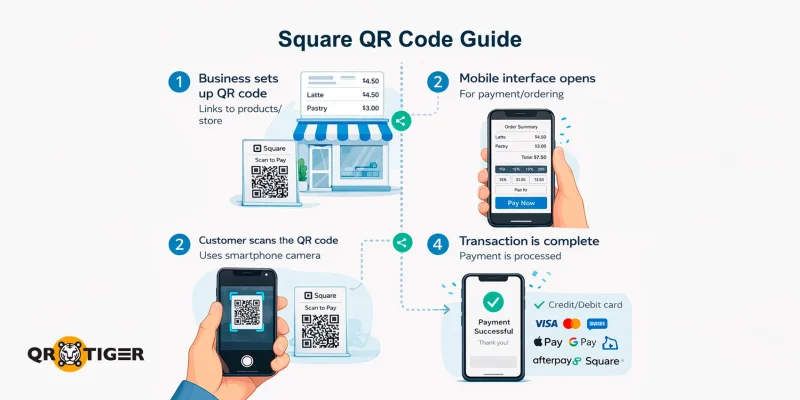
Kode QR persegi langsung menghubungkan pengguna ke antarmuka pembayaran digital, pemesanan, atau pemesanan.
Perusahaan dapat mengaktifkan Kode QR untuk pembayaran mengatur transaksi dengan menyelenggarakan produk mereka atau menghubungkan ke toko online Squareup yang sudah ada.
Kode QR dari Square mendukung semua metode pembayaran utama, termasuk kartu kredit dan debit, Apple Pay, Google Pay, Square Pay, dan Afterpay, memungkinkan transaksi nirkontak yang mulus dari setiap smartphone.
Ini dirancang secara utama untuk:
- Memberikan cara cepat bagi pelanggan untuk menyelesaikan transaksi
- Aktifkan pembayaran dengan kode QR tanpa kontak untuk interaksi yang lebih aman
- Tawarkan pengalaman yang ramah pengguna untuk pelanggan dari segala usia
- Memberikan bisnis alat sederhana untuk memperlancar pembayaran dan pemesanan
Solusi kode QR ini dari Square memungkinkan toko online dan fisik serta bisnis mengurangi kontak fisik, mempercepat proses checkout, dan menyederhanakan pengalaman pembayaran secara keseluruhan.
Mengapa pembayaran dengan kode QR penting?
- Mereka mengurangi gesekan saat checkout, mempersingkat antrian, dan mengurangi ketergantungan pada penanganan uang tunai atau terminal fisik.
- Mereka membuatnya lebih mudah untuk memperluas operasi di restoran, pop-up, dan layanan sambil menjaga pengalaman pelanggan tetap sederhana: pindai, bayar, dan pergi.
- Mereka juga membuka data dan optimisasi, memungkinkan pelacakan, integrasi, dan pelaporan yang lebih efisien untuk keputusan yang lebih cerdas dan alur kerja yang lebih efisien.
Secara singkat, pembayaran dengan kode QR bukan hanya peningkatan teknologi: mereka adalah cara praktis untuk meningkatkan kecepatan, meningkatkan kepuasan pelanggan, dan melindungi pembayaran ke depan.
Bagaimana bisnis menggunakan kode QR dari Square?
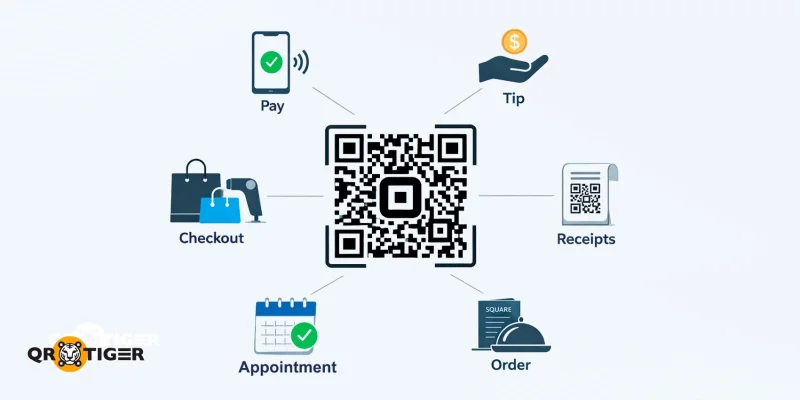
Berikut beberapa cara umum di mana bisnis Anda dapat menggunakan kode QR Square:
- Pembayaran tanpa kontak: Implementasikan metode pemindai QR code untuk pembayaran yang memungkinkan pelanggan menyelesaikan transaksi di smartphone mereka daripada membayar dengan uang tunai atau kartu.
- Pemesanan cepat di kafe dan restoran: Tempatkan sebuah menu tanpa kontak Kode QR di meja atau meja kasir sehingga pelanggan dapat melihat menu dan memesan secara digital, mempercepat layanan dan mengurangi waktu tunggu.
- Tips dan gratifikasi: Gunakan kode QR untuk menerima tips secara instan dan nyaman.
- Pembayaran di kasir: Terapkan kode QR untuk pembayaran di toko. Letakkan di meja kasir atau dekat produk sehingga pelanggan dapat memindai dan menyelesaikan pembelian tanpa harus menunggu di antrian.
- Kode QR pembayaran pada struk atau kemasan: Sertakan kode QR pada struk, faktur, atau kemasan produk untuk memberikan pelanggan cara pembayaran yang lebih cepat atau akses ke layanan tambahan.
- Pemesanan janji temu: Tambahkan kode QR yang langsung mengarah ke halaman pemesanan Anda, memungkinkan pelanggan untuk membuat janji langsung tanpa harus bolak-balik.
Keterbatasan dari kode QR oleh Square Up
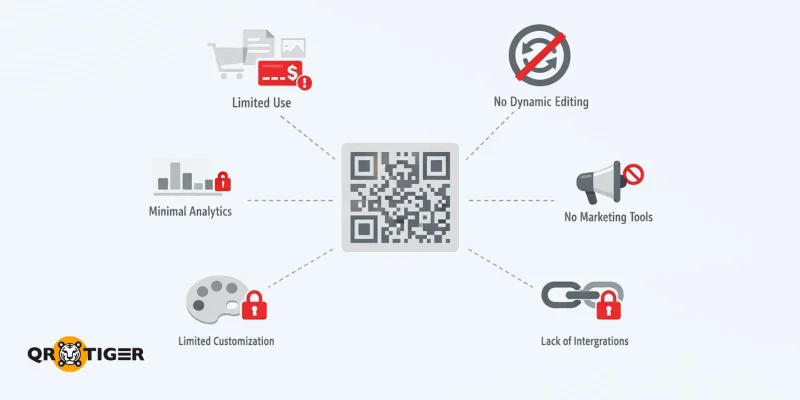
Square Up menyediakan kode QR yang berfungsi dengan baik sebagai kode QR pembayaran tanpa kontak, tetapi ada beberapa keterbatasan yang harus dipertimbangkan oleh bisnis saat menggunakan platform tersebut:
- Dibangun untuk tujuan pemesanan dan pembayaran saja: Alat QR code Square lebih berfungsi untuk transaksi seperti checkout dan tip. Hal ini membatasi kegunaannya untuk tujuan non-pembayaran, seperti pemasaran atau berbagi informasi.
- Kurangnya alat pemasaran: Square menawarkan solusi dan fitur QR code terbatas untuk promosi dan integrasi media sosial, sehingga kurang cocok untuk digunakan dalam pemasaran.
- Tidak ada pengeditan dinamis: Tujuan atau konten kode QR tidak dapat diperbarui. Ini berarti bisnis harus membuat kode baru setiap kali diperlukan pembaruan.
- Pelacakan dan analitika dasar kode QR: Perangkat lunak ini memberikan wawasan yang minimal, yang membuat sulit untuk mengukur keterlibatan atau meningkatkan kampanye berdasarkan data.
- Batasan desain dan kustomisasi: Square menawarkan opsi untuk menyesuaikan branding, tetapi kode QR sendiri memiliki opsi styling yang terbatas, seperti kustomisasi warna atau penambahan logo.
- Ketergantungan pada ekosistem Square: Perusahaan harus menggunakan platform Square, yang mungkin tidak terintegrasi dengan lancar dengan alat atau alur kerja lainnya.
Perangkat lunak QR code terbaik untuk aplikasi QR code yang luas
Untuk bisnis yang membutuhkan solusi QR code yang lebih serbaguna untuk pemasaran, keterlibatan pelanggan, pemesanan, dan kebutuhan operasional lainnya, kami merekomendasikan generator QR code teratas ini:
QR TIGER: Terbaik untuk kasus penggunaan kode QR yang fleksibel
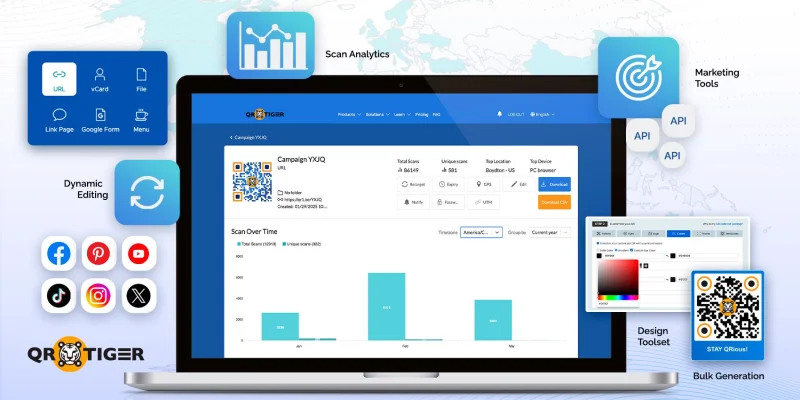
QR TIGER adalah multi fungsi generator kode QR canggih untuk bisnis, menawarkan berbagai solusi dan alat untuk memenuhi berbagai kebutuhan.
Berbeda dengan Square, Inc., yang berfokus pada pembayaran dan pemesanan, QR TIGER memprioritaskan fleksibilitas pemasaran dan optimisasi kampanye, menjadikannya ideal untuk meningkatkan keterlibatan dan konversi.
Fitur Utama
- Berbagai jenis kode QR: Dari URL dan file hingga berbagi lokasi, akses Wi-Fi, dan tautan media sosial.
- Kode QR dinamis: Perbarui tujuan tanpa mengubah kode QR itu sendiri.
- Pindai analitika: Lacak kinerja, pantau keterlibatan, dan dapatkan wawasan yang dapat dijalankan.
- Alat pemasaran: Akses alat, seperti retargeting, geofencing, penandaan UTM, pengaturan kedaluwarsa, dan lainnya.
- Integrasi: Hubungkan kampanye kode QR ke email, media sosial, dan saluran pemasaran dan alur kerja lainnya.
- Opsi desain kustom: Sesuaikan kode QR dengan warna, logo, dan branding untuk mencocokkan identitas bisnis Anda.
- Pembuatan kode QR secara massal: Hasilkan beberapa kode QR sekaligus untuk kampanye, acara, dan implementasi berskala besar.
Ini membuat QR TIGER menjadi pilihan yang tepat bagi bisnis yang ingin melampaui transaksi sederhana dan menggunakan kode QR sebagai alat pertumbuhan dan keterlibatan di berbagai poin pemasaran dan sentuhan pelanggan.
Cons
- Tidak ada pembayaran bawaan
- Tidak menyediakan integrasi tingkat POS
- Tidak mendukung pemesanan mandiri
MENU TIGER: Terbaik untuk menu digital dan branding restoran
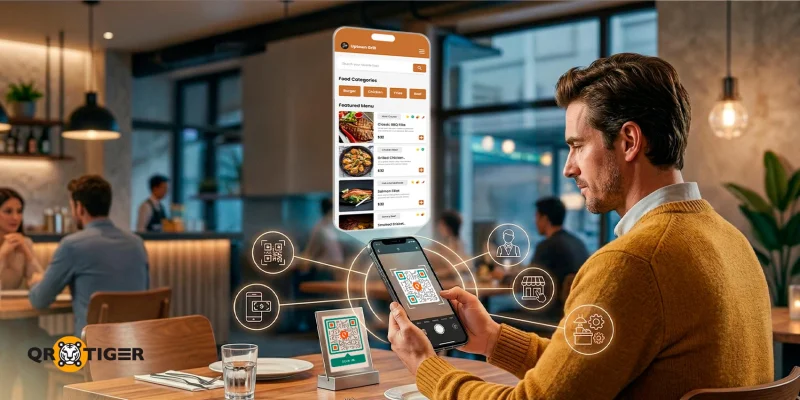
MENU HARIMAU berfokus pada industri layanan makanan, menawarkan kode QR dinamis untuk restoran guna memperlancar operasi.
Ini memungkinkan bisnis untuk mengunggah barang, mengorganisasikannya dalam kategori, menambahkan foto, dan menyesuaikan tampilan agar sesuai dengan merek mereka.
Pembaruan pada item menu, harga, dan ketersediaan dapat dilakukan secara instan, dan perubahan akan muncul segera ketika pelanggan memindai kode QR yang sama.
MENU TIGER menyediakan desain menu yang dapat disesuaikan secara luas dan alat peningkatan penjualan, yang tidak dimiliki oleh Square.
Fitur Utama
- Menu QR code: Menu digital yang dapat diakses melalui smartphone, mengurangi kebutuhan akan salinan cetak.
- Pemesanan tanpa kontak: Pelanggan dapat melakukan pemesanan langsung dari perangkat mereka, meningkatkan keamanan dan kenyamanan.
- Sistem pemesanan meja: Aktifkan pemesanan dan pembayaran di meja tanpa campur tangan staf.
- Integrasi pemesanan online: Hubungkan kode QR ke platform pemesanan online untuk layanan yang lancar.
- Manajemen alur kerja restoran: Sederhanakan pelacakan pesanan, koordinasi dapur, dan pemrosesan pembayaran.
Secara keseluruhan, MENU TIGER adalah pilihan yang bagus untuk bisnis di industri restoran dan layanan yang ingin beralih ke solusi perangkat lunak menu digital yang sudah termasuk alat pembayaran dan alur kerja dapur.
Cons
- Integrasi POS terbatas
- Bergantung pada prosesor pihak ketiga untuk pembayaran
- Analitika data pelanggan terbatas
Tabel perbandingan: Square vs. QR TIGER vs. MENU TIGER
Ini adalah perbandingan samping demi samping fitur dan kasus penggunaan utama dari ketiga platform tersebut.
| Fitur | Persegi | QR TIGER | MENU HARIMAU |
Kasus penggunaan | Pembayaran | Pemasaran, keterlibatan, dan operasi | Menu digital, pemesanan, dan manajemen restoran |
| Integrasi pembayaran | Terintegrasi dengan pembayaran Square | Opsional, mendukung beberapa integrasi | Terintegrasi dengan sistem pemesanan dan pembayaran |
| Kode QR pemasaran | Terbatas | Luas, termasuk promosi, kampanye, dan media sosial | Terbatas, difokuskan pada menu dan pemesanan |
| Kode QR dinamis | Terbatas | Tersedia, memungkinkan pembaruan tanpa mencetak ulang | Tersedia untuk pembaruan menu dan pemesanan |
| Analitika | Wawasan berbasis transaksi, seperti data pembelian dan perilaku pelanggan | Maju, termasuk pelacakan pemindaian, lokasi, dan data perangkat | Pelacakan pesanan dan perilaku pelanggan |
| Penyesuaian | Opsi desain minimalis | Tinggi, termasuk logo, warna, dan merek | Penyesuaian sedang berfokus pada menu |
| Pembangkitan massal | Tidak tersedia | Tersedia untuk kampanye dan penggunaan dalam skala besar | Bukan fitur utama |
Bagaimana memilih penyedia kode QR yang tepat untuk bisnis Anda
Memilih solusi kode QR yang tepat bergantung pada industri Anda, tujuan bisnis Anda, dan jenis pengalaman pelanggan yang ingin Anda tawarkan.
Berikut adalah beberapa poin yang perlu dipertimbangkan saat memilih perangkat lunak QR code:
- Tujuan dari kode QR: Jika tujuan Anda adalah secara ketat pembayaran tanpa kontak Untuk memberi tip, kode QR Square sudah cukup. Untuk pemasaran, keterlibatan, atau penggunaan operasional, generator kode QR canggih, seperti QR TIGER, menawarkan lebih banyak fleksibilitas.
- Kebutuhan untuk pembaruan dinamis: Platform QR dinamis, seperti QR TIGER dan MENU TIGER, memungkinkan Anda untuk mengubah tujuan atau konten dari kode QR bahkan setelah dicetak, yang berguna untuk kampanye atau menu.
- Analitika dan wawasan: Jika pelacakan interaksi pelanggan dan keterlibatan penting, platform canggih menyediakan data pemindaian yang detail untuk memberi informasi pada keputusan bisnis.
- Desain dan branding: Perusahaan yang menginginkan warna kustom, logo, atau kode QR merek dagang akan mendapatkan manfaat dari platform seperti QR TIGER dan MENU TIGER, yang tawarkan kustomisasi desain alat.
- Volume kode yang dibutuhkan: Jika Anda memerlukan beberapa kode QR untuk promosi, acara, atau menu, fitur pembuatan dalam jumlah besar dapat menghemat waktu dan usaha.
- Integrasi dengan sistem yang sudah ada: Pertimbangkan apakah solusi kode QR cocok dengan sistem POS, pemesanan, atau platform pemasaran Anda untuk menyederhanakan operasi.
- Kebutuhan khusus industri: Restoran mungkin memprioritaskan pemesanan meja dan menu digital, sementara bisnis ritel atau jasa mungkin fokus pada alat pemasaran dan keterlibatan.
Dengan mengevaluasi faktor-faktor ini, Anda dapat memilih solusi perangkat lunak kode QR yang sejalan dengan tujuan dan alur kerja operasional Anda, memastikan bisnis Anda mendapatkan nilai maksimal darinya. 
Kode QR untuk transaksi tanpa kontak yang lancar
Kode QR persegi adalah alat yang berguna untuk menerapkan pembayaran tanpa kontak dan menyederhanakan pemesanan, terutama di bisnis yang memprioritaskan kecepatan dan kenyamanan.
Untuk mereka yang membutuhkan pemasaran, keterlibatan, dan efisiensi operasional di luar pembayaran, kami merekomendasikan menggunakan generator kode QR canggih untuk mengakses kode dinamis, analitik, dan alat personalisasi.
Dengan memahami kelebihan dan keterbatasan dari setiap opsi, Anda dapat memilih solusi kode QR yang memberikan pengalaman pelanggan yang efisien, aman, dan interaktif.
Siap untuk meningkatkan strategi QR Anda? Jelajahi platform kode QR yang fleksibel untuk membuat kampanye QR bermerk, dapat dilacak, dan berorientasi pada konversi yang melampaui pembayaran. 
Pertanyaan yang Sering Diajukan
Bagaimana cara mendapatkan kode QR untuk Square?
Untuk mendapatkan kode QR Persegi, masuk ke akun Anda di Square. Selanjutnya, arahkan ke bagian pembayaran atau checkout, dan buat kode QR yang terhubung ke halaman pembayaran atau item Anda. Unduh, cetak, atau tampilkan kode secara digital agar pelanggan dapat memindainya dan membayar.
Berapa biaya yang dikenakan oleh Square untuk kode QR?
Square tidak mengenakan biaya terpisah untuk membuat kode QR. Namun, biaya transaksi standar dikenakan saat pembayaran dilakukan melalui kode QR, biasanya sebagai persentase dari jumlah transaksi ditambah biaya tetap, tergantung pada wilayah dan jenis pembayaran Anda. 

