
HTMLを使用してQRコードを生成する方法:簡単なガイド

パブ: Feb 26, 2026•Upd: Oct 17, 2026- 1 分読み
HTMLを使用してQRコードを生成する方法:簡単なガイド

HTML(ハイパーテキストマークアップ言語)を使用してQRコードを生成することは可能ですか?

簡単に言うと、はい、しかし、HTMLだけではQRコードを作成することはできません。QRコード自体を生成するには、JavaScriptや他のQRコードソフトウェアが必要です。

この記事では、HTMLとJavaScriptを使用してQRコードを作成する方法、および編集、トラッキング、スケーラビリティなどの機能を備えた高度なQRコードジェネレータを使用するビジネス上の理由について学びます。

目次

    1. QRコードHTMLジェネレーターとは何ですか?
    2. HTMLとJavaScriptを使用してQRコードを生成する方法
    3. HTMLベースのQRコード生成が不十分な点
    4. HTML用の高度なQRコードジェネレーターが必要な理由は何ですか
    5. ランディングページQRコード:ノーコードソリューション
    6. HTMLのQRコードを作成する方法(コーディング不要)
    7. なぜQR TIGERがHTMLコード付きの最高のQRコードジェネレーターなのか
    8. まとめ
    9. FAQ

QRコードHTMLジェネレーターとは何ですか?

アン HTML QRコードジェネレーター HTMLとJavaScriptまたはAPIを使用して、Webページ上にQRコードを作成および表示するWebベースのソリューションです。

簡単で迅速なQRコード生成のために、QR TIGERのようなオンラインプラットフォームを利用すると、HTMLコーディングなしで作成することができます。

HTMLとJavaScriptを使用してQRコードを生成する方法

HTMLと小さなJavaScriptライブラリを組み合わせてQRコードを作成することができます。

覚えていてください ハイパーテキストマークアップ言語 ウェブページを構築するのはHTMLであり、JavaScriptがQRコードの生成を処理します。

これらのツールを使用してHTML QRコードを作成する方法を見てみましょう。

ステップ1:HTMLファイルを作成する
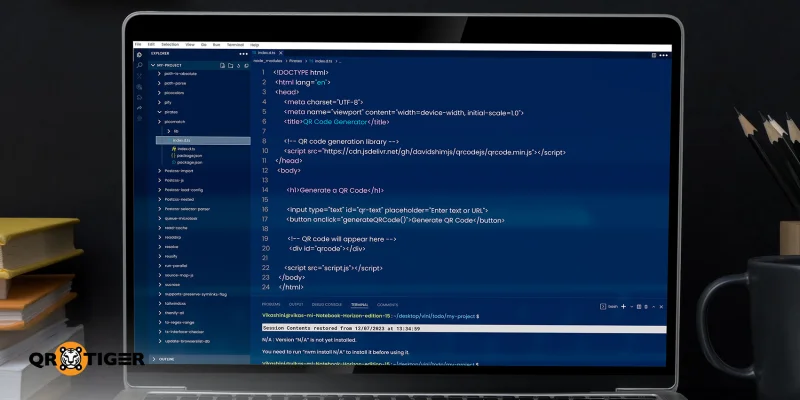
Create HTML file

最初に、QRコードを作成するためのHTMLが必要です。index.htmlという名前のファイルを作成してください。このファイルには、QRコードジェネレーターの構造が記述されます。

次に、ファイルに、ユーザーがURLやテキストを入力できるテキスト入力フィールド、QRコードを生成するボタン、そしてQRコードが表示される空白スペースを追加してください。ここでは、実際にQRコードを生成するライブラリへのリンクも追加できます。

最終的に、あなたのHTMLファイルはこのように見えるでしょう:


QRコードジェネレーター


QRコードを生成する


ステップ2:JavaScriptを追加します

Add the JavaScript

script.js という名前の2番目のファイルを作成してください。これはユーザーの入力を読み取り、QRコードを生成するファイルです。

この2番目のファイルが作成されると、スクリプトは入力されたテキストを取得し、既存のQRコードをクリアして新しいQRコードを作成します。

これがスクリプトファイルの見た目です:

generateQRCode() 関数 {

const text = document.getElementById("qr-text").value.trim();

if (!text) {

alert("テキストまたはURLを入力してください");

return;

}   

document.getElementById("qrcode").innerHTML = "";

新しいQRコード(document.getElementById("qrcode"), {

text: text,

width: 150,

高さ: 150

});

ステップ3:ファイルを保存して開く

以前に生成した両方のファイルを同じフォルダに保存してください。次に、index.htmlファイルを任意のウェブブラウザで開いてください。

今、URLまたはテキストを入力し、生成ボタンをクリックしてください。

HTMLを使用してQRコードを生成する方法です。

HTMLベースのQRコード生成が不十分な点

Disadvantages of HTML-based code

HTMLとJavaScriptを使用してQRコードを生成する複雑さを考慮すると、このアプローチがどこで不十分であるかを理解する価値があります。これにより、自分のニーズに最適な方法を迅速かつ自信を持って決定するのに役立ちます。

HTMLだけではQRコードを生成することはできません

HTMLファイルだけではQRコードを生成することはできません。HTMLはマークアップ言語だけなので、HTMLファイルをQRコードに変換するには、JavaScriptライブラリやサードパーティのAPI(アプリケーションプログラミングインターフェース)と組み合わせる必要があります。

JavaScriptの知識は必須です

JavaScriptでは、スクリプト内のわずかなミスでも全体のプロセスを壊す可能性があります。これは、JavaScriptの十分な作業知識が絶対に必要であることを意味します。

限られたカスタマイズオプション

HTMLとJavaScriptを使用して生成されたQRコードは非常に限られたカスタマイズオプションしか提供していません。その結果、デザインをブランドアイデンティティに合わせることが簡単ではありません。

分析やトラッキングはありません

HTMLを使用してQRコードを生成すると、アナリティクスやトラッキング機能にアクセスできません。大規模なブランドキャンペーンでは、これらのインサイトは完全なコントロールを維持し、パフォーマンスを効果的に測定するために不可欠です。

HTMLは静的なQRコードのみ作成できます

専用のQRコードジェネレーターとは異なり、HTMLでは動的なQRコードを作成することはできません。したがって、後で変更を加える必要がある場合は、QRコードをゼロから再生成する必要があります。

セキュリティの制限

HTMLベースのQRコードには、暗号化、アクセス制御、パスワード保護、ISO認証などのコンプライアンス機能が提供されていません。したがって、埋め込まれたデータが保護されていることを保証するものではありません。

メンテナンスの難しさ

コーディングやプログラミングに詳しくない場合、HTMLで作成されたQRコードの管理は非常に難しいかもしれません。更新ごとにコードの変更、再展開、テストが必要です。

HTML用の高度なQRコードジェネレーターが必要な理由は何ですか

専門のQRコードソフトウェアを使用すると、コーディングや技術的な知識なしにQRコードを作成できます。

自動化プラットフォームと互換性があり、提供します。 QRコードAPIのドキュメント ソフトウェアアプリケーション内で直接QRコードを生成するために開発者が使用できるツール

いくつかはHTMLコードをすぐに提供しており、作成したQRコードをウェブサイトや他のウェブページに簡単に埋め込むことができます。コーディングの手間をかけることなく。

専用のQRコードジェネレーターは、完全なカスタマイズオプションも提供しており、ブランドアイデンティティに合ったQRコードをデザインすることが簡単です。

さらに、動的QRコードをサポートしており、展開後にコンテンツを更新したり、リアルタイムでパフォーマンスを監視したりすることができます。

これらの機能は、柔軟性とコントロールが不可欠な長期キャンペーンや継続的なプロモーション活動に特に価値があります。

ランディングページQRコード:ノーコードソリューション

Landing page QR code

A ランディングページのQRコード QR TIGERのような高度なQRコードソフトウェアで利用可能なソリューションであり、1つのスキャンを通じてモバイル最適化されたコンテンツを柔軟かつ実用的に共有する方法です。

このQRコードは、QRコードプラットフォーム内で直接ホストおよび管理されているランディングページを開きます。

あなたの望むテキスト、画像、ビデオ、リンク、ボタン、およびその他のインタラクティブ要素を、1行のコードも書かずにページにデザインすることができます。自分でコーディングを行いたい場合は、「コード表示」オプションもあります。

これは、自分のQRコードをブランドのイメージやコミュニケーション目標に合わせたいマーケターやビジネスプロフェッショナル、キャンペーンマネージャーにとって理想的なソリューションとなります。

HTMLのQRコードを作成する方法(コーディング不要)

ランディングページ用のノーコードQRコードを作成するには、次の簡単な手順に従ってください:

1. 訪問する 動的QRコードジェネレーター オンライン

ソリューションダッシュボードからH5 QRコードオプションを選択します。

利用可能なWebデザイン要素を使用して、H5ページを追加およびデザインしてください。

直接のコーディングやプログラミングを希望する場合は、コードビューに切り替えてください。。

ページが準備できたら、HTMLをQRコードに変換するために生成をクリックしてください。

高品質の画像形式(PNG、SVG、またはEPS)でQRコードをカスタマイズしてダウンロードします。

HTMLコードを表示するには、クリックしてください QRコードを埋め込む コピーしてください。

リマインダー: キャンペーンやウェブページでQRコードを使用する前に、デバイス間でスムーズに動作することを確認するために常にテストしてください。

なぜQR TIGERがHTMLコード付きの最高のQRコードジェネレーターなのか

いくつかの高度なジェネレーターがあり、QRコードを作成できます。ただし、組み込みのHTMLコードを持つものに関しては、QR TIGERを強くお勧めします。

ビジネスや開発者にとって、ウェブサイト用のQRコードジェネレーターとしての選択肢としては、以下の理由から人気があります。

  • 真のプラットフォーム内作成: プラットフォーム内で完全にカスタムQRコード着陸ページを作成でき、別のウェブサイト、CMS、またはホスティングプロバイダーに依存する必要がありません。
  • 印刷後も編集可能: ランディングページ用の動的QRコードを使用すると、QRコードが印刷されたり配布された後でもいつでもランディングページの内容を更新できます。
  • 技術的な専門知識は必要ありません。 視覚的でセクションベースのエディターは、技術的でないユーザーが簡単にランディングページのQRコードを作成および管理できるようにします。
  • 簡単なAPI統合: APIのドキュメント 他のソフトウェアアプリケーションでQRコードを生成することを、プロセス全体を自動化することでより速く、スムーズでスケーラブルにします。
  • HTMLコードを移動中: QR TIGERは、QRコードのためのHTMLコードを自動生成し、手作業でコーディングする手間を省いて、直接ウェブサイトに埋め込むことができます。
  • より大きなブランディングの制御: ランディングページとQRコードのデザインに関して、色、レイアウト、およびブランドアイデンティティに合ったCTAタグを含め、完全な制御を提供します。
  • 安全で信頼性の高いホスティング: QR TIGERを優先します データセキュリティ ISO 27001、GDPR、CCPA、およびSSOの基準を遵守することにより、大規模で長期のキャンペーンを行う企業にとって信頼できるプラットフォームとなっています。

まとめ

HTMLとJavaScriptを使用してQRコードを生成する方法と、機能と拡張性の面でどこに不足があるかをすでに知っています。

HTMLコードを使用した高度なQRコードジェネレーターをお勧めします。これにより、コードの作成と管理が簡単でストレスフリーになります。

QRコードに完全な制御を取得できます。コンテンツの更新、デザインのカスタマイズ、ブランドに合わせたトラッキング、ウェブサイトへの埋め込みなどが可能です。 Free ebooks for QR codes

FAQ

HTMLに必要なソフトウェアは何ですか?

HTMLを使う場合、NotepadやTextEditのようなシンプルなテキストエディタ、またはVS Codeのような機能豊富なエディタが必要です。ファイルを.html拡張子で保存したら、Chrome、Firefox、Safariなどのウェブブラウザで開いて見ることができます。

HTMLの7つの基本タグは何ですか?

いくつかの最も基本的で一般的に使用されるタグには、、、 が含まれています。 </p><p>, </p><h1>, <p>, そして <a> . </a></p></h1><h3 id="toc_definition_of_terms"><a><b>用語の定義 </b></a></h3><p><a><b>HTML </b>Hyper Text Markup Languageの略です。これは、Webブラウザに表示するコンテンツやその構成方法(テキスト、画像、リンク、ボタン、フォームなど)を指示する標準言語です。 </a></p><p><a><b>JavaScript </b>ユーザーのアクションに応答したり、リアルタイムでコンテンツを更新したり、ページをリロードせずにロジックを実行したりすることができるプログラミング言語。 </a></p><p><a><b>API </b>アプリケーションプログラミングインターフェースの略です。これは、1つのアプリケーションが、別のアプリケーションの機能やデータを使用するためのルールやツールのセットです。それがどのように構築されたかを知る必要はありません。 </a><a class="blog-company-banner" href="https://www.qrcode-tiger.com" target="_blank"><img loading="lazy" decoding="async" src="https://qrtiger-banners.s3.amazonaws.com/blog-banner-company-logo.jpg" style="width: 100%;" alt="Brands using QR codes" width height title></a></p> <div class="article-disclaimer"> <span>免責事項</span> <p> この記事は一般的な情報提供を目的としており、法的、財務、その他の専門的な助言を構成するものではありません。QR TIGERの製品やサービスに関するご質問については、弊社サポートチームまでお問い合わせください:<a href='mailto:it@qrtiger.com'>it@qrtiger.com</a>。 </p> </div> </div></section><div class="blog-article-extras"><section class="blog-faq"><h2 class="blog-section-heading">よくある質問(FAQ)</h2><div class="blog-faq-list"><details class="blog-faq-item"><summary class="blog-faq-question"><span>What software do I need for HTML?</span><span class="blog-faq-icon" aria-hidden="true">+</span></summary><div class="blog-faq-answer">For HTML, all you need is a simple text editor such as Notepad or TextEdit, or more feature-rich editors like VS Code. Once the file is saved with an .html extension, you can open it in any web browser, such as Chrome, Firefox, or Safari, to see how it looks.</div></details><details class="blog-faq-item"><summary class="blog-faq-question"><span>What are the 7 basic tags of HTML?</span><span class="blog-faq-icon" aria-hidden="true">+</span></summary><div class="blog-faq-answer">Some of the most basic and commonly used tags include <html>, <head>, <title> <body>, <h1>, <p> and <a> .</div></details></div></section><section class="blog-feedback"><h3>この記事は役に立ちましたか?</h3><div class="blog-feedback-actions"><button type="button">はい、とても役立ちました</button><button type="button">いいえ、修正が必要です</button></div></section><section class="blog-enterprise-cta"><span class="blog-enterprise-badge">エンタープライズ対応</span><h2>最高のQRコードジェネレーターでスキャンを最大限に活用してください。</h2><p>数千のグローバルブランドが、動的ルーティング、一括作成、および深い帰属分析を管理するためにQR TIGERを使用しています。</p><a class="blog-cta-btn blog-cta-btn--lg" href="/ja/register?signup_source=blog_cta_btn">無料で始める</a></section><div class="blog-share"><span class="blog-share-label">このガイドを共有してください。</span><div class="blog-share-icons"><a href="https://www.linkedin.com/sharing/share-offsite/?url=https%3A%2F%2Fwww.qrcode-tiger.com%2Fja%2Fhow-to-generate-a-qr-code-using-html" target="_blank" rel="noopener noreferrer" class="blog-share-icon" aria-label="LinkedIn"><i class="qr-linkedin" aria-hidden="true"></i></a><a href="https://www.facebook.com/sharer/sharer.php?u=https%3A%2F%2Fwww.qrcode-tiger.com%2Fja%2Fhow-to-generate-a-qr-code-using-html" target="_blank" rel="noopener noreferrer" class="blog-share-icon" aria-label="Facebook"><i class="qr-facebook" aria-hidden="true"></i></a><a href="https://twitter.com/intent/tweet?url=https%3A%2F%2Fwww.qrcode-tiger.com%2Fja%2Fhow-to-generate-a-qr-code-using-html&text=HTML%E3%82%92%E4%BD%BF%E7%94%A8%E3%81%97%E3%81%A6QR%E3%82%B3%E3%83%BC%E3%83%89%E3%82%92%E7%94%9F%E6%88%90%E3%81%99%E3%82%8B%E6%96%B9%E6%B3%95%EF%BC%9A%E7%B0%A1%E5%8D%98%E3%81%AA%E3%82%AC%E3%82%A4%E3%83%89" target="_blank" rel="noopener noreferrer" class="blog-share-icon" aria-label="X"><i class="qr-twitter" aria-hidden="true"></i></a></div></div><section class="blog-author-bio"><img class="blog-author-bio-avatar" src="https://media.qrtiger.com/blog/2026/10/ashleyjpg_800_71.jpeg" alt="Ashley P." width="72" height="72"/><div class="blog-author-bio-content"><a class="blog-author-bio-name" href="/ja/blog/author/ashley">Ashley P.</a><p class="blog-author-bio-role">QR TIGERのコンテンツライター</p><p class="blog-author-bio-text">アシュリーはビジネスと社会科学の学位を持ち、コンテンツマーケティングやコピーライティングの認定資格も取得しています。出版経験は8年以上で、デジタルマーケティングやQRコード技術の専門知識も3年以上の経験があります。彼女の仕事は、複雑なデータや技術的な概念を明確で実践的な洞察に変換し、計測可能な成果をもたらす実用的な解決策を開発することに焦点を当てています。</p></div></section></div></article><aside class="blog-sidebar" aria-busy="true"></aside></div></div></div><div class="footer"><div class="container"><div class="social-section"><div class="subscribe"><section>ループにとどまる</section><span class="footer-text footer-subscribe__desc">ニュースレターに登録して、最新のプロモーション、アップデート、そしてヒントを最初にお知らせします。</span><div class="input-group footer-subscribe__input"><input class="form-control" type="email" placeholder="あなたのemailアドレス" name="email"/><div class="input-group-append"><span class="input-group-text pointer"><i class="qr-icons qr-send" aria-hidden="true"></i></span></div></div></div><div class="social-community"><span class="footer-text mb-2">コミュニティに参加してください。</span><div class="social-icons"><a target="_blank" rel="noopener noreferrer" class="icon linkedin-icon" aria-label="フォローしてください: LinkedIn" href="https://www.linkedin.com/company/qrtiger/"><i class="qr-icons qr-linkedin" aria-hidden="true"></i></a><a target="_blank" rel="noopener noreferrer" class="icon" aria-label="フォローしてください: YouTube" href="https://www.youtube.com/c/QRTiger"><i class="qr-icons qr-youtube" aria-hidden="true"></i></a><a target="_blank" rel="noopener noreferrer" class="icon" aria-label="フォローしてください: Instagram" href="https://www.instagram.com/qrtiger"><i class="qr-icons qr-instagram" aria-hidden="true"></i></a><a target="_blank" rel="noopener noreferrer" class="icon" aria-label="フォローしてください: Facebook" href="https://www.facebook.com/QRTIGERS/"><i class="qr-icons qr-facebook" aria-hidden="true"></i></a><a target="_blank" rel="noopener noreferrer" class="icon" aria-label="フォローしてください: X" href="https://x.com/qrtigers"><i class="qr-icons qr-x-logo" aria-hidden="true"></i></a></div></div><div class="social-community download-app"><h4 class="footer-text">QR TIGERアプリをダウンロードしてください。</h4><span class="footer-text mb-2">QRコードを作成してスキャンすることができます。</span><div class="download-buttons"><a href="https://apps.apple.com/us/app/qr-tiger-qr-code-generator/id1509675463"><img src="https://qrtiger-fe.nyc3.cdn.digitaloceanspaces.com/static/img/MainFooter/appStore.webp" alt="Download on the App Store" width="139" height="46" loading="lazy" decoding="async"/></a><a href="https://play.google.com/store/apps/details?id=com.qrtiger&pli=1"><img src="https://qrtiger-fe.nyc3.cdn.digitaloceanspaces.com/static/img/MainFooter/googlePlay.webp" alt="Get it on Google Play" width="155" height="46" loading="lazy" decoding="async"/></a></div></div></div><div class="resources-wrapper mt-5 mb-5"><div class="resources-header">リソース</div><div class="row"><div class="col-md-6 col-lg-3 mb-1 mt-1"><div class="resource-item"><a class="text-white text-center" href="https://www.qrcode-tiger.com/ja/how-do-dynamic-qr-codes-work">ダイナミックQRコードはどのように動作しますか?</a></div></div><div class="col-md-6 col-lg-3 mb-1 mt-1"><div class="resource-item"><a class="text-white text-center" href="https://www.qrcode-tiger.com/ja/how-does-a-multi-url-qr-code-works-and-can-benefit-your-business-smart-qr-code">マルチURL QRコード</a></div></div><div class="col-md-6 col-lg-3 mb-1 mt-1"><div class="resource-item"><a class="text-white text-center" href="https://www.qrcode-tiger.com/ja/digital-business-card-qr-code">デジタル名刺のQRコード</a></div></div><div class="col-md-6 col-lg-3 mb-1 mt-1"><div class="resource-item"><a class="text-white text-center" href="https://www.qrcode-tiger.com/ja/bulk-qr-code-generator">QRコード一括生成器</a></div></div><div class="col-md-6 col-lg-3 mb-1 mt-1"><div class="resource-item"><a class="text-white text-center" href="https://www.qrcode-tiger.com/ja/how-to-make-a-qr-code-of-an-image">画像のためのQRコードを作成する方法</a></div></div><div class="col-md-6 col-lg-3 mb-1 mt-1"><div class="resource-item"><a class="text-white text-center" href="https://www.qrcode-tiger.com/ja/how-to-create-a-video-qr-code-">ビデオ用のQRコードを作成する方法</a></div></div><div class="col-md-6 col-lg-3 mb-1 mt-1"><div class="resource-item"><a class="text-white text-center" href="https://www.qrcode-tiger.com/ja/how-to-make-a-qr-code-for-a-google-form">Google FormのQRコードを作成する方法 </a></div></div><div class="col-md-6 col-lg-3 mb-1 mt-1"><div class="resource-item"><a class="text-white text-center" href="https://www.qrcode-tiger.com/ja/qr-code-with-logo">ロゴ付きのQRコードを作成する方法 </a></div></div><div class="col-md-6 col-lg-3 mb-1 mt-1"><div class="resource-item"><a class="text-white text-center" href="https://www.qrcode-tiger.com/ja/track-qr-code-with-google-analytics">Google AnalyticsでQRコードを追跡する方法 、Google AnalyticsでQRコードを追跡する方法について説明します。QRコードを作成する際に、各コードに個別のトラッキングURLを割り当て、それをGoogle Analyticsで追跡することができます。これにより、QRコードからのトラフィックやコンバージョンを正確に計測することができます。</a></div></div><div class="col-md-6 col-lg-3 mb-1 mt-1"><div class="resource-item"><a class="text-white text-center" href="https://www.qrcode-tiger.com/ja/how-to-make-your-qr-code-in-restaurant">レストランメニューのQRコードを作成する方法</a></div></div><div class="col-md-6 col-lg-3 mb-1 mt-1"><div class="resource-item"><a class="text-white text-center" href="https://www.qrcode-tiger.com/ja/file-qr-code-converter">File QRコード変換ツール</a></div></div></div></div><div class="main-menu"><div class="section text-lg-left text-left"><div><label class="text-white">ガイド</label><ul><li class="faq"><a class="text-white" target="_blank" href="https://www.qrcode-tiger.com/ja/faq">FAQ</a></li><li class="contactUs"><a class="text-white" target="_blank" href="https://www.qrcode-tiger.com/ja/contact">お問い合わせ</a></li><li class="helpCenter"><a class="text-white" target="_self" href="https://www.qrcode-tiger.com/ja/blog/help-center">ヘルプセンター</a></li></ul></div></div><div class="section text-lg-left text-right text-lg-left"><div><label class="text-white">サポート</label><ul><li class="mailTo"><a class="text-white" target="_self" href="mailto:it@qrtiger.com">it@qrtiger.com</a></li></ul></div></div><div class="section text-lg-left text-left"><div><label class="text-white">会社</label><ul><li class="aboutUs"><a class="text-white" target="_blank" href="https://www.qrcode-tiger.com/ja/about">私たちについて</a></li><li class="status"><a class="text-white" target="_blank" href="https://qrtiger.statuspage.io/">ステータス</a></li><li class="enterpriseSolutions"><a class="text-white" target="_blank" href="https://enterprise.qrcode-tiger.com/">エンタープライズソリューション</a></li><li class="pricing"><a class="text-white" target="_self" href="https://www.qrcode-tiger.com/ja/payment">価格設定</a></li></ul></div></div><div class="section text-lg-left text-right text-lg-left"><div><label class="text-white">用語</label><ul><li class="termsAgreements"><a class="text-white" target="_blank" href="https://www.qrcode-tiger.com/ja/terms-and-conditions">利用規約</a></li><li class="termsOfAcceptableUse"><a class="text-white" target="_blank" href="https://www.qrcode-tiger.com/ja/term-acceptable-use">利用規約</a></li><li class="privacyPolicy"><a class="text-white" target="_blank" href="https://www.qrcode-tiger.com/ja/privacy-policy">プライバシーポリシー</a></li><li class="cookiesPolicy"><a class="text-white" target="_blank" href="https://www.qrcode-tiger.com/ja/cookies-policy">クッキーポリシー</a></li></ul></div></div></div><div class="vtline"></div><div class="d-flex justify-content-center m-3"><a class="main-logo" href="/ja"><img src="https://qrtiger-fe.nyc3.cdn.digitaloceanspaces.com/static/img/MainHeader/qrtiger_logo_s.svg" alt="qr code generator" width="200" height="59" loading="lazy" decoding="async"/></a></div><div class="text-center copy-right">このQRコードジェネレーターはQR TIGER株式会社の登録商標です。<br/>'QRコード'はデンソーウェーブ株式会社の商標です。 © 2026 www.qrcode-tiger.com</div></div></div></div></div></div></div><script src="/_next/static/chunks/webpack-d70282bc4c82f720.js" crossorigin="" async=""></script><script>(self.__next_f=self.__next_f||[]).push([0]);self.__next_f.push([2,null])</script><script>self.__next_f.push([1,"1:I[12846,[],\"\"]\n4:I[4707,[],\"\"]\n7:I[36423,[],\"\"]\n8:I[59152,[\"1781\",\"static/chunks/app/%5Blocale%5D/(site)/layout-9ebccaf4a00b26a0.js\"],\"default\"]\nc:I[61060,[],\"\"]\n5:[\"locale\",\"ja\",\"d\"]\n6:[\"slug\",\"how-to-generate-a-qr-code-using-html\",\"d\"]\nd:[]\n"])</script><script>self.__next_f.push([1,"0:[\"$\",\"$L1\",null,{\"buildId\":\"2ie17S_ah5dahdEoWdqSo\",\"assetPrefix\":\"\",\"urlParts\":[\"\",\"ja\",\"how-to-generate-a-qr-code-using-html\"],\"initialTree\":[\"\",{\"children\":[[\"locale\",\"ja\",\"d\"],{\"children\":[\"(cms)\",{\"children\":[[\"slug\",\"how-to-generate-a-qr-code-using-html\",\"d\"],{\"children\":[\"__PAGE__\",{}]}]}]}]},\"$undefined\",\"$undefined\",true],\"initialSeedData\":[\"\",{\"children\":[[\"locale\",\"ja\",\"d\"],{\"children\":[\"(cms)\",{\"children\":[[\"slug\",\"how-to-generate-a-qr-code-using-html\",\"d\"],{\"children\":[\"__PAGE__\",{},[[\"$L2\",\"$L3\",null],null],null]},[null,[\"$\",\"$L4\",null,{\"parallelRouterKey\":\"children\",\"segmentPath\":[\"children\",\"$5\",\"children\",\"(cms)\",\"children\",\"$6\",\"children\"],\"error\":\"$undefined\",\"errorStyles\":\"$undefined\",\"errorScripts\":\"$undefined\",\"template\":[\"$\",\"$L7\",null,{}],\"templateStyles\":\"$undefined\",\"templateScripts\":\"$undefined\",\"notFound\":\"$undefined\",\"notFoundStyles\":\"$undefined\"}]],null]},[[null,[[[\"$\",\"link\",null,{\"rel\":\"preload\",\"href\":\"/static/assets/styles/bundles/site.bundle.css?v=1791956706693\",\"as\":\"style\"}],[\"$\",\"link\",null,{\"rel\":\"stylesheet\",\"href\":\"/static/assets/styles/bundles/site.bundle.css?v=1791956706693\",\"precedence\":\"default\"}],[\"$\",\"$L8\",null,{\"href\":\"/static/assets/styles/bundles/site.bundle.css?v=1791956706693\"}]],[[\"$\",\"link\",null,{\"rel\":\"preload\",\"href\":\"/static/assets/styles/bundles/blog.bundle.css?v=1791956706693\",\"as\":\"style\"}],[\"$\",\"link\",null,{\"rel\":\"stylesheet\",\"href\":\"/static/assets/styles/bundles/blog.bundle.css?v=1791956706693\",\"precedence\":\"default\"}],[\"$\",\"$L8\",null,{\"href\":\"/static/assets/styles/bundles/blog.bundle.css?v=1791956706693\"}]],[\"$\",\"$L4\",null,{\"parallelRouterKey\":\"children\",\"segmentPath\":[\"children\",\"$5\",\"children\",\"(cms)\",\"children\"],\"error\":\"$undefined\",\"errorStyles\":\"$undefined\",\"errorScripts\":\"$undefined\",\"template\":[\"$\",\"$L7\",null,{}],\"templateStyles\":\"$undefined\",\"templateScripts\":\"$undefined\",\"notFound\":\"$undefined\",\"notFoundStyles\":\"$undefined\"}]]],null],null]},[[null,\"$L9\"],null],null]},[[null,\"$La\"],null],null],\"couldBeIntercepted\":false,\"initialHead\":[null,\"$Lb\"],\"globalErrorComponent\":\"$c\",\"missingSlots\":\"$Wd\"}]\n"])</script><script>self.__next_f.push([1,"f:I[6034,[\"2653\",\"static/chunks/2653-2c7d73a5b4d8fd48.js\",\"7774\",\"static/chunks/7774-b0a5d2d28f2682a5.js\",\"9441\",\"static/chunks/9441-6e162664b08a40d1.js\",\"8322\",\"static/chunks/8322-438db9bcf24bc73e.js\",\"3426\",\"static/chunks/3426-c2abb27e049260f9.js\",\"2420\",\"static/chunks/2420-6b15e0904dc5e4d4.js\",\"4281\",\"static/chunks/4281-df9a22eaa52cf3cd.js\",\"5124\",\"static/chunks/5124-85248a3cffe36581.js\",\"9708\",\"static/chunks/9708-d1b49845002480bf.js\",\"6851\",\"static/chunks/6851-7a3483c090d054ac.js\",\"6773\",\"static/chunks/6773-3e2bd4b98aff02a6.js\",\"4412\",\"static/chunks/4412-30315123d872f27c.js\",\"1629\",\"static/chunks/1629-d60dd2c128c78c82.js\",\"4613\",\"static/chunks/4613-14d82ab156e1d01f.js\",\"39\",\"static/chunks/39-62057ba9d3a0659e.js\",\"7322\",\"static/chunks/7322-39c70f38352e1e56.js\",\"3500\",\"static/chunks/app/%5Blocale%5D/(site)/page-a9dc76348c5c3686.js\"],\"default\"]\n10:I[34238,[\"2653\",\"static/chunks/2653-2c7d73a5b4d8fd48.js\",\"7774\",\"static/chunks/7774-b0a5d2d28f2682a5.js\",\"2420\",\"static/chunks/2420-6b15e0904dc5e4d4.js\",\"8003\",\"static/chunks/8003-01df224e05286a2d.js\",\"108\",\"static/chunks/108-b89c441db37c7d30.js\",\"4412\",\"static/chunks/4412-30315123d872f27c.js\",\"3185\",\"static/chunks/app/layout-02efb43790863941.js\"],\"default\"]\n11:I[74196,[\"2653\",\"static/chunks/2653-2c7d73a5b4d8fd48.js\",\"7774\",\"static/chunks/7774-b0a5d2d28f2682a5.js\",\"2420\",\"static/chunks/2420-6b15e0904dc5e4d4.js\",\"8003\",\"static/chunks/8003-01df224e05286a2d.js\",\"108\",\"static/chunks/108-b89c441db37c7d30.js\",\"4412\",\"static/chunks/4412-30315123d872f27c.js\",\"3185\",\"static/chunks/app/layout-02efb43790863941.js\"],\"default\"]\n12:I[88003,[\"2653\",\"static/chunks/2653-2c7d73a5b4d8fd48.js\",\"7774\",\"static/chunks/7774-b0a5d2d28f2682a5.js\",\"2420\",\"static/chunks/2420-6b15e0904dc5e4d4.js\",\"8003\",\"static/chunks/8003-01df224e05286a2d.js\",\"108\",\"static/chunks/108-b89c441db37c7d30.js\",\"4412\",\"static/chunks/4412-30315123d872f27c.js\",\"3185\",\"static/chunks/app/layout-02efb43790863941.js\"],\"\"]\n13:I[37187,[\"2653\",\"static/chunks/2653-2c7d73a5b4d8fd48.js\",\"7774\",\"static/chunks/7774-b0a5d2d28f2682a5.j"])</script><script>self.__next_f.push([1,"s\",\"9441\",\"static/chunks/9441-6e162664b08a40d1.js\",\"8322\",\"static/chunks/8322-438db9bcf24bc73e.js\",\"3426\",\"static/chunks/3426-c2abb27e049260f9.js\",\"2420\",\"static/chunks/2420-6b15e0904dc5e4d4.js\",\"4281\",\"static/chunks/4281-df9a22eaa52cf3cd.js\",\"5124\",\"static/chunks/5124-85248a3cffe36581.js\",\"9708\",\"static/chunks/9708-d1b49845002480bf.js\",\"6851\",\"static/chunks/6851-7a3483c090d054ac.js\",\"6773\",\"static/chunks/6773-3e2bd4b98aff02a6.js\",\"4412\",\"static/chunks/4412-30315123d872f27c.js\",\"1629\",\"static/chunks/1629-d60dd2c128c78c82.js\",\"4613\",\"static/chunks/4613-14d82ab156e1d01f.js\",\"39\",\"static/chunks/39-62057ba9d3a0659e.js\",\"7322\",\"static/chunks/7322-39c70f38352e1e56.js\",\"3500\",\"static/chunks/app/%5Blocale%5D/(site)/page-a9dc76348c5c3686.js\"],\"default\"]\n14:I[84704,[\"2653\",\"static/chunks/2653-2c7d73a5b4d8fd48.js\",\"7774\",\"static/chunks/7774-b0a5d2d28f2682a5.js\",\"9441\",\"static/chunks/9441-6e162664b08a40d1.js\",\"8322\",\"static/chunks/8322-438db9bcf24bc73e.js\",\"3426\",\"static/chunks/3426-c2abb27e049260f9.js\",\"4412\",\"static/chunks/4412-30315123d872f27c.js\",\"1629\",\"static/chunks/1629-d60dd2c128c78c82.js\",\"7968\",\"static/chunks/app/%5Blocale%5D/(cms)/%5Bslug%5D/page-047743a06f571c27.js\"],\"default\"]\n15:I[84393,[\"2653\",\"static/chunks/2653-2c7d73a5b4d8fd48.js\",\"9441\",\"static/chunks/9441-6e162664b08a40d1.js\",\"8322\",\"static/chunks/8322-438db9bcf24bc73e.js\",\"1449\",\"static/chunks/1449-f5cc50f5784ef500.js\",\"1203\",\"static/chunks/app/%5Blocale%5D/layout-a1736618a1bbbbd1.js\"],\"default\"]\n16:\"$Sreact.suspense\"\n17:I[26766,[\"2653\",\"static/chunks/2653-2c7d73a5b4d8fd48.js\",\"9441\",\"static/chunks/9441-6e162664b08a40d1.js\",\"8322\",\"static/chunks/8322-438db9bcf24bc73e.js\",\"1449\",\"static/chunks/1449-f5cc50f5784ef500.js\",\"1203\",\"static/chunks/app/%5Blocale%5D/layout-a1736618a1bbbbd1.js\"],\"default\"]\n18:I[96743,[\"2653\",\"static/chunks/2653-2c7d73a5b4d8fd48.js\",\"9441\",\"static/chunks/9441-6e162664b08a40d1.js\",\"8322\",\"static/chunks/8322-438db9bcf24bc73e.js\",\"1449\",\"static/chunks/1449-f5cc50f5784ef500.js\",\"1203\",\"static/chunks/app/%5Blocale%5D/layout-a1736618a1bbb"])</script><script>self.__next_f.push([1,"bd1.js\"],\"default\"]\ne:T3eb4,"])</script><script>self.__next_f.push([1,"@font-face {\n font-family: 'Poppins';\n font-style: normal;\n font-weight: 600;\n font-display: swap;\n src: url(/static/assets/fonts/Poppins/Poppins-SemiBold.woff2) format('woff2');\n unicode-range: U+0000-00FF, U+0131, U+0152-0153, U+02BB-02BC, U+02C6, U+02DA, U+02DC, U+2000-206F, U+2074, U+20AC, U+2122, U+2191, U+2193, U+2212, U+2215, U+FEFF, U+FFFD;\n}\n\n@font-face {\n font-family: 'Poppins';\n font-style: normal;\n font-weight: 500;\n font-display: swap;\n src: url(/static/assets/fonts/Poppins/Poppins-Medium.woff2) format('woff2');\n unicode-range: U+0000-00FF, U+0131, U+0152-0153, U+02BB-02BC, U+02C6, U+02DA, U+02DC, U+2000-206F, U+2074, U+20AC,\n U+2122, U+2191, U+2193, U+2212, U+2215, U+FEFF, U+FFFD;\n}\n\n@font-face {\n font-family: 'Poppins';\n font-style: normal;\n font-weight: 400;\n font-display: swap;\n src: url(/static/assets/fonts/Poppins/Poppins-Regular.woff2) format('woff2');\n unicode-range: U+0000-00FF, U+0131, U+0152-0153, U+02BB-02BC, U+02C6, U+02DA, U+02DC, U+2000-206F, U+2074, U+20AC, U+2122, U+2191, U+2193, U+2212, U+2215, U+FEFF, U+FFFD;\n}\n\n@font-face {\n font-family: 'Poppins';\n font-style: normal;\n font-weight: 700;\n font-display: swap;\n src: url(/static/assets/fonts/Poppins/Poppins-Bold.woff2) format('woff2');\n unicode-range: U+0000-00FF, U+0131, U+0152-0153, U+02BB-02BC, U+02C6, U+02DA, U+02DC, U+2000-206F, U+2074, U+20AC, U+2122, U+2191, U+2193, U+2212, U+2215, U+FEFF, U+FFFD;\n}\n\n@font-face {\n font-family: 'Lato';\n font-style: normal;\n font-weight: 400;\n font-display: swap;\n src: url(https://fonts.gstatic.com/s/lato/v23/S6uyw4BMUTPHjx4wXg.woff2) format('woff2');\n unicode-range: U+0000-00FF, U+0131, U+0152-0153, U+02BB-02BC, U+02C6, U+02DA, U+02DC, U+2000-206F, U+2074, U+20AC, U+2122, U+2191, U+2193, U+2212, U+2215, U+FEFF, U+FFFD;\n}\n\n@font-face {\n font-family: 'QrTiger';\n src: url('/static/assets/fonts/QrTiger/fonts/QrTiger.eot?3rhkpx');\n src: url('/static/assets/fonts/QrTiger/fonts/QrTiger.eot?3rhkpx#iefix') format('embedded-opentype'),\n url('/static/assets/fonts/QrTiger/fonts/QrTiger.ttf?3rhkpx') format('truetype'),\n url('/static/assets/fonts/QrTiger/fonts/QrTiger.woff?3rhkpx') format('woff'),\n url('/static/assets/fonts/QrTiger/fonts/QrTiger.svg?3rhkpx#QrTiger') format('svg');\n font-weight: normal;\n font-style: normal;\n font-display: swap;\n ascent-override: 90%;\n descent-override: 10%;\n line-gap-override: 0%;\n}\n\n[class^=\"qr-\"], [class*=\" qr-\"] {\n /* use !important to prevent issues with browser extensions that change fonts */\n font-family: 'QrTiger' !important;\n speak: never;\n font-style: normal;\n font-weight: normal;\n font-variant: normal;\n text-transform: none;\n line-height: 1;\n\n /* Better Font Rendering =========== */\n -webkit-font-smoothing: antialiased;\n -moz-osx-font-smoothing: grayscale;\n}\n\n.qr-warning:before {\n content: \"\\e900\";\n}\n.qr-stoplight_logo:before {\n content: \"\\e901\";\n}\n.qr-email:before {\n content: \"\\e902\";\n}\n.qr-instagram:before {\n content: \"\\e903\";\n}\n.qr-pdf:before {\n content: \"\\e904\";\n}\n.qr-html:before {\n content: \"\\e905\";\n}\n.qr-facebook-thin:before {\n content: \"\\e906\";\n}\n.qr-email1:before {\n content: \"\\e907\";\n}\n.qr-app-store:before {\n content: \"\\e908\";\n}\n.qr-facebook-like:before {\n content: \"\\e909\";\n}\n.qr-pinterest:before {\n content: \"\\e90a\";\n}\n.qr-mp3:before {\n content: \"\\e90b\";\n}\n.qr-vcard:before {\n content: \"\\e90c\";\n}\n.qr-url:before {\n content: \"\\e90d\";\n}\n.qr-text:before {\n content: \"\\e90e\";\n}\n.qr-event:before {\n content: \"\\e90f\";\n}\n.qr-youtube:before {\n content: \"\\e910\";\n}\n.qr-star-inside-circle:before {\n content: \"\\e911\";\n}\n.qr-open-menu:before {\n content: \"\\e912\";\n}\n.qr-twitter:before {\n content: \"\\e913\";\n}\n.qr-caret-up:before {\n content: \"\\e914\";\n}\n.qr-caret-down:before {\n content: \"\\e915\";\n}\n.qr-sns:before {\n content: \"\\e916\";\n}\n.qr-wechat:before {\n content: \"\\e917\";\n}\n.qr-multi:before {\n content: \"\\e918\";\n}\n.qr-search:before {\n content: \"\\e919\";\n}\n.qr-alipay:before {\n content: \"\\e91a\";\n}\n.qr-social-media:before {\n content: \"\\e91b\";\n}\n.qr-forms:before {\n content: \"\\e91c\";\n}\n.qr-check-circle:before {\n content: \"\\e91d\";\n}\n.qr-more:before {\n content: \"\\e91e\";\n}\n.qr-line:before {\n content: \"\\e91f\";\n}\n.qr-tiktok:before {\n content: \"\\e920\";\n}\n.qr-close:before {\n content: \"\\e921\";\n}\n.qr-question-circle:before {\n content: \"\\e922\";\n}\n.qr-angle-down:before {\n content: \"\\e923\";\n}\n.qr-angle-up:before {\n content: \"\\e924\";\n}\n.qr-plus:before {\n content: \"\\e925\";\n}\n.qr-user:before {\n content: \"\\e926\";\n}\n.qr-qrcode:before {\n content: \"\\e927\";\n}\n.qr-double-arrow-left:before {\n content: \"\\e928\";\n}\n.qr-double-arrow-right:before {\n content: \"\\e929\";\n}\n.qr-question:before {\n content: \"\\e92a\";\n}\n.qr-paint-brush:before {\n content: \"\\e92b\";\n}\n.qr-trash:before {\n content: \"\\e92c\";\n}\n.qr-linkedin:before {\n content: \"\\e92d\";\n}\n.qr-wechat-main:before {\n content: \"\\e92e\";\n}\n.qr-whatsapp:before {\n content: \"\\e92f\";\n}\n.qr-tumblr:before {\n content: \"\\e930\";\n}\n.qr-messenger:before {\n content: \"\\e931\";\n}\n.qr-reddit:before {\n content: \"\\e932\";\n}\n.qr-qq:before {\n content: \"\\e933\";\n}\n.qr-medium:before {\n content: \"\\e934\";\n}\n.qr-yelp:before {\n content: \"\\e935\";\n}\n.qr-quora:before {\n content: \"\\e936\";\n}\n.qr-meetup:before {\n content: \"\\e937\";\n}\n.qr-snapchat:before {\n content: \"\\e938\";\n}\n.qr-check:before {\n content: \"\\e939\";\n}\n.qr-exchange:before {\n content: \"\\e93a\";\n}\n.qr-facebook:before {\n content: \"\\e93b\";\n}\n.qr-play:before {\n content: \"\\e93c\";\n}\n.qr-kakao-talk:before {\n content: \"\\e93d\";\n}\n.qr-viber:before {\n content: \"\\e93e\";\n}\n.qr-high-signal:before {\n content: \"\\e93f\";\n}\n.qr-telegram:before {\n content: \"\\e940\";\n}\n.qr-twitch:before {\n content: \"\\e941\";\n}\n.qr-phone-call:before {\n content: \"\\e942\";\n}\n.qr-global:before {\n content: \"\\e943\";\n}\n.qr-postmates:before {\n content: \"\\e944\";\n}\n.qr-foodpanda:before {\n content: \"\\e945\";\n}\n.qr-ebay:before {\n content: \"\\e946\";\n}\n.qr-rakuten:before {\n content: \"\\e947\";\n}\n.qr-menulog:before {\n content: \"\\e948\";\n}\n.qr-podcast:before {\n content: \"\\e949\";\n}\n.qr-zomato:before {\n content: \"\\e94a\";\n}\n.qr-shopify:before {\n content: \"\\e94b\";\n}\n.qr-ubereats:before {\n content: \"\\e94c\";\n}\n.qr-etsy:before {\n content: \"\\e94d\";\n}\n.qr-bilibili:before {\n content: \"\\e94e\";\n}\n.qr-streamlabs:before {\n content: \"\\e94f\";\n}\n.qr-soundcloud:before {\n content: \"\\e950\";\n}\n.qr-patreon:before {\n content: \"\\e951\";\n}\n.qr-grubhub:before {\n content: \"\\e952\";\n}\n.qr-doordash:before {\n content: \"\\e953\";\n}\n.qr-kuaishou:before {\n content: \"\\e954\";\n}\n.qr-douban:before {\n content: \"\\e955\";\n}\n.qr-account:before {\n content: \"\\e956\";\n}\n.qr-settings:before {\n content: \"\\e957\";\n}\n.qr-refresh:before {\n content: \"\\e958\";\n}\n.qr-swiggy:before {\n content: \"\\e959\";\n}\n.qr-justeat:before {\n content: \"\\e95a\";\n}\n.qr-deliveroo:before {\n content: \"\\e95b\";\n}\n.qr-glovo:before {\n content: \"\\e95c\";\n}\n.qr-time:before {\n content: \"\\e95d\";\n}\n.qr-notification:before {\n content: \"\\e95e\";\n}\n.qr-lock:before {\n content: \"\\e95f\";\n}\n.qr-zhihu:before {\n content: \"\\e960\";\n}\n.qr-xiao-hongsu:before {\n content: \"\\e961\";\n}\n.qr-weibo:before {\n content: \"\\e962\";\n}\n.qr-wechat-mini:before {\n content: \"\\e963\";\n}\n.qr-soul:before {\n content: \"\\e964\";\n}\n.qr-himalaya:before {\n content: \"\\e965\";\n}\n.qr-meituan:before {\n content: \"\\e966\";\n}\n.qr-eleme:before {\n content: \"\\e967\";\n}\n.qr-pingduoduo:before {\n content: \"\\e968\";\n}\n.qr-jingdong:before {\n content: \"\\e969\";\n}\n.qr-taobao:before {\n content: \"\\e96a\";\n}\n.qr-xuexi:before {\n content: \"\\e96b\";\n}\n.qr-qq-music:before {\n content: \"\\e96c\";\n}\n.qr-k-song:before {\n content: \"\\e96d\";\n}\n.qr-hibixin:before {\n content: \"\\e96e\";\n}\n.qr-dianping:before {\n content: \"\\e96f\";\n}\n.qr-wechat-channel:before {\n content: \"\\e970\";\n}\n.qr-amazon:before {\n content: \"\\e971\";\n}\n.qr-applemusic:before {\n content: \"\\e972\";\n}\n.qr-yogiyo:before {\n content: \"\\e973\";\n}\n.qr-send:before {\n content: \"\\e974\";\n}\n.qr-open-box:before {\n content: \"\\e975\";\n}\n.qr-left-arrow:before {\n content: \"\\e976\";\n}\n.qr-xianyu:before {\n content: \"\\e977\";\n}\n.qr-tick-inside-circle:before {\n content: \"\\e978\";\n}\n.qr-reward:before {\n content: \"\\e979\";\n}\n.qr-template:before {\n content: \"\\e97a\";\n}\n.qr-location:before {\n content: \"\\e97b\";\n}\n.qr-fax:before {\n content: \"\\e97c\";\n}\n.qr-brief-case:before {\n content: \"\\e97d\";\n}\n.qr-phone:before {\n content: \"\\e97e\";\n}\n.qr-form:before {\n content: \"\\e97f\";\n}\n.qr-add-user:before {\n content: \"\\e980\";\n}\n.qr-documentation:before {\n content: \"\\e981\";\n}\n.qr-kesong:before {\n content: \"\\e982\";\n}\n.qr-cloud-computing:before {\n content: \"\\e983\";\n}\n.qr-rise:before {\n content: \"\\e984\";\n}\n.qr-box:before {\n content: \"\\e985\";\n}\n.qr-bolt:before {\n content: \"\\e986\";\n}\n.qr-shield:before {\n content: \"\\e987\";\n}\n.qr-circle-check-thin:before {\n content: \"\\e988\";\n}\n.qr-share:before {\n content: \"\\e989\";\n}\n.qr-link:before {\n content: \"\\e98a\";\n}\n.qr-hot-coffee:before {\n content: \"\\e98b\";\n}\n.qr-speech-bubble:before {\n content: \"\\e98c\";\n}\n.qr-shopping-bag:before {\n content: \"\\e98d\";\n}\n.qr-music:before {\n content: \"\\e98e\";\n}\n.qr-wifi:before {\n content: \"\\e98f\";\n}\n.qr-paper:before {\n content: \"\\e990\";\n}\n.qr-user-profile:before {\n content: \"\\e991\";\n}\n.qr-facebook-circle:before {\n content: \"\\e992\";\n}\n.qr-frame:before {\n content: \"\\e993\";\n}\n.qr-layout:before {\n content: \"\\e994\";\n}\n.qr-sliders:before {\n content: \"\\e995\";\n}\n.qr-image:before {\n content: \"\\e996\";\n}\n.qr-two-arrows-pointing-right-and-left:before {\n content: \"\\e997\";\n}\n.qr-lock-no-key-hold:before {\n content: \"\\e998\";\n}\n.qr-arrow-down-in-circle:before {\n content: \"\\e999\";\n}\n.qr-scan:before {\n content: \"\\e99a\";\n}\n.qr-star:before {\n content: \"\\e99b\";\n}\n.qr-embed-other:before {\n content: \"\\e99c\";\n}\n.qr-embed-video:before {\n content: \"\\e99d\";\n}\n.qr-meta-tags:before {\n content: \"\\e99e\";\n}\n.qr-store-hours:before {\n content: \"\\e99f\";\n}\n.qr-eyes:before {\n content: \"\\e9a0\";\n}\n.qr-pattern:before {\n content: \"\\e9a1\";\n}\n.qr-template-frame:before {\n content: \"\\e9a2\";\n}\n.qr-angle-right:before {\n content: \"\\e9a3\";\n}\n.qr-angle-left:before {\n content: \"\\e9a4\";\n}\n.qr-uber:before {\n content: \"\\e9a5\";\n}\n.qr-exclamation-circle:before {\n content: \"\\e9a6\";\n}\n.qr-circle-check-regular:before {\n content: \"\\e9a7\";\n}\n.qr-plus-circle:before {\n content: \"\\e9a8\";\n}\n.qr-colors:before {\n content: \"\\e9a9\";\n}\n.qr-logo:before {\n content: \"\\e9aa\";\n}\n.qr-close-circle:before {\n content: \"\\e9ab\";\n}\n.qr-trashcan:before {\n content: \"\\e9ac\";\n}\n.qr-arrow:before {\n content: \"\\e9ad\";\n}\n.qr-location-solid:before {\n content: \"\\e9ae\";\n}\n.qr-lock-circle:before {\n content: \"\\e9af\";\n}\n.qr-show-more:before {\n content: \"\\e9b0\";\n}\n.qr-register:before {\n content: \"\\e9b1\";\n}\n.qr-login:before {\n content: \"\\e9b2\";\n}\n.qr-user-add:before {\n content: \"\\e9b3\";\n}\n.qr-dashboard:before {\n content: \"\\e9b4\";\n}\n.qr-logout:before {\n content: \"\\e9b5\";\n}\n.qr-sms:before {\n content: \"\\e9b6\";\n}\n.qr-event2:before {\n content: \"\\e9b7\";\n}\n.qr-padlock:before {\n content: \"\\e9b8\";\n}\n.qr-profile-stack:before {\n content: \"\\e9b9\";\n}\n.qr-huawei:before {\n content: \"\\e9ba\";\n}\n.qr-apple:before {\n content: \"\\e9bb\";\n}\n.qr-android:before {\n content: \"\\e9bc\";\n}\n.qr-billing:before {\n content: \"\\e9bd\";\n}\n.qr-x-logo:before {\n content: \"\\e9be\";\n}\n.qr-micro:before {\n content: \"\\e9bf\";\n}\n.qr-pieces:before {\n content: \"\\e9c0\";\n}\n.qr-ebook:before {\n content: \"\\e9c1\";\n}\n.qr-edit-comment:before {\n content: \"\\e9c2\";\n}\n.qr-tiger:before {\n content: \"\\e9c3\";\n}\n.qr-group:before {\n content: \"\\e9c4\";\n}\n.qr-clound:before {\n content: \"\\e9c5\";\n}\n.qr-stacks:before {\n content: \"\\e9c6\";\n}\n.qr-frame-code:before {\n content: \"\\e9c7\";\n}\n.qr-audio:before {\n content: \"\\e9c8\";\n}\n.qr-facebook-solid:before {\n content: \"\\e9c9\";\n}\n.qr-share-link:before {\n content: \"\\e9ca\";\n}\n.qr-building:before {\n content: \"\\e9cb\";\n}\n.qr-gs1-link:before {\n content: \"\\e9cc\";\n}\n.qr-multi-url-v2:before {\n content: \"\\e9cd\";\n}\n.qr-url-v2:before {\n content: \"\\e9ce\";\n}\n.qr-event-v2:before {\n content: \"\\e9cf\";\n}\n.qr-text-v2:before {\n content: \"\\e9d0\";\n}\n.qr-menu-v2:before {\n content: \"\\e9d1\";\n}\n.qr-link-page:before {\n content: \"\\e9d2\";\n}\n.qr-email-v2:before {\n content: \"\\e9d3\";\n}\n.qr-file-v2:before {\n content: \"\\e9d4\";\n}\n.qr-landing-page:before {\n content: \"\\e9d5\";\n}\n.qr-wifi-v2:before {\n content: \"\\e9d6\";\n}\n.qr-sms-v2:before {\n content: \"\\e9d7\";\n}\n.qr-youtube-v2:before {\n content: \"\\e9d8\";\n}\n.qr-mp3-v2:before {\n content: \"\\e9d9\";\n}\n.qr-google-form:before {\n content: \"\\e9da\";\n}\n.qr-appstore-v2:before {\n content: \"\\e9db\";\n}\n.qr-location-v2:before {\n content: \"\\e9dc\";\n}\n.qr-vcard-v2:before {\n content: \"\\e9dd\";\n}\n.qr-pinterest-v2:before {\n content: \"\\e9de\";\n}\n.qr-tiktok-v2:before {\n content: \"\\e9df\";\n}\n.qr-instagram-v2:before {\n content: \"\\e9e0\";\n}\n.qr-facebook-v2:before {\n content: \"\\e9e1\";\n}\n.qr-x-logo-v2:before {\n content: \"\\e9e2\";\n}\n.qr-sms1:before {\n content: \"\\e9e3\";\n}\n.qr-gs1:before {\n content: \"\\e9e4\";\n}\n.qr-url1:before {\n content: \"\\e9e5\";\n}\n.qr-text-v3:before {\n content: \"\\e9e6\";\n}\n.qr-app-store-v3:before {\n content: \"\\e9e7\";\n}\n.qr-email-v3:before {\n content: \"\\e9e8\";\n}\n.qr-event-v3:before {\n content: \"\\e9e9\";\n}\n.qr-facebook-v3:before {\n content: \"\\e9ea\";\n}\n.qr-file:before {\n content: \"\\e9eb\";\n}\n.qr-google-form-v3:before {\n content: \"\\e9ec\";\n}\n.qr-instagram-v3:before {\n content: \"\\e9ed\";\n}\n.qr-landing-page-v3:before {\n content: \"\\e9ee\";\n}\n.qr-link-page-v3:before {\n content: \"\\e9ef\";\n}\n.qr-location-v3:before {\n content: \"\\e9f0\";\n}\n.qr-hot-coffee-v3:before {\n content: \"\\e9f1\";\n}\n.qr-music-v3:before {\n content: \"\\e9f2\";\n}\n.qr-murl:before {\n content: \"\\e9f3\";\n}\n.qr-pinterest-v3:before {\n content: \"\\e9f4\";\n}\n.qr-code:before {\n content: \"\\e9f5\";\n}\n.qr-tiger-v3:before {\n content: \"\\e9f6\";\n}\n.qr-sepa:before {\n content: \"\\e9f7\";\n}\n.qr-tiktok1:before {\n content: \"\\e9f8\";\n}\n.qr-vcard-v3:before {\n content: \"\\e9f9\";\n}\n.qr-wifi-v3:before {\n content: \"\\e9fa\";\n}\n.qr-x:before {\n content: \"\\e9fb\";\n}\n.qr-youtube-v3:before {\n content: \"\\e9fc\";\n}\n.qr-setting-v2:before {\n content: \"\\e9fd\";\n}\n.qr-video:before {\n content: \"\\e9fe\";\n}\n.qr-scan-check:before {\n content: \"\\e9ff\";\n}\n.qr-scan-chart:before {\n content: \"\\ea00\";\n}\n.qr-scan-settings:before {\n content: \"\\ea01\";\n}\n.qr-spotify:before {\n content: \"\\ea02\";\n}\n.qr-rounded-plus:before {\n content: \"\\ea03\";\n}\n.qr-rounded-minus:before {\n content: \"\\ea04\";\n}\n.qr-versus:before {\n content: \"\\ea05\";\n}\n.qr-neutral:before {\n content: \"\\ea06\";\n}\n.qr-dislike:before {\n content: \"\\ea07\";\n}\n.qr-like:before {\n content: \"\\ea08\";\n}\n.qr-color-picker:before {\n content: \"\\ea09\";\n}\n.qr-bulb:before {\n content: \"\\ea0a\";\n}\n.qr-eye:before {\n content: \"\\ea0b\";\n}\n.qr-print:before {\n content: \"\\ea0c\";\n}\n.qr-gift:before {\n content: \"\\ea0d\";\n}\n.qr-scissors:before {\n content: \"\\ea0e\";\n}\n.qr-diamond:before {\n content: \"\\ea0f\";\n}\n.qr-secure-shield:before {\n content: \"\\ea10\";\n}\n.qr-insecure-shield:before {\n content: \"\\ea11\";\n}\n.qr-email-notify:before {\n content: \"\\ea12\";\n}\n.qr-speed-meter:before {\n content: \"\\ea13\";\n}\n.qr-check-shield:before {\n content: \"\\ea14\";\n}\n.qr-slash-user:before {\n content: \"\\ea15\";\n}\n.qr-increase:before {\n content: \"\\ea16\";\n}\n.qr-ar:before {\n content: \"\\ea17\";\n}\n.qr-building-v2:before {\n content: \"\\ea18\";\n}\n.qr-business-report:before {\n content: \"\\ea19\";\n}\n.qr-bar-chart:before {\n content: \"\\ea1a\";\n}\n.qr-offer:before {\n content: \"\\ea1b\";\n}\n.qr-plug:before {\n content: \"\\ea1c\";\n}\n.qr-store:before {\n content: \"\\ea1d\";\n}\n.qr-grabfood:before {\n content: \"\\ea1e\";\n}\n.qr-card:before {\n content: \"\\ea1f\";\n}\n.qr-canvas-pencil:before {\n content: \"\\ea20\";\n}\n.qr-microscope:before {\n content: \"\\ea21\";\n}\n.qr-measuring-tape:before {\n content: \"\\ea22\";\n}\n.qr-touch:before {\n content: \"\\ea23\";\n}\n.qr-arrow-choose:before {\n content: \"\\ea24\";\n}\n.qr-shapes:before {\n content: \"\\ea25\";\n}\n.qr-outlined-star:before {\n content: \"\\ea26\";\n}\n.qr-checklist:before {\n content: \"\\ea27\";\n}\n.qr-circle:before {\n content: \"\\ea28\";\n}\n.qr-google-review:before {\n content: \"\\ea29\";\n}\n.qr-pip:before {\n content: \"\\ea2a\";\n}\n.qr-mcp:before {\n content: \"\\ea2b\";\n}"])</script><script>self.__next_f.push([1,"a:[\"$\",\"html\",null,{\"lang\":\"ja\",\"children\":[[\"$\",\"head\",null,{\"children\":[[\"$\",\"link\",null,{\"rel\":\"manifest\",\"href\":\"/static/favicon/manifest.json\"}],[\"$\",\"link\",null,{\"rel\":\"shortcut icon\",\"href\":\"/static/favicon/favicon.ico\"}],[\"$\",\"meta\",null,{\"name\":\"mobile-web-app-capable\",\"content\":\"yes\"}],[\"$\",\"meta\",null,{\"httpEquiv\":\"X-UA-Compatible\",\"content\":\"IE=edge\"}],[\"$\",\"meta\",null,{\"name\":\"apple-itunes-app\",\"content\":\"app-id=id1509675463\"}],[\"$\",\"meta\",null,{\"name\":\"google-play-app\",\"content\":\"app-id=com.qrtiger\"}],[\"$\",\"link\",null,{\"rel\":\"apple-touch-icon\",\"href\":\"/static/favicon/icon.png\"}],[\"$\",\"link\",null,{\"rel\":\"android-touch-icon\",\"href\":\"/static/favicon/icon.png\"}],[\"$\",\"link\",null,{\"rel\":\"preconnect\",\"href\":\"https://qrtiger-fe.nyc3.cdn.digitaloceanspaces.com\",\"crossOrigin\":\"\"}],[\"$\",\"link\",null,{\"rel\":\"preconnect\",\"href\":\"https://fonts.gstatic.com\",\"crossOrigin\":\"anonymous\"}],[[\"$\",\"link\",\"preload-/static/assets/fonts/Poppins/Poppins-Regular.woff2\",{\"rel\":\"preload\",\"href\":\"/static/assets/fonts/Poppins/Poppins-Regular.woff2\",\"as\":\"font\",\"type\":\"font/woff2\",\"crossOrigin\":\"anonymous\"}],[\"$\",\"link\",\"preload-/static/assets/fonts/Poppins/Poppins-Bold.woff2\",{\"rel\":\"preload\",\"href\":\"/static/assets/fonts/Poppins/Poppins-Bold.woff2\",\"as\":\"font\",\"type\":\"font/woff2\",\"crossOrigin\":\"anonymous\"}]],[\"$\",\"style\",null,{\"id\":\"critical-fonts-inline\",\"dangerouslySetInnerHTML\":{\"__html\":\"$e\"}}],[\"$\",\"link\",null,{\"rel\":\"stylesheet\",\"href\":\"/static/assets/fonts/fontface.css\",\"media\":\"print\",\"id\":\"extended-fontface-css\",\"suppressHydrationWarning\":true}],[\"$\",\"script\",null,{\"dangerouslySetInnerHTML\":{\"__html\":\"\\n (function () {\\n function activateDeferredStylesheet(id) {\\n var link = document.getElementById(id);\\n if (!link) return;\\n link.onload = function () { this.media = \\\"all\\\"; };\\n if (link.sheet) link.media = \\\"all\\\";\\n }\\n activateDeferredStylesheet(\\\"extended-fontface-css\\\");\\n })();\\n \"}}],[\"$\",\"noscript\",null,{\"children\":[\"$\",\"link\",null,{\"rel\":\"stylesheet\",\"href\":\"/static/assets/fonts/fontface.css\"}]}],[[\"$\",\"meta\",null,{\"name\":\"subject\",\"content\":\"Qrtiger\"}],[\"$\",\"meta\",null,{\"name\":\"copyright\",\"content\":\"Qrtiger\"}],[\"$\",\"meta\",null,{\"name\":\"language\",\"content\":\"EN\"}],[\"$\",\"meta\",null,{\"name\":\"author\",\"content\":\"Benjamin Claeys, info@qrtiger.com\"}],[\"$\",\"meta\",null,{\"name\":\"url\",\"content\":\"https://qrcode-tiger.com\"}],false,[\"$\",\"meta\",null,{\"name\":\"facebook-domain-verification\",\"content\":\"tctmbaunwrxf1ru5bbwf8c85wcmpbl\"}]],[\"$\",\"script\",null,{\"dangerouslySetInnerHTML\":{\"__html\":\"\\n window.dataLayer = window.dataLayer || [];\\n \"}}]]}],[\"$\",\"body\",null,{\"children\":[[\"$\",\"$Lf\",null,{}],[\"$\",\"$L10\",null,{\"children\":[\"$\",\"$L11\",null,{\"children\":[\"$\",\"$L4\",null,{\"parallelRouterKey\":\"children\",\"segmentPath\":[\"children\"],\"error\":\"$undefined\",\"errorStyles\":\"$undefined\",\"errorScripts\":\"$undefined\",\"template\":[\"$\",\"$L7\",null,{}],\"templateStyles\":\"$undefined\",\"templateScripts\":\"$undefined\",\"notFound\":[[\"$\",\"title\",null,{\"children\":\"404: This page could not be found.\"}],[\"$\",\"div\",null,{\"style\":{\"fontFamily\":\"system-ui,\\\"Segoe UI\\\",Roboto,Helvetica,Arial,sans-serif,\\\"Apple Color Emoji\\\",\\\"Segoe UI Emoji\\\"\",\"height\":\"100vh\",\"textAlign\":\"center\",\"display\":\"flex\",\"flexDirection\":\"column\",\"alignItems\":\"center\",\"justifyContent\":\"center\"},\"children\":[\"$\",\"div\",null,{\"children\":[[\"$\",\"style\",null,{\"dangerouslySetInnerHTML\":{\"__html\":\"body{color:#000;background:#fff;margin:0}.next-error-h1{border-right:1px solid rgba(0,0,0,.3)}@media (prefers-color-scheme:dark){body{color:#fff;background:#000}.next-error-h1{border-right:1px solid rgba(255,255,255,.3)}}\"}}],[\"$\",\"h1\",null,{\"className\":\"next-error-h1\",\"style\":{\"display\":\"inline-block\",\"margin\":\"0 20px 0 0\",\"padding\":\"0 23px 0 0\",\"fontSize\":24,\"fontWeight\":500,\"verticalAlign\":\"top\",\"lineHeight\":\"49px\"},\"children\":\"404\"}],[\"$\",\"div\",null,{\"style\":{\"display\":\"inline-block\"},\"children\":[\"$\",\"h2\",null,{\"style\":{\"fontSize\":14,\"fontWeight\":400,\"lineHeight\":\"49px\",\"margin\":0},\"children\":\"This page could not be found.\"}]}]]}]}]],\"notFoundStyles\":[]}]}]}],[\"$\",\"$L12\",null,{\"id\":\"ahrefs-analytics\",\"strategy\":\"lazyOnload\",\"src\":\"https://analytics.ahrefs.com/analytics.js\",\"data-key\":\"kV0BskPB0ph96ZxJ/l9ygg\"}],[\"$\",\"$L13\",null,{\"containerId\":\"GTM-M753FHX\"}]]}]]}]\n"])</script><script>self.__next_f.push([1,"9:[\"$\",\"$L14\",null,{\"locale\":\"ja\",\"messages\":{\"common\":{\"app\":{\"containers\":{\"LocaleToggle\":{\"af\":\"af\",\"afName\":\"Afrikaans\",\"ar\":\"ar\",\"arName\":\"العربية\",\"bn\":\"bn\",\"bnName\":\"বাংলা\",\"cn\":\"cn\",\"cnName\":\"简体中文\",\"cs\":\"cs\",\"csName\":\"Czech\",\"da\":\"da\",\"daName\":\"Dansk\",\"de\":\"de\",\"deName\":\"Deutsch\",\"el\":\"el\",\"elName\":\"Ελληνικά\",\"en\":\"en\",\"enName\":\"Eng\",\"es\":\"es\",\"esName\":\"Español\",\"fi\":\"fi\",\"fiName\":\"Suomi\",\"fr\":\"fr\",\"frName\":\"Français\",\"hi\":\"hi\",\"hiName\":\"हिन्दी\",\"hu\":\"hu\",\"huName\":\"Magyar\",\"id\":\"id\",\"idName\":\"Indonesia\",\"it\":\"it\",\"itName\":\"Italiano\",\"ja\":\"ja\",\"jaName\":\"日本語\",\"jv\":\"jv\",\"jvName\":\"Basa Jawa\",\"ko\":\"ko\",\"koName\":\"한국어\",\"ms\":\"ms\",\"msName\":\"Melayu\",\"nb\":\"nb\",\"nbName\":\"Norsk\",\"nl\":\"nl\",\"nlName\":\"Nederlands\",\"pa\":\"pa\",\"paName\":\"ਪੰਜਾਬੀ\",\"pl\":\"pl\",\"plName\":\"Polski\",\"pt\":\"pt\",\"ptName\":\"Português\",\"ro\":\"ro\",\"roName\":\"Română\",\"ru\":\"ru\",\"ruName\":\"Русский\",\"selectLanguage\":\"Select your language\",\"sv\":\"sv\",\"svName\":\"Svenska\",\"ta\":\"ta\",\"taName\":\"தமிழ்\",\"th\":\"th\",\"thName\":\"ไทย\",\"tr\":\"tr\",\"trName\":\"Türkçe\",\"ur\":\"ur\",\"urName\":\"اردو\",\"vi\":\"vi\",\"viName\":\"Tiếng Việt\",\"zh\":\"zh\",\"zhName\":\"简体中文\",\"zh-cn\":\"zh-cn\",\"zh-cnName\":\"简体中文\",\"zh-tw\":\"zh-tw\",\"zh-twName\":\"繁體中文\"},\"global\":{\"400\":\"不正なリクエスト\",\"404\":\"リンクが見つかりません\",\"500\":\"何かがうまくいかなかった\",\"bookDemo\":\"デモを予約する\",\"faq\":\"よくある質問\",\"more\":\"もっと\",\"less\":\"不足\",\"eventMenu\":\"イベント\",\"scanMe\":\"Scan me\",\"success\":\"成功\",\"needPaidToUseFeature\":\"この機能を使用するには有料プランが必要です。\",\"needPremiumToUseFeature\":\"この機能はプレミアムアカウントでのみご利用いただけます。\",\"noMoreFreeTrial\":\"無料トライアル用の動的QRコードを使用できません。継続するには、新しいプランを購入するか、プランを更新してください。\",\"getNow\":\"今すぐ取得してください。\",\"removeWatermark\":\"ウォーターマークを削除します\",\"requireField\":\"必須項目\",\"min\":\"スキャン値は{number}以上でなければなりません。\",\"invalidUrl\":\"無効なURL\",\"invalidGoogleReviewUrl\":\"有効なGoogleレビューリンクを入力してください\",\"invalidEmail\":\"無効な email\",\"invalidNumber\":\"無効な番号\",\"invalidFileSize\":\"あなたのfileは大きすぎます。人々がスキャンすると、彼らの携帯電話でロードするのに時間がかかります。fileをリサイズするか、アップグレードしてください!\",\"invalidImageSize\":\"画像が大きすぎます!推奨される画像サイズを使用してください。\",\"invalidFile\":\"無効な file\",\"uploadFileSuccess\":\"あなたのfileが正常にアップロードされました!\",\"showDemo\":\"デモを見る\",\"pleaseVerifyEmail\":\"この機能を使用するには、emailを確認してください。\",\"qrCode\":\"QRコード\",\"editUrl\":\"URLを編集します\",\"trackData\":\"データを追跡します\",\"learnMore\":\"詳細を学ぶ\",\"vCard\":\"vCard\",\"event\":\"イベント\",\"file\":\"File\",\"menu\":\"メニュー\",\"video\":\"ビデオ\",\"settings\":\"設定\",\"socialMedia\":\"Link Page\",\"socialMediaProfile\":\"ソーシャルメディア\",\"dashboard\":\"ダッシュボード\",\"titleH5Editor\":\"ページのタイトル\",\"descH5Editor\":\"ページの簡単な説明\",\"htmlCategory\":\"Landing page\",\"smedia\":\"Link Page\",\"googleFormUrl\":\"Google Form\",\"googleReviewUrl\":\"Google レビュー\",\"googleReviewUrlDesc\":\"スキャン可能なQRコードを使用して、Google レビューをもっと増やしましょう。\",\"multiUrl\":\"Smart URL\",\"wechatMiniApp\":\"Wechat ミニアプリ\",\"wechatTaobao\":\"Wechat/Taobao\",\"wechatAlipayPayment\":\"Wechat/Alipay\",\"appStores\":\"App stores\",\"mp3\":\"MP3\",\"instagram\":\"インスタグラム\",\"pinterest\":\"Pinterest\",\"tiktok\":\"Tiktok\",\"youtube\":\"Youtube\",\"wifi\":\"Wifi\",\"gs1DigitalLink\":\"GS1 デジタル\",\"yourUrl\":\"あなたのURL\",\"yourUrlDesc\":\"リンクやリソースをオンラインで保存して、簡単に共有できるようにしてください。\",\"vCardDesc\":\"スキャン可能なデジタル名刺を使って、連絡先情報を共有してください。\",\"fileDesc\":\"PDF、JPEG、PNG、MP4、Excel、Word file を含むスキャンしたファイルを共有してください。\",\"socialMediaProfileDesc\":\"ソーシャルメディアでの観客、エンゲージメント、印象を増やしましょう。\",\"googleFormUrlDesc\":\"Google FormsをQRコードに変換することで、より多くの回答を得ることができます。\",\"gs1DigitalLinkDesc\":\"GTIN、GCN、SSCC、GLN、GDTI、GSRNなどのために簡単にQRコードを作成してください。\",\"menuDesc\":\"コンタクトレスオプションとして、デジタルメニューをQRコードに変換してください。\",\"appStoresDesc\":\"Google Play、App Store、AppGallery でのアプリのダウンロード数を増やす\",\"htmlCategoryDesc\":\"どんなキャンペーンにも最適なノーコードのページビルダー\",\"multiUrlDesc\":\"様々なスキャナーをターゲットに複数のリンクを1つのQRコードに埋め込む\",\"emailDesc\":\"emailのアドレスと事前に作成されたemailを保存してください。\",\"wifiDesc\":\"スキャンでネットワークを共有します。Wi-Fiパスワード、SSID、および暗号化を保存します。\",\"mp3Desc\":\"60MBまでのWAVまたはMP3形式の音声ファイルをアップロードしてください。\",\"videoDesc\":\"mp4ファイルまたはリッチメディアを共有しやすい形式に変換してください。\",\"eventDesc\":\"イベントの詳細を入力してください — タイトル、会場、および期間\",\"facebookDesc\":\"プロフィール、ページ、グループ、投稿、リール、イベントを共有してください。\",\"youtubeDesc\":\"YouTubeチャンネルのリンク、動画、ショート動画、およびその他のコンテンツを保存してください。\",\"instagramDesc\":\"プロフィール、ページ、投稿、またはリールを共有してリーチを拡大しましょう。\",\"pinterestDesc\":\"プロフィールと丁寧に作成されたピンを共有して、可視性を高めましょう。\",\"tiktokDesc\":\"プロフィールを共有することで、観客とエンゲージメントを増やしましょう。\",\"twitterDesc\":\"あなたのコミュニティを拡大するために、Xのプロフィール、ページ、またはツイートを共有してください。\",\"locationDesc\":\"正確な位置情報を共有するために、緯度と経度を入力してください。\",\"textDesc\":\"引用、指示、コード、プレーンテキストなどを共有します。\",\"smsDesc\":\"テキストメッセージが事前に入力された携帯電話番号を保存してください。\",\"organizationDescription\":\"QR TIGERは、世界中の個人および企業向けに静的および動的QRコードソリューションを提供する高度なオンラインQRコードジェネレーターです。\",\"webApplicationName\":\"QR TIGER QRコードジェネレーター\",\"webApplicationDescription\":\"ロゴ付きの無料QRコード、または編集可能なリンク先とリアルタイムのスキャン追跡ができるダイナミックQRコードを作成できます。最大3,000件を一括生成し、API、Zapier、HubSpot、Canva、Google Analyticsと連携できます。\",\"webApplicationOperatingSystem\":\"任意(ウェブベース)\",\"webApplicationBrowserRequirements\":\"JavaScriptと最新のウェブブラウザが必要です\",\"webApplicationOfferFree\":\"無料プラン\",\"webApplicationFeature1\":\"QRコードの種類:URL、vCard、ファイル、リンクページ、Googleフォーム、Googleレビュー、メニュー、アプリストア、ランディングページ、スマートURL、GS1 Digital、MP3、動画、WiFi、メール、WhatsApp、イベント、位置情報、テキスト、SMS\",\"webApplicationFeature2\":\"Facebook、YouTube、Instagram、Pinterest、TikTok、Twitter向けソーシャルメディアQRコード\",\"webApplicationFeature3\":\"編集可能なリンク先とリアルタイムのスキャン追跡ができるダイナミックQRコード\",\"webApplicationFeature4\":\"時間、場所、デバイス別のスキャン分析\",\"webApplicationFeature5\":\"ロゴ、色、パターン、目、フレームによるQRコードのカスタマイズ\",\"webApplicationFeature6\":\"1バッチあたり最大3,000件の一括QRコード生成\",\"webApplicationFeature7\":\"Sena AIキャンペーンインサイト\",\"webApplicationFeature8\":\"ホワイトラベルリンクとカスタムドメイン\",\"webApplicationFeature9\":\"パスワード保護、有効期限、スキャン通知\",\"webApplicationFeature10\":\"位置情報追跡とジオフェンシング\",\"webApplicationFeature11\":\"QRコードAPI\",\"webApplicationFeature12\":\"連携:Zapier、HubSpot、Canva、Google Analytics 4、Google Tag Manager、monday.com\",\"seoOgTitle\":\"最高のQRコードジェネレーター - QR Tiger - ロゴ付きのカスタムQRコードを生成するQRコードジェネレーター\",\"seoOgDescription\":\"プロフェッショナルな使用とマーケティングのために、ロゴを入れたダイナミックなQRコードを作成し、データを追跡するための最高のQRコードジェネレーターは何ですか?ロゴを入れた無料のカスタマイズ可能なQRコードジェネレーターをお探しの場合は、こちらをご覧ください。\",\"home\":\"家\",\"about\":\"について\",\"acceptAll\":\"すべてを受け入れる\",\"acceptAllNote\":\"「すべてのCookieを許可」をクリックすることで、弊社の{link}に説明されているように、すべてのCookieの使用に同意するものとします。\",\"advertisingCookies\":\"広告クッキーを有効にする\",\"advertisingCookiesDesc\":\"これらは、より関連性の高い広告を表示し、広告の効果を測定するのに役立ちます。\",\"applyChanges\":\"変更を適用します。\",\"bulkQR\":\"QRコードの一括生成\",\"cookieCategories\":\"クッキーのカテゴリ\",\"cookieDeclaration\":\"クッキー宣言\",\"cookieNote\":\"注意: 重要なクッキーは、当社のウェブサイトをスムーズに動作させ、オフにすることはできません。\",\"cookiePolicy\":\"クッキーポリシー\",\"cookieSettings\":\"Cookie設定\",\"essentialCookies\":\"重要なクッキー(常にアクティブ)\",\"essentialCookiesDesc\":\"これらは常にオンになっています。セキュリティ、ログイン、基本機能など、当サイトの動作に必要です。\",\"functionalCookies\":\"機能クッキーを有効にする\",\"functionalCookiesDesc\":\"これらは、あなたの言語、場所、またはログイン詳細などの設定を記憶し、よりスムーズな体験を提供します。\",\"manageYourCookie\":\"以下でクッキーの設定を管理できます。詳細については、当社の{link}をご確認ください。\",\"performanceCookies\":\"パフォーマンスクッキーを有効にする\",\"performanceCookiesDesc\":\"これらは、私たちがサイトの利用方法を理解し、より良くするために役立ちます。\",\"rejectCookies\":\"非必須なクッキーを拒否します。\",\"whichCookies\":\"私たちが使用しているクッキーの詳細をご覧になりたい場合は、{link} ページをご覧ください。そこでは、提供元や目的、およびデバイスにどのくらい残るかについての完全なクッキーのリストが見つかります。\",\"whyCookies\":\"私たちは、ウェブサイト上でどのように、そしてなぜクッキーが使用されているかを正確に理解するために、このページをご確認いただくことをお勧めします。\",\"whyUseCookie\":\"私たちは、あなたの体験をより良くするためにクッキーを使用し、当サイトの利用方法を理解し、あなたにとって重要なコンテンツや広告を表示します。\",\"twitter\":\"ツイッター\",\"bulkSolution\":\"大量ソリューション\",\"login\":\"ログイン\",\"longLogin\":\"QR TIGERアカウントにログインしてください。\",\"loginWithSAML\":\"SAMLを使用してログインしてください。\",\"backToLogin\":\"ログイン画面に戻る\",\"back\":\"戻る\",\"logout\":\"ログアウト\",\"emailAddress\":\"住所\",\"phoneNumber\":\"電話番号\",\"password\":\"パスワード\",\"enterCaptcha\":\"コードを入力してください\",\"confirmPassword\":\"パスワードを確認してください。\",\"passwordNotMatch\":\"パスワードが一致しません\",\"rememberMe\":\"覚えています\",\"signin\":\"サインイン\",\"forgotPassword\":\"パスワードを忘れました\",\"dontHaveAnAccount\":\"アカウントをお持ちでないですか?\",\"signUp\":\"サインアップ\",\"register\":\"登録\",\"save\":\"保存\",\"generateQRCode\":\"QRコードを生成します。\",\"CreateQRCode\":\"QRコードを作成します\",\"generateDynamicQRCode\":\"ダイナミックQRコードを生成してください。\",\"logoFormat\":\"300 x 300 ピクセル、72dpi\",\"noImage\":\"画像なし\",\"removeLogo\":\"ロゴを削除します。\",\"removeImage\":\"画像を削除します。\",\"downloadSampleImage\":\"サンプル画像をダウンロード\",\"logoCodeGuide\":\"後でこれらのテンプレートをカスタマイズして、あなたのブランドに合わせることができます。\",\"logoCodeGuide2\":\"常にQRコードが機能しているかをテストするためにスキャンしてください。\",\"logoCodeHint\":\"QRコードが機能しない理由を読んでください。\",\"noLogo\":\"ロゴなし\",\"uploadImage\":\"アップロード\",\"downloadSVG\":\"SVG をダウンロードします。\",\"downloadPNG\":\"PNGファイルをダウンロードしてください。\",\"downloadEbook\":\"eBookをダウンロード\",\"singleColor\":\"単色\",\"colorGradient\":\"グラデーション\",\"backgroundImage\":\"画像\",\"backgroundImageFormat\":\"320 x 640ピクセル、72dpiのフォーマット\",\"backgroundImageFormat1\":\"(320 x 320 ピクセル、72dpi)\",\"customEyeColor\":\"カスタムアイカラー\",\"background\":\"背景\",\"pleaseSelect\":\"選択してください。\",\"leftRight\":\"左 - 右\",\"topBottom\":\"トップ - ボトム\",\"bottomTop\":\"底部 - 上部\",\"NWSE\":\"北西 - 南東\",\"SWNE\":\"南西 - 北東\",\"radial\":\"放射状\",\"eyeColor\":\"目の色\",\"color\":\"色\",\"transparentBackground\":\"透明な背景\",\"frameText\":\"テキストをフレーム化します (15文字以内)\",\"frameTextFont\":\"テキストフォントをフレーム化\",\"name\":\"あなたの名前\",\"username\":\"ユーザー名\",\"usernamePlaceholder\":\"ユーザー名\",\"title\":\"タイトル\",\"organization\":\"組織\",\"here\":\"ここ\",\"fullName\":\"あなたのフルネーム\",\"phone\":\"電話\",\"firstName\":\"名前\",\"lastName\":\"姓\",\"email\":\"Email\",\"whatsapp\":\"ja\",\"website\":\"ウェブサイト\",\"appstoreHeading\":\"Android と iOS デバイスの両方に対応した QR コードを作成してください。\",\"appstoreBody\":\"正しいapp storeまたはplay storeリンクに自動的にリンクする1つのQRコード。スキャナーが使用するデバイスのOSに関係なく、ユーザーは正しいアプリにアクセスできます。\",\"fileHeading\":\"その場でファイルや写真を共有します。\",\"fileBody\":\"どこにいても、たった1つのQRコードですべてのデジタルアセットを共有し、その売り上げを獲得しましょう!\",\"googleFormHeading\":\"顧客の情報をもっと詳しく知るためにGoogle formを作成してください。\",\"googleFormBody\":\"Google Formsを使用すると、特別なソフトウェアは必要ありません。モバイル端末やウェブブラウザ上で調査を作成し、分析することができます。回答が入るたびに即座に結果を得ることができます。さらに、グラフやチャートを使用して調査結果を一目でまとめることができます。\",\"googleReviewHeading\":\"1つのスキャンでGoogleレビューをさらに増やしましょう\",\"googleReviewBody\":\"1スキャンですぐにお客様をレビューページに案内し、検索は不要です。QRコードをReviewCookと組み合わせて、声入力とAI支援、SEO最適化された下書きを提供して、フィードバックを残すのが楽になります。\",\"htmlHeading\":\"あなたのテキスト、画像、ビデオ、ファイルを含むHTML5ページを作成してください。\",\"htmlBody\":\"1つのHTML5ページに、すべてのテキスト、画像、ファイル、mp3、ビデオを含め、製品やサービスを宣伝し、スキャンしてデータを追跡できるようにしましょう!\",\"menuHeading\":\"お客様向けの非接触ソリューション\",\"menuBody\":\"PDFまたは画像形式で、ユーザーがすぐに見ることができるデジタルメニューを作成してください。アプリは不要です!\",\"mp3Heading\":\"オーディオをアップロードして、リスナーと共有するには、たったひとつのQRコードを使用してください。\",\"mp3Body\":\"ファンにMP3曲のプレビューを共有するためのQRコードを作成してください。\",\"murlHeading\":\"複数の目的に利用される1つのQRコード\",\"murlBody\":\"ユーザーの場所、時間帯、言語に応じてURLが変わるQRコードを作成してください。朝食からランチ、夕方のカクテルに切り替わるメニューのようなものです。\",\"smediaHeading\":\"すべてのソーシャルメディアやビジネスチャンネル用の1つのQRコード\",\"smediaBody\":\"お客様層を最大化し、ソーシャルメディアやビジネスページのフォロワーを増やすことは、より多くの売り上げやフォロワーを獲得するために重要です。\",\"vcardHeading\":\"デジタル名刺を作成してください。\",\"vcardBody\":\"今後、ユーザーはスキャンとタップだけで貴社の情報を保存できます。\",\"videoHeading\":\"ビデオファイルを数秒で共有します。\",\"videoBody\":\"ビデオfileをアップロードして、視聴回数と可視性を向上させるためにQRコードに変換してください。\",\"urlHeading\":\"URLを変更してください。QRコードは変更しないでください。\",\"urlBody\":\"動的QRコードを使用すると、URLが変更された場合でも再印刷の必要はありません。\",\"free\":\"無料\",\"generateBulkQR\":\"バルクQRを生成します。\",\"noCreditRequire\":\"クレジットカードは不要です。\",\"supportedFormats\":\"サポートされている形式\",\"regular\":\"通常\",\"advanced\":\"高度\",\"premium\":\"プレミアム\",\"professional\":\"専門家\",\"enterprise\":\"企業\",\"contactUs\":\"お問い合わせ\",\"support\":\"サポート\",\"currency\":\"US$\",\"month\":\"月\",\"year\":\"年\",\"getOneMonth\":\"1ヶ月分を入手してください。\",\"getOneYear\":\"1年間を取得してください。\",\"copy\":\"コピー\",\"copied\":\"コピーされました\",\"canUploadOneFile\":\"一度に1つのfileしかアップロードできません。\",\"uploadMenuFile\":\"メニューをアップロードしてください:\",\"uploadVideoFile\":\"ビデオをアップロードしてください:\",\"usageInstruction\":\"使用方法\",\"uploadYourFile\":\"Fileをアップロードしてください。\",\"uploadYourPaymentCode\":\"支払いコードの画像をアップロードしてください。\",\"uploadMenu\":\"メニューをアップロード\",\"uploadVideo\":\"ビデオをアップロード\",\"trackDynamicQR\":\"{dynamicQR}を使用してデータを追跡する方法を学びます。\",\"finishQrCode\":\"いいえ、編集を続けてください。\",\"switchToCategory\":\"はい、新しいカテゴリに切り替えてください。\",\"dynamicQRCodes\":\"動的QRコード\",\"dynamicQRVcard\":\"電子名刺のQRコード作成チュートリアル\",\"dynamicQRFile\":\"File QRコード作成チュートリアル\",\"dynamicQRMurl\":\"マルチリンク機能は、動的QRコードの生成のみをサポートしています。\",\"dynamicQRWechatAlipay\":\"WeChat Alipay 集合收款码生成教程\",\"dynamicQRAppStore\":\"アプリのダウンロード用QRコード作成チュートリアル\",\"dynamicQRHtml\":\"H5編集用のQRコード作成チュートリアル\",\"dynamicQRMp3\":\"MP3オーディオQRコード作成チュートリアル\",\"dynamicQRSmedia\":\"ソーシャルメディアQRコード作成チュートリアル\",\"dynamicQRUrl\":\"ウェブサイトQRコード作成チュートリアル\",\"buildWithMenuTiger\":\"あらゆる種類のレストラン向けの直感的なデジタルメニュー+売上ダッシュボード。\",\"buildWithGiftlips\":\"友達、家族、同僚向けにビデオグリーティングカードを録音してパーソナライズしましょう。\",\"tryForFree\":\"無料でお試しください。\",\"buildWithGoogleForm\":\"カスタマイズ可能なフィールドとアナリティクスを備えたオールインワンフォームビルダーをご利用ください。よりアクセスしやすく柔軟性のあるダイナミックQRコードでパワーアップしています。\",\"buildWithGoogleReview\":\"当社の万能なレビューツールを使用して、ユーザーが投稿前に編集できるAI支援のSEO最適化されたレビュードラフト、ガイド付きフィードバック、音声入力を提供します。\",\"createFreeForm\":\"無料でフォームを作成する\",\"createAiReviewQR\":\"AIレビューQRを作成してください\",\"or\":\"または\",\"urlForIphone\":\"iPhoneのURL\",\"urlForAndroid\":\"Android用のURL\",\"urlForHarmony\":\"HarmonyのURL\",\"facebook\":\"フェイスブック\",\"signUpFreeDynamicQr\":\"ダイナミックQRコードの無料サインアップ\",\"benefitFreeOneYear\":\"1年間無料、クレジットカード不要\",\"benefitEditDestination\":\"リンクの宛先をいつでも編集できます\",\"benefitTrackScansData\":\"トラックスキャン、位置、およびデバイスデータ\",\"createMyAccount\":\"アカウントを作成\",\"location\":\"場所\",\"text\":\"テキスト\",\"ssid\":\"SSID\",\"ssidTooltip\":\"ルーターの底か側面を確認してください。\",\"type\":\"タイプ\",\"noEncryption\":\"暗号化なし\",\"time\":\"時間\",\"language\":\"言語\",\"geoFence\":\"ジオフェンシング\",\"latitude\":\"緯度\",\"longitude\":\"経度\",\"minCoordinates\":\"{title}は{number}以上でなければなりません。\",\"maxCoordinates\":\"{title}は{number}以下でなければなりません。\",\"radius\":\"半径(1メートル = 3.28フィート)\",\"amountOfScans\":\"スキャンの数\",\"urlForLanguage\":\"言語{number}用のURL\",\"addMore\":\"もっと追加してください。\",\"startUrl\":\"開始URL\",\"defaultUrl\":\"デフォルトURL\",\"urlForScan\":\"数字{number}用のURL\",\"url\":\"URL\",\"urlForLocation\":\"場所のURL {number}\",\"urlForGeoFence\":\"ジオフェンシングのURL {number}\",\"country\":\"国\",\"region\":\"地域\",\"city\":\"市\",\"optional\":\"オプション\",\"urlForTimezone\":\"時間 {number} のURL\",\"twentyFourHourFormat\":\"24時間制\",\"startTime\":\"開始時間\",\"endTime\":\"終了時間\",\"enterTimezone\":\"タイムゾーンを入力してください(すべての時間は同じタイムゾーンに従う必要があります)。\",\"endTimeMustBigger\":\"終了時刻は開始時刻よりも遅くする必要があります。\",\"timeOverlap\":\"前の入力と時間が重なっています。変更してください!\",\"yes\":\"はい\",\"ok\":\"了解\",\"error\":\"エラー\",\"confirm2Fa\":\"2段階認証を確認してください。\",\"confirm2FaCodeTooltip\":\"お手数ですが、携帯電話に送信された6桁の認証コードを入力してください。\",\"authenticatorCodeTooltip\":\"オーセンティケーターアプリからの6桁のコードを入力してください\",\"authenticatorApp\":\"認証アプリ\",\"phoneSms\":\"電話のSMS\",\"choose2FaMethod\":\"検証方法を選択してください\",\"choose2FaMethodDesc\":\"あなたの身元を確認する方法を選択してください\",\"resendConfirm2FaCode\":\"コードを再送してください。\",\"seconds\":\"秒\",\"sms\":\"SMS\",\"call\":\"コール\",\"registerWithEmail\":\"emailで登録してください。\",\"registerWithWechat\":\"Wechatの登録\",\"loginWithEmail\":\"メールアカウントのログイン\",\"loginWithWechat\":\"Wechatログイン\",\"editPhoto\":\"写真を編集してください。\",\"zoom\":\"ズーム\",\"crop\":\"クロップ\",\"skipCropping\":\"クロップをスキップ\",\"cancel\":\"キャンセル\",\"verify\":\"確認します\",\"download\":\"ダウンロード\",\"share\":\"共有\",\"embedQR\":\"QRコードを埋め込む\",\"embedQRTitle\":\"ウェブサイトにQRコードを埋め込んでください。\",\"embedQRDesc\":\"ウェブサイトにQRコードを埋め込むには、以下のHTMLコードを使用してください。\",\"embedQRNoti\":\"商用利用が許可されています。\",\"dynamicQRRecommend\":\"印刷後もパフォーマンスを追跡し、データを編集したい場合は、動的なQRコードの作成をお勧めします。\",\"dynamicQRProvide\":\"{qrCategory}用のダイナミックQRコードのみを提供しています。\",\"appstoreTab\":\"App Stores ソリューション\",\"murlTab\":\"マルチURLソリューション\",\"vcardTab\":\"vCardは多くのデータを含んでいるため\",\"taobaoTab\":\"淘宝二次元码\",\"fileTab\":\"File の解決\",\"htmlTab\":\"HTML QRコード\",\"zhifuTab\":\"支払いQRコード\",\"smediaTab\":\"ソーシャルメディアQRコード\",\"mp3Tab\":\"MP3 QRコード\",\"menuTab\":\"メニューQRコード\",\"videoTab\":\"ビデオQRコード\",\"search\":\"検索\",\"gradientType\":\"グラデーションの種類\",\"months\":\"月間\",\"years\":\"年\",\"shareCode\":\"コードを共有 - QR TIGER\",\"resetPassword\":\"パスワードをリセット - QR TIGER\",\"submit\":\"提出\",\"changePasswordSuccess\":\"パスワードが正常に変更されました!\",\"changePasswordError\":\"Unable to change password. Please try again or use a new reset link.\",\"clickOnGenerateQRCodeButton\":\"STEP 1 で QR コード生成ボタンをクリックしてください。\",\"yourName\":\"あなたの名前\",\"yourEmail\":\"あなたのemail\",\"yourMessage\":\"あなたのメッセージ\",\"send\":\"送信\",\"registrationConfirm\":\"登録確認\",\"enterEmail\":\"emailを入力してください。\",\"enterYourEmail\":\"emailを入力してください。\",\"newletterSubscribe\":\"ヒントやチュートリアルを送ってください。\",\"help\":\"手伝います\",\"referFriend\":\"無料の1か月を入手してください。\",\"billing\":\"請求\",\"gdprPrivacy\":\"あなたのプライバシーは私たちにとって重要です。\",\"gdprDescription\":\"当社は、情報を保存および取得することでウェブサイト体験を向上させるためにクッキーおよび類似の技術を使用しています。「すべてを許可」をクリックすることで、クッキーや類似の技術の使用に同意するものとします。\",\"gdprAcceptAll\":\"すべてを受け入れる\",\"gdprAcceptEssential\":\"重要なものを受け入れる\",\"formQR\":\"動的QRコード\",\"videoQR\":\"動的QRコード\",\"docVerifyDesc\":\"2D Rainbowのすべての新規ユーザーは、支払いプロセスを完了した後、QRコードを作成する前にユーザーレコードを完了する必要があります。そして、「file」、「H5編集」、および「音声」機能を使用してください。また、二次元虹色QRコードを使用して違法な情報を広めないことを約束してください。\",\"docVerifyHeading\":\"新規ユーザー記録\",\"docVerifyBtnText\":\"今、File\",\"useMapForLocation\":\"インタラクティブマップを使用して、希望の場所を設定してください。\",\"product\":\"製品\",\"solution\":\"ソリューション\",\"learn\":\"学ぶ\",\"customQr\":\"QRコードをカスタマイズしてください。\",\"whyIsMy\":\"なぜ私のQRコードが機能しないのですか?\",\"qrCodeNotWorking\":\"QRコードが機能していません。\",\"saveAsTemplate\":\"テンプレートとして保存\",\"yourTemplates\":\"あなたのテンプレート\",\"pattern\":\"パターン\",\"eyes\":\"目\",\"logo\":\"ロゴ\",\"colors\":\"色\",\"frame\":\"フレーム\",\"template\":\"テンプレート\",\"patternCustom\":\"後でこれらのテンプレートをカスタマイズして、ブランドに合わせることができます。\",\"patternWarning\":\"このパターンを選択すると、一部の古いAndroidカメラではスキャンが難しい場合があります。代わりのパターンを使用することをお勧めします。\",\"eyeCustom\":\"QRコードを目立たせるために目を選択してください。スキャンする際、カメラが認識するのは目です。\",\"eyeWarning\":\"このアイコンを選択すると、一部の古いAndroidカメラではスキャンが難しい場合があります。代替のアイコンデザインを使用することをお勧めします。\",\"framesCustom\":\"フレームと呼びかけを含むクイックレスポンスコードは、スキャン数が80%増加します。\",\"logoCustom\":\"このQRコードジェネレーターには、ロゴを追加してブランドの認知度を高めることができます。\",\"logoSize\":\"(300 x 300px, 72dpi)\",\"bulkLogoMaxSize\":\"Max file size: 1MB\",\"invalidBulkLogoSize\":\"Logo file must be 1MB or smaller. Please resize your image and try again.\",\"colorsCustom\":\"ブランドのカラーでカスタマイズしたQRコードを飾ってください。\",\"templatesCustom\":\"準備されたテンプレートを選択してください(任意)\",\"availableLogos\":\"または、当社の利用可能なロゴを使用してください。\",\"yourLogos\":\"または、あなたのロゴを使用してください。\",\"templates\":\"テンプレート\",\"enterPlace\":\"Google マップを検索します。\",\"nameYourQRCode\":\"QRコードの名前を入力してください(任意)\",\"resend\":\"Emailの確認を再送信してください。\",\"verifyYourEmail\":\"email {email} を確認して、QR TIGER アカウントのセキュリティを向上させてください。\",\"trustedBy\":\"2018年以来、{brandNumber}を超える信頼を得ています。\",\"brandNumber\":\"850,000 ブランド\",\"successStories\":\"お客様の成功事例をご覧ください。\",\"enjoyCustomerSupport\":\"すべてのプランで24時間365日カスタマーサポートをお楽しみください。\",\"registerFreeTrial\":\"無料トライアルアカウントを登録してください。\",\"gotoVCardEnterprise\":\"500枚以上のvCardが必要ですか?Enterpriseをお試しください!\",\"step1\":\"ステップ1\",\"step2\":\"ステップ2\",\"step3\":\"ステップ3\",\"urlFirstStep\":\"ウェブサイトのURLを入力してください。\",\"staticQR\":\"静的QR\",\"dynamicQR\":\"動的QR\",\"dynamicQRTooltip\":\"URLを編集してスキャンデータを追跡できます。\",\"uploadQrCodeImageToExtractUrl\":\"...または画像をアップロードしてURLを抽出します。\",\"socialMediaTitle\":\"Links and Connections\",\"whatsappTab\":\"WhatsApp QRコード\",\"whatsappHeading\":\"WhatsAppメッセージ用のQRコードを作成してください。\",\"whatsappBody\":\"QRコードをスキャンすると、あなたの連絡先番号と事前入力されたメッセージが入ったWhatsAppの新しいチャットが即座に開きます。チャットが開かれた際に通知を受け取ることができます。\",\"no\":\"いいえ\",\"advanceQR\":\"QRコードを進める\",\"confirm2FaAuthenticatorTooltip\":\"Please enter the 6-digit code from your authenticator app\",\"select2FaMethod\":\"Choose verification method\",\"change2FaMethod\":\"Change method\",\"continue\":\"Continue\",\"scanAuthenticatorQr\":\"Scan this QR code with your authenticator app, then enter the 6-digit code\",\"enableAuthenticatorApp\":\"Enable authenticator app\",\"disableAuthenticatorApp\":\"Disable authenticator app\",\"twoFaPaidPlanOnly\":\"Two-factor authentication is available on paid plans\",\"vcardCustomSlugInvalidFormat\":\"無効な形式です。別のものをお試しください。\",\"vcardCustomSlugMinLength\":\"最小の長さは{num}文字です。\",\"vcardCustomSlugTakenError\":\"すでに取られています。別のものをお試しください。\",\"youtubeBody\":\"ビデオQRコードは、コンテンツの拡散速度を向上させ、プロジェクト管理の効率を向上させ、製品の説明を表示します。\",\"youtubeHeading\":\"ビデオQRコードを使用して、大規模な観衆に簡単にビデオを表示できます。\"},\"Home\":{\"scanMe\":\"スキャンしてください\"}},\"components\":{\"MainHeader\":{\"qrCodeApi\":\"QRコードAPI\",\"pricing\":\"価格設定\",\"blog\":\"ブログ\",\"faq\":\"よくある質問\",\"myAccount\":\"私のアカウント\",\"qrCodeGenerator\":\"QRコードジェネレータ\",\"qrCodeGeneratorDesc\":\"どんな目的にも使える{customQr}を作成してください。\",\"freeCustomQr\":\"無料のカスタムQRコード\",\"bulkQrCodeGenerator\":\"QRコードの一括生成器\",\"bulkQrCodeGeneratorDesc\":\"1つのアップロードで最大3,000個のQRコードを生成してください。\",\"comparePlatform\":\"他のQRコードジェネレーターとQR TIGER比較\",\"comparePlatformDesc\":\"類似のプラットフォームとの価値を比較してください。\",\"qrDecodedReport\":\"QR デコード済み: 2026 QR コード業界インサイトレポート\",\"qrDecodedReportDesc\":\"グローバル調査からのQRコードトレンド、洞察、および主要な調査結果を最初に手に入れてください。\",\"qrCodeGeneratorApi\":\"QRコード生成API\",\"qrCodeGeneratorApiDesc\":\"世界的なブランドがQRコードパートナーとしてQR TIGERを選ぶ理由を見つけてください。\",\"qrCodeGeneratorEnterprise\":\"企業向けQRコードジェネレータ\",\"qrCodeGeneratorEnterpriseDesc\":\"大規模キャンペーン向けのカスタムソリューション\",\"qrCodevCardEnterprise\":\"エンタープライズ向けデジタル名刺\",\"qrCodevCardEnterpriseDesc\":\"チーム用にカスタマイズ可能なvCardsを作成および管理します。\",\"menuTiger\":\"MENU TIGER\",\"menuTigerDesc\":\"QRコードを利用したインタラクティブなレストランメニューをお試しください。\",\"blogDesc\":\"QRコードのニュース、特集、チュートリアルを読む\",\"ebookAndWebinars\":\"電子書籍とウェビナー\",\"ebookAndWebinarsDesc\":\"QRコードの最適化に関するすべてを学べるリソースハブ\",\"appAndItegrations\":\"アプリと統合\",\"appAndItegrationsDesc\":\"お気に入りのツールをQR TIGERと連携させる\",\"podCasts\":\"ビデオチュートリアルとポッドキャスト\",\"podCastsDesc\":\"ビデオチュートリアルとStay QRiousポッドキャストシリーズの編集\",\"marketing\":\"マーケティング\",\"mcpServer\":\"MCPサーバー\",\"education\":\"教育\",\"realEstate\":\"不動産\",\"retail\":\"小売\",\"logistics\":\"物流\",\"manufacturing\":\"製造\",\"restaurants\":\"レストラン\",\"bookDesc\":\"さまざまな種類のQRコードを探索し、ビジネス戦略に効果的に統合する方法を見つけてください。\",\"freeTrial\":\"弊社の電子書籍をご覧ください。\",\"industry\":\"産業\",\"qrCodesVsBarcodes\":\"QRコードとバーコード\",\"videoQRCode\":\"ビデオQRコード\",\"dynamicQRCode\":\"動的QRコード\",\"menuQRCode\":\"メニューQRコード\",\"bulkQRCode\":\"大量のQRコード\",\"googleFormQRCode\":\"QRコード\",\"urlQRCode\":\"URL QRコード\",\"multiURLQRCode\":\"マルチURL QRコード\",\"vCardQRCode\":\"vCard QRコード\",\"appStoresQRCode\":\"QRコード\",\"pdfQRCode\":\"PDF QR コード\",\"analyticsQRCode\":\"アナリティクスQRコード\",\"fileQRCode\":\"QRコード\",\"linkInBioQRCode\":\"QRコード\",\"imageQRCode\":\"QRコードを画像化\",\"socialMediaQRCode\":\"ソーシャルメディアQRコード\",\"wiFiQRCode\":\"Wi-Fi QRコード\",\"whiteLabelQRCodeGenerator\":\"ホワイトラベルQRコードジェネレータ\",\"affiliates\":\"提携先\",\"tryItNow\":\"今すぐ試してみてください!\",\"scanNow\":\"スキャンを開始します!\",\"linkToQRCode\":\"QRコードへのリンク\",\"pdfToQRCode\":\"PDFをQRコードに変換します。\",\"instagramToQRCode\":\"インスタグラム用のQRコード\",\"locationToQRCode\":\"場所QRコードジェネレータ\",\"youtubeToQRCode\":\"YouTube QRコード\",\"socialToQRCode\":\"ソーシャルメディアQRコードジェネレータ\",\"smsToQRCode\":\"SMS QRコードジェネレータ\",\"emailToQRCode\":\"Email QRコードジェネレータ\",\"mp3ToQRCode\":\"MP3およびオーディオQRコードジェネレータ\",\"facbookToQRCode\":\"Facebook QRコード\",\"pinterestToQRCode\":\"Pinterest QRコード\",\"textToQRCode\":\"テキストQRコードジェネレータ\",\"digitalBusinessCardQrCode\":\"デジタル名刺QRコード\",\"landingPageQrCode\":\"QRコード\",\"mp3QrCode\":\"MP3 QRコード\",\"facebookQrCode\":\"Facebook QRコード\",\"youtubeQrCode\":\"YouTubeのQRコード\",\"instagramQrCode\":\"インスタグラムQRコード\",\"pinterestQrCode\":\"Pinterest QRコード\",\"emailQrCode\":\"QRコード\",\"textQrCode\":\"テキストQRコード\",\"smsQrCode\":\"SMS QRコード\",\"eventQrCode\":\"イベントQRコード\",\"locationQrCode\":\"場所QRコード\",\"qrCodeMCP\":\"QRコードMCPサーバ\",\"qrCodeMCPDesc\":\"AIアシスタントから直接QRコードを生成します\",\"useCase\":\"ユースケース\"},\"MainFooter\":{\"privacyPolicy\":\"プライバシーポリシー\",\"cookiesPolicy\":\"クッキーポリシー\",\"termAndConditions\":\"利用規約\",\"copyRight\":\"このQRコードジェネレーターはQR TIGER株式会社の登録商標です。{br}{tradeMark} © {year} www.qrcode-tiger.com\",\"qrCodeTradeMark\":\"'QRコード'はデンソーウェーブ株式会社の商標です。\",\"copyRightLink\":\"リンク1\",\"copyRightLink2\":\"リンク 2\",\"homepage\":\"ホームページ\",\"learn\":\"学ぶ\",\"blog\":\"ブログ\",\"videoTutorials\":\"ビデオチュートリアル - QRコードの基礎\",\"useCases\":\"使用事例\",\"resources\":\"リソース\",\"faq\":\"FAQ\",\"appsIntegrations\":\"アプリと統合\",\"qrInBulk\":\"大量のQRコード\",\"apiSolutions\":\"APIソリューション\",\"helpCenter\":\"ヘルプセンター\",\"company\":\"会社\",\"aboutUs\":\"私たちについて\",\"contactUs\":\"お問い合わせ\",\"support\":\"サポート\",\"mailTo\":\"it@qrtiger.com\",\"status\":\"ステータス\",\"enterpriseSolutions\":\"エンタープライズソリューション\",\"pricing\":\"価格設定\",\"terms\":\"用語\",\"termsAgreements\":\"利用規約\",\"termsOfAcceptableUse\":\"利用規約\",\"language\":\"言語\",\"stayInLoop\":\"ループにとどまる\",\"stayInLoopdesc\":\"ニュースレターに登録して、最新のプロモーション、アップデート、そしてヒントを最初にお知らせします。\",\"thanksSigningUp\":\"登録していただきありがとうございます!\",\"community\":\"コミュニティに参加してください。\",\"downloadApp\":\"QR TIGERアプリをダウンロードしてください。\",\"downloadAppDesc\":\"QRコードを作成してスキャンすることができます。\",\"faqText\":\"よくある質問(FAQ)\",\"helpCenterBtnText\":\"ヘルプセンターをご覧ください。\",\"enterEmailAddress\":\"あなたのemailアドレス\",\"podcasts\":\"ポッドキャスト\",\"videoTutorialsBusiness\":\"ビデオチュートリアル - 企業向けQRコード\",\"qrCodeForMarketing\":\"マーケティング用のQRコード\",\"qrCodeForEducation\":\"教育用のQRコード\",\"qrCodeForLogistics\":\"物流用のQRコード\",\"qrCodeForEvents\":\"イベント用のQRコード\",\"qrCodeForEcommerce\":\"eコマースのためのQRコード\",\"qrCodeForRealEstate\":\"不動産用のQRコード\",\"qrCodeForManufacturing\":\"製造業のためのQRコード\",\"qrCodeForGraphic\":\"グラフィックとテキストQRコードの生成\",\"qrCodeForBusiness\":\"名刺のQRコード生成\",\"qrCodeForImages\":\"QRコードの生成\",\"qrCodesForRestaurants\":\"レストラン用のQRコード\",\"qrCodesForHealthcare\":\"医療のためのQRコード\",\"qrCodesForTravel\":\"旅行用のQRコード\",\"qrCodeVsBarcode\":\"QRコードとバーコード\",\"qrCodesVsBarcodes\":\"QRコードとバーコード\",\"urlQrCode\":\"URL QRコード\",\"vcardQrCode\":\"vCard QRコード\",\"pdfQrCode\":\"PDF QRコード\",\"fileQrCode\":\"QRコード\",\"imageQrCode\":\"QRコードを画像化\",\"wifiQrCode\":\"Wi-Fi QRコード\",\"videoQrCode\":\"ビデオQRコード\",\"menuQrCode\":\"メニューQRコード\",\"googleFormQrCode\":\"QRコード\",\"murlQrCode\":\"複数のURLを含むQRコード\",\"appStoresQrCode\":\"QRコード\",\"guides\":\"ガイド\",\"appsAndIntegrations\":\"アプリと統合\",\"bulkQrCodes\":\"大量のQRコード\",\"faqs\":\"FAQs\",\"followUs\":\"フォローしてください\",\"exchangeLinks\":\"リンクを交換してください。\",\"autoHome\":\"Autohome\",\"gaiBang\":\"外部デザイン\",\"quickDesign\":\"ネットワークナビゲーションの迅速なデザイン\",\"fontSearch\":\"フォント検索\",\"pptTemplates\":\"PPTテンプレート\",\"gifCreation\":\"GIF作成\",\"ufoDesign\":\"UFO デザインステーション\",\"qrCodeLabel\":\"QRコードラベル印刷\",\"siteMap\":\"サイトマップ\",\"dynamicQRCode\":\"ダイナミックQRコードはどのように動作しますか?\",\"multiUrlQRCode\":\"マルチURL QRコード\",\"digitalBusinessCard\":\"デジタル名刺のQRコード\",\"bulkQRCode\":\"QRコード一括生成器\",\"imageQRCode\":\"画像のためのQRコードを作成する方法\",\"videoQRCode\":\"ビデオ用のQRコードを作成する方法\",\"googleFormQRCode\":\"Google FormのQRコードを作成する方法\\n\\n\",\"logoQRCode\":\"ロゴ付きのQRコードを作成する方法\\n\\n\",\"analyticsQRCode\":\"Google AnalyticsでQRコードを追跡する方法\\n\\n、Google AnalyticsでQRコードを追跡する方法について説明します。QRコードを作成する際に、各コードに個別のトラッキングURLを割り当て、それをGoogle Analyticsで追跡することができます。これにより、QRコードからのトラフィックやコンバージョンを正確に計測することができます。\",\"restaurantQRCode\":\"レストランメニューのQRコードを作成する方法\",\"fileQRCode\":\"File QRコード変換ツール\"},\"RenderEditor\":{\"stylesLibrary\":\"スタイルライブラリ\",\"title\":\"タイトル\",\"enterTitle\":\"タイトルを入力してください\",\"addTitle\":\"タイトルを追加してください\",\"text\":\"テキスト\",\"titleBody\":\"簡潔なタイトルと本文\",\"paragraph1\":\"小さな窓の下で、秋の夜に外の窓を叩く雨音を静かに聞いています。\",\"paragraph2\":\"思いを巡らせながら、シーユは砕けた蓮にそっと広がっていった。\",\"paragraph3\":\"昔々、同じ緑の大根の傘カバーでしたが、今は緑の草が黄色くなり、緑の葉が焼け、そしてピンクのパッチが細い花に変わりましたが、それでも屈することなく立っています。\",\"addText\":\"テキストをここに追加してください\",\"letter\":\"手紙\",\"letterHeader\":\"親愛なる\",\"letterBody\":\"われわれは、中国共産党第15回全国代表大会の精神の指導のもと、一層努力を重ねる決意であり、貴重なご支援とご配慮に感謝し、実際の行動でお応えしていきます。\",\"letterFooter\":\"誠に\",\"style\":\"スタイル\",\"p\":\"通常\",\"blockquote\":\"引用\",\"pre\":\"コード\",\"h1\":\"ヘッダー1\",\"h2\":\"ヘッダー2\",\"h3\":\"見出し3\",\"h4\":\"ヘッダー4\",\"h5\":\"見出し5\",\"h6\":\"ヘッダー6\",\"buttons\":\"ボタン\",\"green\":\"緑\",\"cyan\":\"シアン\",\"gray\":\"灰色\",\"red\":\"赤\",\"orange\":\"オレンジ\",\"dark\":\"暗い\",\"clickMe\":\"クリックしてください\",\"recent\":\"最近の色\",\"foreground\":\"前景色\",\"setTransparent\":\"透明に設定\",\"reset\":\"リセット\",\"resetToDefault\":\"デフォルトにリセット\",\"cpSelect\":\"選択\",\"bold\":\"太字\",\"italic\":\"イタリック\",\"underline\":\"下線\",\"clear\":\"フォントスタイルを削除します。\",\"lineHeight\":\"行の高さ\",\"fontFamily\":\"フォントファミリー\",\"strikethrough\":\"取り消し線\",\"subscript\":\"添字\",\"superscript\":\"スーパースクリプト\",\"fontSize\":\"上付き文字\",\"horizonalLine\":\"水平ルールを挿入します\",\"unorderedList\":\"順序のないリスト\",\"orderedList\":\"順序付けされたリスト\",\"insert\":\"挿入\",\"audio\":\"オーディオ\",\"audioUrl\":\"オーディオURL\",\"info\":\"情報\",\"url\":\"URL\",\"needLoginToUseFeature\":\"この機能を利用するにはログインまたは登録してください。\",\"maximumFileSize\":\"最大fileサイズ\",\"maximumFileSizeError\":\"最大fileサイズを超過しました。\",\"insertAudio\":\"オーディオを挿入します。\",\"selectFromFiles\":\"ファイルから選択\",\"table\":\"テーブル\",\"tableMargin\":\"テーブルの余白\",\"addRowAbove\":\"行を上に追加\",\"addRowBelow\":\"下に行を追加します\",\"addColLeft\":\"左に列を追加\",\"addColRight\":\"右に列を追加\",\"delRow\":\"行を削除します。\",\"delCol\":\"列を削除します。\",\"delTable\":\"テーブルを削除します。\",\"borderColor\":\"境界の色\",\"merge\":\"セルの結合\",\"colspan\":\"colspan\",\"rowspan\":\"rowspan\\n\",\"split\":\"細胞分裂\",\"paragraph\":\"段落\",\"top\":\"トップ\",\"middle\":\"真ん中\",\"bottom\":\"底\",\"baseline\":\"ベースライン\",\"tableInfo\":\"テーブル情報\",\"margin\":\"マージン\",\"apply\":\"適用\",\"addDeleteRowCol\":\"行/列(追加/削除)\",\"areaReset\":\"エリアリセット\",\"message\":\"\u003cb\u003e結合解除後に利用可能\u003cbr/\u003e現在のセルまたは周囲のセル\u003c/br\u003e\",\"more\":\"さらにカラフル\",\"background\":\"背景色\",\"backgroundImg\":\"背景画像\",\"transparent\":\"透明\",\"left\":\"左揃え\",\"center\":\"中央揃え\",\"right\":\"右揃え\",\"justify\":\"完全に正当化する\",\"outdent\":\"アウトデント\",\"indent\":\"インデント\",\"link\":\"リンク\",\"insertLink\":\"リンクを挿入します\",\"unlink\":\"リンク解除\",\"edit\":\"編集\",\"textToDisplay\":\"表示するテキスト\",\"goLink\":\"このリンクはどのURLに向けるべきですか?\",\"goEmail\":\"これはどの email に送ればいいですか?\",\"openInNewWindow\":\"新しいウィンドウで開く\",\"tableStyle\":\"テーブルスタイル\",\"tableBasic\":\"基本\",\"tableBordered\":\"枠付き\",\"tableStriped\":\"ストライプの\",\"tableCondensed\":\"コンデンスされました\",\"tableHoverable\":\"ホバー可能\",\"file\":\"File\",\"support\":\"サポート\",\"fileUrl\":\"File URL\",\"insertFile\":\"Fileを挿入してください。\",\"editImage\":\"画像を編集します\",\"altText\":\"代替テキスト\",\"caption\":\"キャプション\",\"width\":\"幅\",\"height\":\"身長\",\"lock\":\"ロック\",\"dialogTitle\":\"画像属性を変更します。\",\"dialogSave\":\"保存\",\"resizeLabel\":\"サイズを元に戻す\",\"picture\":\"写真\",\"videos\":\"ビデオ\",\"insertVideo\":\"ビデオを挿入します。\",\"uploadVideo\":\"ビデオをアップロード\",\"video\":\"ビデオ\",\"videoLink\":\"ビデオリンク\",\"videoUrl\":\"ビデオURL\",\"videoProviders\":\"(YouTube、Vimeo、Vine、Instagram、DailyMotion、またはYouku)\",\"note\":\"注意: サポートされているプラットフォームはYouTube、Vimeo、Youku、Bilibiliです。\",\"videoSize\":\"ビデオサイズ\",\"videoOption0\":\"レスポンシブ\",\"videoOption1\":\"1280x720\",\"videoOption2\":\"853x480\",\"videoOption3\":\"640x360\",\"videoOption4\":\"560x315\",\"alignment\":\"アラインメント\",\"alignmentOption0\":\"なし\",\"alignmentOption1\":\"左\",\"alignmentOption2\":\"正しい\",\"alignmentOption3\":\"最初\",\"alignmentOption4\":\"継承\",\"suggested\":\"ビデオの再生が終了したときに、推奨されるビデオを表示します。\",\"controls\":\"プレーヤーのコントロールを表示\",\"autoplay\":\"自動再生\",\"loop\":\"ループ\",\"ok\":\"了解\",\"notValidPlatform\":\"プラットフォームがサポートされていません。次のいずれかを選択してください:YouTube、Vimeo、Youku、Bilibili\",\"emptyURL\":\"URLが設定されていません\",\"template\":\"テンプレート\",\"error\":\"エラー\",\"sliderImage\":\"スライダー画像\",\"upload\":\"アップロード\",\"noFile\":\"fileが選択されていません。\",\"insertImage\":\"画像を挿入してください。\",\"imageUrl\":\"画像のURL\",\"resizeFull\":\"フルサイズにリサイズ\",\"resizeHalf\":\"半分にリサイズ\",\"resizeQuarter\":\"四分の一にリサイズします。\",\"resizeNone\":\"元のサイズ\",\"floatLeft\":\"左に配置\",\"floatRight\":\"右に浮かべる\",\"floatNone\":\"浮動小数点を削除します。\",\"shapeRounded\":\"形状: 丸い\",\"shapeCircle\":\"形状:円\",\"shapeThumbnail\":\"形状: サムネイル\",\"shapeNone\":\"形状: なし\",\"dragImageHere\":\"画像またはテキストをこちらにドラッグしてください。\",\"dropImage\":\"画像またはテキストをドロップしてください。\",\"removeImage\":\"クリア\",\"original\":\"オリジナル\",\"loader\":\"ロード中...\",\"addBtn\":\"追加\",\"resetBtn\":\"リセット\",\"imageSlider\":\"スライダー用の画像\",\"invalidExtensionError\":\"拡張子がサポートされていません。次のいずれかを挿入してください:jpg、png、svg、jpeg\",\"invalidVideoExtensionError\":\"拡張子がサポートされていません。次のいずれかを挿入してください: mp4、mov\",\"uploadImagesError\":\"何か問題が発生しました。もう一度お試しください。\",\"Success\":\"成功\",\"SuccessMessage\":\"テンプレートは正常に読み込まれました。\",\"Error\":\"エラー\",\"ErrorMessage\":\"恐らくエラーが発生したようです。\",\"selectTemplate\":\"テンプレートを選択してください。\",\"popularTemplate\":\"より人気がある\",\"yourTemplates\":\"あなたのテンプレート\",\"empty\":\"データはありません。\",\"select\":\"選択\",\"delete\":\"削除\",\"deleteTemplate\":\"テンプレートを削除します。\",\"deleteConfirmation\":\"テンプレートを削除しますか?\",\"noDelete\":\"いいえ\",\"yesDelete\":\"はい、テンプレートを削除してください。\",\"saveYourTemplate\":\"テンプレートを保存します\",\"saveThisTemplate\":\"このテンプレートを保存します。\",\"saveTemplate\":\"テンプレートを保存\",\"nameOfTemplate\":\"テンプレートの名前\",\"unsaved\":\"エディターに保存されていない変更があります。このページを離れて変更を破棄しますか、それともこのページに留まりますか?\",\"notLogged\":\"テンプレートを保存するにはログインする必要があります。\",\"undo\":\"元に戻す\",\"redo\":\"やり直す\",\"copy\":\"コピー\",\"paste\":\"貼り付け\",\"print\":\"印刷\",\"shortcuts\":\"キーボードショートカット\",\"close\":\"閉じる\",\"textFormatting\":\"テキストのフォーマット\",\"action\":\"アクション\",\"paragraphFormatting\":\"段落の書式設定\",\"documentStyle\":\"ドキュメントスタイル\",\"extraKeys\":\"余分なキー\",\"specialChar\":\"特殊文字\",\"selectChar\":\"特殊文字を選択します。\",\"insertParagraph\":\"段落を挿入します。\",\"helpUndo\":\"最後のコマンドを取り消します。\",\"helpRedo\":\"最後のコマンドをやり直す\",\"tab\":\"タブ\",\"untab\":\"Untab\",\"helpBold\":\"太字スタイルを設定します\",\"helpItalic\":\"斜体スタイルを設定します\",\"helpUnderline\":\"下線スタイルを設定してください。\",\"helpStrikethrough\":\"取り消し線のスタイルを設定します。\",\"removeFormat\":\"スタイルをクリーンにする\",\"justifyLeft\":\"左揃えに設定\",\"justifyCenter\":\"中央揃えに設定\",\"justifyRight\":\"右寄せに設定\",\"justifyFull\":\"フルアラインに設定\",\"insertUnorderedList\":\"無順序リストを切り替える\",\"insertOrderedList\":\"オーダーリストを切り替える\",\"helpOutdent\":\"現在の段落のアウトデント\",\"helpIndent\":\"現在の段落にインデントを入れる\",\"formatParagraph\":\"現在のブロックの形式を段落(Pタグ)に変更してください。\",\"formatH1\":\"現在のブロックの形式をH1に変更します。\",\"formatH2\":\"現在のブロックのフォーマットをH2に変更します。\",\"formatH3\":\"現在のブロックの形式をH3に変更します。\",\"formatH4\":\"現在のブロックの形式をH4に変更します。\",\"formatH5\":\"現在のブロックの形式をH5に変更します。\",\"formatH6\":\"現在のブロックの形式をH6に変更します。\",\"insertHorizontalRule\":\"水平線を挿入します\",\"linkDialog\":\"リンクダイアログを表示します。\",\"fontName\":\"フォントファミリーを設定\",\"help\":\"手伝います\",\"fullscreen\":\"フルスクリーン\",\"codeview\":\"コード表示\",\"yourContent\":\"あなたのコンテンツ\",\"limitOneFile\":\"1回につき1つのfileのアップロードを許可します。\"}}}}},\"timeZone\":\"UTC\",\"children\":[[\"$\",\"$L15\",null,{}],[\"$\",\"$16\",null,{\"fallback\":null,\"children\":[\"$\",\"$L17\",null,{}]}],[\"$\",\"$L18\",null,{}],[\"$\",\"$L4\",null,{\"parallelRouterKey\":\"children\",\"segmentPath\":[\"children\",\"$5\",\"children\"],\"error\":\"$undefined\",\"errorStyles\":\"$undefined\",\"errorScripts\":\"$undefined\",\"template\":[\"$\",\"$L7\",null,{}],\"templateStyles\":\"$undefined\",\"templateScripts\":\"$undefined\",\"notFound\":\"$L19\",\"notFoundStyles\":[]}]]}]\n"])</script><script>self.__next_f.push([1,"1a:I[84704,[\"2653\",\"static/chunks/2653-2c7d73a5b4d8fd48.js\",\"7774\",\"static/chunks/7774-b0a5d2d28f2682a5.js\",\"9441\",\"static/chunks/9441-6e162664b08a40d1.js\",\"8322\",\"static/chunks/8322-438db9bcf24bc73e.js\",\"3426\",\"static/chunks/3426-c2abb27e049260f9.js\",\"4412\",\"static/chunks/4412-30315123d872f27c.js\",\"1629\",\"static/chunks/1629-d60dd2c128c78c82.js\",\"7968\",\"static/chunks/app/%5Blocale%5D/(cms)/%5Bslug%5D/page-047743a06f571c27.js\"],\"PageIntlClientBoundary\"]\n1b:I[70049,[\"2653\",\"static/chunks/2653-2c7d73a5b4d8fd48.js\",\"7774\",\"static/chunks/7774-b0a5d2d28f2682a5.js\",\"9441\",\"static/chunks/9441-6e162664b08a40d1.js\",\"8322\",\"static/chunks/8322-438db9bcf24bc73e.js\",\"3426\",\"static/chunks/3426-c2abb27e049260f9.js\",\"2420\",\"static/chunks/2420-6b15e0904dc5e4d4.js\",\"4281\",\"static/chunks/4281-df9a22eaa52cf3cd.js\",\"5124\",\"static/chunks/5124-85248a3cffe36581.js\",\"9708\",\"static/chunks/9708-d1b49845002480bf.js\",\"6851\",\"static/chunks/6851-7a3483c090d054ac.js\",\"6773\",\"static/chunks/6773-3e2bd4b98aff02a6.js\",\"4412\",\"static/chunks/4412-30315123d872f27c.js\",\"1629\",\"static/chunks/1629-d60dd2c128c78c82.js\",\"4613\",\"static/chunks/4613-14d82ab156e1d01f.js\",\"39\",\"static/chunks/39-62057ba9d3a0659e.js\",\"7322\",\"static/chunks/7322-39c70f38352e1e56.js\",\"3500\",\"static/chunks/app/%5Blocale%5D/(site)/page-a9dc76348c5c3686.js\"],\"PreloadCss\"]\n1c:I[41393,[\"2653\",\"static/chunks/2653-2c7d73a5b4d8fd48.js\",\"7774\",\"static/chunks/7774-b0a5d2d28f2682a5.js\",\"9441\",\"static/chunks/9441-6e162664b08a40d1.js\",\"8322\",\"static/chunks/8322-438db9bcf24bc73e.js\",\"3426\",\"static/chunks/3426-c2abb27e049260f9.js\",\"2420\",\"static/chunks/2420-6b15e0904dc5e4d4.js\",\"4281\",\"static/chunks/4281-df9a22eaa52cf3cd.js\",\"5124\",\"static/chunks/5124-85248a3cffe36581.js\",\"9708\",\"static/chunks/9708-d1b49845002480bf.js\",\"6851\",\"static/chunks/6851-7a3483c090d054ac.js\",\"6773\",\"static/chunks/6773-3e2bd4b98aff02a6.js\",\"4412\",\"static/chunks/4412-30315123d872f27c.js\",\"1629\",\"static/chunks/1629-d60dd2c128c78c82.js\",\"4613\",\"static/chunks/4613-14d82ab156e1d01f.js\",\"39\",\"static/chunks/39-62057ba9d3a0659e.js\","])</script><script>self.__next_f.push([1,"\"7322\",\"static/chunks/7322-39c70f38352e1e56.js\",\"3500\",\"static/chunks/app/%5Blocale%5D/(site)/page-a9dc76348c5c3686.js\"],\"default\"]\n1d:I[17857,[\"2653\",\"static/chunks/2653-2c7d73a5b4d8fd48.js\",\"7774\",\"static/chunks/7774-b0a5d2d28f2682a5.js\",\"9441\",\"static/chunks/9441-6e162664b08a40d1.js\",\"8322\",\"static/chunks/8322-438db9bcf24bc73e.js\",\"3426\",\"static/chunks/3426-c2abb27e049260f9.js\",\"2420\",\"static/chunks/2420-6b15e0904dc5e4d4.js\",\"4281\",\"static/chunks/4281-df9a22eaa52cf3cd.js\",\"5124\",\"static/chunks/5124-85248a3cffe36581.js\",\"9708\",\"static/chunks/9708-d1b49845002480bf.js\",\"6851\",\"static/chunks/6851-7a3483c090d054ac.js\",\"6773\",\"static/chunks/6773-3e2bd4b98aff02a6.js\",\"4412\",\"static/chunks/4412-30315123d872f27c.js\",\"1629\",\"static/chunks/1629-d60dd2c128c78c82.js\",\"4613\",\"static/chunks/4613-14d82ab156e1d01f.js\",\"39\",\"static/chunks/39-62057ba9d3a0659e.js\",\"7322\",\"static/chunks/7322-39c70f38352e1e56.js\",\"3500\",\"static/chunks/app/%5Blocale%5D/(site)/page-a9dc76348c5c3686.js\"],\"default\"]\n1e:I[81523,[\"2653\",\"static/chunks/2653-2c7d73a5b4d8fd48.js\",\"7774\",\"static/chunks/7774-b0a5d2d28f2682a5.js\",\"9441\",\"static/chunks/9441-6e162664b08a40d1.js\",\"8322\",\"static/chunks/8322-438db9bcf24bc73e.js\",\"3426\",\"static/chunks/3426-c2abb27e049260f9.js\",\"2420\",\"static/chunks/2420-6b15e0904dc5e4d4.js\",\"4281\",\"static/chunks/4281-df9a22eaa52cf3cd.js\",\"5124\",\"static/chunks/5124-85248a3cffe36581.js\",\"9708\",\"static/chunks/9708-d1b49845002480bf.js\",\"6851\",\"static/chunks/6851-7a3483c090d054ac.js\",\"6773\",\"static/chunks/6773-3e2bd4b98aff02a6.js\",\"4412\",\"static/chunks/4412-30315123d872f27c.js\",\"1629\",\"static/chunks/1629-d60dd2c128c78c82.js\",\"4613\",\"static/chunks/4613-14d82ab156e1d01f.js\",\"39\",\"static/chunks/39-62057ba9d3a0659e.js\",\"7322\",\"static/chunks/7322-39c70f38352e1e56.js\",\"3500\",\"static/chunks/app/%5Blocale%5D/(site)/page-a9dc76348c5c3686.js\"],\"BailoutToCSR\"]\n1f:I[83347,[\"2653\",\"static/chunks/2653-2c7d73a5b4d8fd48.js\",\"7774\",\"static/chunks/7774-b0a5d2d28f2682a5.js\",\"9441\",\"static/chunks/9441-6e162664b08a40d1.js\",\"8322\",\"static/chunks/8322-438db9bc"])</script><script>self.__next_f.push([1,"f24bc73e.js\",\"3426\",\"static/chunks/3426-c2abb27e049260f9.js\",\"2420\",\"static/chunks/2420-6b15e0904dc5e4d4.js\",\"4281\",\"static/chunks/4281-df9a22eaa52cf3cd.js\",\"5124\",\"static/chunks/5124-85248a3cffe36581.js\",\"4412\",\"static/chunks/4412-30315123d872f27c.js\",\"1629\",\"static/chunks/1629-d60dd2c128c78c82.js\",\"4613\",\"static/chunks/4613-14d82ab156e1d01f.js\",\"6082\",\"static/chunks/app/%5Blocale%5D/not-found-26c334290bd21bef.js\"],\"default\"]\n19:[[[\"$\",\"link\",null,{\"rel\":\"preload\",\"href\":\"/static/assets/styles/bundles/site.bundle.css?v=1791956706693\",\"as\":\"style\"}],[\"$\",\"link\",null,{\"rel\":\"stylesheet\",\"href\":\"/static/assets/styles/bundles/site.bundle.css?v=1791956706693\",\"precedence\":\"default\"}],[\"$\",\"$L8\",null,{\"href\":\"/static/assets/styles/bundles/site.bundle.css?v=1791956706693\"}]],[[\"$\",\"link\",null,{\"rel\":\"preload\",\"href\":\"/static/assets/styles/bundles/notfound.bundle.css?v=1791956706693\",\"as\":\"style\"}],[\"$\",\"link\",null,{\"rel\":\"stylesheet\",\"href\":\"/static/assets/styles/bundles/notfound.bundle.css?v=1791956706693\",\"precedence\":\"default\"}],[\"$\",\"$L8\",null,{\"href\":\"/static/assets/styles/bundles/notfound.bundle.css?v=1791956706693\"}]],[\"$\",\"$L1a\",null,{\"locale\":\"ja\",\"messages\":{\"404\":{\"app\":{\"containers\":{\"NotFound\":{\"header\":\"ページが見つかりません - QR TIGER\",\"description\":\"お探しのページは削除された可能性がありますし、名前が変更されたか一時的に利用できない状態にあるかもしれません。\",\"homepage\":\"ホームページ\"}}}}},\"timeZone\":\"UTC\",\"children\":[\"$\",\"div\",null,{\"className\":\"main-container app-container \",\"children\":[[\"$\",\"$16\",null,{\"fallback\":null,\"children\":[[\"$\",\"$L1b\",null,{\"moduleIds\":[\"containers/Layout/appLayout.js -\u003e @containers/Layout/gdprBanner\"]}],[\"$\",\"$L1c\",null,{}]]}],[\"$\",\"div\",null,{\"className\":\"relative\",\"children\":[[\"$\",\"$L1d\",null,{}],[\"$\",\"div\",null,{\"className\":\"main-container-body\",\"children\":[\"$\",\"div\",null,{\"className\":\"children\",\"children\":[\"$\",\"$16\",null,{\"fallback\":null,\"children\":[\"$\",\"$L1e\",null,{\"reason\":\"next/dynamic\",\"children\""])</script><script>self.__next_f.push([1,":[\"$\",\"$L1f\",null,{}]}]}]}]}],\"$L20\"]}]]}]}]]\n"])</script><script>self.__next_f.push([1,"21:I[12330,[\"2653\",\"static/chunks/2653-2c7d73a5b4d8fd48.js\",\"7774\",\"static/chunks/7774-b0a5d2d28f2682a5.js\",\"9441\",\"static/chunks/9441-6e162664b08a40d1.js\",\"8322\",\"static/chunks/8322-438db9bcf24bc73e.js\",\"3426\",\"static/chunks/3426-c2abb27e049260f9.js\",\"4412\",\"static/chunks/4412-30315123d872f27c.js\",\"1629\",\"static/chunks/1629-d60dd2c128c78c82.js\",\"7968\",\"static/chunks/app/%5Blocale%5D/(cms)/%5Bslug%5D/page-047743a06f571c27.js\"],\"default\"]\n"])</script><script>self.__next_f.push([1,"20:[\"$\",\"div\",null,{\"className\":\"footer\",\"children\":[\"$\",\"div\",null,{\"className\":\"container\",\"children\":[[\"$\",\"div\",null,{\"className\":\"social-section\",\"children\":[[\"$\",\"div\",null,{\"className\":\"subscribe\",\"children\":[[\"$\",\"section\",null,{\"children\":\"ループにとどまる\"}],[\"$\",\"span\",null,{\"className\":\"footer-text footer-subscribe__desc\",\"dangerouslySetInnerHTML\":{\"__html\":\"ニュースレターに登録して、最新のプロモーション、アップデート、そしてヒントを最初にお知らせします。\"}}],[\"$\",\"$L21\",null,{}]]}],[\"$\",\"div\",null,{\"className\":\"social-community\",\"children\":[[\"$\",\"span\",null,{\"className\":\"footer-text mb-2\",\"children\":\"コミュニティに参加してください。\"}],[\"$\",\"div\",null,{\"className\":\"social-icons\",\"children\":[\"$L22\",\"$L23\",\"$L24\",\"$L25\",\"$L26\"]}]]}],[\"$\",\"div\",null,{\"className\":\"social-community download-app\",\"children\":[[\"$\",\"h4\",null,{\"className\":\"footer-text\",\"children\":\"QR TIGERアプリをダウンロードしてください。\"}],[\"$\",\"span\",null,{\"className\":\"footer-text mb-2\",\"children\":\"QRコードを作成してスキャンすることができます。\"}],[\"$\",\"div\",null,{\"className\":\"download-buttons\",\"children\":[\"$L27\",\"$L28\"]}]]}]]}],\"$L29\",[\"$\",\"div\",null,{\"className\":\"main-menu\",\"children\":[[\"$\",\"div\",\"footer-menu-col-0\",{\"className\":\"section text-lg-left text-left\",\"children\":[[\"$\",\"div\",\"guides\",{\"children\":[[\"$\",\"label\",null,{\"className\":\"text-white\",\"children\":\"ガイド\"}],[\"$\",\"ul\",null,{\"children\":[[\"$\",\"li\",\"faq\",{\"className\":\"faq\",\"children\":\"$L2a\"}],[\"$\",\"li\",\"contactUs\",{\"className\":\"contactUs\",\"children\":\"$L2b\"}],[\"$\",\"li\",\"helpCenter\",{\"className\":\"helpCenter\",\"children\":\"$L2c\"}]]}]]}]]}],[\"$\",\"div\",\"footer-menu-col-1\",{\"className\":\"section text-lg-left text-right text-lg-left\",\"children\":[[\"$\",\"div\",\"support\",{\"children\":[[\"$\",\"label\",null,{\"className\":\"text-white\",\"children\":\"サポート\"}],[\"$\",\"ul\",null,{\"children\":[[\"$\",\"li\",\"mailTo\",{\"className\":\"mailTo\",\"children\":\"$L2d\"}]]}]]}]]}],[\"$\",\"div\",\"footer-menu-col-2\",{\"className\":\"section text-lg-left text-left\",\"children\":[[\"$\",\"div\",\"company\",{\"children\":[[\"$\",\"label\",null,{\"className\":\"text-white\",\"children\":\"会社\"}],[\"$\",\"ul\",null,{\"children\":[[\"$\",\"li\",\"aboutUs\",{\"className\":\"aboutUs\",\"children\":\"$L2e\"}],[\"$\",\"li\",\"status\",{\"className\":\"status\",\"children\":\"$L2f\"}],[\"$\",\"li\",\"enterpriseSolutions\",{\"className\":\"enterpriseSolutions\",\"children\":\"$L30\"}],[\"$\",\"li\",\"pricing\",{\"className\":\"pricing\",\"children\":\"$L31\"}]]}]]}]]}],[\"$\",\"div\",\"footer-menu-col-3\",{\"className\":\"section text-lg-left text-right text-lg-left\",\"children\":[[\"$\",\"div\",\"terms\",{\"children\":[[\"$\",\"label\",null,{\"className\":\"text-white\",\"children\":\"用語\"}],[\"$\",\"ul\",null,{\"children\":[[\"$\",\"li\",\"termsAgreements\",{\"className\":\"termsAgreements\",\"children\":\"$L32\"}],[\"$\",\"li\",\"termsOfAcceptableUse\",{\"className\":\"termsOfAcceptableUse\",\"children\":\"$L33\"}],[\"$\",\"li\",\"privacyPolicy\",{\"className\":\"privacyPolicy\",\"children\":\"$L34\"}],[\"$\",\"li\",\"cookiesPolicy\",{\"className\":\"cookiesPolicy\",\"children\":\"$L35\"}]]}]]}]]}]]}],[\"$\",\"div\",null,{\"className\":\"vtline\"}],[\"$\",\"div\",null,{\"className\":\"d-flex justify-content-center m-3\",\"children\":\"$L36\"}],[\"$\",\"div\",null,{\"className\":\"text-center copy-right\",\"children\":[\"このQRコードジェネレーターはQR TIGER株式会社の登録商標です。\",[\"$\",\"br\",\"br\",{}],\"'QRコード'はデンソーウェーブ株式会社の商標です。 © 2026 www.qrcode-tiger.com\"]}]]}]}]\n"])</script><script>self.__next_f.push([1,"37:I[6641,[\"2653\",\"static/chunks/2653-2c7d73a5b4d8fd48.js\",\"7774\",\"static/chunks/7774-b0a5d2d28f2682a5.js\",\"9441\",\"static/chunks/9441-6e162664b08a40d1.js\",\"8322\",\"static/chunks/8322-438db9bcf24bc73e.js\",\"3426\",\"static/chunks/3426-c2abb27e049260f9.js\",\"4412\",\"static/chunks/4412-30315123d872f27c.js\",\"1629\",\"static/chunks/1629-d60dd2c128c78c82.js\",\"7968\",\"static/chunks/app/%5Blocale%5D/(cms)/%5Bslug%5D/page-047743a06f571c27.js\"],\"default\"]\n22:[\"$\",\"$L37\",null,{\"href\":\"https://www.linkedin.com/company/qrtiger/\",\"locale\":\"$undefined\",\"localeCookie\":{\"name\":\"NEXT_LOCALE\",\"sameSite\":\"lax\"},\"target\":\"_blank\",\"rel\":\"noopener noreferrer\",\"className\":\"icon linkedin-icon\",\"prefetch\":true,\"aria-label\":\"フォローしてください: LinkedIn\",\"children\":[\"$\",\"i\",null,{\"className\":\"qr-icons qr-linkedin\",\"aria-hidden\":\"true\"}]}]\n38:{\"name\":\"NEXT_LOCALE\",\"sameSite\":\"lax\"}\n23:[\"$\",\"$L37\",null,{\"href\":\"https://www.youtube.com/c/QRTiger\",\"locale\":\"$undefined\",\"localeCookie\":\"$38\",\"target\":\"_blank\",\"rel\":\"noopener noreferrer\",\"className\":\"icon\",\"prefetch\":true,\"aria-label\":\"フォローしてください: YouTube\",\"children\":[\"$\",\"i\",null,{\"className\":\"qr-icons qr-youtube\",\"aria-hidden\":\"true\"}]}]\n24:[\"$\",\"$L37\",null,{\"href\":\"https://www.instagram.com/qrtiger\",\"locale\":\"$undefined\",\"localeCookie\":\"$38\",\"target\":\"_blank\",\"rel\":\"noopener noreferrer\",\"className\":\"icon\",\"prefetch\":true,\"aria-label\":\"フォローしてください: Instagram\",\"children\":[\"$\",\"i\",null,{\"className\":\"qr-icons qr-instagram\",\"aria-hidden\":\"true\"}]}]\n25:[\"$\",\"$L37\",null,{\"href\":\"https://www.facebook.com/QRTIGERS/\",\"locale\":\"$undefined\",\"localeCookie\":\"$38\",\"target\":\"_blank\",\"rel\":\"noopener noreferrer\",\"className\":\"icon\",\"prefetch\":true,\"aria-label\":\"フォローしてください: Facebook\",\"children\":[\"$\",\"i\",null,{\"className\":\"qr-icons qr-facebook\",\"aria-hidden\":\"true\"}]}]\n26:[\"$\",\"$L37\",null,{\"href\":\"https://x.com/qrtigers\",\"locale\":\"$undefined\",\"localeCookie\":\"$38\",\"target\":\"_blank\",\"rel\":\"noopener noreferrer\",\"className\":\"icon\",\"prefetch\":true,\"aria-labe"])</script><script>self.__next_f.push([1,"l\":\"フォローしてください: X\",\"children\":[\"$\",\"i\",null,{\"className\":\"qr-icons qr-x-logo\",\"aria-hidden\":\"true\"}]}]\n27:[\"$\",\"$L37\",null,{\"href\":\"https://apps.apple.com/us/app/qr-tiger-qr-code-generator/id1509675463\",\"locale\":\"$undefined\",\"localeCookie\":\"$38\",\"children\":[\"$\",\"img\",null,{\"src\":\"https://qrtiger-fe.nyc3.cdn.digitaloceanspaces.com/static/img/MainFooter/appStore.webp\",\"alt\":\"Download on the App Store\",\"width\":139,\"height\":46,\"loading\":\"lazy\",\"decoding\":\"async\"}]}]\n28:[\"$\",\"$L37\",null,{\"href\":\"https://play.google.com/store/apps/details?id=com.qrtiger\u0026pli=1\",\"locale\":\"$undefined\",\"localeCookie\":\"$38\",\"children\":[\"$\",\"img\",null,{\"src\":\"https://qrtiger-fe.nyc3.cdn.digitaloceanspaces.com/static/img/MainFooter/googlePlay.webp\",\"alt\":\"Get it on Google Play\",\"width\":155,\"height\":46,\"loading\":\"lazy\",\"decoding\":\"async\"}]}]\n2a:[\"$\",\"$L37\",null,{\"href\":\"https://www.qrcode-tiger.com/ja/faq\",\"locale\":\"$undefined\",\"localeCookie\":\"$38\",\"className\":\"text-white\",\"target\":\"_blank\",\"children\":\"FAQ\"}]\n2b:[\"$\",\"$L37\",null,{\"href\":\"https://www.qrcode-tiger.com/ja/contact\",\"locale\":\"$undefined\",\"localeCookie\":\"$38\",\"className\":\"text-white\",\"target\":\"_blank\",\"children\":\"お問い合わせ\"}]\n2c:[\"$\",\"$L37\",null,{\"href\":\"https://www.qrcode-tiger.com/ja/blog/help-center\",\"locale\":\"$undefined\",\"localeCookie\":\"$38\",\"className\":\"text-white\",\"target\":\"_self\",\"children\":\"ヘルプセンター\"}]\n2d:[\"$\",\"$L37\",null,{\"href\":\"mailto:it@qrtiger.com\",\"locale\":\"$undefined\",\"localeCookie\":\"$38\",\"className\":\"text-white\",\"target\":\"_self\",\"children\":\"it@qrtiger.com\"}]\n2e:[\"$\",\"$L37\",null,{\"href\":\"https://www.qrcode-tiger.com/ja/about\",\"locale\":\"$undefined\",\"localeCookie\":\"$38\",\"className\":\"text-white\",\"target\":\"_blank\",\"children\":\"私たちについて\"}]\n2f:[\"$\",\"$L37\",null,{\"href\":\"https://qrtiger.statuspage.io/\",\"locale\":\"$undefined\",\"localeCookie\":\"$38\",\"className\":\"text-white\",\"target\":\"_blank\",\"children\":\"ステータス\"}]\n30:[\"$\",\"$L37\",null,{\"href\":\"https://enterprise.qrcode-tiger.com/\",\"locale\":\"$undefined\",\"localeCookie\":\"$3"])</script><script>self.__next_f.push([1,"8\",\"className\":\"text-white\",\"target\":\"_blank\",\"children\":\"エンタープライズソリューション\"}]\n31:[\"$\",\"$L37\",null,{\"href\":\"https://www.qrcode-tiger.com/ja/payment\",\"locale\":\"$undefined\",\"localeCookie\":\"$38\",\"className\":\"text-white\",\"target\":\"_self\",\"children\":\"価格設定\"}]\n32:[\"$\",\"$L37\",null,{\"href\":\"https://www.qrcode-tiger.com/ja/terms-and-conditions\",\"locale\":\"$undefined\",\"localeCookie\":\"$38\",\"className\":\"text-white\",\"target\":\"_blank\",\"children\":\"利用規約\"}]\n33:[\"$\",\"$L37\",null,{\"href\":\"https://www.qrcode-tiger.com/ja/term-acceptable-use\",\"locale\":\"$undefined\",\"localeCookie\":\"$38\",\"className\":\"text-white\",\"target\":\"_blank\",\"children\":\"利用規約\"}]\n34:[\"$\",\"$L37\",null,{\"href\":\"https://www.qrcode-tiger.com/ja/privacy-policy\",\"locale\":\"$undefined\",\"localeCookie\":\"$38\",\"className\":\"text-white\",\"target\":\"_blank\",\"children\":\"プライバシーポリシー\"}]\n35:[\"$\",\"$L37\",null,{\"href\":\"https://www.qrcode-tiger.com/ja/cookies-policy\",\"locale\":\"$undefined\",\"localeCookie\":\"$38\",\"className\":\"text-white\",\"target\":\"_blank\",\"children\":\"クッキーポリシー\"}]\n36:[\"$\",\"$L37\",null,{\"href\":\"/ja\",\"locale\":\"$undefined\",\"localeCookie\":\"$38\",\"className\":\"main-logo\",\"children\":[\"$\",\"img\",null,{\"src\":\"https://qrtiger-fe.nyc3.cdn.digitaloceanspaces.com/static/img/MainHeader/qrtiger_logo_s.svg\",\"alt\":\"qr code generator\",\"width\":200,\"height\":59,\"loading\":\"lazy\",\"decoding\":\"async\"}]}]\n29:[\"$\",\"div\",null,{\"className\":\"resources-wrapper mt-5 mb-5\",\"children\":[[\"$\",\"div\",null,{\"className\":\"resources-header\",\"children\":\"リソース\"}],[\"$\",\"div\",null,{\"className\":\"row\",\"children\":[[\"$\",\"div\",\"dynamicQRCode\",{\"className\":\"col-md-6 col-lg-3 mb-1 mt-1\",\"children\":[\"$\",\"div\",null,{\"className\":\"resource-item\",\"children\":\"$L39\"}]}],[\"$\",\"div\",\"multiUrlQRCode\",{\"className\":\"col-md-6 col-lg-3 mb-1 mt-1\",\"children\":[\"$\",\"div\",null,{\"className\":\"resource-item\",\"children\":\"$L3a\"}]}],[\"$\",\"div\",\"digitalBusinessCard\",{\"className\":\"col-md-6 col-lg-3 mb-1 mt-1\",\"children\":[\"$\",\"div\",null,{\"className\":\"resource-item\",\"childre"])</script><script>self.__next_f.push([1,"n\":\"$L3b\"}]}],[\"$\",\"div\",\"bulkQRCode\",{\"className\":\"col-md-6 col-lg-3 mb-1 mt-1\",\"children\":[\"$\",\"div\",null,{\"className\":\"resource-item\",\"children\":\"$L3c\"}]}],[\"$\",\"div\",\"imageQRCode\",{\"className\":\"col-md-6 col-lg-3 mb-1 mt-1\",\"children\":[\"$\",\"div\",null,{\"className\":\"resource-item\",\"children\":\"$L3d\"}]}],[\"$\",\"div\",\"videoQRCode\",{\"className\":\"col-md-6 col-lg-3 mb-1 mt-1\",\"children\":[\"$\",\"div\",null,{\"className\":\"resource-item\",\"children\":\"$L3e\"}]}],[\"$\",\"div\",\"googleFormQRCode\",{\"className\":\"col-md-6 col-lg-3 mb-1 mt-1\",\"children\":[\"$\",\"div\",null,{\"className\":\"resource-item\",\"children\":\"$L3f\"}]}],[\"$\",\"div\",\"logoQRCode\",{\"className\":\"col-md-6 col-lg-3 mb-1 mt-1\",\"children\":[\"$\",\"div\",null,{\"className\":\"resource-item\",\"children\":\"$L40\"}]}],[\"$\",\"div\",\"analyticsQRCode\",{\"className\":\"col-md-6 col-lg-3 mb-1 mt-1\",\"children\":[\"$\",\"div\",null,{\"className\":\"resource-item\",\"children\":\"$L41\"}]}],[\"$\",\"div\",\"restaurantQRCode\",{\"className\":\"col-md-6 col-lg-3 mb-1 mt-1\",\"children\":[\"$\",\"div\",null,{\"className\":\"resource-item\",\"children\":\"$L42\"}]}],[\"$\",\"div\",\"fileQRCode\",{\"className\":\"col-md-6 col-lg-3 mb-1 mt-1\",\"children\":[\"$\",\"div\",null,{\"className\":\"resource-item\",\"children\":\"$L43\"}]}]]}]]}]\n"])</script><script>self.__next_f.push([1,"39:[\"$\",\"$L37\",null,{\"href\":\"https://www.qrcode-tiger.com/ja/how-do-dynamic-qr-codes-work\",\"locale\":\"$undefined\",\"localeCookie\":\"$38\",\"className\":\"text-white text-center\",\"children\":\"ダイナミックQRコードはどのように動作しますか?\"}]\n3a:[\"$\",\"$L37\",null,{\"href\":\"https://www.qrcode-tiger.com/ja/how-does-a-multi-url-qr-code-works-and-can-benefit-your-business-smart-qr-code\",\"locale\":\"$undefined\",\"localeCookie\":\"$38\",\"className\":\"text-white text-center\",\"children\":\"マルチURL QRコード\"}]\n3b:[\"$\",\"$L37\",null,{\"href\":\"https://www.qrcode-tiger.com/ja/digital-business-card-qr-code\",\"locale\":\"$undefined\",\"localeCookie\":\"$38\",\"className\":\"text-white text-center\",\"children\":\"デジタル名刺のQRコード\"}]\n3c:[\"$\",\"$L37\",null,{\"href\":\"https://www.qrcode-tiger.com/ja/bulk-qr-code-generator\",\"locale\":\"$undefined\",\"localeCookie\":\"$38\",\"className\":\"text-white text-center\",\"children\":\"QRコード一括生成器\"}]\n3d:[\"$\",\"$L37\",null,{\"href\":\"https://www.qrcode-tiger.com/ja/how-to-make-a-qr-code-of-an-image\",\"locale\":\"$undefined\",\"localeCookie\":\"$38\",\"className\":\"text-white text-center\",\"children\":\"画像のためのQRコードを作成する方法\"}]\n3e:[\"$\",\"$L37\",null,{\"href\":\"https://www.qrcode-tiger.com/ja/how-to-create-a-video-qr-code-\",\"locale\":\"$undefined\",\"localeCookie\":\"$38\",\"className\":\"text-white text-center\",\"children\":\"ビデオ用のQRコードを作成する方法\"}]\n3f:[\"$\",\"$L37\",null,{\"href\":\"https://www.qrcode-tiger.com/ja/how-to-make-a-qr-code-for-a-google-form\",\"locale\":\"$undefined\",\"localeCookie\":\"$38\",\"className\":\"text-white text-center\",\"children\":\"Google FormのQRコードを作成する方法\\n\\n\"}]\n40:[\"$\",\"$L37\",null,{\"href\":\"https://www.qrcode-tiger.com/ja/qr-code-with-logo\",\"locale\":\"$undefined\",\"localeCookie\":\"$38\",\"className\":\"text-white text-center\",\"children\":\"ロゴ付きのQRコードを作成する方法\\n\\n\"}]\n41:[\"$\",\"$L37\",null,{\"href\":\"https://www.qrcode-tiger.com/ja/track-qr-code-with-google-analytics\",\"locale\":\"$undefined\",\"localeCookie\":\"$38\",\"className\""])</script><script>self.__next_f.push([1,":\"text-white text-center\",\"children\":\"Google AnalyticsでQRコードを追跡する方法\\n\\n、Google AnalyticsでQRコードを追跡する方法について説明します。QRコードを作成する際に、各コードに個別のトラッキングURLを割り当て、それをGoogle Analyticsで追跡することができます。これにより、QRコードからのトラフィックやコンバージョンを正確に計測することができます。\"}]\n42:[\"$\",\"$L37\",null,{\"href\":\"https://www.qrcode-tiger.com/ja/how-to-make-your-qr-code-in-restaurant\",\"locale\":\"$undefined\",\"localeCookie\":\"$38\",\"className\":\"text-white text-center\",\"children\":\"レストランメニューのQRコードを作成する方法\"}]\n43:[\"$\",\"$L37\",null,{\"href\":\"https://www.qrcode-tiger.com/ja/file-qr-code-converter\",\"locale\":\"$undefined\",\"localeCookie\":\"$38\",\"className\":\"text-white text-center\",\"children\":\"File QRコード変換ツール\"}]\n"])</script><script>self.__next_f.push([1,"48:I[4472,[\"2653\",\"static/chunks/2653-2c7d73a5b4d8fd48.js\",\"7774\",\"static/chunks/7774-b0a5d2d28f2682a5.js\",\"9441\",\"static/chunks/9441-6e162664b08a40d1.js\",\"8322\",\"static/chunks/8322-438db9bcf24bc73e.js\",\"3426\",\"static/chunks/3426-c2abb27e049260f9.js\",\"4412\",\"static/chunks/4412-30315123d872f27c.js\",\"1629\",\"static/chunks/1629-d60dd2c128c78c82.js\",\"7968\",\"static/chunks/app/%5Blocale%5D/(cms)/%5Bslug%5D/page-047743a06f571c27.js\"],\"default\"]\n47:{\"header\":\"ページが見つかりません - QR TIGER\",\"description\":\"お探しのページは削除された可能性がありますし、名前が変更されたか一時的に利用できない状態にあるかもしれません。\",\"homepage\":\"ホームページ\"}\n46:{\"NotFound\":\"$47\"}\n45:{\"containers\":\"$46\"}\n44:{\"app\":\"$45\"}\n"])</script><script>self.__next_f.push([1,"3:[\"$\",\"$L1a\",null,{\"locale\":\"ja\",\"messages\":{\"404\":\"$44\",\"blog\":{\"app\":{\"containers\":{\"Blog\":{\"header\":\"ブログ - ロゴ付き無料カスタムQRコードメーカーとクリエイター | QR TIGER\",\"helpHeader\":\"ヘルプセンター - ロゴ付き無料カスタムQRコード作成者・生成者 | QR TIGER\",\"codeQrGenerator\":\"ロゴ付きのカスタムQRコードを作成するQRコードジェネレーター\",\"home\":\"家\",\"blog\":\"ブログ\",\"qrHelp\":\"QRTIGER ヘルプセンター\",\"qrHelpDesc\":\"どのようにお手伝いいたしましょうか?\",\"notHelpFound\":\"検索に該当するヘルプ記事は見つかりませんでした。\",\"helpPage\":\"ヘルプセンター\",\"bestQrCode\":\"最高のQRコードジェネレータ\",\"update\":\"更新\",\"by\":\"に\",\"reviewedBy\":\"Reviewed by\",\"author\":\"著者\",\"backToHome\":\"戻る\",\"categoryFilters\":\"カテゴリーフィルター:\",\"allArticles\":\"すべての記事\",\"more\":\"その他+\",\"hide\":\"表示を少なくする\",\"customQR\":\"カスタムQRコード\",\"emailQR\":\"QRコード\",\"menuQR\":\"メニューQRコード\",\"murlQR\":\"マルチURL QRコード\",\"smediaQR\":\"ソーシャルメディア\",\"fileQR\":\"QRコード\",\"vCardQR\":\"vCard QRコード\",\"latestArticle\":\"最新の記事\",\"notFound\":\"提供された検索テキストでレコードが見つかりませんでした。\",\"qrBlog\":\"QRTIGER ブログ\",\"qrBlogDesc\":\"最新のQRコードの革新と実践について最新情報を入手しましょう。\",\"mostPopularArtical\":\"最も人気のある記事\",\"otherArticles\":\"他の記事を読む\",\"articlesByAuthor\":\"{name}さんの最新記事\",\"writtenByHuman\":\"人間によって書かれました\",\"contentWriter\":\"QR TIGERのコンテンツライター\",\"publishedOn\":\"公開されました\",\"searchFilter\":\"検索&フィルター\",\"searchArticles\":\"記事を検索中...\",\"filterGuides\":\"ガイド\",\"filterUseCases\":\"ユースケース\",\"filterReports\":\"レポート\",\"filterProductUpdates\":\"製品の更新\",\"tableOfContents\":\"目次\",\"tocHide\":\"非表示\",\"tocShow\":\"表示\",\"createCustomQr\":\"カスタムQRコードを作成します。\",\"ctaTabUrl\":\"URL\",\"ctaTabFile\":\"File\",\"ctaTabVcard\":\"vCard\",\"ctaTabApp\":\"アプリ\",\"ctaDescUrl\":\"リンクをトラッキング可能で編集可能なQRコードに変換します。\",\"ctaDescFile\":\"スキャン可能なFileQRコードで、PDF、画像、およびドキュメントを即座に共有できます。\",\"ctaDescVcard\":\"1スキャンで連絡先を保存できるように、デジタル名刺のQRコードを作成してください。\",\"ctaDescApp\":\"スマートなApp Store QRコードで正しいapp storeにユーザーを誘導します。\",\"ctaBtnUrl\":\"URL QRコードを作成します\",\"ctaBtnFile\":\"QRコードを作成します\",\"ctaBtnVcard\":\"vCard QRコードを作成する\",\"ctaBtnApp\":\"QRコードを作成します\",\"qrTigerSolutions\":\"QR TIGER ソリューション\",\"createFreeQRCode\":\"無料のQRコードを作成してください\",\"solutionEnterprise\":\"エンタープライズ機能\",\"subscribeNewsletter\":\"ニュースレターに登録\",\"subscribeNewsletterDesc\":\"あなたの受信トレイにQRコードのヒント、製品の最新情報、キャンペーンのアイデアをお届けします。\",\"emailPlaceholder\":\"Your email address\",\"signUp\":\"Sign Up\",\"faqHeading\":\"よくある質問(FAQ)\",\"wasHelpful\":\"この記事は役に立ちましたか?\",\"helpfulYes\":\"はい、とても役立ちました\",\"helpfulNo\":\"いいえ、修正が必要です\",\"thanksFeedback\":\"フィードバックをありがとうございます!\",\"enterpriseReady\":\"エンタープライズ対応\",\"enterpriseCtaTitle\":\"最高のQRコードジェネレーターでスキャンを最大限に活用してください。\",\"enterpriseCtaDesc\":\"数千のグローバルブランドが、動的ルーティング、一括作成、および深い帰属分析を管理するためにQR TIGERを使用しています。\",\"getStartedFree\":\"無料で始める\",\"shareThisGuide\":\"このガイドを共有してください。\",\"previousArticle\":\"前の記事\",\"nextArticle\":\"次の記事\",\"relatedGuides\":\"関連するマーケティングガイド\",\"pub\":\"パブ\",\"upd\":\"Upd\",\"minRead\":\"{minutes} 分読み\",\"disclaimerTitle\":\"免責事項\",\"disclaimerDescription\":\"この記事は一般的な情報提供を目的としており、法的、財務、その他の専門的な助言を構成するものではありません。QR TIGERの製品やサービスに関するご質問については、弊社サポートチームまでお問い合わせください:\u003ca href='mailto:it@qrtiger.com'\u003eit@qrtiger.com\u003c/a\u003e。\"}}}}},\"timeZone\":\"UTC\",\"children\":[\"$\",\"div\",null,{\"className\":\"main-blog-container\",\"children\":[\"$\",\"div\",null,{\"className\":\"main-container blog-container single-blog\",\"children\":[\"$\",\"div\",null,{\"className\":\"relative\",\"children\":[\"$\",\"div\",null,{\"className\":\"main-blog-container-body\",\"children\":[[\"$\",\"$L48\",null,{\"onLanguageChange\":\"$undefined\",\"isBot\":\"$undefined\",\"isHomeBlog\":false,\"locales\":[\"en\",\"nl\",\"da\",\"sv\",\"de\",\"es\",\"id\",\"ms\",\"nb\",\"it\",\"ro\",\"zh-cn\",\"zh-tw\",\"fi\",\"ja\",\"ko\",\"hu\",\"ru\",\"vi\",\"ar\",\"el\",\"bn\"]}],[\"$\",\"div\",null,{\"className\":\"children\",\"children\":[\"$L49\",[[\"$\",\"script\",\"article-jsonld-0\",{\"id\":\"article-jsonld-0\",\"type\":\"application/ld+json\",\"dangerouslySetInnerHTML\":{\"__html\":\"{\\\"@context\\\":\\\"https://schema.org\\\",\\\"@type\\\":\\\"Article\\\",\\\"publisher\\\":{\\\"@type\\\":\\\"Organization\\\",\\\"name\\\":\\\"HTMLを使用してQRコードを生成する方法:簡単なガイド\\\",\\\"logo\\\":\\\"https://media.qrtiger.com/images/QRtiger/logo.png\\\"},\\\"author\\\":{\\\"@type\\\":\\\"Person\\\",\\\"name\\\":\\\"Ashley P.\\\",\\\"description\\\":\\\"アシュリーはビジネスと社会科学の学位を持ち、コンテンツマーケティングやコピーライティングの認定資格も取得しています。出版経験は8年以上で、デジタルマーケティングやQRコード技術の専門知識も3年以上の経験があります。彼女の仕事は、複雑なデータや技術的な概念を明確で実践的な洞察に変換し、計測可能な成果をもたらす実用的な解決策を開発することに焦点を当てています。\\\",\\\"image\\\":\\\"https://media.qrtiger.com/blog/2026/10/ashleyjpg_800_71.jpeg\\\"},\\\"url\\\":\\\"https://www.qrcode-tiger.com/how-to-generate-a-qr-code-using-html\\\",\\\"headline\\\":\\\"HTMLを使用してQRコードを生成する方法:簡単なガイド\\\",\\\"description\\\":\\\"コーディングを通じてQRコードを作成しようと考えていますか? HTMLとJavaScriptを使用してQRコードを生成する方法を見つけてください。\\\",\\\"image\\\":\\\"https://media.qrtiger.com/blog/2026/06/how-to-generate-a-qr-code-using-htmljpg_800.jpeg\\\",\\\"datePublished\\\":\\\"2026-02-26T17:52:00.000Z\\\",\\\"dateModified\\\":\\\"2026-10-17T18:49:44.821Z\\\"}\"}}],[\"$\",\"script\",\"article-jsonld-1\",{\"id\":\"article-jsonld-1\",\"type\":\"application/ld+json\",\"dangerouslySetInnerHTML\":{\"__html\":\"{\\\"@context\\\":\\\"https://schema.org\\\",\\\"@type\\\":\\\"FAQPage\\\",\\\"mainEntity\\\":[{\\\"@type\\\":\\\"Question\\\",\\\"name\\\":\\\"What software do I need for HTML?\\\",\\\"acceptedAnswer\\\":{\\\"@type\\\":\\\"Answer\\\",\\\"text\\\":\\\"For HTML, all you need is a simple text editor such as Notepad or TextEdit, or more feature-rich editors like VS Code. Once the file is saved with an .html extension, you can open it in any web browser, such as Chrome, Firefox, or Safari, to see how it looks.\\\"}},{\\\"@type\\\":\\\"Question\\\",\\\"name\\\":\\\"What are the 7 basic tags of HTML?\\\",\\\"acceptedAnswer\\\":{\\\"@type\\\":\\\"Answer\\\",\\\"text\\\":\\\"Some of the most basic and commonly used tags include \\\\u003chtml\u003e, \\\\u003chead\u003e, \\\\u003ctitle\u003e \\\\n\\\\n\\\\u003cbody\u003e, \\\\u003ch1\u003e, \\\\u003cp\u003e and \\\\u003ca\u003e .\\\"}}]}\"}}],[\"$\",\"script\",\"article-jsonld-2\",{\"id\":\"article-jsonld-2\",\"type\":\"application/ld+json\",\"dangerouslySetInnerHTML\":{\"__html\":\"{\\\"@context\\\":\\\"https://schema.org\\\",\\\"@type\\\":\\\"HowTo\\\",\\\"step\\\":[{\\\"@type\\\":\\\"HowToStep\\\",\\\"position\\\":1,\\\"name\\\":\\\"Create an HTML file\\\",\\\"text\\\":\\\"First, you need an HTML to create QR code. Start by creating a file named index.html. This file will hold the structure of the QR code generator. \\\"},{\\\"@type\\\":\\\"HowToStep\\\",\\\"position\\\":2,\\\"name\\\":\\\"Add the JavaScript\\\",\\\"text\\\":\\\"Create a second file named script.js. This is the file that reads user input and generates the QR code. \\\"},{\\\"@type\\\":\\\"HowToStep\\\",\\\"position\\\":3,\\\"name\\\":\\\"Save and open the file\\\",\\\"text\\\":\\\"Now you should save both the files we generated earlier in the same folder. Next, open the index.html file in any web browser.\\\"}]}\"}}]],\"$L4a\"]}],\"$L4b\"]}]}]}]}]}]\n"])</script><script>self.__next_f.push([1,"b:[[\"$\",\"meta\",\"0\",{\"name\":\"viewport\",\"content\":\"width=device-width, initial-scale=1\"}],[\"$\",\"meta\",\"1\",{\"charSet\":\"utf-8\"}],[\"$\",\"title\",\"2\",{\"children\":\"HTMLを使用してQRコードを生成する方法:簡単なガイド | QR Tiger\"}],[\"$\",\"meta\",\"3\",{\"name\":\"description\",\"content\":\"コーディングを通じてQRコードを作成しようと考えていますか? HTMLとJavaScriptを使用してQRコードを生成する方法を見つけてください。 - QR Tiger\"}],[\"$\",\"meta\",\"4\",{\"name\":\"robots\",\"content\":\"index, follow\"}],[\"$\",\"link\",\"5\",{\"rel\":\"canonical\",\"href\":\"https://www.qrcode-tiger.com/ja/how-to-generate-a-qr-code-using-html\"}],[\"$\",\"link\",\"6\",{\"rel\":\"alternate\",\"hrefLang\":\"nl\",\"href\":\"https://www.qrcode-tiger.com/nl/how-to-generate-a-qr-code-using-html\"}],[\"$\",\"link\",\"7\",{\"rel\":\"alternate\",\"hrefLang\":\"da\",\"href\":\"https://www.qrcode-tiger.com/da/how-to-generate-a-qr-code-using-html\"}],[\"$\",\"link\",\"8\",{\"rel\":\"alternate\",\"hrefLang\":\"sv\",\"href\":\"https://www.qrcode-tiger.com/sv/how-to-generate-a-qr-code-using-html\"}],[\"$\",\"link\",\"9\",{\"rel\":\"alternate\",\"hrefLang\":\"de\",\"href\":\"https://www.qrcode-tiger.com/de/how-to-generate-a-qr-code-using-html\"}],[\"$\",\"link\",\"10\",{\"rel\":\"alternate\",\"hrefLang\":\"es\",\"href\":\"https://www.qrcode-tiger.com/es/how-to-generate-a-qr-code-using-html\"}],[\"$\",\"link\",\"11\",{\"rel\":\"alternate\",\"hrefLang\":\"id\",\"href\":\"https://www.qrcode-tiger.com/id/how-to-generate-a-qr-code-using-html\"}],[\"$\",\"link\",\"12\",{\"rel\":\"alternate\",\"hrefLang\":\"ms\",\"href\":\"https://www.qrcode-tiger.com/ms/how-to-generate-a-qr-code-using-html\"}],[\"$\",\"link\",\"13\",{\"rel\":\"alternate\",\"hrefLang\":\"nb\",\"href\":\"https://www.qrcode-tiger.com/nb/how-to-generate-a-qr-code-using-html\"}],[\"$\",\"link\",\"14\",{\"rel\":\"alternate\",\"hrefLang\":\"it\",\"href\":\"https://www.qrcode-tiger.com/it/how-to-generate-a-qr-code-using-html\"}],[\"$\",\"link\",\"15\",{\"rel\":\"alternate\",\"hrefLang\":\"ro\",\"href\":\"https://www.qrcode-tiger.com/ro/how-to-generate-a-qr-code-using-html\"}],[\"$\",\"link\",\"16\",{\"rel\":\"alternate\",\"hrefLang\":\"zh-cn\",\"href\":\"https://www.qrcode-tiger.com/zh-cn/how-to-generate-a-qr-code-using-html\"}],[\"$\",\"link\",\"17\",{\"rel\":\"alternate\",\"hrefLang\":\"zh-tw\",\"href\":\"https://www.qrcode-tiger.com/zh-tw/how-to-generate-a-qr-code-using-html\"}],[\"$\",\"link\",\"18\",{\"rel\":\"alternate\",\"hrefLang\":\"fi\",\"href\":\"https://www.qrcode-tiger.com/fi/how-to-generate-a-qr-code-using-html\"}],[\"$\",\"link\",\"19\",{\"rel\":\"alternate\",\"hrefLang\":\"ja\",\"href\":\"https://www.qrcode-tiger.com/ja/how-to-generate-a-qr-code-using-html\"}],[\"$\",\"link\",\"20\",{\"rel\":\"alternate\",\"hrefLang\":\"ko\",\"href\":\"https://www.qrcode-tiger.com/ko/how-to-generate-a-qr-code-using-html\"}],[\"$\",\"link\",\"21\",{\"rel\":\"alternate\",\"hrefLang\":\"hu\",\"href\":\"https://www.qrcode-tiger.com/hu/how-to-generate-a-qr-code-using-html\"}],[\"$\",\"link\",\"22\",{\"rel\":\"alternate\",\"hrefLang\":\"ru\",\"href\":\"https://www.qrcode-tiger.com/ru/how-to-generate-a-qr-code-using-html\"}],[\"$\",\"link\",\"23\",{\"rel\":\"alternate\",\"hrefLang\":\"vi\",\"href\":\"https://www.qrcode-tiger.com/vi/how-to-generate-a-qr-code-using-html\"}],[\"$\",\"link\",\"24\",{\"rel\":\"alternate\",\"hrefLang\":\"ar\",\"href\":\"https://www.qrcode-tiger.com/ar/how-to-generate-a-qr-code-using-html\"}],[\"$\",\"link\",\"25\",{\"rel\":\"alternate\",\"hrefLang\":\"el\",\"href\":\"https://www.qrcode-tiger.com/el/how-to-generate-a-qr-code-using-html\"}],[\"$\",\"link\",\"26\",{\"rel\":\"alternate\",\"hrefLang\":\"bn\",\"href\":\"https://www.qrcode-tiger.com/bn/how-to-generate-a-qr-code-using-html\"}],[\"$\",\"link\",\"27\",{\"rel\":\"alternate\",\"hrefLang\":\"x-default\",\"href\":\"https://www.qrcode-tiger.com/how-to-generate-a-qr-code-using-html\"}],[\"$\",\"meta\",\"28\",{\"property\":\"og:title\",\"content\":\"HTMLを使用してQRコードを生成する方法:簡単なガイド | QR Tiger\"}],[\"$\",\"meta\",\"29\",{\"property\":\"og:description\",\"content\":\"コーディングを通じてQRコードを作成しようと考えていますか? HTMLとJavaScriptを使用してQRコードを生成する方法を見つけてください。 - QR Tiger\"}],[\"$\",\"meta\",\"30\",{\"name\":\"twitter:card\",\"content\":\"summary\"}],[\"$\",\"meta\",\"31\",{\"name\":\"twitter:title\",\"content\":\"HTMLを使用してQRコードを生成する方法:簡単なガイド | QR Tiger\"}],[\"$\",\"meta\",\"32\",{\"name\":\"twitter:description\",\"content\":\"コーディングを通じてQRコードを作成しようと考えていますか? HTMLとJavaScriptを使用してQRコードを生成する方法を見つけてください。 - QR Tiger\"}]]\n"])</script><script>self.__next_f.push([1,"2:null\n"])</script><script>self.__next_f.push([1,"62:\"$Sreact.fragment\"\n68:I[53679,[\"2653\",\"static/chunks/2653-2c7d73a5b4d8fd48.js\",\"7774\",\"static/chunks/7774-b0a5d2d28f2682a5.js\",\"9441\",\"static/chunks/9441-6e162664b08a40d1.js\",\"8322\",\"static/chunks/8322-438db9bcf24bc73e.js\",\"3426\",\"static/chunks/3426-c2abb27e049260f9.js\",\"4412\",\"static/chunks/4412-30315123d872f27c.js\",\"1629\",\"static/chunks/1629-d60dd2c128c78c82.js\",\"7968\",\"static/chunks/app/%5Blocale%5D/(cms)/%5Bslug%5D/page-047743a06f571c27.js\"],\"default\"]\n6c:I[49691,[\"2653\",\"static/chunks/2653-2c7d73a5b4d8fd48.js\",\"7774\",\"static/chunks/7774-b0a5d2d28f2682a5.js\",\"9441\",\"static/chunks/9441-6e162664b08a40d1.js\",\"8322\",\"static/chunks/8322-438db9bcf24bc73e.js\",\"3426\",\"static/chunks/3426-c2abb27e049260f9.js\",\"4412\",\"static/chunks/4412-30315123d872f27c.js\",\"1629\",\"static/chunks/1629-d60dd2c128c78c82.js\",\"7968\",\"static/chunks/app/%5Blocale%5D/(cms)/%5Bslug%5D/page-047743a06f571c27.js\"],\"default\"]\n6d:I[78232,[\"2653\",\"static/chunks/2653-2c7d73a5b4d8fd48.js\",\"7774\",\"static/chunks/7774-b0a5d2d28f2682a5.js\",\"9441\",\"static/chunks/9441-6e162664b08a40d1.js\",\"8322\",\"static/chunks/8322-438db9bcf24bc73e.js\",\"3426\",\"static/chunks/3426-c2abb27e049260f9.js\",\"4412\",\"static/chunks/4412-30315123d872f27c.js\",\"1629\",\"static/chunks/1629-d60dd2c128c78c82.js\",\"7968\",\"static/chunks/app/%5Blocale%5D/(cms)/%5Bslug%5D/page-047743a06f571c27.js\"],\"default\"]\n"])</script><script>self.__next_f.push([1,"4b:[\"$\",\"div\",null,{\"className\":\"footer\",\"children\":[\"$\",\"div\",null,{\"className\":\"container\",\"children\":[[\"$\",\"div\",null,{\"className\":\"social-section\",\"children\":[[\"$\",\"div\",null,{\"className\":\"subscribe\",\"children\":[[\"$\",\"section\",null,{\"children\":\"ループにとどまる\"}],[\"$\",\"span\",null,{\"className\":\"footer-text footer-subscribe__desc\",\"dangerouslySetInnerHTML\":{\"__html\":\"ニュースレターに登録して、最新のプロモーション、アップデート、そしてヒントを最初にお知らせします。\"}}],[\"$\",\"$L21\",null,{}]]}],[\"$\",\"div\",null,{\"className\":\"social-community\",\"children\":[[\"$\",\"span\",null,{\"className\":\"footer-text mb-2\",\"children\":\"コミュニティに参加してください。\"}],[\"$\",\"div\",null,{\"className\":\"social-icons\",\"children\":[\"$L4c\",\"$L4d\",\"$L4e\",\"$L4f\",\"$L50\"]}]]}],[\"$\",\"div\",null,{\"className\":\"social-community download-app\",\"children\":[[\"$\",\"h4\",null,{\"className\":\"footer-text\",\"children\":\"QR TIGERアプリをダウンロードしてください。\"}],[\"$\",\"span\",null,{\"className\":\"footer-text mb-2\",\"children\":\"QRコードを作成してスキャンすることができます。\"}],[\"$\",\"div\",null,{\"className\":\"download-buttons\",\"children\":[\"$L51\",\"$L52\"]}]]}]]}],\"$L53\",[\"$\",\"div\",null,{\"className\":\"main-menu\",\"children\":[[\"$\",\"div\",\"footer-menu-col-0\",{\"className\":\"section text-lg-left text-left\",\"children\":[[\"$\",\"div\",\"guides\",{\"children\":[[\"$\",\"label\",null,{\"className\":\"text-white\",\"children\":\"ガイド\"}],[\"$\",\"ul\",null,{\"children\":[[\"$\",\"li\",\"faq\",{\"className\":\"faq\",\"children\":\"$L54\"}],[\"$\",\"li\",\"contactUs\",{\"className\":\"contactUs\",\"children\":\"$L55\"}],[\"$\",\"li\",\"helpCenter\",{\"className\":\"helpCenter\",\"children\":\"$L56\"}]]}]]}]]}],[\"$\",\"div\",\"footer-menu-col-1\",{\"className\":\"section text-lg-left text-right text-lg-left\",\"children\":[[\"$\",\"div\",\"support\",{\"children\":[[\"$\",\"label\",null,{\"className\":\"text-white\",\"children\":\"サポート\"}],[\"$\",\"ul\",null,{\"children\":[[\"$\",\"li\",\"mailTo\",{\"className\":\"mailTo\",\"children\":\"$L57\"}]]}]]}]]}],[\"$\",\"div\",\"footer-menu-col-2\",{\"className\":\"section text-lg-left text-left\",\"children\":[[\"$\",\"div\",\"company\",{\"children\":[[\"$\",\"label\",null,{\"className\":\"text-white\",\"children\":\"会社\"}],[\"$\",\"ul\",null,{\"children\":[[\"$\",\"li\",\"aboutUs\",{\"className\":\"aboutUs\",\"children\":\"$L58\"}],[\"$\",\"li\",\"status\",{\"className\":\"status\",\"children\":\"$L59\"}],[\"$\",\"li\",\"enterpriseSolutions\",{\"className\":\"enterpriseSolutions\",\"children\":\"$L5a\"}],[\"$\",\"li\",\"pricing\",{\"className\":\"pricing\",\"children\":\"$L5b\"}]]}]]}]]}],[\"$\",\"div\",\"footer-menu-col-3\",{\"className\":\"section text-lg-left text-right text-lg-left\",\"children\":[[\"$\",\"div\",\"terms\",{\"children\":[[\"$\",\"label\",null,{\"className\":\"text-white\",\"children\":\"用語\"}],[\"$\",\"ul\",null,{\"children\":[[\"$\",\"li\",\"termsAgreements\",{\"className\":\"termsAgreements\",\"children\":\"$L5c\"}],[\"$\",\"li\",\"termsOfAcceptableUse\",{\"className\":\"termsOfAcceptableUse\",\"children\":\"$L5d\"}],[\"$\",\"li\",\"privacyPolicy\",{\"className\":\"privacyPolicy\",\"children\":\"$L5e\"}],[\"$\",\"li\",\"cookiesPolicy\",{\"className\":\"cookiesPolicy\",\"children\":\"$L5f\"}]]}]]}]]}]]}],[\"$\",\"div\",null,{\"className\":\"vtline\"}],[\"$\",\"div\",null,{\"className\":\"d-flex justify-content-center m-3\",\"children\":\"$L60\"}],[\"$\",\"div\",null,{\"className\":\"text-center copy-right\",\"children\":[\"このQRコードジェネレーターはQR TIGER株式会社の登録商標です。\",[\"$\",\"br\",\"br\",{}],\"'QRコード'はデンソーウェーブ株式会社の商標です。 © 2026 www.qrcode-tiger.com\"]}]]}]}]\n"])</script><script>self.__next_f.push([1,"61:T875,"])</script><script>self.__next_f.push([1,"(function(){if(document.getElementById(\"cms-blog-default-jsonld\"))return;var s=document.createElement(\"script\");s.type=\"application/ld+json\";s.id=\"cms-blog-default-jsonld\";s.text=new TextDecoder().decode(Uint8Array.from(atob(\"eyJAY29udGV4dCI6Imh0dHBzOi8vc2NoZW1hLm9yZyIsIkBncmFwaCI6W3siQHR5cGUiOiJPcmdhbml6YXRpb24iLCJAaWQiOiJodHRwczovL3d3dy5xcmNvZGUtdGlnZXIuY29tL2phLyNvcmdhbml6YXRpb24iLCJuYW1lIjoiUVIgVElHRVIiLCJhbHRlcm5hdGVOYW1lIjoiUVIgVGlnZXIgLSBRUiBDb2RlIEdlbmVyYXRvciIsInVybCI6Imh0dHBzOi8vd3d3LnFyY29kZS10aWdlci5jb20vamEvIiwibG9nbyI6eyJAdHlwZSI6IkltYWdlT2JqZWN0IiwiQGlkIjoiaHR0cHM6Ly93d3cucXJjb2RlLXRpZ2VyLmNvbS9qYS8jbG9nbyIsInVybCI6Imh0dHBzOi8vcXJ0aWdlci1mZS5ueWMzLmNkbi5kaWdpdGFsb2NlYW5zcGFjZXMuY29tL3N0YXRpYy9pbWcvTWFpbkhlYWRlci9xcnRpZ2VyX2xvZ29fcy5zdmcifSwiZGVzY3JpcHRpb24iOiJRUiBUSUdFUuOBr+OAgeS4lueVjOS4reOBruWAi+S6uuOBiuOCiOOBs+S8gealreWQkeOBkeOBq+mdmeeahOOBiuOCiOOBs+WLleeahFFS44Kz44O844OJ44K944Oq44Ol44O844K344On44Oz44KS5o+Q5L6b44GZ44KL6auY5bqm44Gq44Kq44Oz44Op44Kk44OzUVLjgrPjg7zjg4njgrjjgqfjg43jg6zjg7zjgr/jg7zjgafjgZnjgIIiLCJmb3VuZGluZ0RhdGUiOiIyMDE4IiwiZm91bmRlciI6eyJAdHlwZSI6IlBlcnNvbiIsIm5hbWUiOiJCZW5qYW1pbiBDbGFleXMifSwic2FtZUFzIjpbImh0dHBzOi8vd3d3LmxpbmtlZGluLmNvbS9jb21wYW55L3FydGlnZXIvIiwiaHR0cHM6Ly93d3cuZmFjZWJvb2suY29tL1FSVElHRVJTLyIsImh0dHBzOi8veC5jb20vcXJ0aWdlcnMiLCJodHRwczovL3d3dy5pbnN0YWdyYW0uY29tL3FydGlnZXIiLCJodHRwczovL3d3dy55b3V0dWJlLmNvbS9jL1FSVGlnZXIiLCJodHRwczovL3d3dy50cnVzdHBpbG90LmNvbS9yZXZpZXcvd3d3LnFyY29kZS10aWdlci5jb20iLCJodHRwczovL3d3dy5nMi5jb20vcHJvZHVjdHMvcXItdGlnZXIvcmV2aWV3cyIsImh0dHBzOi8vc291cmNlZm9yZ2UubmV0L3NvZnR3YXJlL3Byb2R1Y3QvUVJUaWdlci8iXSwiY29udGFjdFBvaW50Ijp7IkB0eXBlIjoiQ29udGFjdFBvaW50IiwiY29udGFjdFR5cGUiOiJjdXN0b21lciBzdXBwb3J0IiwiZW1haWwiOiJpdEBxcnRpZ2VyLmNvbSIsInVybCI6Imh0dHBzOi8vd3d3LnFyY29kZS10aWdlci5jb20vamEvY29udGFjdCJ9fSx7IkB0eXBlIjoiV2ViU2l0ZSIsIkBpZCI6Imh0dHBzOi8vd3d3LnFyY29kZS10aWdlci5jb20vamEvI3dlYnNpdGUiLCJ1cmwiOiJodHRwczovL3d3dy5xcmNvZGUtdGlnZXIuY29tL2phLyIsIm5hbWUiOiJRUiBUSUdFUiIsInB1Ymxpc2hlciI6eyJAaWQiOiJodHRwczovL3d3dy5xcmNvZGUtdGlnZXIuY29tL2phLyNvcmdhbml6YXRpb24ifX1dfQ==\"),function(c){return c.charCodeAt(0)}));(document.head||document.documentElement).appendChild(s);})();"])</script><script>self.__next_f.push([1,"49:[\"$\",\"script\",\"cms-blog-default-jsonld-loader\",{\"id\":\"cms-blog-default-jsonld-loader\",\"suppressHydrationWarning\":true,\"dangerouslySetInnerHTML\":{\"__html\":\"$61\"}}]\n66:{\"className\":\"qr-angle-right\"}\n65:[\"$\",\"i\",null,\"$66\"]\n6a:T5d76,"])</script><script>self.__next_f.push([1,"\u003cp\u003e\u003cb\u003eHTML(ハイパーテキストマークアップ言語)を使用してQRコードを生成することは可能ですか? \u003c/b\u003e\u003c/p\u003e\u003cp\u003e簡単に言うと、はい、しかし、HTMLだけではQRコードを作成することはできません。QRコード自体を生成するには、JavaScriptや他のQRコードソフトウェアが必要です。 \u003c/p\u003e\u003cp\u003eこの記事では、HTMLとJavaScriptを使用してQRコードを作成する方法、および編集、トラッキング、スケーラビリティなどの機能を備えた高度なQRコードジェネレータを使用するビジネス上の理由について学びます。 \u003c/p\u003e\u003cp\u003e\u003cb\u003e目次 \u003c/b\u003e\u003c/p\u003e\u003col class=\"font-style: normal; font-variant-ligatures: normal; font-variant-caps: normal; font-weight: 400; font-family: Georgia, serif; font-size: 17px;\"\u003e\u003col\u003e\u003cli\u003e\u003ca href=\"#toc_what_is_a_qr_code_html_generator\"\u003eQRコードHTMLジェネレーターとは何ですか? \u003c/a\u003e\u003c/li\u003e\u003cli\u003e\u003ca href=\"#toc_how_to_generate_a_qr_code_using_html_and_javascript\"\u003eHTMLとJavaScriptを使用してQRコードを生成する方法 \u003c/a\u003e\u003cul\u003e\u003cli\u003e\u003ca href=\"#toc_step_1_create_an_html_file\"\u003eステップ1:HTMLファイルを作成する \u003c/a\u003e\u003c/li\u003e\u003cli\u003e\u003ca href=\"#toc_step_2_add_the_javascript\"\u003eステップ2:JavaScriptを追加します \u003c/a\u003e\u003c/li\u003e\u003cli\u003e\u003ca href=\"#toc_step_3_save_and_open_the_file\"\u003eステップ3:ファイルを保存して開く \u003c/a\u003e\u003c/li\u003e\u003c/ul\u003e\u003c/li\u003e\u003cli\u003e\u003ca href=\"#toc_where_htmlbased_qr_code_generation_falls_short\"\u003eHTMLベースのQRコード生成が不十分な点 \u003c/a\u003e\u003cul\u003e\u003cli\u003e\u003ca href=\"#toc_1_html_alone_cannot_generate_qr_codes\"\u003eHTMLだけではQRコードを生成することはできません \u003c/a\u003e\u003c/li\u003e\u003cli\u003e\u003ca href=\"#toc_2_knowledge_of_javascript_is_a_necessity_\"\u003eJavaScriptの知識は必須です \u003c/a\u003e\u003c/li\u003e\u003cli\u003e\u003ca href=\"#toc_3_limited_customization_options\"\u003e限られたカスタマイズオプション \u003c/a\u003e\u003c/li\u003e\u003cli\u003e\u003ca href=\"#toc_4_no_analytics_or_tracking\"\u003e分析やトラッキングはありません \u003c/a\u003e\u003c/li\u003e\u003cli\u003e\u003ca href=\"#toc_5_html_can_create_static_qr_codes_only\"\u003eHTMLは静的なQRコードのみ作成できます \u003c/a\u003e\u003c/li\u003e\u003cli\u003e\u003ca href=\"#toc_6_security_limitations\"\u003eセキュリティの制限 \u003c/a\u003e\u003c/li\u003e\u003cli\u003e\u003ca href=\"#toc_7_difficulty_in_maintenance\"\u003eメンテナンスの難しさ \u003c/a\u003e\u003c/li\u003e\u003c/ul\u003e\u003c/li\u003e\u003cli\u003e\u003ca href=\"#toc_why_do_you_need_an_advanced_qr_code_generator_for_html\"\u003eHTML用の高度なQRコードジェネレーターが必要な理由は何ですか \u003c/a\u003e\u003c/li\u003e\u003cli\u003e\u003ca href=\"#toc_landing_page_qr_code_a_nocode_solution\"\u003eランディングページQRコード:ノーコードソリューション \u003c/a\u003e\u003c/li\u003e\u003cli\u003e\u003ca href=\"#toc_how_to_create_an_html_qr_code_no_coding\"\u003eHTMLのQRコードを作成する方法(コーディング不要) \u003c/a\u003e\u003c/li\u003e\u003cli\u003e\u003ca href=\"#toc_why_qr_tiger_is_the_best_qr_code_generator_with_html_code\"\u003eなぜQR TIGERがHTMLコード付きの最高のQRコードジェネレーターなのか \u003c/a\u003e\u003c/li\u003e\u003cli\u003e\u003ca href=\"#toc_summing_up\"\u003eまとめ \u003c/a\u003e\u003c/li\u003e\u003cli\u003e\u003ca href=\"#toc_faq\"\u003eFAQ \u003c/a\u003e\u003c/li\u003e\u003c/ol\u003e\u003c/ol\u003e\u003ch2 id=\"toc_what_is_a_qr_code_html_generator\"\u003eQRコードHTMLジェネレーターとは何ですか? \u003c/h2\u003e\u003cp\u003eアン \u003ca href=\"https://www.qrcode-tiger.com/ja/html-qr-code-generator\"\u003eHTML QRコードジェネレーター\u003c/a\u003e HTMLとJavaScriptまたはAPIを使用して、Webページ上にQRコードを作成および表示するWebベースのソリューションです。\u003c/p\u003e\u003cp\u003e簡単で迅速なQRコード生成のために、QR TIGERのようなオンラインプラットフォームを利用すると、HTMLコーディングなしで作成することができます。 \u003c/p\u003e\u003ch2 id=\"toc_how_to_generate_a_qr_code_using_html_and_javascript\"\u003eHTMLとJavaScriptを使用してQRコードを生成する方法 \u003c/h2\u003e\u003cp\u003eHTMLと小さなJavaScriptライブラリを組み合わせてQRコードを作成することができます。 \u003c/p\u003e\u003cp\u003e覚えていてください ハイパーテキストマークアップ言語 ウェブページを構築するのはHTMLであり、JavaScriptがQRコードの生成を処理します。\u003c/p\u003e\u003cp\u003eこれらのツールを使用してHTML QRコードを作成する方法を見てみましょう。 \u003c/p\u003e\u003ch3 id=\"toc_step_1_create_an_html_file\"\u003e\u003cb\u003eステップ1:HTMLファイルを作成する \u003c/b\u003e\u003c/h3\u003e\u003cpicture\u003e\u003csource srcset=\"https://media.qrtiger.com/blog/2026/02/create-an-html-filejpg_800.webp\" type=\"image/webp\"\u003e\u003csource srcset=\"https://media.qrtiger.com/blog/2026/02/create-an-html-filejpg_800.jpeg\" type=\"image/jpeg\"\u003e\u003cimg src=\"https://media.qrtiger.com/blog/2026/02/create-an-html-filejpg_800.jpeg\" width=\"800\" height=\"100%\" loading=\"lazy\" style=\"width: 100%;\" alt=\"Create HTML file\" title=\"Start by creating a file named index.html\"\u003e\u003c/picture\u003e\u003cp\u003e最初に、QRコードを作成するためのHTMLが必要です。index.htmlという名前のファイルを作成してください。このファイルには、QRコードジェネレーターの構造が記述されます。 \u003c/p\u003e\u003cp\u003e次に、ファイルに、ユーザーがURLやテキストを入力できるテキスト入力フィールド、QRコードを生成するボタン、そしてQRコードが表示される空白スペースを追加してください。ここでは、実際にQRコードを生成するライブラリへのリンクも追加できます。 \u003c/p\u003e\u003cp\u003e最終的に、あなたのHTMLファイルはこのように見えるでしょう: \u003c/p\u003e\u003cp\u003e\u003cspan style=\"font-family: \"Courier New\";\"\u003e\u003c!DOCTYPE html\u003e \u003c/span\u003e\u003c/p\u003e\u003cp\u003e\u003cspan style=\"font-family: \"Courier New\";\"\u003e \u003c/span\u003e\u003c/p\u003e\u003cp\u003e\u003cspan style=\"font-family: \"Courier New\";\"\u003e \u003c/span\u003e\u003c/p\u003e\u003cp\u003e\u003cspan style=\"font-family: \"Courier New\";\"\u003e    \u003cmeta charset=\"UTF-8\"\u003e \u003c/span\u003e\u003c/p\u003e\u003cp\u003e\u003cspan style=\"font-family: \"Courier New\";\"\u003e    \u003cmeta name=\"viewport\" content=\"width=device-width, initial-scale=1.0\"\u003e \u003c/span\u003e\u003c/p\u003e\u003cp\u003e\u003cspan style=\"font-family: \"Courier New\";\"\u003e\u003ctitle\u003eQRコードジェネレーター\u003c/title\u003e \u003c/span\u003e\u003c/p\u003e\u003cp\u003e\u003cspan style=\"font-family: \"Courier New\";\"\u003e\u003c!-- QRコード生成ライブラリ --\u003e \u003c/span\u003e\u003c/p\u003e\u003cp\u003e\u003cspan style=\"font-family: \"Courier New\";\"\u003e    \u003cscript src=\"https://cdn.jsdelivr.net/gh/davidshimjs/qrcodejs/qrcode.min.js\"\u003e\u003c/script\u003e \u003c/span\u003e\u003c/p\u003e\u003cp\u003e\u003cspan style=\"font-family: \"Courier New\";\"\u003e \u003c/span\u003e\u003c/p\u003e\u003cp\u003e\u003cspan style=\"font-family: \"Courier New\";\"\u003e \u003c/span\u003e\u003c/p\u003e\u003cp\u003e\u003cspan style=\"font-family: \"Courier New\";\"\u003e\u003c/span\u003e\u003c/p\u003e\u003ch1\u003eQRコードを生成する\u003c/h1\u003e \u003cp\u003e\u003c/p\u003e\u003cp\u003e\u003cspan style=\"font-family: \"Courier New\";\"\u003e    \u003cinput type=\"text\" id=\"qr-text\" placeholder=\"Enter text or URL\"\u003e \u003c/span\u003e\u003c/p\u003e\u003cp\u003e\u003cspan style=\"font-family: \"Courier New\";\"\u003e    \u003cbutton onclick=\"generateQRCode()\"\u003eGenerate QR Code\u003c/button\u003e \u003c/span\u003e\u003c/p\u003e\u003cp\u003e\u003cspan style=\"font-family: \"Courier New\";\"\u003e\u003c!-- QRコードがここに表示されます --\u003e \u003c/span\u003e\u003c/p\u003e\u003cp\u003e\u003cspan style=\"font-family: \"Courier New\";\"\u003e\u003c/span\u003e\u003c/p\u003e\u003cdiv id=\"qrcode\"\u003e\u003c/div\u003e \u003cp\u003e\u003c/p\u003e\u003cp\u003e\u003cspan style=\"font-family: \"Courier New\";\"\u003e    \u003cscript src=\"script.js\"\u003e\u003c/script\u003e \u003c/span\u003e\u003c/p\u003e\u003cp\u003e\u003cspan style=\"font-family: \"Courier New\";\"\u003e \u003c/span\u003e\u003c/p\u003e\u003cp\u003e\u003cspan style=\"font-family: \"Courier New\";\"\u003e\u003c/html\u003e \u003c/span\u003e\u003c/p\u003e\u003ch3 id=\"toc_step_2_add_the_javascript\"\u003e\u003cb\u003eステップ2:JavaScriptを追加します \u003c/b\u003e\u003c/h3\u003e\u003cpicture\u003e\u003csource srcset=\"https://media.qrtiger.com/blog/2026/02/add-the-javascriptjpg_800.webp\" type=\"image/webp\"\u003e\u003csource srcset=\"https://media.qrtiger.com/blog/2026/02/add-the-javascriptjpg_800.jpeg\" type=\"image/jpeg\"\u003e\u003cimg src=\"https://media.qrtiger.com/blog/2026/02/add-the-javascriptjpg_800.jpeg\" width=\"800\" height=\"100%\" loading=\"lazy\" style=\"width: 100%;\" alt=\"Add the JavaScript\" title=\"Create a second file named script.js\"\u003e\u003c/picture\u003e\u003cp\u003escript.js という名前の2番目のファイルを作成してください。これはユーザーの入力を読み取り、QRコードを生成するファイルです。 \u003c/p\u003e\u003cp\u003eこの2番目のファイルが作成されると、スクリプトは入力されたテキストを取得し、既存のQRコードをクリアして新しいQRコードを作成します。 \u003c/p\u003e\u003cp\u003eこれがスクリプトファイルの見た目です: \u003c/p\u003e\u003cp\u003e\u003cspan style=\"font-family: \"Courier New\";\"\u003egenerateQRCode() 関数 { \u003c/span\u003e\u003c/p\u003e\u003cp\u003e\u003cspan style=\"font-family: \"Courier New\";\"\u003econst text = document.getElementById(\"qr-text\").value.trim(); \u003c/span\u003e\u003c/p\u003e\u003cp\u003e\u003cspan style=\"font-family: \"Courier New\";\"\u003eif (!text) { \u003c/span\u003e\u003c/p\u003e\u003cp\u003e\u003cspan style=\"font-family: \"Courier New\";\"\u003ealert(\"テキストまたはURLを入力してください\"); \u003c/span\u003e\u003c/p\u003e\u003cp\u003e\u003cspan style=\"font-family: \"Courier New\";\"\u003ereturn; \u003c/span\u003e\u003c/p\u003e\u003cp\u003e\u003cspan style=\"font-family: \"Courier New\";\"\u003e}    \u003c/span\u003e\u003c/p\u003e\u003cp\u003e\u003cspan style=\"font-family: \"Courier New\";\"\u003edocument.getElementById(\"qrcode\").innerHTML = \"\"; \u003c/span\u003e\u003c/p\u003e\u003cp\u003e\u003cspan style=\"font-family: \"Courier New\";\"\u003e新しいQRコード(document.getElementById(\"qrcode\"), { \u003c/span\u003e\u003c/p\u003e\u003cp\u003e\u003cspan style=\"font-family: \"Courier New\";\"\u003etext: text, \u003c/span\u003e\u003c/p\u003e\u003cp\u003e\u003cspan style=\"font-family: \"Courier New\";\"\u003ewidth: 150, \u003c/span\u003e\u003c/p\u003e\u003cp\u003e\u003cspan style=\"font-family: \"Courier New\";\"\u003e高さ: 150 \u003c/span\u003e\u003c/p\u003e\u003cp\u003e\u003cspan style=\"font-family: \"Courier New\";\"\u003e}); \u003c/span\u003e\u003c/p\u003e\u003cp\u003e\u003cspan style=\"font-family: \"Courier New\";\"\u003e \u003c/span\u003e\u003c/p\u003e\u003ch3 id=\"toc_step_3_save_and_open_the_file\"\u003e\u003cb\u003eステップ3:ファイルを保存して開く \u003c/b\u003e\u003c/h3\u003e\u003cp\u003e以前に生成した両方のファイルを同じフォルダに保存してください。次に、index.htmlファイルを任意のウェブブラウザで開いてください。 \u003c/p\u003e\u003cp\u003e今、URLまたはテキストを入力し、生成ボタンをクリックしてください。 \u003c/p\u003e\u003cp\u003eHTMLを使用してQRコードを生成する方法です。 \u003c/p\u003e\u003ch2 id=\"toc_where_htmlbased_qr_code_generation_falls_short\"\u003eHTMLベースのQRコード生成が不十分な点 \u003c/h2\u003e\u003cpicture\u003e\u003csource srcset=\"https://media.qrtiger.com/blog/2026/02/disadvantages-of-html-based-qr-code-generationjpg_800.webp\" type=\"image/webp\"\u003e\u003csource srcset=\"https://media.qrtiger.com/blog/2026/02/disadvantages-of-html-based-qr-code-generationjpg_800.jpeg\" type=\"image/jpeg\"\u003e\u003cimg src=\"https://media.qrtiger.com/blog/2026/02/disadvantages-of-html-based-qr-code-generationjpg_800.jpeg\" width=\"800\" height=\"100%\" loading=\"lazy\" style=\"width: 100%;\" alt=\"Disadvantages of HTML-based code\" title=\"Reasons why coded QR is not advisable\"\u003e\u003c/picture\u003e\u003cp\u003eHTMLとJavaScriptを使用してQRコードを生成する複雑さを考慮すると、このアプローチがどこで不十分であるかを理解する価値があります。これにより、自分のニーズに最適な方法を迅速かつ自信を持って決定するのに役立ちます。 \u003c/p\u003e\u003ch3 id=\"toc_1_html_alone_cannot_generate_qr_codes\"\u003e\u003cb\u003eHTMLだけではQRコードを生成することはできません \u003c/b\u003e\u003c/h3\u003e\u003cp\u003eHTMLファイルだけではQRコードを生成することはできません。HTMLはマークアップ言語だけなので、HTMLファイルをQRコードに変換するには、JavaScriptライブラリやサードパーティのAPI(アプリケーションプログラミングインターフェース)と組み合わせる必要があります。 \u003c/p\u003e\u003ch3 id=\"toc_2_knowledge_of_javascript_is_a_necessity_\"\u003e\u003cb\u003eJavaScriptの知識は必須です \u003c/b\u003e\u003c/h3\u003e\u003cp\u003eJavaScriptでは、スクリプト内のわずかなミスでも全体のプロセスを壊す可能性があります。これは、JavaScriptの十分な作業知識が絶対に必要であることを意味します。 \u003c/p\u003e\u003ch3 id=\"toc_3_limited_customization_options\"\u003e\u003cb\u003e限られたカスタマイズオプション \u003c/b\u003e\u003c/h3\u003e\u003cp\u003eHTMLとJavaScriptを使用して生成されたQRコードは非常に限られたカスタマイズオプションしか提供していません。その結果、デザインをブランドアイデンティティに合わせることが簡単ではありません。 \u003c/p\u003e\u003ch3 id=\"toc_4_no_analytics_or_tracking\"\u003e\u003cb\u003e分析やトラッキングはありません \u003c/b\u003e\u003c/h3\u003e\u003cp\u003eHTMLを使用してQRコードを生成すると、アナリティクスやトラッキング機能にアクセスできません。大規模なブランドキャンペーンでは、これらのインサイトは完全なコントロールを維持し、パフォーマンスを効果的に測定するために不可欠です。 \u003c/p\u003e\u003ch3 id=\"toc_5_html_can_create_static_qr_codes_only\"\u003e\u003cb\u003eHTMLは静的なQRコードのみ作成できます \u003c/b\u003e\u003c/h3\u003e\u003cp\u003e専用のQRコードジェネレーターとは異なり、HTMLでは動的なQRコードを作成することはできません。したがって、後で変更を加える必要がある場合は、QRコードをゼロから再生成する必要があります。 \u003c/p\u003e\u003ch3 id=\"toc_6_security_limitations\"\u003e\u003cb\u003eセキュリティの制限 \u003c/b\u003e\u003c/h3\u003e\u003cp\u003eHTMLベースのQRコードには、暗号化、アクセス制御、パスワード保護、ISO認証などのコンプライアンス機能が提供されていません。したがって、埋め込まれたデータが保護されていることを保証するものではありません。 \u003c/p\u003e\u003ch3 id=\"toc_7_difficulty_in_maintenance\"\u003e\u003cb\u003eメンテナンスの難しさ \u003c/b\u003e\u003c/h3\u003e\u003cp\u003eコーディングやプログラミングに詳しくない場合、HTMLで作成されたQRコードの管理は非常に難しいかもしれません。更新ごとにコードの変更、再展開、テストが必要です。 \u003c/p\u003e\u003ch2 id=\"toc_why_do_you_need_an_advanced_qr_code_generator_for_html\"\u003eHTML用の高度なQRコードジェネレーターが必要な理由は何ですか \u003c/h2\u003e\u003cp\u003e専門のQRコードソフトウェアを使用すると、コーディングや技術的な知識なしにQRコードを作成できます。 \u003c/p\u003e\u003cp\u003e自動化プラットフォームと互換性があり、提供します。 \u003ca href=\"https://www.qrcode-tiger.com/ja/api-documentation\"\u003eQRコードAPIのドキュメント\u003c/a\u003e ソフトウェアアプリケーション内で直接QRコードを生成するために開発者が使用できるツール\u003c/p\u003e\u003cp\u003eいくつかはHTMLコードをすぐに提供しており、作成したQRコードをウェブサイトや他のウェブページに簡単に埋め込むことができます。コーディングの手間をかけることなく。 \u003c/p\u003e\u003cp\u003e専用のQRコードジェネレーターは、完全なカスタマイズオプションも提供しており、ブランドアイデンティティに合ったQRコードをデザインすることが簡単です。 \u003c/p\u003e\u003cp\u003eさらに、動的QRコードをサポートしており、展開後にコンテンツを更新したり、リアルタイムでパフォーマンスを監視したりすることができます。 \u003c/p\u003e\u003cp\u003eこれらの機能は、柔軟性とコントロールが不可欠な長期キャンペーンや継続的なプロモーション活動に特に価値があります。 \u003c/p\u003e\u003ch2 id=\"toc_landing_page_qr_code_a_nocode_solution\"\u003eランディングページQRコード:ノーコードソリューション \u003c/h2\u003e\u003cpicture\u003e\u003csource srcset=\"https://media.qrtiger.com/blog/2026/02/landing-page-qr-code-a-no-code-solutionjpg_800.webp\" type=\"image/webp\"\u003e\u003csource srcset=\"https://media.qrtiger.com/blog/2026/02/landing-page-qr-code-a-no-code-solutionjpg_800.jpeg\" type=\"image/jpeg\"\u003e\u003cimg src=\"https://media.qrtiger.com/blog/2026/02/landing-page-qr-code-a-no-code-solutionjpg_800.jpeg\" width=\"800\" height=\"100%\" loading=\"lazy\" style=\"width: 100%;\" alt=\"Landing page QR code\" title=\"QR code solution for free landing page\"\u003e\u003c/picture\u003e\u003cp\u003eA \u003ca href=\"https://www.qrcode-tiger.com/ja/qr-code-generator/landing-page\"\u003eランディングページのQRコード\u003c/a\u003e QR TIGERのような高度なQRコードソフトウェアで利用可能なソリューションであり、1つのスキャンを通じてモバイル最適化されたコンテンツを柔軟かつ実用的に共有する方法です。\u003c/p\u003e\u003cp\u003eこのQRコードは、QRコードプラットフォーム内で直接ホストおよび管理されているランディングページを開きます。 \u003c/p\u003e\u003cp\u003eあなたの望むテキスト、画像、ビデオ、リンク、ボタン、およびその他のインタラクティブ要素を、1行のコードも書かずにページにデザインすることができます。自分でコーディングを行いたい場合は、「コード表示」オプションもあります。 \u003c/p\u003e\u003cp\u003eこれは、自分のQRコードをブランドのイメージやコミュニケーション目標に合わせたいマーケターやビジネスプロフェッショナル、キャンペーンマネージャーにとって理想的なソリューションとなります。 \u003c/p\u003e\u003ch2 id=\"toc_how_to_create_an_html_qr_code_no_coding\"\u003eHTMLのQRコードを作成する方法(コーディング不要) \u003c/h2\u003e\u003cp\u003eランディングページ用のノーコードQRコードを作成するには、次の簡単な手順に従ってください: \u003c/p\u003e\u003cp\u003e1. 訪問する \u003ca href=\"https://www.qrcode-tiger.com\"\u003e動的QRコードジェネレーター\u003c/a\u003e オンライン\u003c/p\u003e\u003cp\u003eソリューションダッシュボードからH5 QRコードオプションを選択します。 \u003c/p\u003e\u003cp\u003e利用可能なWebデザイン要素を使用して、H5ページを追加およびデザインしてください。 \u003c/p\u003e\u003cp\u003e直接のコーディングやプログラミングを希望する場合は、コードビューに切り替えてください。\u003c/\u003e。 \u003c/p\u003e\u003cp\u003eページが準備できたら、HTMLをQRコードに変換するために生成をクリックしてください。 \u003c/p\u003e\u003cp\u003e高品質の画像形式(PNG、SVG、またはEPS)でQRコードをカスタマイズしてダウンロードします。 \u003c/p\u003e\u003cp\u003eHTMLコードを表示するには、クリックしてください \u003cb\u003e\u003ci\u003eQRコードを埋め込む \u003c/i\u003e\u003c/b\u003eコピーしてください。 \u003c/p\u003e\u003cp\u003e\u003cb\u003eリマインダー: \u003c/b\u003eキャンペーンやウェブページでQRコードを使用する前に、デバイス間でスムーズに動作することを確認するために常にテストしてください。 \u003ca class=\"blog-bottom-create-a-qr-code\" href=\"https://www.qrcode-tiger.com/ja/register\" target=\"_blank\"\u003e\u003cimg loading=\"lazy\" decoding=\"async\" src=\"https://qrtiger-banners.s3.amazonaws.com/qrtiger.gif\" style=\"width: 100%;\" alt width height title\u003e\u003c/a\u003e\u003c/p\u003e\u003ch2 id=\"toc_why_qr_tiger_is_the_best_qr_code_generator_with_html_code\"\u003eなぜQR TIGERがHTMLコード付きの最高のQRコードジェネレーターなのか \u003c/h2\u003e\u003cp\u003eいくつかの高度なジェネレーターがあり、QRコードを作成できます。ただし、組み込みのHTMLコードを持つものに関しては、QR TIGERを強くお勧めします。 \u003c/p\u003e\u003cp\u003eビジネスや開発者にとって、ウェブサイト用のQRコードジェネレーターとしての選択肢としては、以下の理由から人気があります。 \u003c/p\u003e\u003cul\u003e\u003cli\u003e\u003cb\u003e真のプラットフォーム内作成: \u003c/b\u003eプラットフォーム内で完全にカスタムQRコード着陸ページを作成でき、別のウェブサイト、CMS、またはホスティングプロバイダーに依存する必要がありません。 \u003c/li\u003e\u003cli\u003e\u003cb\u003e印刷後も編集可能: \u003c/b\u003eランディングページ用の動的QRコードを使用すると、QRコードが印刷されたり配布された後でもいつでもランディングページの内容を更新できます。 \u003c/li\u003e\u003cli\u003e\u003cb\u003e技術的な専門知識は必要ありません。 \u003c/b\u003e視覚的でセクションベースのエディターは、技術的でないユーザーが簡単にランディングページのQRコードを作成および管理できるようにします。 \u003c/li\u003e\u003cli\u003e\u003cb\u003e簡単なAPI統合: \u003c/b\u003e\u003ca href=\"https://www.qrcode-tiger.com/ja/api-documentation\"\u003eAPIのドキュメント\u003c/a\u003e 他のソフトウェアアプリケーションでQRコードを生成することを、プロセス全体を自動化することでより速く、スムーズでスケーラブルにします。\u003c/li\u003e\u003cli\u003e\u003cb\u003eHTMLコードを移動中: \u003c/b\u003eQR TIGERは、QRコードのためのHTMLコードを自動生成し、手作業でコーディングする手間を省いて、直接ウェブサイトに埋め込むことができます。 \u003c/li\u003e\u003cli\u003e\u003cb\u003eより大きなブランディングの制御: \u003c/b\u003eランディングページとQRコードのデザインに関して、色、レイアウト、およびブランドアイデンティティに合ったCTAタグを含め、完全な制御を提供します。 \u003c/li\u003e\u003cli\u003e\u003cb\u003e安全で信頼性の高いホスティング: \u003c/b\u003eQR TIGERを優先します データセキュリティ ISO 27001、GDPR、CCPA、およびSSOの基準を遵守することにより、大規模で長期のキャンペーンを行う企業にとって信頼できるプラットフォームとなっています。\u003c/li\u003e\u003c/ul\u003e\u003ch2 id=\"toc_summing_up\"\u003eまとめ \u003c/h2\u003e\u003cp\u003eHTMLとJavaScriptを使用してQRコードを生成する方法と、機能と拡張性の面でどこに不足があるかをすでに知っています。 \u003c/p\u003e\u003cp\u003eHTMLコードを使用した高度なQRコードジェネレーターをお勧めします。これにより、コードの作成と管理が簡単でストレスフリーになります。 \u003c/p\u003e\u003cp\u003eQRコードに完全な制御を取得できます。コンテンツの更新、デザインのカスタマイズ、ブランドに合わせたトラッキング、ウェブサイトへの埋め込みなどが可能です。 \u003ca class=\"blog-free-ebooks-for-qr-codes\" href=\"https://www.qrcode-tiger.com/ja/ebook\" target=\"_blank\"\u003e\u003cimg loading=\"lazy\" decoding=\"async\" src=\"https://qrtiger-banners.s3.amazonaws.com/free+ebook.gif\" style=\"width: 100%;\" alt=\"Free ebooks for QR codes\" width height title\u003e\u003c/a\u003e\u003c/p\u003e\u003ch2 id=\"toc_faq\"\u003eFAQ \u003c/h2\u003e\u003ch3 id=\"toc_what_software_do_i_need_for_html\"\u003e\u003cb\u003eHTMLに必要なソフトウェアは何ですか? \u003c/b\u003e\u003c/h3\u003e\u003cp\u003eHTMLを使う場合、NotepadやTextEditのようなシンプルなテキストエディタ、またはVS Codeのような機能豊富なエディタが必要です。ファイルを.html拡張子で保存したら、Chrome、Firefox、Safariなどのウェブブラウザで開いて見ることができます。 \u003c/p\u003e\u003ch3 id=\"toc_what_are_the_7_basic_tags_of_html\"\u003e\u003cb\u003eHTMLの7つの基本タグは何ですか? \u003c/b\u003e\u003c/h3\u003e\u003cp\u003eいくつかの最も基本的で一般的に使用されるタグには、\u003chtml\u003e、\u003chead\u003e、\u003ctitle\u003e が含まれています。 \u003c/p\u003e\u003cp\u003e, \u003c/p\u003e\u003ch1\u003e, \u003cp\u003e, そして \u003ca\u003e . \u003c/a\u003e\u003c/p\u003e\u003c/h1\u003e\u003ch3 id=\"toc_definition_of_terms\"\u003e\u003ca\u003e\u003cb\u003e用語の定義 \u003c/b\u003e\u003c/a\u003e\u003c/h3\u003e\u003cp\u003e\u003ca\u003e\u003cb\u003eHTML \u003c/b\u003eHyper Text Markup Languageの略です。これは、Webブラウザに表示するコンテンツやその構成方法(テキスト、画像、リンク、ボタン、フォームなど)を指示する標準言語です。 \u003c/a\u003e\u003c/p\u003e\u003cp\u003e\u003ca\u003e\u003cb\u003eJavaScript \u003c/b\u003eユーザーのアクションに応答したり、リアルタイムでコンテンツを更新したり、ページをリロードせずにロジックを実行したりすることができるプログラミング言語。 \u003c/a\u003e\u003c/p\u003e\u003cp\u003e\u003ca\u003e\u003cb\u003eAPI \u003c/b\u003eアプリケーションプログラミングインターフェースの略です。これは、1つのアプリケーションが、別のアプリケーションの機能やデータを使用するためのルールやツールのセットです。それがどのように構築されたかを知る必要はありません。 \u003c/a\u003e\u003ca class=\"blog-company-banner\" href=\"https://www.qrcode-tiger.com\" target=\"_blank\"\u003e\u003cimg loading=\"lazy\" decoding=\"async\" src=\"https://qrtiger-banners.s3.amazonaws.com/blog-banner-company-logo.jpg\" style=\"width: 100%;\" alt=\"Brands using QR codes\" width height title\u003e\u003c/a\u003e\u003c/p\u003e\n \u003cdiv class=\"article-disclaimer\"\u003e\n \u003cspan\u003e免責事項\u003c/span\u003e\n \u003cp\u003e\n この記事は一般的な情報提供を目的としており、法的、財務、その他の専門的な助言を構成するものではありません。QR TIGERの製品やサービスに関するご質問については、弊社サポートチームまでお問い合わせください:\u003ca href='mailto:it@qrtiger.com'\u003eit@qrtiger.com\u003c/a\u003e。\n \u003c/p\u003e\n \u003c/div\u003e\n"])</script><script>self.__next_f.push([1,"4a:[\"$\",\"div\",null,{\"className\":\"site-main blog-article-page\",\"id\":\"site-main\",\"children\":[[\"$\",\"div\",null,{\"className\":\"blog-article-layout\",\"children\":[[\"$\",\"article\",null,{\"className\":\"post-full post-status-published blog-article-main\",\"children\":[[\"$\",\"div\",null,{\"className\":\"blog-article-topbar\",\"children\":[[\"$\",\"div\",null,{\"className\":\"breadcrumbs\",\"children\":[\"$\",\"nav\",null,{\"children\":[\"$\",\"ul\",null,{\"children\":[[\"$\",\"$62\",\"家0\",{\"children\":[[\"$\",\"li\",\"家\",{\"children\":\"$L63\"}],[\"$\",\"li\",null,{\"className\":\"separator\",\"children\":[\"$\",\"i\",null,{\"className\":\"qr-angle-right\"}]}]]}],[\"$\",\"$62\",\"ブログ1\",{\"children\":[[\"$\",\"li\",\"ブログ\",{\"children\":\"$L64\"}],[\"$\",\"li\",null,{\"className\":\"separator\",\"children\":\"$65\"}]]}],[\"$\",\"$62\",\"HTMLを使用してQRコードを生成する方法:簡単なガイド2\",{\"children\":[\"$\",\"li\",\"HTMLを使用してQRコードを生成する方法:簡単なガイド\",{\"children\":\"$L67\"}]}]]}]}]}],[\"$\",\"$L68\",null,{\"title\":\"HTMLを使用してQRコードを生成する方法:簡単なガイド\"}]]}],[\"$\",\"header\",null,{\"className\":\"post-full-header\",\"children\":[[\"$\",\"h1\",null,{\"className\":\"post-full-title\",\"children\":\"HTMLを使用してQRコードを生成する方法:簡単なガイド\"}],[\"$\",\"section\",null,{\"className\":\"post-full-meta\",\"children\":[[\"$\",\"div\",null,{\"className\":\"blog-people-row\",\"children\":[[\"$\",\"div\",null,{\"className\":\"blog-person\",\"children\":[[\"$\",\"img\",null,{\"src\":\"https://media.qrtiger.com/blog/2026/10/ashleyjpg_800_71.jpeg\",\"alt\":\"\",\"className\":\"blog-person-avatar\",\"width\":28,\"height\":28,\"loading\":\"lazy\",\"decoding\":\"async\"}],[\"$\",\"span\",null,{\"className\":\"blog-person-text\",\"children\":[[\"$\",\"span\",null,{\"className\":\"blog-person-label\",\"children\":\"に\"}],\" \",\"$L69\"]}]]}],\"$undefined\"]}],[\"$\",\"div\",null,{\"className\":\"blog-meta-dates\",\"children\":[[\"$\",\"span\",null,{\"children\":[\"パブ\",\":\",\" \",\"Feb 26, 2026\"]}],[\"$\",\"span\",null,{\"className\":\"blog-meta-sep\",\"children\":\"•\"}],[\"$\",\"span\",null,{\"children\":[\"Upd\",\":\",\" \",\"Oct 17, 2026\"]}],[\"$\",\"span\",null,{\"className\":\"blog-meta-sep blog-meta-sep--dash\",\"children\":\"-\"}],[\"$\",\"span\",null,{\"className\":\"blog-read-time\",\"children\":[[\"$\",\"i\",null,{\"className\":\"qr-time\",\"aria-hidden\":\"true\"}],\" \",\"1 分読み\"]}]]}]]}]]}],[\"$\",\"figure\",null,{\"className\":\"post-full-image blog-article-hero\",\"children\":[[\"$\",\"img\",null,{\"className\":\"home-cover\",\"alt\":\"HTMLを使用してQRコードを生成する方法:簡単なガイド\",\"src\":\"https://media.qrtiger.com/blog/2026/06/how-to-generate-a-qr-code-using-htmljpg_800.jpeg\",\"id\":\"blog-image\",\"width\":800,\"height\":450,\"decoding\":\"async\"}],\"$undefined\"]}],[\"$\",\"section\",null,{\"className\":\"post-full-content\",\"children\":[\"$\",\"div\",null,{\"className\":\"\",\"dangerouslySetInnerHTML\":{\"__html\":\"$6a\"}}]}],\"$L6b\"]}],[\"$\",\"$L6c\",null,{\"toc\":[{\"id\":\"toc_what_is_a_qr_code_html_generator\",\"text\":\"QRコードHTMLジェネレーターとは何ですか?\",\"level\":2},{\"id\":\"toc_how_to_generate_a_qr_code_using_html_and_javascript\",\"text\":\"HTMLとJavaScriptを使用してQRコードを生成する方法\",\"level\":2},{\"id\":\"toc_step_1_create_an_html_file\",\"text\":\"ステップ1:HTMLファイルを作成する\",\"level\":3},{\"id\":\"toc_step_2_add_the_javascript\",\"text\":\"ステップ2:JavaScriptを追加します\",\"level\":3},{\"id\":\"toc_step_3_save_and_open_the_file\",\"text\":\"ステップ3:ファイルを保存して開く\",\"level\":3},{\"id\":\"toc_where_htmlbased_qr_code_generation_falls_short\",\"text\":\"HTMLベースのQRコード生成が不十分な点\",\"level\":2},{\"id\":\"toc_1_html_alone_cannot_generate_qr_codes\",\"text\":\"HTMLだけではQRコードを生成することはできません\",\"level\":3},{\"id\":\"toc_2_knowledge_of_javascript_is_a_necessity_\",\"text\":\"JavaScriptの知識は必須です\",\"level\":3},{\"id\":\"toc_3_limited_customization_options\",\"text\":\"限られたカスタマイズオプション\",\"level\":3},{\"id\":\"toc_4_no_analytics_or_tracking\",\"text\":\"分析やトラッキングはありません\",\"level\":3},{\"id\":\"toc_5_html_can_create_static_qr_codes_only\",\"text\":\"HTMLは静的なQRコードのみ作成できます\",\"level\":3},{\"id\":\"toc_6_security_limitations\",\"text\":\"セキュリティの制限\",\"level\":3},{\"id\":\"toc_7_difficulty_in_maintenance\",\"text\":\"メンテナンスの難しさ\",\"level\":3},{\"id\":\"toc_why_do_you_need_an_advanced_qr_code_generator_for_html\",\"text\":\"HTML用の高度なQRコードジェネレーターが必要な理由は何ですか\",\"level\":2},{\"id\":\"toc_landing_page_qr_code_a_nocode_solution\",\"text\":\"ランディングページQRコード:ノーコードソリューション\",\"level\":2},{\"id\":\"toc_how_to_create_an_html_qr_code_no_coding\",\"text\":\"HTMLのQRコードを作成する方法(コーディング不要)\",\"level\":2},{\"id\":\"toc_why_qr_tiger_is_the_best_qr_code_generator_with_html_code\",\"text\":\"なぜQR TIGERがHTMLコード付きの最高のQRコードジェネレーターなのか\",\"level\":2},{\"id\":\"toc_summing_up\",\"text\":\"まとめ\",\"level\":2},{\"id\":\"toc_faq\",\"text\":\"FAQ\",\"level\":2},{\"id\":\"toc_what_software_do_i_need_for_html\",\"text\":\"HTMLに必要なソフトウェアは何ですか?\",\"level\":3},{\"id\":\"toc_what_are_the_7_basic_tags_of_html\",\"text\":\"HTMLの7つの基本タグは何ですか?\",\"level\":3},{\"id\":\"toc_definition_of_terms\",\"text\":\"用語の定義\",\"level\":3}],\"categorySlug\":null}]]}],[\"$\",\"$L6d\",null,{\"currentSlug\":\"how-to-generate-a-qr-code-using-html\"}]]}]\n"])</script><script>self.__next_f.push([1,"6e:I[55620,[\"2653\",\"static/chunks/2653-2c7d73a5b4d8fd48.js\",\"7774\",\"static/chunks/7774-b0a5d2d28f2682a5.js\",\"9441\",\"static/chunks/9441-6e162664b08a40d1.js\",\"8322\",\"static/chunks/8322-438db9bcf24bc73e.js\",\"3426\",\"static/chunks/3426-c2abb27e049260f9.js\",\"4412\",\"static/chunks/4412-30315123d872f27c.js\",\"1629\",\"static/chunks/1629-d60dd2c128c78c82.js\",\"7968\",\"static/chunks/app/%5Blocale%5D/(cms)/%5Bslug%5D/page-047743a06f571c27.js\"],\"default\"]\n4c:[\"$\",\"$L37\",null,{\"href\":\"https://www.linkedin.com/company/qrtiger/\",\"locale\":\"$undefined\",\"localeCookie\":\"$38\",\"target\":\"_blank\",\"rel\":\"noopener noreferrer\",\"className\":\"icon linkedin-icon\",\"prefetch\":true,\"aria-label\":\"フォローしてください: LinkedIn\",\"children\":[\"$\",\"i\",null,{\"className\":\"qr-icons qr-linkedin\",\"aria-hidden\":\"true\"}]}]\n4d:[\"$\",\"$L37\",null,{\"href\":\"https://www.youtube.com/c/QRTiger\",\"locale\":\"$undefined\",\"localeCookie\":\"$38\",\"target\":\"_blank\",\"rel\":\"noopener noreferrer\",\"className\":\"icon\",\"prefetch\":true,\"aria-label\":\"フォローしてください: YouTube\",\"children\":[\"$\",\"i\",null,{\"className\":\"qr-icons qr-youtube\",\"aria-hidden\":\"true\"}]}]\n4e:[\"$\",\"$L37\",null,{\"href\":\"https://www.instagram.com/qrtiger\",\"locale\":\"$undefined\",\"localeCookie\":\"$38\",\"target\":\"_blank\",\"rel\":\"noopener noreferrer\",\"className\":\"icon\",\"prefetch\":true,\"aria-label\":\"フォローしてください: Instagram\",\"children\":[\"$\",\"i\",null,{\"className\":\"qr-icons qr-instagram\",\"aria-hidden\":\"true\"}]}]\n4f:[\"$\",\"$L37\",null,{\"href\":\"https://www.facebook.com/QRTIGERS/\",\"locale\":\"$undefined\",\"localeCookie\":\"$38\",\"target\":\"_blank\",\"rel\":\"noopener noreferrer\",\"className\":\"icon\",\"prefetch\":true,\"aria-label\":\"フォローしてください: Facebook\",\"children\":[\"$\",\"i\",null,{\"className\":\"qr-icons qr-facebook\",\"aria-hidden\":\"true\"}]}]\n50:[\"$\",\"$L37\",null,{\"href\":\"https://x.com/qrtigers\",\"locale\":\"$undefined\",\"localeCookie\":\"$38\",\"target\":\"_blank\",\"rel\":\"noopener noreferrer\",\"className\":\"icon\",\"prefetch\":true,\"aria-label\":\"フォローしてください: X\",\"children\":[\"$\",\"i\",null,{\"className\""])</script><script>self.__next_f.push([1,":\"qr-icons qr-x-logo\",\"aria-hidden\":\"true\"}]}]\n51:[\"$\",\"$L37\",null,{\"href\":\"https://apps.apple.com/us/app/qr-tiger-qr-code-generator/id1509675463\",\"locale\":\"$undefined\",\"localeCookie\":\"$38\",\"children\":[\"$\",\"img\",null,{\"src\":\"https://qrtiger-fe.nyc3.cdn.digitaloceanspaces.com/static/img/MainFooter/appStore.webp\",\"alt\":\"Download on the App Store\",\"width\":139,\"height\":46,\"loading\":\"lazy\",\"decoding\":\"async\"}]}]\n52:[\"$\",\"$L37\",null,{\"href\":\"https://play.google.com/store/apps/details?id=com.qrtiger\u0026pli=1\",\"locale\":\"$undefined\",\"localeCookie\":\"$38\",\"children\":[\"$\",\"img\",null,{\"src\":\"https://qrtiger-fe.nyc3.cdn.digitaloceanspaces.com/static/img/MainFooter/googlePlay.webp\",\"alt\":\"Get it on Google Play\",\"width\":155,\"height\":46,\"loading\":\"lazy\",\"decoding\":\"async\"}]}]\n54:[\"$\",\"$L37\",null,{\"href\":\"https://www.qrcode-tiger.com/ja/faq\",\"locale\":\"$undefined\",\"localeCookie\":\"$38\",\"className\":\"text-white\",\"target\":\"_blank\",\"children\":\"FAQ\"}]\n55:[\"$\",\"$L37\",null,{\"href\":\"https://www.qrcode-tiger.com/ja/contact\",\"locale\":\"$undefined\",\"localeCookie\":\"$38\",\"className\":\"text-white\",\"target\":\"_blank\",\"children\":\"お問い合わせ\"}]\n56:[\"$\",\"$L37\",null,{\"href\":\"https://www.qrcode-tiger.com/ja/blog/help-center\",\"locale\":\"$undefined\",\"localeCookie\":\"$38\",\"className\":\"text-white\",\"target\":\"_self\",\"children\":\"ヘルプセンター\"}]\n57:[\"$\",\"$L37\",null,{\"href\":\"mailto:it@qrtiger.com\",\"locale\":\"$undefined\",\"localeCookie\":\"$38\",\"className\":\"text-white\",\"target\":\"_self\",\"children\":\"it@qrtiger.com\"}]\n58:[\"$\",\"$L37\",null,{\"href\":\"https://www.qrcode-tiger.com/ja/about\",\"locale\":\"$undefined\",\"localeCookie\":\"$38\",\"className\":\"text-white\",\"target\":\"_blank\",\"children\":\"私たちについて\"}]\n59:[\"$\",\"$L37\",null,{\"href\":\"https://qrtiger.statuspage.io/\",\"locale\":\"$undefined\",\"localeCookie\":\"$38\",\"className\":\"text-white\",\"target\":\"_blank\",\"children\":\"ステータス\"}]\n5a:[\"$\",\"$L37\",null,{\"href\":\"https://enterprise.qrcode-tiger.com/\",\"locale\":\"$undefined\",\"localeCookie\":\"$38\",\"className\":\"text-white\",\"target\":\"_blank\",\"children\":\"エンタープラ"])</script><script>self.__next_f.push([1,"イズソリューション\"}]\n5b:[\"$\",\"$L37\",null,{\"href\":\"https://www.qrcode-tiger.com/ja/payment\",\"locale\":\"$undefined\",\"localeCookie\":\"$38\",\"className\":\"text-white\",\"target\":\"_self\",\"children\":\"価格設定\"}]\n5c:[\"$\",\"$L37\",null,{\"href\":\"https://www.qrcode-tiger.com/ja/terms-and-conditions\",\"locale\":\"$undefined\",\"localeCookie\":\"$38\",\"className\":\"text-white\",\"target\":\"_blank\",\"children\":\"利用規約\"}]\n5d:[\"$\",\"$L37\",null,{\"href\":\"https://www.qrcode-tiger.com/ja/term-acceptable-use\",\"locale\":\"$undefined\",\"localeCookie\":\"$38\",\"className\":\"text-white\",\"target\":\"_blank\",\"children\":\"利用規約\"}]\n5e:[\"$\",\"$L37\",null,{\"href\":\"https://www.qrcode-tiger.com/ja/privacy-policy\",\"locale\":\"$undefined\",\"localeCookie\":\"$38\",\"className\":\"text-white\",\"target\":\"_blank\",\"children\":\"プライバシーポリシー\"}]\n5f:[\"$\",\"$L37\",null,{\"href\":\"https://www.qrcode-tiger.com/ja/cookies-policy\",\"locale\":\"$undefined\",\"localeCookie\":\"$38\",\"className\":\"text-white\",\"target\":\"_blank\",\"children\":\"クッキーポリシー\"}]\n60:[\"$\",\"$L37\",null,{\"href\":\"/ja\",\"locale\":\"$undefined\",\"localeCookie\":\"$38\",\"className\":\"main-logo\",\"children\":[\"$\",\"img\",null,{\"src\":\"https://qrtiger-fe.nyc3.cdn.digitaloceanspaces.com/static/img/MainHeader/qrtiger_logo_s.svg\",\"alt\":\"qr code generator\",\"width\":200,\"height\":59,\"loading\":\"lazy\",\"decoding\":\"async\"}]}]\n63:[\"$\",\"$L37\",null,{\"href\":\"/ja\",\"locale\":\"$undefined\",\"localeCookie\":\"$38\",\"className\":\"breadcrumb-item\",\"children\":\"家\"}]\n64:[\"$\",\"$L37\",null,{\"href\":\"/ja/blog\",\"locale\":\"$undefined\",\"localeCookie\":\"$38\",\"className\":\"breadcrumb-item\",\"children\":\"ブログ\"}]\n67:[\"$\",\"$L37\",null,{\"href\":\"/ja/how-to-generate-a-qr-code-using-html\",\"locale\":\"$undefined\",\"localeCookie\":\"$38\",\"className\":\"breadcrumb-item\",\"children\":\"HTMLを使用してQRコードを生成する方法:簡単なガイド\"}]\n69:[\"$\",\"$L37\",null,{\"href\":\"/ja/blog/author/ashley\",\"locale\":\"$undefined\",\"localeCookie\":\"$38\",\"className\":\"blog-person-name\",\"children\":\"Ashley P.\"}]\n"])</script><script>self.__next_f.push([1,"6b:[\"$\",\"div\",null,{\"className\":\"blog-article-extras\",\"children\":[[\"$\",\"section\",null,{\"className\":\"blog-faq\",\"children\":[[\"$\",\"h2\",null,{\"className\":\"blog-section-heading\",\"children\":\"よくある質問(FAQ)\"}],[\"$\",\"div\",null,{\"className\":\"blog-faq-list\",\"children\":[[\"$\",\"details\",\"What software do I need for HTML?-0\",{\"className\":\"blog-faq-item\",\"children\":[[\"$\",\"summary\",null,{\"className\":\"blog-faq-question\",\"children\":[[\"$\",\"span\",null,{\"children\":\"What software do I need for HTML?\"}],[\"$\",\"span\",null,{\"className\":\"blog-faq-icon\",\"aria-hidden\":\"true\",\"children\":\"+\"}]]}],[\"$\",\"div\",null,{\"className\":\"blog-faq-answer\",\"dangerouslySetInnerHTML\":{\"__html\":\"For HTML, all you need is a simple text editor such as Notepad or TextEdit, or more feature-rich editors like VS Code. Once the file is saved with an .html extension, you can open it in any web browser, such as Chrome, Firefox, or Safari, to see how it looks.\"}}]]}],[\"$\",\"details\",\"What are the 7 basic tags of HTML?-1\",{\"className\":\"blog-faq-item\",\"children\":[[\"$\",\"summary\",null,{\"className\":\"blog-faq-question\",\"children\":[[\"$\",\"span\",null,{\"children\":\"What are the 7 basic tags of HTML?\"}],[\"$\",\"span\",null,{\"className\":\"blog-faq-icon\",\"aria-hidden\":\"true\",\"children\":\"+\"}]]}],[\"$\",\"div\",null,{\"className\":\"blog-faq-answer\",\"dangerouslySetInnerHTML\":{\"__html\":\"Some of the most basic and commonly used tags include \u003chtml\u003e, \u003chead\u003e, \u003ctitle\u003e \\n\\n\u003cbody\u003e, \u003ch1\u003e, \u003cp\u003e and \u003ca\u003e .\"}}]]}]]}]]}],[\"$\",\"$L6e\",null,{}],[\"$\",\"section\",null,{\"className\":\"blog-enterprise-cta\",\"children\":[[\"$\",\"span\",null,{\"className\":\"blog-enterprise-badge\",\"children\":\"エンタープライズ対応\"}],[\"$\",\"h2\",null,{\"children\":\"最高のQRコードジェネレーターでスキャンを最大限に活用してください。\"}],[\"$\",\"p\",null,{\"children\":\"数千のグローバルブランドが、動的ルーティング、一括作成、および深い帰属分析を管理するためにQR TIGERを使用しています。\"}],\"$L6f\"]}],[\"$\",\"div\",null,{\"className\":\"blog-share\",\"children\":[[\"$\",\"span\",null,{\"className\":\"blog-share-label\",\"children\":\"このガイドを共有してください。\"}],[\"$\",\"div\",null,{\"className\":\"blog-share-icons\",\"children\":[[\"$\",\"a\",\"linkedin\",{\"href\":\"https://www.linkedin.com/sharing/share-offsite/?url=https%3A%2F%2Fwww.qrcode-tiger.com%2Fja%2Fhow-to-generate-a-qr-code-using-html\",\"target\":\"_blank\",\"rel\":\"noopener noreferrer\",\"className\":\"blog-share-icon\",\"aria-label\":\"LinkedIn\",\"children\":[\"$\",\"i\",null,{\"className\":\"qr-linkedin\",\"aria-hidden\":\"true\"}]}],[\"$\",\"a\",\"facebook\",{\"href\":\"https://www.facebook.com/sharer/sharer.php?u=https%3A%2F%2Fwww.qrcode-tiger.com%2Fja%2Fhow-to-generate-a-qr-code-using-html\",\"target\":\"_blank\",\"rel\":\"noopener noreferrer\",\"className\":\"blog-share-icon\",\"aria-label\":\"Facebook\",\"children\":[\"$\",\"i\",null,{\"className\":\"qr-facebook\",\"aria-hidden\":\"true\"}]}],[\"$\",\"a\",\"x\",{\"href\":\"https://twitter.com/intent/tweet?url=https%3A%2F%2Fwww.qrcode-tiger.com%2Fja%2Fhow-to-generate-a-qr-code-using-html\u0026text=HTML%E3%82%92%E4%BD%BF%E7%94%A8%E3%81%97%E3%81%A6QR%E3%82%B3%E3%83%BC%E3%83%89%E3%82%92%E7%94%9F%E6%88%90%E3%81%99%E3%82%8B%E6%96%B9%E6%B3%95%EF%BC%9A%E7%B0%A1%E5%8D%98%E3%81%AA%E3%82%AC%E3%82%A4%E3%83%89\",\"target\":\"_blank\",\"rel\":\"noopener noreferrer\",\"className\":\"blog-share-icon\",\"aria-label\":\"X\",\"children\":[\"$\",\"i\",null,{\"className\":\"qr-twitter\",\"aria-hidden\":\"true\"}]}]]}]]}],[\"$\",\"section\",null,{\"className\":\"blog-author-bio\",\"children\":[[\"$\",\"img\",null,{\"className\":\"blog-author-bio-avatar\",\"src\":\"https://media.qrtiger.com/blog/2026/10/ashleyjpg_800_71.jpeg\",\"alt\":\"Ashley P.\",\"width\":72,\"height\":72}],[\"$\",\"div\",null,{\"className\":\"blog-author-bio-content\",\"children\":[\"$L70\",[\"$\",\"p\",null,{\"className\":\"blog-author-bio-role\",\"children\":\"QR TIGERのコンテンツライター\"}],[\"$\",\"p\",null,{\"className\":\"blog-author-bio-text\",\"children\":\"アシュリーはビジネスと社会科学の学位を持ち、コンテンツマーケティングやコピーライティングの認定資格も取得しています。出版経験は8年以上で、デジタルマーケティングやQRコード技術の専門知識も3年以上の経験があります。彼女の仕事は、複雑なデータや技術的な概念を明確で実践的な洞察に変換し、計測可能な成果をもたらす実用的な解決策を開発することに焦点を当てています。\"}]]}]]}],null]}]\n"])</script><script>self.__next_f.push([1,"53:[\"$\",\"div\",null,{\"className\":\"resources-wrapper mt-5 mb-5\",\"children\":[[\"$\",\"div\",null,{\"className\":\"resources-header\",\"children\":\"リソース\"}],[\"$\",\"div\",null,{\"className\":\"row\",\"children\":[[\"$\",\"div\",\"dynamicQRCode\",{\"className\":\"col-md-6 col-lg-3 mb-1 mt-1\",\"children\":[\"$\",\"div\",null,{\"className\":\"resource-item\",\"children\":\"$L71\"}]}],[\"$\",\"div\",\"multiUrlQRCode\",{\"className\":\"col-md-6 col-lg-3 mb-1 mt-1\",\"children\":[\"$\",\"div\",null,{\"className\":\"resource-item\",\"children\":\"$L72\"}]}],[\"$\",\"div\",\"digitalBusinessCard\",{\"className\":\"col-md-6 col-lg-3 mb-1 mt-1\",\"children\":[\"$\",\"div\",null,{\"className\":\"resource-item\",\"children\":\"$L73\"}]}],[\"$\",\"div\",\"bulkQRCode\",{\"className\":\"col-md-6 col-lg-3 mb-1 mt-1\",\"children\":[\"$\",\"div\",null,{\"className\":\"resource-item\",\"children\":\"$L74\"}]}],[\"$\",\"div\",\"imageQRCode\",{\"className\":\"col-md-6 col-lg-3 mb-1 mt-1\",\"children\":[\"$\",\"div\",null,{\"className\":\"resource-item\",\"children\":\"$L75\"}]}],[\"$\",\"div\",\"videoQRCode\",{\"className\":\"col-md-6 col-lg-3 mb-1 mt-1\",\"children\":[\"$\",\"div\",null,{\"className\":\"resource-item\",\"children\":\"$L76\"}]}],[\"$\",\"div\",\"googleFormQRCode\",{\"className\":\"col-md-6 col-lg-3 mb-1 mt-1\",\"children\":[\"$\",\"div\",null,{\"className\":\"resource-item\",\"children\":\"$L77\"}]}],[\"$\",\"div\",\"logoQRCode\",{\"className\":\"col-md-6 col-lg-3 mb-1 mt-1\",\"children\":[\"$\",\"div\",null,{\"className\":\"resource-item\",\"children\":\"$L78\"}]}],[\"$\",\"div\",\"analyticsQRCode\",{\"className\":\"col-md-6 col-lg-3 mb-1 mt-1\",\"children\":[\"$\",\"div\",null,{\"className\":\"resource-item\",\"children\":\"$L79\"}]}],[\"$\",\"div\",\"restaurantQRCode\",{\"className\":\"col-md-6 col-lg-3 mb-1 mt-1\",\"children\":[\"$\",\"div\",null,{\"className\":\"resource-item\",\"children\":\"$L7a\"}]}],[\"$\",\"div\",\"fileQRCode\",{\"className\":\"col-md-6 col-lg-3 mb-1 mt-1\",\"children\":[\"$\",\"div\",null,{\"className\":\"resource-item\",\"children\":\"$L7b\"}]}]]}]]}]\n"])</script><script>self.__next_f.push([1,"6f:[\"$\",\"$L37\",null,{\"href\":\"/ja/register?signup_source=blog_cta_btn\",\"locale\":\"$undefined\",\"localeCookie\":\"$38\",\"className\":\"blog-cta-btn blog-cta-btn--lg\",\"children\":\"無料で始める\"}]\n70:[\"$\",\"$L37\",null,{\"href\":\"/ja/blog/author/ashley\",\"locale\":\"$undefined\",\"localeCookie\":\"$38\",\"className\":\"blog-author-bio-name\",\"children\":\"Ashley P.\"}]\n71:[\"$\",\"$L37\",null,{\"href\":\"https://www.qrcode-tiger.com/ja/how-do-dynamic-qr-codes-work\",\"locale\":\"$undefined\",\"localeCookie\":\"$38\",\"className\":\"text-white text-center\",\"children\":\"ダイナミックQRコードはどのように動作しますか?\"}]\n72:[\"$\",\"$L37\",null,{\"href\":\"https://www.qrcode-tiger.com/ja/how-does-a-multi-url-qr-code-works-and-can-benefit-your-business-smart-qr-code\",\"locale\":\"$undefined\",\"localeCookie\":\"$38\",\"className\":\"text-white text-center\",\"children\":\"マルチURL QRコード\"}]\n73:[\"$\",\"$L37\",null,{\"href\":\"https://www.qrcode-tiger.com/ja/digital-business-card-qr-code\",\"locale\":\"$undefined\",\"localeCookie\":\"$38\",\"className\":\"text-white text-center\",\"children\":\"デジタル名刺のQRコード\"}]\n74:[\"$\",\"$L37\",null,{\"href\":\"https://www.qrcode-tiger.com/ja/bulk-qr-code-generator\",\"locale\":\"$undefined\",\"localeCookie\":\"$38\",\"className\":\"text-white text-center\",\"children\":\"QRコード一括生成器\"}]\n75:[\"$\",\"$L37\",null,{\"href\":\"https://www.qrcode-tiger.com/ja/how-to-make-a-qr-code-of-an-image\",\"locale\":\"$undefined\",\"localeCookie\":\"$38\",\"className\":\"text-white text-center\",\"children\":\"画像のためのQRコードを作成する方法\"}]\n76:[\"$\",\"$L37\",null,{\"href\":\"https://www.qrcode-tiger.com/ja/how-to-create-a-video-qr-code-\",\"locale\":\"$undefined\",\"localeCookie\":\"$38\",\"className\":\"text-white text-center\",\"children\":\"ビデオ用のQRコードを作成する方法\"}]\n77:[\"$\",\"$L37\",null,{\"href\":\"https://www.qrcode-tiger.com/ja/how-to-make-a-qr-code-for-a-google-form\",\"locale\":\"$undefined\",\"localeCookie\":\"$38\",\"className\":\"text-white text-center\",\"children\":\"Google FormのQRコードを作成する方法\\n\\n\"}]\n78:[\"$\",\"$L37\",null,{\"href\":\"htt"])</script><script>self.__next_f.push([1,"ps://www.qrcode-tiger.com/ja/qr-code-with-logo\",\"locale\":\"$undefined\",\"localeCookie\":\"$38\",\"className\":\"text-white text-center\",\"children\":\"ロゴ付きのQRコードを作成する方法\\n\\n\"}]\n79:[\"$\",\"$L37\",null,{\"href\":\"https://www.qrcode-tiger.com/ja/track-qr-code-with-google-analytics\",\"locale\":\"$undefined\",\"localeCookie\":\"$38\",\"className\":\"text-white text-center\",\"children\":\"Google AnalyticsでQRコードを追跡する方法\\n\\n、Google AnalyticsでQRコードを追跡する方法について説明します。QRコードを作成する際に、各コードに個別のトラッキングURLを割り当て、それをGoogle Analyticsで追跡することができます。これにより、QRコードからのトラフィックやコンバージョンを正確に計測することができます。\"}]\n7a:[\"$\",\"$L37\",null,{\"href\":\"https://www.qrcode-tiger.com/ja/how-to-make-your-qr-code-in-restaurant\",\"locale\":\"$undefined\",\"localeCookie\":\"$38\",\"className\":\"text-white text-center\",\"children\":\"レストランメニューのQRコードを作成する方法\"}]\n7b:[\"$\",\"$L37\",null,{\"href\":\"https://www.qrcode-tiger.com/ja/file-qr-code-converter\",\"locale\":\"$undefined\",\"localeCookie\":\"$38\",\"className\":\"text-white text-center\",\"children\":\"File QRコード変換ツール\"}]\n"])</script></body></html>