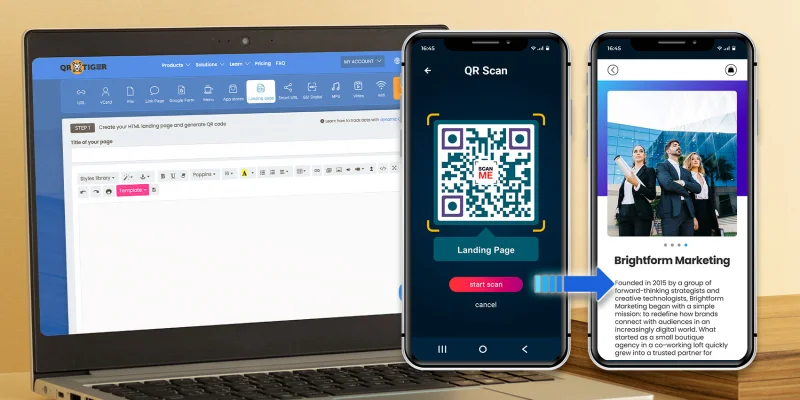
HTML(Hyper Text Markup Language)을 사용하여 QR 코드를 생성하는 것이 가능한가요?
짧게 대답하면 예, 그러나 HTML만으로는 QR 코드를 생성할 수 없습니다. QR 코드 자체를 생성하려면 JavaScript 또는 다른 QR 코드 소프트웨어가 필요합니다.
이 기사에서는 HTML과 JavaScript를 사용하여 QR 코드를 만드는 방법과 편집, 추적 및 확장성과 같은 기능을 갖춘 고급 QR 코드 생성기를 사용하는 것이 비즈니스적으로 더 합리적인 경우에 대해 배우게 됩니다.
목차
QR 코드 HTML 생성기란 무엇인가요? HTML과 JavaScript를 사용하여 QR 코드를 생성하는 방법 HTML 기반 QR 코드 생성이 부족한 점 HTML에 고급 QR 코드 생성기가 필요한 이유는 무엇인가요? 랜딩 페이지 QR 코드: 노코드 솔루션 HTML QR 코드를 만드는 방법 (코딩 없이) 왜 QR TIGER가 HTML 코드로 최고의 QR 코드 생성기인가 요약 자주 묻는 질문 QR 코드 HTML 생성기란 무엇인가요? 에이 HTML QR 코드 생성기 웹 기반 솔루션으로, HTML 및 JavaScript 또는 API를 사용하여 웹 페이지에 QR 코드를 생성하고 표시합니다.
빠르고 쉬운 QR 코드 생성을 위해 QR TIGER와 같은 온라인 플랫폼을 사용하면 HTML 코딩 없이도 만들 수 있습니다.
HTML과 JavaScript를 사용하여 QR 코드를 생성하는 방법 HTML을 사용하여 작은 JavaScript 라이브러리와 결합하여 QR 코드를 생성할 수 있습니다.
기억하세요, 하이퍼 텍스트 마크업 언어 웹 페이지를 구축하는 데 사용되는 것이 HTML이며, JavaScript가 QR 코드 생성을 처리합니다.
이제 이 도구들을 사용하여 HTML QR 코드를 만드는 방법을 알아보겠습니다.
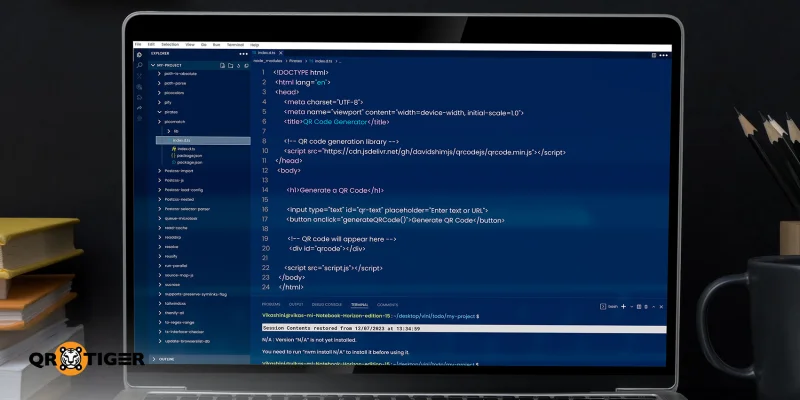
1단계: HTML 파일을 만드세요 먼저 QR 코드를 생성하기 위한 HTML이 필요합니다. index.html이라는 파일을 만들어야 합니다. 이 파일은 QR 코드 생성기의 구조를 담을 것입니다.
다음으로 파일에 URL 또는 텍스트를 입력할 수 있는 텍스트 입력란, QR 코드를 생성하는 버튼, 그리고 QR 코드가 나타날 빈 공간을 추가하세요. 여기서 실제로 작업을 생성하는 라이브러리에 링크할 수도 있습니다.
결국, 당신의 HTML 파일은 이렇게 보일 것입니다:
QR 코드 생성기
QR 코드 생성
Generate QR Code
2단계: JavaScript 추가하기 두 번째 파일을 script.js로 만드십시오. 이 파일은 사용자 입력을 읽고 QR 코드를 생성합니다.
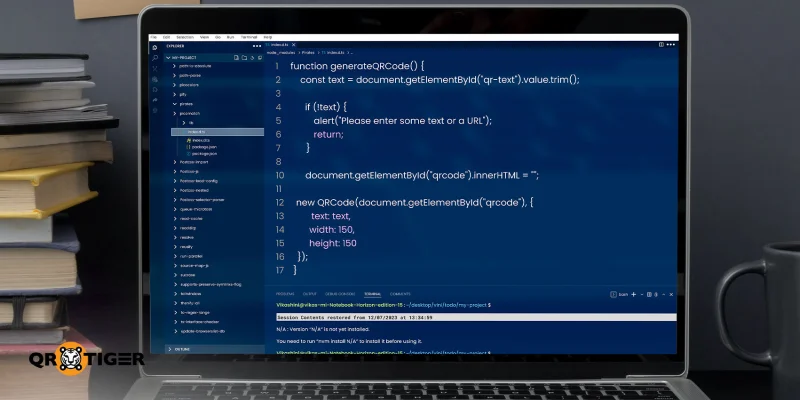
두 번째 파일이 생성되면, 스크립트는 입력된 텍스트를 가져와 기존의 QR 코드를 지우고 새로운 코드를 생성합니다.
이것이 스크립트 파일이 보일 것입니다.
generateQRCode() 함수를 생성합니다.
const text = document.getElementById("qr-text").value.trim();
if (!text) {
alert("텍스트나 URL을 입력해주세요");
리턴;
}
document.getElementById("qrcode").innerHTML = "";
새 QRCode(document.getElementById("qrcode"), {
텍스트: 텍스트,
너비: 150,
높이: 150
});
3단계: 파일을 저장하고 열기 이제 앞서 생성한 두 파일을 동일한 폴더에 저장해야 합니다. 그다음, 웹 브라우저에서 index.html 파일을 엽니다.
지금 URL 또는 텍스트를 입력하고 생성 버튼을 클릭하십시오.
HTML을 사용하여 QR 코드를 생성하는 방법입니다.
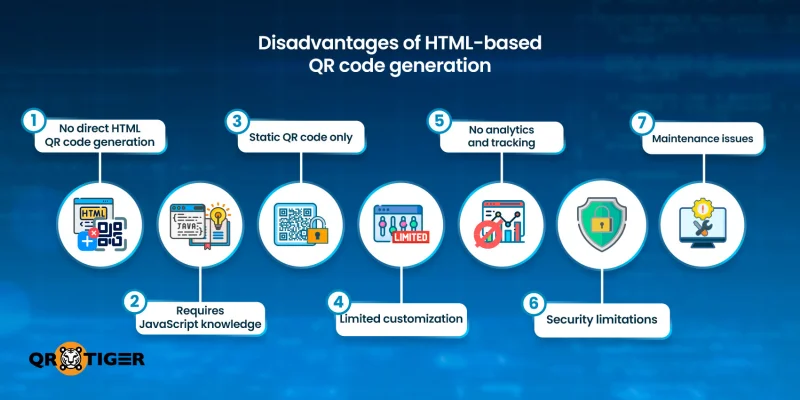
HTML 기반 QR 코드 생성이 부족한 점 HTML과 JavaScript를 사용하여 QR 코드를 생성하는 복잡성을 고려할 때, 이 방법이 어디에서 부족한지 이해하는 데 시간을 할애하는 것이 가치가 있습니다. 이를 통해 여러분이 빠르고 확신 있게 여러분의 요구에 가장 적합한 방법을 결정할 수 있을 것입니다.
HTML 만으로는 QR 코드를 생성할 수 없습니다. HTML 파일 하나만으로는 QR 코드를 생성할 수 없습니다. HTML은 단지 마크업 언어이기 때문입니다. HTML 파일을 QR 코드로 변환하려면 HTML과 JavaScript 라이브러리 또는 제3자 API(응용 프로그램 프로그래밍 인터페이스)를 결합해야 합니다.
자바스크립트에 대한 지식은 필수입니다 자바스크립트에서는 스크립트의 작은 실수조차도 전체 프로세스를 망가뜨릴 수 있습니다. 이는 자바스크립트에 대한 좋은 작동 지식이 절대적으로 필요하다는 것을 의미합니다.
제한된 사용자 정의 옵션 HTML과 JavaScript를 사용하여 생성된 QR 코드는 매우 제한된 사용자 정의 옵션을 제공합니다. 결과적으로 디자인을 쉽게 조정하여 브랜드 아이덴티티에 맞출 수 없습니다.
분석 또는 추적 없음 HTML을 사용하여 QR 코드를 생성할 때는 분석이나 추적 기능에 액세스할 수 없습니다. 대규모 브랜드 캠페인의 경우, 이러한 통찰력은 완전한 통제를 유지하고 성능을 효과적으로 측정하는 데 필수적입니다.
HTML은 정적 QR 코드만 생성할 수 있습니다. HTML은 동적 QR 코드를 제공하는 전용 QR 코드 생성기와 달리 정적 QR 코드만 생성할 수 있습니다. 따라서 나중에 변경 사항을 적용해야 하는 경우 QR 코드를 처음부터 다시 생성해야 합니다.
보안 제한 HTML 기반 QR 코드는 암호화, 접근 제어, 비밀번호 보호 또는 ISO 인증과 같은 규정 기능을 제공하지 않습니다. 따라서 내장된 데이터가 보호되는 것을 보장할 수 없습니다.
유지 보수의 어려움 코딩이나 프로그래밍에 익숙하지 않다면 HTML로 만든 QR 코드를 관리하는 것은 매우 어려울 수 있습니다. 모든 업데이트마다 코드 변경, 재배포 및 테스트가 필요하기 때문입니다.
HTML에 고급 QR 코드 생성기가 필요한 이유는 무엇인가요? 특수 QR 코드 소프트웨어를 사용하면 코딩이나 기술 전문 지식 없이 QR 코드를 만들 수 있습니다.
자동화 플랫폼과 호환되며 제공합니다 QR 코드 API 문서 소프트웨어 응용 프로그램에서 직접 QR 코드를 생성하는 데 사용할 수 있는 도구입니다.
일부는 HTML 코드를 쉽게 제공하여 코딩의 번거로움 없이 웹사이트나 웹페이지에 만든 QR 코드를 쉽게 삽입할 수 있습니다.
전용 QR 코드 생성기는 완전한 사용자 정의 옵션도 제공하여 브랜드 아이덴티티와 일치하는 QR 코드를 디자인하기 쉽게 만듭니다.
또한, 동적 QR 코드를 지원하여 배포 후 내용을 업데이트하고 실시간으로 성능을 모니터링할 수 있습니다.
이러한 기능들은 장기 캠페인과 지속적인 홍보 활동에 특히 가치가 있으며, 유연성과 통제가 필수적인 경우입니다.
랜딩 페이지 QR 코드: 노코드 솔루션 A 랜딩 페이지 QR 코드 모바일 최적화된 콘텐츠를 공유하는 유연하고 실용적인 방법입니다. QR TIGER와 같은 고급 QR 코드 소프트웨어에서 제공되는 솔루션입니다.
이 QR 코드는 QR 코드 플랫폼 내에서 직접 호스팅 및 관리되는 랜딩 페이지를 엽니다.
당신이 원하는 텍스트, 이미지, 비디오, 링크, 버튼 및 다른 상호 작용 요소로 페이지를 디자인할 수 있습니다. 코드 한 줄도 쓰지 않고요. 직접 코딩을 하고 싶다면 "코드 보기" 옵션이 있습니다.
이는 자신의 QR 코드를 브랜드 이미지와 커뮤니케이션 목표에 맞추고 싶은 마케터, 비즈니스 전문가 및 캠페인 매니저들에게 이상적인 솔루션이 됩니다.
HTML QR 코드를 만드는 방법 (코딩 없이) 노코드 QR 코드를 생성하려면 다음 간단한 단계를 따르세요:
1. 방문하다 동적 QR 코드 생성기 온라인
솔루션 대시보드에서 H5 QR 코드 옵션을 선택합니다.
사용 가능한 웹 디자인 요소를 활용하여 H5 페이지를 추가하고 디자인하세요.
직접 코딩이나 프로그래밍을 위해서는 코드 보기로 전환하세요 .
페이지가 준비되면 HTML을 QR 코드로 변환하려면 생성을 클릭하세요.
고화질 이미지 형식인 PNG, SVG 또는 EPS로 QR 코드를 사용자 정의하고 다운로드하세요.
HTML 코드를 보려면 클릭하세요 QR 코드 삽입
알림: 캠페인이나 웹페이지에서 QR 코드를 사용하기 전에 항상 각 기기에서 원활하게 작동하는지 테스트해야 합니다.
QR TIGER가 HTML 코드로 최고의 QR 코드 생성기인 이유 고급 생성기 몇 개가 QR 코드를 만들 수 있게 해줍니다. 그러나 HTML 코드가 내장된 것들 중에서는 QR TIGER를 강력히 추천합니다.
비즈니스 및 개발자들이 웹사이트용 QR 코드 생성기로 선택하는 이유는 다음과 같습니다:
진정한 플랫폼 내 창작 플랫폼 내에서 완전히 사용자 정의 QR 코드 랜딩 페이지를 생성할 수 있게 해줍니다. 별도의 웹사이트, CMS 또는 호스팅 제공업체에 의존하지 않습니다. 인쇄 후에도 편집 가능합니다. 랜딩 페이지용 동적 QR 코드를 사용하면 QR 코드가 인쇄되거나 배포된 후에도 언제든지 랜딩 페이지의 내용을 업데이트할 수 있습니다. 기술 전문 지식이 필요하지 않습니다: 시각적인 섹션 기반 편집기를 사용하면 비전문가도 쉽게 랜딩 페이지 QR 코드를 만들고 관리할 수 있습니다. 쉬운 API 통합: API 문서 다른 소프트웨어 응용 프로그램에서 QR 코드를 생성하는 것을 자동화하여 전체 프로세스를 더 빠르고 원활하며 확장 가능하게 만듭니다.HTML 코드를 이동 중: QR TIGER는 QR 코드를 위한 HTML 코드를 자동으로 생성하여 수동 코딩의 번거로움 없이 웹사이트에 직접 삽입할 수 있습니다. 더 큰 브랜딩 통제 랜딩 페이지와 QR 코드 디자인에 대한 완전한 제어를 제공하며, 색상, 레이아웃 및 브랜드 정체성과 일치하는 CTA 태그를 포함합니다. 안전하고 신뢰할 수 있는 호스팅: QR TIGER를 우선으로 합니다 데이터 보안 ISO 27001, GDPR, CCPA 및 SSO 표준을 준수하여 대규모 장기 캠페인을 진행하는 기업들에게 신뢰할 수 있는 플랫폼으로 만듭니다.요약 HTML과 JavaScript를 사용하여 QR 코드를 생성하는 방법과 기능 및 확장성 측면에서의 한계를 이미 알고 계십니다.
고급 QR 코드 생성기를 사용하여 HTML 코드로 코드를 만들고 관리하는 것을 권장합니다. 이렇게 하면 코드를 만들고 관리하는 것이 간단하고 스트레스 없이 할 수 있습니다.
QR 코드에 대한 완전한 제어권을 갖게 됩니다. 콘텐츠 업데이트, 브랜드에 맞게 디자인 커스터마이징, 시간이 지남에 따른 성능 추적, 웹사이트에 삽입하는 등의 기능이 가능합니다.
자주 묻는 질문 HTML을 위해 어떤 소프트웨어가 필요한가요? HTML을 위해서는 메모장이나 TextEdit과 같은 간단한 텍스트 편집기나 VS Code와 같은 더 많은 기능을 가진 편집기가 필요합니다. 파일을 .html 확장자로 저장한 후에는 Chrome, Firefox 또는 Safari와 같은 웹 브라우저에서 열어서 어떻게 보이는지 확인할 수 있습니다.
가장 기본적이고 자주 사용되는 태그 중 일부는 ,
,
이 포함됩니다. </p><p><body>, <h1>, <p> 그리고 <a> . </p><h3 id="toc_definition_of_terms"><b>용어 정의 </b></h3><p><b>HTML </b>HTML은 Hyper Text Markup Language의 약자입니다. 이것은 웹 브라우저에게 어떤 콘텐츠를 보여줄지와 어떻게 구성되어 있는지를 알려주는 표준 언어입니다. 텍스트, 이미지, 링크, 버튼, 그리고 폼 등을 포함합니다. </p><p><b>자바스크립트 </b>사용자 조작에 응답하고 실시간으로 콘텐츠를 업데이트하며 페이지를 다시로드하지 않고 논리를 수행할 수 있게 하는 프로그래밍 언어입니다. </p><p><b>API </b>API는 Application Programming Interface의 약자입니다. 다른 애플리케이션의 기능이나 데이터를 사용할 수 있도록 하는 규칙과 도구의 집합입니다. 이를 통해 해당 애플리케이션이 어떻게 구축되었는지 알 필요 없이 다른 애플리케이션의 기능이나 데이터를 사용할 수 있습니다. <a class="blog-company-banner" href="https://www.qrcode-tiger.com" target="_blank"><img loading="lazy" decoding="async" src="https://qrtiger-banners.s3.amazonaws.com/blog-banner-company-logo.jpg" style="width: 100%;" alt="Brands using QR codes" width height title></a></p>
<div class="article-disclaimer">
<span>면책 조항</span>
<p>
이 문서는 일반 정보 목적으로만 제공되며 법적, 금융적 또는 다른 전문적인 조언으로 간주되지 않습니다. QR TIGER 제품 또는 서비스에 관한 질문이 있으시면 지원팀에게 <a href='mailto:it@qrtiger.com'>it@qrtiger.com</a>으로 문의하십시오.
</p>
</div>
</div></section><div class="blog-article-extras"><section class="blog-faq"><h2 class="blog-section-heading">자주 묻는 질문 (FAQ)</h2><div class="blog-faq-list"><details class="blog-faq-item"><summary class="blog-faq-question"><span>What software do I need for HTML?</span><span class="blog-faq-icon" aria-hidden="true">+</span></summary><div class="blog-faq-answer">For HTML, all you need is a simple text editor such as Notepad or TextEdit, or more feature-rich editors like VS Code. Once the file is saved with an .html extension, you can open it in any web browser, such as Chrome, Firefox, or Safari, to see how it looks.</div></details><details class="blog-faq-item"><summary class="blog-faq-question"><span>What are the 7 basic tags of HTML?</span><span class="blog-faq-icon" aria-hidden="true">+</span></summary><div class="blog-faq-answer">Some of the most basic and commonly used tags include <html>, <head>, <title>
<body>, <h1>, <p> and <a> .</div></details></div></section><section class="blog-feedback"><h3>이 기사가 도움이 되었습니까?</h3><div class="blog-feedback-actions"><button type="button">네, 매우 도움이 되었습니다.</button><button type="button">아니요, 작업이 필요합니다.</button></div></section><section class="blog-enterprise-cta"><span class="blog-enterprise-badge">기업용</span><h2>최고의 QR 코드 생성기로 스캔을 최대화하세요.</h2><p>수천 개의 글로벌 브랜드가 동적 라우팅, 대량 생성 및 심층 속성 분석을 관리하는 데 QR TIGER을 사용하고 있습니다.</p><a class="blog-cta-btn blog-cta-btn--lg" href="/ko/register?signup_source=blog_cta_btn">무료로 시작하기</a></section><div class="blog-share"><span class="blog-share-label">이 가이드를 공유하세요.</span><div class="blog-share-icons"><a href="https://www.linkedin.com/sharing/share-offsite/?url=https%3A%2F%2Fwww.qrcode-tiger.com%2Fko%2Fhow-to-generate-a-qr-code-using-html" target="_blank" rel="noopener noreferrer" class="blog-share-icon" aria-label="LinkedIn"><i class="qr-linkedin" aria-hidden="true"></i></a><a href="https://www.facebook.com/sharer/sharer.php?u=https%3A%2F%2Fwww.qrcode-tiger.com%2Fko%2Fhow-to-generate-a-qr-code-using-html" target="_blank" rel="noopener noreferrer" class="blog-share-icon" aria-label="Facebook"><i class="qr-facebook" aria-hidden="true"></i></a><a href="https://twitter.com/intent/tweet?url=https%3A%2F%2Fwww.qrcode-tiger.com%2Fko%2Fhow-to-generate-a-qr-code-using-html&text=HTML%EC%9D%84%20%EC%82%AC%EC%9A%A9%ED%95%98%EC%97%AC%20QR%20%EC%BD%94%EB%93%9C%EB%A5%BC%20%EC%83%9D%EC%84%B1%ED%95%98%EB%8A%94%20%EB%B0%A9%EB%B2%95%3A%20%EC%89%AC%EC%9A%B4%20%EC%95%88%EB%82%B4%EC%84%9C" target="_blank" rel="noopener noreferrer" class="blog-share-icon" aria-label="X"><i class="qr-twitter" aria-hidden="true"></i></a></div></div><section class="blog-author-bio"><img class="blog-author-bio-avatar" src="https://media.qrtiger.com/blog/2026/10/ashleyjpg_800_71.jpeg" alt="Ashley P." width="72" height="72"/><div class="blog-author-bio-content"><a class="blog-author-bio-name" href="/ko/blog/author/ashley">Ashley P.</a><p class="blog-author-bio-role">QR TIGER의 콘텐츠 작가</p><p class="blog-author-bio-text">애슐리는 비즈니스 및 사회과학 연구 분야에서 이중 학위를 보유하고 있으며 콘텐츠 마케팅 및 콘텐츠 작성에 대한 자격증을 보유하고 있습니다. 출판 경험이 8년 이상이며 디지털 마케팅과 QR 코드 기술 분야에서 3년의 전문 지식을 갖추고 있습니다. 그녀의 작업은 복잡한 데이터와 기술적 개념을 명확하고 실행 가능한 통찰력으로 번역하며 측정 가능한 결과를 제공하는 실용적인 해결책을 개발하는 데 초점을 맞추고 있습니다.</p></div></section></div></article><aside class="blog-sidebar" aria-busy="true"></aside></div></div></div><div class="footer"><div class="container"><div class="social-section"><div class="subscribe"><section>계속 연락을 유지하세요.</section><span class="footer-text footer-subscribe__desc">뉴스레터에 가입하여 프로모션, 업데이트, 그리고 팁을 가장 먼저 받아보세요.</span><div class="input-group footer-subscribe__input"><input class="form-control" type="email" placeholder="당신의 email 주소" name="email"/><div class="input-group-append"><span class="input-group-text pointer"><i class="qr-icons qr-send" aria-hidden="true"></i></span></div></div></div><div class="social-community"><span class="footer-text mb-2">커뮤니티에 참여해주세요</span><div class="social-icons"><a target="_blank" rel="noopener noreferrer" class="icon linkedin-icon" aria-label="팔로우하세요: LinkedIn" href="https://www.linkedin.com/company/qrtiger/"><i class="qr-icons qr-linkedin" aria-hidden="true"></i></a><a target="_blank" rel="noopener noreferrer" class="icon" aria-label="팔로우하세요: YouTube" href="https://www.youtube.com/c/QRTiger"><i class="qr-icons qr-youtube" aria-hidden="true"></i></a><a target="_blank" rel="noopener noreferrer" class="icon" aria-label="팔로우하세요: Instagram" href="https://www.instagram.com/qrtiger"><i class="qr-icons qr-instagram" aria-hidden="true"></i></a><a target="_blank" rel="noopener noreferrer" class="icon" aria-label="팔로우하세요: Facebook" href="https://www.facebook.com/QRTIGERS/"><i class="qr-icons qr-facebook" aria-hidden="true"></i></a><a target="_blank" rel="noopener noreferrer" class="icon" aria-label="팔로우하세요: X" href="https://x.com/qrtigers"><i class="qr-icons qr-x-logo" aria-hidden="true"></i></a></div></div><div class="social-community download-app"><h4 class="footer-text">QR TIGER 앱을 다운로드하세요.</h4><span class="footer-text mb-2">QR 코드를 생성하고 이동 중에 스캔하세요.</span><div class="download-buttons"><a href="https://apps.apple.com/us/app/qr-tiger-qr-code-generator/id1509675463"><img src="https://qrtiger-fe.nyc3.cdn.digitaloceanspaces.com/static/img/MainFooter/appStore.webp" alt="Download on the App Store" width="139" height="46" loading="lazy" decoding="async"/></a><a href="https://play.google.com/store/apps/details?id=com.qrtiger&pli=1"><img src="https://qrtiger-fe.nyc3.cdn.digitaloceanspaces.com/static/img/MainFooter/googlePlay.webp" alt="Get it on Google Play" width="155" height="46" loading="lazy" decoding="async"/></a></div></div></div><div class="resources-wrapper mt-5 mb-5"><div class="resources-header">자원</div><div class="row"><div class="col-md-6 col-lg-3 mb-1 mt-1"><div class="resource-item"><a class="text-white text-center" href="https://www.qrcode-tiger.com/ko/how-do-dynamic-qr-codes-work">다이내믹 QR 코드는 어떻게 작동합니까?</a></div></div><div class="col-md-6 col-lg-3 mb-1 mt-1"><div class="resource-item"><a class="text-white text-center" href="https://www.qrcode-tiger.com/ko/how-does-a-multi-url-qr-code-works-and-can-benefit-your-business-smart-qr-code">다중 URL QR 코드</a></div></div><div class="col-md-6 col-lg-3 mb-1 mt-1"><div class="resource-item"><a class="text-white text-center" href="https://www.qrcode-tiger.com/ko/digital-business-card-qr-code">디지턼 비즈니스 카드 QR 코드</a></div></div><div class="col-md-6 col-lg-3 mb-1 mt-1"><div class="resource-item"><a class="text-white text-center" href="https://www.qrcode-tiger.com/ko/bulk-qr-code-generator">대량 QR 코드 생성기</a></div></div><div class="col-md-6 col-lg-3 mb-1 mt-1"><div class="resource-item"><a class="text-white text-center" href="https://www.qrcode-tiger.com/ko/how-to-make-a-qr-code-of-an-image">이미지용 QR 코드를 만드는 방법</a></div></div><div class="col-md-6 col-lg-3 mb-1 mt-1"><div class="resource-item"><a class="text-white text-center" href="https://www.qrcode-tiger.com/ko/how-to-create-a-video-qr-code-">비디오용 QR 코드를 만드는 방법</a></div></div><div class="col-md-6 col-lg-3 mb-1 mt-1"><div class="resource-item"><a class="text-white text-center" href="https://www.qrcode-tiger.com/ko/how-to-make-a-qr-code-for-a-google-form">Google Form을(를) 위한 QR 코드를 만드는 방법은 다음과 같습니다.</a></div></div><div class="col-md-6 col-lg-3 mb-1 mt-1"><div class="resource-item"><a class="text-white text-center" href="https://www.qrcode-tiger.com/ko/qr-code-with-logo">로고가 있는 QR 코드를 만드는 방법
</a></div></div><div class="col-md-6 col-lg-3 mb-1 mt-1"><div class="resource-item"><a class="text-white text-center" href="https://www.qrcode-tiger.com/ko/track-qr-code-with-google-analytics">Google Analytics로 QR 코드를 추적하는 방법
</a></div></div><div class="col-md-6 col-lg-3 mb-1 mt-1"><div class="resource-item"><a class="text-white text-center" href="https://www.qrcode-tiger.com/ko/how-to-make-your-qr-code-in-restaurant">식당 메뉴용 QR 코드를 만드는 방법</a></div></div><div class="col-md-6 col-lg-3 mb-1 mt-1"><div class="resource-item"><a class="text-white text-center" href="https://www.qrcode-tiger.com/ko/file-qr-code-converter">File QR 코드 변환기</a></div></div></div></div><div class="main-menu"><div class="section text-lg-left text-left"><div><label class="text-white">가이드</label><ul><li class="faq"><a class="text-white" target="_blank" href="https://www.qrcode-tiger.com/ko/faq">자주 묻는 질문</a></li><li class="contactUs"><a class="text-white" target="_blank" href="https://www.qrcode-tiger.com/ko/contact">문의하기</a></li><li class="helpCenter"><a class="text-white" target="_self" href="https://www.qrcode-tiger.com/ko/blog/help-center">도움 센터</a></li></ul></div></div><div class="section text-lg-left text-right text-lg-left"><div><label class="text-white">지원</label><ul><li class="mailTo"><a class="text-white" target="_self" href="mailto:it@qrtiger.com">it@qrtiger.com</a></li></ul></div></div><div class="section text-lg-left text-left"><div><label class="text-white">회사</label><ul><li class="aboutUs"><a class="text-white" target="_blank" href="https://www.qrcode-tiger.com/ko/about">회사 소개</a></li><li class="status"><a class="text-white" target="_blank" href="https://qrtiger.statuspage.io/">상태</a></li><li class="enterpriseSolutions"><a class="text-white" target="_blank" href="https://enterprise.qrcode-tiger.com/">기업 솔루션</a></li><li class="pricing"><a class="text-white" target="_self" href="https://www.qrcode-tiger.com/ko/payment">가격 설정</a></li></ul></div></div><div class="section text-lg-left text-right text-lg-left"><div><label class="text-white">용어</label><ul><li class="termsAgreements"><a class="text-white" target="_blank" href="https://www.qrcode-tiger.com/ko/terms-and-conditions">약관 및 조건</a></li><li class="termsOfAcceptableUse"><a class="text-white" target="_blank" href="https://www.qrcode-tiger.com/ko/term-acceptable-use">사용 약관</a></li><li class="privacyPolicy"><a class="text-white" target="_blank" href="https://www.qrcode-tiger.com/ko/privacy-policy">개인정보 보호 정책</a></li><li class="cookiesPolicy"><a class="text-white" target="_blank" href="https://www.qrcode-tiger.com/ko/cookies-policy">쿠키 정책</a></li></ul></div></div></div><div class="vtline"></div><div class="d-flex justify-content-center m-3"><a class="main-logo" href="/ko"><img src="https://qrtiger-fe.nyc3.cdn.digitaloceanspaces.com/static/img/MainHeader/qrtiger_logo_s.svg" alt="qr code generator" width="200" height="59" loading="lazy" decoding="async"/></a></div><div class="text-center copy-right">이 QR 코드 생성기는 QR TIGER 주식회사의 등록 상표입니다. <br/>'QR 코드'는 덴소 웨이브 주식회사의 상표입니다. © 2026 www.qrcode-tiger.com</div></div></div></div></div></div></div><script src="/_next/static/chunks/webpack-d70282bc4c82f720.js" crossorigin="" async=""></script><script>(self.__next_f=self.__next_f||[]).push([0]);self.__next_f.push([2,null])</script><script>self.__next_f.push([1,"1:I[12846,[],\"\"]\n4:I[4707,[],\"\"]\n7:I[36423,[],\"\"]\n8:I[59152,[\"1781\",\"static/chunks/app/%5Blocale%5D/(site)/layout-9ebccaf4a00b26a0.js\"],\"default\"]\nc:I[61060,[],\"\"]\n5:[\"locale\",\"ko\",\"d\"]\n6:[\"slug\",\"how-to-generate-a-qr-code-using-html\",\"d\"]\nd:[]\n"])</script><script>self.__next_f.push([1,"0:[\"$\",\"$L1\",null,{\"buildId\":\"2ie17S_ah5dahdEoWdqSo\",\"assetPrefix\":\"\",\"urlParts\":[\"\",\"ko\",\"how-to-generate-a-qr-code-using-html\"],\"initialTree\":[\"\",{\"children\":[[\"locale\",\"ko\",\"d\"],{\"children\":[\"(cms)\",{\"children\":[[\"slug\",\"how-to-generate-a-qr-code-using-html\",\"d\"],{\"children\":[\"__PAGE__\",{}]}]}]}]},\"$undefined\",\"$undefined\",true],\"initialSeedData\":[\"\",{\"children\":[[\"locale\",\"ko\",\"d\"],{\"children\":[\"(cms)\",{\"children\":[[\"slug\",\"how-to-generate-a-qr-code-using-html\",\"d\"],{\"children\":[\"__PAGE__\",{},[[\"$L2\",\"$L3\",null],null],null]},[null,[\"$\",\"$L4\",null,{\"parallelRouterKey\":\"children\",\"segmentPath\":[\"children\",\"$5\",\"children\",\"(cms)\",\"children\",\"$6\",\"children\"],\"error\":\"$undefined\",\"errorStyles\":\"$undefined\",\"errorScripts\":\"$undefined\",\"template\":[\"$\",\"$L7\",null,{}],\"templateStyles\":\"$undefined\",\"templateScripts\":\"$undefined\",\"notFound\":\"$undefined\",\"notFoundStyles\":\"$undefined\"}]],null]},[[null,[[[\"$\",\"link\",null,{\"rel\":\"preload\",\"href\":\"/static/assets/styles/bundles/site.bundle.css?v=1791956706693\",\"as\":\"style\"}],[\"$\",\"link\",null,{\"rel\":\"stylesheet\",\"href\":\"/static/assets/styles/bundles/site.bundle.css?v=1791956706693\",\"precedence\":\"default\"}],[\"$\",\"$L8\",null,{\"href\":\"/static/assets/styles/bundles/site.bundle.css?v=1791956706693\"}]],[[\"$\",\"link\",null,{\"rel\":\"preload\",\"href\":\"/static/assets/styles/bundles/blog.bundle.css?v=1791956706693\",\"as\":\"style\"}],[\"$\",\"link\",null,{\"rel\":\"stylesheet\",\"href\":\"/static/assets/styles/bundles/blog.bundle.css?v=1791956706693\",\"precedence\":\"default\"}],[\"$\",\"$L8\",null,{\"href\":\"/static/assets/styles/bundles/blog.bundle.css?v=1791956706693\"}]],[\"$\",\"$L4\",null,{\"parallelRouterKey\":\"children\",\"segmentPath\":[\"children\",\"$5\",\"children\",\"(cms)\",\"children\"],\"error\":\"$undefined\",\"errorStyles\":\"$undefined\",\"errorScripts\":\"$undefined\",\"template\":[\"$\",\"$L7\",null,{}],\"templateStyles\":\"$undefined\",\"templateScripts\":\"$undefined\",\"notFound\":\"$undefined\",\"notFoundStyles\":\"$undefined\"}]]],null],null]},[[null,\"$L9\"],null],null]},[[null,\"$La\"],null],null],\"couldBeIntercepted\":false,\"initialHead\":[null,\"$Lb\"],\"globalErrorComponent\":\"$c\",\"missingSlots\":\"$Wd\"}]\n"])</script><script>self.__next_f.push([1,"f:I[6034,[\"2653\",\"static/chunks/2653-2c7d73a5b4d8fd48.js\",\"7774\",\"static/chunks/7774-b0a5d2d28f2682a5.js\",\"9441\",\"static/chunks/9441-6e162664b08a40d1.js\",\"8322\",\"static/chunks/8322-438db9bcf24bc73e.js\",\"3426\",\"static/chunks/3426-c2abb27e049260f9.js\",\"2420\",\"static/chunks/2420-6b15e0904dc5e4d4.js\",\"4281\",\"static/chunks/4281-df9a22eaa52cf3cd.js\",\"5124\",\"static/chunks/5124-85248a3cffe36581.js\",\"9708\",\"static/chunks/9708-d1b49845002480bf.js\",\"6851\",\"static/chunks/6851-7a3483c090d054ac.js\",\"6773\",\"static/chunks/6773-3e2bd4b98aff02a6.js\",\"4412\",\"static/chunks/4412-30315123d872f27c.js\",\"1629\",\"static/chunks/1629-d60dd2c128c78c82.js\",\"4613\",\"static/chunks/4613-14d82ab156e1d01f.js\",\"39\",\"static/chunks/39-62057ba9d3a0659e.js\",\"7322\",\"static/chunks/7322-39c70f38352e1e56.js\",\"3500\",\"static/chunks/app/%5Blocale%5D/(site)/page-a9dc76348c5c3686.js\"],\"default\"]\n10:I[34238,[\"2653\",\"static/chunks/2653-2c7d73a5b4d8fd48.js\",\"7774\",\"static/chunks/7774-b0a5d2d28f2682a5.js\",\"2420\",\"static/chunks/2420-6b15e0904dc5e4d4.js\",\"8003\",\"static/chunks/8003-01df224e05286a2d.js\",\"108\",\"static/chunks/108-b89c441db37c7d30.js\",\"4412\",\"static/chunks/4412-30315123d872f27c.js\",\"3185\",\"static/chunks/app/layout-02efb43790863941.js\"],\"default\"]\n11:I[74196,[\"2653\",\"static/chunks/2653-2c7d73a5b4d8fd48.js\",\"7774\",\"static/chunks/7774-b0a5d2d28f2682a5.js\",\"2420\",\"static/chunks/2420-6b15e0904dc5e4d4.js\",\"8003\",\"static/chunks/8003-01df224e05286a2d.js\",\"108\",\"static/chunks/108-b89c441db37c7d30.js\",\"4412\",\"static/chunks/4412-30315123d872f27c.js\",\"3185\",\"static/chunks/app/layout-02efb43790863941.js\"],\"default\"]\n12:I[88003,[\"2653\",\"static/chunks/2653-2c7d73a5b4d8fd48.js\",\"7774\",\"static/chunks/7774-b0a5d2d28f2682a5.js\",\"2420\",\"static/chunks/2420-6b15e0904dc5e4d4.js\",\"8003\",\"static/chunks/8003-01df224e05286a2d.js\",\"108\",\"static/chunks/108-b89c441db37c7d30.js\",\"4412\",\"static/chunks/4412-30315123d872f27c.js\",\"3185\",\"static/chunks/app/layout-02efb43790863941.js\"],\"\"]\n13:I[37187,[\"2653\",\"static/chunks/2653-2c7d73a5b4d8fd48.js\",\"7774\",\"static/chunks/7774-b0a5d2d28f2682a5.j"])</script><script>self.__next_f.push([1,"s\",\"9441\",\"static/chunks/9441-6e162664b08a40d1.js\",\"8322\",\"static/chunks/8322-438db9bcf24bc73e.js\",\"3426\",\"static/chunks/3426-c2abb27e049260f9.js\",\"2420\",\"static/chunks/2420-6b15e0904dc5e4d4.js\",\"4281\",\"static/chunks/4281-df9a22eaa52cf3cd.js\",\"5124\",\"static/chunks/5124-85248a3cffe36581.js\",\"9708\",\"static/chunks/9708-d1b49845002480bf.js\",\"6851\",\"static/chunks/6851-7a3483c090d054ac.js\",\"6773\",\"static/chunks/6773-3e2bd4b98aff02a6.js\",\"4412\",\"static/chunks/4412-30315123d872f27c.js\",\"1629\",\"static/chunks/1629-d60dd2c128c78c82.js\",\"4613\",\"static/chunks/4613-14d82ab156e1d01f.js\",\"39\",\"static/chunks/39-62057ba9d3a0659e.js\",\"7322\",\"static/chunks/7322-39c70f38352e1e56.js\",\"3500\",\"static/chunks/app/%5Blocale%5D/(site)/page-a9dc76348c5c3686.js\"],\"default\"]\n14:I[84704,[\"2653\",\"static/chunks/2653-2c7d73a5b4d8fd48.js\",\"7774\",\"static/chunks/7774-b0a5d2d28f2682a5.js\",\"9441\",\"static/chunks/9441-6e162664b08a40d1.js\",\"8322\",\"static/chunks/8322-438db9bcf24bc73e.js\",\"3426\",\"static/chunks/3426-c2abb27e049260f9.js\",\"4412\",\"static/chunks/4412-30315123d872f27c.js\",\"1629\",\"static/chunks/1629-d60dd2c128c78c82.js\",\"7968\",\"static/chunks/app/%5Blocale%5D/(cms)/%5Bslug%5D/page-047743a06f571c27.js\"],\"default\"]\n15:I[84393,[\"2653\",\"static/chunks/2653-2c7d73a5b4d8fd48.js\",\"9441\",\"static/chunks/9441-6e162664b08a40d1.js\",\"8322\",\"static/chunks/8322-438db9bcf24bc73e.js\",\"1449\",\"static/chunks/1449-f5cc50f5784ef500.js\",\"1203\",\"static/chunks/app/%5Blocale%5D/layout-a1736618a1bbbbd1.js\"],\"default\"]\n16:\"$Sreact.suspense\"\n17:I[26766,[\"2653\",\"static/chunks/2653-2c7d73a5b4d8fd48.js\",\"9441\",\"static/chunks/9441-6e162664b08a40d1.js\",\"8322\",\"static/chunks/8322-438db9bcf24bc73e.js\",\"1449\",\"static/chunks/1449-f5cc50f5784ef500.js\",\"1203\",\"static/chunks/app/%5Blocale%5D/layout-a1736618a1bbbbd1.js\"],\"default\"]\n18:I[96743,[\"2653\",\"static/chunks/2653-2c7d73a5b4d8fd48.js\",\"9441\",\"static/chunks/9441-6e162664b08a40d1.js\",\"8322\",\"static/chunks/8322-438db9bcf24bc73e.js\",\"1449\",\"static/chunks/1449-f5cc50f5784ef500.js\",\"1203\",\"static/chunks/app/%5Blocale%5D/layout-a1736618a1bbb"])</script><script>self.__next_f.push([1,"bd1.js\"],\"default\"]\ne:T3eb4,"])</script><script>self.__next_f.push([1,"@font-face {\n font-family: 'Poppins';\n font-style: normal;\n font-weight: 600;\n font-display: swap;\n src: url(/static/assets/fonts/Poppins/Poppins-SemiBold.woff2) format('woff2');\n unicode-range: U+0000-00FF, U+0131, U+0152-0153, U+02BB-02BC, U+02C6, U+02DA, U+02DC, U+2000-206F, U+2074, U+20AC, U+2122, U+2191, U+2193, U+2212, U+2215, U+FEFF, U+FFFD;\n}\n\n@font-face {\n font-family: 'Poppins';\n font-style: normal;\n font-weight: 500;\n font-display: swap;\n src: url(/static/assets/fonts/Poppins/Poppins-Medium.woff2) format('woff2');\n unicode-range: U+0000-00FF, U+0131, U+0152-0153, U+02BB-02BC, U+02C6, U+02DA, U+02DC, U+2000-206F, U+2074, U+20AC,\n U+2122, U+2191, U+2193, U+2212, U+2215, U+FEFF, U+FFFD;\n}\n\n@font-face {\n font-family: 'Poppins';\n font-style: normal;\n font-weight: 400;\n font-display: swap;\n src: url(/static/assets/fonts/Poppins/Poppins-Regular.woff2) format('woff2');\n unicode-range: U+0000-00FF, U+0131, U+0152-0153, U+02BB-02BC, U+02C6, U+02DA, U+02DC, U+2000-206F, U+2074, U+20AC, U+2122, U+2191, U+2193, U+2212, U+2215, U+FEFF, U+FFFD;\n}\n\n@font-face {\n font-family: 'Poppins';\n font-style: normal;\n font-weight: 700;\n font-display: swap;\n src: url(/static/assets/fonts/Poppins/Poppins-Bold.woff2) format('woff2');\n unicode-range: U+0000-00FF, U+0131, U+0152-0153, U+02BB-02BC, U+02C6, U+02DA, U+02DC, U+2000-206F, U+2074, U+20AC, U+2122, U+2191, U+2193, U+2212, U+2215, U+FEFF, U+FFFD;\n}\n\n@font-face {\n font-family: 'Lato';\n font-style: normal;\n font-weight: 400;\n font-display: swap;\n src: url(https://fonts.gstatic.com/s/lato/v23/S6uyw4BMUTPHjx4wXg.woff2) format('woff2');\n unicode-range: U+0000-00FF, U+0131, U+0152-0153, U+02BB-02BC, U+02C6, U+02DA, U+02DC, U+2000-206F, U+2074, U+20AC, U+2122, U+2191, U+2193, U+2212, U+2215, U+FEFF, U+FFFD;\n}\n\n@font-face {\n font-family: 'QrTiger';\n src: url('/static/assets/fonts/QrTiger/fonts/QrTiger.eot?3rhkpx');\n src: url('/static/assets/fonts/QrTiger/fonts/QrTiger.eot?3rhkpx#iefix') format('embedded-opentype'),\n url('/static/assets/fonts/QrTiger/fonts/QrTiger.ttf?3rhkpx') format('truetype'),\n url('/static/assets/fonts/QrTiger/fonts/QrTiger.woff?3rhkpx') format('woff'),\n url('/static/assets/fonts/QrTiger/fonts/QrTiger.svg?3rhkpx#QrTiger') format('svg');\n font-weight: normal;\n font-style: normal;\n font-display: swap;\n ascent-override: 90%;\n descent-override: 10%;\n line-gap-override: 0%;\n}\n\n[class^=\"qr-\"], [class*=\" qr-\"] {\n /* use !important to prevent issues with browser extensions that change fonts */\n font-family: 'QrTiger' !important;\n speak: never;\n font-style: normal;\n font-weight: normal;\n font-variant: normal;\n text-transform: none;\n line-height: 1;\n\n /* Better Font Rendering =========== */\n -webkit-font-smoothing: antialiased;\n -moz-osx-font-smoothing: grayscale;\n}\n\n.qr-warning:before {\n content: \"\\e900\";\n}\n.qr-stoplight_logo:before {\n content: \"\\e901\";\n}\n.qr-email:before {\n content: \"\\e902\";\n}\n.qr-instagram:before {\n content: \"\\e903\";\n}\n.qr-pdf:before {\n content: \"\\e904\";\n}\n.qr-html:before {\n content: \"\\e905\";\n}\n.qr-facebook-thin:before {\n content: \"\\e906\";\n}\n.qr-email1:before {\n content: \"\\e907\";\n}\n.qr-app-store:before {\n content: \"\\e908\";\n}\n.qr-facebook-like:before {\n content: \"\\e909\";\n}\n.qr-pinterest:before {\n content: \"\\e90a\";\n}\n.qr-mp3:before {\n content: \"\\e90b\";\n}\n.qr-vcard:before {\n content: \"\\e90c\";\n}\n.qr-url:before {\n content: \"\\e90d\";\n}\n.qr-text:before {\n content: \"\\e90e\";\n}\n.qr-event:before {\n content: \"\\e90f\";\n}\n.qr-youtube:before {\n content: \"\\e910\";\n}\n.qr-star-inside-circle:before {\n content: \"\\e911\";\n}\n.qr-open-menu:before {\n content: \"\\e912\";\n}\n.qr-twitter:before {\n content: \"\\e913\";\n}\n.qr-caret-up:before {\n content: \"\\e914\";\n}\n.qr-caret-down:before {\n content: \"\\e915\";\n}\n.qr-sns:before {\n content: \"\\e916\";\n}\n.qr-wechat:before {\n content: \"\\e917\";\n}\n.qr-multi:before {\n content: \"\\e918\";\n}\n.qr-search:before {\n content: \"\\e919\";\n}\n.qr-alipay:before {\n content: \"\\e91a\";\n}\n.qr-social-media:before {\n content: \"\\e91b\";\n}\n.qr-forms:before {\n content: \"\\e91c\";\n}\n.qr-check-circle:before {\n content: \"\\e91d\";\n}\n.qr-more:before {\n content: \"\\e91e\";\n}\n.qr-line:before {\n content: \"\\e91f\";\n}\n.qr-tiktok:before {\n content: \"\\e920\";\n}\n.qr-close:before {\n content: \"\\e921\";\n}\n.qr-question-circle:before {\n content: \"\\e922\";\n}\n.qr-angle-down:before {\n content: \"\\e923\";\n}\n.qr-angle-up:before {\n content: \"\\e924\";\n}\n.qr-plus:before {\n content: \"\\e925\";\n}\n.qr-user:before {\n content: \"\\e926\";\n}\n.qr-qrcode:before {\n content: \"\\e927\";\n}\n.qr-double-arrow-left:before {\n content: \"\\e928\";\n}\n.qr-double-arrow-right:before {\n content: \"\\e929\";\n}\n.qr-question:before {\n content: \"\\e92a\";\n}\n.qr-paint-brush:before {\n content: \"\\e92b\";\n}\n.qr-trash:before {\n content: \"\\e92c\";\n}\n.qr-linkedin:before {\n content: \"\\e92d\";\n}\n.qr-wechat-main:before {\n content: \"\\e92e\";\n}\n.qr-whatsapp:before {\n content: \"\\e92f\";\n}\n.qr-tumblr:before {\n content: \"\\e930\";\n}\n.qr-messenger:before {\n content: \"\\e931\";\n}\n.qr-reddit:before {\n content: \"\\e932\";\n}\n.qr-qq:before {\n content: \"\\e933\";\n}\n.qr-medium:before {\n content: \"\\e934\";\n}\n.qr-yelp:before {\n content: \"\\e935\";\n}\n.qr-quora:before {\n content: \"\\e936\";\n}\n.qr-meetup:before {\n content: \"\\e937\";\n}\n.qr-snapchat:before {\n content: \"\\e938\";\n}\n.qr-check:before {\n content: \"\\e939\";\n}\n.qr-exchange:before {\n content: \"\\e93a\";\n}\n.qr-facebook:before {\n content: \"\\e93b\";\n}\n.qr-play:before {\n content: \"\\e93c\";\n}\n.qr-kakao-talk:before {\n content: \"\\e93d\";\n}\n.qr-viber:before {\n content: \"\\e93e\";\n}\n.qr-high-signal:before {\n content: \"\\e93f\";\n}\n.qr-telegram:before {\n content: \"\\e940\";\n}\n.qr-twitch:before {\n content: \"\\e941\";\n}\n.qr-phone-call:before {\n content: \"\\e942\";\n}\n.qr-global:before {\n content: \"\\e943\";\n}\n.qr-postmates:before {\n content: \"\\e944\";\n}\n.qr-foodpanda:before {\n content: \"\\e945\";\n}\n.qr-ebay:before {\n content: \"\\e946\";\n}\n.qr-rakuten:before {\n content: \"\\e947\";\n}\n.qr-menulog:before {\n content: \"\\e948\";\n}\n.qr-podcast:before {\n content: \"\\e949\";\n}\n.qr-zomato:before {\n content: \"\\e94a\";\n}\n.qr-shopify:before {\n content: \"\\e94b\";\n}\n.qr-ubereats:before {\n content: \"\\e94c\";\n}\n.qr-etsy:before {\n content: \"\\e94d\";\n}\n.qr-bilibili:before {\n content: \"\\e94e\";\n}\n.qr-streamlabs:before {\n content: \"\\e94f\";\n}\n.qr-soundcloud:before {\n content: \"\\e950\";\n}\n.qr-patreon:before {\n content: \"\\e951\";\n}\n.qr-grubhub:before {\n content: \"\\e952\";\n}\n.qr-doordash:before {\n content: \"\\e953\";\n}\n.qr-kuaishou:before {\n content: \"\\e954\";\n}\n.qr-douban:before {\n content: \"\\e955\";\n}\n.qr-account:before {\n content: \"\\e956\";\n}\n.qr-settings:before {\n content: \"\\e957\";\n}\n.qr-refresh:before {\n content: \"\\e958\";\n}\n.qr-swiggy:before {\n content: \"\\e959\";\n}\n.qr-justeat:before {\n content: \"\\e95a\";\n}\n.qr-deliveroo:before {\n content: \"\\e95b\";\n}\n.qr-glovo:before {\n content: \"\\e95c\";\n}\n.qr-time:before {\n content: \"\\e95d\";\n}\n.qr-notification:before {\n content: \"\\e95e\";\n}\n.qr-lock:before {\n content: \"\\e95f\";\n}\n.qr-zhihu:before {\n content: \"\\e960\";\n}\n.qr-xiao-hongsu:before {\n content: \"\\e961\";\n}\n.qr-weibo:before {\n content: \"\\e962\";\n}\n.qr-wechat-mini:before {\n content: \"\\e963\";\n}\n.qr-soul:before {\n content: \"\\e964\";\n}\n.qr-himalaya:before {\n content: \"\\e965\";\n}\n.qr-meituan:before {\n content: \"\\e966\";\n}\n.qr-eleme:before {\n content: \"\\e967\";\n}\n.qr-pingduoduo:before {\n content: \"\\e968\";\n}\n.qr-jingdong:before {\n content: \"\\e969\";\n}\n.qr-taobao:before {\n content: \"\\e96a\";\n}\n.qr-xuexi:before {\n content: \"\\e96b\";\n}\n.qr-qq-music:before {\n content: \"\\e96c\";\n}\n.qr-k-song:before {\n content: \"\\e96d\";\n}\n.qr-hibixin:before {\n content: \"\\e96e\";\n}\n.qr-dianping:before {\n content: \"\\e96f\";\n}\n.qr-wechat-channel:before {\n content: \"\\e970\";\n}\n.qr-amazon:before {\n content: \"\\e971\";\n}\n.qr-applemusic:before {\n content: \"\\e972\";\n}\n.qr-yogiyo:before {\n content: \"\\e973\";\n}\n.qr-send:before {\n content: \"\\e974\";\n}\n.qr-open-box:before {\n content: \"\\e975\";\n}\n.qr-left-arrow:before {\n content: \"\\e976\";\n}\n.qr-xianyu:before {\n content: \"\\e977\";\n}\n.qr-tick-inside-circle:before {\n content: \"\\e978\";\n}\n.qr-reward:before {\n content: \"\\e979\";\n}\n.qr-template:before {\n content: \"\\e97a\";\n}\n.qr-location:before {\n content: \"\\e97b\";\n}\n.qr-fax:before {\n content: \"\\e97c\";\n}\n.qr-brief-case:before {\n content: \"\\e97d\";\n}\n.qr-phone:before {\n content: \"\\e97e\";\n}\n.qr-form:before {\n content: \"\\e97f\";\n}\n.qr-add-user:before {\n content: \"\\e980\";\n}\n.qr-documentation:before {\n content: \"\\e981\";\n}\n.qr-kesong:before {\n content: \"\\e982\";\n}\n.qr-cloud-computing:before {\n content: \"\\e983\";\n}\n.qr-rise:before {\n content: \"\\e984\";\n}\n.qr-box:before {\n content: \"\\e985\";\n}\n.qr-bolt:before {\n content: \"\\e986\";\n}\n.qr-shield:before {\n content: \"\\e987\";\n}\n.qr-circle-check-thin:before {\n content: \"\\e988\";\n}\n.qr-share:before {\n content: \"\\e989\";\n}\n.qr-link:before {\n content: \"\\e98a\";\n}\n.qr-hot-coffee:before {\n content: \"\\e98b\";\n}\n.qr-speech-bubble:before {\n content: \"\\e98c\";\n}\n.qr-shopping-bag:before {\n content: \"\\e98d\";\n}\n.qr-music:before {\n content: \"\\e98e\";\n}\n.qr-wifi:before {\n content: \"\\e98f\";\n}\n.qr-paper:before {\n content: \"\\e990\";\n}\n.qr-user-profile:before {\n content: \"\\e991\";\n}\n.qr-facebook-circle:before {\n content: \"\\e992\";\n}\n.qr-frame:before {\n content: \"\\e993\";\n}\n.qr-layout:before {\n content: \"\\e994\";\n}\n.qr-sliders:before {\n content: \"\\e995\";\n}\n.qr-image:before {\n content: \"\\e996\";\n}\n.qr-two-arrows-pointing-right-and-left:before {\n content: \"\\e997\";\n}\n.qr-lock-no-key-hold:before {\n content: \"\\e998\";\n}\n.qr-arrow-down-in-circle:before {\n content: \"\\e999\";\n}\n.qr-scan:before {\n content: \"\\e99a\";\n}\n.qr-star:before {\n content: \"\\e99b\";\n}\n.qr-embed-other:before {\n content: \"\\e99c\";\n}\n.qr-embed-video:before {\n content: \"\\e99d\";\n}\n.qr-meta-tags:before {\n content: \"\\e99e\";\n}\n.qr-store-hours:before {\n content: \"\\e99f\";\n}\n.qr-eyes:before {\n content: \"\\e9a0\";\n}\n.qr-pattern:before {\n content: \"\\e9a1\";\n}\n.qr-template-frame:before {\n content: \"\\e9a2\";\n}\n.qr-angle-right:before {\n content: \"\\e9a3\";\n}\n.qr-angle-left:before {\n content: \"\\e9a4\";\n}\n.qr-uber:before {\n content: \"\\e9a5\";\n}\n.qr-exclamation-circle:before {\n content: \"\\e9a6\";\n}\n.qr-circle-check-regular:before {\n content: \"\\e9a7\";\n}\n.qr-plus-circle:before {\n content: \"\\e9a8\";\n}\n.qr-colors:before {\n content: \"\\e9a9\";\n}\n.qr-logo:before {\n content: \"\\e9aa\";\n}\n.qr-close-circle:before {\n content: \"\\e9ab\";\n}\n.qr-trashcan:before {\n content: \"\\e9ac\";\n}\n.qr-arrow:before {\n content: \"\\e9ad\";\n}\n.qr-location-solid:before {\n content: \"\\e9ae\";\n}\n.qr-lock-circle:before {\n content: \"\\e9af\";\n}\n.qr-show-more:before {\n content: \"\\e9b0\";\n}\n.qr-register:before {\n content: \"\\e9b1\";\n}\n.qr-login:before {\n content: \"\\e9b2\";\n}\n.qr-user-add:before {\n content: \"\\e9b3\";\n}\n.qr-dashboard:before {\n content: \"\\e9b4\";\n}\n.qr-logout:before {\n content: \"\\e9b5\";\n}\n.qr-sms:before {\n content: \"\\e9b6\";\n}\n.qr-event2:before {\n content: \"\\e9b7\";\n}\n.qr-padlock:before {\n content: \"\\e9b8\";\n}\n.qr-profile-stack:before {\n content: \"\\e9b9\";\n}\n.qr-huawei:before {\n content: \"\\e9ba\";\n}\n.qr-apple:before {\n content: \"\\e9bb\";\n}\n.qr-android:before {\n content: \"\\e9bc\";\n}\n.qr-billing:before {\n content: \"\\e9bd\";\n}\n.qr-x-logo:before {\n content: \"\\e9be\";\n}\n.qr-micro:before {\n content: \"\\e9bf\";\n}\n.qr-pieces:before {\n content: \"\\e9c0\";\n}\n.qr-ebook:before {\n content: \"\\e9c1\";\n}\n.qr-edit-comment:before {\n content: \"\\e9c2\";\n}\n.qr-tiger:before {\n content: \"\\e9c3\";\n}\n.qr-group:before {\n content: \"\\e9c4\";\n}\n.qr-clound:before {\n content: \"\\e9c5\";\n}\n.qr-stacks:before {\n content: \"\\e9c6\";\n}\n.qr-frame-code:before {\n content: \"\\e9c7\";\n}\n.qr-audio:before {\n content: \"\\e9c8\";\n}\n.qr-facebook-solid:before {\n content: \"\\e9c9\";\n}\n.qr-share-link:before {\n content: \"\\e9ca\";\n}\n.qr-building:before {\n content: \"\\e9cb\";\n}\n.qr-gs1-link:before {\n content: \"\\e9cc\";\n}\n.qr-multi-url-v2:before {\n content: \"\\e9cd\";\n}\n.qr-url-v2:before {\n content: \"\\e9ce\";\n}\n.qr-event-v2:before {\n content: \"\\e9cf\";\n}\n.qr-text-v2:before {\n content: \"\\e9d0\";\n}\n.qr-menu-v2:before {\n content: \"\\e9d1\";\n}\n.qr-link-page:before {\n content: \"\\e9d2\";\n}\n.qr-email-v2:before {\n content: \"\\e9d3\";\n}\n.qr-file-v2:before {\n content: \"\\e9d4\";\n}\n.qr-landing-page:before {\n content: \"\\e9d5\";\n}\n.qr-wifi-v2:before {\n content: \"\\e9d6\";\n}\n.qr-sms-v2:before {\n content: \"\\e9d7\";\n}\n.qr-youtube-v2:before {\n content: \"\\e9d8\";\n}\n.qr-mp3-v2:before {\n content: \"\\e9d9\";\n}\n.qr-google-form:before {\n content: \"\\e9da\";\n}\n.qr-appstore-v2:before {\n content: \"\\e9db\";\n}\n.qr-location-v2:before {\n content: \"\\e9dc\";\n}\n.qr-vcard-v2:before {\n content: \"\\e9dd\";\n}\n.qr-pinterest-v2:before {\n content: \"\\e9de\";\n}\n.qr-tiktok-v2:before {\n content: \"\\e9df\";\n}\n.qr-instagram-v2:before {\n content: \"\\e9e0\";\n}\n.qr-facebook-v2:before {\n content: \"\\e9e1\";\n}\n.qr-x-logo-v2:before {\n content: \"\\e9e2\";\n}\n.qr-sms1:before {\n content: \"\\e9e3\";\n}\n.qr-gs1:before {\n content: \"\\e9e4\";\n}\n.qr-url1:before {\n content: \"\\e9e5\";\n}\n.qr-text-v3:before {\n content: \"\\e9e6\";\n}\n.qr-app-store-v3:before {\n content: \"\\e9e7\";\n}\n.qr-email-v3:before {\n content: \"\\e9e8\";\n}\n.qr-event-v3:before {\n content: \"\\e9e9\";\n}\n.qr-facebook-v3:before {\n content: \"\\e9ea\";\n}\n.qr-file:before {\n content: \"\\e9eb\";\n}\n.qr-google-form-v3:before {\n content: \"\\e9ec\";\n}\n.qr-instagram-v3:before {\n content: \"\\e9ed\";\n}\n.qr-landing-page-v3:before {\n content: \"\\e9ee\";\n}\n.qr-link-page-v3:before {\n content: \"\\e9ef\";\n}\n.qr-location-v3:before {\n content: \"\\e9f0\";\n}\n.qr-hot-coffee-v3:before {\n content: \"\\e9f1\";\n}\n.qr-music-v3:before {\n content: \"\\e9f2\";\n}\n.qr-murl:before {\n content: \"\\e9f3\";\n}\n.qr-pinterest-v3:before {\n content: \"\\e9f4\";\n}\n.qr-code:before {\n content: \"\\e9f5\";\n}\n.qr-tiger-v3:before {\n content: \"\\e9f6\";\n}\n.qr-sepa:before {\n content: \"\\e9f7\";\n}\n.qr-tiktok1:before {\n content: \"\\e9f8\";\n}\n.qr-vcard-v3:before {\n content: \"\\e9f9\";\n}\n.qr-wifi-v3:before {\n content: \"\\e9fa\";\n}\n.qr-x:before {\n content: \"\\e9fb\";\n}\n.qr-youtube-v3:before {\n content: \"\\e9fc\";\n}\n.qr-setting-v2:before {\n content: \"\\e9fd\";\n}\n.qr-video:before {\n content: \"\\e9fe\";\n}\n.qr-scan-check:before {\n content: \"\\e9ff\";\n}\n.qr-scan-chart:before {\n content: \"\\ea00\";\n}\n.qr-scan-settings:before {\n content: \"\\ea01\";\n}\n.qr-spotify:before {\n content: \"\\ea02\";\n}\n.qr-rounded-plus:before {\n content: \"\\ea03\";\n}\n.qr-rounded-minus:before {\n content: \"\\ea04\";\n}\n.qr-versus:before {\n content: \"\\ea05\";\n}\n.qr-neutral:before {\n content: \"\\ea06\";\n}\n.qr-dislike:before {\n content: \"\\ea07\";\n}\n.qr-like:before {\n content: \"\\ea08\";\n}\n.qr-color-picker:before {\n content: \"\\ea09\";\n}\n.qr-bulb:before {\n content: \"\\ea0a\";\n}\n.qr-eye:before {\n content: \"\\ea0b\";\n}\n.qr-print:before {\n content: \"\\ea0c\";\n}\n.qr-gift:before {\n content: \"\\ea0d\";\n}\n.qr-scissors:before {\n content: \"\\ea0e\";\n}\n.qr-diamond:before {\n content: \"\\ea0f\";\n}\n.qr-secure-shield:before {\n content: \"\\ea10\";\n}\n.qr-insecure-shield:before {\n content: \"\\ea11\";\n}\n.qr-email-notify:before {\n content: \"\\ea12\";\n}\n.qr-speed-meter:before {\n content: \"\\ea13\";\n}\n.qr-check-shield:before {\n content: \"\\ea14\";\n}\n.qr-slash-user:before {\n content: \"\\ea15\";\n}\n.qr-increase:before {\n content: \"\\ea16\";\n}\n.qr-ar:before {\n content: \"\\ea17\";\n}\n.qr-building-v2:before {\n content: \"\\ea18\";\n}\n.qr-business-report:before {\n content: \"\\ea19\";\n}\n.qr-bar-chart:before {\n content: \"\\ea1a\";\n}\n.qr-offer:before {\n content: \"\\ea1b\";\n}\n.qr-plug:before {\n content: \"\\ea1c\";\n}\n.qr-store:before {\n content: \"\\ea1d\";\n}\n.qr-grabfood:before {\n content: \"\\ea1e\";\n}\n.qr-card:before {\n content: \"\\ea1f\";\n}\n.qr-canvas-pencil:before {\n content: \"\\ea20\";\n}\n.qr-microscope:before {\n content: \"\\ea21\";\n}\n.qr-measuring-tape:before {\n content: \"\\ea22\";\n}\n.qr-touch:before {\n content: \"\\ea23\";\n}\n.qr-arrow-choose:before {\n content: \"\\ea24\";\n}\n.qr-shapes:before {\n content: \"\\ea25\";\n}\n.qr-outlined-star:before {\n content: \"\\ea26\";\n}\n.qr-checklist:before {\n content: \"\\ea27\";\n}\n.qr-circle:before {\n content: \"\\ea28\";\n}\n.qr-google-review:before {\n content: \"\\ea29\";\n}\n.qr-pip:before {\n content: \"\\ea2a\";\n}\n.qr-mcp:before {\n content: \"\\ea2b\";\n}"])</script><script>self.__next_f.push([1,"a:[\"$\",\"html\",null,{\"lang\":\"ko\",\"children\":[[\"$\",\"head\",null,{\"children\":[[\"$\",\"link\",null,{\"rel\":\"manifest\",\"href\":\"/static/favicon/manifest.json\"}],[\"$\",\"link\",null,{\"rel\":\"shortcut icon\",\"href\":\"/static/favicon/favicon.ico\"}],[\"$\",\"meta\",null,{\"name\":\"mobile-web-app-capable\",\"content\":\"yes\"}],[\"$\",\"meta\",null,{\"httpEquiv\":\"X-UA-Compatible\",\"content\":\"IE=edge\"}],[\"$\",\"meta\",null,{\"name\":\"apple-itunes-app\",\"content\":\"app-id=id1509675463\"}],[\"$\",\"meta\",null,{\"name\":\"google-play-app\",\"content\":\"app-id=com.qrtiger\"}],[\"$\",\"link\",null,{\"rel\":\"apple-touch-icon\",\"href\":\"/static/favicon/icon.png\"}],[\"$\",\"link\",null,{\"rel\":\"android-touch-icon\",\"href\":\"/static/favicon/icon.png\"}],[\"$\",\"link\",null,{\"rel\":\"preconnect\",\"href\":\"https://qrtiger-fe.nyc3.cdn.digitaloceanspaces.com\",\"crossOrigin\":\"\"}],[\"$\",\"link\",null,{\"rel\":\"preconnect\",\"href\":\"https://fonts.gstatic.com\",\"crossOrigin\":\"anonymous\"}],[[\"$\",\"link\",\"preload-/static/assets/fonts/Poppins/Poppins-Regular.woff2\",{\"rel\":\"preload\",\"href\":\"/static/assets/fonts/Poppins/Poppins-Regular.woff2\",\"as\":\"font\",\"type\":\"font/woff2\",\"crossOrigin\":\"anonymous\"}],[\"$\",\"link\",\"preload-/static/assets/fonts/Poppins/Poppins-Bold.woff2\",{\"rel\":\"preload\",\"href\":\"/static/assets/fonts/Poppins/Poppins-Bold.woff2\",\"as\":\"font\",\"type\":\"font/woff2\",\"crossOrigin\":\"anonymous\"}]],[\"$\",\"style\",null,{\"id\":\"critical-fonts-inline\",\"dangerouslySetInnerHTML\":{\"__html\":\"$e\"}}],[\"$\",\"link\",null,{\"rel\":\"stylesheet\",\"href\":\"/static/assets/fonts/fontface.css\",\"media\":\"print\",\"id\":\"extended-fontface-css\",\"suppressHydrationWarning\":true}],[\"$\",\"script\",null,{\"dangerouslySetInnerHTML\":{\"__html\":\"\\n (function () {\\n function activateDeferredStylesheet(id) {\\n var link = document.getElementById(id);\\n if (!link) return;\\n link.onload = function () { this.media = \\\"all\\\"; };\\n if (link.sheet) link.media = \\\"all\\\";\\n }\\n activateDeferredStylesheet(\\\"extended-fontface-css\\\");\\n })();\\n \"}}],[\"$\",\"noscript\",null,{\"children\":[\"$\",\"link\",null,{\"rel\":\"stylesheet\",\"href\":\"/static/assets/fonts/fontface.css\"}]}],[[\"$\",\"meta\",null,{\"name\":\"subject\",\"content\":\"Qrtiger\"}],[\"$\",\"meta\",null,{\"name\":\"copyright\",\"content\":\"Qrtiger\"}],[\"$\",\"meta\",null,{\"name\":\"language\",\"content\":\"EN\"}],[\"$\",\"meta\",null,{\"name\":\"author\",\"content\":\"Benjamin Claeys, info@qrtiger.com\"}],[\"$\",\"meta\",null,{\"name\":\"url\",\"content\":\"https://qrcode-tiger.com\"}],false,[\"$\",\"meta\",null,{\"name\":\"facebook-domain-verification\",\"content\":\"tctmbaunwrxf1ru5bbwf8c85wcmpbl\"}]],[\"$\",\"script\",null,{\"dangerouslySetInnerHTML\":{\"__html\":\"\\n window.dataLayer = window.dataLayer || [];\\n \"}}]]}],[\"$\",\"body\",null,{\"children\":[[\"$\",\"$Lf\",null,{}],[\"$\",\"$L10\",null,{\"children\":[\"$\",\"$L11\",null,{\"children\":[\"$\",\"$L4\",null,{\"parallelRouterKey\":\"children\",\"segmentPath\":[\"children\"],\"error\":\"$undefined\",\"errorStyles\":\"$undefined\",\"errorScripts\":\"$undefined\",\"template\":[\"$\",\"$L7\",null,{}],\"templateStyles\":\"$undefined\",\"templateScripts\":\"$undefined\",\"notFound\":[[\"$\",\"title\",null,{\"children\":\"404: This page could not be found.\"}],[\"$\",\"div\",null,{\"style\":{\"fontFamily\":\"system-ui,\\\"Segoe UI\\\",Roboto,Helvetica,Arial,sans-serif,\\\"Apple Color Emoji\\\",\\\"Segoe UI Emoji\\\"\",\"height\":\"100vh\",\"textAlign\":\"center\",\"display\":\"flex\",\"flexDirection\":\"column\",\"alignItems\":\"center\",\"justifyContent\":\"center\"},\"children\":[\"$\",\"div\",null,{\"children\":[[\"$\",\"style\",null,{\"dangerouslySetInnerHTML\":{\"__html\":\"body{color:#000;background:#fff;margin:0}.next-error-h1{border-right:1px solid rgba(0,0,0,.3)}@media (prefers-color-scheme:dark){body{color:#fff;background:#000}.next-error-h1{border-right:1px solid rgba(255,255,255,.3)}}\"}}],[\"$\",\"h1\",null,{\"className\":\"next-error-h1\",\"style\":{\"display\":\"inline-block\",\"margin\":\"0 20px 0 0\",\"padding\":\"0 23px 0 0\",\"fontSize\":24,\"fontWeight\":500,\"verticalAlign\":\"top\",\"lineHeight\":\"49px\"},\"children\":\"404\"}],[\"$\",\"div\",null,{\"style\":{\"display\":\"inline-block\"},\"children\":[\"$\",\"h2\",null,{\"style\":{\"fontSize\":14,\"fontWeight\":400,\"lineHeight\":\"49px\",\"margin\":0},\"children\":\"This page could not be found.\"}]}]]}]}]],\"notFoundStyles\":[]}]}]}],[\"$\",\"$L12\",null,{\"id\":\"ahrefs-analytics\",\"strategy\":\"lazyOnload\",\"src\":\"https://analytics.ahrefs.com/analytics.js\",\"data-key\":\"kV0BskPB0ph96ZxJ/l9ygg\"}],[\"$\",\"$L13\",null,{\"containerId\":\"GTM-M753FHX\"}]]}]]}]\n"])</script><script>self.__next_f.push([1,"9:[\"$\",\"$L14\",null,{\"locale\":\"ko\",\"messages\":{\"common\":{\"app\":{\"containers\":{\"LocaleToggle\":{\"af\":\"af\",\"afName\":\"Afrikaans\",\"ar\":\"ar\",\"arName\":\"العربية\",\"bn\":\"bn\",\"bnName\":\"বাংলা\",\"cn\":\"cn\",\"cnName\":\"简体中文\",\"cs\":\"cs\",\"csName\":\"Czech\",\"da\":\"da\",\"daName\":\"Dansk\",\"de\":\"de\",\"deName\":\"Deutsch\",\"el\":\"el\",\"elName\":\"Ελληνικά\",\"en\":\"en\",\"enName\":\"Eng\",\"es\":\"es\",\"esName\":\"Español\",\"fi\":\"fi\",\"fiName\":\"Suomi\",\"fr\":\"fr\",\"frName\":\"Français\",\"hi\":\"hi\",\"hiName\":\"हिन्दी\",\"hu\":\"hu\",\"huName\":\"Magyar\",\"id\":\"id\",\"idName\":\"Indonesia\",\"it\":\"it\",\"itName\":\"Italiano\",\"ja\":\"ja\",\"jaName\":\"日本語\",\"jv\":\"jv\",\"jvName\":\"Basa Jawa\",\"ko\":\"ko\",\"koName\":\"한국어\",\"ms\":\"ms\",\"msName\":\"Melayu\",\"nb\":\"nb\",\"nbName\":\"Norsk\",\"nl\":\"nl\",\"nlName\":\"Nederlands\",\"pa\":\"pa\",\"paName\":\"ਪੰਜਾਬੀ\",\"pl\":\"pl\",\"plName\":\"Polski\",\"pt\":\"pt\",\"ptName\":\"Português\",\"ro\":\"ro\",\"roName\":\"Română\",\"ru\":\"ru\",\"ruName\":\"Русский\",\"selectLanguage\":\"Select your language\",\"sv\":\"sv\",\"svName\":\"Svenska\",\"ta\":\"ta\",\"taName\":\"தமிழ்\",\"th\":\"th\",\"thName\":\"ไทย\",\"tr\":\"tr\",\"trName\":\"Türkçe\",\"ur\":\"ur\",\"urName\":\"اردو\",\"vi\":\"vi\",\"viName\":\"Tiếng Việt\",\"zh\":\"zh\",\"zhName\":\"简体中文\",\"zh-cn\":\"zh-cn\",\"zh-cnName\":\"简体中文\",\"zh-tw\":\"zh-tw\",\"zh-twName\":\"繁體中文\"},\"global\":{\"400\":\"잘못된 요청\",\"404\":\"링크를 찾을 수 없습니다.\",\"500\":\"문제가 발생했습니다\",\"bookDemo\":\"데모 예약하기\",\"faq\":\"자주 묻는 질문\",\"more\":\"더 많은\",\"less\":\"더 적은\",\"eventMenu\":\"이벤트\",\"scanMe\":\"Scan me\",\"success\":\"성공\",\"needPaidToUseFeature\":\"이 기능을 사용하려면 유료 요금제가 필요합니다.\",\"needPremiumToUseFeature\":\"이 기능은 프리미엄 계정에서만 작동합니다.\",\"noMoreFreeTrial\":\"더 이상 무료 평가용 다이내믹 QR 코드를 사용할 수 없습니다. 계속하려면 새 요금제를 구매하거나 요금제를 갱신할 수 있습니다.\",\"getNow\":\"지금 가져오세요\",\"removeWatermark\":\"워터마크 제거\",\"requireField\":\"필수 항목\",\"min\":\"스캔 값은 {number}보다 크거나 같아야 합니다.\",\"invalidUrl\":\"잘못된 URL입니다.\",\"invalidGoogleReviewUrl\":\"유효한 Google 리뷰 링크를 입력해주세요.\",\"invalidEmail\":\"잘못된 email\",\"invalidNumber\":\"유효하지 않은 숫자\",\"invalidFileSize\":\"당신의 file이 너무 큽니다. 사람들이 스캔하면 핸드폰에서 오랜 시간이 걸릴 것입니다. file을(를) 조정하거나 업그레이드해주세요!\",\"invalidImageSize\":\"이미지 크기가 너무 큽니다! 권장되는 이미지 크기를 사용해주세요.\",\"invalidFile\":\"유효하지 않은 file\",\"uploadFileSuccess\":\"당신의 file이(가) 성공적으로 업로드되었습니다!\",\"showDemo\":\"데모를 시청하세요.\",\"pleaseVerifyEmail\":\"이 기능을 사용하려면 email를 확인해주세요.\",\"qrCode\":\"QR 코드\",\"editUrl\":\"URL 편집\",\"trackData\":\"데이터 추적\",\"learnMore\":\"더 알아보기\",\"vCard\":\"vCard\",\"event\":\"이벤트\",\"file\":\"File\",\"menu\":\"메뉴\",\"video\":\"비디오\",\"settings\":\"설정\",\"socialMedia\":\"Link Page\",\"socialMediaProfile\":\"소셜 미디어\",\"dashboard\":\"대시보드\",\"titleH5Editor\":\"페이지 제목\",\"descH5Editor\":\"페이지의 간단한 설명\",\"htmlCategory\":\"Landing page\",\"smedia\":\"Link Page\",\"googleFormUrl\":\"Google Form\",\"googleReviewUrl\":\"구글 리뷰\",\"googleReviewUrlDesc\":\"스캐너블 QR 코드로 더 많은 구글 리뷰를 받으세요.\",\"multiUrl\":\"Smart URL\",\"wechatMiniApp\":\"위챗 미니 앱\",\"wechatTaobao\":\"위챗/타오바오\",\"wechatAlipayPayment\":\"위챗/알리페이\",\"appStores\":\"App stores\",\"mp3\":\"MP3\",\"instagram\":\"인스타그램\",\"pinterest\":\"Pinterest\",\"tiktok\":\"틱톡\",\"youtube\":\"유튜브\",\"wifi\":\"와이파이\",\"gs1DigitalLink\":\"GS1 디지턈\",\"yourUrl\":\"당신의 URL\",\"yourUrlDesc\":\"링크나 자료를 온라인에 저장해서 쉽게 공유하세요.\",\"vCardDesc\":\"스캔 가능한 디지털 명함으로 연락처 정보를 공유해주세요.\",\"fileDesc\":\"PDF, JPEG, PNG, MP4, Excel 및 Word file 스캔을 공유해주세요.\",\"socialMediaProfileDesc\":\"소셜 미디어에서 여러분의 관객, 참여도, 그리고 인상을 키워보세요.\",\"googleFormUrlDesc\":\"QR로 Google Forms를 변환하여 더 많은 응답을 받으세요.\",\"gs1DigitalLinkDesc\":\"GTIN, GCN, SSCC, GLN, GDTI, GSRN 등을 위한 QR 코드를 쉽게 생성하세요.\",\"menuDesc\":\"디지털 메뉴를 QR 코드로 변환하여 접촉 없는 옵션을 제공해주세요.\",\"appStoresDesc\":\"Google Play, App Store, 그리고 AppGallery에서 앱 다운로드 수를 늘리세요.\",\"htmlCategoryDesc\":\"어떤 캠페인에도 최적인 노코드 페이지 빌더\",\"multiUrlDesc\":\"다양한 스캐너를 대상으로 여러 링크를 하나의 QR 코드에 포함하세요.\",\"emailDesc\":\"당신의 email 주소와 미리 작성된 email을 저장하세요.\",\"wifiDesc\":\"스캔으로 네트워크를 공유하세요. Wi-Fi 비밀번호, SSID 및 암호화를 저장하세요.\",\"mp3Desc\":\"WAV 또는 MP3 형식의 오디오 파일을 최대 60MB까지 업로드하세요.\",\"videoDesc\":\"mp4 또는 리치 미디어를 쉽게 공유할 수 있도록 변환해주세요.\",\"eventDesc\":\"이벤트 세부 정보를 입력하세요—제목, 장소, 및 기간\",\"facebookDesc\":\"프로필, 페이지, 그룹, 게시물, 릴, 이벤트를 공유해주세요.\",\"youtubeDesc\":\"당신의 YouTube 채널 링크, 동영상, 쇼트 영상, 그리고 기타 자산을 저장해주세요.\",\"instagramDesc\":\"프로필, 페이지, 게시물 또는 릴을 공유하여 도달을 확대하세요.\",\"pinterestDesc\":\"프로필과 정성 가득한 핀을 공유하여 가시성을 높이세요.\",\"tiktokDesc\":\"프로필을 공유하여 청중과 참여도를 늘려보세요.\",\"twitterDesc\":\"귀하의 커뮤니티를 확장하기 위해 X 프로필, 페이지 또는 트윗을 공유해주세요.\",\"locationDesc\":\"정확한 위치를 공유하려면 위도와 경도를 입력하세요.\",\"textDesc\":\"인용구, 지시사항, 코드, 일반 텍스트 등을 공유하세요.\",\"smsDesc\":\"미리 작성된 문자 메시지와 함께 휴대전화 번호를 저장하세요.\",\"organizationDescription\":\"QR TIGER는 전 세계 개인과 기업을 위해 정적 및 동적 QR 코드 솔루션을 제공하는 고급 온라인 QR 코드 생성기입니다.\",\"webApplicationName\":\"QR TIGER QR 코드 생성기\",\"webApplicationDescription\":\"로고가 있는 무료 QR 코드를 만들거나, 목적지를 수정하고 스캔을 실시간으로 추적하는 동적 QR 코드를 만드세요. 한 번에 최대 3,000개까지 생성하고 API, Zapier, HubSpot, Canva, Google Analytics와 연결할 수 있습니다.\",\"webApplicationOperatingSystem\":\"모두 (웹 기반)\",\"webApplicationBrowserRequirements\":\"JavaScript와 최신 웹 브라우저가 필요합니다\",\"webApplicationOfferFree\":\"무료 플랜\",\"webApplicationFeature1\":\"QR 코드 유형: URL, vCard, 파일, 링크 페이지, Google 폼, Google 리뷰, 메뉴, 앱 스토어, 랜딩 페이지, 스마트 URL, GS1 Digital, MP3, 동영상, WiFi, 이메일, WhatsApp, 이벤트, 위치, 텍스트, SMS\",\"webApplicationFeature2\":\"Facebook, YouTube, Instagram, Pinterest, TikTok, Twitter용 소셜 미디어 QR 코드\",\"webApplicationFeature3\":\"목적지를 수정하고 스캔을 실시간으로 추적하는 동적 QR 코드\",\"webApplicationFeature4\":\"시간, 위치, 기기별 스캔 분석\",\"webApplicationFeature5\":\"로고, 색상, 패턴, 눈, 프레임으로 QR 코드 맞춤 설정\",\"webApplicationFeature6\":\"배치당 최대 3,000개의 대량 QR 코드 생성\",\"webApplicationFeature7\":\"Sena AI 캠페인 인사이트\",\"webApplicationFeature8\":\"화이트 라벨 링크와 맞춤 도메인\",\"webApplicationFeature9\":\"비밀번호 보호, 만료 및 스캔 알림\",\"webApplicationFeature10\":\"위치 추적 및 지오펜싱\",\"webApplicationFeature11\":\"QR 코드 API\",\"webApplicationFeature12\":\"연동: Zapier, HubSpot, Canva, Google Analytics 4, Google Tag Manager, monday.com\",\"seoOgTitle\":\"최고의 QR 코드 생성기 - QR Tiger - 로고가 있는 사용자 정의 QR 코드를 생성하는 QR 코드 생성기\",\"seoOgDescription\":\"전문적인 사용 및 마케팅을 위해 로고와 데이터를 추적할 수 있는 동적 QR 코드를 생성하는 최고의 QR 코드 생성기, 로고가 있는 무료 맞춤형 QR 코드 생성기입니다.\",\"home\":\"집\",\"about\":\"대하여\",\"acceptAll\":\"모두 수락\",\"acceptAllNote\":\"\\\"모든 쿠키 허용\\\"을 클릭함으로써 {link}에 설명된 대로 모든 쿠키 사용에 동의합니다.\",\"advertisingCookies\":\"광고 쿠키 사용 설정\",\"advertisingCookiesDesc\":\"이들은 더 관련성 높은 광고를 보여주고 광고 효과를 측정하는 데 도움을 줍니다.\",\"applyChanges\":\"변경 사항 적용\",\"bulkQR\":\"대량 QR 코드\",\"cookieCategories\":\"쿠키 카테고리\",\"cookieDeclaration\":\"쿠키 선언\",\"cookieNote\":\"참고: 필수 쿠키는 웹사이트를 원활하게 운영하고 끌 수 없습니다.\",\"cookiePolicy\":\"쿠키 정책\",\"cookieSettings\":\"쿠키 설정\",\"essentialCookies\":\"필수 쿠키 (항상 활성화)\",\"essentialCookiesDesc\":\"이것들은 항상 켜져 있습니다. 보안, 로그인, 기본 기능과 같은 사이트 작동에 필요합니다.\",\"functionalCookies\":\"기능적 쿠키 활성화\",\"functionalCookiesDesc\":\"이 설정은 사용자가 더 원활한 경험을 할 수 있도록 언어, 위치 또는 로그인 세부 정보와 같은 설정을 기억합니다.\",\"manageYourCookie\":\"아래에서 쿠키 설정을 관리하세요. 자세한 내용은 저희 {link}를 확인해주세요.\",\"performanceCookies\":\"성능 쿠키 활성화\",\"performanceCookiesDesc\":\"이들은 사이트 이용 방식을 이해하고 개선할 수 있도록 도와줍니다.\",\"rejectCookies\":\"비필수 쿠키 거부\",\"whichCookies\":\"우리가 사용하는 정확한 쿠키 목록을 보고 싶다면, {link} 페이지를 방문해주세요. 거기에서는 쿠키의 전체 목록과 제공자, 기능, 그리고 기기에 유지되는 기간을 찾을 수 있습니다.\",\"whyCookies\":\"저희 웹사이트에서 쿠키가 어떻게 사용되는지 정확히 이해하고 그 이유를 파악하기 위해 이 페이지를 검토하는 것을 권장합니다.\",\"whyUseCookie\":\"당사는 쿠키를 사용하여 귀하의 경험을 개선하고, 사이트 이용 방법을 이해하며, 귀하에게 중요한 콘텐츠와 광고를 제공합니다.\",\"twitter\":\"트위터\",\"bulkSolution\":\"대량 솔루션\",\"login\":\"로그인\",\"longLogin\":\"QR TIGER 계정에 로그인하세요.\",\"loginWithSAML\":\"SAML을 사용하여 로그인하세요.\",\"backToLogin\":\"로그인으로 돌아가기\",\"back\":\"뒤\",\"logout\":\"로그아웃\",\"emailAddress\":\"주소\",\"phoneNumber\":\"전화번호\",\"password\":\"비밀번호\",\"enterCaptcha\":\"코드를 입력하세요.\",\"confirmPassword\":\"비밀번호 확인\",\"passwordNotMatch\":\"비밀번호가 일치하지 않습니다.\",\"rememberMe\":\"나를 기억해주세요\",\"signin\":\"로그인\",\"forgotPassword\":\"비밀번호를 잊으셨나요?\",\"dontHaveAnAccount\":\"계정이 없으신가요?\",\"signUp\":\"가입하기\",\"register\":\"등록\",\"save\":\"저장\",\"generateQRCode\":\"QR 코드 생성\",\"CreateQRCode\":\"QR 코드 생성\",\"generateDynamicQRCode\":\"동적 QR 코드 생성\",\"logoFormat\":\"300 x 300 픽셀, 72dpi\",\"noImage\":\"이미지 없음\",\"removeLogo\":\"로고를 제거하세요.\",\"removeImage\":\"이미지 삭제\",\"downloadSampleImage\":\"샘플 이미지 다운로드\",\"logoCodeGuide\":\"나중에 브랜드에 맞게 이 템플릿을 사용자 정의할 수 있습니다.\",\"logoCodeGuide2\":\"언제나 QR 코드가 작동하는지 확인하기 위해 스캔해보세요.\",\"logoCodeHint\":\"QR 코드가 작동하지 않는 이유를 확인해보세요.\",\"noLogo\":\"로고 없음\",\"uploadImage\":\"업로드\",\"downloadSVG\":\"SVG 다운로드\",\"downloadPNG\":\"PNG 파일을 다운로드하세요.\",\"downloadEbook\":\"eBook 다운로드\",\"singleColor\":\"단색\",\"colorGradient\":\"그라데이션\",\"backgroundImage\":\"이미지\",\"backgroundImageFormat\":\"320 x 640 픽셀, 72dpi 형식\",\"backgroundImageFormat1\":\"(320 x 320 픽셀, 72dpi)\",\"customEyeColor\":\"사용자 정의 눈 색깔\",\"background\":\"배경\",\"pleaseSelect\":\"선택해주세요\",\"leftRight\":\"왼쪽 - 오른쪽\",\"topBottom\":\"상 - 하\",\"bottomTop\":\"하단 - 상단\",\"NWSE\":\"북서 - 남동\",\"SWNE\":\"남서 - 북동\",\"radial\":\"반경\",\"eyeColor\":\"눈 색깔\",\"color\":\"색\",\"transparentBackground\":\"투명 배경\",\"frameText\":\"프레임 텍스트\",\"frameTextFont\":\"프레임 텍스트 글꼴\",\"name\":\"당신의 이름\",\"username\":\"사용자 이름\",\"usernamePlaceholder\":\"사용자 이름\",\"title\":\"제목\",\"organization\":\"조직\",\"here\":\"여기\",\"fullName\":\"당신의 전체 이름\",\"phone\":\"전화\",\"firstName\":\"이름\",\"lastName\":\"성 (Seong)\",\"email\":\"Email\",\"whatsapp\":\"ko\",\"website\":\"웹사이트\",\"appstoreHeading\":\"안드로이드 및 iOS 기기 모두에서 사용할 수 있는 하나의 QR 코드를 생성해주세요.\",\"appstoreBody\":\"올바른 app store 또는 play store 링크로 자동으로 연결되는 QR 코드 하나입니다. 스캐너를 사용하는 기기의 OS에 관계 없이 올바른 앱으로 이동하게 됩니다.\",\"fileHeading\":\"파일과 사진을 현장에서 공유하세요.\",\"fileBody\":\"어디 있든, 디지털 자산을 모두 QR 코드로 공유하고 거래를 체결하세요!\",\"googleFormHeading\":\"고객들에 대한 더 많은 정보를 얻기 위해 Google form을(를) 생성하십시오.\",\"googleFormBody\":\"Google Forms를 사용하면 특별한 소프트웨어가 필요하지 않은 모바일이나 웹 브라우저에서 설문 조사를 만들고 분석할 수 있습니다. 결과는 즉시 제공되며 차트와 그래프로 한눈에 설문 조사 결과를 요약할 수 있습니다.\",\"googleReviewHeading\":\"단 한 번의 스캔으로 더 많은 구글 리뷰를 받아보세요.\",\"googleReviewBody\":\"고객들을 한 번 스캔으로 리뷰 페이지로 직접 안내하세요. 검색이 필요하지 않습니다. ReviewCook와 함께 QR 코드를 결합하여 음성 입력 및 AI 지원, SEO 최적화된 초안을 제공하여 피드백 작성이 간편해집니다.\",\"htmlHeading\":\"당신의 텍스트, 이미지, 비디오 및 파일이 포함된 HTML5 페이지를 만들어주세요.\",\"htmlBody\":\"하나의 HTML5 페이지에는 귀하의 제품 및 서비스를 홍보하기 위한 모든 텍스트, 이미지, 파일, mp3, 비디오가 포함되어 있어서 한 번의 스캔으로 데이터를 추적할 수 있습니다!\",\"menuHeading\":\"고객을 위한 비접촉 솔루션\",\"menuBody\":\"사용자가 즉시 볼 수 있는 디지턈 메뉴를 PDF나 이미지로 만들어주세요. 앱은 필요하지 않습니다!\",\"mp3Heading\":\"오디오를 업로드하고 청취자들과 공유하세요. 단순히 QR 코드만 있으면 됩니다.\",\"mp3Body\":\"팬들에게 MP3 노래 미리보기를 공유하기 위한 QR 코드를 생성하세요.\",\"murlHeading\":\"여러 목적으로 사용되는 QR 코드 하나\",\"murlBody\":\"사용자의 위치, 시간 또는 언어에 따라 URL이 변경되는 QR 코드를 생성하십시오. 아침 식사에서 점심과 저녁 칵테일로 전환되는 메뉴처럼요.\",\"smediaHeading\":\"모든 소셜 및 비즈니스 채널을 위한 하나의 QR 코드\",\"smediaBody\":\"귀하의 고객 기반을 최대화하고 모든 소셜 미디어 및 비즈니스 페이지에서 팔로워를 늘리세요. 더 많은 판매와 팔로워를 얻는 데 좋습니다.\",\"vcardHeading\":\"당신의 디지턈 비즈니스 카드를 만들어보세요.\",\"vcardBody\":\"이제 사용자들은 스캔하고 탭하기만으로 귀하의 비즈니스 정보를 저장할 수 있습니다.\",\"videoHeading\":\"비디오 파일을 몇 초 안에 공유하세요.\",\"videoBody\":\"동영상 file을 업로드하고 조회수와 가시성을 높이기 위해 QR 코드로 변환하세요.\",\"urlHeading\":\"URL을 변경하되 QR 코드는 변경하지 마세요.\",\"urlBody\":\"동적 QR 코드를 사용하면 URL이 변경되어도 다시 인쇄할 필요가 없습니다.\",\"free\":\"무료\",\"generateBulkQR\":\"대량의 QR 코드 생성\",\"noCreditRequire\":\"신용카드가 필요하지 않습니다.\",\"supportedFormats\":\"지원되는 형식\",\"regular\":\"정기적인\",\"advanced\":\"고급\",\"premium\":\"프리미엄\",\"professional\":\"전문가\",\"enterprise\":\"기업\",\"contactUs\":\"문의하세요\",\"support\":\"지원\",\"currency\":\"미국 달러\",\"month\":\"월\",\"year\":\"년\",\"getOneMonth\":\"1개월 동안 받으세요\",\"getOneYear\":\"1년 받으세요\",\"copy\":\"복사\",\"copied\":\"복사됨\",\"canUploadOneFile\":\"한 번에 하나의 file만 업로드할 수 있습니다.\",\"uploadMenuFile\":\"메뉴를 업로드해주세요:\",\"uploadVideoFile\":\"비디오를 업로드하세요:\",\"usageInstruction\":\"사용 방법\",\"uploadYourFile\":\"File을 업로드하세요.\",\"uploadYourPaymentCode\":\"결제 코드 사진을 업로드해주세요.\",\"uploadMenu\":\"메뉴 업로드\",\"uploadVideo\":\"비디오 업로드\",\"trackDynamicQR\":\"{dynamicQR}로 데이터를 추적하는 방법을 배우세요.\",\"finishQrCode\":\"아니요, 편집을 계속하세요\",\"switchToCategory\":\"네, 새 카테고리로 전환하세요.\",\"dynamicQRCodes\":\"동적 QR 코드\",\"dynamicQRVcard\":\"전자명함 QR 코드 만드는 방법 안내\",\"dynamicQRFile\":\"QR 코드 만들기 튜토리얼\",\"dynamicQRMurl\":\"다중 링크 기능은 동적 QR 코드 생성만 지원합니다.\",\"dynamicQRWechatAlipay\":\"위챗 알리페이 집계 수금 코드 생성 튜토리얼\",\"dynamicQRAppStore\":\"앱 다운로드용 QR 코드 만드는 방법 설명서\",\"dynamicQRHtml\":\"H5 편집 QR 코드 제작 튜토리얼\",\"dynamicQRMp3\":\"MP3 오디오 QR 코드 만드는 방법 안내\",\"dynamicQRSmedia\":\"소셜 미디어 QR 코드 만들기 튜토리얼\",\"dynamicQRUrl\":\"웹사이트 QR 코드 만드는 튜토리얼\",\"buildWithMenuTiger\":\"모든 종류의 음식점을 위한 직관적인 디지털 메뉴와 판매 대시보드를 하나로 통합한 서비스입니다.\",\"buildWithGiftlips\":\"친구, 가족, 동료들을 위해 비디오 인사말 카드를 녹화하고 개인화하세요.\",\"tryForFree\":\"무료로 시도해보세요\",\"buildWithGoogleForm\":\"사용자 정의 가능한 필드와 분석을 갖춘 종합적인 양식 빌더를 사용해보세요. 더 많은 접근성과 유연성을 위해 동적 QR 코드로 구동됩니다.\",\"buildWithGoogleReview\":\"우리의 종합 리뷰 도구를 사용하세요. 사용자들은 안내 피드백, 음성 입력, 그리고 게시하기 전 편집 가능한 AI 지원 및 SEO 최적화된 리뷰 초고를 이용할 수 있습니다.\",\"createFreeForm\":\"무료로 양식을 만들어보세요.\",\"createAiReviewQR\":\"AI 리뷰 QR을 생성하세요.\",\"or\":\"또는\",\"urlForIphone\":\"아이폰용 URL\",\"urlForAndroid\":\"안드로이드용 URL\",\"urlForHarmony\":\"하모니용 URL\",\"facebook\":\"페이스북\",\"signUpFreeDynamicQr\":\"동적 QR 코드를 무료로 등록하세요.\",\"benefitFreeOneYear\":\"1년 무료, 신용카드 필요 없음\",\"benefitEditDestination\":\"링크 대상을 언제든지 편집하세요\",\"benefitTrackScansData\":\"트랙 스캔, 위치 및 장치 데이터\",\"createMyAccount\":\"계정을 만들다\",\"location\":\"위치\",\"text\":\"텍스트\",\"ssid\":\"SSID\",\"ssidTooltip\":\"라우터의 바닥이나 측면을 확인해주세요.\",\"type\":\"유형\",\"noEncryption\":\"암호화 없음\",\"time\":\"시간\",\"language\":\"언어\",\"geoFence\":\"지오펜싱\",\"latitude\":\"위도\",\"longitude\":\"경도\",\"minCoordinates\":\"{title}은(는) {number} 이상이어야 합니다.\",\"maxCoordinates\":\"{title}은(는) {number} 이하여야 합니다.\",\"radius\":\"미터당 반지름 (1미터 = 3.28피트)\",\"amountOfScans\":\"스캔 횟수\",\"urlForLanguage\":\"언어 {number}을(를) 위한 URL\",\"addMore\":\"더 추가해주세요.\",\"startUrl\":\"시작 URL\",\"defaultUrl\":\"기본 URL\",\"urlForScan\":\"숫자 {number}에 대한 URL\",\"url\":\"URL\",\"urlForLocation\":\"위치 {number}의 URL\",\"urlForGeoFence\":\"지오펜싱 URL {number}입니다.\",\"country\":\"나라\",\"region\":\"지역\",\"city\":\"도시\",\"optional\":\"선택 사항\",\"urlForTimezone\":\"시간 {number}을 위한 URL\",\"twentyFourHourFormat\":\"24시간 형식\",\"startTime\":\"시작 시간\",\"endTime\":\"종료 시간\",\"enterTimezone\":\"시간대를 입력하십시오 (모든 시간은 동일한 시간대를 따라야 합니다)\",\"endTimeMustBigger\":\"시작 시간보다 종료 시간이 커야 합니다.\",\"timeOverlap\":\"이전 입력과 시간이 겹칩니다. 변경해주세요!\",\"yes\":\"네\",\"ok\":\"알겠습니다\",\"error\":\"오류\",\"confirm2Fa\":\"2단계 인증 확인\",\"confirm2FaCodeTooltip\":\"휴대폰 번호로 전송된 6자리 인증 코드를 입력해주세요.\",\"authenticatorCodeTooltip\":\"인증 앱에서 6자리 코드를 입력하세요\",\"authenticatorApp\":\"인증 앱\",\"phoneSms\":\"문자 메시지\",\"choose2FaMethod\":\"검증 방법 선택\",\"choose2FaMethodDesc\":\"당신의 신원을 확인하는 방법을 선택하세요.\",\"resendConfirm2FaCode\":\"코드를 재전송해주세요.\",\"seconds\":\"초\",\"sms\":\"문자 메시지\",\"call\":\"전화\",\"registerWithEmail\":\"당신의 email로 등록하세요.\",\"registerWithWechat\":\"위챗 등록\",\"loginWithEmail\":\"메일 계정 로그인\",\"loginWithWechat\":\"위챗 로그인\",\"editPhoto\":\"사진 편집\",\"zoom\":\"줌\",\"crop\":\"작물\",\"skipCropping\":\"자르기 건너뛰기\",\"cancel\":\"취소\",\"verify\":\"확인하세요\",\"download\":\"다운로드\",\"share\":\"공유\",\"embedQR\":\"QR 코드 삽입\",\"embedQRTitle\":\"웹사이트에 QR 코드를 삽입하세요.\",\"embedQRDesc\":\"QR 코드를 웹사이트에 삽입하려면 다음 HTML 코드를 사용하십시오.\",\"embedQRNoti\":\"상업적 이용이 허용됩니다.\",\"dynamicQRRecommend\":\"프린트 후에도 성과를 추적하고 데이터를 편집하고 싶다면 동적 QR 코드를 생성하는 것을 권장합니다.\",\"dynamicQRProvide\":\"우리는 {qrCategory}에 대해서만 동적 QR 코드를 제공합니다.\",\"appstoreTab\":\"해결책\",\"murlTab\":\"다중 URL 솔루션\",\"vcardTab\":\"vCards는 많은 데이터를 포함하고 있기 때문에요.\",\"taobaoTab\":\"타오바오 QR 코드\",\"fileTab\":\"File 솔루션\",\"htmlTab\":\"HTML QR 코드\",\"zhifuTab\":\"지푸 QR 코드\",\"smediaTab\":\"소셜 미디어 QR 코드\",\"mp3Tab\":\"MP3 QR 코드\",\"menuTab\":\"메뉴 QR 코드\",\"videoTab\":\"비디오 QR 코드\",\"search\":\"검색\",\"gradientType\":\"그라데이션 유형\",\"months\":\"개월\",\"years\":\"년\",\"shareCode\":\"코드를 공유합니다 - QR TIGER\",\"resetPassword\":\"비밀번호 재설정 - QR TIGER\",\"submit\":\"제출\",\"changePasswordSuccess\":\"비밀번호가 성공적으로 변경되었습니다!\",\"changePasswordError\":\"Unable to change password. Please try again or use a new reset link.\",\"clickOnGenerateQRCodeButton\":\"STEP 1에서 QR 코드 생성 버튼을 클릭하세요.\",\"yourName\":\"당신의 이름\",\"yourEmail\":\"당신의 email\",\"yourMessage\":\"당신의 메시지\",\"send\":\"보내세요\",\"registrationConfirm\":\"등록 확인\",\"enterEmail\":\"email를 입력하세요.\",\"enterYourEmail\":\"email을 입력하십시오.\",\"newletterSubscribe\":\"팁과 튜토리얼을 보내주세요.\",\"help\":\"도와주세요\",\"referFriend\":\"무료 한 달 받기\",\"billing\":\"청구\",\"gdprPrivacy\":\"당사는 귀하의 개인정보를 중요하게 생각합니다.\",\"gdprDescription\":\"쿠키 및 유사 기술을 사용하여 정보를 저장하고 검색함으로써 웹사이트 경험을 향상시킵니다. \\\"모두 수락\\\"을 클릭하면 쿠키 및 유사 기술 사용에 동의하는 것입니다.\",\"gdprAcceptAll\":\"모두 수락\",\"gdprAcceptEssential\":\"필수 수락\",\"formQR\":\"동적 QR 코드\",\"videoQR\":\"동적 QR 코드\",\"docVerifyDesc\":\"2D 무지개의 모든 새로운 사용자는 결제 과정을 완료한 후 \\\"file\\\", \\\"H5 편집\\\", \\\"오디오\\\" 기능을 사용하여 QR 코드를 생성하기 전에 사용자 레코드를 완성해야 합니다. 그리고 이차원 무지개 QR 코드를 사용하여 불법 정보를 확산하지 않겠다고 약속해야 합니다.\",\"docVerifyHeading\":\"새로운 사용자 레코드\",\"docVerifyBtnText\":\"지금\",\"useMapForLocation\":\"원하는 위치를 설정하려면 대화형 지도를 사용하세요.\",\"product\":\"제품\",\"solution\":\"해결책\",\"learn\":\"배우다\",\"customQr\":\"QR를 사용자 정의하세요.\",\"whyIsMy\":\"왜 내 {qrCodeNotWorking}인가요?\",\"qrCodeNotWorking\":\"QR 코드가 작동하지 않습니다.\",\"saveAsTemplate\":\"템플릿으로 저장\",\"yourTemplates\":\"당신의 템플릿\",\"pattern\":\"패턴\",\"eyes\":\"눈\",\"logo\":\"로고\",\"colors\":\"색깔\",\"frame\":\"프레임\",\"template\":\"템플릿\",\"patternCustom\":\"나중에 브랜드에 맞게 이 템플릿을 사용자 정의할 수 있습니다.\",\"patternWarning\":\"이 패턴을 선택하면 일부 오래된 안드로이드 카메라에서 스캔하는 데 어려움을 겪을 수 있습니다. 대안 패턴을 사용하는 것을 권장합니다.\",\"eyeCustom\":\"QR 코드를 돚어주기 위해 눈을 선택하세요. 눈은 카메라가 스캔할 때 인식하는 부분입니다.\",\"eyeWarning\":\"이 눈을 선택하면 일부 오래된 안드로이드 카메라에서 스캔하는 데 어려움을 겪을 수 있습니다. 대안적인 눈 디자인을 사용하는 것을 권장합니다.\",\"framesCustom\":\"프레임과 호출 행동이 포함된 빠른 응답 코드는 스캔률이 80% 증가합니다.\",\"logoCustom\":\"이 로고가 있는 QR 코드 생성기를 사용하면 브랜드 회상력을 강화하기 위해 로고를 쉽게 추가할 수 있습니다.\",\"logoSize\":\"(300 x 300픽셀, 72dpi)\",\"bulkLogoMaxSize\":\"Max file size: 1MB\",\"invalidBulkLogoSize\":\"Logo file must be 1MB or smaller. Please resize your image and try again.\",\"colorsCustom\":\"귀하의 브랜드 색상으로 맞춤 QR 코드를 장식해보세요.\",\"templatesCustom\":\"준비된 템플릿을 선택하세요 (선택사항)\",\"availableLogos\":\"또는 사용 가능한 로고를 사용하세요.\",\"yourLogos\":\"또는 여러분의 로고를 사용하세요.\",\"templates\":\"템플릿\",\"enterPlace\":\"Google 지도 검색\",\"nameYourQRCode\":\"QR 코드의 이름을 지정하십시오 (선택사항)\",\"resend\":\"Email 인증 재전송\",\"verifyYourEmail\":\"계정 보안을 향상시키기 위해 email {email}을(를) 확인하세요.\",\"trustedBy\":\"2018년 이후로 {brandNumber} 이상의 고객이 신뢰하는 중입니다.\",\"brandNumber\":\"850,000 브랜드\",\"successStories\":\"저희 고객 성공 사례들을 읽어보세요.\",\"enjoyCustomerSupport\":\"모든 요금제에서 24/7 고객 지원을 즐기세요.\",\"registerFreeTrial\":\"무료 평가판 계정을 등록하세요.\",\"gotoVCardEnterprise\":\"500개 이상의 vCard가 필요하신가요? Enterprise를 이용해보세요!\",\"step1\":\"단계 1\",\"step2\":\"단계 2\",\"step3\":\"단계 3\",\"urlFirstStep\":\"웹사이트의 URL을 입력해주세요.\",\"staticQR\":\"정적 QR\",\"dynamicQR\":\"동적 QR\",\"dynamicQRTooltip\":\"URL을 편집하고 스캔 데이터를 추적할 수 있습니다.\",\"uploadQrCodeImageToExtractUrl\":\"...또는 이미지를 업로드하여 URL을 추출하세요.\",\"socialMediaTitle\":\"Links and Connections\",\"whatsappTab\":\"ko: WhatsApp QR 코드\",\"whatsappHeading\":\"WhatsApp 메시지용 QR 코드를 생성하세요.\",\"whatsappBody\":\"QR를 스캔하면 즉시 WhatsApp에서 귀하의 연락처 번호와 미리 작성된 메시지가 포함된 새로운 채팅이 열립니다. 채팅이 열리면 알림을 받습니다.\",\"no\":\"아니요\",\"advanceQR\":\"QR 코드 생성\",\"confirm2FaAuthenticatorTooltip\":\"Please enter the 6-digit code from your authenticator app\",\"select2FaMethod\":\"Choose verification method\",\"change2FaMethod\":\"Change method\",\"continue\":\"Continue\",\"scanAuthenticatorQr\":\"Scan this QR code with your authenticator app, then enter the 6-digit code\",\"enableAuthenticatorApp\":\"Enable authenticator app\",\"disableAuthenticatorApp\":\"Disable authenticator app\",\"twoFaPaidPlanOnly\":\"Two-factor authentication is available on paid plans\",\"vcardCustomSlugInvalidFormat\":\"잘못된 형식입니다. 다른 것을 시도해보세요.\",\"vcardCustomSlugMinLength\":\"최소 길이는 {num}자입니다.\",\"vcardCustomSlugTakenError\":\"이미 선택되었습니다. 다른 것을 시도해보세요.\",\"youtubeBody\":\"비디오 QR 코드는 콘텐츠 전파 속도를 높이고 프로젝트 관리 효율을 향상시키며 제품 사용 설명을 표시합니다.\",\"youtubeHeading\":\"비디오 QR 코드를 사용하여 대규모로 더 많은 사람들에게 쉽게 비디오를 보여줄 수 있습니다.\"},\"Home\":{\"scanMe\":\"스캔해주세요\"}},\"components\":{\"MainHeader\":{\"qrCodeApi\":\"QR 코드 API\",\"pricing\":\"가격 설정\",\"blog\":\"블로그\",\"faq\":\"자주 묻는 질문\",\"myAccount\":\"내 계정\",\"qrCodeGenerator\":\"QR 코드 생성기\",\"qrCodeGeneratorDesc\":\"어떤 목적으로든 {customQr}을(를) 만들어보세요.\",\"freeCustomQr\":\"무료 맞춤형 QR 코드\",\"bulkQrCodeGenerator\":\"대량 QR 코드 생성기\",\"bulkQrCodeGeneratorDesc\":\"한 번의 업로드로 최대 3,000개의 QR 코드를 생성하세요.\",\"comparePlatform\":\"QR TIGER 대 다른 QR 코드 생성기\",\"comparePlatformDesc\":\"유사한 플랫폼과 비교하여 우리가 제공하는 가치를 비교해보세요.\",\"qrDecodedReport\":\"QR 해독: 2026 QR 코드 산업 인사이트 보고서\",\"qrDecodedReportDesc\":\"우리의 글로벌 조사로부터 QR 코드 트렌드, 통찰력, 그리고 주요 결과를 최초로 받아보세요.\",\"qrCodeGeneratorApi\":\"QR 코드 생성기 API\",\"qrCodeGeneratorApiDesc\":\"글로벌 브랜드들이 왜 자신들의 QR 코드 파트너로 QR TIGER을 선택하는지 알아보세요.\",\"qrCodeGeneratorEnterprise\":\"기업용 QR 코드 생성기\",\"qrCodeGeneratorEnterpriseDesc\":\"대규모 캠페인을 위한 맞춤 솔루션\",\"qrCodevCardEnterprise\":\"기업용 디지턈 비즈니스 카드\",\"qrCodevCardEnterpriseDesc\":\"각 사용자가 사용자 정의할 수 있는 팀용 vCard를 생성하고 관리합니다.\",\"menuTiger\":\"MENU TIGER\",\"menuTigerDesc\":\"QR 코드를 활용한 인터랙티브 레스토랑 메뉴를 시도해보세요.\",\"blogDesc\":\"QR 코드 뉴스, 기능, 및 튜토리얼을 읽어보세요.\",\"ebookAndWebinars\":\"eBooks와 웨비나\",\"ebookAndWebinarsDesc\":\"QR 코드 최적화에 대해 모든 것을 배울 수 있는 리소스 허브입니다.\",\"appAndItegrations\":\"앱 및 통합\",\"appAndItegrationsDesc\":\"당신이 좋아하는 도구들을 QR TIGER에 연결하세요.\",\"podCasts\":\"비디오 튜토리얼과 팟캐스트\",\"podCastsDesc\":\"비디오 자습서와 Stay QRious 팟캐스트 시리즈를 컴파일한 것\",\"marketing\":\"마케팅\",\"mcpServer\":\"MCP 서버\",\"education\":\"교육\",\"realEstate\":\"부동산\",\"retail\":\"소매\",\"logistics\":\"물류\",\"manufacturing\":\"제조\",\"restaurants\":\"식당\",\"bookDesc\":\"다양한 유형의 QR 코드를 탐색하고 그것들을 비즈니스 전략에 효과적으로 통합하는 방법을 발견해보세요.\",\"freeTrial\":\"우리의 eBook 책들을 살펴보세요.\",\"industry\":\"산업\",\"qrCodesVsBarcodes\":\"QR 코드 대 바코드\",\"videoQRCode\":\"비디오 QR 코드\",\"dynamicQRCode\":\"동적 QR 코드\",\"menuQRCode\":\"메뉴 QR 코드\",\"bulkQRCode\":\"대량 QR 코드\",\"googleFormQRCode\":\"QR 코드\",\"urlQRCode\":\"URL QR 코드\",\"multiURLQRCode\":\"다중 URL QR 코드\",\"vCardQRCode\":\"vCard QR 코드\",\"appStoresQRCode\":\"QR 코드\",\"pdfQRCode\":\"PDF QR 코드\",\"analyticsQRCode\":\"분석 QR 코드\",\"fileQRCode\":\"QR 코드\",\"linkInBioQRCode\":\"QR 코드\",\"imageQRCode\":\"이미지 QR 코드\",\"socialMediaQRCode\":\"소셜 미디어 QR 코드\",\"wiFiQRCode\":\"Wi-Fi QR 코드\",\"whiteLabelQRCodeGenerator\":\"화이트 레이블 QR 코드 생성기\",\"affiliates\":\"제휴사\",\"tryItNow\":\"지금 해보세요!\",\"scanNow\":\"지금 스캔하세요!\",\"linkToQRCode\":\"QR 코드 링크\",\"pdfToQRCode\":\"PDF를 QR 코드로 변환합니다.\",\"instagramToQRCode\":\"인스타그램용 QR 코드\",\"locationToQRCode\":\"위치 QR 코드 생성기\",\"youtubeToQRCode\":\"YouTube QR 코드\",\"socialToQRCode\":\"소셜 미디어 QR 코드 생성기\",\"smsToQRCode\":\"SMS QR 코드 생성기\",\"emailToQRCode\":\"Email QR 코드 생성기\",\"mp3ToQRCode\":\"MP3 및 오디오 QR 코드 생성기\",\"facbookToQRCode\":\"페이스북 QR 코드\",\"pinterestToQRCode\":\"Pinterest QR 코드\",\"textToQRCode\":\"텍스트 QR 코드 생성기\",\"digitalBusinessCardQrCode\":\"디지턼 명함 QR 코드\",\"landingPageQrCode\":\"QR 코드\",\"mp3QrCode\":\"MP3 QR 코드\",\"facebookQrCode\":\"Facebook QR 코드\",\"youtubeQrCode\":\"유튜브 QR 코드\",\"instagramQrCode\":\"인스타그램 QR 코드\",\"pinterestQrCode\":\"Pinterest QR 코드\",\"emailQrCode\":\"QR 코드\",\"textQrCode\":\"텍스트 QR 코드\",\"smsQrCode\":\"SMS QR 코드\",\"eventQrCode\":\"이벤트 QR 코드\",\"locationQrCode\":\"위치 QR 코드\",\"qrCodeMCP\":\"QR 코드 MCP 서버\",\"qrCodeMCPDesc\":\"AI 어시스턴트에서 직접 QR 코드 생성\",\"useCase\":\"사용 사례\"},\"MainFooter\":{\"privacyPolicy\":\"개인정보 보호 정책\",\"cookiesPolicy\":\"쿠키 정책\",\"termAndConditions\":\"약관 및 조건\",\"copyRight\":\"이 QR 코드 생성기는 QR TIGER 주식회사의 등록 상표입니다. {br}{tradeMark} © {year} www.qrcode-tiger.com\",\"qrCodeTradeMark\":\"'QR 코드'는 덴소 웨이브 주식회사의 상표입니다.\",\"copyRightLink\":\"링크 1\",\"copyRightLink2\":\"링크 2\",\"homepage\":\"홈페이지\",\"learn\":\"학습하세요\",\"blog\":\"블로그\",\"videoTutorials\":\"비디오 강좌 - QR 코드 기초\",\"useCases\":\"사용 사례\",\"resources\":\"자원\",\"faq\":\"자주 묻는 질문\",\"appsIntegrations\":\"앱 및 통합\",\"qrInBulk\":\"대량으로 생성된 QR 코드\",\"apiSolutions\":\"API 솔루션\",\"helpCenter\":\"도움 센터\",\"company\":\"회사\",\"aboutUs\":\"회사 소개\",\"contactUs\":\"문의하기\",\"support\":\"지원\",\"mailTo\":\"it@qrtiger.com\",\"status\":\"상태\",\"enterpriseSolutions\":\"기업 솔루션\",\"pricing\":\"가격 설정\",\"terms\":\"용어\",\"termsAgreements\":\"약관 및 조건\",\"termsOfAcceptableUse\":\"사용 약관\",\"language\":\"언어\",\"stayInLoop\":\"계속 연락을 유지하세요.\",\"stayInLoopdesc\":\"뉴스레터에 가입하여 프로모션, 업데이트, 그리고 팁을 가장 먼저 받아보세요.\",\"thanksSigningUp\":\"가입해 주셔서 감사합니다!\",\"community\":\"커뮤니티에 참여해주세요\",\"downloadApp\":\"QR TIGER 앱을 다운로드하세요.\",\"downloadAppDesc\":\"QR 코드를 생성하고 이동 중에 스캔하세요.\",\"faqText\":\"자주 묻는 질문 (FAQ)\",\"helpCenterBtnText\":\"도움말 센터를 방문해주세요.\",\"enterEmailAddress\":\"당신의 email 주소\",\"podcasts\":\"팟캐스트\",\"videoTutorialsBusiness\":\"비디오 강좌 - 기업용 QR 코드\",\"qrCodeForMarketing\":\"마케팅용 QR 코드\",\"qrCodeForEducation\":\"교육용 QR 코드\",\"qrCodeForLogistics\":\"물류용 QR 코드\",\"qrCodeForEvents\":\"이벤트용 QR 코드\",\"qrCodeForEcommerce\":\"전자상거래용 QR 코드\",\"qrCodeForRealEstate\":\"부동산용 QR 코드\",\"qrCodeForManufacturing\":\"제조업을 위한 QR 코드\",\"qrCodeForGraphic\":\"그래픽 및 텍스트 QR 코드 생성\",\"qrCodeForBusiness\":\"명함 QR 코드 생성\",\"qrCodeForImages\":\"QR 코드 생성하기\",\"qrCodesForRestaurants\":\"식당용 QR 코드\",\"qrCodesForHealthcare\":\"의료용 QR 코드\",\"qrCodesForTravel\":\"여행용 QR 코드\",\"qrCodeVsBarcode\":\"QR 코드 대 바코드\",\"qrCodesVsBarcodes\":\"QR 코드 대 바코드\",\"urlQrCode\":\"URL QR 코드\",\"vcardQrCode\":\"vCard QR 코드\",\"pdfQrCode\":\"PDF QR 코드\",\"fileQrCode\":\"QR 코드\",\"imageQrCode\":\"이미지 QR 코드\",\"wifiQrCode\":\"Wi-Fi QR 코드\",\"videoQrCode\":\"비디오 QR 코드\",\"menuQrCode\":\"메뉴 QR 코드\",\"googleFormQrCode\":\"QR 코드\",\"murlQrCode\":\"다중 URL QR 코드\",\"appStoresQrCode\":\"QR 코드\",\"guides\":\"가이드\",\"appsAndIntegrations\":\"앱 및 통합\",\"bulkQrCodes\":\"대량 QR 코드\",\"faqs\":\"자주 묻는 질문들\",\"followUs\":\"팔로우하세요\",\"exchangeLinks\":\"링크를 교환해주세요.\",\"autoHome\":\"오토홈\",\"gaiBang\":\"가이방 디자인\",\"quickDesign\":\"빠른 디자인 네트워크 내비게이션\",\"fontSearch\":\"글꼴 검색\",\"pptTemplates\":\"PPT 템플릿\",\"gifCreation\":\"GIF 생성\",\"ufoDesign\":\"UFO 디자인 스테이션\",\"qrCodeLabel\":\"QR 코드 라벨 인쇄\",\"siteMap\":\"사이트 맵\",\"dynamicQRCode\":\"다이내믹 QR 코드는 어떻게 작동합니까?\",\"multiUrlQRCode\":\"다중 URL QR 코드\",\"digitalBusinessCard\":\"디지턼 비즈니스 카드 QR 코드\",\"bulkQRCode\":\"대량 QR 코드 생성기\",\"imageQRCode\":\"이미지용 QR 코드를 만드는 방법\",\"videoQRCode\":\"비디오용 QR 코드를 만드는 방법\",\"googleFormQRCode\":\"Google Form을(를) 위한 QR 코드를 만드는 방법은 다음과 같습니다.\",\"logoQRCode\":\"로고가 있는 QR 코드를 만드는 방법\\n\\n\",\"analyticsQRCode\":\"Google Analytics로 QR 코드를 추적하는 방법\\n\\n\",\"restaurantQRCode\":\"식당 메뉴용 QR 코드를 만드는 방법\",\"fileQRCode\":\"File QR 코드 변환기\"},\"RenderEditor\":{\"stylesLibrary\":\"스타일 라이브러리\",\"title\":\"제목\",\"enterTitle\":\"제목을 입력해주세요.\",\"addTitle\":\"제목을 추가해주세요.\",\"text\":\"텍스트\",\"titleBody\":\"간결한 제목과 본문\",\"paragraph1\":\"작은 창 아래 조용히, 창문에 빗소리를 듣는 가을 밤에.\",\"paragraph2\":\"시유는 먼 생각과 섞여 조각난 연꽃 쪽으로 부드럽게 퍼져갔다.\",\"paragraph3\":\"옛날 어느 날, 여전히 같은 녹색 무우우 우산 커버였지만, 이제는 초록 잔디가 노랗고, 녹색 잎사귀는 탔으며, 분홍빛 얼룩들은 여위고 말았지만, 그럼에도 불구하고 그들은 굴하지 않고 서 있습니다.\",\"addText\":\"텍스트를 추가하세요\",\"letter\":\"편지\",\"letterHeader\":\"친애하는\",\"letterBody\":\"우리는 중국 공산당 제15차 전국대회 정신의 지도 아래 열심히 일하겠다는 결의를 가지고 있으며, 현실적인 행동으로 지원과 관심에 감사드립니다.\",\"letterFooter\":\"진심으로\",\"style\":\"스타일\",\"p\":\"보통\",\"blockquote\":\"인용문\",\"pre\":\"코드\",\"h1\":\"헤더 1\",\"h2\":\"헤더 2\",\"h3\":\"헤더 3\",\"h4\":\"헤더 4\",\"h5\":\"헤더 5\",\"h6\":\"헤더 6\",\"buttons\":\"버튼\",\"green\":\"초록색\",\"cyan\":\"청록\",\"gray\":\"회색\",\"red\":\"빨간색\",\"orange\":\"주황색\",\"dark\":\"어두운\",\"clickMe\":\"클릭하세요\",\"recent\":\"최근 색\",\"foreground\":\"전경색\",\"setTransparent\":\"투명으로 설정하세요.\",\"reset\":\"재설정\",\"resetToDefault\":\"기본값으로 재설정\",\"cpSelect\":\"선택하세요\",\"bold\":\"굵게\",\"italic\":\"이탤릭체\",\"underline\":\"밑줄\",\"clear\":\"글꼴 스타일 제거\",\"lineHeight\":\"줄 간격\",\"fontFamily\":\"폰트 패밀리\",\"strikethrough\":\"취소선\",\"subscript\":\"아래 첨자\",\"superscript\":\"슈퍼스크립트\",\"fontSize\":\"슈퍼스크립트\",\"horizonalLine\":\"수평선 삽입\",\"unorderedList\":\"순서 없는 목록\",\"orderedList\":\"순서 있는 목록\",\"insert\":\"삽입\",\"audio\":\"오디오\",\"audioUrl\":\"오디오 URL\",\"info\":\"정보\",\"url\":\"URL\",\"needLoginToUseFeature\":\"이 기능을 사용하려면 로그인하거나 등록해주세요.\",\"maximumFileSize\":\"최대 file 크기\",\"maximumFileSizeError\":\"최대 file 크기를 초과했습니다.\",\"insertAudio\":\"오디오 삽입\",\"selectFromFiles\":\"파일에서 선택하세요.\",\"table\":\"테이블\",\"tableMargin\":\"표 여백\",\"addRowAbove\":\"위에 행 추가\",\"addRowBelow\":\"아래에 행 추가\",\"addColLeft\":\"왼쪽에 열 추가\",\"addColRight\":\"오른쪽에 열 추가\",\"delRow\":\"행 삭제\",\"delCol\":\"열 삭제\",\"delTable\":\"표 삭제\",\"borderColor\":\"테두리 색\",\"merge\":\"셀 병합\",\"colspan\":\"colspan\",\"rowspan\":\"rowspan\",\"split\":\"세포 분열\",\"paragraph\":\"단락\",\"top\":\"상단\",\"middle\":\"가운데\",\"bottom\":\"하단\",\"baseline\":\"기준선\",\"tableInfo\":\"테이블 정보\",\"margin\":\"여백\",\"apply\":\"적용\",\"addDeleteRowCol\":\"행/열(추가/삭제)\",\"areaReset\":\"영역 재설정\",\"message\":\"\u003cb\u003e언머지 후에 사용 가능\u003cbr/\u003e현재 또는 주변 셀\u003c/br\u003e\",\"more\":\"더 많은 색\",\"background\":\"배경색\",\"backgroundImg\":\"배경 이미지\",\"transparent\":\"투명한\",\"left\":\"왼쪽 정렬\",\"center\":\"가운데 정렬\",\"right\":\"오른쪽 정렬\",\"justify\":\"정당화하다\",\"outdent\":\"내어쓰기\",\"indent\":\"들여쓰기\",\"link\":\"링크\",\"insertLink\":\"링크를 삽입하세요\",\"unlink\":\"링크 끊기\",\"edit\":\"편집\",\"textToDisplay\":\"표시할 텍스트\",\"goLink\":\"이 링크는 어떤 URL로 이동해야 하나요?\",\"goEmail\":\"이것은 어떤 email에 보내어야 하나요?\",\"openInNewWindow\":\"새 창에서 열기\",\"tableStyle\":\"표 스타일\",\"tableBasic\":\"기본적인\",\"tableBordered\":\"테두리가 있는\",\"tableStriped\":\"줄무늬\",\"tableCondensed\":\"압축된\",\"tableHoverable\":\"호버 가능\",\"file\":\"File\",\"support\":\"지원\",\"fileUrl\":\"File 주소\",\"insertFile\":\"File을 삽입하세요.\",\"editImage\":\"이미지 편집\",\"altText\":\"대안 텍스트\",\"caption\":\"자막\",\"width\":\"폭\",\"height\":\"키\",\"lock\":\"잠그다\",\"dialogTitle\":\"이미지 속성 변경\",\"dialogSave\":\"저장\",\"resizeLabel\":\"사이즈를 원래대로 재설정하세요.\",\"picture\":\"사진\",\"videos\":\"비디오\",\"insertVideo\":\"비디오 삽입\",\"uploadVideo\":\"비디오 업로드\",\"video\":\"비디오\",\"videoLink\":\"비디오 링크\",\"videoUrl\":\"비디오 URL\",\"videoProviders\":\"(YouTube, Vimeo, Vine, Instagram, DailyMotion 또는 Youku)\",\"note\":\"참고: 지원되는 플랫폼은 YouTube, Vimeo, Youku, Bilibili입니다.\",\"videoSize\":\"비디오 크기\",\"videoOption0\":\"반응형\",\"videoOption1\":\"1280x720\",\"videoOption2\":\"853x480\",\"videoOption3\":\"640x360\",\"videoOption4\":\"560x315\",\"alignment\":\"정렬\",\"alignmentOption0\":\"없음\",\"alignmentOption1\":\"왼쪽\",\"alignmentOption2\":\"그렇다\",\"alignmentOption3\":\"초기\",\"alignmentOption4\":\"상속 받다\",\"suggested\":\"동영상이 끝나면 추천하는 동영상을 보여주세요.\",\"controls\":\"플레이어 컨트롤 보이기\",\"autoplay\":\"자동 재생\",\"loop\":\"루프\",\"ok\":\"알겠어\",\"notValidPlatform\":\"플랫폼이 지원되지 않습니다. 다음 중 하나를 선택하십시오: YouTube, Vimeo, Youku, Bilibili\",\"emptyURL\":\"URL이 설정되지 않았습니다.\",\"template\":\"템플릿\",\"error\":\"오류\",\"sliderImage\":\"슬라이더 이미지\",\"upload\":\"업로드\",\"noFile\":\"선택된 file가 없습니다.\",\"insertImage\":\"이미지 삽입\",\"imageUrl\":\"이미지 URL\",\"resizeFull\":\"전체 크기 조정\",\"resizeHalf\":\"반으로 크기 조정\",\"resizeQuarter\":\"사분의 크기를 조절하세요.\",\"resizeNone\":\"원래 크기\",\"floatLeft\":\"왼쪽으로 띄우기\",\"floatRight\":\"오른쪽으로 띄우기\",\"floatNone\":\"부동소수점 제거\",\"shapeRounded\":\"모양: 둥근\",\"shapeCircle\":\"모양: 원\",\"shapeThumbnail\":\"모양: 섬네일\",\"shapeNone\":\"모양: 없음\",\"dragImageHere\":\"이미지나 텍스트를 여기로 끌어다 놓으세요.\",\"dropImage\":\"이미지나 텍스트를 끌어다 놓으세요.\",\"removeImage\":\"명확합니다.\",\"original\":\"원본\",\"loader\":\"로딩 중...\",\"addBtn\":\"더하다\",\"resetBtn\":\"재설정\",\"imageSlider\":\"슬라이더용 이미지\",\"invalidExtensionError\":\"확장자가 지원되지 않습니다. 다음 중 하나를 삽입해주세요: jpg, png, svg, jpeg\",\"invalidVideoExtensionError\":\"확장자가 지원되지 않습니다. 다음 중 하나를 삽입해주세요: mp4, mov\",\"uploadImagesError\":\"문제가 발생했습니다. 다시 시도해주세요!\",\"Success\":\"성공\",\"SuccessMessage\":\"템플릿이 성공적으로 불러와졌습니다.\",\"Error\":\"오류\",\"ErrorMessage\":\"오류가 발생한 것 같습니다.\",\"selectTemplate\":\"템플릿을 선택하세요\",\"popularTemplate\":\"더 인기 있어요\",\"yourTemplates\":\"귀하의 템플릿\",\"empty\":\"아니요, 데이터가 있습니다.\",\"select\":\"선택하세요\",\"delete\":\"삭제\",\"deleteTemplate\":\"템플릿을 삭제합니다.\",\"deleteConfirmation\":\"템플릿을 삭제하시겠습니까?\",\"noDelete\":\"아니요\",\"yesDelete\":\"네, 템플릿을 삭제해주세요.\",\"saveYourTemplate\":\"템플릿을 저장하세요\",\"saveThisTemplate\":\"이 템플릿을 저장하세요.\",\"saveTemplate\":\"템플릿 저장\",\"nameOfTemplate\":\"템플릿 이름\",\"unsaved\":\"에디터에 저장되지 않은 변경 사항이 있습니다. 이 페이지를 떠나서 변경 사항을 취소하시겠습니까, 아니면 이 페이지에 남아 계시겠습니까?\",\"notLogged\":\"템플릿을 저장하려면 로그인해야 합니다.\",\"undo\":\"취소\",\"redo\":\"다시 하다\",\"copy\":\"복사\",\"paste\":\"Paster\",\"print\":\"인쇄\",\"shortcuts\":\"키보드 단축키\",\"close\":\"가까운\",\"textFormatting\":\"텍스트 서식 설정\",\"action\":\"행동\",\"paragraphFormatting\":\"문단 서식\",\"documentStyle\":\"문서 스타일\",\"extraKeys\":\"추가 키\",\"specialChar\":\"특수 문자\",\"selectChar\":\"특수 문자 선택\",\"insertParagraph\":\"문단 삽입\",\"helpUndo\":\"마지막 명령을 취소합니다.\",\"helpRedo\":\"마지막 명령어를 다시 실행합니다.\",\"tab\":\"탭\",\"untab\":\"탭 없애기\",\"helpBold\":\"굵은 스타일을 설정하세요.\",\"helpItalic\":\"이탤릭 스타일을 설정하세요.\",\"helpUnderline\":\"밑줄 스타일을 설정하세요.\",\"helpStrikethrough\":\"취소선 스타일을 설정하세요.\",\"removeFormat\":\"스타일 정리\",\"justifyLeft\":\"왼쪽 정렬 설정\",\"justifyCenter\":\"가운데 정렬 설정\",\"justifyRight\":\"오른쪽 정렬 설정\",\"justifyFull\":\"전체 정렬 설정\",\"insertUnorderedList\":\"비순서형 목록 전환\",\"insertOrderedList\":\"순서 없는 목록으로 변경\",\"helpOutdent\":\"현재 단락의 들여쓰기 해제\",\"helpIndent\":\"현재 단락에 들여쓰기를 해주세요.\",\"formatParagraph\":\"현재 블록의 형식을 단락(P 태그)으로 변경합니다.\",\"formatH1\":\"현재 블록의 형식을 H1로 변경합니다.\",\"formatH2\":\"현재 블록의 형식을 H2로 변경하세요.\",\"formatH3\":\"현재 블록의 형식을 H3으로 변경하세요.\",\"formatH4\":\"현재 블록의 형식을 H4로 변경하세요.\",\"formatH5\":\"현재 블록의 형식을 H5로 변경하십시오.\",\"formatH6\":\"현재 블록의 형식을 H6로 변경하세요.\",\"insertHorizontalRule\":\"수평 규칙 삽입\",\"linkDialog\":\"링크 대화 상자 보기\",\"fontName\":\"글꼴 패밀리 설정\",\"help\":\"도와주세요\",\"fullscreen\":\"전체 화면\",\"codeview\":\"코드 보기\",\"yourContent\":\"귀하의 콘텐츠\",\"limitOneFile\":\"한 번에 한 개의 file만 업로드할 수 있습니다.\"}}}}},\"timeZone\":\"UTC\",\"children\":[[\"$\",\"$L15\",null,{}],[\"$\",\"$16\",null,{\"fallback\":null,\"children\":[\"$\",\"$L17\",null,{}]}],[\"$\",\"$L18\",null,{}],[\"$\",\"$L4\",null,{\"parallelRouterKey\":\"children\",\"segmentPath\":[\"children\",\"$5\",\"children\"],\"error\":\"$undefined\",\"errorStyles\":\"$undefined\",\"errorScripts\":\"$undefined\",\"template\":[\"$\",\"$L7\",null,{}],\"templateStyles\":\"$undefined\",\"templateScripts\":\"$undefined\",\"notFound\":\"$L19\",\"notFoundStyles\":[]}]]}]\n"])</script><script>self.__next_f.push([1,"1a:I[84704,[\"2653\",\"static/chunks/2653-2c7d73a5b4d8fd48.js\",\"7774\",\"static/chunks/7774-b0a5d2d28f2682a5.js\",\"9441\",\"static/chunks/9441-6e162664b08a40d1.js\",\"8322\",\"static/chunks/8322-438db9bcf24bc73e.js\",\"3426\",\"static/chunks/3426-c2abb27e049260f9.js\",\"4412\",\"static/chunks/4412-30315123d872f27c.js\",\"1629\",\"static/chunks/1629-d60dd2c128c78c82.js\",\"7968\",\"static/chunks/app/%5Blocale%5D/(cms)/%5Bslug%5D/page-047743a06f571c27.js\"],\"PageIntlClientBoundary\"]\n1b:I[70049,[\"2653\",\"static/chunks/2653-2c7d73a5b4d8fd48.js\",\"7774\",\"static/chunks/7774-b0a5d2d28f2682a5.js\",\"9441\",\"static/chunks/9441-6e162664b08a40d1.js\",\"8322\",\"static/chunks/8322-438db9bcf24bc73e.js\",\"3426\",\"static/chunks/3426-c2abb27e049260f9.js\",\"2420\",\"static/chunks/2420-6b15e0904dc5e4d4.js\",\"4281\",\"static/chunks/4281-df9a22eaa52cf3cd.js\",\"5124\",\"static/chunks/5124-85248a3cffe36581.js\",\"9708\",\"static/chunks/9708-d1b49845002480bf.js\",\"6851\",\"static/chunks/6851-7a3483c090d054ac.js\",\"6773\",\"static/chunks/6773-3e2bd4b98aff02a6.js\",\"4412\",\"static/chunks/4412-30315123d872f27c.js\",\"1629\",\"static/chunks/1629-d60dd2c128c78c82.js\",\"4613\",\"static/chunks/4613-14d82ab156e1d01f.js\",\"39\",\"static/chunks/39-62057ba9d3a0659e.js\",\"7322\",\"static/chunks/7322-39c70f38352e1e56.js\",\"3500\",\"static/chunks/app/%5Blocale%5D/(site)/page-a9dc76348c5c3686.js\"],\"PreloadCss\"]\n1c:I[41393,[\"2653\",\"static/chunks/2653-2c7d73a5b4d8fd48.js\",\"7774\",\"static/chunks/7774-b0a5d2d28f2682a5.js\",\"9441\",\"static/chunks/9441-6e162664b08a40d1.js\",\"8322\",\"static/chunks/8322-438db9bcf24bc73e.js\",\"3426\",\"static/chunks/3426-c2abb27e049260f9.js\",\"2420\",\"static/chunks/2420-6b15e0904dc5e4d4.js\",\"4281\",\"static/chunks/4281-df9a22eaa52cf3cd.js\",\"5124\",\"static/chunks/5124-85248a3cffe36581.js\",\"9708\",\"static/chunks/9708-d1b49845002480bf.js\",\"6851\",\"static/chunks/6851-7a3483c090d054ac.js\",\"6773\",\"static/chunks/6773-3e2bd4b98aff02a6.js\",\"4412\",\"static/chunks/4412-30315123d872f27c.js\",\"1629\",\"static/chunks/1629-d60dd2c128c78c82.js\",\"4613\",\"static/chunks/4613-14d82ab156e1d01f.js\",\"39\",\"static/chunks/39-62057ba9d3a0659e.js\","])</script><script>self.__next_f.push([1,"\"7322\",\"static/chunks/7322-39c70f38352e1e56.js\",\"3500\",\"static/chunks/app/%5Blocale%5D/(site)/page-a9dc76348c5c3686.js\"],\"default\"]\n1d:I[17857,[\"2653\",\"static/chunks/2653-2c7d73a5b4d8fd48.js\",\"7774\",\"static/chunks/7774-b0a5d2d28f2682a5.js\",\"9441\",\"static/chunks/9441-6e162664b08a40d1.js\",\"8322\",\"static/chunks/8322-438db9bcf24bc73e.js\",\"3426\",\"static/chunks/3426-c2abb27e049260f9.js\",\"2420\",\"static/chunks/2420-6b15e0904dc5e4d4.js\",\"4281\",\"static/chunks/4281-df9a22eaa52cf3cd.js\",\"5124\",\"static/chunks/5124-85248a3cffe36581.js\",\"9708\",\"static/chunks/9708-d1b49845002480bf.js\",\"6851\",\"static/chunks/6851-7a3483c090d054ac.js\",\"6773\",\"static/chunks/6773-3e2bd4b98aff02a6.js\",\"4412\",\"static/chunks/4412-30315123d872f27c.js\",\"1629\",\"static/chunks/1629-d60dd2c128c78c82.js\",\"4613\",\"static/chunks/4613-14d82ab156e1d01f.js\",\"39\",\"static/chunks/39-62057ba9d3a0659e.js\",\"7322\",\"static/chunks/7322-39c70f38352e1e56.js\",\"3500\",\"static/chunks/app/%5Blocale%5D/(site)/page-a9dc76348c5c3686.js\"],\"default\"]\n1e:I[81523,[\"2653\",\"static/chunks/2653-2c7d73a5b4d8fd48.js\",\"7774\",\"static/chunks/7774-b0a5d2d28f2682a5.js\",\"9441\",\"static/chunks/9441-6e162664b08a40d1.js\",\"8322\",\"static/chunks/8322-438db9bcf24bc73e.js\",\"3426\",\"static/chunks/3426-c2abb27e049260f9.js\",\"2420\",\"static/chunks/2420-6b15e0904dc5e4d4.js\",\"4281\",\"static/chunks/4281-df9a22eaa52cf3cd.js\",\"5124\",\"static/chunks/5124-85248a3cffe36581.js\",\"9708\",\"static/chunks/9708-d1b49845002480bf.js\",\"6851\",\"static/chunks/6851-7a3483c090d054ac.js\",\"6773\",\"static/chunks/6773-3e2bd4b98aff02a6.js\",\"4412\",\"static/chunks/4412-30315123d872f27c.js\",\"1629\",\"static/chunks/1629-d60dd2c128c78c82.js\",\"4613\",\"static/chunks/4613-14d82ab156e1d01f.js\",\"39\",\"static/chunks/39-62057ba9d3a0659e.js\",\"7322\",\"static/chunks/7322-39c70f38352e1e56.js\",\"3500\",\"static/chunks/app/%5Blocale%5D/(site)/page-a9dc76348c5c3686.js\"],\"BailoutToCSR\"]\n1f:I[83347,[\"2653\",\"static/chunks/2653-2c7d73a5b4d8fd48.js\",\"7774\",\"static/chunks/7774-b0a5d2d28f2682a5.js\",\"9441\",\"static/chunks/9441-6e162664b08a40d1.js\",\"8322\",\"static/chunks/8322-438db9bc"])</script><script>self.__next_f.push([1,"f24bc73e.js\",\"3426\",\"static/chunks/3426-c2abb27e049260f9.js\",\"2420\",\"static/chunks/2420-6b15e0904dc5e4d4.js\",\"4281\",\"static/chunks/4281-df9a22eaa52cf3cd.js\",\"5124\",\"static/chunks/5124-85248a3cffe36581.js\",\"4412\",\"static/chunks/4412-30315123d872f27c.js\",\"1629\",\"static/chunks/1629-d60dd2c128c78c82.js\",\"4613\",\"static/chunks/4613-14d82ab156e1d01f.js\",\"6082\",\"static/chunks/app/%5Blocale%5D/not-found-26c334290bd21bef.js\"],\"default\"]\n19:[[[\"$\",\"link\",null,{\"rel\":\"preload\",\"href\":\"/static/assets/styles/bundles/site.bundle.css?v=1791956706693\",\"as\":\"style\"}],[\"$\",\"link\",null,{\"rel\":\"stylesheet\",\"href\":\"/static/assets/styles/bundles/site.bundle.css?v=1791956706693\",\"precedence\":\"default\"}],[\"$\",\"$L8\",null,{\"href\":\"/static/assets/styles/bundles/site.bundle.css?v=1791956706693\"}]],[[\"$\",\"link\",null,{\"rel\":\"preload\",\"href\":\"/static/assets/styles/bundles/notfound.bundle.css?v=1791956706693\",\"as\":\"style\"}],[\"$\",\"link\",null,{\"rel\":\"stylesheet\",\"href\":\"/static/assets/styles/bundles/notfound.bundle.css?v=1791956706693\",\"precedence\":\"default\"}],[\"$\",\"$L8\",null,{\"href\":\"/static/assets/styles/bundles/notfound.bundle.css?v=1791956706693\"}]],[\"$\",\"$L1a\",null,{\"locale\":\"ko\",\"messages\":{\"404\":{\"app\":{\"containers\":{\"NotFound\":{\"header\":\"페이지를 찾을 수 없음 - QR TIGER\",\"description\":\"찾고 계신 페이지는 삭제되었거나 이름이 변경되었거나 일시적으로 이용할 수 없는 상태일 수 있습니다.\",\"homepage\":\"홈 페이지\"}}}}},\"timeZone\":\"UTC\",\"children\":[\"$\",\"div\",null,{\"className\":\"main-container app-container \",\"children\":[[\"$\",\"$16\",null,{\"fallback\":null,\"children\":[[\"$\",\"$L1b\",null,{\"moduleIds\":[\"containers/Layout/appLayout.js -\u003e @containers/Layout/gdprBanner\"]}],[\"$\",\"$L1c\",null,{}]]}],[\"$\",\"div\",null,{\"className\":\"relative\",\"children\":[[\"$\",\"$L1d\",null,{}],[\"$\",\"div\",null,{\"className\":\"main-container-body\",\"children\":[\"$\",\"div\",null,{\"className\":\"children\",\"children\":[\"$\",\"$16\",null,{\"fallback\":null,\"children\":[\"$\",\"$L1e\",null,{\"reason\":\"next/dynamic\",\"children\":[\"$\",\"$L1f\",null,{}]}]}]}]}],\"$L2"])</script><script>self.__next_f.push([1,"0\"]}]]}]}]]\n"])</script><script>self.__next_f.push([1,"21:I[12330,[\"2653\",\"static/chunks/2653-2c7d73a5b4d8fd48.js\",\"7774\",\"static/chunks/7774-b0a5d2d28f2682a5.js\",\"9441\",\"static/chunks/9441-6e162664b08a40d1.js\",\"8322\",\"static/chunks/8322-438db9bcf24bc73e.js\",\"3426\",\"static/chunks/3426-c2abb27e049260f9.js\",\"4412\",\"static/chunks/4412-30315123d872f27c.js\",\"1629\",\"static/chunks/1629-d60dd2c128c78c82.js\",\"7968\",\"static/chunks/app/%5Blocale%5D/(cms)/%5Bslug%5D/page-047743a06f571c27.js\"],\"default\"]\n"])</script><script>self.__next_f.push([1,"20:[\"$\",\"div\",null,{\"className\":\"footer\",\"children\":[\"$\",\"div\",null,{\"className\":\"container\",\"children\":[[\"$\",\"div\",null,{\"className\":\"social-section\",\"children\":[[\"$\",\"div\",null,{\"className\":\"subscribe\",\"children\":[[\"$\",\"section\",null,{\"children\":\"계속 연락을 유지하세요.\"}],[\"$\",\"span\",null,{\"className\":\"footer-text footer-subscribe__desc\",\"dangerouslySetInnerHTML\":{\"__html\":\"뉴스레터에 가입하여 프로모션, 업데이트, 그리고 팁을 가장 먼저 받아보세요.\"}}],[\"$\",\"$L21\",null,{}]]}],[\"$\",\"div\",null,{\"className\":\"social-community\",\"children\":[[\"$\",\"span\",null,{\"className\":\"footer-text mb-2\",\"children\":\"커뮤니티에 참여해주세요\"}],[\"$\",\"div\",null,{\"className\":\"social-icons\",\"children\":[\"$L22\",\"$L23\",\"$L24\",\"$L25\",\"$L26\"]}]]}],[\"$\",\"div\",null,{\"className\":\"social-community download-app\",\"children\":[[\"$\",\"h4\",null,{\"className\":\"footer-text\",\"children\":\"QR TIGER 앱을 다운로드하세요.\"}],[\"$\",\"span\",null,{\"className\":\"footer-text mb-2\",\"children\":\"QR 코드를 생성하고 이동 중에 스캔하세요.\"}],[\"$\",\"div\",null,{\"className\":\"download-buttons\",\"children\":[\"$L27\",\"$L28\"]}]]}]]}],\"$L29\",[\"$\",\"div\",null,{\"className\":\"main-menu\",\"children\":[[\"$\",\"div\",\"footer-menu-col-0\",{\"className\":\"section text-lg-left text-left\",\"children\":[[\"$\",\"div\",\"guides\",{\"children\":[[\"$\",\"label\",null,{\"className\":\"text-white\",\"children\":\"가이드\"}],[\"$\",\"ul\",null,{\"children\":[[\"$\",\"li\",\"faq\",{\"className\":\"faq\",\"children\":\"$L2a\"}],[\"$\",\"li\",\"contactUs\",{\"className\":\"contactUs\",\"children\":\"$L2b\"}],[\"$\",\"li\",\"helpCenter\",{\"className\":\"helpCenter\",\"children\":\"$L2c\"}]]}]]}]]}],[\"$\",\"div\",\"footer-menu-col-1\",{\"className\":\"section text-lg-left text-right text-lg-left\",\"children\":[[\"$\",\"div\",\"support\",{\"children\":[[\"$\",\"label\",null,{\"className\":\"text-white\",\"children\":\"지원\"}],[\"$\",\"ul\",null,{\"children\":[[\"$\",\"li\",\"mailTo\",{\"className\":\"mailTo\",\"children\":\"$L2d\"}]]}]]}]]}],[\"$\",\"div\",\"footer-menu-col-2\",{\"className\":\"section text-lg-left text-left\",\"children\":[[\"$\",\"div\",\"company\",{\"children\":[[\"$\",\"label\",null,{\"className\":\"text-white\",\"children\":\"회사\"}],[\"$\",\"ul\",null,{\"children\":[[\"$\",\"li\",\"aboutUs\",{\"className\":\"aboutUs\",\"children\":\"$L2e\"}],[\"$\",\"li\",\"status\",{\"className\":\"status\",\"children\":\"$L2f\"}],[\"$\",\"li\",\"enterpriseSolutions\",{\"className\":\"enterpriseSolutions\",\"children\":\"$L30\"}],[\"$\",\"li\",\"pricing\",{\"className\":\"pricing\",\"children\":\"$L31\"}]]}]]}]]}],[\"$\",\"div\",\"footer-menu-col-3\",{\"className\":\"section text-lg-left text-right text-lg-left\",\"children\":[[\"$\",\"div\",\"terms\",{\"children\":[[\"$\",\"label\",null,{\"className\":\"text-white\",\"children\":\"용어\"}],[\"$\",\"ul\",null,{\"children\":[[\"$\",\"li\",\"termsAgreements\",{\"className\":\"termsAgreements\",\"children\":\"$L32\"}],[\"$\",\"li\",\"termsOfAcceptableUse\",{\"className\":\"termsOfAcceptableUse\",\"children\":\"$L33\"}],[\"$\",\"li\",\"privacyPolicy\",{\"className\":\"privacyPolicy\",\"children\":\"$L34\"}],[\"$\",\"li\",\"cookiesPolicy\",{\"className\":\"cookiesPolicy\",\"children\":\"$L35\"}]]}]]}]]}]]}],[\"$\",\"div\",null,{\"className\":\"vtline\"}],[\"$\",\"div\",null,{\"className\":\"d-flex justify-content-center m-3\",\"children\":\"$L36\"}],[\"$\",\"div\",null,{\"className\":\"text-center copy-right\",\"children\":[\"이 QR 코드 생성기는 QR TIGER 주식회사의 등록 상표입니다. \",[\"$\",\"br\",\"br\",{}],\"'QR 코드'는 덴소 웨이브 주식회사의 상표입니다. © 2026 www.qrcode-tiger.com\"]}]]}]}]\n"])</script><script>self.__next_f.push([1,"37:I[6641,[\"2653\",\"static/chunks/2653-2c7d73a5b4d8fd48.js\",\"7774\",\"static/chunks/7774-b0a5d2d28f2682a5.js\",\"9441\",\"static/chunks/9441-6e162664b08a40d1.js\",\"8322\",\"static/chunks/8322-438db9bcf24bc73e.js\",\"3426\",\"static/chunks/3426-c2abb27e049260f9.js\",\"4412\",\"static/chunks/4412-30315123d872f27c.js\",\"1629\",\"static/chunks/1629-d60dd2c128c78c82.js\",\"7968\",\"static/chunks/app/%5Blocale%5D/(cms)/%5Bslug%5D/page-047743a06f571c27.js\"],\"default\"]\n22:[\"$\",\"$L37\",null,{\"href\":\"https://www.linkedin.com/company/qrtiger/\",\"locale\":\"$undefined\",\"localeCookie\":{\"name\":\"NEXT_LOCALE\",\"sameSite\":\"lax\"},\"target\":\"_blank\",\"rel\":\"noopener noreferrer\",\"className\":\"icon linkedin-icon\",\"prefetch\":true,\"aria-label\":\"팔로우하세요: LinkedIn\",\"children\":[\"$\",\"i\",null,{\"className\":\"qr-icons qr-linkedin\",\"aria-hidden\":\"true\"}]}]\n38:{\"name\":\"NEXT_LOCALE\",\"sameSite\":\"lax\"}\n23:[\"$\",\"$L37\",null,{\"href\":\"https://www.youtube.com/c/QRTiger\",\"locale\":\"$undefined\",\"localeCookie\":\"$38\",\"target\":\"_blank\",\"rel\":\"noopener noreferrer\",\"className\":\"icon\",\"prefetch\":true,\"aria-label\":\"팔로우하세요: YouTube\",\"children\":[\"$\",\"i\",null,{\"className\":\"qr-icons qr-youtube\",\"aria-hidden\":\"true\"}]}]\n24:[\"$\",\"$L37\",null,{\"href\":\"https://www.instagram.com/qrtiger\",\"locale\":\"$undefined\",\"localeCookie\":\"$38\",\"target\":\"_blank\",\"rel\":\"noopener noreferrer\",\"className\":\"icon\",\"prefetch\":true,\"aria-label\":\"팔로우하세요: Instagram\",\"children\":[\"$\",\"i\",null,{\"className\":\"qr-icons qr-instagram\",\"aria-hidden\":\"true\"}]}]\n25:[\"$\",\"$L37\",null,{\"href\":\"https://www.facebook.com/QRTIGERS/\",\"locale\":\"$undefined\",\"localeCookie\":\"$38\",\"target\":\"_blank\",\"rel\":\"noopener noreferrer\",\"className\":\"icon\",\"prefetch\":true,\"aria-label\":\"팔로우하세요: Facebook\",\"children\":[\"$\",\"i\",null,{\"className\":\"qr-icons qr-facebook\",\"aria-hidden\":\"true\"}]}]\n26:[\"$\",\"$L37\",null,{\"href\":\"https://x.com/qrtigers\",\"locale\":\"$undefined\",\"localeCookie\":\"$38\",\"target\":\"_blank\",\"rel\":\"noopener noreferrer\",\"className\":\"icon\",\"prefetch\":true,\"aria-label\":\"팔로우하세요: X\",\"children\":[\"$\",\"i\",n"])</script><script>self.__next_f.push([1,"ull,{\"className\":\"qr-icons qr-x-logo\",\"aria-hidden\":\"true\"}]}]\n27:[\"$\",\"$L37\",null,{\"href\":\"https://apps.apple.com/us/app/qr-tiger-qr-code-generator/id1509675463\",\"locale\":\"$undefined\",\"localeCookie\":\"$38\",\"children\":[\"$\",\"img\",null,{\"src\":\"https://qrtiger-fe.nyc3.cdn.digitaloceanspaces.com/static/img/MainFooter/appStore.webp\",\"alt\":\"Download on the App Store\",\"width\":139,\"height\":46,\"loading\":\"lazy\",\"decoding\":\"async\"}]}]\n28:[\"$\",\"$L37\",null,{\"href\":\"https://play.google.com/store/apps/details?id=com.qrtiger\u0026pli=1\",\"locale\":\"$undefined\",\"localeCookie\":\"$38\",\"children\":[\"$\",\"img\",null,{\"src\":\"https://qrtiger-fe.nyc3.cdn.digitaloceanspaces.com/static/img/MainFooter/googlePlay.webp\",\"alt\":\"Get it on Google Play\",\"width\":155,\"height\":46,\"loading\":\"lazy\",\"decoding\":\"async\"}]}]\n2a:[\"$\",\"$L37\",null,{\"href\":\"https://www.qrcode-tiger.com/ko/faq\",\"locale\":\"$undefined\",\"localeCookie\":\"$38\",\"className\":\"text-white\",\"target\":\"_blank\",\"children\":\"자주 묻는 질문\"}]\n2b:[\"$\",\"$L37\",null,{\"href\":\"https://www.qrcode-tiger.com/ko/contact\",\"locale\":\"$undefined\",\"localeCookie\":\"$38\",\"className\":\"text-white\",\"target\":\"_blank\",\"children\":\"문의하기\"}]\n2c:[\"$\",\"$L37\",null,{\"href\":\"https://www.qrcode-tiger.com/ko/blog/help-center\",\"locale\":\"$undefined\",\"localeCookie\":\"$38\",\"className\":\"text-white\",\"target\":\"_self\",\"children\":\"도움 센터\"}]\n2d:[\"$\",\"$L37\",null,{\"href\":\"mailto:it@qrtiger.com\",\"locale\":\"$undefined\",\"localeCookie\":\"$38\",\"className\":\"text-white\",\"target\":\"_self\",\"children\":\"it@qrtiger.com\"}]\n2e:[\"$\",\"$L37\",null,{\"href\":\"https://www.qrcode-tiger.com/ko/about\",\"locale\":\"$undefined\",\"localeCookie\":\"$38\",\"className\":\"text-white\",\"target\":\"_blank\",\"children\":\"회사 소개\"}]\n2f:[\"$\",\"$L37\",null,{\"href\":\"https://qrtiger.statuspage.io/\",\"locale\":\"$undefined\",\"localeCookie\":\"$38\",\"className\":\"text-white\",\"target\":\"_blank\",\"children\":\"상태\"}]\n30:[\"$\",\"$L37\",null,{\"href\":\"https://enterprise.qrcode-tiger.com/\",\"locale\":\"$undefined\",\"localeCookie\":\"$38\",\"className\":\"text-white\",\"target\":\"_blank\",\"children\":\"기업 솔루션"])</script><script>self.__next_f.push([1,"\"}]\n31:[\"$\",\"$L37\",null,{\"href\":\"https://www.qrcode-tiger.com/ko/payment\",\"locale\":\"$undefined\",\"localeCookie\":\"$38\",\"className\":\"text-white\",\"target\":\"_self\",\"children\":\"가격 설정\"}]\n32:[\"$\",\"$L37\",null,{\"href\":\"https://www.qrcode-tiger.com/ko/terms-and-conditions\",\"locale\":\"$undefined\",\"localeCookie\":\"$38\",\"className\":\"text-white\",\"target\":\"_blank\",\"children\":\"약관 및 조건\"}]\n33:[\"$\",\"$L37\",null,{\"href\":\"https://www.qrcode-tiger.com/ko/term-acceptable-use\",\"locale\":\"$undefined\",\"localeCookie\":\"$38\",\"className\":\"text-white\",\"target\":\"_blank\",\"children\":\"사용 약관\"}]\n34:[\"$\",\"$L37\",null,{\"href\":\"https://www.qrcode-tiger.com/ko/privacy-policy\",\"locale\":\"$undefined\",\"localeCookie\":\"$38\",\"className\":\"text-white\",\"target\":\"_blank\",\"children\":\"개인정보 보호 정책\"}]\n35:[\"$\",\"$L37\",null,{\"href\":\"https://www.qrcode-tiger.com/ko/cookies-policy\",\"locale\":\"$undefined\",\"localeCookie\":\"$38\",\"className\":\"text-white\",\"target\":\"_blank\",\"children\":\"쿠키 정책\"}]\n36:[\"$\",\"$L37\",null,{\"href\":\"/ko\",\"locale\":\"$undefined\",\"localeCookie\":\"$38\",\"className\":\"main-logo\",\"children\":[\"$\",\"img\",null,{\"src\":\"https://qrtiger-fe.nyc3.cdn.digitaloceanspaces.com/static/img/MainHeader/qrtiger_logo_s.svg\",\"alt\":\"qr code generator\",\"width\":200,\"height\":59,\"loading\":\"lazy\",\"decoding\":\"async\"}]}]\n29:[\"$\",\"div\",null,{\"className\":\"resources-wrapper mt-5 mb-5\",\"children\":[[\"$\",\"div\",null,{\"className\":\"resources-header\",\"children\":\"자원\"}],[\"$\",\"div\",null,{\"className\":\"row\",\"children\":[[\"$\",\"div\",\"dynamicQRCode\",{\"className\":\"col-md-6 col-lg-3 mb-1 mt-1\",\"children\":[\"$\",\"div\",null,{\"className\":\"resource-item\",\"children\":\"$L39\"}]}],[\"$\",\"div\",\"multiUrlQRCode\",{\"className\":\"col-md-6 col-lg-3 mb-1 mt-1\",\"children\":[\"$\",\"div\",null,{\"className\":\"resource-item\",\"children\":\"$L3a\"}]}],[\"$\",\"div\",\"digitalBusinessCard\",{\"className\":\"col-md-6 col-lg-3 mb-1 mt-1\",\"children\":[\"$\",\"div\",null,{\"className\":\"resource-item\",\"children\":\"$L3b\"}]}],[\"$\",\"div\",\"bulkQRCode\",{\"className\":\"col-md-6 col-lg-3 mb-1 mt-1\",\"children\":[\"$\",\"div\",null,{\"classNa"])</script><script>self.__next_f.push([1,"me\":\"resource-item\",\"children\":\"$L3c\"}]}],[\"$\",\"div\",\"imageQRCode\",{\"className\":\"col-md-6 col-lg-3 mb-1 mt-1\",\"children\":[\"$\",\"div\",null,{\"className\":\"resource-item\",\"children\":\"$L3d\"}]}],[\"$\",\"div\",\"videoQRCode\",{\"className\":\"col-md-6 col-lg-3 mb-1 mt-1\",\"children\":[\"$\",\"div\",null,{\"className\":\"resource-item\",\"children\":\"$L3e\"}]}],[\"$\",\"div\",\"googleFormQRCode\",{\"className\":\"col-md-6 col-lg-3 mb-1 mt-1\",\"children\":[\"$\",\"div\",null,{\"className\":\"resource-item\",\"children\":\"$L3f\"}]}],[\"$\",\"div\",\"logoQRCode\",{\"className\":\"col-md-6 col-lg-3 mb-1 mt-1\",\"children\":[\"$\",\"div\",null,{\"className\":\"resource-item\",\"children\":\"$L40\"}]}],[\"$\",\"div\",\"analyticsQRCode\",{\"className\":\"col-md-6 col-lg-3 mb-1 mt-1\",\"children\":[\"$\",\"div\",null,{\"className\":\"resource-item\",\"children\":\"$L41\"}]}],[\"$\",\"div\",\"restaurantQRCode\",{\"className\":\"col-md-6 col-lg-3 mb-1 mt-1\",\"children\":[\"$\",\"div\",null,{\"className\":\"resource-item\",\"children\":\"$L42\"}]}],[\"$\",\"div\",\"fileQRCode\",{\"className\":\"col-md-6 col-lg-3 mb-1 mt-1\",\"children\":[\"$\",\"div\",null,{\"className\":\"resource-item\",\"children\":\"$L43\"}]}]]}]]}]\n"])</script><script>self.__next_f.push([1,"39:[\"$\",\"$L37\",null,{\"href\":\"https://www.qrcode-tiger.com/ko/how-do-dynamic-qr-codes-work\",\"locale\":\"$undefined\",\"localeCookie\":\"$38\",\"className\":\"text-white text-center\",\"children\":\"다이내믹 QR 코드는 어떻게 작동합니까?\"}]\n3a:[\"$\",\"$L37\",null,{\"href\":\"https://www.qrcode-tiger.com/ko/how-does-a-multi-url-qr-code-works-and-can-benefit-your-business-smart-qr-code\",\"locale\":\"$undefined\",\"localeCookie\":\"$38\",\"className\":\"text-white text-center\",\"children\":\"다중 URL QR 코드\"}]\n3b:[\"$\",\"$L37\",null,{\"href\":\"https://www.qrcode-tiger.com/ko/digital-business-card-qr-code\",\"locale\":\"$undefined\",\"localeCookie\":\"$38\",\"className\":\"text-white text-center\",\"children\":\"디지턼 비즈니스 카드 QR 코드\"}]\n3c:[\"$\",\"$L37\",null,{\"href\":\"https://www.qrcode-tiger.com/ko/bulk-qr-code-generator\",\"locale\":\"$undefined\",\"localeCookie\":\"$38\",\"className\":\"text-white text-center\",\"children\":\"대량 QR 코드 생성기\"}]\n3d:[\"$\",\"$L37\",null,{\"href\":\"https://www.qrcode-tiger.com/ko/how-to-make-a-qr-code-of-an-image\",\"locale\":\"$undefined\",\"localeCookie\":\"$38\",\"className\":\"text-white text-center\",\"children\":\"이미지용 QR 코드를 만드는 방법\"}]\n3e:[\"$\",\"$L37\",null,{\"href\":\"https://www.qrcode-tiger.com/ko/how-to-create-a-video-qr-code-\",\"locale\":\"$undefined\",\"localeCookie\":\"$38\",\"className\":\"text-white text-center\",\"children\":\"비디오용 QR 코드를 만드는 방법\"}]\n3f:[\"$\",\"$L37\",null,{\"href\":\"https://www.qrcode-tiger.com/ko/how-to-make-a-qr-code-for-a-google-form\",\"locale\":\"$undefined\",\"localeCookie\":\"$38\",\"className\":\"text-white text-center\",\"children\":\"Google Form을(를) 위한 QR 코드를 만드는 방법은 다음과 같습니다.\"}]\n40:[\"$\",\"$L37\",null,{\"href\":\"https://www.qrcode-tiger.com/ko/qr-code-with-logo\",\"locale\":\"$undefined\",\"localeCookie\":\"$38\",\"className\":\"text-white text-center\",\"children\":\"로고가 있는 QR 코드를 만드는 방법\\n\\n\"}]\n41:[\"$\",\"$L37\",null,{\"href\":\"https://www.qrcode-tiger.com/ko/track-qr-code-with-google-analytics\",\"locale\":\"$undefined\",\"localeCookie\":\"$38\",\"clas"])</script><script>self.__next_f.push([1,"sName\":\"text-white text-center\",\"children\":\"Google Analytics로 QR 코드를 추적하는 방법\\n\\n\"}]\n42:[\"$\",\"$L37\",null,{\"href\":\"https://www.qrcode-tiger.com/ko/how-to-make-your-qr-code-in-restaurant\",\"locale\":\"$undefined\",\"localeCookie\":\"$38\",\"className\":\"text-white text-center\",\"children\":\"식당 메뉴용 QR 코드를 만드는 방법\"}]\n43:[\"$\",\"$L37\",null,{\"href\":\"https://www.qrcode-tiger.com/ko/file-qr-code-converter\",\"locale\":\"$undefined\",\"localeCookie\":\"$38\",\"className\":\"text-white text-center\",\"children\":\"File QR 코드 변환기\"}]\n"])</script><script>self.__next_f.push([1,"48:I[4472,[\"2653\",\"static/chunks/2653-2c7d73a5b4d8fd48.js\",\"7774\",\"static/chunks/7774-b0a5d2d28f2682a5.js\",\"9441\",\"static/chunks/9441-6e162664b08a40d1.js\",\"8322\",\"static/chunks/8322-438db9bcf24bc73e.js\",\"3426\",\"static/chunks/3426-c2abb27e049260f9.js\",\"4412\",\"static/chunks/4412-30315123d872f27c.js\",\"1629\",\"static/chunks/1629-d60dd2c128c78c82.js\",\"7968\",\"static/chunks/app/%5Blocale%5D/(cms)/%5Bslug%5D/page-047743a06f571c27.js\"],\"default\"]\n47:{\"header\":\"페이지를 찾을 수 없음 - QR TIGER\",\"description\":\"찾고 계신 페이지는 삭제되었거나 이름이 변경되었거나 일시적으로 이용할 수 없는 상태일 수 있습니다.\",\"homepage\":\"홈 페이지\"}\n46:{\"NotFound\":\"$47\"}\n45:{\"containers\":\"$46\"}\n44:{\"app\":\"$45\"}\n"])</script><script>self.__next_f.push([1,"3:[\"$\",\"$L1a\",null,{\"locale\":\"ko\",\"messages\":{\"404\":\"$44\",\"blog\":{\"app\":{\"containers\":{\"Blog\":{\"header\":\"블로그 - 로고와 함께 사용자 정의 QR 코드 생성기 및 생성기 무료 | QR TIGER\",\"helpHeader\":\"도움말 센터 - 로고가 있는 무료 맞춤 QR 코드 생성기 및 생성자 | QR TIGER\",\"codeQrGenerator\":\"로고가 있는 사용자 정의 QR 코드를 생성하는 QR 코드 생성기\",\"home\":\"집\",\"blog\":\"블로그\",\"qrHelp\":\"QRTIGER 도움말 센터\",\"qrHelpDesc\":\"어떻게 도와드릴까요?\",\"notHelpFound\":\"귀하의 검색에 대한 도움 문서를 찾을 수 없습니다.\",\"helpPage\":\"도움 센터\",\"bestQrCode\":\"최고의 QR 코드 생성기\",\"update\":\"업데이트\",\"by\":\"에 의해\",\"reviewedBy\":\"검토함\",\"author\":\"저자\",\"backToHome\":\"뒤\",\"categoryFilters\":\"카테고리 필터:\",\"allArticles\":\"모든 기사\",\"more\":\"더하기\",\"hide\":\"더 적게 보기\",\"customQR\":\"사용자 정의 QR 코드\",\"emailQR\":\"QR 코드\",\"menuQR\":\"메뉴 QR 코드\",\"murlQR\":\"다중 URL QR 코드\",\"smediaQR\":\"소셜 미디어\",\"fileQR\":\"QR 코드\",\"vCardQR\":\"vCard QR 코드\",\"latestArticle\":\"최신 기사\",\"notFound\":\"제공된 검색 텍스트로는 어떤 레코드도 찾을 수 없습니다.\",\"qrBlog\":\"QRTIGER 블로그\",\"qrBlogDesc\":\"QR 코드 혁신과 실천에 대해 최신 정보를 유지하세요.\",\"mostPopularArtical\":\"가장 인기 있는 기사들\",\"otherArticles\":\"다른 읽을 기사들\",\"articlesByAuthor\":\"{name}의 최근 기사\",\"writtenByHuman\":\"인간에 의해 작성되었습니다.\",\"contentWriter\":\"QR TIGER의 콘텐츠 작가\",\"publishedOn\":\"발표된 날짜\",\"searchFilter\":\"검색 및 필터\",\"searchArticles\":\"기사 검색...\",\"filterGuides\":\"가이드\",\"filterUseCases\":\"사용 사례\",\"filterReports\":\"보고서\",\"filterProductUpdates\":\"제품 업데이트\",\"tableOfContents\":\"목차\",\"tocHide\":\"숨기기\",\"tocShow\":\"보이기\",\"createCustomQr\":\"사용자 정의 QR 코드 만들기\",\"ctaTabUrl\":\"URL\",\"ctaTabFile\":\"File\",\"ctaTabVcard\":\"vCard\",\"ctaTabApp\":\"앱\",\"ctaDescUrl\":\"캠페인 및 인쇄용으로 링크를 추적 가능하고 편집 가능한 QR 코드로 변환하세요.\",\"ctaDescFile\":\"스캔 가능한 File QR 코드로 PDF, 이미지 및 문서를 즉시 공유하세요.\",\"ctaDescVcard\":\"한 번의 스캔으로 연락처를 저장할 수 있는 디지털 명함 QR을 만들어주세요.\",\"ctaDescApp\":\"스마트한 App Store QR 코드로 사용자를 올바른 app store로 안내하세요.\",\"ctaBtnUrl\":\"URL QR 코드 만들기\",\"ctaBtnFile\":\"QR 코드 만들기\",\"ctaBtnVcard\":\"vCard QR 코드 만들기\",\"ctaBtnApp\":\"QR 코드 만들기\",\"qrTigerSolutions\":\"ko: QR TIGER 솔루션\",\"createFreeQRCode\":\"무료 QR 코드 생성\",\"solutionEnterprise\":\"기업 기능\",\"subscribeNewsletter\":\"뉴스레터 구독\",\"subscribeNewsletterDesc\":\"QR 팁, 제품 업데이트 및 캠페인 아이디어를 이메일로 받아보세요.\",\"emailPlaceholder\":\"Your email address\",\"signUp\":\"Sign Up\",\"faqHeading\":\"자주 묻는 질문 (FAQ)\",\"wasHelpful\":\"이 기사가 도움이 되었습니까?\",\"helpfulYes\":\"네, 매우 도움이 되었습니다.\",\"helpfulNo\":\"아니요, 작업이 필요합니다.\",\"thanksFeedback\":\"피드백 주셔서 감사합니다!\",\"enterpriseReady\":\"기업용\",\"enterpriseCtaTitle\":\"최고의 QR 코드 생성기로 스캔을 최대화하세요.\",\"enterpriseCtaDesc\":\"수천 개의 글로벌 브랜드가 동적 라우팅, 대량 생성 및 심층 속성 분석을 관리하는 데 QR TIGER을 사용하고 있습니다.\",\"getStartedFree\":\"무료로 시작하기\",\"shareThisGuide\":\"이 가이드를 공유하세요.\",\"previousArticle\":\"이전 기사\",\"nextArticle\":\"다음 기사\",\"relatedGuides\":\"관련 마케팅 안내서\",\"pub\":\"Pub\",\"upd\":\"업데이트\",\"minRead\":\"{minutes}분 독해\",\"disclaimerTitle\":\"면책 조항\",\"disclaimerDescription\":\"이 문서는 일반 정보 목적으로만 제공되며 법적, 금융적 또는 다른 전문적인 조언으로 간주되지 않습니다. QR TIGER 제품 또는 서비스에 관한 질문이 있으시면 지원팀에게 \u003ca href='mailto:it@qrtiger.com'\u003eit@qrtiger.com\u003c/a\u003e으로 문의하십시오.\"}}}}},\"timeZone\":\"UTC\",\"children\":[\"$\",\"div\",null,{\"className\":\"main-blog-container\",\"children\":[\"$\",\"div\",null,{\"className\":\"main-container blog-container single-blog\",\"children\":[\"$\",\"div\",null,{\"className\":\"relative\",\"children\":[\"$\",\"div\",null,{\"className\":\"main-blog-container-body\",\"children\":[[\"$\",\"$L48\",null,{\"onLanguageChange\":\"$undefined\",\"isBot\":\"$undefined\",\"isHomeBlog\":false,\"locales\":[\"en\",\"nl\",\"da\",\"sv\",\"de\",\"es\",\"id\",\"ms\",\"nb\",\"it\",\"ro\",\"zh-cn\",\"zh-tw\",\"fi\",\"ja\",\"ko\",\"hu\",\"ru\",\"vi\",\"ar\",\"el\",\"bn\"]}],[\"$\",\"div\",null,{\"className\":\"children\",\"children\":[\"$L49\",[[\"$\",\"script\",\"article-jsonld-0\",{\"id\":\"article-jsonld-0\",\"type\":\"application/ld+json\",\"dangerouslySetInnerHTML\":{\"__html\":\"{\\\"@context\\\":\\\"https://schema.org\\\",\\\"@type\\\":\\\"Article\\\",\\\"publisher\\\":{\\\"@type\\\":\\\"Organization\\\",\\\"name\\\":\\\"HTML을 사용하여 QR 코드를 생성하는 방법: 쉬운 안내서\\\",\\\"logo\\\":\\\"https://media.qrtiger.com/images/QRtiger/logo.png\\\"},\\\"author\\\":{\\\"@type\\\":\\\"Person\\\",\\\"name\\\":\\\"Ashley P.\\\",\\\"description\\\":\\\"애슐리는 비즈니스 및 사회과학 연구 분야에서 이중 학위를 보유하고 있으며 콘텐츠 마케팅 및 콘텐츠 작성에 대한 자격증을 보유하고 있습니다. 출판 경험이 8년 이상이며 디지털 마케팅과 QR 코드 기술 분야에서 3년의 전문 지식을 갖추고 있습니다. 그녀의 작업은 복잡한 데이터와 기술적 개념을 명확하고 실행 가능한 통찰력으로 번역하며 측정 가능한 결과를 제공하는 실용적인 해결책을 개발하는 데 초점을 맞추고 있습니다.\\\",\\\"image\\\":\\\"https://media.qrtiger.com/blog/2026/10/ashleyjpg_800_71.jpeg\\\"},\\\"url\\\":\\\"https://www.qrcode-tiger.com/how-to-generate-a-qr-code-using-html\\\",\\\"headline\\\":\\\"HTML을 사용하여 QR 코드를 생성하는 방법: 쉬운 안내서\\\",\\\"description\\\":\\\"코딩을 통해 QR 코드를 생성하고 싶나요? HTML과 JavaScript를 사용하여 QR 코드를 생성하는 방법을 알아보세요.\\\",\\\"image\\\":\\\"https://media.qrtiger.com/blog/2026/06/how-to-generate-a-qr-code-using-htmljpg_800.jpeg\\\",\\\"datePublished\\\":\\\"2026-02-26T17:52:00.000Z\\\",\\\"dateModified\\\":\\\"2026-10-17T18:49:44.821Z\\\"}\"}}],[\"$\",\"script\",\"article-jsonld-1\",{\"id\":\"article-jsonld-1\",\"type\":\"application/ld+json\",\"dangerouslySetInnerHTML\":{\"__html\":\"{\\\"@context\\\":\\\"https://schema.org\\\",\\\"@type\\\":\\\"FAQPage\\\",\\\"mainEntity\\\":[{\\\"@type\\\":\\\"Question\\\",\\\"name\\\":\\\"What software do I need for HTML?\\\",\\\"acceptedAnswer\\\":{\\\"@type\\\":\\\"Answer\\\",\\\"text\\\":\\\"For HTML, all you need is a simple text editor such as Notepad or TextEdit, or more feature-rich editors like VS Code. Once the file is saved with an .html extension, you can open it in any web browser, such as Chrome, Firefox, or Safari, to see how it looks.\\\"}},{\\\"@type\\\":\\\"Question\\\",\\\"name\\\":\\\"What are the 7 basic tags of HTML?\\\",\\\"acceptedAnswer\\\":{\\\"@type\\\":\\\"Answer\\\",\\\"text\\\":\\\"Some of the most basic and commonly used tags include \\\\u003chtml\u003e, \\\\u003chead\u003e, \\\\u003ctitle\u003e \\\\n\\\\n\\\\u003cbody\u003e, \\\\u003ch1\u003e, \\\\u003cp\u003e and \\\\u003ca\u003e .\\\"}}]}\"}}],[\"$\",\"script\",\"article-jsonld-2\",{\"id\":\"article-jsonld-2\",\"type\":\"application/ld+json\",\"dangerouslySetInnerHTML\":{\"__html\":\"{\\\"@context\\\":\\\"https://schema.org\\\",\\\"@type\\\":\\\"HowTo\\\",\\\"step\\\":[{\\\"@type\\\":\\\"HowToStep\\\",\\\"position\\\":1,\\\"name\\\":\\\"Create an HTML file\\\",\\\"text\\\":\\\"First, you need an HTML to create QR code. Start by creating a file named index.html. This file will hold the structure of the QR code generator. \\\"},{\\\"@type\\\":\\\"HowToStep\\\",\\\"position\\\":2,\\\"name\\\":\\\"Add the JavaScript\\\",\\\"text\\\":\\\"Create a second file named script.js. This is the file that reads user input and generates the QR code. \\\"},{\\\"@type\\\":\\\"HowToStep\\\",\\\"position\\\":3,\\\"name\\\":\\\"Save and open the file\\\",\\\"text\\\":\\\"Now you should save both the files we generated earlier in the same folder. Next, open the index.html file in any web browser.\\\"}]}\"}}]],\"$L4a\"]}],\"$L4b\"]}]}]}]}]}]\n"])</script><script>self.__next_f.push([1,"b:[[\"$\",\"meta\",\"0\",{\"name\":\"viewport\",\"content\":\"width=device-width, initial-scale=1\"}],[\"$\",\"meta\",\"1\",{\"charSet\":\"utf-8\"}],[\"$\",\"title\",\"2\",{\"children\":\"HTML을 사용하여 QR 코드를 생성하는 방법: 쉬운 안내서 | QR Tiger\"}],[\"$\",\"meta\",\"3\",{\"name\":\"description\",\"content\":\"코딩을 통해 QR 코드를 생성하고 싶나요? HTML과 JavaScript를 사용하여 QR 코드를 생성하는 방법을 알아보세요. - QR Tiger\"}],[\"$\",\"meta\",\"4\",{\"name\":\"robots\",\"content\":\"index, follow\"}],[\"$\",\"link\",\"5\",{\"rel\":\"canonical\",\"href\":\"https://www.qrcode-tiger.com/ko/how-to-generate-a-qr-code-using-html\"}],[\"$\",\"link\",\"6\",{\"rel\":\"alternate\",\"hrefLang\":\"nl\",\"href\":\"https://www.qrcode-tiger.com/nl/how-to-generate-a-qr-code-using-html\"}],[\"$\",\"link\",\"7\",{\"rel\":\"alternate\",\"hrefLang\":\"da\",\"href\":\"https://www.qrcode-tiger.com/da/how-to-generate-a-qr-code-using-html\"}],[\"$\",\"link\",\"8\",{\"rel\":\"alternate\",\"hrefLang\":\"sv\",\"href\":\"https://www.qrcode-tiger.com/sv/how-to-generate-a-qr-code-using-html\"}],[\"$\",\"link\",\"9\",{\"rel\":\"alternate\",\"hrefLang\":\"de\",\"href\":\"https://www.qrcode-tiger.com/de/how-to-generate-a-qr-code-using-html\"}],[\"$\",\"link\",\"10\",{\"rel\":\"alternate\",\"hrefLang\":\"es\",\"href\":\"https://www.qrcode-tiger.com/es/how-to-generate-a-qr-code-using-html\"}],[\"$\",\"link\",\"11\",{\"rel\":\"alternate\",\"hrefLang\":\"id\",\"href\":\"https://www.qrcode-tiger.com/id/how-to-generate-a-qr-code-using-html\"}],[\"$\",\"link\",\"12\",{\"rel\":\"alternate\",\"hrefLang\":\"ms\",\"href\":\"https://www.qrcode-tiger.com/ms/how-to-generate-a-qr-code-using-html\"}],[\"$\",\"link\",\"13\",{\"rel\":\"alternate\",\"hrefLang\":\"nb\",\"href\":\"https://www.qrcode-tiger.com/nb/how-to-generate-a-qr-code-using-html\"}],[\"$\",\"link\",\"14\",{\"rel\":\"alternate\",\"hrefLang\":\"it\",\"href\":\"https://www.qrcode-tiger.com/it/how-to-generate-a-qr-code-using-html\"}],[\"$\",\"link\",\"15\",{\"rel\":\"alternate\",\"hrefLang\":\"ro\",\"href\":\"https://www.qrcode-tiger.com/ro/how-to-generate-a-qr-code-using-html\"}],[\"$\",\"link\",\"16\",{\"rel\":\"alternate\",\"hrefLang\":\"zh-cn\",\"href\":\"https://www.qrcode-tiger.com/zh-cn/how-to-generate-a-qr-code-using-html\"}],[\"$\",\"link\",\"17\",{\"rel\":\"alternate\",\"hrefLang\":\"zh-tw\",\"href\":\"https://www.qrcode-tiger.com/zh-tw/how-to-generate-a-qr-code-using-html\"}],[\"$\",\"link\",\"18\",{\"rel\":\"alternate\",\"hrefLang\":\"fi\",\"href\":\"https://www.qrcode-tiger.com/fi/how-to-generate-a-qr-code-using-html\"}],[\"$\",\"link\",\"19\",{\"rel\":\"alternate\",\"hrefLang\":\"ja\",\"href\":\"https://www.qrcode-tiger.com/ja/how-to-generate-a-qr-code-using-html\"}],[\"$\",\"link\",\"20\",{\"rel\":\"alternate\",\"hrefLang\":\"ko\",\"href\":\"https://www.qrcode-tiger.com/ko/how-to-generate-a-qr-code-using-html\"}],[\"$\",\"link\",\"21\",{\"rel\":\"alternate\",\"hrefLang\":\"hu\",\"href\":\"https://www.qrcode-tiger.com/hu/how-to-generate-a-qr-code-using-html\"}],[\"$\",\"link\",\"22\",{\"rel\":\"alternate\",\"hrefLang\":\"ru\",\"href\":\"https://www.qrcode-tiger.com/ru/how-to-generate-a-qr-code-using-html\"}],[\"$\",\"link\",\"23\",{\"rel\":\"alternate\",\"hrefLang\":\"vi\",\"href\":\"https://www.qrcode-tiger.com/vi/how-to-generate-a-qr-code-using-html\"}],[\"$\",\"link\",\"24\",{\"rel\":\"alternate\",\"hrefLang\":\"ar\",\"href\":\"https://www.qrcode-tiger.com/ar/how-to-generate-a-qr-code-using-html\"}],[\"$\",\"link\",\"25\",{\"rel\":\"alternate\",\"hrefLang\":\"el\",\"href\":\"https://www.qrcode-tiger.com/el/how-to-generate-a-qr-code-using-html\"}],[\"$\",\"link\",\"26\",{\"rel\":\"alternate\",\"hrefLang\":\"bn\",\"href\":\"https://www.qrcode-tiger.com/bn/how-to-generate-a-qr-code-using-html\"}],[\"$\",\"link\",\"27\",{\"rel\":\"alternate\",\"hrefLang\":\"x-default\",\"href\":\"https://www.qrcode-tiger.com/how-to-generate-a-qr-code-using-html\"}],[\"$\",\"meta\",\"28\",{\"property\":\"og:title\",\"content\":\"HTML을 사용하여 QR 코드를 생성하는 방법: 쉬운 안내서 | QR Tiger\"}],[\"$\",\"meta\",\"29\",{\"property\":\"og:description\",\"content\":\"코딩을 통해 QR 코드를 생성하고 싶나요? HTML과 JavaScript를 사용하여 QR 코드를 생성하는 방법을 알아보세요. - QR Tiger\"}],[\"$\",\"meta\",\"30\",{\"name\":\"twitter:card\",\"content\":\"summary\"}],[\"$\",\"meta\",\"31\",{\"name\":\"twitter:title\",\"content\":\"HTML을 사용하여 QR 코드를 생성하는 방법: 쉬운 안내서 | QR Tiger\"}],[\"$\",\"meta\",\"32\",{\"name\":\"twitter:description\",\"content\":\"코딩을 통해 QR 코드를 생성하고 싶나요? HTML과 JavaScript를 사용하여 QR 코드를 생성하는 방법을 알아보세요. - QR Tiger\"}]]\n"])</script><script>self.__next_f.push([1,"2:null\n"])</script><script>self.__next_f.push([1,"62:\"$Sreact.fragment\"\n68:I[53679,[\"2653\",\"static/chunks/2653-2c7d73a5b4d8fd48.js\",\"7774\",\"static/chunks/7774-b0a5d2d28f2682a5.js\",\"9441\",\"static/chunks/9441-6e162664b08a40d1.js\",\"8322\",\"static/chunks/8322-438db9bcf24bc73e.js\",\"3426\",\"static/chunks/3426-c2abb27e049260f9.js\",\"4412\",\"static/chunks/4412-30315123d872f27c.js\",\"1629\",\"static/chunks/1629-d60dd2c128c78c82.js\",\"7968\",\"static/chunks/app/%5Blocale%5D/(cms)/%5Bslug%5D/page-047743a06f571c27.js\"],\"default\"]\n6c:I[49691,[\"2653\",\"static/chunks/2653-2c7d73a5b4d8fd48.js\",\"7774\",\"static/chunks/7774-b0a5d2d28f2682a5.js\",\"9441\",\"static/chunks/9441-6e162664b08a40d1.js\",\"8322\",\"static/chunks/8322-438db9bcf24bc73e.js\",\"3426\",\"static/chunks/3426-c2abb27e049260f9.js\",\"4412\",\"static/chunks/4412-30315123d872f27c.js\",\"1629\",\"static/chunks/1629-d60dd2c128c78c82.js\",\"7968\",\"static/chunks/app/%5Blocale%5D/(cms)/%5Bslug%5D/page-047743a06f571c27.js\"],\"default\"]\n6d:I[78232,[\"2653\",\"static/chunks/2653-2c7d73a5b4d8fd48.js\",\"7774\",\"static/chunks/7774-b0a5d2d28f2682a5.js\",\"9441\",\"static/chunks/9441-6e162664b08a40d1.js\",\"8322\",\"static/chunks/8322-438db9bcf24bc73e.js\",\"3426\",\"static/chunks/3426-c2abb27e049260f9.js\",\"4412\",\"static/chunks/4412-30315123d872f27c.js\",\"1629\",\"static/chunks/1629-d60dd2c128c78c82.js\",\"7968\",\"static/chunks/app/%5Blocale%5D/(cms)/%5Bslug%5D/page-047743a06f571c27.js\"],\"default\"]\n"])</script><script>self.__next_f.push([1,"4b:[\"$\",\"div\",null,{\"className\":\"footer\",\"children\":[\"$\",\"div\",null,{\"className\":\"container\",\"children\":[[\"$\",\"div\",null,{\"className\":\"social-section\",\"children\":[[\"$\",\"div\",null,{\"className\":\"subscribe\",\"children\":[[\"$\",\"section\",null,{\"children\":\"계속 연락을 유지하세요.\"}],[\"$\",\"span\",null,{\"className\":\"footer-text footer-subscribe__desc\",\"dangerouslySetInnerHTML\":{\"__html\":\"뉴스레터에 가입하여 프로모션, 업데이트, 그리고 팁을 가장 먼저 받아보세요.\"}}],[\"$\",\"$L21\",null,{}]]}],[\"$\",\"div\",null,{\"className\":\"social-community\",\"children\":[[\"$\",\"span\",null,{\"className\":\"footer-text mb-2\",\"children\":\"커뮤니티에 참여해주세요\"}],[\"$\",\"div\",null,{\"className\":\"social-icons\",\"children\":[\"$L4c\",\"$L4d\",\"$L4e\",\"$L4f\",\"$L50\"]}]]}],[\"$\",\"div\",null,{\"className\":\"social-community download-app\",\"children\":[[\"$\",\"h4\",null,{\"className\":\"footer-text\",\"children\":\"QR TIGER 앱을 다운로드하세요.\"}],[\"$\",\"span\",null,{\"className\":\"footer-text mb-2\",\"children\":\"QR 코드를 생성하고 이동 중에 스캔하세요.\"}],[\"$\",\"div\",null,{\"className\":\"download-buttons\",\"children\":[\"$L51\",\"$L52\"]}]]}]]}],\"$L53\",[\"$\",\"div\",null,{\"className\":\"main-menu\",\"children\":[[\"$\",\"div\",\"footer-menu-col-0\",{\"className\":\"section text-lg-left text-left\",\"children\":[[\"$\",\"div\",\"guides\",{\"children\":[[\"$\",\"label\",null,{\"className\":\"text-white\",\"children\":\"가이드\"}],[\"$\",\"ul\",null,{\"children\":[[\"$\",\"li\",\"faq\",{\"className\":\"faq\",\"children\":\"$L54\"}],[\"$\",\"li\",\"contactUs\",{\"className\":\"contactUs\",\"children\":\"$L55\"}],[\"$\",\"li\",\"helpCenter\",{\"className\":\"helpCenter\",\"children\":\"$L56\"}]]}]]}]]}],[\"$\",\"div\",\"footer-menu-col-1\",{\"className\":\"section text-lg-left text-right text-lg-left\",\"children\":[[\"$\",\"div\",\"support\",{\"children\":[[\"$\",\"label\",null,{\"className\":\"text-white\",\"children\":\"지원\"}],[\"$\",\"ul\",null,{\"children\":[[\"$\",\"li\",\"mailTo\",{\"className\":\"mailTo\",\"children\":\"$L57\"}]]}]]}]]}],[\"$\",\"div\",\"footer-menu-col-2\",{\"className\":\"section text-lg-left text-left\",\"children\":[[\"$\",\"div\",\"company\",{\"children\":[[\"$\",\"label\",null,{\"className\":\"text-white\",\"children\":\"회사\"}],[\"$\",\"ul\",null,{\"children\":[[\"$\",\"li\",\"aboutUs\",{\"className\":\"aboutUs\",\"children\":\"$L58\"}],[\"$\",\"li\",\"status\",{\"className\":\"status\",\"children\":\"$L59\"}],[\"$\",\"li\",\"enterpriseSolutions\",{\"className\":\"enterpriseSolutions\",\"children\":\"$L5a\"}],[\"$\",\"li\",\"pricing\",{\"className\":\"pricing\",\"children\":\"$L5b\"}]]}]]}]]}],[\"$\",\"div\",\"footer-menu-col-3\",{\"className\":\"section text-lg-left text-right text-lg-left\",\"children\":[[\"$\",\"div\",\"terms\",{\"children\":[[\"$\",\"label\",null,{\"className\":\"text-white\",\"children\":\"용어\"}],[\"$\",\"ul\",null,{\"children\":[[\"$\",\"li\",\"termsAgreements\",{\"className\":\"termsAgreements\",\"children\":\"$L5c\"}],[\"$\",\"li\",\"termsOfAcceptableUse\",{\"className\":\"termsOfAcceptableUse\",\"children\":\"$L5d\"}],[\"$\",\"li\",\"privacyPolicy\",{\"className\":\"privacyPolicy\",\"children\":\"$L5e\"}],[\"$\",\"li\",\"cookiesPolicy\",{\"className\":\"cookiesPolicy\",\"children\":\"$L5f\"}]]}]]}]]}]]}],[\"$\",\"div\",null,{\"className\":\"vtline\"}],[\"$\",\"div\",null,{\"className\":\"d-flex justify-content-center m-3\",\"children\":\"$L60\"}],[\"$\",\"div\",null,{\"className\":\"text-center copy-right\",\"children\":[\"이 QR 코드 생성기는 QR TIGER 주식회사의 등록 상표입니다. \",[\"$\",\"br\",\"br\",{}],\"'QR 코드'는 덴소 웨이브 주식회사의 상표입니다. © 2026 www.qrcode-tiger.com\"]}]]}]}]\n"])</script><script>self.__next_f.push([1,"61:T841,"])</script><script>self.__next_f.push([1,"(function(){if(document.getElementById(\"cms-blog-default-jsonld\"))return;var s=document.createElement(\"script\");s.type=\"application/ld+json\";s.id=\"cms-blog-default-jsonld\";s.text=new TextDecoder().decode(Uint8Array.from(atob(\"eyJAY29udGV4dCI6Imh0dHBzOi8vc2NoZW1hLm9yZyIsIkBncmFwaCI6W3siQHR5cGUiOiJPcmdhbml6YXRpb24iLCJAaWQiOiJodHRwczovL3d3dy5xcmNvZGUtdGlnZXIuY29tL2tvLyNvcmdhbml6YXRpb24iLCJuYW1lIjoiUVIgVElHRVIiLCJhbHRlcm5hdGVOYW1lIjoiUVIgVGlnZXIgLSBRUiBDb2RlIEdlbmVyYXRvciIsInVybCI6Imh0dHBzOi8vd3d3LnFyY29kZS10aWdlci5jb20va28vIiwibG9nbyI6eyJAdHlwZSI6IkltYWdlT2JqZWN0IiwiQGlkIjoiaHR0cHM6Ly93d3cucXJjb2RlLXRpZ2VyLmNvbS9rby8jbG9nbyIsInVybCI6Imh0dHBzOi8vcXJ0aWdlci1mZS5ueWMzLmNkbi5kaWdpdGFsb2NlYW5zcGFjZXMuY29tL3N0YXRpYy9pbWcvTWFpbkhlYWRlci9xcnRpZ2VyX2xvZ29fcy5zdmcifSwiZGVzY3JpcHRpb24iOiJRUiBUSUdFUuuKlCDsoIQg7IS46rOEIOqwnOyduOqzvCDquLDsl4XsnYQg7JyE7ZW0IOygleyggSDrsI8g64+Z7KCBIFFSIOy9lOuTnCDshpTro6jshZjsnYQg7KCc6rO17ZWY64qUIOqzoOq4iSDsmKjrnbzsnbggUVIg7L2U65OcIOyDneyEseq4sOyeheuLiOuLpC4iLCJmb3VuZGluZ0RhdGUiOiIyMDE4IiwiZm91bmRlciI6eyJAdHlwZSI6IlBlcnNvbiIsIm5hbWUiOiJCZW5qYW1pbiBDbGFleXMifSwic2FtZUFzIjpbImh0dHBzOi8vd3d3LmxpbmtlZGluLmNvbS9jb21wYW55L3FydGlnZXIvIiwiaHR0cHM6Ly93d3cuZmFjZWJvb2suY29tL1FSVElHRVJTLyIsImh0dHBzOi8veC5jb20vcXJ0aWdlcnMiLCJodHRwczovL3d3dy5pbnN0YWdyYW0uY29tL3FydGlnZXIiLCJodHRwczovL3d3dy55b3V0dWJlLmNvbS9jL1FSVGlnZXIiLCJodHRwczovL3d3dy50cnVzdHBpbG90LmNvbS9yZXZpZXcvd3d3LnFyY29kZS10aWdlci5jb20iLCJodHRwczovL3d3dy5nMi5jb20vcHJvZHVjdHMvcXItdGlnZXIvcmV2aWV3cyIsImh0dHBzOi8vc291cmNlZm9yZ2UubmV0L3NvZnR3YXJlL3Byb2R1Y3QvUVJUaWdlci8iXSwiY29udGFjdFBvaW50Ijp7IkB0eXBlIjoiQ29udGFjdFBvaW50IiwiY29udGFjdFR5cGUiOiJjdXN0b21lciBzdXBwb3J0IiwiZW1haWwiOiJpdEBxcnRpZ2VyLmNvbSIsInVybCI6Imh0dHBzOi8vd3d3LnFyY29kZS10aWdlci5jb20va28vY29udGFjdCJ9fSx7IkB0eXBlIjoiV2ViU2l0ZSIsIkBpZCI6Imh0dHBzOi8vd3d3LnFyY29kZS10aWdlci5jb20va28vI3dlYnNpdGUiLCJ1cmwiOiJodHRwczovL3d3dy5xcmNvZGUtdGlnZXIuY29tL2tvLyIsIm5hbWUiOiJRUiBUSUdFUiIsInB1Ymxpc2hlciI6eyJAaWQiOiJodHRwczovL3d3dy5xcmNvZGUtdGlnZXIuY29tL2tvLyNvcmdhbml6YXRpb24ifX1dfQ==\"),function(c){return c.charCodeAt(0)}));(document.head||document.documentElement).appendChild(s);})();"])</script><script>self.__next_f.push([1,"49:[\"$\",\"script\",\"cms-blog-default-jsonld-loader\",{\"id\":\"cms-blog-default-jsonld-loader\",\"suppressHydrationWarning\":true,\"dangerouslySetInnerHTML\":{\"__html\":\"$61\"}}]\n66:{\"className\":\"qr-angle-right\"}\n65:[\"$\",\"i\",null,\"$66\"]\n6a:T5521,"])</script><script>self.__next_f.push([1,"\u003cp\u003e\u003cb\u003eHTML(Hyper Text Markup Language)을 사용하여 QR 코드를 생성하는 것이 가능한가요? \u003c/b\u003e\u003c/p\u003e\u003cp\u003e짧게 대답하면 예, 그러나 HTML만으로는 QR 코드를 생성할 수 없습니다. QR 코드 자체를 생성하려면 JavaScript 또는 다른 QR 코드 소프트웨어가 필요합니다. \u003c/p\u003e\u003cp\u003e이 기사에서는 HTML과 JavaScript를 사용하여 QR 코드를 만드는 방법과 편집, 추적 및 확장성과 같은 기능을 갖춘 고급 QR 코드 생성기를 사용하는 것이 비즈니스적으로 더 합리적인 경우에 대해 배우게 됩니다. \u003c/p\u003e\u003cp\u003e\u003cb\u003e목차 \u003c/b\u003e\u003c/p\u003e\u003col class=\"font-style: normal; font-variant-ligatures: normal; font-variant-caps: normal; font-weight: 400; font-family: Georgia, serif; font-size: 17px;\"\u003e\u003col\u003e\u003cli\u003e\u003ca href=\"#toc_what_is_a_qr_code_html_generator\"\u003eQR 코드 HTML 생성기란 무엇인가요? \u003c/a\u003e\u003c/li\u003e\u003cli\u003e\u003ca href=\"#toc_how_to_generate_a_qr_code_using_html_and_javascript\"\u003eHTML과 JavaScript를 사용하여 QR 코드를 생성하는 방법 \u003c/a\u003e\u003cul\u003e\u003cli\u003e\u003ca href=\"#toc_step_1_create_an_html_file\"\u003e1단계: HTML 파일을 만드세요 \u003c/a\u003e\u003c/li\u003e\u003cli\u003e\u003ca href=\"#toc_step_2_add_the_javascript\"\u003e2단계: JavaScript 추가하기 \u003c/a\u003e\u003c/li\u003e\u003cli\u003e\u003ca href=\"#toc_step_3_save_and_open_the_file\"\u003e3단계: 파일을 저장하고 열기 \u003c/a\u003e\u003c/li\u003e\u003c/ul\u003e\u003c/li\u003e\u003cli\u003e\u003ca href=\"#toc_where_htmlbased_qr_code_generation_falls_short\"\u003eHTML 기반 QR 코드 생성이 부족한 점 \u003c/a\u003e\u003cul\u003e\u003cli\u003e\u003ca href=\"#toc_1_html_alone_cannot_generate_qr_codes\"\u003eHTML 만으로는 QR 코드를 생성할 수 없습니다. \u003c/a\u003e\u003c/li\u003e\u003cli\u003e\u003ca href=\"#toc_2_knowledge_of_javascript_is_a_necessity_\"\u003e자바스크립트 지식은 필수입니다 \u003c/a\u003e\u003c/li\u003e\u003cli\u003e\u003ca href=\"#toc_3_limited_customization_options\"\u003e제한된 사용자 정의 옵션 \u003c/a\u003e\u003c/li\u003e\u003cli\u003e\u003ca href=\"#toc_4_no_analytics_or_tracking\"\u003e분석 또는 추적 없음 \u003c/a\u003e\u003c/li\u003e\u003cli\u003e\u003ca href=\"#toc_5_html_can_create_static_qr_codes_only\"\u003eHTML은 정적 QR 코드만 생성할 수 있습니다. \u003c/a\u003e\u003c/li\u003e\u003cli\u003e\u003ca href=\"#toc_6_security_limitations\"\u003e보안 제한 \u003c/a\u003e\u003c/li\u003e\u003cli\u003e\u003ca href=\"#toc_7_difficulty_in_maintenance\"\u003e유지 보수의 어려움 \u003c/a\u003e\u003c/li\u003e\u003c/ul\u003e\u003c/li\u003e\u003cli\u003e\u003ca href=\"#toc_why_do_you_need_an_advanced_qr_code_generator_for_html\"\u003eHTML에 고급 QR 코드 생성기가 필요한 이유는 무엇인가요? \u003c/a\u003e\u003c/li\u003e\u003cli\u003e\u003ca href=\"#toc_landing_page_qr_code_a_nocode_solution\"\u003e랜딩 페이지 QR 코드: 노코드 솔루션 \u003c/a\u003e\u003c/li\u003e\u003cli\u003e\u003ca href=\"#toc_how_to_create_an_html_qr_code_no_coding\"\u003eHTML QR 코드를 만드는 방법 (코딩 없이) \u003c/a\u003e\u003c/li\u003e\u003cli\u003e\u003ca href=\"#toc_why_qr_tiger_is_the_best_qr_code_generator_with_html_code\"\u003e왜 QR TIGER가 HTML 코드로 최고의 QR 코드 생성기인가 \u003c/a\u003e\u003c/li\u003e\u003cli\u003e\u003ca href=\"#toc_summing_up\"\u003e요약 \u003c/a\u003e\u003c/li\u003e\u003cli\u003e\u003ca href=\"#toc_faq\"\u003e자주 묻는 질문 \u003c/a\u003e\u003c/li\u003e\u003c/ol\u003e\u003c/ol\u003e\u003ch2 id=\"toc_what_is_a_qr_code_html_generator\"\u003eQR 코드 HTML 생성기란 무엇인가요? \u003c/h2\u003e\u003cp\u003e에이 \u003ca href=\"https://www.qrcode-tiger.com/ko/html-qr-code-generator\"\u003eHTML QR 코드 생성기\u003c/a\u003e 웹 기반 솔루션으로, HTML 및 JavaScript 또는 API를 사용하여 웹 페이지에 QR 코드를 생성하고 표시합니다.\u003c/p\u003e\u003cp\u003e빠르고 쉬운 QR 코드 생성을 위해 QR TIGER와 같은 온라인 플랫폼을 사용하면 HTML 코딩 없이도 만들 수 있습니다. \u003c/p\u003e\u003ch2 id=\"toc_how_to_generate_a_qr_code_using_html_and_javascript\"\u003eHTML과 JavaScript를 사용하여 QR 코드를 생성하는 방법 \u003c/h2\u003e\u003cp\u003eHTML을 사용하여 작은 JavaScript 라이브러리와 결합하여 QR 코드를 생성할 수 있습니다. \u003c/p\u003e\u003cp\u003e기억하세요, 하이퍼 텍스트 마크업 언어 웹 페이지를 구축하는 데 사용되는 것이 HTML이며, JavaScript가 QR 코드 생성을 처리합니다.\u003c/p\u003e\u003cp\u003e이제 이 도구들을 사용하여 HTML QR 코드를 만드는 방법을 알아보겠습니다. \u003c/p\u003e\u003ch3 id=\"toc_step_1_create_an_html_file\"\u003e\u003cb\u003e1단계: HTML 파일을 만드세요 \u003c/b\u003e\u003c/h3\u003e\u003cpicture\u003e\u003csource srcset=\"https://media.qrtiger.com/blog/2026/02/create-an-html-filejpg_800.webp\" type=\"image/webp\"\u003e\u003csource srcset=\"https://media.qrtiger.com/blog/2026/02/create-an-html-filejpg_800.jpeg\" type=\"image/jpeg\"\u003e\u003cimg src=\"https://media.qrtiger.com/blog/2026/02/create-an-html-filejpg_800.jpeg\" width=\"800\" height=\"100%\" loading=\"lazy\" style=\"width: 100%;\" alt=\"Create HTML file\" title=\"Start by creating a file named index.html\"\u003e\u003c/picture\u003e\u003cp\u003e먼저 QR 코드를 생성하기 위한 HTML이 필요합니다. index.html이라는 파일을 만들어야 합니다. 이 파일은 QR 코드 생성기의 구조를 담을 것입니다. \u003c/p\u003e\u003cp\u003e다음으로 파일에 URL 또는 텍스트를 입력할 수 있는 텍스트 입력란, QR 코드를 생성하는 버튼, 그리고 QR 코드가 나타날 빈 공간을 추가하세요. 여기서 실제로 작업을 생성하는 라이브러리에 링크할 수도 있습니다. \u003c/p\u003e\u003cp\u003e결국, 당신의 HTML 파일은 이렇게 보일 것입니다: \u003c/p\u003e\u003cp\u003e\u003cspan style=\"font-family: \"Courier New\";\"\u003e \u003c/span\u003e\u003c/p\u003e\u003cp\u003e\u003cspan style=\"font-family: \"Courier New\";\"\u003e \u003c/span\u003e\u003c/p\u003e\u003cp\u003e\u003cspan style=\"font-family: \"Courier New\";\"\u003e\u003chead\u003e \u003c/span\u003e\u003c/p\u003e\u003cp\u003e\u003cspan style=\"font-family: \"Courier New\";\"\u003e \u003cmeta charset=\"UTF-8\"\u003e \u003c/span\u003e\u003c/p\u003e\u003cp\u003e\u003cspan style=\"font-family: \"Courier New\";\"\u003e\u003cmeta name=\"viewport\" content=\"width=device-width, initial-scale=1.0\"\u003e \u003c/span\u003e\u003c/p\u003e\u003cp\u003e\u003cspan style=\"font-family: \"Courier New\";\"\u003e \u003ctitle\u003eQR 코드 생성기\u003c/title\u003e \u003c/span\u003e\u003c/p\u003e\u003cp\u003e\u003cspan style=\"font-family: \"Courier New\";\"\u003e\u003c!-- QR 코드 생성 라이브러리 --\u003e \u003c/span\u003e\u003c/p\u003e\u003cp\u003e\u003cspan style=\"font-family: \"Courier New\";\"\u003e \u003cscript src=\"https://cdn.jsdelivr.net/gh/davidshimjs/qrcodejs/qrcode.min.js\"\u003e\u003c/script\u003e \u003c/span\u003e\u003c/p\u003e\u003cp\u003e\u003cspan style=\"font-family: \"Courier New\";\"\u003e \u003c/span\u003e\u003c/p\u003e\u003cp\u003e\u003cspan style=\"font-family: \"Courier New\";\"\u003e \u003c/span\u003e\u003c/p\u003e\u003cp\u003e\u003cspan style=\"font-family: \"Courier New\";\"\u003eQR 코드 생성 \u003c/span\u003e\u003c/p\u003e\u003cp\u003e\u003cspan style=\"font-family: \"Courier New\";\"\u003e \u003cinput type=\"text\" id=\"qr-text\" placeholder=\"Enter text or URL\"\u003e \u003c/span\u003e\u003c/p\u003e\u003cp\u003e\u003cspan style=\"font-family: \"Courier New\";\"\u003e \u003cbutton onclick=\"generateQRCode()\"\u003eGenerate QR Code\u003c/button\u003e \u003c/span\u003e\u003c/p\u003e\u003cp\u003e\u003cspan style=\"font-family: \"Courier New\";\"\u003e\u003c!-- QR 코드가 여기에 표시됩니다 --\u003e \u003c/span\u003e\u003c/p\u003e\u003cp\u003e\u003cspan style=\"font-family: \"Courier New\";\"\u003e \u003cdiv id=\"qrcode\"\u003e\u003c/div\u003e \u003c/span\u003e\u003c/p\u003e\u003cp\u003e\u003cspan style=\"font-family: \"Courier New\";\"\u003e \u003cscript src=\"script.js\"\u003e\u003c/script\u003e \u003c/span\u003e\u003c/p\u003e\u003cp\u003e\u003cspan style=\"font-family: \"Courier New\";\"\u003e \u003c/span\u003e\u003c/p\u003e\u003cp\u003e\u003cspan style=\"font-family: \"Courier New\";\"\u003e\u003c/html\u003e \u003c/span\u003e\u003c/p\u003e\u003ch3 id=\"toc_step_2_add_the_javascript\"\u003e\u003cb\u003e2단계: JavaScript 추가하기 \u003c/b\u003e\u003c/h3\u003e\u003cpicture\u003e\u003csource srcset=\"https://media.qrtiger.com/blog/2026/02/add-the-javascriptjpg_800.webp\" type=\"image/webp\"\u003e\u003csource srcset=\"https://media.qrtiger.com/blog/2026/02/add-the-javascriptjpg_800.jpeg\" type=\"image/jpeg\"\u003e\u003cimg src=\"https://media.qrtiger.com/blog/2026/02/add-the-javascriptjpg_800.jpeg\" width=\"800\" height=\"100%\" loading=\"lazy\" style=\"width: 100%;\" alt=\"Add the JavaScript\" title=\"Create a second file named script.js\"\u003e\u003c/picture\u003e\u003cp\u003e두 번째 파일을 script.js로 만드십시오. 이 파일은 사용자 입력을 읽고 QR 코드를 생성합니다. \u003c/p\u003e\u003cp\u003e두 번째 파일이 생성되면, 스크립트는 입력된 텍스트를 가져와 기존의 QR 코드를 지우고 새로운 코드를 생성합니다. \u003c/p\u003e\u003cp\u003e이것이 스크립트 파일이 보일 것입니다. \u003c/p\u003e\u003cp\u003e\u003cspan style=\"font-family: \"Courier New\";\"\u003egenerateQRCode() 함수를 생성합니다. \u003c/span\u003e\u003c/p\u003e\u003cp\u003e\u003cspan style=\"font-family: \"Courier New\";\"\u003econst text = document.getElementById(\"qr-text\").value.trim(); \u003c/span\u003e\u003c/p\u003e\u003cp\u003e\u003cspan style=\"font-family: \"Courier New\";\"\u003eif (!text) { \u003c/span\u003e\u003c/p\u003e\u003cp\u003e\u003cspan style=\"font-family: \"Courier New\";\"\u003ealert(\"텍스트나 URL을 입력해주세요\"); \u003c/span\u003e\u003c/p\u003e\u003cp\u003e\u003cspan style=\"font-family: \"Courier New\";\"\u003e리턴; \u003c/span\u003e\u003c/p\u003e\u003cp\u003e\u003cspan style=\"font-family: \"Courier New\";\"\u003e } \u003c/span\u003e\u003c/p\u003e\u003cp\u003e\u003cspan style=\"font-family: \"Courier New\";\"\u003edocument.getElementById(\"qrcode\").innerHTML = \"\"; \u003c/span\u003e\u003c/p\u003e\u003cp\u003e\u003cspan style=\"font-family: \"Courier New\";\"\u003e새 QRCode(document.getElementById(\"qrcode\"), { \u003c/span\u003e\u003c/p\u003e\u003cp\u003e\u003cspan style=\"font-family: \"Courier New\";\"\u003e텍스트: 텍스트, \u003c/span\u003e\u003c/p\u003e\u003cp\u003e\u003cspan style=\"font-family: \"Courier New\";\"\u003e너비: 150, \u003c/span\u003e\u003c/p\u003e\u003cp\u003e\u003cspan style=\"font-family: \"Courier New\";\"\u003e높이: 150 \u003c/span\u003e\u003c/p\u003e\u003cp\u003e\u003cspan style=\"font-family: \"Courier New\";\"\u003e}); \u003c/span\u003e\u003c/p\u003e\u003cp\u003e\u003cspan style=\"font-family: \"Courier New\";\"\u003e \u003c/span\u003e\u003c/p\u003e\u003ch3 id=\"toc_step_3_save_and_open_the_file\"\u003e\u003cb\u003e3단계: 파일을 저장하고 열기 \u003c/b\u003e\u003c/h3\u003e\u003cp\u003e이제 앞서 생성한 두 파일을 동일한 폴더에 저장해야 합니다. 그다음, 웹 브라우저에서 index.html 파일을 엽니다. \u003c/p\u003e\u003cp\u003e지금 URL 또는 텍스트를 입력하고 생성 버튼을 클릭하십시오. \u003c/p\u003e\u003cp\u003eHTML을 사용하여 QR 코드를 생성하는 방법입니다. \u003c/p\u003e\u003ch2 id=\"toc_where_htmlbased_qr_code_generation_falls_short\"\u003eHTML 기반 QR 코드 생성이 부족한 점 \u003c/h2\u003e\u003cpicture\u003e\u003csource srcset=\"https://media.qrtiger.com/blog/2026/02/disadvantages-of-html-based-qr-code-generationjpg_800.webp\" type=\"image/webp\"\u003e\u003csource srcset=\"https://media.qrtiger.com/blog/2026/02/disadvantages-of-html-based-qr-code-generationjpg_800.jpeg\" type=\"image/jpeg\"\u003e\u003cimg src=\"https://media.qrtiger.com/blog/2026/02/disadvantages-of-html-based-qr-code-generationjpg_800.jpeg\" width=\"800\" height=\"100%\" loading=\"lazy\" style=\"width: 100%;\" alt=\"Disadvantages of HTML-based code\" title=\"Reasons why coded QR is not advisable\"\u003e\u003c/picture\u003e\u003cp\u003eHTML과 JavaScript를 사용하여 QR 코드를 생성하는 복잡성을 고려할 때, 이 방법이 어디에서 부족한지 이해하는 데 시간을 할애하는 것이 가치가 있습니다. 이를 통해 여러분이 빠르고 확신 있게 여러분의 요구에 가장 적합한 방법을 결정할 수 있을 것입니다. \u003c/p\u003e\u003ch3 id=\"toc_1_html_alone_cannot_generate_qr_codes\"\u003e\u003cb\u003eHTML 만으로는 QR 코드를 생성할 수 없습니다. \u003c/b\u003e\u003c/h3\u003e\u003cp\u003eHTML 파일 하나만으로는 QR 코드를 생성할 수 없습니다. HTML은 단지 마크업 언어이기 때문입니다. HTML 파일을 QR 코드로 변환하려면 HTML과 JavaScript 라이브러리 또는 제3자 API(응용 프로그램 프로그래밍 인터페이스)를 결합해야 합니다. \u003c/p\u003e\u003ch3 id=\"toc_2_knowledge_of_javascript_is_a_necessity_\"\u003e\u003cb\u003e자바스크립트에 대한 지식은 필수입니다 \u003c/b\u003e\u003c/h3\u003e\u003cp\u003e자바스크립트에서는 스크립트의 작은 실수조차도 전체 프로세스를 망가뜨릴 수 있습니다. 이는 자바스크립트에 대한 좋은 작동 지식이 절대적으로 필요하다는 것을 의미합니다. \u003c/p\u003e\u003ch3 id=\"toc_3_limited_customization_options\"\u003e\u003cb\u003e제한된 사용자 정의 옵션 \u003c/b\u003e\u003c/h3\u003e\u003cp\u003eHTML과 JavaScript를 사용하여 생성된 QR 코드는 매우 제한된 사용자 정의 옵션을 제공합니다. 결과적으로 디자인을 쉽게 조정하여 브랜드 아이덴티티에 맞출 수 없습니다. \u003c/p\u003e\u003ch3 id=\"toc_4_no_analytics_or_tracking\"\u003e\u003cb\u003e분석 또는 추적 없음 \u003c/b\u003e\u003c/h3\u003e\u003cp\u003eHTML을 사용하여 QR 코드를 생성할 때는 분석이나 추적 기능에 액세스할 수 없습니다. 대규모 브랜드 캠페인의 경우, 이러한 통찰력은 완전한 통제를 유지하고 성능을 효과적으로 측정하는 데 필수적입니다. \u003c/p\u003e\u003ch3 id=\"toc_5_html_can_create_static_qr_codes_only\"\u003e\u003cb\u003eHTML은 정적 QR 코드만 생성할 수 있습니다. \u003c/b\u003e\u003c/h3\u003e\u003cp\u003eHTML은 동적 QR 코드를 제공하는 전용 QR 코드 생성기와 달리 정적 QR 코드만 생성할 수 있습니다. 따라서 나중에 변경 사항을 적용해야 하는 경우 QR 코드를 처음부터 다시 생성해야 합니다. \u003c/p\u003e\u003ch3 id=\"toc_6_security_limitations\"\u003e\u003cb\u003e보안 제한 \u003c/b\u003e\u003c/h3\u003e\u003cp\u003eHTML 기반 QR 코드는 암호화, 접근 제어, 비밀번호 보호 또는 ISO 인증과 같은 규정 기능을 제공하지 않습니다. 따라서 내장된 데이터가 보호되는 것을 보장할 수 없습니다. \u003c/p\u003e\u003ch3 id=\"toc_7_difficulty_in_maintenance\"\u003e\u003cb\u003e유지 보수의 어려움 \u003c/b\u003e\u003c/h3\u003e\u003cp\u003e코딩이나 프로그래밍에 익숙하지 않다면 HTML로 만든 QR 코드를 관리하는 것은 매우 어려울 수 있습니다. 모든 업데이트마다 코드 변경, 재배포 및 테스트가 필요하기 때문입니다. \u003c/p\u003e\u003ch2 id=\"toc_why_do_you_need_an_advanced_qr_code_generator_for_html\"\u003eHTML에 고급 QR 코드 생성기가 필요한 이유는 무엇인가요? \u003c/h2\u003e\u003cp\u003e특수 QR 코드 소프트웨어를 사용하면 코딩이나 기술 전문 지식 없이 QR 코드를 만들 수 있습니다. \u003c/p\u003e\u003cp\u003e자동화 플랫폼과 호환되며 제공합니다 \u003ca href=\"https://www.qrcode-tiger.com/ko/api-documentation\"\u003eQR 코드 API 문서\u003c/a\u003e 소프트웨어 응용 프로그램에서 직접 QR 코드를 생성하는 데 사용할 수 있는 도구입니다.\u003c/p\u003e\u003cp\u003e일부는 HTML 코드를 쉽게 제공하여 코딩의 번거로움 없이 웹사이트나 웹페이지에 만든 QR 코드를 쉽게 삽입할 수 있습니다. \u003c/p\u003e\u003cp\u003e전용 QR 코드 생성기는 완전한 사용자 정의 옵션도 제공하여 브랜드 아이덴티티와 일치하는 QR 코드를 디자인하기 쉽게 만듭니다. \u003c/p\u003e\u003cp\u003e또한, 동적 QR 코드를 지원하여 배포 후 내용을 업데이트하고 실시간으로 성능을 모니터링할 수 있습니다. \u003c/p\u003e\u003cp\u003e이러한 기능들은 장기 캠페인과 지속적인 홍보 활동에 특히 가치가 있으며, 유연성과 통제가 필수적인 경우입니다. \u003c/p\u003e\u003ch2 id=\"toc_landing_page_qr_code_a_nocode_solution\"\u003e랜딩 페이지 QR 코드: 노코드 솔루션 \u003c/h2\u003e\u003cpicture\u003e\u003csource srcset=\"https://media.qrtiger.com/blog/2026/02/landing-page-qr-code-a-no-code-solutionjpg_800.webp\" type=\"image/webp\"\u003e\u003csource srcset=\"https://media.qrtiger.com/blog/2026/02/landing-page-qr-code-a-no-code-solutionjpg_800.jpeg\" type=\"image/jpeg\"\u003e\u003cimg src=\"https://media.qrtiger.com/blog/2026/02/landing-page-qr-code-a-no-code-solutionjpg_800.jpeg\" width=\"800\" height=\"100%\" loading=\"lazy\" style=\"width: 100%;\" alt=\"Landing page QR code\" title=\"QR code solution for free landing page\"\u003e\u003c/picture\u003e\u003cp\u003eA \u003ca href=\"https://www.qrcode-tiger.com/ko/qr-code-generator/landing-page\"\u003e랜딩 페이지 QR 코드\u003c/a\u003e 모바일 최적화된 콘텐츠를 공유하는 유연하고 실용적인 방법입니다. QR TIGER와 같은 고급 QR 코드 소프트웨어에서 제공되는 솔루션입니다.\u003c/p\u003e\u003cp\u003e이 QR 코드는 QR 코드 플랫폼 내에서 직접 호스팅 및 관리되는 랜딩 페이지를 엽니다. \u003c/p\u003e\u003cp\u003e당신이 원하는 텍스트, 이미지, 비디오, 링크, 버튼 및 다른 상호 작용 요소로 페이지를 디자인할 수 있습니다. 코드 한 줄도 쓰지 않고요. 직접 코딩을 하고 싶다면 \"코드 보기\" 옵션이 있습니다. \u003c/p\u003e\u003cp\u003e이는 자신의 QR 코드를 브랜드 이미지와 커뮤니케이션 목표에 맞추고 싶은 마케터, 비즈니스 전문가 및 캠페인 매니저들에게 이상적인 솔루션이 됩니다. \u003c/p\u003e\u003ch2 id=\"toc_how_to_create_an_html_qr_code_no_coding\"\u003eHTML QR 코드를 만드는 방법 (코딩 없이) \u003c/h2\u003e\u003cp\u003e노코드 QR 코드를 생성하려면 다음 간단한 단계를 따르세요: \u003c/p\u003e\u003cp\u003e1. 방문하다 \u003ca href=\"https://www.qrcode-tiger.com\"\u003e동적 QR 코드 생성기\u003c/a\u003e 온라인\u003c/p\u003e\u003cp\u003e솔루션 대시보드에서 H5 QR 코드 옵션을 선택합니다. \u003c/p\u003e\u003cp\u003e사용 가능한 웹 디자인 요소를 활용하여 H5 페이지를 추가하고 디자인하세요. \u003c/p\u003e\u003cp\u003e직접 코딩이나 프로그래밍을 위해서는 코드 보기로 전환하세요 \u003c/\u003e. \u003c/p\u003e\u003cp\u003e페이지가 준비되면 HTML을 QR 코드로 변환하려면 생성을 클릭하세요. \u003c/p\u003e\u003cp\u003e고화질 이미지 형식인 PNG, SVG 또는 EPS로 QR 코드를 사용자 정의하고 다운로드하세요. \u003c/p\u003e\u003cp\u003eHTML 코드를 보려면 클릭하세요 \u003cb\u003e\u003ci\u003eQR 코드 삽입 \u003c/i\u003e\u003c/b\u003e그리고 복사하세요. \u003c/p\u003e\u003cp\u003e\u003cb\u003e알림: \u003c/b\u003e캠페인이나 웹페이지에서 QR 코드를 사용하기 전에 항상 각 기기에서 원활하게 작동하는지 테스트해야 합니다. \u003ca class=\"blog-bottom-create-a-qr-code\" href=\"https://www.qrcode-tiger.com/ko/register\" target=\"_blank\"\u003e\u003cimg loading=\"lazy\" decoding=\"async\" src=\"https://qrtiger-banners.s3.amazonaws.com/qrtiger.gif\" style=\"width: 100%;\" alt width height title\u003e\u003c/a\u003e\u003c/p\u003e\u003ch2 id=\"toc_why_qr_tiger_is_the_best_qr_code_generator_with_html_code\"\u003eQR TIGER가 HTML 코드로 최고의 QR 코드 생성기인 이유 \u003c/h2\u003e\u003cp\u003e고급 생성기 몇 개가 QR 코드를 만들 수 있게 해줍니다. 그러나 HTML 코드가 내장된 것들 중에서는 QR TIGER를 강력히 추천합니다. \u003c/p\u003e\u003cp\u003e비즈니스 및 개발자들이 웹사이트용 QR 코드 생성기로 선택하는 이유는 다음과 같습니다: \u003c/p\u003e\u003cul\u003e\u003cli\u003e\u003cb\u003e진정한 플랫폼 내 창작 \u003c/b\u003e플랫폼 내에서 완전히 사용자 정의 QR 코드 랜딩 페이지를 생성할 수 있게 해줍니다. 별도의 웹사이트, CMS 또는 호스팅 제공업체에 의존하지 않습니다. \u003c/li\u003e\u003cli\u003e\u003cb\u003e인쇄 후에도 편집 가능합니다. \u003c/b\u003e랜딩 페이지용 동적 QR 코드를 사용하면 QR 코드가 인쇄되거나 배포된 후에도 언제든지 랜딩 페이지의 내용을 업데이트할 수 있습니다. \u003c/li\u003e\u003cli\u003e\u003cb\u003e기술 전문 지식이 필요하지 않습니다: \u003c/b\u003e시각적인 섹션 기반 편집기를 사용하면 비전문가도 쉽게 랜딩 페이지 QR 코드를 만들고 관리할 수 있습니다. \u003c/li\u003e\u003cli\u003e\u003cb\u003e쉬운 API 통합: \u003c/b\u003e\u003ca href=\"https://www.qrcode-tiger.com/ko/api-documentation\"\u003eAPI 문서\u003c/a\u003e 다른 소프트웨어 응용 프로그램에서 QR 코드를 생성하는 것을 자동화하여 전체 프로세스를 더 빠르고 원활하며 확장 가능하게 만듭니다.\u003c/li\u003e\u003cli\u003e\u003cb\u003eHTML 코드를 이동 중: \u003c/b\u003eQR TIGER는 QR 코드를 위한 HTML 코드를 자동으로 생성하여 수동 코딩의 번거로움 없이 웹사이트에 직접 삽입할 수 있습니다. \u003c/li\u003e\u003cli\u003e\u003cb\u003e더 큰 브랜딩 통제 \u003c/b\u003e랜딩 페이지와 QR 코드 디자인에 대한 완전한 제어를 제공하며, 색상, 레이아웃 및 브랜드 정체성과 일치하는 CTA 태그를 포함합니다. \u003c/li\u003e\u003cli\u003e\u003cb\u003e안전하고 신뢰할 수 있는 호스팅: \u003c/b\u003eQR TIGER를 우선으로 합니다 데이터 보안 ISO 27001, GDPR, CCPA 및 SSO 표준을 준수하여 대규모 장기 캠페인을 진행하는 기업들에게 신뢰할 수 있는 플랫폼으로 만듭니다.\u003c/li\u003e\u003c/ul\u003e\u003ch2 id=\"toc_summing_up\"\u003e요약 \u003c/h2\u003e\u003cp\u003eHTML과 JavaScript를 사용하여 QR 코드를 생성하는 방법과 기능 및 확장성 측면에서의 한계를 이미 알고 계십니다. \u003c/p\u003e\u003cp\u003e고급 QR 코드 생성기를 사용하여 HTML 코드로 코드를 만들고 관리하는 것을 권장합니다. 이렇게 하면 코드를 만들고 관리하는 것이 간단하고 스트레스 없이 할 수 있습니다. \u003c/p\u003e\u003cp\u003eQR 코드에 대한 완전한 제어권을 갖게 됩니다. 콘텐츠 업데이트, 브랜드에 맞게 디자인 커스터마이징, 시간이 지남에 따른 성능 추적, 웹사이트에 삽입하는 등의 기능이 가능합니다. \u003ca class=\"blog-free-ebooks-for-qr-codes\" href=\"https://www.qrcode-tiger.com/ko/ebook\" target=\"_blank\"\u003e\u003cimg loading=\"lazy\" decoding=\"async\" src=\"https://qrtiger-banners.s3.amazonaws.com/free+ebook.gif\" style=\"width: 100%;\" alt=\"Free ebooks for QR codes\" width height title\u003e\u003c/a\u003e\u003c/p\u003e\u003ch2 id=\"toc_faq\"\u003e자주 묻는 질문 \u003c/h2\u003e\u003ch3 id=\"toc_what_software_do_i_need_for_html\"\u003e\u003cb\u003eHTML을 위해 어떤 소프트웨어가 필요한가요? \u003c/b\u003e\u003c/h3\u003e\u003cp\u003eHTML을 위해서는 메모장이나 TextEdit과 같은 간단한 텍스트 편집기나 VS Code와 같은 더 많은 기능을 가진 편집기가 필요합니다. 파일을 .html 확장자로 저장한 후에는 Chrome, Firefox 또는 Safari와 같은 웹 브라우저에서 열어서 어떻게 보이는지 확인할 수 있습니다. \u003c/p\u003e\u003ch3 id=\"toc_what_are_the_7_basic_tags_of_html\"\u003e\u003cb\u003eHTML의 7가지 기본 태그는 무엇인가요? \u003c/b\u003e\u003c/h3\u003e\u003cp\u003e가장 기본적이고 자주 사용되는 태그 중 일부는 \u003chtml\u003e, \u003chead\u003e, \u003ctitle\u003e이 포함됩니다. \u003c/p\u003e\u003cp\u003e\u003cbody\u003e, \u003ch1\u003e, \u003cp\u003e 그리고 \u003ca\u003e . \u003c/p\u003e\u003ch3 id=\"toc_definition_of_terms\"\u003e\u003cb\u003e용어 정의 \u003c/b\u003e\u003c/h3\u003e\u003cp\u003e\u003cb\u003eHTML \u003c/b\u003eHTML은 Hyper Text Markup Language의 약자입니다. 이것은 웹 브라우저에게 어떤 콘텐츠를 보여줄지와 어떻게 구성되어 있는지를 알려주는 표준 언어입니다. 텍스트, 이미지, 링크, 버튼, 그리고 폼 등을 포함합니다. \u003c/p\u003e\u003cp\u003e\u003cb\u003e자바스크립트 \u003c/b\u003e사용자 조작에 응답하고 실시간으로 콘텐츠를 업데이트하며 페이지를 다시로드하지 않고 논리를 수행할 수 있게 하는 프로그래밍 언어입니다. \u003c/p\u003e\u003cp\u003e\u003cb\u003eAPI \u003c/b\u003eAPI는 Application Programming Interface의 약자입니다. 다른 애플리케이션의 기능이나 데이터를 사용할 수 있도록 하는 규칙과 도구의 집합입니다. 이를 통해 해당 애플리케이션이 어떻게 구축되었는지 알 필요 없이 다른 애플리케이션의 기능이나 데이터를 사용할 수 있습니다. \u003ca class=\"blog-company-banner\" href=\"https://www.qrcode-tiger.com\" target=\"_blank\"\u003e\u003cimg loading=\"lazy\" decoding=\"async\" src=\"https://qrtiger-banners.s3.amazonaws.com/blog-banner-company-logo.jpg\" style=\"width: 100%;\" alt=\"Brands using QR codes\" width height title\u003e\u003c/a\u003e\u003c/p\u003e\n \u003cdiv class=\"article-disclaimer\"\u003e\n \u003cspan\u003e면책 조항\u003c/span\u003e\n \u003cp\u003e\n 이 문서는 일반 정보 목적으로만 제공되며 법적, 금융적 또는 다른 전문적인 조언으로 간주되지 않습니다. QR TIGER 제품 또는 서비스에 관한 질문이 있으시면 지원팀에게 \u003ca href='mailto:it@qrtiger.com'\u003eit@qrtiger.com\u003c/a\u003e으로 문의하십시오.\n \u003c/p\u003e\n \u003c/div\u003e\n"])</script><script>self.__next_f.push([1,"4a:[\"$\",\"div\",null,{\"className\":\"site-main blog-article-page\",\"id\":\"site-main\",\"children\":[[\"$\",\"div\",null,{\"className\":\"blog-article-layout\",\"children\":[[\"$\",\"article\",null,{\"className\":\"post-full post-status-published blog-article-main\",\"children\":[[\"$\",\"div\",null,{\"className\":\"blog-article-topbar\",\"children\":[[\"$\",\"div\",null,{\"className\":\"breadcrumbs\",\"children\":[\"$\",\"nav\",null,{\"children\":[\"$\",\"ul\",null,{\"children\":[[\"$\",\"$62\",\"집0\",{\"children\":[[\"$\",\"li\",\"집\",{\"children\":\"$L63\"}],[\"$\",\"li\",null,{\"className\":\"separator\",\"children\":[\"$\",\"i\",null,{\"className\":\"qr-angle-right\"}]}]]}],[\"$\",\"$62\",\"블로그1\",{\"children\":[[\"$\",\"li\",\"블로그\",{\"children\":\"$L64\"}],[\"$\",\"li\",null,{\"className\":\"separator\",\"children\":\"$65\"}]]}],[\"$\",\"$62\",\"HTML을 사용하여 QR 코드를 생성하는 방법: 쉬운 안내서2\",{\"children\":[\"$\",\"li\",\"HTML을 사용하여 QR 코드를 생성하는 방법: 쉬운 안내서\",{\"children\":\"$L67\"}]}]]}]}]}],[\"$\",\"$L68\",null,{\"title\":\"HTML을 사용하여 QR 코드를 생성하는 방법: 쉬운 안내서\"}]]}],[\"$\",\"header\",null,{\"className\":\"post-full-header\",\"children\":[[\"$\",\"h1\",null,{\"className\":\"post-full-title\",\"children\":\"HTML을 사용하여 QR 코드를 생성하는 방법: 쉬운 안내서\"}],[\"$\",\"section\",null,{\"className\":\"post-full-meta\",\"children\":[[\"$\",\"div\",null,{\"className\":\"blog-people-row\",\"children\":[[\"$\",\"div\",null,{\"className\":\"blog-person\",\"children\":[[\"$\",\"img\",null,{\"src\":\"https://media.qrtiger.com/blog/2026/10/ashleyjpg_800_71.jpeg\",\"alt\":\"\",\"className\":\"blog-person-avatar\",\"width\":28,\"height\":28,\"loading\":\"lazy\",\"decoding\":\"async\"}],[\"$\",\"span\",null,{\"className\":\"blog-person-text\",\"children\":[[\"$\",\"span\",null,{\"className\":\"blog-person-label\",\"children\":\"에 의해\"}],\" \",\"$L69\"]}]]}],\"$undefined\"]}],[\"$\",\"div\",null,{\"className\":\"blog-meta-dates\",\"children\":[[\"$\",\"span\",null,{\"children\":[\"Pub\",\":\",\" \",\"Feb 26, 2026\"]}],[\"$\",\"span\",null,{\"className\":\"blog-meta-sep\",\"children\":\"•\"}],[\"$\",\"span\",null,{\"children\":[\"업데이트\",\":\",\" \",\"Oct 17, 2026\"]}],[\"$\",\"span\",null,{\"className\":\"blog-meta-sep blog-meta-sep--dash\",\"children\":\"-\"}],[\"$\",\"span\",null,{\"className\":\"blog-read-time\",\"children\":[[\"$\",\"i\",null,{\"className\":\"qr-time\",\"aria-hidden\":\"true\"}],\" \",\"7분 독해\"]}]]}]]}]]}],[\"$\",\"figure\",null,{\"className\":\"post-full-image blog-article-hero\",\"children\":[[\"$\",\"img\",null,{\"className\":\"home-cover\",\"alt\":\"HTML을 사용하여 QR 코드를 생성하는 방법: 쉬운 안내서\",\"src\":\"https://media.qrtiger.com/blog/2026/06/how-to-generate-a-qr-code-using-htmljpg_800.jpeg\",\"id\":\"blog-image\",\"width\":800,\"height\":450,\"decoding\":\"async\"}],\"$undefined\"]}],[\"$\",\"section\",null,{\"className\":\"post-full-content\",\"children\":[\"$\",\"div\",null,{\"className\":\"\",\"dangerouslySetInnerHTML\":{\"__html\":\"$6a\"}}]}],\"$L6b\"]}],[\"$\",\"$L6c\",null,{\"toc\":[{\"id\":\"toc_what_is_a_qr_code_html_generator\",\"text\":\"QR 코드 HTML 생성기란 무엇인가요?\",\"level\":2},{\"id\":\"toc_how_to_generate_a_qr_code_using_html_and_javascript\",\"text\":\"HTML과 JavaScript를 사용하여 QR 코드를 생성하는 방법\",\"level\":2},{\"id\":\"toc_step_1_create_an_html_file\",\"text\":\"1단계: HTML 파일을 만드세요\",\"level\":3},{\"id\":\"toc_step_2_add_the_javascript\",\"text\":\"2단계: JavaScript 추가하기\",\"level\":3},{\"id\":\"toc_step_3_save_and_open_the_file\",\"text\":\"3단계: 파일을 저장하고 열기\",\"level\":3},{\"id\":\"toc_where_htmlbased_qr_code_generation_falls_short\",\"text\":\"HTML 기반 QR 코드 생성이 부족한 점\",\"level\":2},{\"id\":\"toc_1_html_alone_cannot_generate_qr_codes\",\"text\":\"HTML 만으로는 QR 코드를 생성할 수 없습니다.\",\"level\":3},{\"id\":\"toc_2_knowledge_of_javascript_is_a_necessity_\",\"text\":\"자바스크립트에 대한 지식은 필수입니다\",\"level\":3},{\"id\":\"toc_3_limited_customization_options\",\"text\":\"제한된 사용자 정의 옵션\",\"level\":3},{\"id\":\"toc_4_no_analytics_or_tracking\",\"text\":\"분석 또는 추적 없음\",\"level\":3},{\"id\":\"toc_5_html_can_create_static_qr_codes_only\",\"text\":\"HTML은 정적 QR 코드만 생성할 수 있습니다.\",\"level\":3},{\"id\":\"toc_6_security_limitations\",\"text\":\"보안 제한\",\"level\":3},{\"id\":\"toc_7_difficulty_in_maintenance\",\"text\":\"유지 보수의 어려움\",\"level\":3},{\"id\":\"toc_why_do_you_need_an_advanced_qr_code_generator_for_html\",\"text\":\"HTML에 고급 QR 코드 생성기가 필요한 이유는 무엇인가요?\",\"level\":2},{\"id\":\"toc_landing_page_qr_code_a_nocode_solution\",\"text\":\"랜딩 페이지 QR 코드: 노코드 솔루션\",\"level\":2},{\"id\":\"toc_how_to_create_an_html_qr_code_no_coding\",\"text\":\"HTML QR 코드를 만드는 방법 (코딩 없이)\",\"level\":2},{\"id\":\"toc_why_qr_tiger_is_the_best_qr_code_generator_with_html_code\",\"text\":\"QR TIGER가 HTML 코드로 최고의 QR 코드 생성기인 이유\",\"level\":2},{\"id\":\"toc_summing_up\",\"text\":\"요약\",\"level\":2},{\"id\":\"toc_faq\",\"text\":\"자주 묻는 질문\",\"level\":2},{\"id\":\"toc_what_software_do_i_need_for_html\",\"text\":\"HTML을 위해 어떤 소프트웨어가 필요한가요?\",\"level\":3},{\"id\":\"toc_what_are_the_7_basic_tags_of_html\",\"text\":\"HTML의 7가지 기본 태그는 무엇인가요?\",\"level\":3},{\"id\":\"toc_definition_of_terms\",\"text\":\"용어 정의\",\"level\":3}],\"categorySlug\":null}]]}],[\"$\",\"$L6d\",null,{\"currentSlug\":\"how-to-generate-a-qr-code-using-html\"}]]}]\n"])</script><script>self.__next_f.push([1,"6e:I[55620,[\"2653\",\"static/chunks/2653-2c7d73a5b4d8fd48.js\",\"7774\",\"static/chunks/7774-b0a5d2d28f2682a5.js\",\"9441\",\"static/chunks/9441-6e162664b08a40d1.js\",\"8322\",\"static/chunks/8322-438db9bcf24bc73e.js\",\"3426\",\"static/chunks/3426-c2abb27e049260f9.js\",\"4412\",\"static/chunks/4412-30315123d872f27c.js\",\"1629\",\"static/chunks/1629-d60dd2c128c78c82.js\",\"7968\",\"static/chunks/app/%5Blocale%5D/(cms)/%5Bslug%5D/page-047743a06f571c27.js\"],\"default\"]\n4c:[\"$\",\"$L37\",null,{\"href\":\"https://www.linkedin.com/company/qrtiger/\",\"locale\":\"$undefined\",\"localeCookie\":\"$38\",\"target\":\"_blank\",\"rel\":\"noopener noreferrer\",\"className\":\"icon linkedin-icon\",\"prefetch\":true,\"aria-label\":\"팔로우하세요: LinkedIn\",\"children\":[\"$\",\"i\",null,{\"className\":\"qr-icons qr-linkedin\",\"aria-hidden\":\"true\"}]}]\n4d:[\"$\",\"$L37\",null,{\"href\":\"https://www.youtube.com/c/QRTiger\",\"locale\":\"$undefined\",\"localeCookie\":\"$38\",\"target\":\"_blank\",\"rel\":\"noopener noreferrer\",\"className\":\"icon\",\"prefetch\":true,\"aria-label\":\"팔로우하세요: YouTube\",\"children\":[\"$\",\"i\",null,{\"className\":\"qr-icons qr-youtube\",\"aria-hidden\":\"true\"}]}]\n4e:[\"$\",\"$L37\",null,{\"href\":\"https://www.instagram.com/qrtiger\",\"locale\":\"$undefined\",\"localeCookie\":\"$38\",\"target\":\"_blank\",\"rel\":\"noopener noreferrer\",\"className\":\"icon\",\"prefetch\":true,\"aria-label\":\"팔로우하세요: Instagram\",\"children\":[\"$\",\"i\",null,{\"className\":\"qr-icons qr-instagram\",\"aria-hidden\":\"true\"}]}]\n4f:[\"$\",\"$L37\",null,{\"href\":\"https://www.facebook.com/QRTIGERS/\",\"locale\":\"$undefined\",\"localeCookie\":\"$38\",\"target\":\"_blank\",\"rel\":\"noopener noreferrer\",\"className\":\"icon\",\"prefetch\":true,\"aria-label\":\"팔로우하세요: Facebook\",\"children\":[\"$\",\"i\",null,{\"className\":\"qr-icons qr-facebook\",\"aria-hidden\":\"true\"}]}]\n50:[\"$\",\"$L37\",null,{\"href\":\"https://x.com/qrtigers\",\"locale\":\"$undefined\",\"localeCookie\":\"$38\",\"target\":\"_blank\",\"rel\":\"noopener noreferrer\",\"className\":\"icon\",\"prefetch\":true,\"aria-label\":\"팔로우하세요: X\",\"children\":[\"$\",\"i\",null,{\"className\":\"qr-icons qr-x-logo\",\"aria-hidden\":\"true\"}]}]\n51:[\"$\",\"$L37"])</script><script>self.__next_f.push([1,"\",null,{\"href\":\"https://apps.apple.com/us/app/qr-tiger-qr-code-generator/id1509675463\",\"locale\":\"$undefined\",\"localeCookie\":\"$38\",\"children\":[\"$\",\"img\",null,{\"src\":\"https://qrtiger-fe.nyc3.cdn.digitaloceanspaces.com/static/img/MainFooter/appStore.webp\",\"alt\":\"Download on the App Store\",\"width\":139,\"height\":46,\"loading\":\"lazy\",\"decoding\":\"async\"}]}]\n52:[\"$\",\"$L37\",null,{\"href\":\"https://play.google.com/store/apps/details?id=com.qrtiger\u0026pli=1\",\"locale\":\"$undefined\",\"localeCookie\":\"$38\",\"children\":[\"$\",\"img\",null,{\"src\":\"https://qrtiger-fe.nyc3.cdn.digitaloceanspaces.com/static/img/MainFooter/googlePlay.webp\",\"alt\":\"Get it on Google Play\",\"width\":155,\"height\":46,\"loading\":\"lazy\",\"decoding\":\"async\"}]}]\n54:[\"$\",\"$L37\",null,{\"href\":\"https://www.qrcode-tiger.com/ko/faq\",\"locale\":\"$undefined\",\"localeCookie\":\"$38\",\"className\":\"text-white\",\"target\":\"_blank\",\"children\":\"자주 묻는 질문\"}]\n55:[\"$\",\"$L37\",null,{\"href\":\"https://www.qrcode-tiger.com/ko/contact\",\"locale\":\"$undefined\",\"localeCookie\":\"$38\",\"className\":\"text-white\",\"target\":\"_blank\",\"children\":\"문의하기\"}]\n56:[\"$\",\"$L37\",null,{\"href\":\"https://www.qrcode-tiger.com/ko/blog/help-center\",\"locale\":\"$undefined\",\"localeCookie\":\"$38\",\"className\":\"text-white\",\"target\":\"_self\",\"children\":\"도움 센터\"}]\n57:[\"$\",\"$L37\",null,{\"href\":\"mailto:it@qrtiger.com\",\"locale\":\"$undefined\",\"localeCookie\":\"$38\",\"className\":\"text-white\",\"target\":\"_self\",\"children\":\"it@qrtiger.com\"}]\n58:[\"$\",\"$L37\",null,{\"href\":\"https://www.qrcode-tiger.com/ko/about\",\"locale\":\"$undefined\",\"localeCookie\":\"$38\",\"className\":\"text-white\",\"target\":\"_blank\",\"children\":\"회사 소개\"}]\n59:[\"$\",\"$L37\",null,{\"href\":\"https://qrtiger.statuspage.io/\",\"locale\":\"$undefined\",\"localeCookie\":\"$38\",\"className\":\"text-white\",\"target\":\"_blank\",\"children\":\"상태\"}]\n5a:[\"$\",\"$L37\",null,{\"href\":\"https://enterprise.qrcode-tiger.com/\",\"locale\":\"$undefined\",\"localeCookie\":\"$38\",\"className\":\"text-white\",\"target\":\"_blank\",\"children\":\"기업 솔루션\"}]\n5b:[\"$\",\"$L37\",null,{\"href\":\"https://www.qrcode-tiger.com/ko/payment\",\"l"])</script><script>self.__next_f.push([1,"ocale\":\"$undefined\",\"localeCookie\":\"$38\",\"className\":\"text-white\",\"target\":\"_self\",\"children\":\"가격 설정\"}]\n5c:[\"$\",\"$L37\",null,{\"href\":\"https://www.qrcode-tiger.com/ko/terms-and-conditions\",\"locale\":\"$undefined\",\"localeCookie\":\"$38\",\"className\":\"text-white\",\"target\":\"_blank\",\"children\":\"약관 및 조건\"}]\n5d:[\"$\",\"$L37\",null,{\"href\":\"https://www.qrcode-tiger.com/ko/term-acceptable-use\",\"locale\":\"$undefined\",\"localeCookie\":\"$38\",\"className\":\"text-white\",\"target\":\"_blank\",\"children\":\"사용 약관\"}]\n5e:[\"$\",\"$L37\",null,{\"href\":\"https://www.qrcode-tiger.com/ko/privacy-policy\",\"locale\":\"$undefined\",\"localeCookie\":\"$38\",\"className\":\"text-white\",\"target\":\"_blank\",\"children\":\"개인정보 보호 정책\"}]\n5f:[\"$\",\"$L37\",null,{\"href\":\"https://www.qrcode-tiger.com/ko/cookies-policy\",\"locale\":\"$undefined\",\"localeCookie\":\"$38\",\"className\":\"text-white\",\"target\":\"_blank\",\"children\":\"쿠키 정책\"}]\n60:[\"$\",\"$L37\",null,{\"href\":\"/ko\",\"locale\":\"$undefined\",\"localeCookie\":\"$38\",\"className\":\"main-logo\",\"children\":[\"$\",\"img\",null,{\"src\":\"https://qrtiger-fe.nyc3.cdn.digitaloceanspaces.com/static/img/MainHeader/qrtiger_logo_s.svg\",\"alt\":\"qr code generator\",\"width\":200,\"height\":59,\"loading\":\"lazy\",\"decoding\":\"async\"}]}]\n63:[\"$\",\"$L37\",null,{\"href\":\"/ko\",\"locale\":\"$undefined\",\"localeCookie\":\"$38\",\"className\":\"breadcrumb-item\",\"children\":\"집\"}]\n64:[\"$\",\"$L37\",null,{\"href\":\"/ko/blog\",\"locale\":\"$undefined\",\"localeCookie\":\"$38\",\"className\":\"breadcrumb-item\",\"children\":\"블로그\"}]\n67:[\"$\",\"$L37\",null,{\"href\":\"/ko/how-to-generate-a-qr-code-using-html\",\"locale\":\"$undefined\",\"localeCookie\":\"$38\",\"className\":\"breadcrumb-item\",\"children\":\"HTML을 사용하여 QR 코드를 생성하는 방법: 쉬운 안내서\"}]\n69:[\"$\",\"$L37\",null,{\"href\":\"/ko/blog/author/ashley\",\"locale\":\"$undefined\",\"localeCookie\":\"$38\",\"className\":\"blog-person-name\",\"children\":\"Ashley P.\"}]\n"])</script><script>self.__next_f.push([1,"6b:[\"$\",\"div\",null,{\"className\":\"blog-article-extras\",\"children\":[[\"$\",\"section\",null,{\"className\":\"blog-faq\",\"children\":[[\"$\",\"h2\",null,{\"className\":\"blog-section-heading\",\"children\":\"자주 묻는 질문 (FAQ)\"}],[\"$\",\"div\",null,{\"className\":\"blog-faq-list\",\"children\":[[\"$\",\"details\",\"What software do I need for HTML?-0\",{\"className\":\"blog-faq-item\",\"children\":[[\"$\",\"summary\",null,{\"className\":\"blog-faq-question\",\"children\":[[\"$\",\"span\",null,{\"children\":\"What software do I need for HTML?\"}],[\"$\",\"span\",null,{\"className\":\"blog-faq-icon\",\"aria-hidden\":\"true\",\"children\":\"+\"}]]}],[\"$\",\"div\",null,{\"className\":\"blog-faq-answer\",\"dangerouslySetInnerHTML\":{\"__html\":\"For HTML, all you need is a simple text editor such as Notepad or TextEdit, or more feature-rich editors like VS Code. Once the file is saved with an .html extension, you can open it in any web browser, such as Chrome, Firefox, or Safari, to see how it looks.\"}}]]}],[\"$\",\"details\",\"What are the 7 basic tags of HTML?-1\",{\"className\":\"blog-faq-item\",\"children\":[[\"$\",\"summary\",null,{\"className\":\"blog-faq-question\",\"children\":[[\"$\",\"span\",null,{\"children\":\"What are the 7 basic tags of HTML?\"}],[\"$\",\"span\",null,{\"className\":\"blog-faq-icon\",\"aria-hidden\":\"true\",\"children\":\"+\"}]]}],[\"$\",\"div\",null,{\"className\":\"blog-faq-answer\",\"dangerouslySetInnerHTML\":{\"__html\":\"Some of the most basic and commonly used tags include \u003chtml\u003e, \u003chead\u003e, \u003ctitle\u003e \\n\\n\u003cbody\u003e, \u003ch1\u003e, \u003cp\u003e and \u003ca\u003e .\"}}]]}]]}]]}],[\"$\",\"$L6e\",null,{}],[\"$\",\"section\",null,{\"className\":\"blog-enterprise-cta\",\"children\":[[\"$\",\"span\",null,{\"className\":\"blog-enterprise-badge\",\"children\":\"기업용\"}],[\"$\",\"h2\",null,{\"children\":\"최고의 QR 코드 생성기로 스캔을 최대화하세요.\"}],[\"$\",\"p\",null,{\"children\":\"수천 개의 글로벌 브랜드가 동적 라우팅, 대량 생성 및 심층 속성 분석을 관리하는 데 QR TIGER을 사용하고 있습니다.\"}],\"$L6f\"]}],[\"$\",\"div\",null,{\"className\":\"blog-share\",\"children\":[[\"$\",\"span\",null,{\"className\":\"blog-share-label\",\"children\":\"이 가이드를 공유하세요.\"}],[\"$\",\"div\",null,{\"className\":\"blog-share-icons\",\"children\":[[\"$\",\"a\",\"linkedin\",{\"href\":\"https://www.linkedin.com/sharing/share-offsite/?url=https%3A%2F%2Fwww.qrcode-tiger.com%2Fko%2Fhow-to-generate-a-qr-code-using-html\",\"target\":\"_blank\",\"rel\":\"noopener noreferrer\",\"className\":\"blog-share-icon\",\"aria-label\":\"LinkedIn\",\"children\":[\"$\",\"i\",null,{\"className\":\"qr-linkedin\",\"aria-hidden\":\"true\"}]}],[\"$\",\"a\",\"facebook\",{\"href\":\"https://www.facebook.com/sharer/sharer.php?u=https%3A%2F%2Fwww.qrcode-tiger.com%2Fko%2Fhow-to-generate-a-qr-code-using-html\",\"target\":\"_blank\",\"rel\":\"noopener noreferrer\",\"className\":\"blog-share-icon\",\"aria-label\":\"Facebook\",\"children\":[\"$\",\"i\",null,{\"className\":\"qr-facebook\",\"aria-hidden\":\"true\"}]}],[\"$\",\"a\",\"x\",{\"href\":\"https://twitter.com/intent/tweet?url=https%3A%2F%2Fwww.qrcode-tiger.com%2Fko%2Fhow-to-generate-a-qr-code-using-html\u0026text=HTML%EC%9D%84%20%EC%82%AC%EC%9A%A9%ED%95%98%EC%97%AC%20QR%20%EC%BD%94%EB%93%9C%EB%A5%BC%20%EC%83%9D%EC%84%B1%ED%95%98%EB%8A%94%20%EB%B0%A9%EB%B2%95%3A%20%EC%89%AC%EC%9A%B4%20%EC%95%88%EB%82%B4%EC%84%9C\",\"target\":\"_blank\",\"rel\":\"noopener noreferrer\",\"className\":\"blog-share-icon\",\"aria-label\":\"X\",\"children\":[\"$\",\"i\",null,{\"className\":\"qr-twitter\",\"aria-hidden\":\"true\"}]}]]}]]}],[\"$\",\"section\",null,{\"className\":\"blog-author-bio\",\"children\":[[\"$\",\"img\",null,{\"className\":\"blog-author-bio-avatar\",\"src\":\"https://media.qrtiger.com/blog/2026/10/ashleyjpg_800_71.jpeg\",\"alt\":\"Ashley P.\",\"width\":72,\"height\":72}],[\"$\",\"div\",null,{\"className\":\"blog-author-bio-content\",\"children\":[\"$L70\",[\"$\",\"p\",null,{\"className\":\"blog-author-bio-role\",\"children\":\"QR TIGER의 콘텐츠 작가\"}],[\"$\",\"p\",null,{\"className\":\"blog-author-bio-text\",\"children\":\"애슐리는 비즈니스 및 사회과학 연구 분야에서 이중 학위를 보유하고 있으며 콘텐츠 마케팅 및 콘텐츠 작성에 대한 자격증을 보유하고 있습니다. 출판 경험이 8년 이상이며 디지털 마케팅과 QR 코드 기술 분야에서 3년의 전문 지식을 갖추고 있습니다. 그녀의 작업은 복잡한 데이터와 기술적 개념을 명확하고 실행 가능한 통찰력으로 번역하며 측정 가능한 결과를 제공하는 실용적인 해결책을 개발하는 데 초점을 맞추고 있습니다.\"}]]}]]}],null]}]\n"])</script><script>self.__next_f.push([1,"53:[\"$\",\"div\",null,{\"className\":\"resources-wrapper mt-5 mb-5\",\"children\":[[\"$\",\"div\",null,{\"className\":\"resources-header\",\"children\":\"자원\"}],[\"$\",\"div\",null,{\"className\":\"row\",\"children\":[[\"$\",\"div\",\"dynamicQRCode\",{\"className\":\"col-md-6 col-lg-3 mb-1 mt-1\",\"children\":[\"$\",\"div\",null,{\"className\":\"resource-item\",\"children\":\"$L71\"}]}],[\"$\",\"div\",\"multiUrlQRCode\",{\"className\":\"col-md-6 col-lg-3 mb-1 mt-1\",\"children\":[\"$\",\"div\",null,{\"className\":\"resource-item\",\"children\":\"$L72\"}]}],[\"$\",\"div\",\"digitalBusinessCard\",{\"className\":\"col-md-6 col-lg-3 mb-1 mt-1\",\"children\":[\"$\",\"div\",null,{\"className\":\"resource-item\",\"children\":\"$L73\"}]}],[\"$\",\"div\",\"bulkQRCode\",{\"className\":\"col-md-6 col-lg-3 mb-1 mt-1\",\"children\":[\"$\",\"div\",null,{\"className\":\"resource-item\",\"children\":\"$L74\"}]}],[\"$\",\"div\",\"imageQRCode\",{\"className\":\"col-md-6 col-lg-3 mb-1 mt-1\",\"children\":[\"$\",\"div\",null,{\"className\":\"resource-item\",\"children\":\"$L75\"}]}],[\"$\",\"div\",\"videoQRCode\",{\"className\":\"col-md-6 col-lg-3 mb-1 mt-1\",\"children\":[\"$\",\"div\",null,{\"className\":\"resource-item\",\"children\":\"$L76\"}]}],[\"$\",\"div\",\"googleFormQRCode\",{\"className\":\"col-md-6 col-lg-3 mb-1 mt-1\",\"children\":[\"$\",\"div\",null,{\"className\":\"resource-item\",\"children\":\"$L77\"}]}],[\"$\",\"div\",\"logoQRCode\",{\"className\":\"col-md-6 col-lg-3 mb-1 mt-1\",\"children\":[\"$\",\"div\",null,{\"className\":\"resource-item\",\"children\":\"$L78\"}]}],[\"$\",\"div\",\"analyticsQRCode\",{\"className\":\"col-md-6 col-lg-3 mb-1 mt-1\",\"children\":[\"$\",\"div\",null,{\"className\":\"resource-item\",\"children\":\"$L79\"}]}],[\"$\",\"div\",\"restaurantQRCode\",{\"className\":\"col-md-6 col-lg-3 mb-1 mt-1\",\"children\":[\"$\",\"div\",null,{\"className\":\"resource-item\",\"children\":\"$L7a\"}]}],[\"$\",\"div\",\"fileQRCode\",{\"className\":\"col-md-6 col-lg-3 mb-1 mt-1\",\"children\":[\"$\",\"div\",null,{\"className\":\"resource-item\",\"children\":\"$L7b\"}]}]]}]]}]\n"])</script><script>self.__next_f.push([1,"6f:[\"$\",\"$L37\",null,{\"href\":\"/ko/register?signup_source=blog_cta_btn\",\"locale\":\"$undefined\",\"localeCookie\":\"$38\",\"className\":\"blog-cta-btn blog-cta-btn--lg\",\"children\":\"무료로 시작하기\"}]\n70:[\"$\",\"$L37\",null,{\"href\":\"/ko/blog/author/ashley\",\"locale\":\"$undefined\",\"localeCookie\":\"$38\",\"className\":\"blog-author-bio-name\",\"children\":\"Ashley P.\"}]\n71:[\"$\",\"$L37\",null,{\"href\":\"https://www.qrcode-tiger.com/ko/how-do-dynamic-qr-codes-work\",\"locale\":\"$undefined\",\"localeCookie\":\"$38\",\"className\":\"text-white text-center\",\"children\":\"다이내믹 QR 코드는 어떻게 작동합니까?\"}]\n72:[\"$\",\"$L37\",null,{\"href\":\"https://www.qrcode-tiger.com/ko/how-does-a-multi-url-qr-code-works-and-can-benefit-your-business-smart-qr-code\",\"locale\":\"$undefined\",\"localeCookie\":\"$38\",\"className\":\"text-white text-center\",\"children\":\"다중 URL QR 코드\"}]\n73:[\"$\",\"$L37\",null,{\"href\":\"https://www.qrcode-tiger.com/ko/digital-business-card-qr-code\",\"locale\":\"$undefined\",\"localeCookie\":\"$38\",\"className\":\"text-white text-center\",\"children\":\"디지턼 비즈니스 카드 QR 코드\"}]\n74:[\"$\",\"$L37\",null,{\"href\":\"https://www.qrcode-tiger.com/ko/bulk-qr-code-generator\",\"locale\":\"$undefined\",\"localeCookie\":\"$38\",\"className\":\"text-white text-center\",\"children\":\"대량 QR 코드 생성기\"}]\n75:[\"$\",\"$L37\",null,{\"href\":\"https://www.qrcode-tiger.com/ko/how-to-make-a-qr-code-of-an-image\",\"locale\":\"$undefined\",\"localeCookie\":\"$38\",\"className\":\"text-white text-center\",\"children\":\"이미지용 QR 코드를 만드는 방법\"}]\n76:[\"$\",\"$L37\",null,{\"href\":\"https://www.qrcode-tiger.com/ko/how-to-create-a-video-qr-code-\",\"locale\":\"$undefined\",\"localeCookie\":\"$38\",\"className\":\"text-white text-center\",\"children\":\"비디오용 QR 코드를 만드는 방법\"}]\n77:[\"$\",\"$L37\",null,{\"href\":\"https://www.qrcode-tiger.com/ko/how-to-make-a-qr-code-for-a-google-form\",\"locale\":\"$undefined\",\"localeCookie\":\"$38\",\"className\":\"text-white text-center\",\"children\":\"Google Form을(를) 위한 QR 코드를 만드는 방법은 다음과 같습니다.\"}]\n78:[\"$\",\"$L37\",null,{"])</script><script>self.__next_f.push([1,"\"href\":\"https://www.qrcode-tiger.com/ko/qr-code-with-logo\",\"locale\":\"$undefined\",\"localeCookie\":\"$38\",\"className\":\"text-white text-center\",\"children\":\"로고가 있는 QR 코드를 만드는 방법\\n\\n\"}]\n79:[\"$\",\"$L37\",null,{\"href\":\"https://www.qrcode-tiger.com/ko/track-qr-code-with-google-analytics\",\"locale\":\"$undefined\",\"localeCookie\":\"$38\",\"className\":\"text-white text-center\",\"children\":\"Google Analytics로 QR 코드를 추적하는 방법\\n\\n\"}]\n7a:[\"$\",\"$L37\",null,{\"href\":\"https://www.qrcode-tiger.com/ko/how-to-make-your-qr-code-in-restaurant\",\"locale\":\"$undefined\",\"localeCookie\":\"$38\",\"className\":\"text-white text-center\",\"children\":\"식당 메뉴용 QR 코드를 만드는 방법\"}]\n7b:[\"$\",\"$L37\",null,{\"href\":\"https://www.qrcode-tiger.com/ko/file-qr-code-converter\",\"locale\":\"$undefined\",\"localeCookie\":\"$38\",\"className\":\"text-white text-center\",\"children\":\"File QR 코드 변환기\"}]\n"])</script></body></html> 
 에 의해 Ashley P.