
7 Bästa AR QR-kodsgeneratorerna år 2026: Djupgående jämförelse
 Av Kyle
Letar du efter att skapa immersiva augmented reality-upplevelser med QR-koder? Genom att använda en AR QR-kodgenerator förvandlar varumärken hur de engagerar sin publik, genom att ge liv åt statiska affischer, produkter eller muraler med en smartphone.
Men med så många alternativ tillgängliga är det svårt att hitta rätt plattform som erbjuder de bästa funktionerna, användarvänligheten och prissättningen för att skapa förstärkt verklighet QR-koder år 2026.
I den här artikeln jämför vi 7 av de bästa gratis AR QR-kodsgeneratorerna online, där vi lyfter fram deras unika styrkor, anpassningsalternativ, analysverktyg och mer — så att du kan välja rätt plattform för din nästa framgångsrika AR-kampanj.
Innehållsförteckning
Vad är en AR QR-kod?
En AR QR-kod är en snabb svarskod som startar en förstärkt verklighetsupplevelse genom att lägga 3D-innehåll, animation eller digital information över den verkliga världen med hjälp av en smartphones kamera.
Några av varumärkeskampanjerna som populariserade AR QR-kodaktivering inkluderar Coca-Cola Zero Sugars #TakeaTaste Now och Toyotas virtuella fordonsvisning och provkörning för dess Toyota Crown.
För närvarande utnyttjar människor runt om i världen AR-kampanjer, allt från att främja varumärken och produkter till att stödja idrottslag, som Dodgers AR-målning QR-kod i Kalifornien.
AR QR-kodtekniker gör det möjligt för företag inom olika branscher att skapa engagerande varumärkesberättelser och låta kunder kliva in i upplevelser som statiska bilder inte kan erbjuda.
Saker att tänka på när du väljer en AR QR-kodsskapare
Att använda AR QR-koder i reklam är nu en del av den digitala marknadsföringslandskapet, och många företag letar efter den bästa QR-kodgeneratorn för att aktivera dem.
Eftersom det finns många alternativ är det viktigt att veta vilka funktioner som är viktigast. Här är några viktiga faktorer att överväga:
- Användarvänlighet Enkel, användarvänlig gränssnitt hjälper dig skapa AR-upplevelser och använda QR-koder med en lägre inlärningskurva.
- Dynamisk generering av QR-kod Dynamiska QR-koder låter dig uppdatera, spåra och analysera AR-annonser. Du får också tillgång till ytterligare avancerade verktyg, inklusive retargeting, geofencing och UTM-taggar.
- Anpassning - QR-kod design Hjälp din kampanj att sticka ut, uppmuntra fler att skanna den. Letar efter en plattform som låter dig anpassa din QR-kod för att passa ditt varumärke.
- Analys och spårning En pålitlig AR QR-kodgenerator tillhandahåller skanningsdata och prestandainsikter, vilket gör det möjligt för dig att mäta hur effektiv AR-kampanjen fungerar.
- Prissättning och skalbarhet Välj en förstärkt verklighet QR-kodgenerator som passar din budget och skalar med ditt företag eller projekt, så att du enkelt kan stödja och driva din kampanj när den växer.
Varför AR QR-kodgeneratorer är viktiga år 2026
AR QR-koder hjälper till att överbrygga klyftan mellan fysiska och digitala upplevelser, vilket gör det möjligt för varumärken att leverera interaktivt innehåll omedelbart.
När mobilt först-beteende ökar kan företag som använder en förstärkt verklighet QR-kodgenerator uppnå högre engagemang, längre interaktionstid och förbättrade konverteringsfrekvenser än med traditionella kampanjer.
Topp 7 AR QR-kodsgeneratorer år 2026
Baserat på de nyckelfaktorer som nämns ovan, jämförde vi de mest populära online AR QR-kodsskaparna för att fastställa deras unika styrkor och idealiska användningsfall.
MyWebAR
MyWebAR är en molnbaserad plattform som låter dig skapa och dela förstärkt verklighetsupplevelser med bara några klick.
Du kan skapa AR-upplevelser genom att dra och släppa videor, bilder och 3D-modeller direkt in i AR-projektet. När projektet är publicerat kommer det automatiskt att generera både en länk och en statisk QR-kod.
Även om QR-koden i sig inte kan anpassas kan användare fortfarande övervaka sin AR-prestanda direkt på instrumentpanelen.
Funktioner
- Erbjuder ett brett utbud av innehålls- och mallalternativ, inklusive en bibliotek av färdiga interaktiva innehåll som du kan lägga till direkt i dina projekt.
- Innehåller en stor pool av tillägg och integrationer, vilket gör det möjligt för användare att använda verktyg som Unity och Google Analytics för att förbättra innehållet och kampanjprestandan.
- AI-genereringsverktyg låter dig generera bilder och 3D-innehåll direkt på plattformen, vilket gör det enklare att skapa AR-upplevelser med rätt instruktioner.
Top Rekommendation För
MyWebAR är lämplig för användning inom branscher som e-handel, marknadsföring och underhållning.
Prissättning
- Pro kostar $25 per månad och inkluderar upp till 50 AR-upplevelser, åtkomst till analys, och en visningsgräns på 120 000 visningar. Erbjuder 1 GB molnlagringsutrymme och lätt plattformsvarumärke.
- Ultimate kostar $250 per månad och erbjuder obegränsade AR-projekt och visningar, 5 GB molnlagring och inga vattenstämplar eller plattformsvarumärken. Inkluderar också tillgång till PRO Editor för anpassad kodning.
- Ultimate Plus kostar $799 per månad och inkluderar alla funktioner i Ultimate-nivån, plus spårning av 3D-objekt i verkliga världen och uppgraderade 10 GB molnlagring.
- Phygital kostar $959 per månad och inkluderar alla funktioner i Ultimate Plus-nivån, plus annonsmålgruppsinriktning och omriktning för mer djupgående publikinsikter.
8th Wall
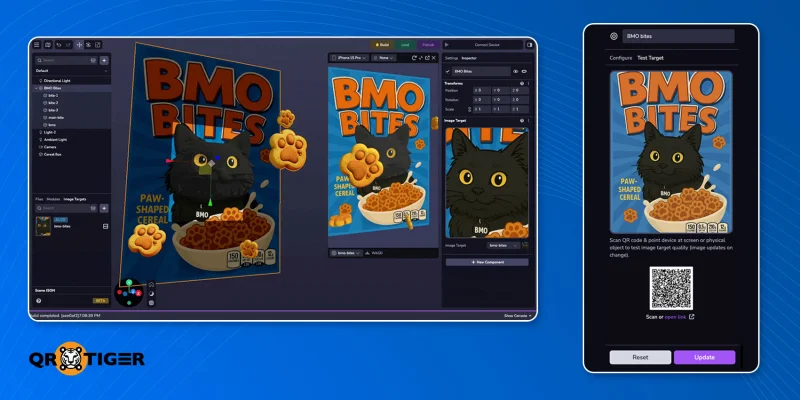
8th Wall är en öppen källkod, webb AR-generator som förenklar skapandet och distributionen av AR-upplevelser. Den stöder även integrationer med tredjeparts spårningsverktyg för djupare analys.
För att vara ärlig har plattformen en inlärningskurva eftersom det finns dussintals verktyg tillgängliga för att skapa AR-projekt. Det är praktiskt när du väl har lärt dig det.
Efter att ha avslutat projektet behöver du bara välja publicera, och plattformen kommer automatiskt skapa en länk och generera en statisk QR-kod som användare kan skanna för att se AR-upplevelsen.
Funktioner
- Tillhandahåller dokumentation för att skapa en förstärkt verklighet QR-kod gratis.
- Inkluderar en kraftfull XR-motor som kan användas nativt eller via webben, vilket gör det möjligt för användare att skapa och redigera 3D-verkliga objekt till digitala AR-upplevelser.
- Stödjer molnredigering, vilket gör det möjligt för flera användare att samarbeta och redigera AR-projekt i realtid.
- Hög kompatibilitet och erbjuder integration med 3D-ramverk som A-frame, three.js, Babylon.js och Play Canvas.
Top Rekommendation För
8th Wall är bra för företag och kreatörer som vill skala upp sina marknadsföringskampanjer för varumärkes- eller kommersiella ändamål.
Prissättning: Denna plattform är helt gratis att använda utan att behöva registrera sig. Du kan installera appen gratis på Mac och Windows skrivbord. Dokumentation för XR Engine, verktyg för arbetsflöden och färdiga mallar finns också gratis tillgängliga på GitHub.
3. AR-kod
AR Code är en plattform som fokuserar enbart på AR-verktyg, erbjuder universell kompatibilitet och en centraliserad instrumentpanel som gör att team enkelt kan hantera AR-projekt och övervaka prestanda.
Efter att ha laddat upp eller skapat AR-innehåll genererar AR-koden en förstärkt dynamisk QR-kod som användare kan anpassa med färger, logotyper och mer.
Förutom det erbjuder plattformen analyser och prestanda-spårningsfunktioner som låter dig se AR-visningsdata, inklusive tid spenderad på att titta på AR-videon.
Funktioner
- Universell kompatibilitet över olika enheter, vilket gör att den kan fungera sömlöst på webben, Android, iOS och andra bärbara AR-enheter.
- Inkluderar AR Data API, som använder en fjärr-AR-molnserver för att låta användare visa textdata på distans i förstärkt verklighet genom att lägga det ovanpå en AR QR-kod i den verkliga världen.
- Stöder AR GenAI, vilket låter användare förvandla foton direkt till interaktiva 3D AR-modeller med hjälp av generativ AI.
Top Rekommendation För
AR-koden är utmärkt för storskaliga marknadsföringskampanjer med förstärkt verklighet, särskilt inom detaljhandel och e-handel.
Prissättning
- Provplan gratis att använda för personliga projekt, med en begränsning på 10 AR-koder och 1 000 AR-skanningar per månad. Det inkluderar möjligheten att ladda ner eller skriva ut 3D-modeller och skapa 3D-texter.
- Standard kostar $89 per månad och inkluderar 1 000 AI-skanningar, anpassade sidor, retargeting-spårning och 100 000 AR-visningar varje månad. Inkluderar också 3D-skanningar, 3D-media, 3D-modeller, 100 AR GenAI-skapelser och API-åtkomst.
- Pro Kostar $990 och inkluderar alla funktioner i standardplanen, plus 10 000 AR-koder och 1 000 000 skanningar varje månad. Pro-planen erbjuder också åtkomst för 10 teammedlemmar, vilket gör det enklare för SMB:er och företag att använda plattformen.
Artivive
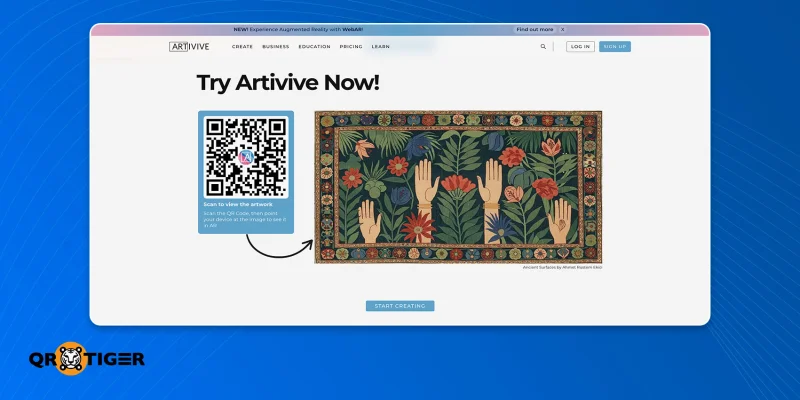
Artivive är en AR-plattform riktad mot kreatörer, med många av dess samarbeten som kommer från museumgallerier och konstutställningar.
Plattformen låter dig ladda upp dina AR-tillgångar, som statiska bilder, videor eller animationer, för att överlagras. Efter redigering kan användare gå till inställningarna och välja "Publicera som WebAR", vilket genererar en QR-kod automatiskt.
Artivive betonar användarvänlighet tillsammans med skalbarhet, och erbjuder dynamisk QR-kodsgenerering, kompatibilitet med appar över olika plattformar och lagring i molnet.
Funktioner
- 3D/Pro-redigeraren gör det möjligt för användare att skapa en 3D-miljö som kan flyttas, skalas, skiktas och roteras med hjälp av de många verktygen och funktionerna som finns tillgängliga i redigeraren.
- Realtids-AR-redigering gör det möjligt för användare att omedelbart redigera AR-upplevelser medan de visar dem i AR-läge.
- Inkluderar ett 3D-ljudlager som använder spatialt ljud för att ändra ljudets volym beroende på betraktarens närhet till konstverket.
Top Rekommendation För
Artivive rekommenderas för konstnärer eller kreativa personer som planerar att arrangera utställningar av sin konst, vilket ger en extra dimension av konstnärlighet och engagemang till evenemanget.
Prissättning
Grundläggande ett gratis plan som endast kräver att användare registrerar sig. Erbjuder endast 50 visningar av AR-projektet, med en minnesbegränsning på 1 MB.
Pro kostar $17,90 per månad, inkluderar upp till 1 000 AR-visningar per månad, tillgång till premiumfunktioner, support och ett minnesbegränsning på 3 MB.
Pro plus kostar $49,90 per månad, inkluderar upp till 5 000 AR-visningar varje månad, ett minnesbegränsning på 5 MB, WebAR, evenemangsrabatter, statistik och premiumkampanjer.
5. ARLOOPA
AR LOOPA erbjuder både app- och webbaserad förstärkt verklighet med QR-kodsgenerering via dess intuitiva dra-och-släpp-gränssnitt som inte kräver någon kodningskompetens.
För att generera QR-koden behöver du först skapa en AR-upplevelse med hjälp av ARLOOPA-plattformen. När den är färdigställd kan du sedan publicera AR-projektet, vilket automatiskt skapar en QR-kod som du kan dela.
Liksom den tidigare plattformen stöder den dynamisk generering av QR-koder och grundläggande appanalys, vilket gör det möjligt för användare att spåra prestanda via tittarmetriker.
Funktioner
- Tillåter användare att skapa platsbaserat AR-innehåll kopplat direkt till specifika landmärken och byggnader med hjälp av platsmarkörer.
- Stödjer 2D- och 3D-innehållsskapande för AR-projekt och spelutveckling med hjälp av den anpassade varumärkta augmented reality-appen.
- Er erbjuder molnbaserade förstärkt verklighetstjänster tillsammans med över 3 000 förinstallerade 3D-modeller och filter från deras digitala bibliotek.
Top Rekommendation För
ARLOOPA är en bra match för små företag som försöker sig på AR i marknadsföringskampanjer, tack vare dess användarvänliga gränssnitt och enkel skapandeprocess.
Prissättning
- För alltid fri kostar inga pengar men erbjuder endast obegränsade platsbaserade AR-upplevelser, med obegränsade AR-vyer och chattstöd.
- Personliga kostnader $4,16 varje månad och erbjuder 10 AR-upplevelser med hjälp av någon av AR-lösningarna (ytföljning, platsbaserad, bildspårning, osv.), grundläggande analys, och 5000 månatliga gratis mynt att använda i deras inbyggda butik.
- Skolor och universitet kostar $33,25 per månad och erbjuder användare 50 AR-upplevelser med avancerad analys, ledarroller, en personlig chef samt en träningsession för hela teamet.
- Företagskostnader $66.58 per månad och inkluderar 200 AR-upplevelser, kommersiell användning, API-åtkomst och alla andra funktioner som listas i de lägre nivåerna.
- Vitt märke erbjuder en installationsavgift på $5999 och inkluderar alla funktioner samt en byrå- och företagspaket.
Berättelser AR
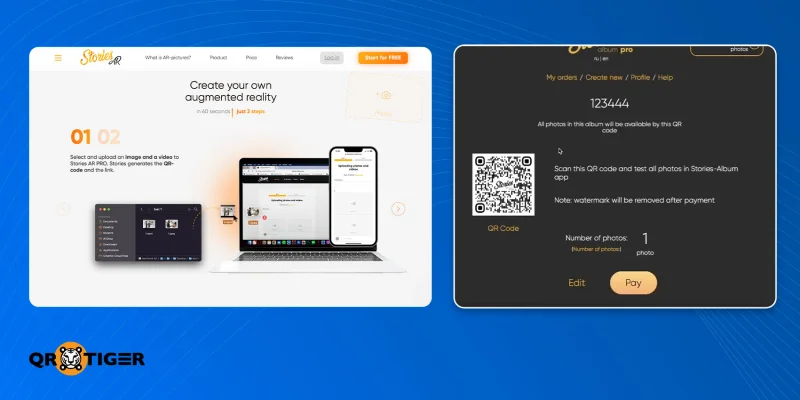
Stories AR är en webb- och mobilbaserad AR-plattform som gör det möjligt för fotografer och företag att skapa förstärkt verklighet-upplevelser med konst och foton.
Efter att ha laddat upp både en bild och en video direkt till denna webbplats kan användare enkelt skapa en icke-anpassningsbar statisk förstärkt verklighet QR-kod som kan skannas för att komma åt AR-upplevelsen.
En av de främsta nackdelarna med denna plattform är dess brist på prestanda-spårningsförmågor, vilket innebär att användare måste förlita sig på tredjepartsappar för att spåra AR-analyser.
Funktioner
- Plattformen erbjuder både mobil- och webbaserad AR-skapande, en onlinevideoredigerare och använder spatial kartläggning för att skanna miljön i realtid.
- Enkel att använda gränssnitt med en snabb 3-stegs guide för att skapa digitala AR-upplevelser.
- Tillåter användare att skapa unika AR-upplevelser med hjälp av foton, affischer, böcker och kort.
Top Rekommendation För
Stories AR är bäst lämpad för innehållsskapare, fotografer och företag som vill lägga till kreativa AR-upplevelser till foton, album, skyltar och mer.
Prissättning
- Pro kostar $29 per månad och inkluderar fullständig åtkomst till Stories AR Pro uppspelnings- och maskeringsfunktioner, obegränsade QR-kodsscanningar, obegränsade visningar, obegränsad projektlagring och inga vattenstämplar.
- Pro+ kostar $39 per månad och inkluderar alla Pro-funktioner, samt åtkomst till plattformens videoredigerare, omedelbar kodgenerering, prioriterade serveruppladdningar, offentliga länkar och analys (Kommer snart).
7. QR TIGER
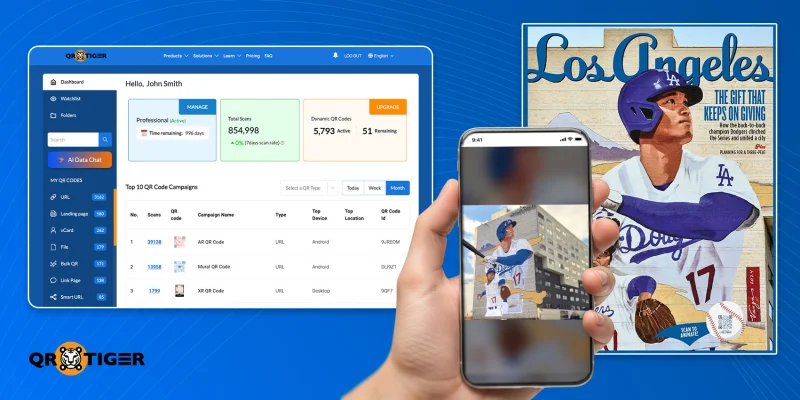
QR TIGER är en avancerad QR-kodgenerator som är det främsta valet bland AR/XR-studior för att skapa en förstärkt verklighet QR-kod.
Det låter dig konvertera AR-upplevelselänken till en statisk eller dynamisk QR-kod som du kan anpassa för att göra den mer iögonfallande och lockande att skanna.
Trots bristen på AR-skaparverktyg erbjuder plattformen djup analys, spårning och säker dataskydd. Dessutom tillhandahåller plattformen även massgenerering för att underlätta hela processen.
Funktioner
- Integrationer med Zapier, Google Analytics och Google Tags möjliggör snabb och enkel retargeting för att återansluta med publiken som skannade AR QR-koden.
- Avancerad analys, schemalagda e-postmeddelanden och platsbaserad spårning gör det möjligt för användare att samla in mer information för att förbättra och öka engagemanget med sina AR-upplevelser.
- En stor anpassningspool gör det möjligt för användare att skapa mycket anpassningsbara varumärkta QR-koder som kan uppmuntra fler personer att skanna.
- Plattformen är ISO 27001-certifierad och GDPR- och CCPA-kompatibel, vilket säkerställer att all marknadsföringsdata är säker och skyddad.
Topprekommendation för
QR TIGER är en ledande augmented reality QR-kodsskapare för varumärken och kreatörer som letar efter pålitlig, mångsidig och skalbar QR-kodsgenerering för AR-marknadsföringskampanjer.
Lära sig: Hur AR-företagets QR-koder låser upp 100 000+ AR-interaktioner med QR TIGER
Prissättning
- The gratis plan kräver att användare registrerar sig och erbjuder tillgång till 3 dynamiska QR-koder, obegränsade statiska QR-koder, obegränsad fil lagring, grundläggande support, analys och en gräns på 500 skanningar per QR-kod.
- Vanligt plan kostar $7 per månad och erbjuder 12 dynamiska QR-koder, avancerad analys, obegränsade skanningar och nedladdningar, inga annonser, 24/7 kundsupport, högupplösta bilder och 500 API-förfrågningar.
- The Avancerad plan kostar $16 per månad och inkluderar alla funktioner i det tidigare planen, plus Bulk QR-kodgenerering, retargeting, skanningsnotiser och integrationer med Google Analytics, Zapier och HubSpot.
- The Premium plan kostar $37 per månad och inkluderar alla funktioner i avancerad plan, plus en vit etikett-domän, exakt geolokalisering, geofencing och smarta multi-URL QR-koder.
 Tabell med jämförelse av tillverkare av förstärkt verklighet QR-koder
Denna tabell sammanfattar styrkorna och svagheterna hos varje plattform när det gäller att skapa AR QR-kodupplevelser:
| AR QR-kodplattformar | Dynamisk QR | Analys | QR-kod design | Användarvänlighet | Skalbarhet | Bäst för |
| MyWebAR | ❌ | ✔✔ | ❌ | ✔✔ | ✔ | Online butiker |
| 8th Wall | ❌ | ✔ | ❌ | ✔ | ✔✔ | Utvecklare |
| AR-kod | ✔ | ✔✔ | ✔ | ✔ | ✔✔ | Stora varumärken och företag |
| Artivive | ✔ | ✔ | ❌ | ✔✔ | ✔ | Evenemang & utställningar |
| ARLOOPA | ✔ | ✔ | ❌ | ✔✔ | ✔ | Nyborjare |
| Berättelser AR | ❌ | ❌ | ❌ | ✔✔ | ✔ | Fotografi & småskaliga företag |
| QR TIGER | ✔ | ✔✔ | ✔✔ | ✔✔ | ✔✔ | Bäst allmänt |
Indikatorer: ✔✔ = starkare eller mer avancerad | ✔ = stöds | ❌ = stöds inte
Viktiga lärdomar
Baserat på vår bedömning, här är en snabb sammanfattning av vad varje plattform är bäst lämpad för:
- QR TIGER Bästa alternativet för att generera QR-koder i reklam med förstärkt verklighet kampanjer, eftersom det erbjuder en mångsidig plattform som enkelt kan skalas från små företag till stora företag.
- ARCode Perfekt för stora företag som förlitar sig mycket på AR-annonsering för minnesvärda produktupplevelser.
- 8th Wall Perfekt för utvecklare som letar efter kraftfulla AR-skaparverktyg som kan generera 3D-text och objekt, samt QR-koder.
- ARLOOPA Perfekt för företag som precis har börjat använda AR-annonsering och letar efter ett enkelt sätt att skapa AR/VR-innehåll och övervaka QR-kodprestanda i samma app.
- Artvive Bäst lämpad för evenemang och utställningar, där användare enkelt kan skanna AR QR-koder för att se 3D-konst bredvid de ursprungliga verken i utställningen.
- MyWebAR Det bästa alternativet för online- och fysiska butiker som vill använda AR QR-koder för att presentera produkter för konsumenter på ett mer interaktivt sätt.
- Berättelser AR Bäst används av frilansfotografer, innehållsskapare och lokala företag som syftar till att lägga till en kreativ förstärkt verklighetsupplevelse i sin marknadsföring och sitt innehåll.
Ge liv åt AR med QR-koder
Förstärkt verklighet kan skapa spännande och engagerande marknadsföringsstrategier, men inte enbart på egen hand. Om du vill att dina AR-kampanjer verkligen ska nå fram till människor, börja med en QR-kod som väcker uppmärksamhet.
Att välja rätt AR QR-kodgenerator är lika viktigt som själva AR-verktyget. Med rätt plattform kan du skapa en QR-kod som uppmuntrar människor att skanna och en AR-upplevelse som är värd att stanna för.
Se till att välja den bästa QR-kodgeneratorn och starta den bästa AR-kampanjen som någonsin skådats. 
Vanliga frågor
Hur man skapar en förstärkt verklighet QR-kod?
För att skapa en QR-kod för aktivering av förstärkt verklighet:
- Öppna en QR-kodgenerator som QR TIGER.
- Välj URL.
- Kopiera och klistra in länken till ditt AR-projekt.
- Generera QR-koden.
- Anpassa det.
- Testa för att se om det fungerar.
- Ladda ner QR-koden och distribuera.
Kräver en AR QR-kod en app?
Inte alltid. Det finns WebAR-plattformar som tillåter användare att uppleva det direkt i sina smartphone-webbläsare.
Är AR QR-koder gratis?
Prissättningen för förstärkt verklighet QR-koder beror på plattformen som används för att skapa och publicera dem. De flesta AR-plattformar tillåter dig att skapa statiska QR-koder utan kostnad, men eftersom de är statiska kan de inte redigeras eller spåras.
Hur kan du kontrollera om din telefon stöder AR?
För iOS stöder alla nyare iPhone-modeller (iPhone 6S och senare) fullt ut AR. Android-telefoner måste dock kontrollera Google Play Store efter en app som heter ARCore. Om enheten kan ladda ner den kan den stödja AR. 
Denna artikel är endast för allmän information och utgör inte juridisk, ekonomisk eller annan professionell rådgivning. För frågor om QR TIGER's produkter eller tjänster, vänligen kontakta vårt supportteam på [email protected].
Vanliga frågor (FAQ)
How to make an augmented reality QR code?
Does an AR QR code require an app?
How can you check whether your phone supports AR?
Var den här artikeln till hjälp?
Maximera skanningar med den bästa QR-kodsgeneratorn
Anslut dig till tusentals globala varumärken som använder QR TIGER för att hantera dynamisk ruttning, bulkskapande och djupgående attributionsanalys.
Kom igång gratis
