如何使用HTML生成QR码:简易指南

如何使用HTML生成QR码:简易指南

能否使用HTML(超文本标记语言)生成QR码?

简短的回答是可以,但单独使用HTML无法创建QR码。您需要JavaScript或其他QR码软件来生成QR码本身。

在这篇文章中,您将学习如何使用HTML和JavaScript创建QR码,以及何时更有商业意义使用高级QR码生成器来实现编辑、跟踪和可扩展性等功能。

目录

    1. 什么是QR码HTML生成器?
    2. 如何使用HTML和JavaScript生成QR码
    3. HTML-based QR code generation的局限性
    4. 为什么需要一个高级的HTML二维码生成器?
    5. 登陆页面二维码:无代码解决方案
    6. 如何创建一个HTML二维码(无需编码)
    7. 为什么 QR TIGER 是最好的带有 HTML 代码的 QR 码生成器
    8. 总结
    9. 常见问题

什么是QR码HTML生成器?

一个 HTML 二维码生成器 是一种基于网络的解决方案,使用HTML和JavaScript或API在网页上创建和显示QR码。

对于快速、简便的QR码生成,像QR TIGER这样的在线平台让您无需HTML编码即可制作一个。

如何使用HTML和JavaScript生成QR码

你可以使用HTML结合一个小的JavaScript库来创建QR码。

记得, 超文本标记语言 是用来构建您的网页的,而JavaScript负责处理QR码生成。

现在,让我们看看如何使用这些工具创建一个HTML二维码。

创建一个HTML文件
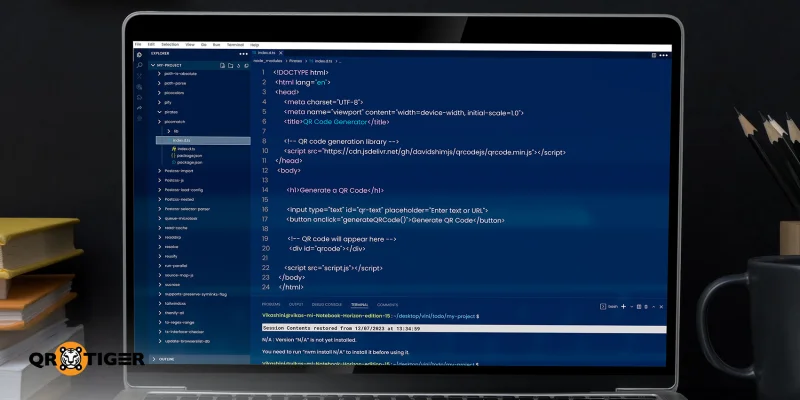
Create HTML file

首先,您需要一个HTML来创建QR码。首先创建一个名为index.html的文件。这个文件将保存QR码生成器的结构。

接下来,在您的文件中,添加一个文本输入框,用户可以输入URL或文本,一个按钮用于生成QR码,以及一个空白空间,QR码将显示在那里。在这里,您还可以链接到一个实际生成QR码的库。

最终,您的HTML文件将看起来像这样:

QR Code Generator

生成一个QR码

第2步:添加JavaScript

Add the JavaScript

创建一个名为script.js的第二个文件。这个文件用于读取用户输入并生成QR码。

当第二个文件被创建时,脚本会获取输入的文本,清除任何现有的QR码,并创建一个新的。

这是您的脚本文件将会看起来的样子:

生成二维码() {

const text = document.getElementById("qr-text").value.trim();

if (!text) {

alert("请输入一些文本或URL");

返回;

}

document.getElementById("qrcode").innerHTML = "";

new QRCode(document.getElementById("qrcode"), {

文本:文本,

宽度: 150,

高度: 150

});

{}

第三步:保存并打开文件

现在你应该把我们之前生成的两个文件都保存在同一个文件夹中。接下来,在任何网络浏览器中打开index.html文件。

现在,请输入一个URL或文本,然后点击生成按钮。

这就是如何使用HTML生成QR码。

HTML-based QR code generation的局限性

Disadvantages of HTML-based code

鉴于使用HTML和JavaScript生成QR码的复杂性,值得花点时间了解这种方法的不足之处。这将帮助您快速而自信地决定哪种方法最适合您的需求。

HTML本身无法生成QR码。

一个单独的HTML文件无法生成QR码,因为它只是一种标记语言。您需要将HTML与JavaScript库或第三方API(应用程序编程接口)结合起来,才能将HTML文件转换为QR码。

JavaScript的知识是必不可少的。

在JavaScript中,即使是脚本中的细微错误也可能破坏整个流程。这使得对JavaScript有良好的工作知识绝对是必要的。

有限的定制选项

使用HTML和JavaScript生成的QR码提供非常有限的定制选项。因此,您无法轻松地调整设计以匹配您的品牌身份。

无分析或跟踪

当您使用HTML生成QR码时,无法访问分析或跟踪功能。对于大规模品牌活动,这些见解对于保持完全控制和有效衡量绩效至关重要。

HTML只能创建静态二维码

与提供动态QR码的专用QR码生成器不同,HTML只能创建静态QR码。因此,如果您需要稍后进行更改,您将不得不从头开始重新生成QR码。

安全限制

基于HTML的QR码不提供加密、访问控制、密码保护或符合ISO认证等功能。因此,无法保证您嵌入的数据受到保护。

维护困难

如果您对编码或编程不太熟悉,管理基于HTML的QR码可能会非常困难,因为每次更新都需要更改代码、重新部署和测试。

为什么需要一个高级的HTML二维码生成器?

使用专门的QR码软件,您可以创建QR码,无需编码或技术专长。

它与自动化平台兼容,并提供了一个 QR码API文档 开发人员可以在软件应用程序中直接生成QR码。

有些网站会直接提供HTML代码,这样你就可以轻松地将你创建的二维码嵌入到你的网站或任何网页上,而不必费心编码。

一个专业的QR码生成器还提供全面的定制选项,使得设计符合品牌形象的QR码变得简单。

此外,它支持动态二维码,使您能够在部署后更新其内容并实时监控其性能。

这些功能对于长期活动和持续的促销活动尤为重要,灵活性和控制性至关重要。

登陆页面二维码:无代码解决方案

Landing page QR code

一个 登陆页面二维码 是一种灵活实用的方式,通过一次扫描分享移动优化内容。这是在高级QR码软件如QR TIGER中提供的解决方案。

这个QR码打开一个着陆页,该着陆页直接在QR码平台中托管和管理。

您可以设计页面,添加您想要的文本、图片、视频、链接、按钮和其他交互元素,而无需编写一行代码。如果您想自己编写一些代码,还有“代码视图”选项。

这使得它成为营销人员、商业专业人士和活动经理的理想解决方案,他们希望将他们的QR码与品牌形象和沟通目标保持一致。

如何创建一个HTML二维码(无需编码)

创建一个无代码QR码用于落地页,按照以下简单步骤进行:

访问一个 动态二维码生成器 在线。

从解决方案仪表板中选择H5二维码选项。

使用现有的网页设计元素添加和设计您的H5页面。

4. 可选:对于直接编码或编程,请切换到代码视图 。

一旦您的页面准备就绪,请单击生成以将HTML转换为QR码。

定制并下载QR码,支持高质量图像格式如PNG、SVG或EPS。

查看HTML代码,请点击 嵌入二维码 和复制。

提醒: 在您的营销活动或网页中使用QR码之前,请始终测试以确保它在各种设备上能够顺利运行。

为什么 QR TIGER 是最好的带有 HTML 代码的 QR 码生成器

有几个先进的生成器可以让您创建QR码。但是当涉及到带有内置HTML代码的生成器时,我们强烈推荐QR TIGER。

这是企业和开发人员作为网站QR码生成器的首选,原因如下:

  • 真正的平台创作: 允许您在平台内完全创建自定义QR码着陆页,无需依赖独立的网站、CMS或托管提供商。
  • 打印后仍可编辑: 其动态二维码用于落地页,让您随时更新落地页的内容,即使二维码已经打印或分发。
  • 不需要技术专长: 一个基于视觉和部分的编辑器让非技术用户能够轻松创建和管理落地页的二维码。
  • 简单的API集成: API 文档 通过自动化整个过程,使在其他软件应用程序中生成QR码更快、更顺畅、更具可扩展性。
  • 随时随地的HTML代码: QR TIGER会自动生成HTML代码,让您可以直接将QR码嵌入到您的网站上,无需手动编码。
  • 更大的品牌控制: 它提供对落地页和二维码设计的完全控制,包括颜色、布局和与您品牌身份一致的CTA标签。
  • 安全可靠的托管: QR TIGER 优先考虑 数据安全 通过遵守ISO 27001、GDPR、CCPA和SSO标准,使其成为受信任的平台,适用于具有大规模、长期活动的公司。

总结

你已经知道如何使用HTML和JavaScript生成QR码,以及在功能和可扩展性方面存在哪些不足。

我们建议使用高级QR码生成器与HTML代码,以使创建和管理您的码变得简单和无压力。

您可以完全控制您的QR码,无论是更新内容、定制设计以匹配您的品牌、随时间跟踪性能,还是将它们嵌入网站。 Free ebooks for QR codes

常见问题

我需要什么软件来编写HTML?

对于HTML,你只需要一个简单的文本编辑器,比如记事本或TextEdit,或者更功能丰富的编辑器如VS Code。一旦文件以.html扩展名保存,你就可以在任何网页浏览器中打开它,比如Chrome、Firefox或Safari,查看它的外观。

HTML的七个基本标签是什么?

一些最基本和常用的标签包括,, </p><p>, </p><h1>, <p> 和 <a> . </a></p></h1><h3 id="toc_definition_of_terms"><a><b>术语定义 </b></a></h3><p><a><b>HTML </b>- 代表超文本标记语言。它是告诉网络浏览器显示什么内容以及如何组织内容的标准语言,例如文本、图像、链接、按钮和表单。 </a></p><p><a><b>JavaScript </b>允许网页响应用户操作、实时更新内容并在不重新加载页面的情况下执行逻辑的编程语言。 </a></p><p><a><b>API </b>API 是应用程序编程接口的缩写。它是一组规则和工具,使一个应用程序能够使用另一个应用程序的功能或数据,而无需了解其构建方式。 </a><a class="blog-company-banner" href="https://www.qrcode-tiger.com" target="_blank"><img src="https://qrtiger-banners.s3.amazonaws.com/blog-banner-company-logo.jpg" style="width: 100%;" alt="Brands using QR codes" width height title></a></p></div></section></article></div></div></div><div class="footer"><div class="container"><div class="social-section"><div class="subscribe"><section>保持跟进</section><span class="footer-text footer-subscribe__desc">注册我们的新闻通讯,第一时间了解促销活动,更新和贴士。</span><div class="input-group footer-subscribe__input"><input class="form-control" type="email" placeholder="您的email地址" name="email"/><div class="input-group-append"><span class="input-group-text pointer"><i class="qr-icons qr-send" aria-hidden="true"></i></span></div></div></div><div class="social-community"><span class="footer-text mb-2">加入社区</span><div class="social-icons"><a target="_blank" rel="noopener noreferrer" class="icon linkedin-icon" aria-label="关注我们: LinkedIn" href="https://www.linkedin.com/company/qrtiger/"><i class="qr-icons qr-linkedin" aria-hidden="true"></i></a><a target="_blank" rel="noopener noreferrer" class="icon" aria-label="关注我们: YouTube" href="https://www.youtube.com/c/QRTiger"><i class="qr-icons qr-youtube" aria-hidden="true"></i></a><a target="_blank" rel="noopener noreferrer" class="icon" aria-label="关注我们: Instagram" href="https://www.instagram.com/qrtiger"><i class="qr-icons qr-instagram" aria-hidden="true"></i></a><a target="_blank" rel="noopener noreferrer" class="icon" aria-label="关注我们: Facebook" href="https://www.facebook.com/QRTIGERS/"><i class="qr-icons qr-facebook" aria-hidden="true"></i></a><a target="_blank" rel="noopener noreferrer" class="icon" aria-label="关注我们: X" href="https://x.com/qrtigers"><i class="qr-icons qr-x-logo" aria-hidden="true"></i></a></div></div><div class="social-community download-app"><h4 class="footer-text">下载QR TIGER应用程序</h4><span class="footer-text mb-2">随时创建和扫描二维码</span><div class="download-buttons"><a href="https://apps.apple.com/us/app/qr-tiger-qr-code-generator/id1509675463"><img src="https://qrtiger-fe.nyc3.cdn.digitaloceanspaces.com/static/img/MainFooter/appStore.webp" alt="Download on the App Store" width="139" height="46" loading="lazy" decoding="async"/></a><a href="https://play.google.com/store/apps/details?id=com.qrtiger&pli=1"><img src="https://qrtiger-fe.nyc3.cdn.digitaloceanspaces.com/static/img/MainFooter/googlePlay.webp" alt="Get it on Google Play" width="155" height="46" loading="lazy" decoding="async"/></a></div></div></div><div class="resources-wrapper mt-5 mb-5"><div class="resources-header">资源</div><div class="row"><div class="col-md-6 col-lg-3 mb-1 mt-1"><div class="resource-item"><a class="text-white text-center" href="https://www.qrcode-tiger.com/zh-cn/how-do-dynamic-qr-codes-work">动态二维码是如何工作的?</a></div></div><div class="col-md-6 col-lg-3 mb-1 mt-1"><div class="resource-item"><a class="text-white text-center" href="https://www.qrcode-tiger.com/zh-cn/how-does-a-multi-url-qr-code-works-and-can-benefit-your-business-smart-qr-code">多URL二维码</a></div></div><div class="col-md-6 col-lg-3 mb-1 mt-1"><div class="resource-item"><a class="text-white text-center" href="https://www.qrcode-tiger.com/zh-cn/digital-business-card-qr-code">数字名片二维码</a></div></div><div class="col-md-6 col-lg-3 mb-1 mt-1"><div class="resource-item"><a class="text-white text-center" href="https://www.qrcode-tiger.com/zh-cn/bulk-qr-code-generator">批量 QR 码生成器</a></div></div><div class="col-md-6 col-lg-3 mb-1 mt-1"><div class="resource-item"><a class="text-white text-center" href="https://www.qrcode-tiger.com/zh-cn/how-to-make-a-qr-code-of-an-image">如何为图像制作二维码</a></div></div><div class="col-md-6 col-lg-3 mb-1 mt-1"><div class="resource-item"><a class="text-white text-center" href="https://www.qrcode-tiger.com/zh-cn/how-to-create-a-video-qr-code-">如何为视频创建二维码</a></div></div><div class="col-md-6 col-lg-3 mb-1 mt-1"><div class="resource-item"><a class="text-white text-center" href="https://www.qrcode-tiger.com/zh-cn/how-to-make-a-qr-code-for-a-google-form">如何为Google Form创建一个QR码</a></div></div><div class="col-md-6 col-lg-3 mb-1 mt-1"><div class="resource-item"><a class="text-white text-center" href="https://www.qrcode-tiger.com/zh-cn/qr-code-with-logo">如何创建带有Logo的QR码</a></div></div><div class="col-md-6 col-lg-3 mb-1 mt-1"><div class="resource-item"><a class="text-white text-center" href="https://www.qrcode-tiger.com/zh-cn/track-qr-code-with-google-analytics">如何使用 Google Analytics 跟踪 QR 码</a></div></div><div class="col-md-6 col-lg-3 mb-1 mt-1"><div class="resource-item"><a class="text-white text-center" href="https://www.qrcode-tiger.com/zh-cn/how-to-make-your-qr-code-in-restaurant">如何制作餐厅菜单的二维码</a></div></div><div class="col-md-6 col-lg-3 mb-1 mt-1"><div class="resource-item"><a class="text-white text-center" href="https://www.qrcode-tiger.com/zh-cn/file-qr-code-converter">File 二维码转换器</a></div></div></div></div><div class="main-menu"><div class="section text-lg-left text-left"><div><label class="text-white">指南</label><ul><li class="faq"><a class="text-white" target="_blank" href="https://www.qrcode-tiger.com/zh-cn/faq">常见问题解答</a></li><li class="contactUs"><a class="text-white" target="_blank" href="https://www.qrcode-tiger.com/zh-cn/contact">联系我们</a></li><li class="helpCenter"><a class="text-white" target="_self" href="https://www.qrcode-tiger.com/zh-cn/blog/help-center">帮助中心</a></li></ul></div></div><div class="section text-lg-left text-right text-lg-left"><div><label class="text-white">支持</label><ul><li class="mailTo"><a class="text-white" target="_self" href="mailto:it@qrtiger.com">it@qrtiger.com</a></li></ul></div></div><div class="section text-lg-left text-left"><div><label class="text-white">公司</label><ul><li class="aboutUs"><a class="text-white" target="_blank" href="https://www.qrcode-tiger.com/zh-cn/about">关于我们</a></li><li class="status"><a class="text-white" target="_blank" href="https://qrtiger.statuspage.io/">状态</a></li><li class="enterpriseSolutions"><a class="text-white" target="_blank" href="https://enterprise.qrcode-tiger.com/">企业解决方案</a></li><li class="pricing"><a class="text-white" target="_self" href="https://www.qrcode-tiger.com/zh-cn/payment">定价</a></li></ul></div></div><div class="section text-lg-left text-right text-lg-left"><div><label class="text-white">条款</label><ul><li class="termsAgreements"><a class="text-white" target="_blank" href="https://www.qrcode-tiger.com/zh-cn/terms-and-conditions">条款和条件</a></li><li class="termsOfAcceptableUse"><a class="text-white" target="_blank" href="https://www.qrcode-tiger.com/zh-cn/term-acceptable-use">可接受使用条款</a></li><li class="privacyPolicy"><a class="text-white" target="_blank" href="https://www.qrcode-tiger.com/zh-cn/privacy-policy">隐私政策</a></li><li class="cookiesPolicy"><a class="text-white" target="_blank" href="https://www.qrcode-tiger.com/zh-cn/cookies-policy">Cookie政策</a></li></ul></div></div></div><div class="vtline"></div><div class="d-flex justify-content-center m-3"><a class="main-logo" href="/zh-cn"><img src="https://qrtiger-fe.nyc3.cdn.digitaloceanspaces.com/static/img/MainHeader/qrtiger_logo_s.svg" alt="qr code generator" width="200" height="59" loading="lazy" decoding="async"/></a></div><div class="text-center copy-right">这个QR码生成器是QR TIGER有限公司的注册商标。<br/>'QR Code' 是电装波公司的注册商标。 © 2026 www.qrcode-tiger.com</div></div></div></div></div></div></div><script src="/_next/static/chunks/webpack-202c94aaca01b051.js" crossorigin="" async=""></script><script>(self.__next_f=self.__next_f||[]).push([0]);self.__next_f.push([2,null])</script><script>self.__next_f.push([1,"1:I[12846,[],\"\"]\n4:I[4707,[],\"\"]\n7:I[36423,[],\"\"]\n8:I[59152,[\"1781\",\"static/chunks/app/%5Blocale%5D/(site)/layout-af53f9846188dc01.js\"],\"default\"]\nc:I[61060,[],\"\"]\n5:[\"locale\",\"zh-cn\",\"d\"]\n6:[\"slug\",\"how-to-generate-a-qr-code-using-html\",\"d\"]\nd:[]\n"])</script><script>self.__next_f.push([1,"0:[\"$\",\"$L1\",null,{\"buildId\":\"CjkTPLjUzbxJWYCIWvQEe\",\"assetPrefix\":\"\",\"urlParts\":[\"\",\"zh-cn\",\"how-to-generate-a-qr-code-using-html\"],\"initialTree\":[\"\",{\"children\":[[\"locale\",\"zh-cn\",\"d\"],{\"children\":[\"(cms)\",{\"children\":[[\"slug\",\"how-to-generate-a-qr-code-using-html\",\"d\"],{\"children\":[\"__PAGE__\",{}]}]}]}]},\"$undefined\",\"$undefined\",true],\"initialSeedData\":[\"\",{\"children\":[[\"locale\",\"zh-cn\",\"d\"],{\"children\":[\"(cms)\",{\"children\":[[\"slug\",\"how-to-generate-a-qr-code-using-html\",\"d\"],{\"children\":[\"__PAGE__\",{},[[\"$L2\",\"$L3\",null],null],null]},[null,[\"$\",\"$L4\",null,{\"parallelRouterKey\":\"children\",\"segmentPath\":[\"children\",\"$5\",\"children\",\"(cms)\",\"children\",\"$6\",\"children\"],\"error\":\"$undefined\",\"errorStyles\":\"$undefined\",\"errorScripts\":\"$undefined\",\"template\":[\"$\",\"$L7\",null,{}],\"templateStyles\":\"$undefined\",\"templateScripts\":\"$undefined\",\"notFound\":\"$undefined\",\"notFoundStyles\":\"$undefined\"}]],null]},[[null,[[[\"$\",\"link\",null,{\"rel\":\"preload\",\"href\":\"/static/assets/styles/bundles/site.bundle.css?v=1791616648564\",\"as\":\"style\"}],[\"$\",\"link\",null,{\"rel\":\"stylesheet\",\"href\":\"/static/assets/styles/bundles/site.bundle.css?v=1791616648564\",\"precedence\":\"default\"}],[\"$\",\"$L8\",null,{\"href\":\"/static/assets/styles/bundles/site.bundle.css?v=1791616648564\"}]],[[\"$\",\"link\",null,{\"rel\":\"preload\",\"href\":\"/static/assets/styles/bundles/blog.bundle.css?v=1791616648564\",\"as\":\"style\"}],[\"$\",\"link\",null,{\"rel\":\"stylesheet\",\"href\":\"/static/assets/styles/bundles/blog.bundle.css?v=1791616648564\",\"precedence\":\"default\"}],[\"$\",\"$L8\",null,{\"href\":\"/static/assets/styles/bundles/blog.bundle.css?v=1791616648564\"}]],[\"$\",\"$L4\",null,{\"parallelRouterKey\":\"children\",\"segmentPath\":[\"children\",\"$5\",\"children\",\"(cms)\",\"children\"],\"error\":\"$undefined\",\"errorStyles\":\"$undefined\",\"errorScripts\":\"$undefined\",\"template\":[\"$\",\"$L7\",null,{}],\"templateStyles\":\"$undefined\",\"templateScripts\":\"$undefined\",\"notFound\":\"$undefined\",\"notFoundStyles\":\"$undefined\"}]]],null],null]},[[null,\"$L9\"],null],null]},[[null,\"$La\"],null],null],\"couldBeIntercepted\":false,\"initialHead\":[null,\"$Lb\"],\"globalErrorComponent\":\"$c\",\"missingSlots\":\"$Wd\"}]\n"])</script><script>self.__next_f.push([1,"f:I[6034,[\"2653\",\"static/chunks/2653-863733b582c9aea0.js\",\"7603\",\"static/chunks/7603-b77ddaf6fd377863.js\",\"261\",\"static/chunks/261-f0452d31d444623d.js\",\"8322\",\"static/chunks/8322-b82229900867ab74.js\",\"800\",\"static/chunks/800-a5bd401db0fb1d89.js\",\"2420\",\"static/chunks/2420-ab7c377bb68e38bc.js\",\"8696\",\"static/chunks/8696-77e50e024bac6f99.js\",\"9776\",\"static/chunks/9776-6ca4077b9664de64.js\",\"9708\",\"static/chunks/9708-1ee31b349ca7cee7.js\",\"6851\",\"static/chunks/6851-efeff18a05a0a715.js\",\"6773\",\"static/chunks/6773-1509e69c8ea411a9.js\",\"1762\",\"static/chunks/1762-74f4ae4ed046cf82.js\",\"1629\",\"static/chunks/1629-f0dc9ef8be75d0de.js\",\"4613\",\"static/chunks/4613-1e6fca45713bfb3b.js\",\"39\",\"static/chunks/39-41d0d7ed12660cff.js\",\"7322\",\"static/chunks/7322-1ae2511e36302f00.js\",\"3500\",\"static/chunks/app/%5Blocale%5D/(site)/page-08b7063f03903966.js\"],\"default\"]\n10:I[34238,[\"2653\",\"static/chunks/2653-863733b582c9aea0.js\",\"7603\",\"static/chunks/7603-b77ddaf6fd377863.js\",\"2420\",\"static/chunks/2420-ab7c377bb68e38bc.js\",\"8003\",\"static/chunks/8003-f160b9a4f1f5a751.js\",\"4600\",\"static/chunks/4600-8843794cf620750b.js\",\"1762\",\"static/chunks/1762-74f4ae4ed046cf82.js\",\"3185\",\"static/chunks/app/layout-d240534d2b341f2e.js\"],\"default\"]\n11:I[74196,[\"2653\",\"static/chunks/2653-863733b582c9aea0.js\",\"7603\",\"static/chunks/7603-b77ddaf6fd377863.js\",\"2420\",\"static/chunks/2420-ab7c377bb68e38bc.js\",\"8003\",\"static/chunks/8003-f160b9a4f1f5a751.js\",\"4600\",\"static/chunks/4600-8843794cf620750b.js\",\"1762\",\"static/chunks/1762-74f4ae4ed046cf82.js\",\"3185\",\"static/chunks/app/layout-d240534d2b341f2e.js\"],\"default\"]\n12:I[88003,[\"2653\",\"static/chunks/2653-863733b582c9aea0.js\",\"7603\",\"static/chunks/7603-b77ddaf6fd377863.js\",\"2420\",\"static/chunks/2420-ab7c377bb68e38bc.js\",\"8003\",\"static/chunks/8003-f160b9a4f1f5a751.js\",\"4600\",\"static/chunks/4600-8843794cf620750b.js\",\"1762\",\"static/chunks/1762-74f4ae4ed046cf82.js\",\"3185\",\"static/chunks/app/layout-d240534d2b341f2e.js\"],\"\"]\n13:I[37187,[\"2653\",\"static/chunks/2653-863733b582c9aea0.js\",\"7603\",\"static/chunks/7603-b77ddaf6fd377863"])</script><script>self.__next_f.push([1,".js\",\"261\",\"static/chunks/261-f0452d31d444623d.js\",\"8322\",\"static/chunks/8322-b82229900867ab74.js\",\"800\",\"static/chunks/800-a5bd401db0fb1d89.js\",\"2420\",\"static/chunks/2420-ab7c377bb68e38bc.js\",\"8696\",\"static/chunks/8696-77e50e024bac6f99.js\",\"9776\",\"static/chunks/9776-6ca4077b9664de64.js\",\"9708\",\"static/chunks/9708-1ee31b349ca7cee7.js\",\"6851\",\"static/chunks/6851-efeff18a05a0a715.js\",\"6773\",\"static/chunks/6773-1509e69c8ea411a9.js\",\"1762\",\"static/chunks/1762-74f4ae4ed046cf82.js\",\"1629\",\"static/chunks/1629-f0dc9ef8be75d0de.js\",\"4613\",\"static/chunks/4613-1e6fca45713bfb3b.js\",\"39\",\"static/chunks/39-41d0d7ed12660cff.js\",\"7322\",\"static/chunks/7322-1ae2511e36302f00.js\",\"3500\",\"static/chunks/app/%5Blocale%5D/(site)/page-08b7063f03903966.js\"],\"default\"]\n14:I[84704,[\"2653\",\"static/chunks/2653-863733b582c9aea0.js\",\"7603\",\"static/chunks/7603-b77ddaf6fd377863.js\",\"261\",\"static/chunks/261-f0452d31d444623d.js\",\"8322\",\"static/chunks/8322-b82229900867ab74.js\",\"800\",\"static/chunks/800-a5bd401db0fb1d89.js\",\"2420\",\"static/chunks/2420-ab7c377bb68e38bc.js\",\"8696\",\"static/chunks/8696-77e50e024bac6f99.js\",\"3103\",\"static/chunks/3103-cafe1a8981b2d230.js\",\"1762\",\"static/chunks/1762-74f4ae4ed046cf82.js\",\"1629\",\"static/chunks/1629-f0dc9ef8be75d0de.js\",\"3698\",\"static/chunks/3698-c34bd7ca87568c90.js\",\"7968\",\"static/chunks/app/%5Blocale%5D/(cms)/%5Bslug%5D/page-311877dcc72311e0.js\"],\"default\"]\n15:I[84393,[\"2653\",\"static/chunks/2653-863733b582c9aea0.js\",\"261\",\"static/chunks/261-f0452d31d444623d.js\",\"8322\",\"static/chunks/8322-b82229900867ab74.js\",\"1449\",\"static/chunks/1449-0ad14b25061f0233.js\",\"1203\",\"static/chunks/app/%5Blocale%5D/layout-fdcf5a9c3efff51d.js\"],\"default\"]\n16:\"$Sreact.suspense\"\n17:I[26766,[\"2653\",\"static/chunks/2653-863733b582c9aea0.js\",\"261\",\"static/chunks/261-f0452d31d444623d.js\",\"8322\",\"static/chunks/8322-b82229900867ab74.js\",\"1449\",\"static/chunks/1449-0ad14b25061f0233.js\",\"1203\",\"static/chunks/app/%5Blocale%5D/layout-fdcf5a9c3efff51d.js\"],\"default\"]\n18:I[96743,[\"2653\",\"static/chunks/2653-863733b582c9aea0.js\",\"261\",\"static/chunks/"])</script><script>self.__next_f.push([1,"261-f0452d31d444623d.js\",\"8322\",\"static/chunks/8322-b82229900867ab74.js\",\"1449\",\"static/chunks/1449-0ad14b25061f0233.js\",\"1203\",\"static/chunks/app/%5Blocale%5D/layout-fdcf5a9c3efff51d.js\"],\"default\"]\ne:T3eb4,"])</script><script>self.__next_f.push([1,"@font-face {\n font-family: 'Poppins';\n font-style: normal;\n font-weight: 600;\n font-display: swap;\n src: url(/static/assets/fonts/Poppins/Poppins-SemiBold.woff2) format('woff2');\n unicode-range: U+0000-00FF, U+0131, U+0152-0153, U+02BB-02BC, U+02C6, U+02DA, U+02DC, U+2000-206F, U+2074, U+20AC, U+2122, U+2191, U+2193, U+2212, U+2215, U+FEFF, U+FFFD;\n}\n\n@font-face {\n font-family: 'Poppins';\n font-style: normal;\n font-weight: 500;\n font-display: swap;\n src: url(/static/assets/fonts/Poppins/Poppins-Medium.woff2) format('woff2');\n unicode-range: U+0000-00FF, U+0131, U+0152-0153, U+02BB-02BC, U+02C6, U+02DA, U+02DC, U+2000-206F, U+2074, U+20AC,\n U+2122, U+2191, U+2193, U+2212, U+2215, U+FEFF, U+FFFD;\n}\n\n@font-face {\n font-family: 'Poppins';\n font-style: normal;\n font-weight: 400;\n font-display: swap;\n src: url(/static/assets/fonts/Poppins/Poppins-Regular.woff2) format('woff2');\n unicode-range: U+0000-00FF, U+0131, U+0152-0153, U+02BB-02BC, U+02C6, U+02DA, U+02DC, U+2000-206F, U+2074, U+20AC, U+2122, U+2191, U+2193, U+2212, U+2215, U+FEFF, U+FFFD;\n}\n\n@font-face {\n font-family: 'Poppins';\n font-style: normal;\n font-weight: 700;\n font-display: swap;\n src: url(/static/assets/fonts/Poppins/Poppins-Bold.woff2) format('woff2');\n unicode-range: U+0000-00FF, U+0131, U+0152-0153, U+02BB-02BC, U+02C6, U+02DA, U+02DC, U+2000-206F, U+2074, U+20AC, U+2122, U+2191, U+2193, U+2212, U+2215, U+FEFF, U+FFFD;\n}\n\n@font-face {\n font-family: 'Lato';\n font-style: normal;\n font-weight: 400;\n font-display: swap;\n src: url(https://fonts.gstatic.com/s/lato/v23/S6uyw4BMUTPHjx4wXg.woff2) format('woff2');\n unicode-range: U+0000-00FF, U+0131, U+0152-0153, U+02BB-02BC, U+02C6, U+02DA, U+02DC, U+2000-206F, U+2074, U+20AC, U+2122, U+2191, U+2193, U+2212, U+2215, U+FEFF, U+FFFD;\n}\n\n@font-face {\n font-family: 'QrTiger';\n src: url('/static/assets/fonts/QrTiger/fonts/QrTiger.eot?3rhkpx');\n src: url('/static/assets/fonts/QrTiger/fonts/QrTiger.eot?3rhkpx#iefix') format('embedded-opentype'),\n url('/static/assets/fonts/QrTiger/fonts/QrTiger.ttf?3rhkpx') format('truetype'),\n url('/static/assets/fonts/QrTiger/fonts/QrTiger.woff?3rhkpx') format('woff'),\n url('/static/assets/fonts/QrTiger/fonts/QrTiger.svg?3rhkpx#QrTiger') format('svg');\n font-weight: normal;\n font-style: normal;\n font-display: swap;\n ascent-override: 90%;\n descent-override: 10%;\n line-gap-override: 0%;\n}\n\n[class^=\"qr-\"], [class*=\" qr-\"] {\n /* use !important to prevent issues with browser extensions that change fonts */\n font-family: 'QrTiger' !important;\n speak: never;\n font-style: normal;\n font-weight: normal;\n font-variant: normal;\n text-transform: none;\n line-height: 1;\n\n /* Better Font Rendering =========== */\n -webkit-font-smoothing: antialiased;\n -moz-osx-font-smoothing: grayscale;\n}\n\n.qr-warning:before {\n content: \"\\e900\";\n}\n.qr-stoplight_logo:before {\n content: \"\\e901\";\n}\n.qr-email:before {\n content: \"\\e902\";\n}\n.qr-instagram:before {\n content: \"\\e903\";\n}\n.qr-pdf:before {\n content: \"\\e904\";\n}\n.qr-html:before {\n content: \"\\e905\";\n}\n.qr-facebook-thin:before {\n content: \"\\e906\";\n}\n.qr-email1:before {\n content: \"\\e907\";\n}\n.qr-app-store:before {\n content: \"\\e908\";\n}\n.qr-facebook-like:before {\n content: \"\\e909\";\n}\n.qr-pinterest:before {\n content: \"\\e90a\";\n}\n.qr-mp3:before {\n content: \"\\e90b\";\n}\n.qr-vcard:before {\n content: \"\\e90c\";\n}\n.qr-url:before {\n content: \"\\e90d\";\n}\n.qr-text:before {\n content: \"\\e90e\";\n}\n.qr-event:before {\n content: \"\\e90f\";\n}\n.qr-youtube:before {\n content: \"\\e910\";\n}\n.qr-star-inside-circle:before {\n content: \"\\e911\";\n}\n.qr-open-menu:before {\n content: \"\\e912\";\n}\n.qr-twitter:before {\n content: \"\\e913\";\n}\n.qr-caret-up:before {\n content: \"\\e914\";\n}\n.qr-caret-down:before {\n content: \"\\e915\";\n}\n.qr-sns:before {\n content: \"\\e916\";\n}\n.qr-wechat:before {\n content: \"\\e917\";\n}\n.qr-multi:before {\n content: \"\\e918\";\n}\n.qr-search:before {\n content: \"\\e919\";\n}\n.qr-alipay:before {\n content: \"\\e91a\";\n}\n.qr-social-media:before {\n content: \"\\e91b\";\n}\n.qr-forms:before {\n content: \"\\e91c\";\n}\n.qr-check-circle:before {\n content: \"\\e91d\";\n}\n.qr-more:before {\n content: \"\\e91e\";\n}\n.qr-line:before {\n content: \"\\e91f\";\n}\n.qr-tiktok:before {\n content: \"\\e920\";\n}\n.qr-close:before {\n content: \"\\e921\";\n}\n.qr-question-circle:before {\n content: \"\\e922\";\n}\n.qr-angle-down:before {\n content: \"\\e923\";\n}\n.qr-angle-up:before {\n content: \"\\e924\";\n}\n.qr-plus:before {\n content: \"\\e925\";\n}\n.qr-user:before {\n content: \"\\e926\";\n}\n.qr-qrcode:before {\n content: \"\\e927\";\n}\n.qr-double-arrow-left:before {\n content: \"\\e928\";\n}\n.qr-double-arrow-right:before {\n content: \"\\e929\";\n}\n.qr-question:before {\n content: \"\\e92a\";\n}\n.qr-paint-brush:before {\n content: \"\\e92b\";\n}\n.qr-trash:before {\n content: \"\\e92c\";\n}\n.qr-linkedin:before {\n content: \"\\e92d\";\n}\n.qr-wechat-main:before {\n content: \"\\e92e\";\n}\n.qr-whatsapp:before {\n content: \"\\e92f\";\n}\n.qr-tumblr:before {\n content: \"\\e930\";\n}\n.qr-messenger:before {\n content: \"\\e931\";\n}\n.qr-reddit:before {\n content: \"\\e932\";\n}\n.qr-qq:before {\n content: \"\\e933\";\n}\n.qr-medium:before {\n content: \"\\e934\";\n}\n.qr-yelp:before {\n content: \"\\e935\";\n}\n.qr-quora:before {\n content: \"\\e936\";\n}\n.qr-meetup:before {\n content: \"\\e937\";\n}\n.qr-snapchat:before {\n content: \"\\e938\";\n}\n.qr-check:before {\n content: \"\\e939\";\n}\n.qr-exchange:before {\n content: \"\\e93a\";\n}\n.qr-facebook:before {\n content: \"\\e93b\";\n}\n.qr-play:before {\n content: \"\\e93c\";\n}\n.qr-kakao-talk:before {\n content: \"\\e93d\";\n}\n.qr-viber:before {\n content: \"\\e93e\";\n}\n.qr-high-signal:before {\n content: \"\\e93f\";\n}\n.qr-telegram:before {\n content: \"\\e940\";\n}\n.qr-twitch:before {\n content: \"\\e941\";\n}\n.qr-phone-call:before {\n content: \"\\e942\";\n}\n.qr-global:before {\n content: \"\\e943\";\n}\n.qr-postmates:before {\n content: \"\\e944\";\n}\n.qr-foodpanda:before {\n content: \"\\e945\";\n}\n.qr-ebay:before {\n content: \"\\e946\";\n}\n.qr-rakuten:before {\n content: \"\\e947\";\n}\n.qr-menulog:before {\n content: \"\\e948\";\n}\n.qr-podcast:before {\n content: \"\\e949\";\n}\n.qr-zomato:before {\n content: \"\\e94a\";\n}\n.qr-shopify:before {\n content: \"\\e94b\";\n}\n.qr-ubereats:before {\n content: \"\\e94c\";\n}\n.qr-etsy:before {\n content: \"\\e94d\";\n}\n.qr-bilibili:before {\n content: \"\\e94e\";\n}\n.qr-streamlabs:before {\n content: \"\\e94f\";\n}\n.qr-soundcloud:before {\n content: \"\\e950\";\n}\n.qr-patreon:before {\n content: \"\\e951\";\n}\n.qr-grubhub:before {\n content: \"\\e952\";\n}\n.qr-doordash:before {\n content: \"\\e953\";\n}\n.qr-kuaishou:before {\n content: \"\\e954\";\n}\n.qr-douban:before {\n content: \"\\e955\";\n}\n.qr-account:before {\n content: \"\\e956\";\n}\n.qr-settings:before {\n content: \"\\e957\";\n}\n.qr-refresh:before {\n content: \"\\e958\";\n}\n.qr-swiggy:before {\n content: \"\\e959\";\n}\n.qr-justeat:before {\n content: \"\\e95a\";\n}\n.qr-deliveroo:before {\n content: \"\\e95b\";\n}\n.qr-glovo:before {\n content: \"\\e95c\";\n}\n.qr-time:before {\n content: \"\\e95d\";\n}\n.qr-notification:before {\n content: \"\\e95e\";\n}\n.qr-lock:before {\n content: \"\\e95f\";\n}\n.qr-zhihu:before {\n content: \"\\e960\";\n}\n.qr-xiao-hongsu:before {\n content: \"\\e961\";\n}\n.qr-weibo:before {\n content: \"\\e962\";\n}\n.qr-wechat-mini:before {\n content: \"\\e963\";\n}\n.qr-soul:before {\n content: \"\\e964\";\n}\n.qr-himalaya:before {\n content: \"\\e965\";\n}\n.qr-meituan:before {\n content: \"\\e966\";\n}\n.qr-eleme:before {\n content: \"\\e967\";\n}\n.qr-pingduoduo:before {\n content: \"\\e968\";\n}\n.qr-jingdong:before {\n content: \"\\e969\";\n}\n.qr-taobao:before {\n content: \"\\e96a\";\n}\n.qr-xuexi:before {\n content: \"\\e96b\";\n}\n.qr-qq-music:before {\n content: \"\\e96c\";\n}\n.qr-k-song:before {\n content: \"\\e96d\";\n}\n.qr-hibixin:before {\n content: \"\\e96e\";\n}\n.qr-dianping:before {\n content: \"\\e96f\";\n}\n.qr-wechat-channel:before {\n content: \"\\e970\";\n}\n.qr-amazon:before {\n content: \"\\e971\";\n}\n.qr-applemusic:before {\n content: \"\\e972\";\n}\n.qr-yogiyo:before {\n content: \"\\e973\";\n}\n.qr-send:before {\n content: \"\\e974\";\n}\n.qr-open-box:before {\n content: \"\\e975\";\n}\n.qr-left-arrow:before {\n content: \"\\e976\";\n}\n.qr-xianyu:before {\n content: \"\\e977\";\n}\n.qr-tick-inside-circle:before {\n content: \"\\e978\";\n}\n.qr-reward:before {\n content: \"\\e979\";\n}\n.qr-template:before {\n content: \"\\e97a\";\n}\n.qr-location:before {\n content: \"\\e97b\";\n}\n.qr-fax:before {\n content: \"\\e97c\";\n}\n.qr-brief-case:before {\n content: \"\\e97d\";\n}\n.qr-phone:before {\n content: \"\\e97e\";\n}\n.qr-form:before {\n content: \"\\e97f\";\n}\n.qr-add-user:before {\n content: \"\\e980\";\n}\n.qr-documentation:before {\n content: \"\\e981\";\n}\n.qr-kesong:before {\n content: \"\\e982\";\n}\n.qr-cloud-computing:before {\n content: \"\\e983\";\n}\n.qr-rise:before {\n content: \"\\e984\";\n}\n.qr-box:before {\n content: \"\\e985\";\n}\n.qr-bolt:before {\n content: \"\\e986\";\n}\n.qr-shield:before {\n content: \"\\e987\";\n}\n.qr-circle-check-thin:before {\n content: \"\\e988\";\n}\n.qr-share:before {\n content: \"\\e989\";\n}\n.qr-link:before {\n content: \"\\e98a\";\n}\n.qr-hot-coffee:before {\n content: \"\\e98b\";\n}\n.qr-speech-bubble:before {\n content: \"\\e98c\";\n}\n.qr-shopping-bag:before {\n content: \"\\e98d\";\n}\n.qr-music:before {\n content: \"\\e98e\";\n}\n.qr-wifi:before {\n content: \"\\e98f\";\n}\n.qr-paper:before {\n content: \"\\e990\";\n}\n.qr-user-profile:before {\n content: \"\\e991\";\n}\n.qr-facebook-circle:before {\n content: \"\\e992\";\n}\n.qr-frame:before {\n content: \"\\e993\";\n}\n.qr-layout:before {\n content: \"\\e994\";\n}\n.qr-sliders:before {\n content: \"\\e995\";\n}\n.qr-image:before {\n content: \"\\e996\";\n}\n.qr-two-arrows-pointing-right-and-left:before {\n content: \"\\e997\";\n}\n.qr-lock-no-key-hold:before {\n content: \"\\e998\";\n}\n.qr-arrow-down-in-circle:before {\n content: \"\\e999\";\n}\n.qr-scan:before {\n content: \"\\e99a\";\n}\n.qr-star:before {\n content: \"\\e99b\";\n}\n.qr-embed-other:before {\n content: \"\\e99c\";\n}\n.qr-embed-video:before {\n content: \"\\e99d\";\n}\n.qr-meta-tags:before {\n content: \"\\e99e\";\n}\n.qr-store-hours:before {\n content: \"\\e99f\";\n}\n.qr-eyes:before {\n content: \"\\e9a0\";\n}\n.qr-pattern:before {\n content: \"\\e9a1\";\n}\n.qr-template-frame:before {\n content: \"\\e9a2\";\n}\n.qr-angle-right:before {\n content: \"\\e9a3\";\n}\n.qr-angle-left:before {\n content: \"\\e9a4\";\n}\n.qr-uber:before {\n content: \"\\e9a5\";\n}\n.qr-exclamation-circle:before {\n content: \"\\e9a6\";\n}\n.qr-circle-check-regular:before {\n content: \"\\e9a7\";\n}\n.qr-plus-circle:before {\n content: \"\\e9a8\";\n}\n.qr-colors:before {\n content: \"\\e9a9\";\n}\n.qr-logo:before {\n content: \"\\e9aa\";\n}\n.qr-close-circle:before {\n content: \"\\e9ab\";\n}\n.qr-trashcan:before {\n content: \"\\e9ac\";\n}\n.qr-arrow:before {\n content: \"\\e9ad\";\n}\n.qr-location-solid:before {\n content: \"\\e9ae\";\n}\n.qr-lock-circle:before {\n content: \"\\e9af\";\n}\n.qr-show-more:before {\n content: \"\\e9b0\";\n}\n.qr-register:before {\n content: \"\\e9b1\";\n}\n.qr-login:before {\n content: \"\\e9b2\";\n}\n.qr-user-add:before {\n content: \"\\e9b3\";\n}\n.qr-dashboard:before {\n content: \"\\e9b4\";\n}\n.qr-logout:before {\n content: \"\\e9b5\";\n}\n.qr-sms:before {\n content: \"\\e9b6\";\n}\n.qr-event2:before {\n content: \"\\e9b7\";\n}\n.qr-padlock:before {\n content: \"\\e9b8\";\n}\n.qr-profile-stack:before {\n content: \"\\e9b9\";\n}\n.qr-huawei:before {\n content: \"\\e9ba\";\n}\n.qr-apple:before {\n content: \"\\e9bb\";\n}\n.qr-android:before {\n content: \"\\e9bc\";\n}\n.qr-billing:before {\n content: \"\\e9bd\";\n}\n.qr-x-logo:before {\n content: \"\\e9be\";\n}\n.qr-micro:before {\n content: \"\\e9bf\";\n}\n.qr-pieces:before {\n content: \"\\e9c0\";\n}\n.qr-ebook:before {\n content: \"\\e9c1\";\n}\n.qr-edit-comment:before {\n content: \"\\e9c2\";\n}\n.qr-tiger:before {\n content: \"\\e9c3\";\n}\n.qr-group:before {\n content: \"\\e9c4\";\n}\n.qr-clound:before {\n content: \"\\e9c5\";\n}\n.qr-stacks:before {\n content: \"\\e9c6\";\n}\n.qr-frame-code:before {\n content: \"\\e9c7\";\n}\n.qr-audio:before {\n content: \"\\e9c8\";\n}\n.qr-facebook-solid:before {\n content: \"\\e9c9\";\n}\n.qr-share-link:before {\n content: \"\\e9ca\";\n}\n.qr-building:before {\n content: \"\\e9cb\";\n}\n.qr-gs1-link:before {\n content: \"\\e9cc\";\n}\n.qr-multi-url-v2:before {\n content: \"\\e9cd\";\n}\n.qr-url-v2:before {\n content: \"\\e9ce\";\n}\n.qr-event-v2:before {\n content: \"\\e9cf\";\n}\n.qr-text-v2:before {\n content: \"\\e9d0\";\n}\n.qr-menu-v2:before {\n content: \"\\e9d1\";\n}\n.qr-link-page:before {\n content: \"\\e9d2\";\n}\n.qr-email-v2:before {\n content: \"\\e9d3\";\n}\n.qr-file-v2:before {\n content: \"\\e9d4\";\n}\n.qr-landing-page:before {\n content: \"\\e9d5\";\n}\n.qr-wifi-v2:before {\n content: \"\\e9d6\";\n}\n.qr-sms-v2:before {\n content: \"\\e9d7\";\n}\n.qr-youtube-v2:before {\n content: \"\\e9d8\";\n}\n.qr-mp3-v2:before {\n content: \"\\e9d9\";\n}\n.qr-google-form:before {\n content: \"\\e9da\";\n}\n.qr-appstore-v2:before {\n content: \"\\e9db\";\n}\n.qr-location-v2:before {\n content: \"\\e9dc\";\n}\n.qr-vcard-v2:before {\n content: \"\\e9dd\";\n}\n.qr-pinterest-v2:before {\n content: \"\\e9de\";\n}\n.qr-tiktok-v2:before {\n content: \"\\e9df\";\n}\n.qr-instagram-v2:before {\n content: \"\\e9e0\";\n}\n.qr-facebook-v2:before {\n content: \"\\e9e1\";\n}\n.qr-x-logo-v2:before {\n content: \"\\e9e2\";\n}\n.qr-sms1:before {\n content: \"\\e9e3\";\n}\n.qr-gs1:before {\n content: \"\\e9e4\";\n}\n.qr-url1:before {\n content: \"\\e9e5\";\n}\n.qr-text-v3:before {\n content: \"\\e9e6\";\n}\n.qr-app-store-v3:before {\n content: \"\\e9e7\";\n}\n.qr-email-v3:before {\n content: \"\\e9e8\";\n}\n.qr-event-v3:before {\n content: \"\\e9e9\";\n}\n.qr-facebook-v3:before {\n content: \"\\e9ea\";\n}\n.qr-file:before {\n content: \"\\e9eb\";\n}\n.qr-google-form-v3:before {\n content: \"\\e9ec\";\n}\n.qr-instagram-v3:before {\n content: \"\\e9ed\";\n}\n.qr-landing-page-v3:before {\n content: \"\\e9ee\";\n}\n.qr-link-page-v3:before {\n content: \"\\e9ef\";\n}\n.qr-location-v3:before {\n content: \"\\e9f0\";\n}\n.qr-hot-coffee-v3:before {\n content: \"\\e9f1\";\n}\n.qr-music-v3:before {\n content: \"\\e9f2\";\n}\n.qr-murl:before {\n content: \"\\e9f3\";\n}\n.qr-pinterest-v3:before {\n content: \"\\e9f4\";\n}\n.qr-code:before {\n content: \"\\e9f5\";\n}\n.qr-tiger-v3:before {\n content: \"\\e9f6\";\n}\n.qr-sepa:before {\n content: \"\\e9f7\";\n}\n.qr-tiktok1:before {\n content: \"\\e9f8\";\n}\n.qr-vcard-v3:before {\n content: \"\\e9f9\";\n}\n.qr-wifi-v3:before {\n content: \"\\e9fa\";\n}\n.qr-x:before {\n content: \"\\e9fb\";\n}\n.qr-youtube-v3:before {\n content: \"\\e9fc\";\n}\n.qr-setting-v2:before {\n content: \"\\e9fd\";\n}\n.qr-video:before {\n content: \"\\e9fe\";\n}\n.qr-scan-check:before {\n content: \"\\e9ff\";\n}\n.qr-scan-chart:before {\n content: \"\\ea00\";\n}\n.qr-scan-settings:before {\n content: \"\\ea01\";\n}\n.qr-spotify:before {\n content: \"\\ea02\";\n}\n.qr-rounded-plus:before {\n content: \"\\ea03\";\n}\n.qr-rounded-minus:before {\n content: \"\\ea04\";\n}\n.qr-versus:before {\n content: \"\\ea05\";\n}\n.qr-neutral:before {\n content: \"\\ea06\";\n}\n.qr-dislike:before {\n content: \"\\ea07\";\n}\n.qr-like:before {\n content: \"\\ea08\";\n}\n.qr-color-picker:before {\n content: \"\\ea09\";\n}\n.qr-bulb:before {\n content: \"\\ea0a\";\n}\n.qr-eye:before {\n content: \"\\ea0b\";\n}\n.qr-print:before {\n content: \"\\ea0c\";\n}\n.qr-gift:before {\n content: \"\\ea0d\";\n}\n.qr-scissors:before {\n content: \"\\ea0e\";\n}\n.qr-diamond:before {\n content: \"\\ea0f\";\n}\n.qr-secure-shield:before {\n content: \"\\ea10\";\n}\n.qr-insecure-shield:before {\n content: \"\\ea11\";\n}\n.qr-email-notify:before {\n content: \"\\ea12\";\n}\n.qr-speed-meter:before {\n content: \"\\ea13\";\n}\n.qr-check-shield:before {\n content: \"\\ea14\";\n}\n.qr-slash-user:before {\n content: \"\\ea15\";\n}\n.qr-increase:before {\n content: \"\\ea16\";\n}\n.qr-ar:before {\n content: \"\\ea17\";\n}\n.qr-building-v2:before {\n content: \"\\ea18\";\n}\n.qr-business-report:before {\n content: \"\\ea19\";\n}\n.qr-bar-chart:before {\n content: \"\\ea1a\";\n}\n.qr-offer:before {\n content: \"\\ea1b\";\n}\n.qr-plug:before {\n content: \"\\ea1c\";\n}\n.qr-store:before {\n content: \"\\ea1d\";\n}\n.qr-grabfood:before {\n content: \"\\ea1e\";\n}\n.qr-card:before {\n content: \"\\ea1f\";\n}\n.qr-canvas-pencil:before {\n content: \"\\ea20\";\n}\n.qr-microscope:before {\n content: \"\\ea21\";\n}\n.qr-measuring-tape:before {\n content: \"\\ea22\";\n}\n.qr-touch:before {\n content: \"\\ea23\";\n}\n.qr-arrow-choose:before {\n content: \"\\ea24\";\n}\n.qr-shapes:before {\n content: \"\\ea25\";\n}\n.qr-outlined-star:before {\n content: \"\\ea26\";\n}\n.qr-checklist:before {\n content: \"\\ea27\";\n}\n.qr-circle:before {\n content: \"\\ea28\";\n}\n.qr-google-review:before {\n content: \"\\ea29\";\n}\n.qr-pip:before {\n content: \"\\ea2a\";\n}\n.qr-mcp:before {\n content: \"\\ea2b\";\n}"])</script><script>self.__next_f.push([1,"a:[\"$\",\"html\",null,{\"lang\":\"zh-cn\",\"children\":[[\"$\",\"head\",null,{\"children\":[[\"$\",\"link\",null,{\"rel\":\"manifest\",\"href\":\"/static/favicon/manifest.json\"}],[\"$\",\"link\",null,{\"rel\":\"shortcut icon\",\"href\":\"/static/favicon/favicon.ico\"}],[\"$\",\"meta\",null,{\"name\":\"mobile-web-app-capable\",\"content\":\"yes\"}],[\"$\",\"meta\",null,{\"httpEquiv\":\"X-UA-Compatible\",\"content\":\"IE=edge\"}],[\"$\",\"meta\",null,{\"name\":\"apple-itunes-app\",\"content\":\"app-id=id1509675463\"}],[\"$\",\"meta\",null,{\"name\":\"google-play-app\",\"content\":\"app-id=com.qrtiger\"}],[\"$\",\"link\",null,{\"rel\":\"apple-touch-icon\",\"href\":\"/static/favicon/icon.png\"}],[\"$\",\"link\",null,{\"rel\":\"android-touch-icon\",\"href\":\"/static/favicon/icon.png\"}],[\"$\",\"link\",null,{\"rel\":\"preconnect\",\"href\":\"https://qrtiger-fe.nyc3.cdn.digitaloceanspaces.com\",\"crossOrigin\":\"\"}],[\"$\",\"link\",null,{\"rel\":\"preconnect\",\"href\":\"https://fonts.gstatic.com\",\"crossOrigin\":\"anonymous\"}],[[\"$\",\"link\",\"preload-/static/assets/fonts/Poppins/Poppins-Regular.woff2\",{\"rel\":\"preload\",\"href\":\"/static/assets/fonts/Poppins/Poppins-Regular.woff2\",\"as\":\"font\",\"type\":\"font/woff2\",\"crossOrigin\":\"anonymous\"}],[\"$\",\"link\",\"preload-/static/assets/fonts/Poppins/Poppins-Bold.woff2\",{\"rel\":\"preload\",\"href\":\"/static/assets/fonts/Poppins/Poppins-Bold.woff2\",\"as\":\"font\",\"type\":\"font/woff2\",\"crossOrigin\":\"anonymous\"}]],[\"$\",\"style\",null,{\"id\":\"critical-fonts-inline\",\"dangerouslySetInnerHTML\":{\"__html\":\"$e\"}}],[\"$\",\"link\",null,{\"rel\":\"stylesheet\",\"href\":\"/static/assets/fonts/fontface.css\",\"media\":\"print\",\"id\":\"extended-fontface-css\",\"suppressHydrationWarning\":true}],[\"$\",\"script\",null,{\"dangerouslySetInnerHTML\":{\"__html\":\"\\n (function () {\\n function activateDeferredStylesheet(id) {\\n var link = document.getElementById(id);\\n if (!link) return;\\n link.onload = function () { this.media = \\\"all\\\"; };\\n if (link.sheet) link.media = \\\"all\\\";\\n }\\n activateDeferredStylesheet(\\\"extended-fontface-css\\\");\\n })();\\n \"}}],[\"$\",\"noscript\",null,{\"children\":[\"$\",\"link\",null,{\"rel\":\"stylesheet\",\"href\":\"/static/assets/fonts/fontface.css\"}]}],[[\"$\",\"meta\",null,{\"name\":\"subject\",\"content\":\"Qrtiger\"}],[\"$\",\"meta\",null,{\"name\":\"copyright\",\"content\":\"Qrtiger\"}],[\"$\",\"meta\",null,{\"name\":\"language\",\"content\":\"EN\"}],[\"$\",\"meta\",null,{\"name\":\"author\",\"content\":\"Benjamin Claeys, info@qrtiger.com\"}],[\"$\",\"meta\",null,{\"name\":\"url\",\"content\":\"https://qrcode-tiger.com\"}],false,[\"$\",\"meta\",null,{\"name\":\"facebook-domain-verification\",\"content\":\"tctmbaunwrxf1ru5bbwf8c85wcmpbl\"}]],[\"$\",\"script\",null,{\"dangerouslySetInnerHTML\":{\"__html\":\"\\n window.dataLayer = window.dataLayer || [];\\n \"}}]]}],[\"$\",\"body\",null,{\"children\":[[\"$\",\"$Lf\",null,{}],[\"$\",\"$L10\",null,{\"children\":[\"$\",\"$L11\",null,{\"children\":[\"$\",\"$L4\",null,{\"parallelRouterKey\":\"children\",\"segmentPath\":[\"children\"],\"error\":\"$undefined\",\"errorStyles\":\"$undefined\",\"errorScripts\":\"$undefined\",\"template\":[\"$\",\"$L7\",null,{}],\"templateStyles\":\"$undefined\",\"templateScripts\":\"$undefined\",\"notFound\":[[\"$\",\"title\",null,{\"children\":\"404: This page could not be found.\"}],[\"$\",\"div\",null,{\"style\":{\"fontFamily\":\"system-ui,\\\"Segoe UI\\\",Roboto,Helvetica,Arial,sans-serif,\\\"Apple Color Emoji\\\",\\\"Segoe UI Emoji\\\"\",\"height\":\"100vh\",\"textAlign\":\"center\",\"display\":\"flex\",\"flexDirection\":\"column\",\"alignItems\":\"center\",\"justifyContent\":\"center\"},\"children\":[\"$\",\"div\",null,{\"children\":[[\"$\",\"style\",null,{\"dangerouslySetInnerHTML\":{\"__html\":\"body{color:#000;background:#fff;margin:0}.next-error-h1{border-right:1px solid rgba(0,0,0,.3)}@media (prefers-color-scheme:dark){body{color:#fff;background:#000}.next-error-h1{border-right:1px solid rgba(255,255,255,.3)}}\"}}],[\"$\",\"h1\",null,{\"className\":\"next-error-h1\",\"style\":{\"display\":\"inline-block\",\"margin\":\"0 20px 0 0\",\"padding\":\"0 23px 0 0\",\"fontSize\":24,\"fontWeight\":500,\"verticalAlign\":\"top\",\"lineHeight\":\"49px\"},\"children\":\"404\"}],[\"$\",\"div\",null,{\"style\":{\"display\":\"inline-block\"},\"children\":[\"$\",\"h2\",null,{\"style\":{\"fontSize\":14,\"fontWeight\":400,\"lineHeight\":\"49px\",\"margin\":0},\"children\":\"This page could not be found.\"}]}]]}]}]],\"notFoundStyles\":[]}]}]}],[\"$\",\"$L12\",null,{\"id\":\"ahrefs-analytics\",\"strategy\":\"lazyOnload\",\"src\":\"https://analytics.ahrefs.com/analytics.js\",\"data-key\":\"kV0BskPB0ph96ZxJ/l9ygg\"}],[\"$\",\"$L13\",null,{\"containerId\":\"GTM-M753FHX\"}]]}]]}]\n"])</script><script>self.__next_f.push([1,"9:[\"$\",\"$L14\",null,{\"locale\":\"zh-cn\",\"messages\":{\"common\":{\"app\":{\"containers\":{\"LocaleToggle\":{\"af\":\"af\",\"afName\":\"Afrikaans\",\"ar\":\"ar\",\"arName\":\"العربية\",\"bn\":\"bn\",\"bnName\":\"বাংলা\",\"cn\":\"cn\",\"cnName\":\"简体中文\",\"cs\":\"cs\",\"csName\":\"Czech\",\"da\":\"da\",\"daName\":\"Dansk\",\"de\":\"de\",\"deName\":\"Deutsch\",\"el\":\"el\",\"elName\":\"Ελληνικά\",\"en\":\"en\",\"enName\":\"Eng\",\"es\":\"es\",\"esName\":\"Español\",\"fi\":\"fi\",\"fiName\":\"Suomi\",\"fr\":\"fr\",\"frName\":\"Français\",\"hi\":\"hi\",\"hiName\":\"हिन्दी\",\"hu\":\"hu\",\"huName\":\"Magyar\",\"id\":\"id\",\"idName\":\"Indonesia\",\"it\":\"it\",\"itName\":\"Italiano\",\"ja\":\"ja\",\"jaName\":\"日本語\",\"jv\":\"jv\",\"jvName\":\"Basa Jawa\",\"ko\":\"ko\",\"koName\":\"한국어\",\"ms\":\"ms\",\"msName\":\"Melayu\",\"nb\":\"nb\",\"nbName\":\"Norsk\",\"nl\":\"nl\",\"nlName\":\"Nederlands\",\"pa\":\"pa\",\"paName\":\"ਪੰਜਾਬੀ\",\"pl\":\"pl\",\"plName\":\"Polski\",\"pt\":\"pt\",\"ptName\":\"Português\",\"ro\":\"ro\",\"roName\":\"Română\",\"ru\":\"ru\",\"ruName\":\"Русский\",\"selectLanguage\":\"Select your language\",\"sv\":\"sv\",\"svName\":\"Svenska\",\"ta\":\"ta\",\"taName\":\"தமிழ்\",\"th\":\"th\",\"thName\":\"ไทย\",\"tr\":\"tr\",\"trName\":\"Türkçe\",\"ur\":\"ur\",\"urName\":\"اردو\",\"vi\":\"vi\",\"viName\":\"Tiếng Việt\",\"zh\":\"zh\",\"zhName\":\"简体中文\",\"zh-cn\":\"zh-cn\",\"zh-cnName\":\"简体中文\",\"zh-tw\":\"zh-tw\",\"zh-twName\":\"繁體中文\"},\"global\":{\"400\":\"错误的请求\",\"404\":\"链接未找到\",\"500\":\"出了点问题\",\"bookDemo\":\"预订演示\",\"faq\":\"常见问题\",\"more\":\"更多\",\"less\":\"更少\",\"eventMenu\":\"事件\",\"scanMe\":\"Scan me\",\"success\":\"成功\",\"needPaidToUseFeature\":\"您需要购买付费计划才能使用此功能。\",\"needPremiumToUseFeature\":\"此功能仅适用于高级账户。\",\"noMoreFreeTrial\":\"您已没有可用的免费试用动态二维码。要继续使用,请购买新套餐或续订您的套餐。\",\"getNow\":\"立即获取\",\"removeWatermark\":\"删除水印\",\"requireField\":\"必填字段\",\"min\":\"扫描值必须大于或等于{number}\",\"invalidUrl\":\"无效的URL\",\"invalidGoogleReviewUrl\":\"请提供一个有效的 Google 评论链接\",\"invalidEmail\":\"无效的 email\",\"invalidNumber\":\"无效的数字\",\"invalidFileSize\":\"您的二维码太大了,如果人们扫描,会导致在他们的手机上加载很长时间,请调整您的二维码大小或升级!\",\"invalidImageSize\":\"您的图片太大了!请使用推荐的图片尺寸。\",\"invalidFile\":\"无效的 file\",\"uploadFileSuccess\":\"您的file已成功上传!\",\"showDemo\":\"观看演示\",\"pleaseVerifyEmail\":\"请验证您的email以使用此功能。\",\"qrCode\":\"二维码\",\"editUrl\":\"编辑 URL\",\"trackData\":\"跟踪数据\",\"learnMore\":\"了解更多\",\"vCard\":\"vCard\\n\",\"event\":\"事件\",\"file\":\"File\",\"menu\":\"菜单\",\"video\":\"视频\",\"settings\":\"设置\",\"socialMedia\":\"Link Page\",\"socialMediaProfile\":\"社交媒体\",\"dashboard\":\"仪表板\",\"titleH5Editor\":\"页面标题\",\"descH5Editor\":\"您页面的简短描述\",\"htmlCategory\":\"Landing page\",\"smedia\":\"Link Page\",\"googleFormUrl\":\"Google Form\",\"googleReviewUrl\":\"zh-cn: 谷歌评论\",\"googleReviewUrlDesc\":\"使用可扫描的QR码获取更多的Google评论\",\"multiUrl\":\"Smart URL\",\"wechatMiniApp\":\"微信小程序\",\"wechatTaobao\":\"微信/淘宝\",\"wechatAlipayPayment\":\"微信/支付宝\",\"appStores\":\"App stores\",\"mp3\":\"MP3\",\"instagram\":\"Instagram\",\"pinterest\":\"Pinterest\",\"tiktok\":\"抖音\",\"youtube\":\"YouTube\",\"wifi\":\"Wifi\\n\\nWifi\",\"gs1DigitalLink\":\"GS1 数字化\",\"yourUrl\":\"您的网址\",\"yourUrlDesc\":\"将任何链接或资源存储在线,以便轻松分享。\",\"vCardDesc\":\"通过可扫描的数字名片分享您的联系方式\",\"fileDesc\":\"分享一个带有扫描的 PDF、JPEG、PNG、MP4、Excel 和 Word file。\",\"socialMediaProfileDesc\":\"在社交媒体上扩大您的受众、互动和印象\",\"googleFormUrlDesc\":\"通过将Google表单转换为QR码,可以获得更多的回应。\",\"gs1DigitalLinkDesc\":\"轻松创建用于GTIN、GCN、SSCC、GLN、GDTI、GSRN等的QR码。\",\"menuDesc\":\"将您的数字菜单转换为二维码,以提供无接触选项。\",\"appStoresDesc\":\"在 Google Play、App Store 和 AppGallery 上提升应用下载量\",\"htmlCategoryDesc\":\"无代码页面构建器最适合任何营销活动。\",\"multiUrlDesc\":\"在一个二维码中嵌入多个链接,以适应不同类型的扫描器。\",\"emailDesc\":\"存储您的email地址和预先编辑的email\",\"wifiDesc\":\"使用扫描功能共享网络。存储 Wi-Fi 密码、SSID 和加密方式。\",\"mp3Desc\":\"上传 WAV 或 MP3 格式的音频文件,最大可达 60MB。\",\"videoDesc\":\"转换一个 mp4 或富媒体文件以便轻松分享\",\"eventDesc\":\"输入活动详情 — 标题、地点和持续时间\",\"facebookDesc\":\"分享您的个人资料、页面、群组、帖子、短视频和活动\",\"youtubeDesc\":\"存储您的YouTube频道链接、视频、短视频和其他资产\",\"instagramDesc\":\"通过分享您的个人资料、页面、帖子或轮转,来提升曝光。\",\"pinterestDesc\":\"通过分享您的个人资料和精心制作的图钉来提高可见度。\",\"tiktokDesc\":\"通过分享您的个人资料来扩大您的受众群和互动。\",\"twitterDesc\":\"分享您的X个人资料、页面或推文,以扩大您的社区。\",\"locationDesc\":\"输入纬度和经度以分享准确的位置\",\"textDesc\":\"分享引语、说明、代码、纯文本等\",\"smsDesc\":\"存储您的手机号码并预填文本消息\",\"organizationDescription\":\"QR TIGER 是一款先进的在线二维码生成器,为全球个人和企业提供静态和动态二维码解决方案。\",\"webApplicationName\":\"QR TIGER 二维码生成器\",\"webApplicationDescription\":\"创建带标志的免费二维码,或创建可编辑目标并实时跟踪扫描的动态二维码。批量生成最多 3,000 个二维码,并通过 API、Zapier、HubSpot、Canva 和 Google Analytics 连接。\",\"webApplicationOperatingSystem\":\"任意(基于网页)\",\"webApplicationBrowserRequirements\":\"需要 JavaScript 和现代网页浏览器\",\"webApplicationOfferFree\":\"免费方案\",\"webApplicationFeature1\":\"二维码类型:URL、vCard、文件、链接页、Google 表单、Google 评价、菜单、应用商店、着陆页、智能 URL、GS1 Digital、MP3、视频、WiFi、电子邮件、WhatsApp、活动、位置、文本、短信\",\"webApplicationFeature2\":\"适用于 Facebook、YouTube、Instagram、Pinterest、TikTok、Twitter 的社交媒体二维码\",\"webApplicationFeature3\":\"可编辑目标并实时跟踪扫描的动态二维码\",\"webApplicationFeature4\":\"按时间、地点和设备统计扫描\",\"webApplicationFeature5\":\"使用标志、颜色、图案、码眼和边框自定义二维码\",\"webApplicationFeature6\":\"每批最多批量生成 3,000 个二维码\",\"webApplicationFeature7\":\"Sena AI 营销洞察\",\"webApplicationFeature8\":\"白标链接和自定义域名\",\"webApplicationFeature9\":\"密码保护、到期和扫描通知\",\"webApplicationFeature10\":\"地理定位跟踪和地理围栏\",\"webApplicationFeature11\":\"二维码 API\",\"webApplicationFeature12\":\"集成:Zapier、HubSpot、Canva、Google Analytics 4、Google Tag Manager、monday.com\",\"seoOgTitle\":\"最佳二维码生成器 - QR Tiger - 这款二维码生成器可以创建带有徽标的自定义二维码\",\"seoOgDescription\":\"用于专业使用和营销的最佳QR码生成器,可创建带有标志和跟踪数据的动态QR码,免费定制的带有标志的QR码生成器。\",\"home\":\"家\",\"about\":\"关于\",\"acceptAll\":\"接受全部\",\"acceptAllNote\":\"通过点击“接受所有Cookie”,您同意我们使用所有Cookie,如我们在我们的{link}中解释的那样。\",\"advertisingCookies\":\"启用广告 Cookie\",\"advertisingCookiesDesc\":\"这些帮助展示更相关的广告,并帮助我们衡量广告的效果。\",\"applyChanges\":\"应用更改\",\"bulkQR\":\"批量二维码\",\"cookieCategories\":\"饼干分类\",\"cookieDeclaration\":\"Cookie声明\",\"cookieNote\":\"注意:必要的 cookie 使我们的网站正常运行,无法关闭。\",\"cookiePolicy\":\"Cookie政策\",\"cookieSettings\":\"Cookie设置\",\"essentialCookies\":\"必要的 Cookie(始终激活)\",\"essentialCookiesDesc\":\"这些始终保持开启。它们用于使我们的网站正常运行,比如安全性、登录和基本功能。\",\"functionalCookies\":\"启用功能性 Cookie\",\"functionalCookiesDesc\":\"这些会记住您的设置,比如您的语言、位置或登录信息,以带给您更流畅的体验。\",\"manageYourCookie\":\"在下方管理您的Cookie偏好设置。欲了解更多详情,请查看我们的{link}。\",\"performanceCookies\":\"启用性能 Cookie\",\"performanceCookiesDesc\":\"这些帮助我们了解人们如何使用我们的网站,以便我们可以做得更好。\",\"rejectCookies\":\"拒绝非必要的 Cookie\",\"whichCookies\":\"如果您想查看我们使用的确切Cookie,请访问我们的{link}页面。在那里,您将找到完整的Cookie列表,提供者是谁,它们的作用以及在您设备上停留的时间。\",\"whyCookies\":\"我们建议查看此页面,以了解在我们的网站上使用 cookie 的具体方式和原因。\",\"whyUseCookie\":\"我们使用cookies来改善您的体验,帮助我们了解网站的使用情况,并向您展示对您重要的内容和广告。\",\"twitter\":\"推特\",\"bulkSolution\":\"批量解决\",\"login\":\"登录\",\"longLogin\":\"登录您的QR TIGER账户\",\"loginWithSAML\":\"使用SAML登录\",\"backToLogin\":\"返回登录\",\"back\":\"回去\",\"logout\":\"退出\",\"emailAddress\":\"地址\",\"phoneNumber\":\"电话号码\",\"password\":\"密码\",\"enterCaptcha\":\"输入代码\",\"confirmPassword\":\"确认密码\",\"passwordNotMatch\":\"密码不匹配\",\"rememberMe\":\"记得我\",\"signin\":\"登录\",\"forgotPassword\":\"忘记密码\",\"dontHaveAnAccount\":\"还没有账号?\",\"signUp\":\"注册\",\"register\":\"注册\",\"save\":\"保存\",\"generateQRCode\":\"生成二维码\",\"CreateQRCode\":\"创建二维码\",\"generateDynamicQRCode\":\"生成动态二维码\",\"logoFormat\":\"300 x 300 像素,72dpi\",\"noImage\":\"没有图像\",\"removeLogo\":\"移除标志\",\"removeImage\":\"删除图片\",\"downloadSampleImage\":\"下载示例图片\",\"logoCodeGuide\":\"您可以稍后自定义这些模板以符合您的品牌。\",\"logoCodeGuide2\":\"始终扫描以测试您的二维码是否有效\",\"logoCodeHint\":\"阅读原因,为什么您的二维码不起作用。\",\"noLogo\":\"无标志\",\"uploadImage\":\"上传\",\"downloadSVG\":\"下载 SVG\",\"downloadPNG\":\"下载 PNG\",\"downloadEbook\":\"下载电子书\",\"singleColor\":\"纯色\",\"colorGradient\":\"梯度\",\"backgroundImage\":\"图像\",\"backgroundImageFormat\":\"320 x 640像素,72dpi\",\"backgroundImageFormat1\":\"(320 x 320 像素,72dpi)\",\"customEyeColor\":\"定制眼睛颜色\",\"background\":\"背景\",\"pleaseSelect\":\"请选择\",\"leftRight\":\"左 - 右\",\"topBottom\":\"自上而下\",\"bottomTop\":\"底部 - 顶部\",\"NWSE\":\"西北 - 东南\",\"SWNE\":\"西南 - 东北\",\"radial\":\"径向\",\"eyeColor\":\"眼睛颜色\",\"color\":\"颜色\",\"transparentBackground\":\"透明背景\",\"frameText\":\"框文本 (限制15个字符)\",\"frameTextFont\":\"文本字体设置\",\"name\":\"你的名字\",\"username\":\"用户名称\",\"usernamePlaceholder\":\"用户名\",\"title\":\"标题\",\"organization\":\"组织\",\"here\":\"这里\",\"fullName\":\"你的全名\",\"phone\":\"电话\",\"firstName\":\"名字\",\"lastName\":\"姓氏\",\"email\":\"Email\",\"whatsapp\":\"zh-cn: WhatsApp\",\"website\":\"网站\",\"appstoreHeading\":\"为安卓和iOS设备创建一个单一的QR码\",\"appstoreBody\":\"一个QR码,会自动链接到正确的app store或play store链接。无论扫描器使用的设备操作系统是什么,用户都会跳转到正确的应用程序。\",\"fileHeading\":\"立即分享文件和照片\",\"fileBody\":\"无论您身在何处,只需一个二维码即可分享您的所有数字资产,轻松完成销售!\",\"googleFormHeading\":\"创建一个Google form来获取更多客户信息\",\"googleFormBody\":\"通过Google表单,您可以在移动设备或网络浏览器中创建和分析调查,无需特殊软件。您可以即时查看调查结果,并通过图表和图形轻松总结调查结果。\",\"googleReviewHeading\":\"通过一次扫描获得更多的谷歌评论\",\"googleReviewBody\":\"在一次扫描中直接引导客户前往您的评论页面,无需搜索。将您的二维码与ReviewCook配对,提供语音输入和AI辅助、SEO优化的草稿,使留下反馈变得轻松。\",\"htmlHeading\":\"创建一个包含文本、图片、视频和文件的 HTML5 页面\",\"htmlBody\":\"一个HTML5页面,包含所有文本、图片、文件、MP3、视频,用于推广您的产品和服务,能够在一次扫描中跟踪数据!\",\"menuHeading\":\"为您的客户提供无接触解决方案\",\"menuBody\":\"创建一个用户可以立即查看的PDF或图像数字菜单,无需使用应用程序!\",\"mp3Heading\":\"通过扫描二维码,上传并与听众分享您的音频。\",\"mp3Body\":\"创建一个二维码,与粉丝分享你的MP3歌曲预览。\",\"murlHeading\":\"一个二维码用于多种用途\",\"murlBody\":\"创建一个根据用户位置、时间或语言而改变URL的二维码,就像一个菜单会根据早餐、午餐和晚间鸡尾酒而切换一样。\",\"smediaHeading\":\"一个二维码包含您所有的社交和商务渠道\",\"smediaBody\":\"最大化您的客户群体,增长您在所有社交媒体和业务页面上的关注者,这对于获得更多销售和粉丝非常重要。\",\"vcardHeading\":\"创建您的数字名片\",\"vcardBody\":\"现在用户只需扫描和轻点,即可保存您的业务信息。\",\"videoHeading\":\"在几秒钟内分享视频文件\",\"videoBody\":\"上传一个视频file,并将其转换为二维码以增加观看次数和可见度。\",\"urlHeading\":\"改变 URL,不要改变二维码\",\"urlBody\":\"通过动态二维码,当您的网址发生变化时,无需担心重新印刷。\",\"free\":\"自由\",\"generateBulkQR\":\"生成批量QR码\",\"noCreditRequire\":\"无需信用卡\",\"supportedFormats\":\"支持的格式\",\"regular\":\"常规\",\"advanced\":\"高级\",\"premium\":\"高级\",\"professional\":\"专业的\",\"enterprise\":\"企业\",\"contactUs\":\"联系我们\",\"support\":\"支持\",\"currency\":\"美元\",\"month\":\"月份\",\"year\":\"年\",\"getOneMonth\":\"获取1个月\",\"getOneYear\":\"获取1年\",\"copy\":\"复制\",\"copied\":\"复制\",\"canUploadOneFile\":\"您一次只能上传一个file。\",\"uploadMenuFile\":\"上传您的菜单:\",\"uploadVideoFile\":\"上传您的视频:\",\"usageInstruction\":\"使用说明\",\"uploadYourFile\":\"上传File\",\"uploadYourPaymentCode\":\"上传付款码图片\",\"uploadMenu\":\"上传菜单\",\"uploadVideo\":\"上传视频\",\"trackDynamicQR\":\"学习如何使用{dynamicQR}跟踪数据\",\"finishQrCode\":\"不,继续编辑\",\"switchToCategory\":\"是的,请切换到新的类别\",\"dynamicQRCodes\":\"动态二维码\",\"dynamicQRVcard\":\"电子名片二维码制作教程\",\"dynamicQRFile\":\"File 二维码制作教程\",\"dynamicQRMurl\":\"多链接功能仅支持生成动态二维码。\",\"dynamicQRWechatAlipay\":\"微信支付宝聚合收款码生成教程\",\"dynamicQRAppStore\":\"APP下载二维码制作教程\",\"dynamicQRHtml\":\"H5编辑二维码制作教程\",\"dynamicQRMp3\":\"MP3音频二维码制作教程\",\"dynamicQRSmedia\":\"社交媒体二维码制作教程\",\"dynamicQRUrl\":\"网站二维码制作教程\",\"buildWithMenuTiger\":\"一个直观的数字菜单+销售仪表板,适用于所有类型的餐厅。\",\"buildWithGiftlips\":\"为朋友、家人和同事录制并个性化视频贺卡。\",\"tryForFree\":\"免费试用\",\"buildWithGoogleForm\":\"使用我们全能的表单构建器,具有可定制的字段和分析功能。它由动态QR码提供支持,使其更易访问和灵活性更强。\",\"buildWithGoogleReview\":\"使用我们全方位的审查工具,带有指导性反馈、语音输入和AI辅助,用户可以在发布前编辑的SEO优化审查草稿。\",\"createFreeForm\":\"免费创建一个表格\",\"createAiReviewQR\":\"创建一个 AI 评论二维码\",\"or\":\"或\",\"urlForIphone\":\"iPhone的网址\",\"urlForAndroid\":\"安卓的URL\",\"urlForHarmony\":\"Harmony的URL\",\"facebook\":\"Facebook\",\"benefitOfDynamicQrCode\":\"动态二维码的好处有哪些?\",\"popupLongTitle\":\"动态二维码允许您随时编辑数据,比如您的网址或电子名片。这可以帮助您节省印刷时间和成本。\",\"trackValueData\":\"跟踪宝贵的数据,例如\",\"amountOfScan\":\"扫描次数\",\"timeOfScan\":\"扫描时间\",\"location\":\"位置\",\"deviceType\":\"设备类型(Android/iPhone)\",\"goToSubscriptionPlans\":\"开始我的免费试用\",\"text\":\"文本\",\"ssid\":\"SSID\",\"ssidTooltip\":\"检查您的路由器底部或侧面。\",\"type\":\"类型\",\"noEncryption\":\"无加密\",\"time\":\"时间\",\"language\":\"语言\",\"geoFence\":\"地理围栏\",\"latitude\":\"纬度\",\"longitude\":\"经度\",\"minCoordinates\":\"{title} 必须大于或等于 {number}\",\"maxCoordinates\":\"{title} 必须小于或等于 {number}\",\"radius\":\"半径(1米 = 3.28英尺)\",\"amountOfScans\":\"扫描次数\",\"urlForLanguage\":\"语言{number}的URL\",\"addMore\":\"添加更多\",\"startUrl\":\"开始网址\",\"defaultUrl\":\"默认URL\",\"urlForScan\":\"数字 {number} 的网址\",\"url\":\"URL\",\"urlForLocation\":\"位置的URL\",\"urlForGeoFence\":\"地理围栏的URL {number}\",\"country\":\"国家\",\"region\":\"区域\",\"city\":\"城市\",\"optional\":\"可选\",\"urlForTimezone\":\"时间 {number} 的 URL\",\"twentyFourHourFormat\":\"24小时制\",\"startTime\":\"开始时间\",\"endTime\":\"结束时间\",\"enterTimezone\":\"输入时区(所有时间都需要遂循一个时区)\",\"endTimeMustBigger\":\"时间结束必须晚于时间开始\",\"timeOverlap\":\"您的时间与先前的输入有重叠。请更改!\",\"yes\":\"是的\",\"ok\":\"好的\",\"error\":\"错误\",\"confirm2Fa\":\"确认双因素认证\",\"confirm2FaCodeTooltip\":\"请填写发送到您手机上的6位数字验证码。\",\"authenticatorCodeTooltip\":\"从您的身份验证器应用中输入6位代码\",\"authenticatorApp\":\"身份验证器应用\",\"phoneSms\":\"短信\",\"choose2FaMethod\":\"选择验证方式\",\"choose2FaMethodDesc\":\"选择您想要验证身份的方式\",\"resendConfirm2FaCode\":\"重新发送验证码\",\"seconds\":\"秒钟\",\"sms\":\"短信\",\"call\":\"电话\",\"registerWithEmail\":\"注册您的email\",\"registerWithWechat\":\"微信注册\",\"loginWithEmail\":\"邮件账户登录\",\"loginWithWechat\":\"微信登录\",\"editPhoto\":\"编辑照片\",\"zoom\":\"缩放\",\"crop\":\"裁剪\",\"skipCropping\":\"跳过裁剪\",\"cancel\":\"取消\",\"verify\":\"验证\",\"download\":\"下载\",\"share\":\"分享\",\"embedQR\":\"嵌入二维码\",\"embedQRTitle\":\"在您的网站上嵌入二维码\",\"embedQRDesc\":\"要在您的网站上嵌入二维码,请使用以下HTML代码。\",\"embedQRNoti\":\"商业使用是允许的。\",\"dynamicQRRecommend\":\"如果您想要在打印后跟踪性能并编辑数据,我们建议创建一个动态二维码。\",\"dynamicQRProvide\":\"我们只为{qrCategory}提供动态二维码。\",\"appstoreTab\":\"App Stores 解决方案\",\"murlTab\":\"多URL解决方案\",\"vcardTab\":\"vCards 因为它们包含大量数据\",\"taobaoTab\":\"淘宝二维码\",\"fileTab\":\"File解决方案\",\"htmlTab\":\"HTML二维码\",\"zhifuTab\":\"支付二维码\",\"smediaTab\":\"社交媒体二维码\",\"mp3Tab\":\"MP3二维码\",\"menuTab\":\"菜单二维码\",\"videoTab\":\"视频二维码\",\"search\":\"搜索\",\"gradientType\":\"渐变类型\",\"months\":\"月份\",\"years\":\"年份\",\"shareCode\":\"分享代码 - QR TIGER\",\"resetPassword\":\"重置密码 - QR TIGER\",\"submit\":\"提交\",\"changePasswordSuccess\":\"您的密码已成功更改!\",\"changePasswordError\":\"Unable to change password. Please try again or use a new reset link.\",\"clickOnGenerateQRCodeButton\":\"点击“生成二维码”按钮,位于第一步。\",\"yourName\":\"你的名字\",\"yourEmail\":\"您的email\",\"yourMessage\":\"您的消息\",\"send\":\"发送\",\"registrationConfirm\":\"注册确认\",\"enterEmail\":\"输入email\",\"enterYourEmail\":\"输入您的email\",\"newletterSubscribe\":\"发送给我提示和教程\",\"help\":\"帮助\",\"referFriend\":\"获得一个免费月份\",\"billing\":\"计费\",\"gdprPrivacy\":\"您的隐私对我们非常重要。\",\"gdprDescription\":\"我们使用 cookie 和类似技术来通过存储和检索信息来增强您的网站体验。点击“接受全部”即表示您同意我们使用 cookie 和类似技术。\",\"gdprAcceptAll\":\"接受全部\",\"gdprAcceptEssential\":\"接受必要\",\"formQR\":\"动态二维码\",\"videoQR\":\"动态二维码\",\"docVerifyDesc\":\"所有2D Rainbow的新用户,在完成支付流程后,需要在使用“file”、“H5编辑”和“音频”功能创建QR码之前完成用户记录。并承诺不使用二维彩虹QR码传播任何非法信息。\",\"docVerifyHeading\":\"新用户记录\",\"docVerifyBtnText\":\"现在\",\"useMapForLocation\":\"使用交互地图设置您想要的位置。\",\"product\":\"产品\",\"solution\":\"解决方案\",\"learn\":\"学习\",\"customQr\":\"定制您的QR码\",\"whyIsMy\":\"为什么我的二维码不工作?\",\"qrCodeNotWorking\":\"二维码无法使用\",\"saveAsTemplate\":\"保存为模板\",\"yourTemplates\":\"您的模板\",\"pattern\":\"模式\",\"eyes\":\"眼睛\",\"logo\":\"标志\",\"colors\":\"颜色\",\"frame\":\"框架\",\"template\":\"模板\",\"patternCustom\":\"您可以稍后自定义这些模板以符合您的品牌。\",\"patternWarning\":\"如果您选择这种模式,请注意一些较旧的安卓相机可能会有困难扫描它。\",\"eyeCustom\":\"选择眼睛来使您的二维码更加突出。扫描时,眼睛是您的相机识别的对象。\",\"eyeWarning\":\"如果您选择这种眼睛,请注意一些较旧的安卓相机可能会有难以扫描的问题。\",\"framesCustom\":\"带有框架和呼叫行动的快速响应码获得了比普通二维码多80%的扫描次数。\",\"logoCustom\":\"使用这款带有Logo的QR码生成器,您可以轻松地添加您的Logo,增强品牌记忆。\",\"logoSize\":\"(300 x 300像素,72dpi)\",\"bulkLogoMaxSize\":\"Max file size: 1MB\",\"invalidBulkLogoSize\":\"Logo file must be 1MB or smaller. Please resize your image and try again.\",\"colorsCustom\":\"用您的品牌颜色装饰您定制的二维码。\",\"templatesCustom\":\"选择一个现成的模板(可选)\",\"availableLogos\":\"或者使用我们提供的标志。\",\"yourLogos\":\"或使用您的标志。\",\"templates\":\"模板\",\"enterPlace\":\"搜索Google地图\",\"nameYourQRCode\":\"请为您的二维码命名(可选)\",\"resend\":\"重新发送 Email 验证。\",\"verifyYourEmail\":\"验证您的email{email}以提高您的QR TIGER账户安全。\",\"trustedBy\":\"自2018年以来,已获得超过{brandNumber}个品牌的信任。\",\"brandNumber\":\"850,000 个品牌\",\"successStories\":\"阅读我们的客户成功案例\",\"enjoyCustomerSupport\":\"享受全天候 24/7 的客户支持,适用于所有套餐。\",\"registerFreeTrial\":\"注册您的免费试用账户\",\"gotoVCardEnterprise\":\"需要超过500个vCard吗?试试企业版吧!\",\"step1\":\"步骤 1\",\"step2\":\"第二步\",\"step3\":\"步骤 3\",\"urlFirstStep\":\"输入您的网站URL。\",\"staticQR\":\"静态二维码\",\"dynamicQR\":\"动态二维码\",\"dynamicQRTooltip\":\"允许您编辑URL并跟踪扫描数据\",\"uploadQrCodeImageToExtractUrl\":\"...或上传图片以提取URL\",\"socialMediaTitle\":\"Links and Connections\",\"whatsappTab\":\"zh-cn: WhatsApp 二维码\",\"whatsappHeading\":\"为 WhatsApp 消息创建一个二维码。\",\"whatsappBody\":\"扫描 QR 码即可在 WhatsApp 中立即打开一个新的聊天,其中包含您的联系方式和预填的消息。一旦打开聊天,您将收到通知。\",\"no\":\"不\",\"advanceQR\":\"高级二维码\",\"confirm2FaAuthenticatorTooltip\":\"Please enter the 6-digit code from your authenticator app\",\"select2FaMethod\":\"Choose verification method\",\"change2FaMethod\":\"Change method\",\"continue\":\"Continue\",\"scanAuthenticatorQr\":\"Scan this QR code with your authenticator app, then enter the 6-digit code\",\"enableAuthenticatorApp\":\"Enable authenticator app\",\"disableAuthenticatorApp\":\"Disable authenticator app\",\"twoFaPaidPlanOnly\":\"Two-factor authentication is available on paid plans\",\"vcardCustomSlugInvalidFormat\":\"无效格式。请尝试另一个。\",\"vcardCustomSlugMinLength\":\"最小长度为{num}个字符。\",\"vcardCustomSlugTakenError\":\"已被占用。请尝试另一个。\",\"youtubeBody\":\"视频二维码提高了内容传播速度,提升了项目管理效率,并展示产品说明。\",\"youtubeHeading\":\"使用视频二维码可以方便地将您的视频大规模展示给更多人。\"},\"Home\":{\"scanMe\":\"扫描我\"}},\"components\":{\"MainHeader\":{\"qrCodeApi\":\"QR码API\",\"pricing\":\"定价\",\"blog\":\"博客\",\"faq\":\"常见问题解答\",\"myAccount\":\"我的账户\",\"qrCodeGenerator\":\"二维码生成器\",\"qrCodeGeneratorDesc\":\"为任何目的创建一个{customQr}\",\"freeCustomQr\":\"免费定制二维码\",\"bulkQrCodeGenerator\":\"批量QR码生成器\",\"bulkQrCodeGeneratorDesc\":\"使用单个上传最多生成3,000个QR码。\",\"comparePlatform\":\"QR TIGER与其他二维码生成器的比较\",\"comparePlatformDesc\":\"将我们提供的价值与类似平台进行比较\",\"qrDecodedReport\":\"QR 解码:2026 年 QR 码行业洞察报告\",\"qrDecodedReportDesc\":\"获取我们全球调查的QR码趋势、见解和关键发现的最新信息。\",\"qrCodeGeneratorApi\":\"QR码生成器API\",\"qrCodeGeneratorApiDesc\":\"了解为什么全球品牌选择QR TIGER作为他们的QR码合作伙伴\",\"qrCodeGeneratorEnterprise\":\"企业二维码生成器\",\"qrCodeGeneratorEnterpriseDesc\":\"大规模活动的定制解决方案\",\"qrCodevCardEnterprise\":\"企业数字名片\",\"qrCodevCardEnterpriseDesc\":\"为团队创建和管理可以由每个用户自定义的vCards。\",\"menuTiger\":\"MENU TIGER\",\"menuTigerDesc\":\"尝试我们基于QR码的互动餐厅菜单吧\",\"blogDesc\":\"阅读 QR 码新闻、特性和教程\",\"ebookAndWebinars\":\"电子书和网络研讨会\",\"ebookAndWebinarsDesc\":\"我们的资源中心,您可以学习有关QR码优化的所有内容。\",\"appAndItegrations\":\"应用程序和集成\",\"appAndItegrationsDesc\":\"将QR TIGER与您喜爱的工具连接起来\",\"podCasts\":\"视频教程和播客\",\"podCastsDesc\":\"我们的视频教程合集和Stay QRious播客系列\",\"marketing\":\"市场营销\",\"mcpServer\":\"MCP 服务器\",\"education\":\"教育\",\"realEstate\":\"房地产\",\"retail\":\"零售\",\"logistics\":\"物流\",\"manufacturing\":\"制造业\",\"restaurants\":\"餐厅\",\"bookDesc\":\"探索各种类型的QR码,并发现将它们有效地整合到您的业务策略中的方法。\",\"freeTrial\":\"浏览我们的电子书\",\"industry\":\"行业\",\"qrCodesVsBarcodes\":\"二维码与条形码\",\"videoQRCode\":\"视频二维码\",\"dynamicQRCode\":\"动态二维码\",\"menuQRCode\":\"菜单二维码\",\"bulkQRCode\":\"批量二维码\",\"googleFormQRCode\":\"Google Form 二维码\",\"urlQRCode\":\"URL二维码\",\"multiURLQRCode\":\"多URL二维码\",\"vCardQRCode\":\"vCard二维码\",\"appStoresQRCode\":\"App Stores 二维码\",\"pdfQRCode\":\"PDF二维码\",\"analyticsQRCode\":\"分析二维码\",\"fileQRCode\":\"二维码\",\"linkInBioQRCode\":\"二维码\",\"imageQRCode\":\"图像二维码\",\"socialMediaQRCode\":\"社交媒体二维码\",\"wiFiQRCode\":\"Wi-Fi QR码\",\"whiteLabelQRCodeGenerator\":\"白标签二维码生成器\",\"affiliates\":\"联属方\",\"tryItNow\":\"立即尝试!\",\"scanNow\":\"立即扫描!\",\"linkToQRCode\":\"二维码链接\",\"pdfToQRCode\":\"PDF转QR码\",\"instagramToQRCode\":\"Instagram的二维码\",\"locationToQRCode\":\"位置二维码生成器\",\"youtubeToQRCode\":\"YouTube 二维码\",\"socialToQRCode\":\"社交媒体二维码生成器\",\"smsToQRCode\":\"短信二维码生成器\",\"emailToQRCode\":\"Email 二维码生成器\",\"mp3ToQRCode\":\"MP3和音频二维码生成器\",\"facbookToQRCode\":\"Facebook 二维码\",\"pinterestToQRCode\":\"Pinterest 二维码\",\"textToQRCode\":\"文本二维码生成器\",\"digitalBusinessCardQrCode\":\"数字名片二维码\",\"landingPageQrCode\":\"Landing Page 二维码\",\"mp3QrCode\":\"MP3二维码\",\"facebookQrCode\":\"Facebook二维码\",\"youtubeQrCode\":\"YouTube二维码\",\"instagramQrCode\":\"Instagram二维码\",\"pinterestQrCode\":\"Pinterest 二维码\",\"emailQrCode\":\"Email 二维码\",\"textQrCode\":\"文本二维码\",\"smsQrCode\":\"短信二维码\",\"eventQrCode\":\"活动二维码\",\"locationQrCode\":\"位置二维码\",\"qrCodeMCP\":\"二维码 MCP 服务器\",\"qrCodeMCPDesc\":\"直接从AI助手生成QR码\",\"useCase\":\"用例\"},\"MainFooter\":{\"privacyPolicy\":\"隐私政策\",\"cookiesPolicy\":\"Cookie政策\",\"termAndConditions\":\"条款和条件\",\"copyRight\":\"这个QR码生成器是QR TIGER有限公司的注册商标。{br}{tradeMark} © {year} www.qrcode-tiger.com\",\"qrCodeTradeMark\":\"'QR Code' 是电装波公司的注册商标。\",\"copyRightLink\":\"链接1\",\"copyRightLink2\":\"链接 2\",\"homepage\":\"主页\",\"learn\":\"学习\",\"blog\":\"博客\",\"videoTutorials\":\"视频教程 - QR码基础\",\"useCases\":\"使用案例\",\"resources\":\"资源\",\"faq\":\"常见问题解答\",\"appsIntegrations\":\"应用程序和集成\",\"qrInBulk\":\"批量生成二维码\",\"apiSolutions\":\"API解决方案\",\"helpCenter\":\"帮助中心\",\"company\":\"公司\",\"aboutUs\":\"关于我们\",\"contactUs\":\"联系我们\",\"support\":\"支持\",\"mailTo\":\"it@qrtiger.com\",\"status\":\"状态\",\"enterpriseSolutions\":\"企业解决方案\",\"pricing\":\"定价\",\"terms\":\"条款\",\"termsAgreements\":\"条款和条件\",\"termsOfAcceptableUse\":\"可接受使用条款\",\"language\":\"语言\",\"stayInLoop\":\"保持跟进\",\"stayInLoopdesc\":\"注册我们的新闻通讯,第一时间了解促销活动,更新和贴士。\",\"thanksSigningUp\":\"感谢您注册!\",\"community\":\"加入社区\",\"downloadApp\":\"下载QR TIGER应用程序\",\"downloadAppDesc\":\"随时创建和扫描二维码\",\"faqText\":\"常见问题解答 (FAQ)\",\"helpCenterBtnText\":\"访问帮助中心\",\"enterEmailAddress\":\"您的email地址\",\"podcasts\":\"播客\",\"videoTutorialsBusiness\":\"视频教程 - 企业用的二维码\",\"qrCodeForMarketing\":\"营销用的二维码\",\"qrCodeForEducation\":\"教育的二维码\",\"qrCodeForLogistics\":\"物流二维码\",\"qrCodeForEvents\":\"活动的二维码\",\"qrCodeForEcommerce\":\"电子商务的二维码\",\"qrCodeForRealEstate\":\"房地产的二维码\",\"qrCodeForManufacturing\":\"制造业的二维码\",\"qrCodeForGraphic\":\"图形和文本二维码生成\",\"qrCodeForBusiness\":\"生成名片二维码\",\"qrCodeForImages\":\"生成图像二维码\",\"qrCodesForRestaurants\":\"餐厅的二维码\",\"qrCodesForHealthcare\":\"医疗保健的二维码\",\"qrCodesForTravel\":\"旅行的二维码\",\"qrCodeVsBarcode\":\"二维码 vs 条形码\",\"qrCodesVsBarcodes\":\"QR码与条形码\",\"urlQrCode\":\"URL二维码\",\"vcardQrCode\":\"名片二维码\",\"pdfQrCode\":\"PDF 二维码\",\"fileQrCode\":\"File 二维码\",\"imageQrCode\":\"图像二维码\",\"wifiQrCode\":\"Wi-Fi QR码\",\"videoQrCode\":\"视频二维码\",\"menuQrCode\":\"菜单二维码\",\"googleFormQrCode\":\"Google Form 二维码\",\"murlQrCode\":\"多URL二维码\",\"appStoresQrCode\":\"二维码\",\"guides\":\"指南\",\"appsAndIntegrations\":\"应用程序和集成\",\"bulkQrCodes\":\"批量二维码\",\"faqs\":\"常见问题解答\",\"followUs\":\"关注我们\",\"exchangeLinks\":\"交换链接\",\"autoHome\":\"汽车之家\",\"gaiBang\":\"盖邦设计\",\"quickDesign\":\"快速设计网络导航\",\"fontSearch\":\"字体搜索\",\"pptTemplates\":\"PPT 模板\",\"gifCreation\":\"创建 GIF\",\"ufoDesign\":\"UFO设计站\",\"qrCodeLabel\":\"QR码标签打印\",\"siteMap\":\"网站地图\",\"dynamicQRCode\":\"动态二维码是如何工作的?\",\"multiUrlQRCode\":\"多URL二维码\",\"digitalBusinessCard\":\"数字名片二维码\",\"bulkQRCode\":\"批量 QR 码生成器\",\"imageQRCode\":\"如何为图像制作二维码\",\"videoQRCode\":\"如何为视频创建二维码\",\"googleFormQRCode\":\"如何为Google Form创建一个QR码\",\"logoQRCode\":\"如何创建带有Logo的QR码\",\"analyticsQRCode\":\"如何使用 Google Analytics 跟踪 QR 码\",\"restaurantQRCode\":\"如何制作餐厅菜单的二维码\",\"fileQRCode\":\"File 二维码转换器\"},\"RenderEditor\":{\"stylesLibrary\":\"样式库\",\"title\":\"标题\",\"enterTitle\":\"请输入标题\",\"addTitle\":\"请添加标题\",\"text\":\"文本\",\"titleBody\":\"简明标题正文\",\"paragraph1\":\"在这个秋夜里,静静地坐在小窗下,听着窗外雨点的声音。\",\"paragraph2\":\"思雨,掺杂着遥远的思绪,轻轻地铺向碎裂的荷花。\",\"paragraph3\":\"从前,那把绿色的萝卜伞套还是一样的,但如今,绿草变黄,绿叶被晒焦,粉色斑点变成了瘦弱的花朵,但它们依然顽强地屹立着。\",\"addText\":\"添加文本在这里\",\"letter\":\"信\",\"letterHeader\":\"亲爱的\",\"letterBody\":\"我们决心在中国共产党第十五次全国代表大会精神的指引下继续努力工作,并感谢您以实际行动的方式给予我们的帮助和关心。\",\"letterFooter\":\"真诚地\",\"style\":\"风格\",\"p\":\"正常\",\"blockquote\":\"引用\",\"pre\":\"代码\",\"h1\":\"标题1\",\"h2\":\"标题2\",\"h3\":\"标题3\",\"h4\":\"标题4\",\"h5\":\"标题 5\",\"h6\":\"标题 6\",\"buttons\":\"按钮\",\"green\":\"绿色\",\"cyan\":\"青色\",\"gray\":\"灰色\",\"red\":\"红色\",\"orange\":\"橙色\",\"dark\":\"黑暗\",\"clickMe\":\"点击我\",\"recent\":\"最近的颜色\",\"foreground\":\"前景颜色\",\"setTransparent\":\"设置透明\",\"reset\":\"重置\",\"resetToDefault\":\"恢复默认设置\",\"cpSelect\":\"选择\",\"bold\":\"粗体\",\"italic\":\"斜体\",\"underline\":\"下划线\",\"clear\":\"移除字体样式\",\"lineHeight\":\"行高\",\"fontFamily\":\"字体系列\",\"strikethrough\":\"删除线\",\"subscript\":\"下标\",\"superscript\":\"上标\",\"fontSize\":\"上标\",\"horizonalLine\":\"插入水平分隔线\",\"unorderedList\":\"无序列表\",\"orderedList\":\"有序列表\",\"insert\":\"插入\",\"audio\":\"音频\",\"audioUrl\":\"音频链接\",\"info\":\"信息\",\"url\":\"网址\",\"needLoginToUseFeature\":\"请登录或注册以使用此功能\",\"maximumFileSize\":\"最大file尺寸\",\"maximumFileSizeError\":\"超过最大file尺寸。\",\"insertAudio\":\"插入音频\",\"selectFromFiles\":\"选择文件\",\"table\":\"表\",\"tableMargin\":\"表格边距\",\"addRowAbove\":\"在上方添加行\",\"addRowBelow\":\"添加下方行\",\"addColLeft\":\"添加左侧列\",\"addColRight\":\"添加右侧列\",\"delRow\":\"删除行\",\"delCol\":\"删除列\",\"delTable\":\"删除表格\",\"borderColor\":\"边框颜色\",\"merge\":\"单元格合并\",\"colspan\":\"colspan\\n跨列\",\"rowspan\":\"rowspan\\n跨行\",\"split\":\"细胞分裂\",\"paragraph\":\"段落\",\"top\":\"顶部\",\"middle\":\"中间\",\"bottom\":\"底部\",\"baseline\":\"基线\",\"tableInfo\":\"表信息\",\"margin\":\"边距\",\"apply\":\"应用\",\"addDeleteRowCol\":\"行/列(添加/删除)\",\"areaReset\":\"区域重置\",\"message\":\"\u003cb\u003e解除合并后可用\u003cbr/\u003e当前或周围单元格\u003c/br\u003e\",\"more\":\"更多颜色\",\"background\":\"背景颜色\",\"backgroundImg\":\"背景图片\",\"transparent\":\"透明\",\"left\":\"左对齐\",\"center\":\"居中对齐\",\"right\":\"右对齐\",\"justify\":\"辩解完整\",\"outdent\":\"凸显\",\"indent\":\"缩进\",\"link\":\"链接\",\"insertLink\":\"插入链接\",\"unlink\":\"取消链接\",\"edit\":\"编辑\",\"textToDisplay\":\"显示的文本\",\"goLink\":\"这个链接应该指向哪个 URL?\",\"goEmail\":\"这应该发给哪个email?\",\"openInNewWindow\":\"在新窗口中打开\",\"tableStyle\":\"表格样式\",\"tableBasic\":\"基本\",\"tableBordered\":\"带边框\",\"tableStriped\":\"条纹\",\"tableCondensed\":\"浓缩\",\"tableHoverable\":\"可悬停\",\"file\":\"File\",\"support\":\"支持\",\"fileUrl\":\"File 网址\",\"insertFile\":\"插入File\",\"editImage\":\"编辑图像\",\"altText\":\"替代文本\",\"caption\":\"标题\",\"width\":\"宽度\",\"height\":\"身高\",\"lock\":\"锁定\",\"dialogTitle\":\"更改图像属性\",\"dialogSave\":\"保存\",\"resizeLabel\":\"将大小重置为原始大小。\",\"picture\":\"图片\",\"videos\":\"视频\",\"insertVideo\":\"插入视频\",\"uploadVideo\":\"上传视频\",\"video\":\"视频\",\"videoLink\":\"视频链接\",\"videoUrl\":\"视频网址\",\"videoProviders\":\"(YouTube、Vimeo、Vine、Instagram、DailyMotion 或 Youku)\",\"note\":\"注意:支持的平台有 YouTube、Vimeo、优酷、哔哩哔哩。\",\"videoSize\":\"视频大小\",\"videoOption0\":\"响应式\",\"videoOption1\":\"1280x720\",\"videoOption2\":\"853x480\",\"videoOption3\":\"640x360\",\"videoOption4\":\"560x315\",\"alignment\":\"对齐\",\"alignmentOption0\":\"没有\",\"alignmentOption1\":\"左\",\"alignmentOption2\":\"正确\",\"alignmentOption3\":\"初始\",\"alignmentOption4\":\"继承\",\"suggested\":\"视频结束时显示推荐视频\",\"controls\":\"显示播放器控件\",\"autoplay\":\"自动播放\",\"loop\":\"循环\",\"ok\":\"好的\",\"notValidPlatform\":\"平台不支持,请从以下选择一个:YouTube、Vimeo、优酷、哔哩哔哩\",\"emptyURL\":\"URL未设置\",\"template\":\"模板\",\"error\":\"错误\",\"sliderImage\":\"滑块图片\",\"upload\":\"上传\",\"noFile\":\"未选择file\",\"insertImage\":\"插入图片\",\"imageUrl\":\"图片网址\",\"resizeFull\":\"调整大小至全屏\",\"resizeHalf\":\"调整大小为一半\",\"resizeQuarter\":\"调整四分之一\",\"resizeNone\":\"原始尺寸\",\"floatLeft\":\"左浮动\",\"floatRight\":\"右浮动\",\"floatNone\":\"移除浮点数\",\"shapeRounded\":\"形状:圆形\",\"shapeCircle\":\"形状:圆形\",\"shapeThumbnail\":\"形状:缩略图\",\"shapeNone\":\"形状:无\",\"dragImageHere\":\"拖动图片或文本到这里\",\"dropImage\":\"放置图片或文本\",\"removeImage\":\"清晰\",\"original\":\"原文\",\"loader\":\"加载中...\",\"addBtn\":\"添加\",\"resetBtn\":\"重置\",\"imageSlider\":\"滑块的图片\",\"invalidExtensionError\":\"不支持的扩展名,请插入以下之一:jpg、png、svg、jpeg\",\"invalidVideoExtensionError\":\"扩展名不受支持,请插入以下之一:mp4,mov\",\"uploadImagesError\":\"发生了一些问题,请再试一次!\",\"Success\":\"成功\",\"SuccessMessage\":\"模板已成功加载\",\"Error\":\"错误\",\"ErrorMessage\":\"显然发生了错误\",\"selectTemplate\":\"选择一个模板\",\"popularTemplate\":\"更受欢迎\",\"yourTemplates\":\"您的模板\",\"empty\":\"不,这里有数据。\",\"select\":\"选择\",\"delete\":\"删除\",\"deleteTemplate\":\"删除一个模板\",\"deleteConfirmation\":\"您想删除这个模板吗?\",\"noDelete\":\"不\",\"yesDelete\":\"是的,删除模板。\",\"saveYourTemplate\":\"保存您的模板\",\"saveThisTemplate\":\"保存这个模板\",\"saveTemplate\":\"保存模板\",\"nameOfTemplate\":\"模板名称\",\"unsaved\":\"您在编辑器中有未保存的更改。您想离开此页面并放弃更改,还是留在此页面?\",\"notLogged\":\"您需要登录才能保存模板。\",\"undo\":\"撤销\",\"redo\":\"重来\",\"copy\":\"复制\",\"paste\":\"粘贴\",\"print\":\"打印\",\"shortcuts\":\"键盘快捷键\",\"close\":\"关闭\",\"textFormatting\":\"文本格式化\",\"action\":\"行动\",\"paragraphFormatting\":\"段落格式化\",\"documentStyle\":\"文档风格\",\"extraKeys\":\"额外的键\",\"specialChar\":\"特殊字符\",\"selectChar\":\"选择特殊字符\",\"insertParagraph\":\"插入段落\",\"helpUndo\":\"撤销上一条命令\",\"helpRedo\":\"重新执行上一个命令\",\"tab\":\"标签\",\"untab\":\"取消制表符\",\"helpBold\":\"设置为粗体样式\",\"helpItalic\":\"设置斜体样式\",\"helpUnderline\":\"设置下划线样式\",\"helpStrikethrough\":\"设置删除线样式\",\"removeFormat\":\"清洁一个风格\",\"justifyLeft\":\"设置左对齐\",\"justifyCenter\":\"设置居中对齐\",\"justifyRight\":\"设置右对齐\",\"justifyFull\":\"设置完全对齐\",\"insertUnorderedList\":\"切换无序列表\",\"insertOrderedList\":\"切换有序列表\",\"helpOutdent\":\"当前段落取消缩进\",\"helpIndent\":\"在当前段落上缩进。\",\"formatParagraph\":\"将当前区块的格式更改为段落(P 标签)。\",\"formatH1\":\"将当前区块的格式更改为H1\",\"formatH2\":\"将当前区块的格式更改为H2\",\"formatH3\":\"将当前块的格式更改为H3\",\"formatH4\":\"将当前区块的格式更改为H4\",\"formatH5\":\"将当前区块的格式更改为H5\",\"formatH6\":\"将当前区块的格式更改为H6。\",\"insertHorizontalRule\":\"插入水平分隔线\",\"linkDialog\":\"显示链接对话框\",\"fontName\":\"设置字体族\",\"help\":\"帮助\",\"fullscreen\":\"全屏\",\"codeview\":\"代码视图\",\"yourContent\":\"您的内容\",\"limitOneFile\":\"您每次只能上传一个file。\"}}}}},\"timeZone\":\"UTC\",\"children\":[[\"$\",\"$L15\",null,{}],[\"$\",\"$16\",null,{\"fallback\":null,\"children\":[\"$\",\"$L17\",null,{}]}],[\"$\",\"$L18\",null,{}],[\"$\",\"$L4\",null,{\"parallelRouterKey\":\"children\",\"segmentPath\":[\"children\",\"$5\",\"children\"],\"error\":\"$undefined\",\"errorStyles\":\"$undefined\",\"errorScripts\":\"$undefined\",\"template\":[\"$\",\"$L7\",null,{}],\"templateStyles\":\"$undefined\",\"templateScripts\":\"$undefined\",\"notFound\":\"$L19\",\"notFoundStyles\":[]}]]}]\n"])</script><script>self.__next_f.push([1,"1a:I[84704,[\"2653\",\"static/chunks/2653-863733b582c9aea0.js\",\"7603\",\"static/chunks/7603-b77ddaf6fd377863.js\",\"261\",\"static/chunks/261-f0452d31d444623d.js\",\"8322\",\"static/chunks/8322-b82229900867ab74.js\",\"800\",\"static/chunks/800-a5bd401db0fb1d89.js\",\"2420\",\"static/chunks/2420-ab7c377bb68e38bc.js\",\"8696\",\"static/chunks/8696-77e50e024bac6f99.js\",\"3103\",\"static/chunks/3103-cafe1a8981b2d230.js\",\"1762\",\"static/chunks/1762-74f4ae4ed046cf82.js\",\"1629\",\"static/chunks/1629-f0dc9ef8be75d0de.js\",\"3698\",\"static/chunks/3698-c34bd7ca87568c90.js\",\"7968\",\"static/chunks/app/%5Blocale%5D/(cms)/%5Bslug%5D/page-311877dcc72311e0.js\"],\"PageIntlClientBoundary\"]\n1b:I[70049,[\"2653\",\"static/chunks/2653-863733b582c9aea0.js\",\"7603\",\"static/chunks/7603-b77ddaf6fd377863.js\",\"261\",\"static/chunks/261-f0452d31d444623d.js\",\"8322\",\"static/chunks/8322-b82229900867ab74.js\",\"800\",\"static/chunks/800-a5bd401db0fb1d89.js\",\"2420\",\"static/chunks/2420-ab7c377bb68e38bc.js\",\"8696\",\"static/chunks/8696-77e50e024bac6f99.js\",\"9776\",\"static/chunks/9776-6ca4077b9664de64.js\",\"9708\",\"static/chunks/9708-1ee31b349ca7cee7.js\",\"6851\",\"static/chunks/6851-efeff18a05a0a715.js\",\"6773\",\"static/chunks/6773-1509e69c8ea411a9.js\",\"1762\",\"static/chunks/1762-74f4ae4ed046cf82.js\",\"1629\",\"static/chunks/1629-f0dc9ef8be75d0de.js\",\"4613\",\"static/chunks/4613-1e6fca45713bfb3b.js\",\"39\",\"static/chunks/39-41d0d7ed12660cff.js\",\"7322\",\"static/chunks/7322-1ae2511e36302f00.js\",\"3500\",\"static/chunks/app/%5Blocale%5D/(site)/page-08b7063f03903966.js\"],\"PreloadCss\"]\n1c:I[41393,[\"2653\",\"static/chunks/2653-863733b582c9aea0.js\",\"7603\",\"static/chunks/7603-b77ddaf6fd377863.js\",\"261\",\"static/chunks/261-f0452d31d444623d.js\",\"8322\",\"static/chunks/8322-b82229900867ab74.js\",\"800\",\"static/chunks/800-a5bd401db0fb1d89.js\",\"2420\",\"static/chunks/2420-ab7c377bb68e38bc.js\",\"8696\",\"static/chunks/8696-77e50e024bac6f99.js\",\"9776\",\"static/chunks/9776-6ca4077b9664de64.js\",\"9708\",\"static/chunks/9708-1ee31b349ca7cee7.js\",\"6851\",\"static/chunks/6851-efeff18a05a0a715.js\",\"6773\",\"static/chunks/6773-1509e69c8ea411a9.js\",\"1762\",\""])</script><script>self.__next_f.push([1,"static/chunks/1762-74f4ae4ed046cf82.js\",\"1629\",\"static/chunks/1629-f0dc9ef8be75d0de.js\",\"4613\",\"static/chunks/4613-1e6fca45713bfb3b.js\",\"39\",\"static/chunks/39-41d0d7ed12660cff.js\",\"7322\",\"static/chunks/7322-1ae2511e36302f00.js\",\"3500\",\"static/chunks/app/%5Blocale%5D/(site)/page-08b7063f03903966.js\"],\"default\"]\n1d:I[17857,[\"2653\",\"static/chunks/2653-863733b582c9aea0.js\",\"7603\",\"static/chunks/7603-b77ddaf6fd377863.js\",\"261\",\"static/chunks/261-f0452d31d444623d.js\",\"8322\",\"static/chunks/8322-b82229900867ab74.js\",\"800\",\"static/chunks/800-a5bd401db0fb1d89.js\",\"2420\",\"static/chunks/2420-ab7c377bb68e38bc.js\",\"8696\",\"static/chunks/8696-77e50e024bac6f99.js\",\"9776\",\"static/chunks/9776-6ca4077b9664de64.js\",\"9708\",\"static/chunks/9708-1ee31b349ca7cee7.js\",\"6851\",\"static/chunks/6851-efeff18a05a0a715.js\",\"6773\",\"static/chunks/6773-1509e69c8ea411a9.js\",\"1762\",\"static/chunks/1762-74f4ae4ed046cf82.js\",\"1629\",\"static/chunks/1629-f0dc9ef8be75d0de.js\",\"4613\",\"static/chunks/4613-1e6fca45713bfb3b.js\",\"39\",\"static/chunks/39-41d0d7ed12660cff.js\",\"7322\",\"static/chunks/7322-1ae2511e36302f00.js\",\"3500\",\"static/chunks/app/%5Blocale%5D/(site)/page-08b7063f03903966.js\"],\"default\"]\n1e:I[81523,[\"2653\",\"static/chunks/2653-863733b582c9aea0.js\",\"7603\",\"static/chunks/7603-b77ddaf6fd377863.js\",\"261\",\"static/chunks/261-f0452d31d444623d.js\",\"8322\",\"static/chunks/8322-b82229900867ab74.js\",\"800\",\"static/chunks/800-a5bd401db0fb1d89.js\",\"2420\",\"static/chunks/2420-ab7c377bb68e38bc.js\",\"8696\",\"static/chunks/8696-77e50e024bac6f99.js\",\"9776\",\"static/chunks/9776-6ca4077b9664de64.js\",\"9708\",\"static/chunks/9708-1ee31b349ca7cee7.js\",\"6851\",\"static/chunks/6851-efeff18a05a0a715.js\",\"6773\",\"static/chunks/6773-1509e69c8ea411a9.js\",\"1762\",\"static/chunks/1762-74f4ae4ed046cf82.js\",\"1629\",\"static/chunks/1629-f0dc9ef8be75d0de.js\",\"4613\",\"static/chunks/4613-1e6fca45713bfb3b.js\",\"39\",\"static/chunks/39-41d0d7ed12660cff.js\",\"7322\",\"static/chunks/7322-1ae2511e36302f00.js\",\"3500\",\"static/chunks/app/%5Blocale%5D/(site)/page-08b7063f03903966.js\"],\"BailoutToCSR\"]\n1f:I[83347,[\"2653\","])</script><script>self.__next_f.push([1,"\"static/chunks/2653-863733b582c9aea0.js\",\"7603\",\"static/chunks/7603-b77ddaf6fd377863.js\",\"261\",\"static/chunks/261-f0452d31d444623d.js\",\"8322\",\"static/chunks/8322-b82229900867ab74.js\",\"800\",\"static/chunks/800-a5bd401db0fb1d89.js\",\"2420\",\"static/chunks/2420-ab7c377bb68e38bc.js\",\"8696\",\"static/chunks/8696-77e50e024bac6f99.js\",\"9776\",\"static/chunks/9776-6ca4077b9664de64.js\",\"1762\",\"static/chunks/1762-74f4ae4ed046cf82.js\",\"1629\",\"static/chunks/1629-f0dc9ef8be75d0de.js\",\"4613\",\"static/chunks/4613-1e6fca45713bfb3b.js\",\"6082\",\"static/chunks/app/%5Blocale%5D/not-found-53cadb3fe35dbe47.js\"],\"default\"]\n19:[[[\"$\",\"link\",null,{\"rel\":\"preload\",\"href\":\"/static/assets/styles/bundles/site.bundle.css?v=1791616648564\",\"as\":\"style\"}],[\"$\",\"link\",null,{\"rel\":\"stylesheet\",\"href\":\"/static/assets/styles/bundles/site.bundle.css?v=1791616648564\",\"precedence\":\"default\"}],[\"$\",\"$L8\",null,{\"href\":\"/static/assets/styles/bundles/site.bundle.css?v=1791616648564\"}]],[[\"$\",\"link\",null,{\"rel\":\"preload\",\"href\":\"/static/assets/styles/bundles/notfound.bundle.css?v=1791616648564\",\"as\":\"style\"}],[\"$\",\"link\",null,{\"rel\":\"stylesheet\",\"href\":\"/static/assets/styles/bundles/notfound.bundle.css?v=1791616648564\",\"precedence\":\"default\"}],[\"$\",\"$L8\",null,{\"href\":\"/static/assets/styles/bundles/notfound.bundle.css?v=1791616648564\"}]],[\"$\",\"$L1a\",null,{\"locale\":\"zh-cn\",\"messages\":{\"404\":{\"app\":{\"containers\":{\"NotFound\":{\"header\":\"页面未找到 - QR TIGER\",\"description\":\"您正在寻找的页面可能已被删除、更改名称或暂时不可用。\",\"homepage\":\"主页\"}}}}},\"timeZone\":\"UTC\",\"children\":[\"$\",\"div\",null,{\"className\":\"main-container app-container \",\"children\":[[\"$\",\"$16\",null,{\"fallback\":null,\"children\":[[\"$\",\"$L1b\",null,{\"moduleIds\":[\"containers/Layout/appLayout.js -\u003e @containers/Layout/gdprBanner\"]}],[\"$\",\"$L1c\",null,{}]]}],[\"$\",\"div\",null,{\"className\":\"relative\",\"children\":[[\"$\",\"$L1d\",null,{}],[\"$\",\"div\",null,{\"className\":\"main-container-body\",\"children\":[\"$\",\"div\",null,{\"className\":\"children\",\"children\":[\"$\",\"$16\",null,{\"fallback\":null,\"children"])</script><script>self.__next_f.push([1,"\":[\"$\",\"$L1e\",null,{\"reason\":\"next/dynamic\",\"children\":[\"$\",\"$L1f\",null,{}]}]}]}]}],\"$L20\"]}]]}]}]]\n"])</script><script>self.__next_f.push([1,"21:I[12330,[\"2653\",\"static/chunks/2653-863733b582c9aea0.js\",\"7603\",\"static/chunks/7603-b77ddaf6fd377863.js\",\"261\",\"static/chunks/261-f0452d31d444623d.js\",\"8322\",\"static/chunks/8322-b82229900867ab74.js\",\"800\",\"static/chunks/800-a5bd401db0fb1d89.js\",\"2420\",\"static/chunks/2420-ab7c377bb68e38bc.js\",\"8696\",\"static/chunks/8696-77e50e024bac6f99.js\",\"3103\",\"static/chunks/3103-cafe1a8981b2d230.js\",\"1762\",\"static/chunks/1762-74f4ae4ed046cf82.js\",\"1629\",\"static/chunks/1629-f0dc9ef8be75d0de.js\",\"3698\",\"static/chunks/3698-c34bd7ca87568c90.js\",\"7968\",\"static/chunks/app/%5Blocale%5D/(cms)/%5Bslug%5D/page-311877dcc72311e0.js\"],\"default\"]\n"])</script><script>self.__next_f.push([1,"20:[\"$\",\"div\",null,{\"className\":\"footer\",\"children\":[\"$\",\"div\",null,{\"className\":\"container\",\"children\":[[\"$\",\"div\",null,{\"className\":\"social-section\",\"children\":[[\"$\",\"div\",null,{\"className\":\"subscribe\",\"children\":[[\"$\",\"section\",null,{\"children\":\"保持跟进\"}],[\"$\",\"span\",null,{\"className\":\"footer-text footer-subscribe__desc\",\"dangerouslySetInnerHTML\":{\"__html\":\"注册我们的新闻通讯,第一时间了解促销活动,更新和贴士。\"}}],[\"$\",\"$L21\",null,{}]]}],[\"$\",\"div\",null,{\"className\":\"social-community\",\"children\":[[\"$\",\"span\",null,{\"className\":\"footer-text mb-2\",\"children\":\"加入社区\"}],[\"$\",\"div\",null,{\"className\":\"social-icons\",\"children\":[\"$L22\",\"$L23\",\"$L24\",\"$L25\",\"$L26\"]}]]}],[\"$\",\"div\",null,{\"className\":\"social-community download-app\",\"children\":[[\"$\",\"h4\",null,{\"className\":\"footer-text\",\"children\":\"下载QR TIGER应用程序\"}],[\"$\",\"span\",null,{\"className\":\"footer-text mb-2\",\"children\":\"随时创建和扫描二维码\"}],[\"$\",\"div\",null,{\"className\":\"download-buttons\",\"children\":[\"$L27\",\"$L28\"]}]]}]]}],\"$L29\",[\"$\",\"div\",null,{\"className\":\"main-menu\",\"children\":[[\"$\",\"div\",\"footer-menu-col-0\",{\"className\":\"section text-lg-left text-left\",\"children\":[[\"$\",\"div\",\"guides\",{\"children\":[[\"$\",\"label\",null,{\"className\":\"text-white\",\"children\":\"指南\"}],[\"$\",\"ul\",null,{\"children\":[[\"$\",\"li\",\"faq\",{\"className\":\"faq\",\"children\":\"$L2a\"}],[\"$\",\"li\",\"contactUs\",{\"className\":\"contactUs\",\"children\":\"$L2b\"}],[\"$\",\"li\",\"helpCenter\",{\"className\":\"helpCenter\",\"children\":\"$L2c\"}]]}]]}]]}],[\"$\",\"div\",\"footer-menu-col-1\",{\"className\":\"section text-lg-left text-right text-lg-left\",\"children\":[[\"$\",\"div\",\"support\",{\"children\":[[\"$\",\"label\",null,{\"className\":\"text-white\",\"children\":\"支持\"}],[\"$\",\"ul\",null,{\"children\":[[\"$\",\"li\",\"mailTo\",{\"className\":\"mailTo\",\"children\":\"$L2d\"}]]}]]}]]}],[\"$\",\"div\",\"footer-menu-col-2\",{\"className\":\"section text-lg-left text-left\",\"children\":[[\"$\",\"div\",\"company\",{\"children\":[[\"$\",\"label\",null,{\"className\":\"text-white\",\"children\":\"公司\"}],[\"$\",\"ul\",null,{\"children\":[[\"$\",\"li\",\"aboutUs\",{\"className\":\"aboutUs\",\"children\":\"$L2e\"}],[\"$\",\"li\",\"status\",{\"className\":\"status\",\"children\":\"$L2f\"}],[\"$\",\"li\",\"enterpriseSolutions\",{\"className\":\"enterpriseSolutions\",\"children\":\"$L30\"}],[\"$\",\"li\",\"pricing\",{\"className\":\"pricing\",\"children\":\"$L31\"}]]}]]}]]}],[\"$\",\"div\",\"footer-menu-col-3\",{\"className\":\"section text-lg-left text-right text-lg-left\",\"children\":[[\"$\",\"div\",\"terms\",{\"children\":[[\"$\",\"label\",null,{\"className\":\"text-white\",\"children\":\"条款\"}],[\"$\",\"ul\",null,{\"children\":[[\"$\",\"li\",\"termsAgreements\",{\"className\":\"termsAgreements\",\"children\":\"$L32\"}],[\"$\",\"li\",\"termsOfAcceptableUse\",{\"className\":\"termsOfAcceptableUse\",\"children\":\"$L33\"}],[\"$\",\"li\",\"privacyPolicy\",{\"className\":\"privacyPolicy\",\"children\":\"$L34\"}],[\"$\",\"li\",\"cookiesPolicy\",{\"className\":\"cookiesPolicy\",\"children\":\"$L35\"}]]}]]}]]}]]}],[\"$\",\"div\",null,{\"className\":\"vtline\"}],[\"$\",\"div\",null,{\"className\":\"d-flex justify-content-center m-3\",\"children\":\"$L36\"}],[\"$\",\"div\",null,{\"className\":\"text-center copy-right\",\"children\":[\"这个QR码生成器是QR TIGER有限公司的注册商标。\",[\"$\",\"br\",\"br\",{}],\"'QR Code' 是电装波公司的注册商标。 © 2026 www.qrcode-tiger.com\"]}]]}]}]\n"])</script><script>self.__next_f.push([1,"37:I[6641,[\"2653\",\"static/chunks/2653-863733b582c9aea0.js\",\"7603\",\"static/chunks/7603-b77ddaf6fd377863.js\",\"261\",\"static/chunks/261-f0452d31d444623d.js\",\"8322\",\"static/chunks/8322-b82229900867ab74.js\",\"800\",\"static/chunks/800-a5bd401db0fb1d89.js\",\"2420\",\"static/chunks/2420-ab7c377bb68e38bc.js\",\"8696\",\"static/chunks/8696-77e50e024bac6f99.js\",\"3103\",\"static/chunks/3103-cafe1a8981b2d230.js\",\"1762\",\"static/chunks/1762-74f4ae4ed046cf82.js\",\"1629\",\"static/chunks/1629-f0dc9ef8be75d0de.js\",\"3698\",\"static/chunks/3698-c34bd7ca87568c90.js\",\"7968\",\"static/chunks/app/%5Blocale%5D/(cms)/%5Bslug%5D/page-311877dcc72311e0.js\"],\"default\"]\n22:[\"$\",\"$L37\",null,{\"href\":\"https://www.linkedin.com/company/qrtiger/\",\"locale\":\"$undefined\",\"localeCookie\":{\"name\":\"NEXT_LOCALE\",\"sameSite\":\"lax\"},\"target\":\"_blank\",\"rel\":\"noopener noreferrer\",\"className\":\"icon linkedin-icon\",\"prefetch\":true,\"aria-label\":\"关注我们: LinkedIn\",\"children\":[\"$\",\"i\",null,{\"className\":\"qr-icons qr-linkedin\",\"aria-hidden\":\"true\"}]}]\n38:{\"name\":\"NEXT_LOCALE\",\"sameSite\":\"lax\"}\n23:[\"$\",\"$L37\",null,{\"href\":\"https://www.youtube.com/c/QRTiger\",\"locale\":\"$undefined\",\"localeCookie\":\"$38\",\"target\":\"_blank\",\"rel\":\"noopener noreferrer\",\"className\":\"icon\",\"prefetch\":true,\"aria-label\":\"关注我们: YouTube\",\"children\":[\"$\",\"i\",null,{\"className\":\"qr-icons qr-youtube\",\"aria-hidden\":\"true\"}]}]\n24:[\"$\",\"$L37\",null,{\"href\":\"https://www.instagram.com/qrtiger\",\"locale\":\"$undefined\",\"localeCookie\":\"$38\",\"target\":\"_blank\",\"rel\":\"noopener noreferrer\",\"className\":\"icon\",\"prefetch\":true,\"aria-label\":\"关注我们: Instagram\",\"children\":[\"$\",\"i\",null,{\"className\":\"qr-icons qr-instagram\",\"aria-hidden\":\"true\"}]}]\n25:[\"$\",\"$L37\",null,{\"href\":\"https://www.facebook.com/QRTIGERS/\",\"locale\":\"$undefined\",\"localeCookie\":\"$38\",\"target\":\"_blank\",\"rel\":\"noopener noreferrer\",\"className\":\"icon\",\"prefetch\":true,\"aria-label\":\"关注我们: Facebook\",\"children\":[\"$\",\"i\",null,{\"className\":\"qr-icons qr-facebook\",\"aria-hidden\":\"true\"}]}]\n26:[\"$\",\"$L37\",null,{\"href\":\"https://x.com/qrtigers\",\"locale\":\"$undefin"])</script><script>self.__next_f.push([1,"ed\",\"localeCookie\":\"$38\",\"target\":\"_blank\",\"rel\":\"noopener noreferrer\",\"className\":\"icon\",\"prefetch\":true,\"aria-label\":\"关注我们: X\",\"children\":[\"$\",\"i\",null,{\"className\":\"qr-icons qr-x-logo\",\"aria-hidden\":\"true\"}]}]\n27:[\"$\",\"$L37\",null,{\"href\":\"https://apps.apple.com/us/app/qr-tiger-qr-code-generator/id1509675463\",\"locale\":\"$undefined\",\"localeCookie\":\"$38\",\"children\":[\"$\",\"img\",null,{\"src\":\"https://qrtiger-fe.nyc3.cdn.digitaloceanspaces.com/static/img/MainFooter/appStore.webp\",\"alt\":\"Download on the App Store\",\"width\":139,\"height\":46,\"loading\":\"lazy\",\"decoding\":\"async\"}]}]\n28:[\"$\",\"$L37\",null,{\"href\":\"https://play.google.com/store/apps/details?id=com.qrtiger\u0026pli=1\",\"locale\":\"$undefined\",\"localeCookie\":\"$38\",\"children\":[\"$\",\"img\",null,{\"src\":\"https://qrtiger-fe.nyc3.cdn.digitaloceanspaces.com/static/img/MainFooter/googlePlay.webp\",\"alt\":\"Get it on Google Play\",\"width\":155,\"height\":46,\"loading\":\"lazy\",\"decoding\":\"async\"}]}]\n2a:[\"$\",\"$L37\",null,{\"href\":\"https://www.qrcode-tiger.com/zh-cn/faq\",\"locale\":\"$undefined\",\"localeCookie\":\"$38\",\"className\":\"text-white\",\"target\":\"_blank\",\"children\":\"常见问题解答\"}]\n2b:[\"$\",\"$L37\",null,{\"href\":\"https://www.qrcode-tiger.com/zh-cn/contact\",\"locale\":\"$undefined\",\"localeCookie\":\"$38\",\"className\":\"text-white\",\"target\":\"_blank\",\"children\":\"联系我们\"}]\n2c:[\"$\",\"$L37\",null,{\"href\":\"https://www.qrcode-tiger.com/zh-cn/blog/help-center\",\"locale\":\"$undefined\",\"localeCookie\":\"$38\",\"className\":\"text-white\",\"target\":\"_self\",\"children\":\"帮助中心\"}]\n2d:[\"$\",\"$L37\",null,{\"href\":\"mailto:it@qrtiger.com\",\"locale\":\"$undefined\",\"localeCookie\":\"$38\",\"className\":\"text-white\",\"target\":\"_self\",\"children\":\"it@qrtiger.com\"}]\n2e:[\"$\",\"$L37\",null,{\"href\":\"https://www.qrcode-tiger.com/zh-cn/about\",\"locale\":\"$undefined\",\"localeCookie\":\"$38\",\"className\":\"text-white\",\"target\":\"_blank\",\"children\":\"关于我们\"}]\n2f:[\"$\",\"$L37\",null,{\"href\":\"https://qrtiger.statuspage.io/\",\"locale\":\"$undefined\",\"localeCookie\":\"$38\",\"className\":\"text-white\",\"target\":\"_blank\",\"children\":\"状态\"}]\n30:[\"$\",\"$L37\","])</script><script>self.__next_f.push([1,"null,{\"href\":\"https://enterprise.qrcode-tiger.com/\",\"locale\":\"$undefined\",\"localeCookie\":\"$38\",\"className\":\"text-white\",\"target\":\"_blank\",\"children\":\"企业解决方案\"}]\n31:[\"$\",\"$L37\",null,{\"href\":\"https://www.qrcode-tiger.com/zh-cn/payment\",\"locale\":\"$undefined\",\"localeCookie\":\"$38\",\"className\":\"text-white\",\"target\":\"_self\",\"children\":\"定价\"}]\n32:[\"$\",\"$L37\",null,{\"href\":\"https://www.qrcode-tiger.com/zh-cn/terms-and-conditions\",\"locale\":\"$undefined\",\"localeCookie\":\"$38\",\"className\":\"text-white\",\"target\":\"_blank\",\"children\":\"条款和条件\"}]\n33:[\"$\",\"$L37\",null,{\"href\":\"https://www.qrcode-tiger.com/zh-cn/term-acceptable-use\",\"locale\":\"$undefined\",\"localeCookie\":\"$38\",\"className\":\"text-white\",\"target\":\"_blank\",\"children\":\"可接受使用条款\"}]\n34:[\"$\",\"$L37\",null,{\"href\":\"https://www.qrcode-tiger.com/zh-cn/privacy-policy\",\"locale\":\"$undefined\",\"localeCookie\":\"$38\",\"className\":\"text-white\",\"target\":\"_blank\",\"children\":\"隐私政策\"}]\n35:[\"$\",\"$L37\",null,{\"href\":\"https://www.qrcode-tiger.com/zh-cn/cookies-policy\",\"locale\":\"$undefined\",\"localeCookie\":\"$38\",\"className\":\"text-white\",\"target\":\"_blank\",\"children\":\"Cookie政策\"}]\n36:[\"$\",\"$L37\",null,{\"href\":\"/zh-cn\",\"locale\":\"$undefined\",\"localeCookie\":\"$38\",\"className\":\"main-logo\",\"children\":[\"$\",\"img\",null,{\"src\":\"https://qrtiger-fe.nyc3.cdn.digitaloceanspaces.com/static/img/MainHeader/qrtiger_logo_s.svg\",\"alt\":\"qr code generator\",\"width\":200,\"height\":59,\"loading\":\"lazy\",\"decoding\":\"async\"}]}]\n29:[\"$\",\"div\",null,{\"className\":\"resources-wrapper mt-5 mb-5\",\"children\":[[\"$\",\"div\",null,{\"className\":\"resources-header\",\"children\":\"资源\"}],[\"$\",\"div\",null,{\"className\":\"row\",\"children\":[[\"$\",\"div\",\"dynamicQRCode\",{\"className\":\"col-md-6 col-lg-3 mb-1 mt-1\",\"children\":[\"$\",\"div\",null,{\"className\":\"resource-item\",\"children\":\"$L39\"}]}],[\"$\",\"div\",\"multiUrlQRCode\",{\"className\":\"col-md-6 col-lg-3 mb-1 mt-1\",\"children\":[\"$\",\"div\",null,{\"className\":\"resource-item\",\"children\":\"$L3a\"}]}],[\"$\",\"div\",\"digitalBusinessCard\",{\"className\":\"col-md-6 col-lg-3 mb-1 mt-1\",\"children\":"])</script><script>self.__next_f.push([1,"[\"$\",\"div\",null,{\"className\":\"resource-item\",\"children\":\"$L3b\"}]}],[\"$\",\"div\",\"bulkQRCode\",{\"className\":\"col-md-6 col-lg-3 mb-1 mt-1\",\"children\":[\"$\",\"div\",null,{\"className\":\"resource-item\",\"children\":\"$L3c\"}]}],[\"$\",\"div\",\"imageQRCode\",{\"className\":\"col-md-6 col-lg-3 mb-1 mt-1\",\"children\":[\"$\",\"div\",null,{\"className\":\"resource-item\",\"children\":\"$L3d\"}]}],[\"$\",\"div\",\"videoQRCode\",{\"className\":\"col-md-6 col-lg-3 mb-1 mt-1\",\"children\":[\"$\",\"div\",null,{\"className\":\"resource-item\",\"children\":\"$L3e\"}]}],[\"$\",\"div\",\"googleFormQRCode\",{\"className\":\"col-md-6 col-lg-3 mb-1 mt-1\",\"children\":[\"$\",\"div\",null,{\"className\":\"resource-item\",\"children\":\"$L3f\"}]}],[\"$\",\"div\",\"logoQRCode\",{\"className\":\"col-md-6 col-lg-3 mb-1 mt-1\",\"children\":[\"$\",\"div\",null,{\"className\":\"resource-item\",\"children\":\"$L40\"}]}],[\"$\",\"div\",\"analyticsQRCode\",{\"className\":\"col-md-6 col-lg-3 mb-1 mt-1\",\"children\":[\"$\",\"div\",null,{\"className\":\"resource-item\",\"children\":\"$L41\"}]}],[\"$\",\"div\",\"restaurantQRCode\",{\"className\":\"col-md-6 col-lg-3 mb-1 mt-1\",\"children\":[\"$\",\"div\",null,{\"className\":\"resource-item\",\"children\":\"$L42\"}]}],[\"$\",\"div\",\"fileQRCode\",{\"className\":\"col-md-6 col-lg-3 mb-1 mt-1\",\"children\":[\"$\",\"div\",null,{\"className\":\"resource-item\",\"children\":\"$L43\"}]}]]}]]}]\n"])</script><script>self.__next_f.push([1,"39:[\"$\",\"$L37\",null,{\"href\":\"https://www.qrcode-tiger.com/zh-cn/how-do-dynamic-qr-codes-work\",\"locale\":\"$undefined\",\"localeCookie\":\"$38\",\"className\":\"text-white text-center\",\"children\":\"动态二维码是如何工作的?\"}]\n3a:[\"$\",\"$L37\",null,{\"href\":\"https://www.qrcode-tiger.com/zh-cn/how-does-a-multi-url-qr-code-works-and-can-benefit-your-business-smart-qr-code\",\"locale\":\"$undefined\",\"localeCookie\":\"$38\",\"className\":\"text-white text-center\",\"children\":\"多URL二维码\"}]\n3b:[\"$\",\"$L37\",null,{\"href\":\"https://www.qrcode-tiger.com/zh-cn/digital-business-card-qr-code\",\"locale\":\"$undefined\",\"localeCookie\":\"$38\",\"className\":\"text-white text-center\",\"children\":\"数字名片二维码\"}]\n3c:[\"$\",\"$L37\",null,{\"href\":\"https://www.qrcode-tiger.com/zh-cn/bulk-qr-code-generator\",\"locale\":\"$undefined\",\"localeCookie\":\"$38\",\"className\":\"text-white text-center\",\"children\":\"批量 QR 码生成器\"}]\n3d:[\"$\",\"$L37\",null,{\"href\":\"https://www.qrcode-tiger.com/zh-cn/how-to-make-a-qr-code-of-an-image\",\"locale\":\"$undefined\",\"localeCookie\":\"$38\",\"className\":\"text-white text-center\",\"children\":\"如何为图像制作二维码\"}]\n3e:[\"$\",\"$L37\",null,{\"href\":\"https://www.qrcode-tiger.com/zh-cn/how-to-create-a-video-qr-code-\",\"locale\":\"$undefined\",\"localeCookie\":\"$38\",\"className\":\"text-white text-center\",\"children\":\"如何为视频创建二维码\"}]\n3f:[\"$\",\"$L37\",null,{\"href\":\"https://www.qrcode-tiger.com/zh-cn/how-to-make-a-qr-code-for-a-google-form\",\"locale\":\"$undefined\",\"localeCookie\":\"$38\",\"className\":\"text-white text-center\",\"children\":\"如何为Google Form创建一个QR码\"}]\n40:[\"$\",\"$L37\",null,{\"href\":\"https://www.qrcode-tiger.com/zh-cn/qr-code-with-logo\",\"locale\":\"$undefined\",\"localeCookie\":\"$38\",\"className\":\"text-white text-center\",\"children\":\"如何创建带有Logo的QR码\"}]\n41:[\"$\",\"$L37\",null,{\"href\":\"https://www.qrcode-tiger.com/zh-cn/track-qr-code-with-google-analytics\",\"locale\":\"$undefined\",\"localeCookie\":\"$38\",\"className\":\"text-white text-center\",\"children\":\"如何使用 Google Analytics 跟踪 QR 码\"}]\n42:[\"$\",\"$L37\","])</script><script>self.__next_f.push([1,"null,{\"href\":\"https://www.qrcode-tiger.com/zh-cn/how-to-make-your-qr-code-in-restaurant\",\"locale\":\"$undefined\",\"localeCookie\":\"$38\",\"className\":\"text-white text-center\",\"children\":\"如何制作餐厅菜单的二维码\"}]\n43:[\"$\",\"$L37\",null,{\"href\":\"https://www.qrcode-tiger.com/zh-cn/file-qr-code-converter\",\"locale\":\"$undefined\",\"localeCookie\":\"$38\",\"className\":\"text-white text-center\",\"children\":\"File 二维码转换器\"}]\n"])</script><script>self.__next_f.push([1,"48:I[98873,[\"2653\",\"static/chunks/2653-863733b582c9aea0.js\",\"7603\",\"static/chunks/7603-b77ddaf6fd377863.js\",\"261\",\"static/chunks/261-f0452d31d444623d.js\",\"8322\",\"static/chunks/8322-b82229900867ab74.js\",\"800\",\"static/chunks/800-a5bd401db0fb1d89.js\",\"2420\",\"static/chunks/2420-ab7c377bb68e38bc.js\",\"8696\",\"static/chunks/8696-77e50e024bac6f99.js\",\"3103\",\"static/chunks/3103-cafe1a8981b2d230.js\",\"1762\",\"static/chunks/1762-74f4ae4ed046cf82.js\",\"1629\",\"static/chunks/1629-f0dc9ef8be75d0de.js\",\"3698\",\"static/chunks/3698-c34bd7ca87568c90.js\",\"7968\",\"static/chunks/app/%5Blocale%5D/(cms)/%5Bslug%5D/page-311877dcc72311e0.js\"],\"default\"]\n4a:I[52616,[\"2653\",\"static/chunks/2653-863733b582c9aea0.js\",\"7603\",\"static/chunks/7603-b77ddaf6fd377863.js\",\"261\",\"static/chunks/261-f0452d31d444623d.js\",\"8322\",\"static/chunks/8322-b82229900867ab74.js\",\"800\",\"static/chunks/800-a5bd401db0fb1d89.js\",\"2420\",\"static/chunks/2420-ab7c377bb68e38bc.js\",\"8696\",\"static/chunks/8696-77e50e024bac6f99.js\",\"3103\",\"static/chunks/3103-cafe1a8981b2d230.js\",\"1762\",\"static/chunks/1762-74f4ae4ed046cf82.js\",\"1629\",\"static/chunks/1629-f0dc9ef8be75d0de.js\",\"3698\",\"static/chunks/3698-c34bd7ca87568c90.js\",\"7968\",\"static/chunks/app/%5Blocale%5D/(cms)/%5Bslug%5D/page-311877dcc72311e0.js\"],\"default\"]\n4b:I[84279,[\"2653\",\"static/chunks/2653-863733b582c9aea0.js\",\"7603\",\"static/chunks/7603-b77ddaf6fd377863.js\",\"261\",\"static/chunks/261-f0452d31d444623d.js\",\"8322\",\"static/chunks/8322-b82229900867ab74.js\",\"800\",\"static/chunks/800-a5bd401db0fb1d89.js\",\"2420\",\"static/chunks/2420-ab7c377bb68e38bc.js\",\"8696\",\"static/chunks/8696-77e50e024bac6f99.js\",\"3103\",\"static/chunks/3103-cafe1a8981b2d230.js\",\"1762\",\"static/chunks/1762-74f4ae4ed046cf82.js\",\"1629\",\"static/chunks/1629-f0dc9ef8be75d0de.js\",\"3698\",\"static/chunks/3698-c34bd7ca87568c90.js\",\"7968\",\"static/chunks/app/%5Blocale%5D/(cms)/%5Bslug%5D/page-311877dcc72311e0.js\"],\"default\"]\n47:{\"header\":\"页面未找到 - QR TIGER\",\"description\":\"您正在寻找的页面可能已被删除、更改名称或暂时不可用。\",\"homepage\":\"主页\"}\n"])</script><script>self.__next_f.push([1,"46:{\"NotFound\":\"$47\"}\n45:{\"containers\":\"$46\"}\n44:{\"app\":\"$45\"}\n4c:T450d,"])</script><script>self.__next_f.push([1,"\u003cp\u003e\u003cb\u003e能否使用HTML(超文本标记语言)生成QR码? \u003c/b\u003e\u003c/p\u003e\u003cp\u003e简短的回答是可以,但单独使用HTML无法创建QR码。您需要JavaScript或其他QR码软件来生成QR码本身。 \u003c/p\u003e\u003cp\u003e在这篇文章中,您将学习如何使用HTML和JavaScript创建QR码,以及何时更有商业意义使用高级QR码生成器来实现编辑、跟踪和可扩展性等功能。 \u003c/p\u003e\u003cp\u003e\u003cb\u003e目录 \u003c/b\u003e\u003c/p\u003e\u003col class=\"font-style: normal; font-variant-ligatures: normal; font-variant-caps: normal; font-weight: 400; font-family: Georgia, serif; font-size: 17px;\"\u003e\u003col\u003e\u003cli\u003e\u003ca href=\"#toc_what_is_a_qr_code_html_generator\"\u003e什么是QR码HTML生成器? \u003c/a\u003e\u003c/li\u003e\u003cli\u003e\u003ca href=\"#toc_how_to_generate_a_qr_code_using_html_and_javascript\"\u003e如何使用HTML和JavaScript生成QR码 \u003c/a\u003e\u003cul\u003e\u003cli\u003e\u003ca href=\"#toc_step_1_create_an_html_file\"\u003e创建一个HTML文件 \u003c/a\u003e\u003c/li\u003e\u003cli\u003e\u003ca href=\"#toc_step_2_add_the_javascript\"\u003e第2步:添加JavaScript代码 \u003c/a\u003e\u003c/li\u003e\u003cli\u003e\u003ca href=\"#toc_step_3_save_and_open_the_file\"\u003e第三步:保存并打开文件 \u003c/a\u003e\u003c/li\u003e\u003c/ul\u003e\u003c/li\u003e\u003cli\u003e\u003ca href=\"#toc_where_htmlbased_qr_code_generation_falls_short\"\u003eHTML-based QR code generation的局限性 \u003c/a\u003e\u003cul\u003e\u003cli\u003e\u003ca href=\"#toc_1_html_alone_cannot_generate_qr_codes\"\u003eHTML本身无法生成QR码。 \u003c/a\u003e\u003c/li\u003e\u003cli\u003e\u003ca href=\"#toc_2_knowledge_of_javascript_is_a_necessity_\"\u003eJavaScript的知识是必不可少的。 \u003c/a\u003e\u003c/li\u003e\u003cli\u003e\u003ca href=\"#toc_3_limited_customization_options\"\u003e有限的定制选项 \u003c/a\u003e\u003c/li\u003e\u003cli\u003e\u003ca href=\"#toc_4_no_analytics_or_tracking\"\u003e没有分析或跟踪 \u003c/a\u003e\u003c/li\u003e\u003cli\u003e\u003ca href=\"#toc_5_html_can_create_static_qr_codes_only\"\u003eHTML只能创建静态二维码 \u003c/a\u003e\u003c/li\u003e\u003cli\u003e\u003ca href=\"#toc_6_security_limitations\"\u003e安全限制 \u003c/a\u003e\u003c/li\u003e\u003cli\u003e\u003ca href=\"#toc_7_difficulty_in_maintenance\"\u003e维护困难 \u003c/a\u003e\u003c/li\u003e\u003c/ul\u003e\u003c/li\u003e\u003cli\u003e\u003ca href=\"#toc_why_do_you_need_an_advanced_qr_code_generator_for_html\"\u003e为什么需要一个高级的HTML二维码生成器? \u003c/a\u003e\u003c/li\u003e\u003cli\u003e\u003ca href=\"#toc_landing_page_qr_code_a_nocode_solution\"\u003e登陆页面二维码:无代码解决方案 \u003c/a\u003e\u003c/li\u003e\u003cli\u003e\u003ca href=\"#toc_how_to_create_an_html_qr_code_no_coding\"\u003e如何创建一个HTML二维码(无需编码) \u003c/a\u003e\u003c/li\u003e\u003cli\u003e\u003ca href=\"#toc_why_qr_tiger_is_the_best_qr_code_generator_with_html_code\"\u003e为什么 QR TIGER 是最好的带有 HTML 代码的 QR 码生成器 \u003c/a\u003e\u003c/li\u003e\u003cli\u003e\u003ca href=\"#toc_summing_up\"\u003e总结 \u003c/a\u003e\u003c/li\u003e\u003cli\u003e\u003ca href=\"#toc_faq\"\u003e常见问题 \u003c/a\u003e\u003c/li\u003e\u003c/ol\u003e\u003c/ol\u003e\u003ch2 id=\"toc_what_is_a_qr_code_html_generator\"\u003e什么是QR码HTML生成器? \u003c/h2\u003e\u003cp\u003e一个 \u003ca href=\"https://www.qrcode-tiger.com/zh-cn/html-qr-code-generator\"\u003eHTML 二维码生成器\u003c/a\u003e 是一种基于网络的解决方案,使用HTML和JavaScript或API在网页上创建和显示QR码。\u003c/p\u003e\u003cp\u003e对于快速、简便的QR码生成,像QR TIGER这样的在线平台让您无需HTML编码即可制作一个。 \u003c/p\u003e\u003ch2 id=\"toc_how_to_generate_a_qr_code_using_html_and_javascript\"\u003e如何使用HTML和JavaScript生成QR码 \u003c/h2\u003e\u003cp\u003e你可以使用HTML结合一个小的JavaScript库来创建QR码。 \u003c/p\u003e\u003cp\u003e记得, 超文本标记语言 是用来构建您的网页的,而JavaScript负责处理QR码生成。\u003c/p\u003e\u003cp\u003e现在,让我们看看如何使用这些工具创建一个HTML二维码。 \u003c/p\u003e\u003ch3 id=\"toc_step_1_create_an_html_file\"\u003e\u003cb\u003e创建一个HTML文件 \u003c/b\u003e\u003c/h3\u003e\u003cpicture\u003e\u003csource srcset=\"https://media.qrtiger.com/blog/2026/02/create-an-html-filejpg_800.webp\" type=\"image/webp\"\u003e\u003csource srcset=\"https://media.qrtiger.com/blog/2026/02/create-an-html-filejpg_800.jpeg\" type=\"image/jpeg\"\u003e\u003cimg src=\"https://media.qrtiger.com/blog/2026/02/create-an-html-filejpg_800.jpeg\" width=\"800\" height=\"100%\" loading=\"lazy\" style=\"width: 100%;\" alt=\"Create HTML file\" title=\"Start by creating a file named index.html\"\u003e\u003c/picture\u003e\u003cp\u003e首先,您需要一个HTML来创建QR码。首先创建一个名为index.html的文件。这个文件将保存QR码生成器的结构。 \u003c/p\u003e\u003cp\u003e接下来,在您的文件中,添加一个文本输入框,用户可以输入URL或文本,一个按钮用于生成QR码,以及一个空白空间,QR码将显示在那里。在这里,您还可以链接到一个实际生成QR码的库。 \u003c/p\u003e\u003cp\u003e最终,您的HTML文件将看起来像这样: \u003c/p\u003e\u003cp\u003e\u003cspan style=\"font-family: \"Courier New\";\"\u003e \u003c/span\u003e\u003c/p\u003e\u003cp\u003e\u003cspan style=\"font-family: \"Courier New\";\"\u003e \u003c/span\u003e\u003c/p\u003e\u003cp\u003e\u003cspan style=\"font-family: \"Courier New\";\"\u003e \u003c/span\u003e\u003c/p\u003e\u003cp\u003e\u003cspan style=\"font-family: \"Courier New\";\"\u003e\u003cmeta charset=\"UTF-8\"\u003e \u003c/span\u003e\u003c/p\u003e\u003cp\u003e\u003cspan style=\"font-family: \"Courier New\";\"\u003e\u003cmeta name=\"viewport\" content=\"width=device-width, initial-scale=1.0\"\u003e \u003c/span\u003e\u003c/p\u003e\u003cp\u003e\u003cspan style=\"font-family: \"Courier New\";\"\u003e\u003ctitle\u003eQR Code Generator\u003c/title\u003e \u003c/span\u003e\u003c/p\u003e\u003cp\u003e\u003cspan style=\"font-family: \"Courier New\";\"\u003e\u003c!-- QR码生成库 --\u003e \u003c/span\u003e\u003c/p\u003e\u003cp\u003e\u003cspan style=\"font-family: \"Courier New\";\"\u003e\u003cscript src=\"https://cdn.jsdelivr.net/gh/davidshimjs/qrcodejs/qrcode.min.js\"\u003e\u003c/script\u003e \u003c/span\u003e\u003c/p\u003e\u003cp\u003e\u003cspan style=\"font-family: \"Courier New\";\"\u003e \u003c/span\u003e\u003c/p\u003e\u003cp\u003e\u003cspan style=\"font-family: \"Courier New\";\"\u003e \u003c/span\u003e\u003c/p\u003e\u003cp\u003e\u003cspan style=\"font-family: \"Courier New\";\"\u003e生成一个QR码 \u003c/span\u003e\u003c/p\u003e\u003cp\u003e\u003cspan style=\"font-family: \"Courier New\";\"\u003e\u003cinput type=\"text\" id=\"qr-text\" placeholder=\"输入文本或URL\"\u003e \u003c/span\u003e\u003c/p\u003e\u003cp\u003e\u003cspan style=\"font-family: \"Courier New\";\"\u003e\u003cbutton onclick=\"generateQRCode()\"\u003e生成二维码\u003c/button\u003e \u003c/span\u003e\u003c/p\u003e\u003cp\u003e\u003cspan style=\"font-family: \"Courier New\";\"\u003e\u003c!-- 这里将显示QR码 --\u003e \u003c/span\u003e\u003c/p\u003e\u003cp\u003e\u003cspan style=\"font-family: \"Courier New\";\"\u003e\u003c/span\u003e\u003c/p\u003e\u003cdiv id=\"qrcode\"\u003e\u003c/div\u003e \u003cp\u003e\u003c/p\u003e\u003cp\u003e\u003cspan style=\"font-family: \"Courier New\";\"\u003e\u003cscript src=\"script.js\"\u003e\u003c/script\u003e \u003c/span\u003e\u003c/p\u003e\u003cp\u003e\u003cspan style=\"font-family: \"Courier New\";\"\u003e \u003c/span\u003e\u003c/p\u003e\u003cp\u003e\u003cspan style=\"font-family: \"Courier New\";\"\u003e\u003c/html\u003e \u003c/span\u003e\u003c/p\u003e\u003ch3 id=\"toc_step_2_add_the_javascript\"\u003e\u003cb\u003e第2步:添加JavaScript \u003c/b\u003e\u003c/h3\u003e\u003cpicture\u003e\u003csource srcset=\"https://media.qrtiger.com/blog/2026/02/add-the-javascriptjpg_800.webp\" type=\"image/webp\"\u003e\u003csource srcset=\"https://media.qrtiger.com/blog/2026/02/add-the-javascriptjpg_800.jpeg\" type=\"image/jpeg\"\u003e\u003cimg src=\"https://media.qrtiger.com/blog/2026/02/add-the-javascriptjpg_800.jpeg\" width=\"800\" height=\"100%\" loading=\"lazy\" style=\"width: 100%;\" alt=\"Add the JavaScript\" title=\"Create a second file named script.js\"\u003e\u003c/picture\u003e\u003cp\u003e创建一个名为script.js的第二个文件。这个文件用于读取用户输入并生成QR码。 \u003c/p\u003e\u003cp\u003e当第二个文件被创建时,脚本会获取输入的文本,清除任何现有的QR码,并创建一个新的。 \u003c/p\u003e\u003cp\u003e这是您的脚本文件将会看起来的样子: \u003c/p\u003e\u003cp\u003e\u003cspan style=\"font-family: \"Courier New\";\"\u003e生成二维码() { \u003c/span\u003e\u003c/p\u003e\u003cp\u003e\u003cspan style=\"font-family: \"Courier New\";\"\u003econst text = document.getElementById(\"qr-text\").value.trim(); \u003c/span\u003e\u003c/p\u003e\u003cp\u003e\u003cspan style=\"font-family: \"Courier New\";\"\u003eif (!text) { \u003c/span\u003e\u003c/p\u003e\u003cp\u003e\u003cspan style=\"font-family: \"Courier New\";\"\u003ealert(\"请输入一些文本或URL\"); \u003c/span\u003e\u003c/p\u003e\u003cp\u003e\u003cspan style=\"font-family: \"Courier New\";\"\u003e返回; \u003c/span\u003e\u003c/p\u003e\u003cp\u003e\u003cspan style=\"font-family: \"Courier New\";\"\u003e} \u003c/span\u003e\u003c/p\u003e\u003cp\u003e\u003cspan style=\"font-family: \"Courier New\";\"\u003edocument.getElementById(\"qrcode\").innerHTML = \"\"; \u003c/span\u003e\u003c/p\u003e\u003cp\u003e\u003cspan style=\"font-family: \"Courier New\";\"\u003enew QRCode(document.getElementById(\"qrcode\"), { \u003c/span\u003e\u003c/p\u003e\u003cp\u003e\u003cspan style=\"font-family: \"Courier New\";\"\u003e文本:文本, \u003c/span\u003e\u003c/p\u003e\u003cp\u003e\u003cspan style=\"font-family: \"Courier New\";\"\u003e宽度: 150, \u003c/span\u003e\u003c/p\u003e\u003cp\u003e\u003cspan style=\"font-family: \"Courier New\";\"\u003e高度: 150 \u003c/span\u003e\u003c/p\u003e\u003cp\u003e\u003cspan style=\"font-family: \"Courier New\";\"\u003e}); \u003c/span\u003e\u003c/p\u003e\u003cp\u003e\u003cspan style=\"font-family: \"Courier New\";\"\u003e{} \u003c/span\u003e\u003c/p\u003e\u003ch3 id=\"toc_step_3_save_and_open_the_file\"\u003e\u003cb\u003e第三步:保存并打开文件 \u003c/b\u003e\u003c/h3\u003e\u003cp\u003e现在你应该把我们之前生成的两个文件都保存在同一个文件夹中。接下来,在任何网络浏览器中打开index.html文件。 \u003c/p\u003e\u003cp\u003e现在,请输入一个URL或文本,然后点击生成按钮。 \u003c/p\u003e\u003cp\u003e这就是如何使用HTML生成QR码。 \u003c/p\u003e\u003ch2 id=\"toc_where_htmlbased_qr_code_generation_falls_short\"\u003eHTML-based QR code generation的局限性 \u003c/h2\u003e\u003cpicture\u003e\u003csource srcset=\"https://media.qrtiger.com/blog/2026/02/disadvantages-of-html-based-qr-code-generationjpg_800.webp\" type=\"image/webp\"\u003e\u003csource srcset=\"https://media.qrtiger.com/blog/2026/02/disadvantages-of-html-based-qr-code-generationjpg_800.jpeg\" type=\"image/jpeg\"\u003e\u003cimg src=\"https://media.qrtiger.com/blog/2026/02/disadvantages-of-html-based-qr-code-generationjpg_800.jpeg\" width=\"800\" height=\"100%\" loading=\"lazy\" style=\"width: 100%;\" alt=\"Disadvantages of HTML-based code\" title=\"Reasons why coded QR is not advisable\"\u003e\u003c/picture\u003e\u003cp\u003e鉴于使用HTML和JavaScript生成QR码的复杂性,值得花点时间了解这种方法的不足之处。这将帮助您快速而自信地决定哪种方法最适合您的需求。 \u003c/p\u003e\u003ch3 id=\"toc_1_html_alone_cannot_generate_qr_codes\"\u003e\u003cb\u003eHTML本身无法生成QR码。 \u003c/b\u003e\u003c/h3\u003e\u003cp\u003e一个单独的HTML文件无法生成QR码,因为它只是一种标记语言。您需要将HTML与JavaScript库或第三方API(应用程序编程接口)结合起来,才能将HTML文件转换为QR码。 \u003c/p\u003e\u003ch3 id=\"toc_2_knowledge_of_javascript_is_a_necessity_\"\u003e\u003cb\u003eJavaScript的知识是必不可少的。 \u003c/b\u003e\u003c/h3\u003e\u003cp\u003e在JavaScript中,即使是脚本中的细微错误也可能破坏整个流程。这使得对JavaScript有良好的工作知识绝对是必要的。 \u003c/p\u003e\u003ch3 id=\"toc_3_limited_customization_options\"\u003e\u003cb\u003e有限的定制选项 \u003c/b\u003e\u003c/h3\u003e\u003cp\u003e使用HTML和JavaScript生成的QR码提供非常有限的定制选项。因此,您无法轻松地调整设计以匹配您的品牌身份。 \u003c/p\u003e\u003ch3 id=\"toc_4_no_analytics_or_tracking\"\u003e\u003cb\u003e无分析或跟踪 \u003c/b\u003e\u003c/h3\u003e\u003cp\u003e当您使用HTML生成QR码时,无法访问分析或跟踪功能。对于大规模品牌活动,这些见解对于保持完全控制和有效衡量绩效至关重要。 \u003c/p\u003e\u003ch3 id=\"toc_5_html_can_create_static_qr_codes_only\"\u003e\u003cb\u003eHTML只能创建静态二维码 \u003c/b\u003e\u003c/h3\u003e\u003cp\u003e与提供动态QR码的专用QR码生成器不同,HTML只能创建静态QR码。因此,如果您需要稍后进行更改,您将不得不从头开始重新生成QR码。 \u003c/p\u003e\u003ch3 id=\"toc_6_security_limitations\"\u003e\u003cb\u003e安全限制 \u003c/b\u003e\u003c/h3\u003e\u003cp\u003e基于HTML的QR码不提供加密、访问控制、密码保护或符合ISO认证等功能。因此,无法保证您嵌入的数据受到保护。 \u003c/p\u003e\u003ch3 id=\"toc_7_difficulty_in_maintenance\"\u003e\u003cb\u003e维护困难 \u003c/b\u003e\u003c/h3\u003e\u003cp\u003e如果您对编码或编程不太熟悉,管理基于HTML的QR码可能会非常困难,因为每次更新都需要更改代码、重新部署和测试。 \u003c/p\u003e\u003ch2 id=\"toc_why_do_you_need_an_advanced_qr_code_generator_for_html\"\u003e为什么需要一个高级的HTML二维码生成器? \u003c/h2\u003e\u003cp\u003e使用专门的QR码软件,您可以创建QR码,无需编码或技术专长。 \u003c/p\u003e\u003cp\u003e它与自动化平台兼容,并提供了一个 \u003ca href=\"https://www.qrcode-tiger.com/zh-cn/api-documentation\"\u003eQR码API文档\u003c/a\u003e 开发人员可以在软件应用程序中直接生成QR码。\u003c/p\u003e\u003cp\u003e有些网站会直接提供HTML代码,这样你就可以轻松地将你创建的二维码嵌入到你的网站或任何网页上,而不必费心编码。 \u003c/p\u003e\u003cp\u003e一个专业的QR码生成器还提供全面的定制选项,使得设计符合品牌形象的QR码变得简单。 \u003c/p\u003e\u003cp\u003e此外,它支持动态二维码,使您能够在部署后更新其内容并实时监控其性能。 \u003c/p\u003e\u003cp\u003e这些功能对于长期活动和持续的促销活动尤为重要,灵活性和控制性至关重要。 \u003c/p\u003e\u003ch2 id=\"toc_landing_page_qr_code_a_nocode_solution\"\u003e登陆页面二维码:无代码解决方案 \u003c/h2\u003e\u003cpicture\u003e\u003csource srcset=\"https://media.qrtiger.com/blog/2026/02/landing-page-qr-code-a-no-code-solutionjpg_800.webp\" type=\"image/webp\"\u003e\u003csource srcset=\"https://media.qrtiger.com/blog/2026/02/landing-page-qr-code-a-no-code-solutionjpg_800.jpeg\" type=\"image/jpeg\"\u003e\u003cimg src=\"https://media.qrtiger.com/blog/2026/02/landing-page-qr-code-a-no-code-solutionjpg_800.jpeg\" width=\"800\" height=\"100%\" loading=\"lazy\" style=\"width: 100%;\" alt=\"Landing page QR code\" title=\"QR code solution for free landing page\"\u003e\u003c/picture\u003e\u003cp\u003e一个 \u003ca href=\"https://www.qrcode-tiger.com/zh-cn/qr-code-generator/landing-page\"\u003e登陆页面二维码\u003c/a\u003e 是一种灵活实用的方式,通过一次扫描分享移动优化内容。这是在高级QR码软件如QR TIGER中提供的解决方案。\u003c/p\u003e\u003cp\u003e这个QR码打开一个着陆页,该着陆页直接在QR码平台中托管和管理。 \u003c/p\u003e\u003cp\u003e您可以设计页面,添加您想要的文本、图片、视频、链接、按钮和其他交互元素,而无需编写一行代码。如果您想自己编写一些代码,还有“代码视图”选项。 \u003c/p\u003e\u003cp\u003e这使得它成为营销人员、商业专业人士和活动经理的理想解决方案,他们希望将他们的QR码与品牌形象和沟通目标保持一致。 \u003c/p\u003e\u003ch2 id=\"toc_how_to_create_an_html_qr_code_no_coding\"\u003e如何创建一个HTML二维码(无需编码) \u003c/h2\u003e\u003cp\u003e创建一个无代码QR码用于落地页,按照以下简单步骤进行: \u003c/p\u003e\u003cp\u003e访问一个 \u003ca href=\"https://www.qrcode-tiger.com\"\u003e动态二维码生成器\u003c/a\u003e 在线。\u003c/p\u003e\u003cp\u003e从解决方案仪表板中选择H5二维码选项。 \u003c/p\u003e\u003cp\u003e使用现有的网页设计元素添加和设计您的H5页面。 \u003c/p\u003e\u003cp\u003e4. 可选:对于直接编码或编程,请切换到代码视图 \u003c/\u003e。 \u003c/p\u003e\u003cp\u003e一旦您的页面准备就绪,请单击生成以将HTML转换为QR码。 \u003c/p\u003e\u003cp\u003e定制并下载QR码,支持高质量图像格式如PNG、SVG或EPS。 \u003c/p\u003e\u003cp\u003e查看HTML代码,请点击 \u003cb\u003e\u003ci\u003e嵌入二维码 \u003c/i\u003e\u003c/b\u003e和复制。 \u003c/p\u003e\u003cp\u003e\u003cb\u003e提醒: \u003c/b\u003e在您的营销活动或网页中使用QR码之前,请始终测试以确保它在各种设备上能够顺利运行。 \u003ca class=\"blog-bottom-create-a-qr-code\" href=\"https://www.qrcode-tiger.com/zh-cn/register\" target=\"_blank\"\u003e\u003cimg src=\"https://qrtiger-banners.s3.amazonaws.com/qrtiger.gif\" style=\"width: 100%;\" alt width height title\u003e\u003c/a\u003e\u003c/p\u003e\u003ch2 id=\"toc_why_qr_tiger_is_the_best_qr_code_generator_with_html_code\"\u003e为什么 QR TIGER 是最好的带有 HTML 代码的 QR 码生成器 \u003c/h2\u003e\u003cp\u003e有几个先进的生成器可以让您创建QR码。但是当涉及到带有内置HTML代码的生成器时,我们强烈推荐QR TIGER。 \u003c/p\u003e\u003cp\u003e这是企业和开发人员作为网站QR码生成器的首选,原因如下: \u003c/p\u003e\u003cul\u003e\u003cli\u003e\u003cb\u003e真正的平台创作: \u003c/b\u003e允许您在平台内完全创建自定义QR码着陆页,无需依赖独立的网站、CMS或托管提供商。 \u003c/li\u003e\u003cli\u003e\u003cb\u003e打印后仍可编辑: \u003c/b\u003e其动态二维码用于落地页,让您随时更新落地页的内容,即使二维码已经打印或分发。 \u003c/li\u003e\u003cli\u003e\u003cb\u003e不需要技术专长: \u003c/b\u003e一个基于视觉和部分的编辑器让非技术用户能够轻松创建和管理落地页的二维码。 \u003c/li\u003e\u003cli\u003e\u003cb\u003e简单的API集成: \u003c/b\u003e\u003ca href=\"https://www.qrcode-tiger.com/zh-cn/api-documentation\"\u003eAPI 文档\u003c/a\u003e 通过自动化整个过程,使在其他软件应用程序中生成QR码更快、更顺畅、更具可扩展性。\u003c/li\u003e\u003cli\u003e\u003cb\u003e随时随地的HTML代码: \u003c/b\u003eQR TIGER会自动生成HTML代码,让您可以直接将QR码嵌入到您的网站上,无需手动编码。 \u003c/li\u003e\u003cli\u003e\u003cb\u003e更大的品牌控制: \u003c/b\u003e它提供对落地页和二维码设计的完全控制,包括颜色、布局和与您品牌身份一致的CTA标签。 \u003c/li\u003e\u003cli\u003e\u003cb\u003e安全可靠的托管: \u003c/b\u003eQR TIGER 优先考虑 数据安全 通过遵守ISO 27001、GDPR、CCPA和SSO标准,使其成为受信任的平台,适用于具有大规模、长期活动的公司。\u003c/li\u003e\u003c/ul\u003e\u003ch2 id=\"toc_summing_up\"\u003e总结 \u003c/h2\u003e\u003cp\u003e你已经知道如何使用HTML和JavaScript生成QR码,以及在功能和可扩展性方面存在哪些不足。 \u003c/p\u003e\u003cp\u003e我们建议使用高级QR码生成器与HTML代码,以使创建和管理您的码变得简单和无压力。 \u003c/p\u003e\u003cp\u003e您可以完全控制您的QR码,无论是更新内容、定制设计以匹配您的品牌、随时间跟踪性能,还是将它们嵌入网站。 \u003ca class=\"blog-free-ebooks-for-qr-codes\" href=\"https://www.qrcode-tiger.com/zh-cn/ebook\" target=\"_blank\"\u003e\u003cimg src=\"https://qrtiger-banners.s3.amazonaws.com/free+ebook.gif\" style=\"width: 100%;\" alt=\"Free ebooks for QR codes\" width height title\u003e\u003c/a\u003e\u003c/p\u003e\u003ch2 id=\"toc_faq\"\u003e常见问题 \u003c/h2\u003e\u003ch3 id=\"toc_what_software_do_i_need_for_html\"\u003e\u003cb\u003e我需要什么软件来编写HTML? \u003c/b\u003e\u003c/h3\u003e\u003cp\u003e对于HTML,你只需要一个简单的文本编辑器,比如记事本或TextEdit,或者更功能丰富的编辑器如VS Code。一旦文件以.html扩展名保存,你就可以在任何网页浏览器中打开它,比如Chrome、Firefox或Safari,查看它的外观。 \u003c/p\u003e\u003ch3 id=\"toc_what_are_the_7_basic_tags_of_html\"\u003e\u003cb\u003eHTML的七个基本标签是什么? \u003c/b\u003e\u003c/h3\u003e\u003cp\u003e一些最基本和常用的标签包括\u003chtml\u003e,\u003chead\u003e,\u003ctitle\u003e \u003c/p\u003e\u003cp\u003e, \u003c/p\u003e\u003ch1\u003e, \u003cp\u003e 和 \u003ca\u003e . \u003c/a\u003e\u003c/p\u003e\u003c/h1\u003e\u003ch3 id=\"toc_definition_of_terms\"\u003e\u003ca\u003e\u003cb\u003e术语定义 \u003c/b\u003e\u003c/a\u003e\u003c/h3\u003e\u003cp\u003e\u003ca\u003e\u003cb\u003eHTML \u003c/b\u003e- 代表超文本标记语言。它是告诉网络浏览器显示什么内容以及如何组织内容的标准语言,例如文本、图像、链接、按钮和表单。 \u003c/a\u003e\u003c/p\u003e\u003cp\u003e\u003ca\u003e\u003cb\u003eJavaScript \u003c/b\u003e允许网页响应用户操作、实时更新内容并在不重新加载页面的情况下执行逻辑的编程语言。 \u003c/a\u003e\u003c/p\u003e\u003cp\u003e\u003ca\u003e\u003cb\u003eAPI \u003c/b\u003eAPI 是应用程序编程接口的缩写。它是一组规则和工具,使一个应用程序能够使用另一个应用程序的功能或数据,而无需了解其构建方式。 \u003c/a\u003e\u003ca class=\"blog-company-banner\" href=\"https://www.qrcode-tiger.com\" target=\"_blank\"\u003e\u003cimg src=\"https://qrtiger-banners.s3.amazonaws.com/blog-banner-company-logo.jpg\" style=\"width: 100%;\" alt=\"Brands using QR codes\" width height title\u003e\u003c/a\u003e\u003c/p\u003e"])</script><script>self.__next_f.push([1,"4e:{\"type\":\"faq\",\"status\":true,\"faq\":\"[{\\\"que\\\":\\\"What software do I need for HTML?\\\",\\\"ans\\\":\\\"For HTML, all you need is a simple text editor such as Notepad or TextEdit, or more feature-rich editors like VS Code. Once the file is saved with an .html extension, you can open it in any web browser, such as Chrome, Firefox, or Safari, to see how it looks.\\\"},{\\\"que\\\":\\\"What are the 7 basic tags of HTML?\\\",\\\"ans\\\":\\\"Some of the most basic and commonly used tags include \u003chtml\u003e, \u003chead\u003e, \u003ctitle\u003e \\\\n\\\\n\u003cbody\u003e, \u003ch1\u003e, \u003cp\u003e and \u003ca\u003e .\\\"}]\"}\n4f:{\"type\":\"howto\",\"status\":true,\"howto\":\"[{\\\"step\\\":\\\"First, you need an HTML to create QR code. Start by creating a file named index.html. This file will hold the structure of the QR code generator. \\\",\\\"name\\\":\\\"Create an HTML file\\\"},{\\\"step\\\":\\\"Create a second file named script.js. This is the file that reads user input and generates the QR code. \\\",\\\"name\\\":\\\"Add the JavaScript\\\"},{\\\"step\\\":\\\"Now you should save both the files we generated earlier in the same folder. Next, open the index.html file in any web browser.\\\",\\\"name\\\":\\\"Save and open the file\\\"}]\"}\n4d:[\"$4e\",\"$4f\"]\n"])</script><script>self.__next_f.push([1,"3:[\"$\",\"$L1a\",null,{\"locale\":\"zh-cn\",\"messages\":{\"404\":\"$44\",\"blog\":{\"app\":{\"containers\":{\"Blog\":{\"header\":\"博客 - 带有标志的免费自定义二维码制作器和创建者 | QR TIGER\",\"helpHeader\":\"帮助中心 - 免费定制QR码生成器和创作者,带有徽标 | QR TIGER\",\"codeQrGenerator\":\"用于创建带有标志的定制QR码的QR码生成器\",\"home\":\"家庭\",\"blog\":\"博客\",\"qrHelp\":\"QRTIGER 帮助中心\",\"qrHelpDesc\":\"我们如何可以帮助您?\",\"notHelpFound\":\"未找到与您搜索相关的帮助文章。\",\"helpPage\":\"帮助中心\",\"bestQrCode\":\"最佳二维码生成器\",\"update\":\"更新\",\"by\":\"通过\",\"reviewedBy\":\"审阅者\",\"author\":\"作者\",\"backToHome\":\"返回\",\"categoryFilters\":\"分类筛选器:\",\"allArticles\":\"所有文章\",\"more\":\"更多+\",\"hide\":\"显示更少\",\"customQR\":\"自定义二维码\",\"emailQR\":\"Email 二维码\",\"menuQR\":\"菜单二维码\",\"murlQR\":\"多URL二维码\",\"smediaQR\":\"社交媒体\",\"fileQR\":\"File 二维码\",\"vCardQR\":\"vCard二维码\",\"latestArticle\":\"最新文章\",\"notFound\":\"未找到符合提供的搜索文本的记录\",\"qrBlog\":\"QRTIGER 博客\",\"qrBlogDesc\":\"保持对最新的QR码创新和实践的了解。\",\"mostPopularArtical\":\"最受欢迎的文章\",\"otherArticles\":\"其他阅读文章\",\"articlesByAuthor\":\"{ name }的最近文章\",\"writtenByHuman\":\"由人类编写\",\"contentWriter\":\"QR TIGER的内容撰写员\",\"publishedOn\":\"发布于\"}}}}},\"timeZone\":\"UTC\",\"children\":[\"$\",\"div\",null,{\"className\":\"main-blog-container\",\"children\":[\"$\",\"div\",null,{\"className\":\"main-container blog-container single-blog\",\"children\":[\"$\",\"div\",null,{\"className\":\"relative\",\"children\":[\"$\",\"div\",null,{\"className\":\"main-blog-container-body\",\"children\":[[\"$\",\"$L48\",null,{\"onLanguageChange\":\"$undefined\",\"isBot\":false,\"isHomeBlog\":false,\"locales\":[\"en\",\"nl\",\"da\",\"sv\",\"de\",\"es\",\"id\",\"ms\",\"fr\",\"nb\",\"it\",\"ro\",\"pl\",\"zh-cn\",\"zh-tw\",\"fi\",\"ja\",\"ko\",\"hu\",\"ru\",\"vi\",\"ar\",\"th\",\"hi\",\"el\",\"bn\"]}],[\"$\",\"div\",null,{\"className\":\"children\",\"children\":[\"$L49\",[\"$\",\"$L4a\",null,{\"slug\":\"how-to-generate-a-qr-code-using-html\",\"locale\":\"zh-cn\"}],[\"$\",\"$L4b\",null,{\"content\":{\"tags\":[],\"categories\":[\"6466de97df810b1dee4ce037\"],\"status\":\"published\",\"schemaData\":[{\"type\":\"faq\",\"status\":true,\"faq\":\"[{\\\"que\\\":\\\"What software do I need for HTML?\\\",\\\"ans\\\":\\\"For HTML, all you need is a simple text editor such as Notepad or TextEdit, or more feature-rich editors like VS Code. Once the file is saved with an .html extension, you can open it in any web browser, such as Chrome, Firefox, or Safari, to see how it looks.\\\"},{\\\"que\\\":\\\"What are the 7 basic tags of HTML?\\\",\\\"ans\\\":\\\"Some of the most basic and commonly used tags include \u003chtml\u003e, \u003chead\u003e, \u003ctitle\u003e \\\\n\\\\n\u003cbody\u003e, \u003ch1\u003e, \u003cp\u003e and \u003ca\u003e .\\\"}]\"},{\"type\":\"howto\",\"status\":true,\"howto\":\"[{\\\"step\\\":\\\"First, you need an HTML to create QR code. Start by creating a file named index.html. This file will hold the structure of the QR code generator. \\\",\\\"name\\\":\\\"Create an HTML file\\\"},{\\\"step\\\":\\\"Create a second file named script.js. This is the file that reads user input and generates the QR code. \\\",\\\"name\\\":\\\"Add the JavaScript\\\"},{\\\"step\\\":\\\"Now you should save both the files we generated earlier in the same folder. Next, open the index.html file in any web browser.\\\",\\\"name\\\":\\\"Save and open the file\\\"}]\"}],\"isTranslated\":true,\"_id\":\"697ffc39490e1dbdfea54b24\",\"slug\":\"how-to-generate-a-qr-code-using-html\",\"title\":\"如何使用HTML生成QR码:简易指南\",\"meta_title\":\"如何使用HTML生成QR码:简易指南\",\"meta_description\":\"考虑通过编程创建QR码吗?了解如何使用HTML和JavaScript生成QR码。\",\"meta_tags\":\"\",\"post_image\":\"https://media.qrtiger.com/blog/2026/06/how-to-generate-a-qr-code-using-htmljpg_800.jpeg\",\"post_image_webp\":\"https://media.qrtiger.com/blog/2026/06/how-to-generate-a-qr-code-using-htmljpg_800.webp\",\"date\":\"2026-02-26T17:52:00.000Z\",\"author\":\"63d21df1b2ec0316dd4001b4\",\"post_content\":\"$4c\",\"createdAt\":\"2026-02-02T01:22:01.943Z\",\"updatedAt\":\"2026-10-01T11:51:12.539Z\",\"__v\":6,\"relativeDate\":\"7 months ago\",\"lastUpdated\":\"a week ago\",\"authorDetail\":[{\"bioTranslations\":[{\"lan\":\"ar\",\"bio\":\"تحمل أشلي درجتين مزدوجتين في دراسات الأعمال والعلوم الاجتماعية، بالإضافة إلى شهادات في التسويق الرقمي وكتابة المحتوى. تمتلك أكثر من ثمانية سنوات من الخبرة في النشر وثلاث سنوات من الخبرة في التسويق الرقمي وتكنولوجيا رمز الاستجابة السريعة. تركز أعمالها على ترجمة البيانات المعقدة والمفاهيم التقنية إلى رؤى واضحة وقابلة للتطبيق وتطوير حلول عملية توفر نتائج قابلة للقياس.\"},{\"lan\":\"bn\",\"bio\":\"আশলি পারিবে ব্যবসা ও সামাজিক বিজ্ঞান অধ্যয়নে ডবল ডিগ্রি এবং কন্টেন্ট মার্কেটিং এবং কপিরাইটিং সার্টিফিকেশন। তিনি অবদান আনেন অধিকাধিক আগেই প্রকাশনা অভিজ্ঞতা এবং তিনি ডিজিটাল মার্কেটিং এবং কিউআর কোড প্রযুক্তিতে তিন বছরের দক্ষতা আনেন। তার কাজের মৌলিক কেন্দ্র করে সঠিক, কার্যকর অবস্থানে ব্যবহার করার মত জটিল ডেটা এবং প্রযুক্তিগত ধারণাগুলি অনুবাদ করা এবং উপায়গুলি তৈরি করা যা পরিমাপযোগ্য ফলাফল দেয়।\"},{\"lan\":\"cs\",\"bio\":\"Ashley má dvojité tituly v oborech obchod a studia společenských věd, a také certifikace v oblasti obsahového marketingu a copywritingu. Má více než osm let zkušeností s publikováním a tři roky odborného know-how v digitálním marketingu a technologii QR kódů. Její práce se zaměřuje na překládání složitých dat a technických konceptů do jasných, použitelných poznatků a na vytváření praktických řešení, která přinášejí měřitelné výsledky.\"},{\"lan\":\"da\",\"bio\":\"Ashley har dobbelt grader i erhvervslivet og samfundsvidenskabelige studier samt certificeringer i indholdsmarkedsføring og copywriting. Hun har mere end otte års erfaring med publikationer og tre års ekspertise inden for digital markedsføring og QR-kodeteknologi. Hendes arbejde fokuserer på at oversætte komplekse data og tekniske koncepter til klare, handlingsrettede indsigter og udvikle praktiske løsninger, der leverer målbare resultater.\"},{\"lan\":\"nl\",\"bio\":\"Ashley heeft dubbele graden in Bedrijfskunde en Sociale Wetenschappen, samen met certificeringen in contentmarketing en copywriting. Ze brengt meer dan acht jaar ervaring in publicaties en drie jaar expertise in digitale marketing en QR-code technologie met zich mee. Haar werk richt zich op het vertalen van complexe gegevens en technische concepten naar duidelijke, bruikbare inzichten en het ontwikkelen van praktische oplossingen die meetbare resultaten opleveren.\"},{\"lan\":\"fi\",\"bio\":\"Ashleylla on kaksoistutkinnot liiketaloudessa ja sosiaalitieteissä, sekä sertifikaatit sisältömarkkinoinnissa ja copywritingissä. Hänellä on yli kahdeksan vuoden kokemus julkaisualalta ja kolmen vuoden asiantuntemus digitaalisessa markkinoinnissa ja QR-kooditekniikassa. Hänen työnsä keskittyy monimutkaisten tietojen ja teknisten käsitteiden selkeyttämiseen selkeiksi, toimintaa ohjaaviksi oivalluksiksi ja käytännön ratkaisujen kehittämiseen, jotka tuottavat mitattavia tuloksia.\"},{\"lan\":\"fr\",\"bio\":\"Ashley détient des doubles diplômes en Business et en Sciences Sociales, ainsi que des certifications en marketing de contenu et en rédaction. Elle apporte plus de huit ans d'expérience en publication et trois ans d'expertise en marketing numérique et en technologie des codes QR. Son travail se concentre sur la traduction de données complexes et de concepts techniques en insights clairs et actionnables, ainsi que sur le développement de solutions pratiques qui fournissent des résultats mesurables.\"},{\"lan\":\"de\",\"bio\":\"Ashley verfügt über Doppelabschlüsse in Betriebswirtschaft und Sozialwissenschaften sowie Zertifizierungen im Bereich Content-Marketing und Texterstellung. Sie bringt mehr als acht Jahre Erfahrung im Verlagswesen und drei Jahre Fachkenntnisse im Bereich digitales Marketing und QR-Code-Technologie mit. Ihre Arbeit konzentriert sich darauf, komplexe Daten und technische Konzepte in klare, umsetzbare Erkenntnisse zu übersetzen und praktische Lösungen zu entwickeln, die messbare Ergebnisse liefern.\"},{\"lan\":\"el\",\"bio\":\"Η Ashley έχει διπλές πτυχές στη Διοίκηση Επιχειρήσεων και στις Κοινωνικές Επιστήμες, μαζί με πιστοποιήσεις σε μάρκετινγκ περιεχομένου και συγγραφή κειμένων. Φέρνει πάνω από οκτώ χρόνια εμπειρίας σε εκδόσεις και τρία χρόνια ειδίκευση σε ψηφιακό μάρκετινγκ και τεχνολογία κωδικών QR. Η δουλειά της επικεντρώνεται στη μετάφραση πολύπλοκων δεδομένων και τεχνικών έννοιων σε σαφείς, εφαρμόσιμες αναλύσεις και στην ανάπτυξη πρακτικών λύσεων που παράγουν μετρήσιμα αποτελέσματα.\"},{\"lan\":\"hi\",\"bio\":\"एश्ले व्यापार और सामाजिक विज्ञान अध्ययन में डबल डिग्री रखती है, साथ ही सामग्री विपणन और कॉपीराइटिंग में प्रमाणपत्र हैं। उसके पास अधिकतम आठ साल प्रकाशन अनुभव और तीन साल डिजिटल मार्केटिंग और क्यूआर कोड प्रौद्योगिकी में विशेषज्ञता है। उसका काम जटिल डेटा और तकनीकी अवधारणाओं को स्पष्ट, कार्यगत सूचनाएँ में अनुभव और मापनीय परिणाम देने वाले व्यावहारिक समाधान विकसित करने पर केंद्रित है।\"},{\"lan\":\"hu\",\"bio\":\"\\\"Ashley kettős diplomával rendelkezik Üzleti és Társadalomtudományi tanulmányok területén, valamint tanúsítványokkal rendelkezik tartalommarketing és szövegírás terén. Több mint nyolc éves kiadói tapasztalattal és három év digitális marketing és QR-kód technológia területén szerzett szakértelemmel rendelkezik. Munkája arra összpontosít, hogy a bonyolult adatokat és technikai fogalmakat érthető, cselekvésre ösztönző információkká fordítsa át, és gyakorlati megoldásokat fejlesszen ki, amelyek mérhető eredményeket hoznak.\\\"\"},{\"lan\":\"id\",\"bio\":\"Ashley memiliki gelar ganda dalam Bisnis dan Studi Ilmu Sosial, bersama dengan sertifikasi dalam pemasaran konten dan penulisan copy. Dia memiliki lebih dari delapan tahun pengalaman publikasi dan tiga tahun keahlian dalam pemasaran digital dan teknologi kode QR. Karyanya berfokus pada menerjemahkan data kompleks dan konsep teknis menjadi wawasan yang jelas dan dapat dijalankan serta mengembangkan solusi praktis yang memberikan hasil yang dapat diukur.\"},{\"lan\":\"it\",\"bio\":\"Ashley possiede una laurea in Scienze Aziendali e in Scienze Sociali, oltre a certificazioni in content marketing e copywriting. Porta con sé oltre otto anni di esperienza nella pubblicazione e tre anni di competenza nel marketing digitale e nella tecnologia QR code. Il suo lavoro si concentra sulla traduzione di dati complessi e concetti tecnici in insight chiari e azioni, sviluppando soluzioni pratiche che offrono risultati misurabili.\"},{\"lan\":\"ja\",\"bio\":\"アシュリーはビジネスと社会科学の学位を持ち、コンテンツマーケティングやコピーライティングの認定資格も取得しています。出版経験は8年以上で、デジタルマーケティングやQRコード技術の専門知識も3年以上の経験があります。彼女の仕事は、複雑なデータや技術的な概念を明確で実践的な洞察に変換し、計測可能な成果をもたらす実用的な解決策を開発することに焦点を当てています。\"},{\"lan\":\"ko\",\"bio\":\"애슐리는 비즈니스 및 사회과학 연구 분야에서 이중 학위를 보유하고 있으며 콘텐츠 마케팅 및 콘텐츠 작성에 대한 자격증을 보유하고 있습니다. 출판 경험이 8년 이상이며 디지털 마케팅과 QR 코드 기술 분야에서 3년의 전문 지식을 갖추고 있습니다. 그녀의 작업은 복잡한 데이터와 기술적 개념을 명확하고 실행 가능한 통찰력으로 번역하며 측정 가능한 결과를 제공하는 실용적인 해결책을 개발하는 데 초점을 맞추고 있습니다.\"},{\"lan\":\"ms\",\"bio\":\"Ashley mempunyai dua ijazah dalam Pengurusan Perniagaan dan Kajian Sains Sosial, berserta sijil dalam pemasaran kandungan dan penulisan salinan. Beliau membawa lebih daripada lapan tahun pengalaman penerbitan dan tiga tahun kepakaran dalam pemasaran digital dan teknologi kod QR. Kerjanya memberi tumpuan kepada menterjemahkan data kompleks dan konsep teknikal kepada pandangan yang jelas, serta membangunkan penyelesaian praktikal yang memberikan hasil yang boleh diukur.\"},{\"lan\":\"nb\",\"bio\":\"Ashley har doble grader innenfor Business og Social Science Studies, i tillegg til sertifiseringer innen innholdsmarkedsføring og tekstforfatning. Hun har mer enn åtte års erfaring med publisering og tre års ekspertise innen digital markedsføring og QR-kodeteknologi. Arbeidet hennes fokuserer på å oversette komplekse data og tekniske konsepter til klare, handlingsrettede innsikter og utvikle praktiske løsninger som gir målbare resultater.\"},{\"lan\":\"pl\",\"bio\":\"Ashley posiada podwójne dyplomy z biznesu i nauk społecznych, a także certyfikaty z zakresu marketingu treści i copywritingu. Ma ponad osiem lat doświadczenia w publikacjach oraz trzy lata ekspertyzy w marketingu cyfrowym i technologii kodów QR. Jej praca skupia się na tłumaczeniu złożonych danych i koncepcji technicznych na jasne, możliwe do zrealizowania wnioski oraz rozwijaniu praktycznych rozwiązań, które przynoszą mierzalne rezultaty.\"},{\"lan\":\"pt\",\"bio\":\"Ashley possui diplomas duplos em Negócios e Estudos de Ciências Sociais, além de certificações em marketing de conteúdo e redação publicitária. Ela possui mais de oito anos de experiência em publicações e três anos de expertise em marketing digital e tecnologia de códigos QR. Seu trabalho concentra-se em traduzir dados complexos e conceitos técnicos em insights claros e acionáveis, desenvolvendo soluções práticas que oferecem resultados mensuráveis.\"},{\"lan\":\"ro\",\"bio\":\"Ashley deține duble diplome în Studii de Business și Științe Sociale, împreună cu certificări în marketing de conținut și copywriting. Ea aduce mai mult de opt ani de experiență în publicații și trei ani de expertiză în marketing digital și tehnologie de coduri QR. Munca ei se concentrează pe traducerea datelor complexe și a conceptelor tehnice în idei clare și acțiuni practice, dezvoltând soluții viabile care aduc rezultate măsurabile.\"},{\"lan\":\"ru\",\"bio\":\"Ашли имеет два диплома по бизнесу и социальным наукам, а также сертификаты по контент-маркетингу и копирайтингу. Она обладает более восьми лет опыта работы в издательской сфере и три года экспертизы в цифровом маркетинге и технологии QR-кодов. Ее работа направлена на перевод сложных данных и технических концепций в четкие, действенные идеи, а также на разработку практических решений, приносящих измеримые результаты.\"},{\"lan\":\"zh-cn\",\"bio\":\"Ashley拥有商务和社会科学研究的双学位,以及内容营销和文案写作的认证。她拥有超过8年的出版经验和3年的数字营销和二维码技术专业知识。她的工作重点是将复杂数据和技术概念转化为清晰、可行的见解,并开发能够带来可衡量结果的实用解决方案。\"},{\"lan\":\"es\",\"bio\":\"Ashley tiene doble licenciatura en Negocios y Estudios de Ciencias Sociales, además de certificaciones en marketing de contenido y redacción publicitaria. Aporta más de ocho años de experiencia en publicaciones y tres años de experiencia en marketing digital y tecnología de códigos QR. Su trabajo se centra en traducir datos complejos y conceptos técnicos en ideas claras y acciones concretas, desarrollando soluciones prácticas que ofrecen resultados medibles.\"},{\"lan\":\"sv\",\"bio\":\"Ashley har dubbla examina i företagsekonomi och samhällsvetenskapliga studier, tillsammans med certifieringar inom innehållsmarknadsföring och copywriting. Hon har över åtta års erfarenhet av publicering och tre års expertis inom digital marknadsföring och QR-kodteknik. Hennes arbete fokuserar på att översätta komplexa data och tekniska begrepp till tydliga, handlingsbara insikter och utveckla praktiska lösningar som ger mätbara resultat.\"},{\"lan\":\"th\",\"bio\":\"แอชลีย์มีปริญญาคู่ในสาขาธุรกิจและวิชาการสังคม พร้อมกับการรับรองในการตลาดเนื้อหาและการเขียนโฆษณา เธอมีประสบการณ์ในการพิมพ์มากกว่าแปดปีและความเชี่ยวชาญในการตลาดดิจิทัลและเทคโนโลยีรหัส QR งานของเธอเน้นการแปลข้อมูลที่ซับซ้อนและแนวความคิดทางเทคนิคให้เป็นข้อมูลที่ชัดเจนและสามารถปฏิบัติตามได้ และพัฒนาวิธีการที่ใช้ได้ต่อในการสร้างผลลัพธ์ที่สามารถวัดได้\"},{\"lan\":\"zh-tw\",\"bio\":\"Ashley擁有商業和社會科學研究的雙學位,以及內容營銷和文案寫作的證書。她擁有超過八年的出版經驗和三年的數位營銷和QR碼技術專業知識。她的工作重點是將複雜的數據和技術概念轉化為清晰、可操作的見解,並開發能夠產生可衡量結果的實用解決方案。\"},{\"lan\":\"tr\",\"bio\":\"Ashley, İşletme ve Sosyal Bilimler alanlarında çift lisans derecesine sahip olup içerik pazarlaması ve kopyazı yazımı alanlarında sertifikalara sahiptir. Sekiz yıldan fazla yayıncılık deneyimi ve dijital pazarlama ile QR kodu teknolojisi konularında üç yıllık uzmanlığı bulunmaktadır. Çalışmaları, karmaşık verileri ve teknik kavramları net ve uygulanabilir bilgilere çevirmeye odaklanmakta ve ölçülebilir sonuçlar sunan pratik çözümler geliştirmektedir.\"},{\"lan\":\"vi\",\"bio\":\"Ashley có hai bằng cử nhân về Kinh doanh và Nghiên cứu Xã hội, cùng với các chứng chỉ về tiếp thị nội dung và viết bài. Cô đã tích lũy hơn tám năm kinh nghiệm trong lĩnh vực xuất bản và ba năm chuyên môn về tiếp thị số và công nghệ mã QR. Công việc của cô tập trung vào việc dịch dữ liệu phức tạp và khái niệm kỹ thuật thành những hiểu biết rõ ràng và hành động, phát triển các giải pháp thực tế mang lại kết quả có thể đo lường.\"}],\"metaTitileTranslation\":[{\"lan\":\"ar\",\"metaTitle\":\"أشلي | محرر مشارك\"},{\"lan\":\"bn\",\"metaTitle\":\"আশলি | সহযোগী সম্পাদক\"},{\"lan\":\"cs\",\"metaTitle\":\"Ashley | Asociální editor\"},{\"lan\":\"da\",\"metaTitle\":\"Ashley | Associate Editor\"},{\"lan\":\"nl\",\"metaTitle\":\"Ashley | Redacteur in opleiding\"},{\"lan\":\"fi\",\"metaTitle\":\"Ashley | Toimittajayhteistyökumppani\"},{\"lan\":\"fr\",\"metaTitle\":\"Ashley | Éditrice Associée\"},{\"lan\":\"de\",\"metaTitle\":\"Ashley | Redakteurin in der Redaktion\"},{\"lan\":\"el\",\"metaTitle\":\"Ασλεϊ | Συντάκτρια Αναρτήσεων\"},{\"lan\":\"hi\",\"metaTitle\":\"एशली | सहयोगी संपादक\"},{\"lan\":\"hu\",\"metaTitle\":\"Ashley | Szerkesztőségi munkatárs\"},{\"lan\":\"id\",\"metaTitle\":\"Ashley | Editor Asosiasi\"},{\"lan\":\"it\",\"metaTitle\":\"Ashley | Editor Associato\"},{\"lan\":\"ja\",\"metaTitle\":\"アシュリー | アソシエイトエディター\"},{\"lan\":\"ko\",\"metaTitle\":\"애슐리 | 부편집장\"},{\"lan\":\"ms\",\"metaTitle\":\"Ashley | Editor Rakan Kongsi\"},{\"lan\":\"nb\",\"metaTitle\":\"Ashley | Redaktørassistent\"},{\"lan\":\"pl\",\"metaTitle\":\"Ashley | Redaktor współpracujący\"},{\"lan\":\"pt\",\"metaTitle\":\"Ashley | Editor Associado\"},{\"lan\":\"ro\",\"metaTitle\":\"Ashley | Redactor asociat\"},{\"lan\":\"ru\",\"metaTitle\":\"Ашли | Заместитель редактора\"},{\"lan\":\"zh-cn\",\"metaTitle\":\"Ashley | 副编辑\"},{\"lan\":\"es\",\"metaTitle\":\"Ashley | Editora Asociada\"},{\"lan\":\"sv\",\"metaTitle\":\"Ashley | Biträdande redaktör\"},{\"lan\":\"th\",\"metaTitle\":\"แอชลีย์ | บรรณาธิการช่วย\"},{\"lan\":\"zh-tw\",\"metaTitle\":\"Ashley | 副編輯\"},{\"lan\":\"tr\",\"metaTitle\":\"Ashley | Yardımcı Editör\"},{\"lan\":\"vi\",\"metaTitle\":\"Ashley | Biên tập viên thuộc nhóm.\"}],\"metaDescTranslation\":[{\"lan\":\"ar\",\"metaDesc\":\"تجمع أشلي بين سنوات من الخبرة في النشر مع خبرتها في التسويق الرقمي، مبسطة البيانات المعقدة وتقنية رمز الاستجابة السريعة QR إلى رؤى قابلة للتنفيذ.\"},{\"lan\":\"bn\",\"metaDesc\":\"আশলি বছরের প্রকাশনা অভিজ্ঞতা এবং ডিজিটাল মার্কেটিং দক্ষতা সংযোগ করে, যার মাধ্যমে জটিল ডেটা এবং কিউআর কোড প্রযোজ্য অবস্থানে সুবিধা প্রাপ্তি দেয়।\"},{\"lan\":\"cs\",\"metaDesc\":\"Ashley kombinuje roky zkušeností v nakladatelství s odbornými znalostmi digitálního marketingu, zjednodušující složitá data a technologii QR kódů do praktických poznatků.\"},{\"lan\":\"da\",\"metaDesc\":\"Ashley kombinerer års erfaring inden for udgivelse med ekspertise inden for digital markedsføring, og hun formår at forenkle komplekse data og QR-kodeteknologi til håndgribelige indsigter.\"},{\"lan\":\"nl\",\"metaDesc\":\"Ashley combineert jarenlange uitgeefervaring met expertise in digitale marketing, waarbij ze complexe gegevens en QR-code technologie vereenvoudigt tot bruikbare inzichten.\"},{\"lan\":\"fi\",\"metaDesc\":\"Ashley yhdistää vuosien julkaisukokemuksen digitaalisen markkinoinnin asiantuntemukseen, yksinkertaistaen monimutkaista dataa ja QR-kooditeknologiaa käytännön oivalluksiksi.\"},{\"lan\":\"fr\",\"metaDesc\":\"Ashley allie des années d'expérience dans l'édition avec une expertise en marketing numérique, simplifiant des données complexes et la technologie des codes QR en idées exploitables.\"},{\"lan\":\"de\",\"metaDesc\":\"Ashley vereint jahrelange Verlagserfahrung mit Fachkenntnissen im Bereich digitales Marketing und vereinfacht komplexe Daten und QR-Code-Technologie zu umsetzbaren Erkenntnissen.\"},{\"lan\":\"el\",\"metaDesc\":\"Η Ashley συνδυάζει χρόνια εμπειρίας στον τομέα της εκδόσεων με εμπειρία στο ψηφιακό μάρκετινγκ, απλοποιώντας πολύπλοκα δεδομένα και την τεχνολογία QR code σε εφαρμόσιμα ευρήματα.\"},{\"lan\":\"hi\",\"metaDesc\":\"एशली वर्षों के प्रकाशन अनुभव को डिजिटल मार्केटिंग के विशेषज्ञता के साथ मिलाकर, जटिल डेटा और क्यूआर कोड प्रौद्योगिकी को कार्यवाही ज्ञान में सरल बनाती है।\"},{\"lan\":\"hu\",\"metaDesc\":\"Ashley évek óta a kiadói tapasztalatait párosítja a digitális marketing szakértelmével, egyszerűsítve a bonyolult adatokat és QR-kód technológiát cselekvésre késztető ötletekké.\"},{\"lan\":\"id\",\"metaDesc\":\"Ashley menggabungkan pengalaman penerbitan bertahun-tahun dengan keahlian pemasaran digital, menyederhanakan data kompleks dan teknologi kode QR menjadi wawasan yang dapat dijalankan.\"},{\"lan\":\"it\",\"metaDesc\":\"Ashley unisce anni di esperienza nel settore editoriale con competenze nel marketing digitale, semplificando dati complessi e tecnologie QR code in approfondimenti utili.\"},{\"lan\":\"ja\",\"metaDesc\":\"アシュリーは出版経験とデジタルマーケティングの専門知識を組み合わせ、複雑なデータやQRコード技術を具体的な洞察に変換します。\"},{\"lan\":\"ko\",\"metaDesc\":\"애슐리는 출판 경험을 바탕으로 디지털 마케팅 전문지식을 결합하여 복잡한 데이터와 QR 코드 기술을 실행 가능한 통찰력으로 단순화합니다.\"},{\"lan\":\"ms\",\"metaDesc\":\"Ashley menggabungkan pengalaman penerbitan bertahun-tahun dengan kepakaran pemasaran digital, menyederhanakan data kompleks dan teknologi kod QR menjadi pandangan yang boleh dilaksanakan.\"},{\"lan\":\"nb\",\"metaDesc\":\"Ashley kombinerer års erfaring innen publisering med ekspertise innen digital markedsføring, og forenkler komplekse data og QR-kodeteknologi til handlekraftige innsikter.\"},{\"lan\":\"pl\",\"metaDesc\":\"Ashley łączy lata doświadczenia w wydawnictwie z wiedzą z zakresu marketingu cyfrowego, upraszczając złożone dane i technologię kodów QR w praktyczne wskazówki.\"},{\"lan\":\"pt\",\"metaDesc\":\"Ashley combina anos de experiência em publicação com expertise em marketing digital, simplificando dados complexos e tecnologia de código QR em insights acionáveis.\"},{\"lan\":\"ro\",\"metaDesc\":\"Ashley îmbină ani de experiență în publicare cu expertiza în marketing digital, simplificând datele complexe și tehnologia codului QR în idei practice.\"},{\"lan\":\"ru\",\"metaDesc\":\"Эшли сочетает в себе многолетний опыт издательской деятельности с экспертизой в цифровом маркетинге, упрощая сложные данные и технологию QR-кодов до конкретных рекомендаций.\"},{\"lan\":\"zh-cn\",\"metaDesc\":\"Ashley将多年的出版经验与数字营销专业知识相结合,将复杂数据和QR码技术转化为可操作的见解。\"},{\"lan\":\"es\",\"metaDesc\":\"Ashley combina años de experiencia en publicaciones con expertise en marketing digital, simplificando datos complejos y tecnología de códigos QR en ideas accionables.\"},{\"lan\":\"sv\",\"metaDesc\":\"Ashley kombinerar års erfarenhet inom publicering med expertis inom digital marknadsföring, vilket gör komplexa data och QR-kodteknik lättförståeligt och omvandlar det till handlingsbara insikter.\"},{\"lan\":\"th\",\"metaDesc\":\"Ashley รวมประสบการณ์ในการพิมพ์มาเป็นปีๆ กับความเชี่ยวชาญในการตลาดดิจิทัล เข้าไปในข้อมูลที่ซับซ้อนและเทคโนโลยีรหัส QR เพื่อให้เป็นข้อมูลที่สามารถใช้ได้\"},{\"lan\":\"zh-tw\",\"metaDesc\":\"Ashley結合多年的出版經驗與數碼營銷專業知識,將複雜的數據和QR碼技術簡化為可操作的見解。\"},{\"lan\":\"tr\",\"metaDesc\":\"Ashley, yılların yayıncılık deneyimini dijital pazarlama uzmanlığıyla birleştirerek karmaşık verileri ve QR kod teknolojisini işlenebilir içgörülere dönüştürmektedir.\"},{\"lan\":\"vi\",\"metaDesc\":\"Ashley kết hợp nhiều năm kinh nghiệm xuất bản với chuyên môn về tiếp thị số, giúp đơn giản hóa dữ liệu phức tạp và công nghệ mã QR thành những thông tin hành động.\"}],\"_id\":\"63d21df1b2ec0316dd4001b4\",\"name\":\"Ashley P.\",\"username\":\"ashley\",\"website\":\"\",\"location\":\"\",\"bio\":\"Ashley拥有商务和社会科学研究的双学位,以及内容营销和文案写作的认证。她拥有超过8年的出版经验和3年的数字营销和二维码技术专业知识。她的工作重点是将复杂数据和技术概念转化为清晰、可行的见解,并开发能够带来可衡量结果的实用解决方案。\",\"avatar\":\"https://media.qrtiger.com/blog/2026/10/ashleyjpg_800_71.jpeg\",\"linkedin\":\"https://www.linkedin.com/in/fatimaashleyperezb/\",\"metaDesc\":\"Ashley将多年的出版经验与数字营销专业知识相结合,将复杂数据和QR码技术转化为可操作的见解。\",\"metaTitle\":\"Ashley | 副编辑\",\"id\":\"63d21df1b2ec0316dd4001b4\"}],\"reviewerDetail\":[],\"id\":\"697ffc39490e1dbdfea54b24\",\"translationNoindex\":false,\"supportedLangs\":[\"en\",\"pt\",\"nl\",\"da\",\"sv\",\"de\",\"es\",\"id\",\"ms\",\"jv\",\"fr\",\"nb\",\"it\",\"ro\",\"pl\",\"zh-cn\",\"af\",\"zh-tw\",\"tr\",\"fi\",\"ja\",\"ko\",\"hu\",\"ru\",\"vi\",\"ar\",\"th\",\"ur\",\"hi\",\"el\",\"bn\",\"pa\",\"ta\"],\"noIndexLangs\":[\"pt\",\"tr\"]},\"schema\":[{\"string\":\"{\\\"@context\\\":\\\"https://schema.org\\\",\\\"@type\\\":\\\"Article\\\",\\\"publisher\\\":{\\\"@type\\\":\\\"Organization\\\",\\\"name\\\":\\\"如何使用HTML生成QR码:简易指南\\\",\\\"logo\\\":\\\"https://media.qrtiger.com/images/QRtiger/logo.png\\\"},\\\"author\\\":{\\\"@type\\\":\\\"Person\\\",\\\"name\\\":\\\"Ashley P.\\\",\\\"description\\\":\\\"Ashley拥有商务和社会科学研究的双学位,以及内容营销和文案写作的认证。她拥有超过8年的出版经验和3年的数字营销和二维码技术专业知识。她的工作重点是将复杂数据和技术概念转化为清晰、可行的见解,并开发能够带来可衡量结果的实用解决方案。\\\",\\\"image\\\":\\\"https://media.qrtiger.com/blog/2026/10/ashleyjpg_800_71.jpeg\\\"},\\\"url\\\":\\\"https://www.qrcode-tiger.com/how-to-generate-a-qr-code-using-html\\\",\\\"headline\\\":\\\"如何使用HTML生成QR码:简易指南\\\",\\\"description\\\":\\\"考虑通过编程创建QR码吗?了解如何使用HTML和JavaScript生成QR码。\\\",\\\"image\\\":\\\"https://media.qrtiger.com/blog/2026/06/how-to-generate-a-qr-code-using-htmljpg_800.jpeg\\\",\\\"datePublished\\\":\\\"2026-02-26T17:52:00.000Z\\\",\\\"dateModified\\\":\\\"2026-10-01T11:51:12.539Z\\\"}\",\"type\":\"application/ld+json\"}],\"schemaData\":\"$4d\",\"isMobile\":false}]]}],\"$L50\"]}]}]}]}]}]\n"])</script><script>self.__next_f.push([1,"b:[[\"$\",\"meta\",\"0\",{\"name\":\"viewport\",\"content\":\"width=device-width, initial-scale=1\"}],[\"$\",\"meta\",\"1\",{\"charSet\":\"utf-8\"}],[\"$\",\"title\",\"2\",{\"children\":\"如何使用HTML生成QR码:简易指南 | QR Tiger\"}],[\"$\",\"meta\",\"3\",{\"name\":\"description\",\"content\":\"考虑通过编程创建QR码吗?了解如何使用HTML和JavaScript生成QR码。 - QR Tiger\"}],[\"$\",\"meta\",\"4\",{\"name\":\"robots\",\"content\":\"index, follow\"}],[\"$\",\"meta\",\"5\",{\"name\":\"title\",\"content\":\"如何使用HTML生成QR码:简易指南 | QR Tiger\"}],[\"$\",\"link\",\"6\",{\"rel\":\"canonical\",\"href\":\"https://www.qrcode-tiger.com/zh-cn/how-to-generate-a-qr-code-using-html\"}],[\"$\",\"link\",\"7\",{\"rel\":\"alternate\",\"hrefLang\":\"nl\",\"href\":\"https://www.qrcode-tiger.com/nl/how-to-generate-a-qr-code-using-html\"}],[\"$\",\"link\",\"8\",{\"rel\":\"alternate\",\"hrefLang\":\"da\",\"href\":\"https://www.qrcode-tiger.com/da/how-to-generate-a-qr-code-using-html\"}],[\"$\",\"link\",\"9\",{\"rel\":\"alternate\",\"hrefLang\":\"sv\",\"href\":\"https://www.qrcode-tiger.com/sv/how-to-generate-a-qr-code-using-html\"}],[\"$\",\"link\",\"10\",{\"rel\":\"alternate\",\"hrefLang\":\"de\",\"href\":\"https://www.qrcode-tiger.com/de/how-to-generate-a-qr-code-using-html\"}],[\"$\",\"link\",\"11\",{\"rel\":\"alternate\",\"hrefLang\":\"es\",\"href\":\"https://www.qrcode-tiger.com/es/how-to-generate-a-qr-code-using-html\"}],[\"$\",\"link\",\"12\",{\"rel\":\"alternate\",\"hrefLang\":\"id\",\"href\":\"https://www.qrcode-tiger.com/id/how-to-generate-a-qr-code-using-html\"}],[\"$\",\"link\",\"13\",{\"rel\":\"alternate\",\"hrefLang\":\"ms\",\"href\":\"https://www.qrcode-tiger.com/ms/how-to-generate-a-qr-code-using-html\"}],[\"$\",\"link\",\"14\",{\"rel\":\"alternate\",\"hrefLang\":\"fr\",\"href\":\"https://www.qrcode-tiger.com/fr/how-to-generate-a-qr-code-using-html\"}],[\"$\",\"link\",\"15\",{\"rel\":\"alternate\",\"hrefLang\":\"nb\",\"href\":\"https://www.qrcode-tiger.com/nb/how-to-generate-a-qr-code-using-html\"}],[\"$\",\"link\",\"16\",{\"rel\":\"alternate\",\"hrefLang\":\"it\",\"href\":\"https://www.qrcode-tiger.com/it/how-to-generate-a-qr-code-using-html\"}],[\"$\",\"link\",\"17\",{\"rel\":\"alternate\",\"hrefLang\":\"ro\",\"href\":\"https://www.qrcode-tiger.com/ro/how-to-generate-a-qr-code-using-html\"}],[\"$\",\"link\",\"18\",{\"rel\":\"alternate\",\"hrefLang\":\"pl\",\"href\":\"https://www.qrcode-tiger.com/pl/how-to-generate-a-qr-code-using-html\"}],[\"$\",\"link\",\"19\",{\"rel\":\"alternate\",\"hrefLang\":\"zh-cn\",\"href\":\"https://www.qrcode-tiger.com/zh-cn/how-to-generate-a-qr-code-using-html\"}],[\"$\",\"link\",\"20\",{\"rel\":\"alternate\",\"hrefLang\":\"zh-tw\",\"href\":\"https://www.qrcode-tiger.com/zh-tw/how-to-generate-a-qr-code-using-html\"}],[\"$\",\"link\",\"21\",{\"rel\":\"alternate\",\"hrefLang\":\"fi\",\"href\":\"https://www.qrcode-tiger.com/fi/how-to-generate-a-qr-code-using-html\"}],[\"$\",\"link\",\"22\",{\"rel\":\"alternate\",\"hrefLang\":\"ja\",\"href\":\"https://www.qrcode-tiger.com/ja/how-to-generate-a-qr-code-using-html\"}],[\"$\",\"link\",\"23\",{\"rel\":\"alternate\",\"hrefLang\":\"ko\",\"href\":\"https://www.qrcode-tiger.com/ko/how-to-generate-a-qr-code-using-html\"}],[\"$\",\"link\",\"24\",{\"rel\":\"alternate\",\"hrefLang\":\"hu\",\"href\":\"https://www.qrcode-tiger.com/hu/how-to-generate-a-qr-code-using-html\"}],[\"$\",\"link\",\"25\",{\"rel\":\"alternate\",\"hrefLang\":\"ru\",\"href\":\"https://www.qrcode-tiger.com/ru/how-to-generate-a-qr-code-using-html\"}],[\"$\",\"link\",\"26\",{\"rel\":\"alternate\",\"hrefLang\":\"vi\",\"href\":\"https://www.qrcode-tiger.com/vi/how-to-generate-a-qr-code-using-html\"}],[\"$\",\"link\",\"27\",{\"rel\":\"alternate\",\"hrefLang\":\"ar\",\"href\":\"https://www.qrcode-tiger.com/ar/how-to-generate-a-qr-code-using-html\"}],[\"$\",\"link\",\"28\",{\"rel\":\"alternate\",\"hrefLang\":\"th\",\"href\":\"https://www.qrcode-tiger.com/th/how-to-generate-a-qr-code-using-html\"}],[\"$\",\"link\",\"29\",{\"rel\":\"alternate\",\"hrefLang\":\"hi\",\"href\":\"https://www.qrcode-tiger.com/hi/how-to-generate-a-qr-code-using-html\"}],[\"$\",\"link\",\"30\",{\"rel\":\"alternate\",\"hrefLang\":\"el\",\"href\":\"https://www.qrcode-tiger.com/el/how-to-generate-a-qr-code-using-html\"}],[\"$\",\"link\",\"31\",{\"rel\":\"alternate\",\"hrefLang\":\"bn\",\"href\":\"https://www.qrcode-tiger.com/bn/how-to-generate-a-qr-code-using-html\"}],[\"$\",\"link\",\"32\",{\"rel\":\"alternate\",\"hrefLang\":\"x-default\",\"href\":\"https://www.qrcode-tiger.com/how-to-generate-a-qr-code-using-html\"}],[\"$\",\"meta\",\"33\",{\"property\":\"og:title\",\"content\":\"如何使用HTML生成QR码:简易指南 | QR Tiger\"}],[\"$\",\"meta\",\"34\",{\"property\":\"og:description\",\"content\":\"考虑通过编程创建QR码吗?了解如何使用HTML和JavaScript生成QR码。 - QR Tiger\"}],[\"$\",\"meta\",\"35\",{\"name\":\"twitter:card\",\"content\":\"summary\"}],[\"$\",\"meta\",\"36\",{\"name\":\"twitter:title\",\"content\":\"如何使用HTML生成QR码:简易指南 | QR Tiger\"}],[\"$\",\"meta\",\"37\",{\"name\":\"twitter:description\",\"content\":\"考虑通过编程创建QR码吗?了解如何使用HTML和JavaScript生成QR码。 - QR Tiger\"}]]\n"])</script><script>self.__next_f.push([1,"2:null\n"])</script><script>self.__next_f.push([1,"50:[\"$\",\"div\",null,{\"className\":\"footer\",\"children\":[\"$\",\"div\",null,{\"className\":\"container\",\"children\":[[\"$\",\"div\",null,{\"className\":\"social-section\",\"children\":[[\"$\",\"div\",null,{\"className\":\"subscribe\",\"children\":[[\"$\",\"section\",null,{\"children\":\"保持跟进\"}],[\"$\",\"span\",null,{\"className\":\"footer-text footer-subscribe__desc\",\"dangerouslySetInnerHTML\":{\"__html\":\"注册我们的新闻通讯,第一时间了解促销活动,更新和贴士。\"}}],[\"$\",\"$L21\",null,{}]]}],[\"$\",\"div\",null,{\"className\":\"social-community\",\"children\":[[\"$\",\"span\",null,{\"className\":\"footer-text mb-2\",\"children\":\"加入社区\"}],[\"$\",\"div\",null,{\"className\":\"social-icons\",\"children\":[\"$L51\",\"$L52\",\"$L53\",\"$L54\",\"$L55\"]}]]}],[\"$\",\"div\",null,{\"className\":\"social-community download-app\",\"children\":[[\"$\",\"h4\",null,{\"className\":\"footer-text\",\"children\":\"下载QR TIGER应用程序\"}],[\"$\",\"span\",null,{\"className\":\"footer-text mb-2\",\"children\":\"随时创建和扫描二维码\"}],[\"$\",\"div\",null,{\"className\":\"download-buttons\",\"children\":[\"$L56\",\"$L57\"]}]]}]]}],\"$L58\",[\"$\",\"div\",null,{\"className\":\"main-menu\",\"children\":[[\"$\",\"div\",\"footer-menu-col-0\",{\"className\":\"section text-lg-left text-left\",\"children\":[[\"$\",\"div\",\"guides\",{\"children\":[[\"$\",\"label\",null,{\"className\":\"text-white\",\"children\":\"指南\"}],[\"$\",\"ul\",null,{\"children\":[[\"$\",\"li\",\"faq\",{\"className\":\"faq\",\"children\":\"$L59\"}],[\"$\",\"li\",\"contactUs\",{\"className\":\"contactUs\",\"children\":\"$L5a\"}],[\"$\",\"li\",\"helpCenter\",{\"className\":\"helpCenter\",\"children\":\"$L5b\"}]]}]]}]]}],[\"$\",\"div\",\"footer-menu-col-1\",{\"className\":\"section text-lg-left text-right text-lg-left\",\"children\":[[\"$\",\"div\",\"support\",{\"children\":[[\"$\",\"label\",null,{\"className\":\"text-white\",\"children\":\"支持\"}],[\"$\",\"ul\",null,{\"children\":[[\"$\",\"li\",\"mailTo\",{\"className\":\"mailTo\",\"children\":\"$L5c\"}]]}]]}]]}],[\"$\",\"div\",\"footer-menu-col-2\",{\"className\":\"section text-lg-left text-left\",\"children\":[[\"$\",\"div\",\"company\",{\"children\":[[\"$\",\"label\",null,{\"className\":\"text-white\",\"children\":\"公司\"}],[\"$\",\"ul\",null,{\"children\":[[\"$\",\"li\",\"aboutUs\",{\"className\":\"aboutUs\",\"children\":\"$L5d\"}],[\"$\",\"li\",\"status\",{\"className\":\"status\",\"children\":\"$L5e\"}],[\"$\",\"li\",\"enterpriseSolutions\",{\"className\":\"enterpriseSolutions\",\"children\":\"$L5f\"}],[\"$\",\"li\",\"pricing\",{\"className\":\"pricing\",\"children\":\"$L60\"}]]}]]}]]}],[\"$\",\"div\",\"footer-menu-col-3\",{\"className\":\"section text-lg-left text-right text-lg-left\",\"children\":[[\"$\",\"div\",\"terms\",{\"children\":[[\"$\",\"label\",null,{\"className\":\"text-white\",\"children\":\"条款\"}],[\"$\",\"ul\",null,{\"children\":[[\"$\",\"li\",\"termsAgreements\",{\"className\":\"termsAgreements\",\"children\":\"$L61\"}],[\"$\",\"li\",\"termsOfAcceptableUse\",{\"className\":\"termsOfAcceptableUse\",\"children\":\"$L62\"}],[\"$\",\"li\",\"privacyPolicy\",{\"className\":\"privacyPolicy\",\"children\":\"$L63\"}],[\"$\",\"li\",\"cookiesPolicy\",{\"className\":\"cookiesPolicy\",\"children\":\"$L64\"}]]}]]}]]}]]}],[\"$\",\"div\",null,{\"className\":\"vtline\"}],[\"$\",\"div\",null,{\"className\":\"d-flex justify-content-center m-3\",\"children\":\"$L65\"}],[\"$\",\"div\",null,{\"className\":\"text-center copy-right\",\"children\":[\"这个QR码生成器是QR TIGER有限公司的注册商标。\",[\"$\",\"br\",\"br\",{}],\"'QR Code' 是电装波公司的注册商标。 © 2026 www.qrcode-tiger.com\"]}]]}]}]\n"])</script><script>self.__next_f.push([1,"66:T532,{\"@context\":\"https://schema.org\",\"@graph\":[{\"@type\":\"Organization\",\"@id\":\"https://www.qrcode-tiger.com/zh-cn/#organization\",\"name\":\"QR TIGER\",\"alternateName\":\"QR Tiger - QR Code Generator\",\"url\":\"https://www.qrcode-tiger.com/zh-cn/\",\"logo\":{\"@type\":\"ImageObject\",\"@id\":\"https://www.qrcode-tiger.com/zh-cn/#logo\",\"url\":\"https://qrtiger-fe.nyc3.cdn.digitaloceanspaces.com/static/img/MainHeader/qrtiger_logo_s.svg\"},\"description\":\"QR TIGER 是一款先进的在线二维码生成器,为全球个人和企业提供静态和动态二维码解决方案。\",\"foundingDate\":\"2018\",\"founder\":{\"@type\":\"Person\",\"name\":\"Benjamin Claeys\"},\"sameAs\":[\"https://www.linkedin.com/company/qrtiger/\",\"https://www.facebook.com/QRTIGERS/\",\"https://x.com/qrtigers\",\"https://www.instagram.com/qrtiger\",\"https://www.youtube.com/c/QRTiger\",\"https://www.trustpilot.com/review/www.qrcode-tiger.com\",\"https://www.g2.com/products/qr-tiger/reviews\",\"https://sourceforge.net/software/product/QRTiger/\"],\"contactPoint\":{\"@type\":\"ContactPoint\",\"contactType\":\"customer support\",\"email\":\"it@qrtiger.com\",\"url\":\"https://www.qrcode-tiger.com/zh-cn/contact\"}},{\"@type\":\"WebSite\",\"@id\":\"https://www.qrcode-tiger.com/zh-cn/#website\",\"url\":\"https://www.qrcode-tiger.com/zh-cn/\",\"name\":\"QR TIGER\",\"publisher\":{\"@id\":\"https://www.qrcode-tiger.com/zh-cn/#organization\"}}]}49:[\"$\",\"script\",\"cms-blog-default-jsonld\",{\"id\":\"cms-blog-default-jsonld\",\"type\":\"application/ld+json\",\"dangerouslySetInnerHTML\":{\"__html\":\"$66\"}}]\n"])</script><script>self.__next_f.push([1,"51:[\"$\",\"$L37\",null,{\"href\":\"https://www.linkedin.com/company/qrtiger/\",\"locale\":\"$undefined\",\"localeCookie\":\"$38\",\"target\":\"_blank\",\"rel\":\"noopener noreferrer\",\"className\":\"icon linkedin-icon\",\"prefetch\":true,\"aria-label\":\"关注我们: LinkedIn\",\"children\":[\"$\",\"i\",null,{\"className\":\"qr-icons qr-linkedin\",\"aria-hidden\":\"true\"}]}]\n52:[\"$\",\"$L37\",null,{\"href\":\"https://www.youtube.com/c/QRTiger\",\"locale\":\"$undefined\",\"localeCookie\":\"$38\",\"target\":\"_blank\",\"rel\":\"noopener noreferrer\",\"className\":\"icon\",\"prefetch\":true,\"aria-label\":\"关注我们: YouTube\",\"children\":[\"$\",\"i\",null,{\"className\":\"qr-icons qr-youtube\",\"aria-hidden\":\"true\"}]}]\n53:[\"$\",\"$L37\",null,{\"href\":\"https://www.instagram.com/qrtiger\",\"locale\":\"$undefined\",\"localeCookie\":\"$38\",\"target\":\"_blank\",\"rel\":\"noopener noreferrer\",\"className\":\"icon\",\"prefetch\":true,\"aria-label\":\"关注我们: Instagram\",\"children\":[\"$\",\"i\",null,{\"className\":\"qr-icons qr-instagram\",\"aria-hidden\":\"true\"}]}]\n54:[\"$\",\"$L37\",null,{\"href\":\"https://www.facebook.com/QRTIGERS/\",\"locale\":\"$undefined\",\"localeCookie\":\"$38\",\"target\":\"_blank\",\"rel\":\"noopener noreferrer\",\"className\":\"icon\",\"prefetch\":true,\"aria-label\":\"关注我们: Facebook\",\"children\":[\"$\",\"i\",null,{\"className\":\"qr-icons qr-facebook\",\"aria-hidden\":\"true\"}]}]\n55:[\"$\",\"$L37\",null,{\"href\":\"https://x.com/qrtigers\",\"locale\":\"$undefined\",\"localeCookie\":\"$38\",\"target\":\"_blank\",\"rel\":\"noopener noreferrer\",\"className\":\"icon\",\"prefetch\":true,\"aria-label\":\"关注我们: X\",\"children\":[\"$\",\"i\",null,{\"className\":\"qr-icons qr-x-logo\",\"aria-hidden\":\"true\"}]}]\n56:[\"$\",\"$L37\",null,{\"href\":\"https://apps.apple.com/us/app/qr-tiger-qr-code-generator/id1509675463\",\"locale\":\"$undefined\",\"localeCookie\":\"$38\",\"children\":[\"$\",\"img\",null,{\"src\":\"https://qrtiger-fe.nyc3.cdn.digitaloceanspaces.com/static/img/MainFooter/appStore.webp\",\"alt\":\"Download on the App Store\",\"width\":139,\"height\":46,\"loading\":\"lazy\",\"decoding\":\"async\"}]}]\n57:[\"$\",\"$L37\",null,{\"href\":\"https://play.google.com/store/apps/details?id=com.qrtiger\u0026pli=1\",\"locale\":\"$undefined\",\"loca"])</script><script>self.__next_f.push([1,"leCookie\":\"$38\",\"children\":[\"$\",\"img\",null,{\"src\":\"https://qrtiger-fe.nyc3.cdn.digitaloceanspaces.com/static/img/MainFooter/googlePlay.webp\",\"alt\":\"Get it on Google Play\",\"width\":155,\"height\":46,\"loading\":\"lazy\",\"decoding\":\"async\"}]}]\n59:[\"$\",\"$L37\",null,{\"href\":\"https://www.qrcode-tiger.com/zh-cn/faq\",\"locale\":\"$undefined\",\"localeCookie\":\"$38\",\"className\":\"text-white\",\"target\":\"_blank\",\"children\":\"常见问题解答\"}]\n5a:[\"$\",\"$L37\",null,{\"href\":\"https://www.qrcode-tiger.com/zh-cn/contact\",\"locale\":\"$undefined\",\"localeCookie\":\"$38\",\"className\":\"text-white\",\"target\":\"_blank\",\"children\":\"联系我们\"}]\n5b:[\"$\",\"$L37\",null,{\"href\":\"https://www.qrcode-tiger.com/zh-cn/blog/help-center\",\"locale\":\"$undefined\",\"localeCookie\":\"$38\",\"className\":\"text-white\",\"target\":\"_self\",\"children\":\"帮助中心\"}]\n5c:[\"$\",\"$L37\",null,{\"href\":\"mailto:it@qrtiger.com\",\"locale\":\"$undefined\",\"localeCookie\":\"$38\",\"className\":\"text-white\",\"target\":\"_self\",\"children\":\"it@qrtiger.com\"}]\n5d:[\"$\",\"$L37\",null,{\"href\":\"https://www.qrcode-tiger.com/zh-cn/about\",\"locale\":\"$undefined\",\"localeCookie\":\"$38\",\"className\":\"text-white\",\"target\":\"_blank\",\"children\":\"关于我们\"}]\n5e:[\"$\",\"$L37\",null,{\"href\":\"https://qrtiger.statuspage.io/\",\"locale\":\"$undefined\",\"localeCookie\":\"$38\",\"className\":\"text-white\",\"target\":\"_blank\",\"children\":\"状态\"}]\n5f:[\"$\",\"$L37\",null,{\"href\":\"https://enterprise.qrcode-tiger.com/\",\"locale\":\"$undefined\",\"localeCookie\":\"$38\",\"className\":\"text-white\",\"target\":\"_blank\",\"children\":\"企业解决方案\"}]\n60:[\"$\",\"$L37\",null,{\"href\":\"https://www.qrcode-tiger.com/zh-cn/payment\",\"locale\":\"$undefined\",\"localeCookie\":\"$38\",\"className\":\"text-white\",\"target\":\"_self\",\"children\":\"定价\"}]\n61:[\"$\",\"$L37\",null,{\"href\":\"https://www.qrcode-tiger.com/zh-cn/terms-and-conditions\",\"locale\":\"$undefined\",\"localeCookie\":\"$38\",\"className\":\"text-white\",\"target\":\"_blank\",\"children\":\"条款和条件\"}]\n62:[\"$\",\"$L37\",null,{\"href\":\"https://www.qrcode-tiger.com/zh-cn/term-acceptable-use\",\"locale\":\"$undefined\",\"localeCookie\":\"$38\",\"className\":\"text-white"])</script><script>self.__next_f.push([1,"\",\"target\":\"_blank\",\"children\":\"可接受使用条款\"}]\n63:[\"$\",\"$L37\",null,{\"href\":\"https://www.qrcode-tiger.com/zh-cn/privacy-policy\",\"locale\":\"$undefined\",\"localeCookie\":\"$38\",\"className\":\"text-white\",\"target\":\"_blank\",\"children\":\"隐私政策\"}]\n64:[\"$\",\"$L37\",null,{\"href\":\"https://www.qrcode-tiger.com/zh-cn/cookies-policy\",\"locale\":\"$undefined\",\"localeCookie\":\"$38\",\"className\":\"text-white\",\"target\":\"_blank\",\"children\":\"Cookie政策\"}]\n65:[\"$\",\"$L37\",null,{\"href\":\"/zh-cn\",\"locale\":\"$undefined\",\"localeCookie\":\"$38\",\"className\":\"main-logo\",\"children\":[\"$\",\"img\",null,{\"src\":\"https://qrtiger-fe.nyc3.cdn.digitaloceanspaces.com/static/img/MainHeader/qrtiger_logo_s.svg\",\"alt\":\"qr code generator\",\"width\":200,\"height\":59,\"loading\":\"lazy\",\"decoding\":\"async\"}]}]\n58:[\"$\",\"div\",null,{\"className\":\"resources-wrapper mt-5 mb-5\",\"children\":[[\"$\",\"div\",null,{\"className\":\"resources-header\",\"children\":\"资源\"}],[\"$\",\"div\",null,{\"className\":\"row\",\"children\":[[\"$\",\"div\",\"dynamicQRCode\",{\"className\":\"col-md-6 col-lg-3 mb-1 mt-1\",\"children\":[\"$\",\"div\",null,{\"className\":\"resource-item\",\"children\":\"$L67\"}]}],[\"$\",\"div\",\"multiUrlQRCode\",{\"className\":\"col-md-6 col-lg-3 mb-1 mt-1\",\"children\":[\"$\",\"div\",null,{\"className\":\"resource-item\",\"children\":\"$L68\"}]}],[\"$\",\"div\",\"digitalBusinessCard\",{\"className\":\"col-md-6 col-lg-3 mb-1 mt-1\",\"children\":[\"$\",\"div\",null,{\"className\":\"resource-item\",\"children\":\"$L69\"}]}],[\"$\",\"div\",\"bulkQRCode\",{\"className\":\"col-md-6 col-lg-3 mb-1 mt-1\",\"children\":[\"$\",\"div\",null,{\"className\":\"resource-item\",\"children\":\"$L6a\"}]}],[\"$\",\"div\",\"imageQRCode\",{\"className\":\"col-md-6 col-lg-3 mb-1 mt-1\",\"children\":[\"$\",\"div\",null,{\"className\":\"resource-item\",\"children\":\"$L6b\"}]}],[\"$\",\"div\",\"videoQRCode\",{\"className\":\"col-md-6 col-lg-3 mb-1 mt-1\",\"children\":[\"$\",\"div\",null,{\"className\":\"resource-item\",\"children\":\"$L6c\"}]}],[\"$\",\"div\",\"googleFormQRCode\",{\"className\":\"col-md-6 col-lg-3 mb-1 mt-1\",\"children\":[\"$\",\"div\",null,{\"className\":\"resource-item\",\"children\":\"$L6d\"}]}],[\"$\",\"div\",\"logoQRCode\",{\"className\":\"col-md-6 col-"])</script><script>self.__next_f.push([1,"lg-3 mb-1 mt-1\",\"children\":[\"$\",\"div\",null,{\"className\":\"resource-item\",\"children\":\"$L6e\"}]}],[\"$\",\"div\",\"analyticsQRCode\",{\"className\":\"col-md-6 col-lg-3 mb-1 mt-1\",\"children\":[\"$\",\"div\",null,{\"className\":\"resource-item\",\"children\":\"$L6f\"}]}],[\"$\",\"div\",\"restaurantQRCode\",{\"className\":\"col-md-6 col-lg-3 mb-1 mt-1\",\"children\":[\"$\",\"div\",null,{\"className\":\"resource-item\",\"children\":\"$L70\"}]}],[\"$\",\"div\",\"fileQRCode\",{\"className\":\"col-md-6 col-lg-3 mb-1 mt-1\",\"children\":[\"$\",\"div\",null,{\"className\":\"resource-item\",\"children\":\"$L71\"}]}]]}]]}]\n"])</script><script>self.__next_f.push([1,"67:[\"$\",\"$L37\",null,{\"href\":\"https://www.qrcode-tiger.com/zh-cn/how-do-dynamic-qr-codes-work\",\"locale\":\"$undefined\",\"localeCookie\":\"$38\",\"className\":\"text-white text-center\",\"children\":\"动态二维码是如何工作的?\"}]\n68:[\"$\",\"$L37\",null,{\"href\":\"https://www.qrcode-tiger.com/zh-cn/how-does-a-multi-url-qr-code-works-and-can-benefit-your-business-smart-qr-code\",\"locale\":\"$undefined\",\"localeCookie\":\"$38\",\"className\":\"text-white text-center\",\"children\":\"多URL二维码\"}]\n69:[\"$\",\"$L37\",null,{\"href\":\"https://www.qrcode-tiger.com/zh-cn/digital-business-card-qr-code\",\"locale\":\"$undefined\",\"localeCookie\":\"$38\",\"className\":\"text-white text-center\",\"children\":\"数字名片二维码\"}]\n6a:[\"$\",\"$L37\",null,{\"href\":\"https://www.qrcode-tiger.com/zh-cn/bulk-qr-code-generator\",\"locale\":\"$undefined\",\"localeCookie\":\"$38\",\"className\":\"text-white text-center\",\"children\":\"批量 QR 码生成器\"}]\n6b:[\"$\",\"$L37\",null,{\"href\":\"https://www.qrcode-tiger.com/zh-cn/how-to-make-a-qr-code-of-an-image\",\"locale\":\"$undefined\",\"localeCookie\":\"$38\",\"className\":\"text-white text-center\",\"children\":\"如何为图像制作二维码\"}]\n6c:[\"$\",\"$L37\",null,{\"href\":\"https://www.qrcode-tiger.com/zh-cn/how-to-create-a-video-qr-code-\",\"locale\":\"$undefined\",\"localeCookie\":\"$38\",\"className\":\"text-white text-center\",\"children\":\"如何为视频创建二维码\"}]\n6d:[\"$\",\"$L37\",null,{\"href\":\"https://www.qrcode-tiger.com/zh-cn/how-to-make-a-qr-code-for-a-google-form\",\"locale\":\"$undefined\",\"localeCookie\":\"$38\",\"className\":\"text-white text-center\",\"children\":\"如何为Google Form创建一个QR码\"}]\n6e:[\"$\",\"$L37\",null,{\"href\":\"https://www.qrcode-tiger.com/zh-cn/qr-code-with-logo\",\"locale\":\"$undefined\",\"localeCookie\":\"$38\",\"className\":\"text-white text-center\",\"children\":\"如何创建带有Logo的QR码\"}]\n6f:[\"$\",\"$L37\",null,{\"href\":\"https://www.qrcode-tiger.com/zh-cn/track-qr-code-with-google-analytics\",\"locale\":\"$undefined\",\"localeCookie\":\"$38\",\"className\":\"text-white text-center\",\"children\":\"如何使用 Google Analytics 跟踪 QR 码\"}]\n70:[\"$\",\"$L37\","])</script><script>self.__next_f.push([1,"null,{\"href\":\"https://www.qrcode-tiger.com/zh-cn/how-to-make-your-qr-code-in-restaurant\",\"locale\":\"$undefined\",\"localeCookie\":\"$38\",\"className\":\"text-white text-center\",\"children\":\"如何制作餐厅菜单的二维码\"}]\n71:[\"$\",\"$L37\",null,{\"href\":\"https://www.qrcode-tiger.com/zh-cn/file-qr-code-converter\",\"locale\":\"$undefined\",\"localeCookie\":\"$38\",\"className\":\"text-white text-center\",\"children\":\"File 二维码转换器\"}]\n"])</script></body></html>