
Best GloriaFood Alternative for Restaurant Online Ordering

Oracle has confirmed: GloriaFood is shutting down on April 30, 2027.
Every GloriaFood-hosted ordering page, integration, and printed QR code will stop working once the service goes offline with no autoredirect or data archive in place.
Now, restaurants worldwide need a GloriaFood alternative with dynamic QR codes and zero commissions in place before the deadline.
MENU TIGER offers a direct swap: the same commission-free model, plus dynamic codes you can edit after they're printed.
Table of Contents
- TL;DR
- Why is Oracle shutting down GloriaFood?
- What to export from GloriaFood before the shutdown
- How MENU TIGER solves the GloriaFood online ordering problem
- How to migrate from GloriaFood to MENU TIGER
- What you gain when you move from static to dynamic QR code menus
- Common questions about the GloriaFood shutdown
- Keep your digital restaurant menu running
TL;DR
- Oracle has scheduled GloriaFood’s permanent shutdown for April 30, 2027;
- All GloriaFood-generated QR codes and ordering pages will stop working after the shutdown;
- Oracle offers no migration tool and no successor product;
- New signups have already closed, and the platform now runs in maintenance mode;
- Industry advisors recommend starting migration at least six months before the deadline;
- MENU TIGER, by QR TIGER, offers a direct QR code menu alternative.
Why is Oracle shutting down GloriaFood?
Oracle is discontinuing GloriaFood to consolidate and restructure its restaurant technology portfolio. The company acquired GloriaFood in 2021 as a commission-free online ordering solution.
The original plan was to extend the MICROS Simphony Cloud POS platform with a global online ordering layer for independent restaurants.
After several years inside Oracle’s enterprise structure, the platform no longer fits that strategy, so Oracle scheduled the permanent shutdown for April 30, 2027.
Partner emails from Oracle assigned end-of-life (EOL) status to the entire GloriaFood product line. New signups have closed. The in-app banner reads: “Important: This offering will be retired on April 30, 2027. A written notice with more details and an FAQ will be sent to the email that is associated with your restaurant (or partner) account."
The message from Oracle is straightforward. Plan your exit, and don't wait until 2027 to start.
What the shutdown means for your GloriaFood QR codes
Your GloriaFood QR codes stop working because Oracle is permanently retiring the platform they point to.
Every printed code, whether on a table tent, poster, sticker, or menu board, leads to a GloriaFood-hosted ordering page. Once the servers go dark, those pages return a dead URL. There's no fallback route and no auto-redirect.
Owners underestimate this risk. GloriaFood QR codes are static references to the platform’s hosted ordering pages, generated once and locked to that destination for life. If the destination disappears, so does the entry point.
The fix is straightforward. Migrate to a QR code menu solution with dynamic QR codes you control. Dynamic lets you edit the destination URL anytime without reprinting.
What to export from GloriaFood before the shutdown
Export your customer list, full menu, delivery zones, and order history from GloriaFood before the deadline. The export falls on you, so move on this before Oracle takes the platform offline.
Pull customer names, emails, and phone numbers. Save the CSV menu. Screenshot every delivery zone, working hours page, and promo code rule, because those settings don’t export as files.
Log in to your GloriaFood admin panel and pull the following:
- Full menu. Setup > Menu Editor > Export menu as CSV. The file contains item names, categories, prices, and descriptions. Menu photos and modifier images do NOT export with the CSV, so download them from the menu editor.
- Order history and customer data. Reports > List View > Orders. Export as CSV. The Lists section in Reports also exports customer contact details, including names, emails, phone numbers, last order date, and lifetime value. Depending on your plan tier, additional fields like address history may also be included.
- Delivery zones, hours, and prep times. Screenshot: Setup > Delivery > Zones, Setup > Working Hours, and Setup > Prep Times. These configurations live as visual settings in the admin, not as export files.
- Promo codes. Screenshot Marketing > Promo Codes to capture all active coupons and their rules.
Save copies in two locations. A hard drive and a cloud folder are a reasonable minimum. Once GloriaFood servers go offline, none of this is recoverable.
Pro Tip: Move on this early. Late exports risk hitting rate limits as usage surges near the cutoff.
How MENU TIGER solves the GloriaFood online ordering problem
MENU TIGER is the direct GloriaFood alternative that matches its zero-commission model and migration takes minutes through an AI Menu Builder.
Here’s how the two platforms compare:
| Feature | GloriaFood | MENU TIGER |
| Base pricing | Free base ordering; typical add-ons push monthly cost to $47 to $116 (online payments $29, promotions $19, website $9, branded app $59) | Freemium; Regular at $17 to Premium at $119 per month; features included at each tier, no separate add-on charges |
| Per-order commissions | None (0%) | None (0%) |
| Payment processing | Stripe or PayPal at 2% per online transaction; cash on delivery | Stripe, PayPal, and Adyen at standard rates; Apple Pay and Google Pay via Stripe |
| POS integrations | Oracle Simphony Essentials POS ($49/mo/location, 2-year term); third-party: SambaPOS, MobiPOS, Ordermark, others | Loyverse and Square POS, plus Zapier for 3,000+ apps and Canva for QR code design |
| Kitchen Display System (KDS) | Not natively supported | Included on Advanced and Premium plans |
| Multi-location management | Chain-level menu and promotions; per-location settings require separate dashboard access | Multi-store management from all paid tiers, with store limits scaling by plan |
| Table management | Basic table setup for on-premise QR ordering | Table Management System (TMS) with multi-floor layouts, table naming, and real-time per-table order updates on Premium plan |
| Restaurant website builder | Free basic ordering widget; sales-optimized site at $9/month | Full site builder with white-label option on Premium plan |
| QR code menu ordering | On-premise QR ordering supported; codes point to GloriaFood servers | Dynamic QR codes, editable anytime without reprinting |
| QR code customization | Basic QR codes with limited design customization | Custom QR codes with logos, brand colors, patterns, eye designs, and CTA text |
| Menu setup | Drag-and-drop menu builder | AI Menu Builder converts PDF or paper menus to digital |
| Multi-language menu | Community-driven translation module (English and Spanish native) | Multi-language localization included in Freemium |
| Scheduled promotions | Advanced promotions (scheduled dates, limited showtime, auto-expiration) via paid Promotions module ($19/month) | Scheduled promotions with automatic start and stop dates included on paid plans |
| Customer feedback and surveys | No native survey tool (recommends third-party integrations) | Built-in customer surveys with automated email reports from Freemium |
| Migration support | None (offers no migration tool) | Free account setup, AI Menu Builder, and step-by-step migration guide |
MENU TIGER's restaurant QR code system runs under QR TIGER's dynamic QR code infrastructure, which has served hospitality operators since 2018.
Third-party reviews and customer testimonials point to specific operational results. According to G2 reviews, where MENU TIGER holds a 5 out of 5-star rating, the platform is ‘well-built, simple to use, and easy to apply,’ with responsive customer service.
How to migrate from GloriaFood to MENU TIGER
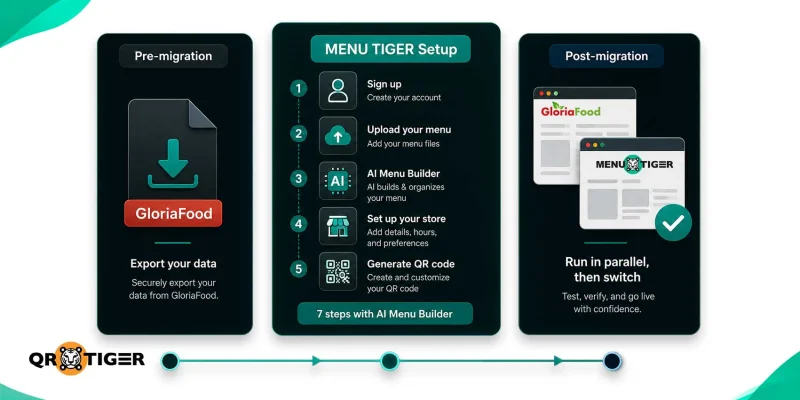
Migrate from GloriaFood to MENU TIGER by uploading your existing menu as a PDF or image into its AI Menu Builder. The system automatically extracts and structures your categories, items, prices, and descriptions in under 5 minutes.
MENU TIGER setup:
- Create your MENU TIGER account. Sign up with your Google account or email address.
- Open the Menu section. From the dashboard, click +Card, then select Set Up Menu.
- Upload your existing menu. AI Menu Builder accepts JPEG, PNG, and PDF files. Upload a clean, high-contrast copy of your current menu.
- Let the AI generate your digital menu. The system extracts categories, item names, descriptions, and prices from the uploaded file.
- Review and edit. Verify item names, categories, descriptions, and prices. Fix anything the AI missed.
- Create your store and connect the menu. Go to the Store section, enter your restaurant details, then link the menu under Settings, then Store Menu.
- Set up QR ordering. Open Tables, add floors and table numbers, then generate and download your QR codes.
Post-migration:
Run both platforms side by side for one to two weeks. Test the order flow, kitchen ticket routing, and payment processing before switching over fully.
Once you’re confident, retire your GloriaFood QR codes. Remove old table tents and window decals. Update your Google Business Profile, website, and social bios with the new ordering link.
What you gain when you move from static to dynamic QR code menus
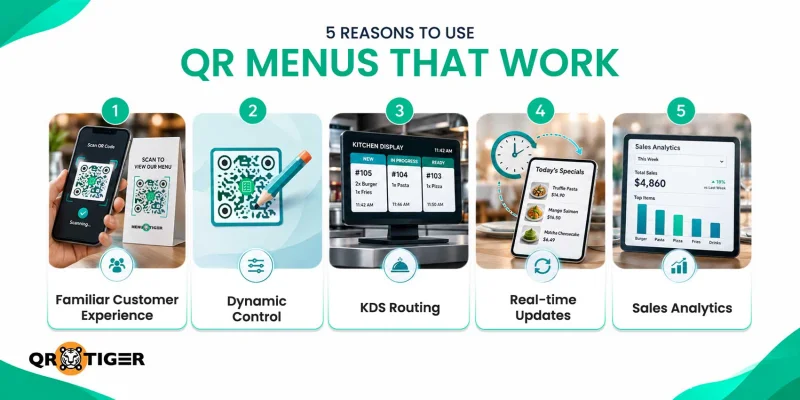
Moving from static to a dynamic menu QR code gives you the ability to update menus instantly, track diner analytics, and improve operational efficiency.
Static locks the destination for life while dynamic QRs stay editable after printing, so a menu update, a rebrand, or a platform switch never requires a single reprint.
1. Your QR code menu stays familiar to customers
Guests still scan a QR code at the table and browse the menu on their phone. No app download or account creation needed.
The ordering flow is nearly identical to what your GloriaFood customers already know, so retraining diners isn’t part of the switch. Each table gets its own QR code, so orders route to the correct table automatically.
2. You control every QR code
Dynamic QR codes give you full control over the destination. Change your menu, your platform, or your ordering flow, and the codes still work.
3. Orders route directly to a Kitchen Display System
When a customer places an order, the ticket appears on the KDS right away. Staff prepare orders on the spot instead of confirming each ticket manually.
Menu updates for availability or ingredient swaps push in real time. The KDS comes with the Advanced and Premium plans.
4. Menu updates happen in seconds
Edit prices, descriptions, or item availability from the admin dashboard. Changes reflect on the customer-facing menu instantly. A sold-out dish disappears from the ordering page before another guest orders.
5. Sales analytics show what sells
The dashboard shows customer ordering patterns, top-performing items, and peak order windows. This data feeds better decisions on menu design, pricing, and promotions. Analytics are built into the base dashboard on paid plans, no add-on required.
Common questions about the GloriaFood shutdown
When should I migrate from GloriaFood?
It's best to migrate as early as possible rather than waiting until the shutdown date. Switching early gives you enough time to transfer your menu, test your new ordering system, train your staff, and familiarize customers with the new platform.
Will I lose my menu data when GloriaFood closes?
Yes, you can lose access to your menu data if you don’t export it before GloriaFood shuts down.
Does MENU TIGER charge commissions?
No, MENU TIGER does not charge commission per order since it uses a subscription-based model.
How long does it take to set up an online menu in MENU TIGER?
It takes less than 5 minutes. MENU TIGER has an AI menu maker that automatically creates your online menu once the menu list file is uploaded.
If you’re using a spreadsheet, you can also import directly from the MENU TIGER.
How much does GloriaFood cost?
The base ordering system is free. Paid add-ons include online payments at $29 per month, promotions at $19 per month, a sales-optimized website at $9 per month, and a branded mobile app at $59 per month. Typical restaurants pay $47 to $116 per month for add-ons.

Keep your digital restaurant menu running
The GloriaFood shutdown isn’t a slow fade—April 30, 2027 is a hard cutoff.
Between exports, menu rebuilds, staff training, and parallel testing, the practical decision window closes around late October 2026.
The question isn’t whether to migrate, it’s which platform to migrate to. MENU TIGER covers what GloriaFood covered, plus what it couldn’t.
Sign up for the FREEMIUM plan to start.

