
সম্প্রদায় নোটিসবোর্ডের জন্য কিউআর কোড: সুবিধা, ব্যবহার, এবং পরামর্শ
 দ্বারা Regie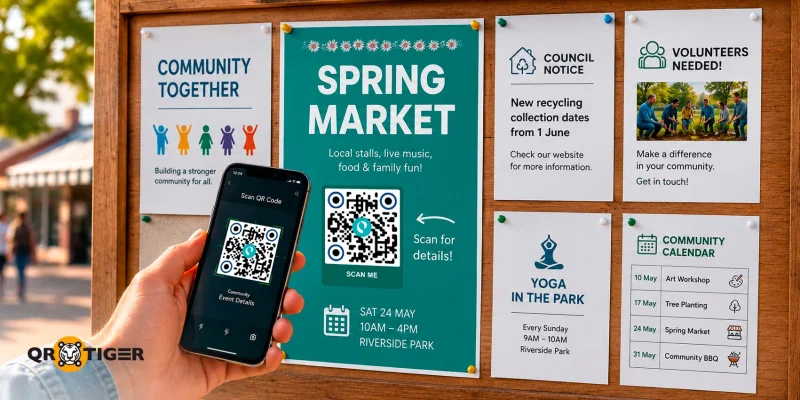
সম্প্রদায়ের নোটিসবোর্ডের জন্য একটি কিউআর কোড হ'ল একটি স্ক্যান করা যাবে কোড, যা সার্বজনীন বুলেটিন বোর্ডে রাখা হয়।
এটি বাসিন্দাদেরকে ডিজিটাল তথ্যের দিকে নির্দেশিত করে, যেমন ঘোষণা, ইভেন্টের বিস্তারিত, সাইন-আপ ফর্ম, জরিপ, মানচিত্র, ভিডিও, এবং ডাউনলোড করা ডকুমেন্ট।
সম্প্রদায়গুলি যারা তাদের মানুষকে প্রাসঙ্গিক সম্প্রদায়িক তথ্যের সাথে সংযোগ করে, তারা একটি আরও জ্ঞানী, সচেতন এবং সংক্ষিপ্ত জনগণ উন্নত করে।
সূচী
- সম্প্রদায় নোটিসবোর্ডের জন্য QR কোড কি?
- সম্প্রদায়গুলি কেন প্রথাগত নোটিসবোর্ডগুলি প্রতিস্থাপন করছে?
- কিউআর কোড সমাধান এবং তাদের ব্যবহার সম্পর্কে জনগণের বোর্ডের জন্য
- আপনার সম্প্রদায়ের নোটিসবোর্ডের জন্য QR কোড তৈরি করতে কি ভাবে করবেন
- নোটিসবোর্ড QR কোড এর জন্য কাস্টমাইজেশন টিপস
- ভিন্ন সম্প্রদায়ের কিভাবে নোটিসবোর্ডে QR কোড ব্যবহার করে
- কিউআর কোড সহ সম্প্রদায়ের তথ্য সাইনের বাস্তব জীবনের উদাহরণ
- পরবর্তী স্ক্যানের জন্য আপনার সম্প্রদায় নোটিসবোর্ড প্রস্তুত করুন
- প্রশ্নগুলি যা আমাদের কাছে জিজ্ঞাসা করা হয়—উত্তর দেওয়া হয়েছে
কমিউনিটি নোটিসবোর্ডের জন্য QR কোড কি?
কমিউনিটি নোটিসবোর্ডের জন্য QR কোডগুলি স্ক্যান করা যায় 2D বারকোড বুলেটিন বোর্ড, সাইনেজ, ডিজিটাল কমিউনিটি বোর্ড বা স্ক্রিনে সংযুক্ত করা।
যখন স্মার্টফোন স্ক্যান করা হয়, তখন তারা মানুষকে একটি ওয়েবপেজ, ডকুমেন্ট, সাইন-আপ ফর্ম, যোগাযোগের তথ্য, এবং বিশেষ ঘোষণা, বিজ্ঞপ্তি, এবং প্রচারণাসম্পর্কিত অতিরিক্ত সম্পদ এগুলি নির্দেশনা দিতে পারে।
ডায়নামিক কিউআর কোড সম্প্রদায় বোর্ডগুলির জন্য বিশেষভাবে প্রস্তাবিত হয় কারণ তুমি তাদের বিষয়বস্তু সম্পাদনা করতে এবং বোর্ডে প্রদর্শিত একটি পরিবর্তন না করে সত্যিকারে ইন্টারেকশন মনিটর করতে পারো।
সম্প্রদায়গুলি কেন প্রথাগত নোটিসবোর্ডগুলি প্রতিস্থাপন করছে?
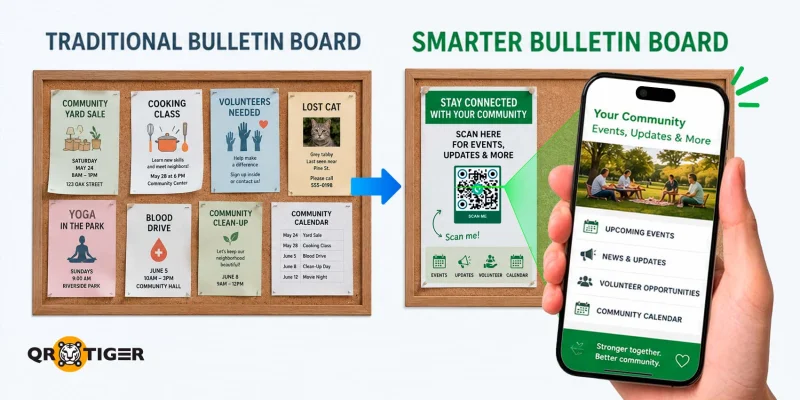
ঐতিহাসিক নোটিসবোর্ড মুদ্রিত ফ্লায়ারগুলির উপর নির্ভর করে যা দ্রুত প্রবৃদ্ধি করে। পোস্টার ধীরে ধীরে ফেড হয়, ঘটনাসমূহ শেষ হয়, যোগাযোগের বিবরণ পরিবর্তন হয়, এবং বোর্ডটি বাসিন্দাদের তা পড়তে পারার চেয়ে দ্রুত ভরে যায়।
অনুযায়ী ২০২৪ মার্কিন জনগণনা ব্যুরো
QR নোটিশ বোর্ডগুলি সম্প্রদায়ে দর্শন, প্রক্রিয়া এবং সুযোগগুলি মানুষদের জন্য আরও অ্যাক্সেসিবল করার জন্য দরকারি।
উদাহরণস্বরূপ, একটি আবাসিক সম্প্রদায়ের সাইনেজে QR কোড থাকলে বাসিন্দাদেরকে মেইন্টেনেন্স অনুরোধ, সম্প্রদায়ের নির্দেশিকা, বা আসন্ন ইভেন্টের সময়সূচি দেখানো হয়।
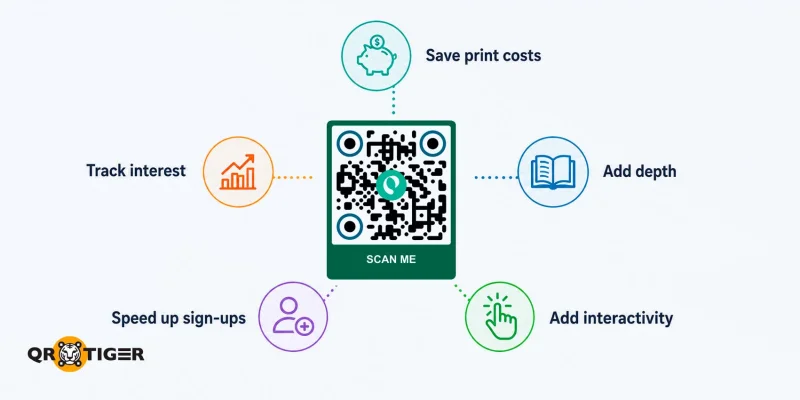
সম্প্রদায় বোর্ডে QR কোড ব্যবহার করা এটা আদর্শ কেনাকাটার অন্যান্য কারণগুলি হল:
- গভীরতা যোগ করুন মানুষকে পোস্ট করা তথ্যের সাথে সম্পর্কিত ভিডিও, ছবি, অডিও গাইড, বা বহুভাষিক সংস্করণের লিংক দিন।
- ইন্টারঅ্যাক্টিভিটি বৃদ্ধি করুন একটি স্ক্যান একটি ফ্লায়ারে ছোট ছবি পড়ার চেয়ে কন্টেন্ট দ্রুত খোলে।
- মুদ্রণ খরচ সংরক্ষণ করুন ফ্লায়ার প্রতিস্থাপন করার বদলে কিউআর কোড সামগ্রী আপডেট করুন।
- সম্প্রদায়ের অংশগ্রহণ দ্রুত করুন বাসিন্দাদেরকে URL টাইপ করতে বাধ্য করা ছাড়া একটি ফরমে নির্দেশ দিন।
- লাভ ট্র্যাক করুন স্ক্যান গণনা, তারিখ, অবস্থান এবং ডিভাইস সম্পর্কে মানসম্পন্ন ডেটা প্রদান করুন।
কিউআর কোড সমাধান এবং তাদের ব্যবহার সম্পর্কে জনগণের বোর্ডের জন্য
এই টেবিলটি দেখায় যে কোনটি কিউআর কোড ব্যবহার করবেন সম্প্রদায় বোর্ডগুলির উদ্দেশ্যে, তা নির্ভর করে।
| QR কোড সমাধান | এটা কী করে | শ্রেষ্ঠ জন্য |
| URL QR কোড | স্ক্যানার পাঠানো হয় একটি ওয়েবপেজ, ইভেন্ট তালিকা, বা সোশ্যাল পেজে | সাধারণ ঘোষণা, সরকারী নীতি পৃষ্ঠা, জনসেবা ঘোষণা |
| ল্যান্ডিং পেজ কিউআর কোড | একটি কাস্টম ল্যান্ডিং পেজ খোলে যা QR কোড জেনারেটরের ভিতরে তৈরি করা হয়েছে | সম্প্রদায় হাব, দানের লিঙ্ক, যোগাযোগের বিবরণ, ফর্ম, টিকা প্রচার, জনগণনা অনুস্মারক, এবং কর মৌসুমের প্রচার |
| সোশ্যাল মিডিয়া কিউআর কোড | প্রতিটি সোশ্যাল মিডিয়া প্রোফাইলকে একটি পৃষ্ঠায় দেখানো হয়েছে | সম্প্রদায় গুলি ফেসবুক, ইনস্টাগ্রাম, হোয়াটসঅ্যাপ, এবং ইউটিউবে আপডেট পোস্ট করছে |
| ফাইল QR কোড | একটি PDF, ভিডিও, চিত্র, বা ওয়ার্ড ডকুমেন্ট খোলে | নিউজলেটার, এইচওএ ব্যবস্থাপনা রেকর্ড, প্রশিক্ষণ ভিডিও, মুদ্রণযোগ্য ফরম, কর ফাইলিং গাইড, সুবিধা তালিকা, এবং পাবলিক হিয়ারিং নোটিশ |
| Google Form এর কিউআর কোড | একটি জরিপ বা নিবন্ধন ফর্ম খোলা | ইভেন্ট RSVP, স্বেচ্ছাসেবক রোস্টার, অভিযোগ লগ, সাইন-আপ, সরকারি প্রতিক্রিয়া জরিপ, জনগণের পরামর্শ জমা, নাগরিক সেবা অনুরোধ |
| ভিকার্ড কিউআর কোড | যোগাযোগ তাকে সরাসরি ফোন বা ইমেইলে সংরক্ষণ করে | বোর্ড সদস্য, ভবন পরিচালক, সম্প্রদায় যোগাযোগ কর্মী, নির্বাচিত কর্মকর্তা, সরকারি কেসওয়ার্কার, পাবলিক তথ্য কর্মকর্তা |
| ইমেইল QR কোড | প্রাপক, বিষয়, এবং বার্তার পূর্বাভাস সহ একটি ইমেইল খসড়া খোলা হয়েছে | বোর্ড সচিব, ভবন পরিচালক, এবং চার্চ স্টাফ যারা সংরক্ষিত যোগাযোগ নম্বরের পরিবর্তে ইমেইল পছন্দ করে |
| SMS কিউআর কোড | ফোনের ম্যাসেজিং অ্যাপটি খোলে পূর্বাভাসিত টেক্সট এবং প্রাপকের সাথে | ফরম পূরণ, দ্রুত অভিযোগ, এবং রক্ষণাবেক্ষণ অনুরোধ |
| অবস্থান QR কোড | Google Maps বা Waze দিকনির্দেশনা খুলুন একটি স্থানে | সম্প্রদায় হল, ভোটার স্থান, পুনঃবাস স্থান, পরিষ্কার স্থান, সরকারী অফিস শাখা, সরকারী হাসপাতাল, এবং আদালত |
| ইভেন্ট QR কোড | স্ক্যান করার পর ইভেন্টের বিস্তারিত তথ্য সরাসরি ফোন ক্যালেন্ডারে যোগ করে দেয়। | একবারের মিটিং, অর্থ-উৎসাহ সংগ্রহ, পুনরাবৃত্তি সম্প্রদায় সম্মেলন, সরকারী টাউন হল, জনসভা, ভোটার নিবন্ধন অনুষ্ঠান |
| MP3 কিউআর কোড | একটি রেকর্ড করা মেসেজ, প্রার্থনা, বা অডিও ঘোষণা প্লে করে | চার্চ এবং জীবাশ্রী সম্প্রদায় কেন্দ্র |
| ওয়াই-ফাই কিউআর কোড | অতিথিদেরকে পাসওয়ার্ড টাইপ করার ছাড়া স্থানীয় নেটওয়ার্কে সংযোগ করে | সাধারণ কক্ষ, লাইব্রেরি, এবং ইভেন্ট হল |
| মাল্টি-URL QR কোড | ফোন ভাষা, দিনের সময়, স্ক্যান গণনা, অবস্থান, বা জিও-ফেন্সিং অনুযায়ী স্ক্যানারগুলিকে পৃষ্ঠাগুলিতে পাঠানোর মার্গ নির্ধারণ করে | বহুসংস্কৃতিক নোটিসবোর্ড, সময় সীমিত ইভেন্ট পোস্টার, পরিষদ এবং সরকারী কার্যালয় যা একাধিক উপনগর বা ভাষা গুলি পরিষেবা করে |
| অ্যাপ স্টোর এর কিউআর কোড | ব্যবহারকারীকে স্বয়ংক্রিয়ভাবে মোবাইল অ্যাপের ডাউনলোড পৃষ্ঠায় পাঠানো হয় যা App Store (iOS) এবং Google Play (Android) এর জন্য | পরিষদ বাসিদের অ্যাপ, সরকারী সেবা অ্যাপ (কর, সামাজিক সুরক্ষা, পরিবহন), এইচওএ পোর্টাল, চার্চ সংগতি অ্যাপ |
আপনার সম্প্রদায়ের নোটিসবোর্ডের জন্য QR কোড তৈরি করতে কি ভাবে করবেন
- খোলুন এবং সাইন ইন করুন QR কোড জেনারেটর অনলাইন।
- একটি কিউআর কোড সমাধান চয়ন করুন।
- আপনার কন্টেন্ট দিন। লিঙ্ক পেস্ট করুন, ফাইল আপলোড করুন, বা যোগাযোগের বিবরণ টাইপ করুন।
- উৎপাদন এবং কাস্টমাইজ করুন। আপনার কমিউনিটি লোগো যোগ করুন, রঙ, চোখ, প্যাটার্ন এবং ফ্রেম পরিবর্তন করুন, এবং কল টু অ্যাকশন সম্পাদনা করুন।
- পরীক্ষা এবং ডাউনলোড করুন। ছাপার আগে দুটি বা তিনটি পোষাক স্ক্যান করুন। ফাইলটি SVG বা PNG হিসেবে সংরক্ষণ করুন, তারপর ছাপুন।
নোটিসবোর্ডের কিউআর কোড সম্পর্কে কাস্টমাইজেশন টিপস
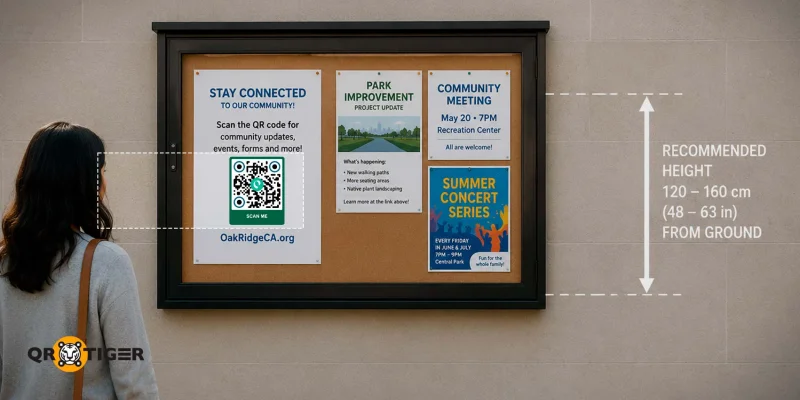
একটি কিউআর কোড স্ক্যানের সাফল্য তিনটি বিষয়ে নির্ভর করে: আপনি এটি কোথায় রাখছেন, আপনি এটি কত বড় ছাপছেন, এবং এটি কতটা পরিষ্কারভাবে পড়তেছে। সব তিনটি ঠিক করলে, এবং অধিবাসীরা প্রথম দৃশ্যে স্ক্যান করে।
ডিজাইন
- গাঢ় প্যাটার্ন এবং উজ্জ্বল পেছাদারের মধ্যে উচ্চ বিরোধ
- কিউআর কোড চারপাশের শান্ত অঞ্চল (সাদা স্থান)
- লোগোটি কেন্দ্রে রাখা হবে, মোট এলাকার 30% নীচে
- কিউআর কোডের নিচে বা উপরে প্রাসঙ্গিক কল টু অ্যাকশন
- আউটডোর বোর্ডগুলির জন্য গ্লেয়ার কাটতে ম্যাট ল্যামিনেট ফিনিশ
- বৃষ্টির প্রভাবে প্রকাশিত বোর্ডগুলির জন্য ভাইনাইল বা এক্রিলিক ব্যাকিং
আকার
আকারটি স্ক্যান দূরত্বের উপর নির্ভর করে, তবে সবচেয়ে নিরাপদ নিয়ম হ'ল এটি কিউআর কোডের প্রস্থের 10 গুণ সেট করা।
উদাহরণস্বরূপ, ৩ সেন্টিমিটার এর কিউআর কোডটি ৩০ সেন্টিমিটার দূরত্ব থেকে ভালোভাবে স্ক্যান করা যায়, এবং ১০ সেন্টিমিটার এর কিউআর কোডটি ১ মিটার দূরত্ব থেকে ভালোভাবে স্ক্যান করা যায়।
ঢাকা হলদুতের বোর্ডগুলির জন্য, 4 সেমি থেকে 6 সেমি কাজ করে। আউটডোর বোর্ডগুলির জন্য, 8-12 সেমি সেরা ফলাফল দেয়।
অবস্থান
- চোখের উচ্চতায় QR কোড প্রদর্শন করুন তাদেরকে মাটিতের উপরে 120 থেকে 160 সেমি অবস্থান করানো যাবে যাতে প্রয়োজনে বিকম্পন বা প্রসারণ ছাড়াই প্রাপ্ত হতে পারে। এই পরিসীমা প্রবীণ বাসিন্দাদের এবং চক্ষু ব্যবহারকারীদের জন্যও উপযুক্ত, কারণ উভয়েরই উপরে মুখ তুলতে বা ঘুমাতে হতে হবে না।
- শীর্ষ কোণগুলি এড়িয়ে চলুন টপ-কর্ণার অবস্থান কোড নোটিশটি আবহাওয়া ফ্ল্যাপ, স্টেপল বা ওভারল্যাপিং ফ্লায়ার পিছু লুকিয়ে রাখতে পারে। কিউআর কোডটি বোর্ডের মাঝে বা নিচের তৃতীয়াংশে রাখুন।
ভিন্ন সম্প্রদায়ের কিভাবে নোটিসবোর্ডে QR কোড ব্যবহার করে
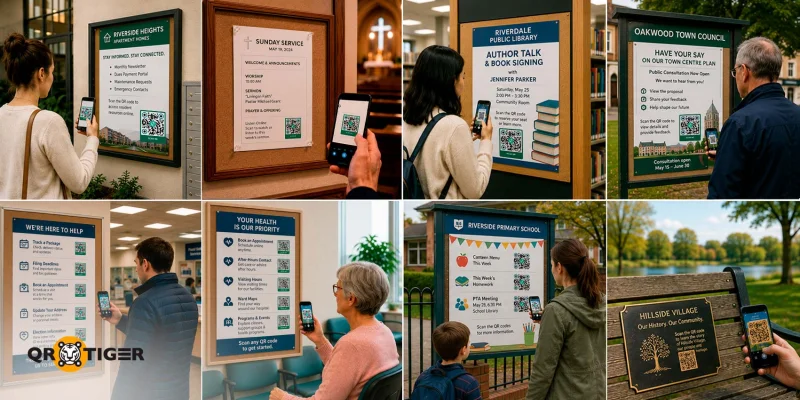
হোয়াস এবং আবাসিক এস্টেট
বাড়ির মালিক সমিতি, স্ট্রাটা কর্পোরেশন, এবং ভাড়া দেওয়া সম্পত্তির ব্যবস্থাপকরা মাসিক সংবাদপত্র, কর পরিশোধ পোর্টাল, রক্ষণাবেক্ষণের অনুরোধ ফর্ম, এবং জরুরী যোগাযোগ তালিকার লিঙ্ক করার জন্য লবি বোর্ডে QR কোড ব্যবহার করে।
বাসিদের ইমেইল থ্রেড বা কাগজের নোটিশ খোঁজার বদলে একটি কোড স্ক্যান করা হয়।
সব ধরনের ধর্মীয় সম্প্রদায়
চার্চ, মসজিদ, মন্দির, গুরুদ্বারা, এবং সিনাগোগ বুলেটিন, লবি বোর্ড, এবং আউটরিচ ম্যাটেরিয়ালে QR কোড ছাপায় যাতে প্রবেশদ্বারের পরের দিকে নোটিসবোর্ডকে প্রসারিত করা যায়।
বুলেটিনগুলির পাশে প্রতিটি ঘটনা আইটেমের পাশে ছোট কোড থাকে, যখন প্রবচন বা সেবা নোটগুলির সাথে কোড থাকে যা অডিও রেকর্ডিং, ভিডিও প্রবচন বা লেখিত প্রতিফলন খোলে। আউটরিচ ইয়ার্ড সাইন এবং ফ্লায়ার পাসারদেরকে স্বাগত ভিডিও বা প্রথম দর্শন গাইডে পাঠায়।
পাবলিক লাইব্রেরি
পাবলিক লাইব্রেরিগুলি ইভেন্ট পোস্টারের পাশে QR কোড রাখে। গ্রাহকরা স্ক্যান করে স্টোরিটাইম, ওয়ার্কশপ, বা লেখকের কথাবার্তার জন্য আসন সংরক্ষণ করে।
স্থানীয় পরিষদ এবং জনসংযোগের চিহ্নিতি
যুক্তরাজ্য, অস্ট্রেলিয়া, আয়ারল্যান্ড এবং মার্কিন যুক্তরাষ্ট্রের স্থানীয় পরিষদগুলি এবং সরকারী কার্যালয়গুলি বিভিন্ন শারীরিক স্পর্শ বিন্দুগুলিতে কিউআর কোড ব্যবহার করে।
সরকারী পরামর্শ পোস্টারগুলি লাইব্রেরিতে এবং সম্প্রদায়ের তথ্য বোর্ডগুলিতে বাসিন্দাদেরকে বিস্তারিত প্রস্তাবনা এবং অনলাইন মন্তব্য পোর্টালে নিয়ে যাওয়ার দিকে নির্দেশ দেয়।
সরকারী দপ্তর এবং জনসেবা
সরকারী অফিস লবিগুলি সেবাগুলিতে একই প্যাটার্ন প্রসারিত করে।
পোস্ট অফিসগুলি প্যাকেজ-ট্র্যাকিং এবং ঠিকানা-পরিবর্তন ফর্মের জন্য কিউআর কোড ব্যবহার করে। কর শাখাগুলি একই কাজগুলি করে ফাইলিং ডেডলাইন এবং ভাষা-বিশেষ নির্দেশিকা জন্য। সামাজিক সুরক্ষা অফিসগুলি, একইভাবে, এপয়েন্টমেন্ট বুকিং এবং ডকুমেন্ট চেকলিস্টের জন্য তাদের ব্যবহার করে।
নির্বাচন কিউআর কোড এখন মাত্র মতাধিকার প্রদানের জায়গাগুলিতেও এই প্রকার মেশিনগুলি সাধারণ দৃশ্য হয়ে উঠছে, যা ভোটাধিকারীদেরকে আইডি প্রয়োজনীয়তা, ভোটাধিকারীদের সময়সূচি, এবং বোটের তথ্যের সাথে সংযোগ করে।
সরকারী হাসপাতাল এবং পুলিশ স্টেশন একই উদ্দেশ্যে কোড ব্যবহার করে, যেমন ওয়ার্ড ম্যাপ, ভিজিটিং হাওয়ার, অনুপস্থিত ব্যক্তি সতর্কতা, এবং প্রবাসী সম্প্রদায় দেখানোর জন্য।
স্বাস্থ্য ও বৃদ্ধাশ্রয় সেবা সুযোগ
ডাক্তারের অফিস, ডেন্টাল ক্লিনিক, ফিজিওথেরাপি প্র্যাকটিস, পাবলিক হাসপাতাল এবং বৃদ্ধাশ্রমের লবি ওয়েটিং রুম বোর্ডে ডিউটি কোড ব্যবহার করে।
রোগী এবং দর্শকরা তাদের স্ক্যান করে অ্যাপয়েন্টমেন্ট বুকিং, অফিস সময়ের যোগাযোগের বিবরণ, ওয়ার্ড ম্যাপ, দর্শন সময়, এবং প্রোগ্রাম সময়সূচি অ্যাক্সেস করতে।
রোগীরা প্রথমে ডেস্ক স্টাফকে জিজ্ঞাসা করার পরিবর্তে অপেক্ষা করতে সময় কাটানোর সময়ে QR কোড স্ক্যান করতে পারেন। বয়সগত যত্ন বোর্ড পরিবারের দর্শনের জন্য কোড যোগ করে এবং ইভেন্ট ক্যালেন্ডার যোগ করে, প্রাপ্তির ডেস্কে ফোন করার প্রয়োজন না হয়ে আত্মীয়দের সূচিত থাকার সাহায্য করে।
স্কুল এবং অভিভাবক সম্প্রদায়
স্কুল এবং পিটিএ-এরা প্যারেন্ট বোর্ডে গেটের কাছে কিউআর কোড পোস্ট করে। প্যারেন্টরা স্ক্যান করে ক্যান্টিন মেনু, সপ্তাহের হোমওয়ার্ক, বা আসন্ন প্যারেন্ট-টিচার এসোসিয়েশন (পিটিএ) মিটিং এর অজেন্ডা দেখতে পারে।
সম্প্রদায়িক খেলার ক্লাবগুলি
সার্ফ ক্লাব এবং সম্প্রদায়ের খেলা ক্লাব ক্লাবহাউস নোটিসবোর্ডে ডোনেশন পেজ, জল সুরক্ষা বার্তা এবং সদস্যপদ নিবন্ধন ফর্মে লিঙ্ক করার জন্য কিউআর কোড ব্যবহার করে।
এখানে ফ্রি কিউআর কোড দান কাজ ভালো করে, সময়কালিক খেলাধুলার ড্রাইভ বা একবারের অভিযানের জন্য এটি ভালো কাজ করে যেখানে ক্লাবটি প্রিমিয়াম বৈশিষ্ট্য প্রদান করা ছাড়া স্ক্যান ট্র্যাক করতে হয়।
একক কোড প্রবেশে নতুন সদস্য অনবোর্ডিং হ্যান্ডেল করে এই কাজটি ম্যানুয়াল কাগজপত্র ছাড়াই।
গ্রামীণ শহর এবং ঐতিহাসিক সাইনেজ
গ্রামীণ শহর পরিষদগুলি সর্বজনীন বেঞ্চ এবং ঐতিহাসিক সাইনেজে QR কোড রাখে যাতে স্থানীয় ব্যক্তিত্ব, যুদ্ধ বেতারকর্মী এবং আদিবাসী বৃদ্ধাদের গল্প ভাগ করতে পারে।
বাসিন্দা এবং দর্শকরা একটি স্থানের নাম, একটি স্মারক, বা একটি দীর্ঘস্থায়ী সম্প্রদায় অবদানকারীর পিছনের গল্পটি পড়তে বা শুনতে স্ক্যান করে।
কিউআর কোড সহ সম্প্রদায়ের তথ্য সাইনের বাস্তব জীবনের উদাহরণ
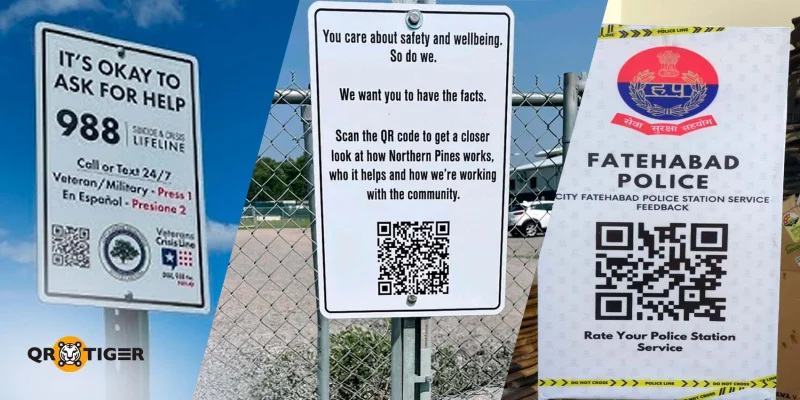
উত্তরী পাইনস শেল্টার, নর্থ বে, অন্টারিও
জুলাই 2025 সালে, নিপিসিং জেলার সোশ্যাল সার্ভিস প্রশাসন বোর্ড (DNSSAB) ইনস্টল করেছিল কিউআর কোড সাইনেজ উত্তর বে শেল্টারের বাইরের বাড়িতে ফেন্সে চিপেওয়া স্ট্রিট পশ্চিমে 590 নম্বরে নর্থ বে, অন্টারিও।
পাসারবাই কোডটি স্ক্যান করতে পারেন এবং স্থায়ী, 24/7 সংযুক্ত শেল্টার এবং হাব খোঁজার জন্য এবং লো ব্যারিয়ার শেল্টার সম্পর্কে অপারেশনাল বিবরণ অ্যাক্সেস করার জন্য।
DNSSAB কর্মকর্তারা কিউআর কোডকে একটি সরাসরি সাধারণ জনগণের সাথে অগ্রগতি ভাগাভাগি করার জন্য একটি সরকারী রিপোর্ট পড়ার প্রয়োজন না হওয়ায় একটি সরঞ্জাম হিসেবে প্রতিষ্ঠিত করেছে।
মেন্টাল হেলথ ক্রাইসিস কিউআর কোড উত্তর চার্লেস্টন, দক্ষিণ ক্যারোলাইনায়।
মে 2026 সালে, দক্ষিণ ক্যারোলাইনা রাজ্যের নর্থ চার্লস্টন শহরে ইনস্টল করা হয়েছিল। মানসিক স্বাস্থ্য QR কোড চিহ্ন উচ্চ ট্রাফিক সার্বজনীন স্থানগুলিতে পার্শ্বগামীদেরকে তাত্ক্ষণিক মানসিক স্বাস্থ্য সংকট সম্পর্কিত সহায়তা সম্পর্কিত সহায়তা সহ যৌথকারী সংস্থানের সাথে যোগাযোগ করার জন্য, যেমন 988 আত্মহত্যা এবং সংকট লাইন।
মেয়র রেজি বার্জেস এই উদ্যোগকে শহরের মানসিক স্বাস্থ্য সমর্থনকে আরও অ্ধিক সহজলভ্য করার অংশ হিসাবে প্রস্তুত করেছেন।
অনুযায়ী মানসিক অসুস্থতা উপর জাতীয় সংধান (NAMI), সুইসাইড হলো মানুষের মৃত্যুর দ্বিতীয় প্রধান কারণ, যারা 10 থেকে 24 বছর বয়সী মানুষ মারা যায় তাদের মধ্যে, যা এই ধরনের সুযোগপূর্ণ সাইনেজকে একটি গুরুত্বপূর্ণ সম্প্রদায় ব্যব্ধান করে।
পুলিশ প্রতিক্রিয়া কিউআর কোড ফতেহাবাদ স্টেশন, ভারত
২০২৫ জুলাইতে, ভারতের হরিয়ানা রাজ্যের ফতেহাবাদ পুলিশ স্টেশনে কিউআর কোড সাইনেজ ইনস্টল করেছিল এবং পুলিশ স্টেশন নোটিসবোর্ড এবং মহিলা সহায়তা ডেস্কে প্রবেশ করে যে বাসিন্দাদের প্রতিক্রিয়া সংগ্রহ করতে।
এই উদ্যোগটি সঠিক এবং দায়িত্বপূর্ণ পুলিশিং সমর্থন করার লক্ষ্য রেখেছে এবং বাসিন্দাদের পরিষেবা গুণমান মূল্যায়ন করার জন্য একটি সরাসরি চ্যানেল প্রদান করা।
বাংলোর (2023), গুরগাও, তেলেঙ্গানা, এবং শ্রীনগরে পূর্বেই একই ধরণের কিউআর কোড ডিজিটাল নোটিশ বোর্ড সিস্টেম প্রকাশিত হয়েছিল। 
পরবর্তী স্ক্যানের জন্য আপনার সম্প্রদায়ের নোটিশবোর্ড প্রস্তুত করুন।
একটি সম্প্রদায় বোর্ড সবচেয়ে উপকারী হয় যখন মানুষরা ফ্রন্ট ডেস্কে জিজ্ঞাসা করার প্রয়োজন না হয়ে তাদের প্রয়োজনীয় তথ্য পেতে পারে।
সম্প্রদায়ের নোটিসবোর্ডের জন্য গতিশীল কিউআর কোড সার্বজনীনদের গুরুত্বপূর্ণ সম্প্রদায়ের তথ্য খুঁজে বের করা, বুঝা এবং করার সুযোগ দেওয়ার মাধ্যমে তাদের অ্যাক্সেস করা সহজ করে।
তারা সীমিত শারীরিক স্থানকে একটি সমৃদ্ধ তথ্যের হাব এবং একই সময়ে একটি স্ক্যান দ্বারা কার্যের পথকে সংক্ষেপে করে দেয়।
সহজে বলতে গেলে, কিউআর কোড সম্প্রদায়গুলির জন্য সম্পত্তি যা তাদের নোটিসবোর্ডগুলি আরও কার্যকর, অ্যাক্সেসযোগ্য এবং আকর্ষণীয় করতে দরকার। 
প্রশ্নগুলি যা আমাদের কাছে জিজ্ঞাসা করা হয়—উত্তর দেওয়া হয়েছে
কি কোড কমিউনিটি নোটিসবোর্ডে প্রিন্ট করার পরে আপডেট করা যাবে?
হ্যাঁ, ডায়নামিক কিউআর কোড আপনাকে কোডটি পুনরায় মুদ্রণ করার প্রয়োজন না হলেও সংযুক্ত কন্টেন্ট আপডেট করার সুযোগ দেয়।
বাসিদের কি একটি স্পেশাল অ্যাপ প্রয়োজন হয় যেখানে কমিউনিটি নোটিসবোর্ডের কিউআর কোড স্ক্যান করতে?
না। আধুনিক আইফোন এবং অ্যান্ড্রয়েড ফোনগুলি QR কোডগুলি নিজেদের অভ্যন্তরীণ ক্যামেরা অ্যাপ দ্বারা সনাক্ত করে। পুরনো ফোনগুলির ক্ষেত্রে এপ স্টোর বা গুগল প্লে থেকে বিনামূল্যে স্ক্যানার প্রয়োজন হতে পারে।
একটি ছাপা কিউআর কোড বাইরে কমিউনিটি নোটিসবোর্ডে কতক্ষণ পর্যন্ত থাকতে পারে?
একটি বাহ্যিক ল্যামিনেটেড QR কোড গড়ে তার উপর প্রায় 12 থেকে 24 মাস পর্যন্ত থাকে। UV-রেজিস্ট্যান্ট ল্যামিনেশন বা ভাইনাইল মাউন্টিং ব্যবহার করুন, এবং প্রতি 6 মাসে ফেডিং বা পীলিং চেক করুন। 
এই নিবন্ধটি মৌলিক তথ্যাদি উদ্দেশ্যে মাত্র এবং আইনি, আর্থিক, বা অন্য পেশাদার পরামর্শ হিসাবে গণ্য হয় না। QR TIGER'র পণ্য বা সেবাগুলি সম্পর্কে প্রশ্ন থাকলে, অনুগ্রহ করে আমাদের সাপোর্ট দলের সাথে যোগাযোগ করুন [email protected].
সচরাচর জিজ্ঞাসিত প্রশ্ন (এফএকিউ)
Can QR codes on community noticeboards be updated after printing?
Do residents need a special app to scan a community noticeboard QR code?
How long does a printed QR code last on an outdoor community noticeboard?
এই নিবন্ধটি কি সাহায্যকর ছিল?
সেরা QR কোড জেনারেটর দিয়ে স্ক্যান সর্বোচ্চ করুন।
যোগ দিন হাজার হাজার বিশ্বব্যাপী ব্র্যান্ড, যারা গভীর গভীর ব্যবস্থাপনা, বাল্ক সৃষ্টি, এবং গভীর অ্যাট্রিবিউশন অ্যানালিটিক্স ব্যবহার করে।
বিনামূল্যে শুরু করুন
