
How to Use an ATM QR Code for Cardless Cash Withdrawals
 By Ashley P.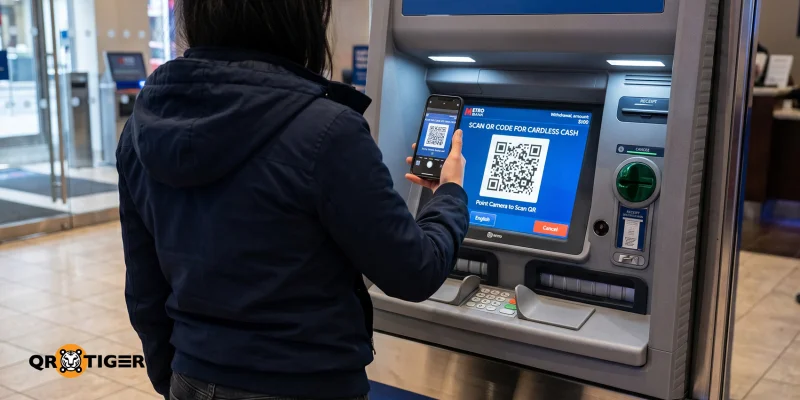
Left your debit or credit card at home? No problem.
Using your bank’s mobile app, you can scan an ATM QR code, enter your PIN (or use your fingerprint), and collect your cash. It's the same as having a physical card, but better.
Since many people already carry smartphones, this touch-free option enables quicker, more secure transactions.
In this blog, we’ll explore how it works, the security it brings compared to physical cards, and the benefits both users and banks can experience.
Table of Contents
- What is an ATM QR code?
- How to use a QR code on an ATM?
- What makes QR code ATM systems secure?
- ATM transactions via QR code vs. card: A side-by-side comparison
- How an ATM QR code system improves banking experiences
- Things to consider when using QR codes at ATMs
- What’s next for cardless ATM transactions
- FAQs
What is an ATM QR code?
An ATM (Automated Teller Machine) QR code is a scannable code that lets you complete cash withdrawals, deposits, or account access by scanning it with your bank app.
When a user selects cardless ATM withdrawal, the bank issues a one-time QR code that you scan and authenticate in the app with PIN/biometrics, and the machine dispenses cash.
This contactless ATM banking solution makes cash withdrawals faster, without requiring you to bring and insert a physical card.
It’s also an intuitive option, as 44% of people prefer scanning a QR code for payments or receiving money, according to a recent industry report.
How to use a QR code on an ATM?
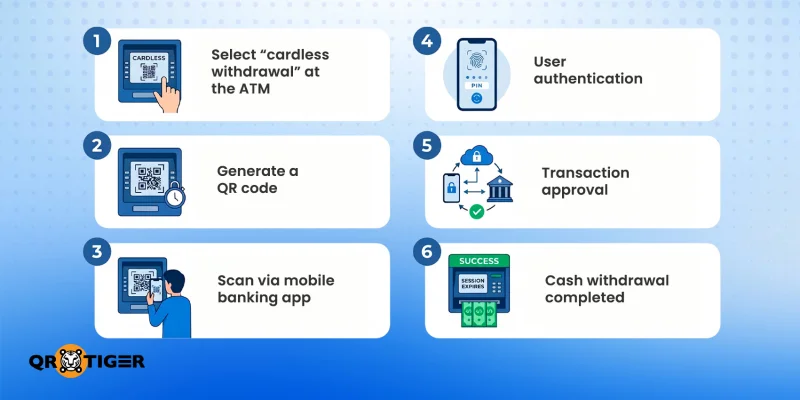
While the process can vary by bank, using a QR code at an ATM generally follows these steps:
1. Select “cardless withdrawal” at the ATM
Make sure that your bank or an ATM supports “cardless” or “QR code” withdrawals first. After verifying, choose the cardless withdrawal option.
2. Generate a QR code
The bank’s QR code generator creates an encrypted, time‑limited QR code. This is linked to the mobile app via the bank’s secure API to prevent cloning.
3. Scan via mobile banking app
Open your banking app and use the QR code scanner to scan the code on the ATM screen.
4. User authentication
The app asks you to authenticate using a PIN, fingerprint, Face ID, or an OTP. This ensures only the account holder has legitimate mobile banking and ATM access.
5. Transaction approval
Once authenticated, the request is securely sent to the bank’s backend system for approval and processing.
6. Cash withdrawal completed
The ATM receives the verified request and dispenses cash or performs the selected transaction. After which, the entire session expires.
Tip: Withdraw cash from your ATM’s bank network; you will be charged twice when withdrawing from a different bank network—a surcharge by the bank that owns the ATM, plus a charge from your bank for using a different network.
What makes QR code ATM systems secure?
QR code transactions at ATMs are powered by an advanced QR code generator for banks designed to deliver both speed and high-level security.
- Dynamic QR code generation: The ATM creates unique, one-time-use codes tied to specific transactions.
- Encrypted data exchange: The QR code software ensures secure communication between the ATM, mobile app, and bank servers.
- Time-sensitive: QR code authentication is valid only briefly, which reduces the risk of copying or interception.
- Multi-factor authentication (MFA): Users verify their identity using PINs, biometrics, and OTPs in the app.
- API-driven validation: Token-based API calls connect ATM systems with bank servers, authorizing transactions in real time.
- Server-side verification: The backend verifies request signatures.
- Scalable infrastructure: Supports high transaction volumes across large ATM networks without compromising security.
These elements ensure ATM QR code systems remain secure, efficient, and scalable as banking demands evolve.
ATM transactions via QR code vs. card: A side-by-side comparison
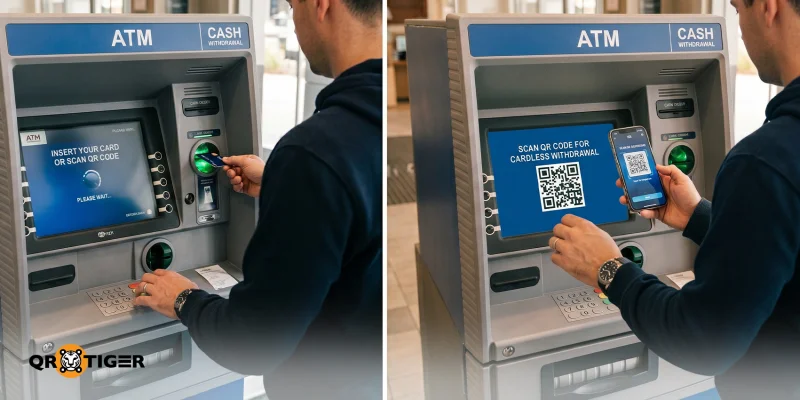
QR codes offer a fully mobile, cardless, and contactless way to withdraw cash, unlike card-based systems.
The table below compares their key differences in speed and security, user experience, and accessibility:
| Factors | QR Code | Physical Card |
| Speed | Faster authentication by scanning and approving via the app | Slower due to card insertion and manual PIN entry |
| Security | Dynamic QR codes, app-based authentication, and encryption reduce fraud risk | Higher risk of card skimming, theft, or PIN exposure |
| User Experience | Fully cardless, contactless, and mobile-first experience | Requires a physical card and physical interaction with the ATM |
| Accessibility | Works even without a physical card; dependent on smartphone and app access | Accessible without a smartphone, but requires a physical card |
| Setup Requirement | Requires mobile banking app setup and activation | Only requires a bank card and PIN setup |
| Transaction Flow | Scan → Authenticate in app → Withdraw cash | Insert card → Enter PIN → Withdraw cash |
| Flexibility | Can integrate multiple services (withdrawals, transfers, inquiries) via the app | Limited to ATM-supported functions only |
Using a QR code for ATM access generally offers greater convenience and security, while traditional ATMs remain more universally accessible due to their low technology requirements.
How an ATM QR code system improves banking experiences
Cardless withdrawal methods, such as using a QR code for ATM access, deliver value on both sides of the banking experience.
They improve both user experience and banking efficiency by making transactions faster, safer, and more convenient. QR codes also help banks modernize their infrastructure while reducing fraud risks and operational costs.
| For Banks | For Users |
| Reduced costs from card issuance | No need to carry a physical card |
| Stronger security through dynamic, app-verified authentication | Faster, more seamless ATM transactions |
| Better integration with mobile banking | Lower risk of card skimming, cloning, or theft |
| Lower fraud risk from lost or stolen cards | Fully contactless, mobile-based experience |
| Reduced reliance on physical card infrastructure | Stronger security via app‑verified authentication |
| Improved transaction traceability and monitoring | Easier access if a card is lost or unavailable |
| Alignment with digital-first banking strategies | More modern, streamlined banking experience |
Things to consider when using QR codes at ATMs
ATM QR codes increase transaction speed, reduce fraud risk, and simplify access. However, there are a few key factors to keep in mind to ensure a smooth and secure mobile-first banking experience.
- Device dependency: QR codes require a smartphone and a compatible banking app.
- Internet connectivity: They need a stable Internet connection for real-time authentication.
- App readiness: Users must have their mobile banking app set up in advance.
- Device compatibility: Older devices or unsupported app versions may limit access to QR-based ATM features.
- User awareness: First-time users may need guidance when using QR-based ATMs.
- Network compatibility: Not all ATMs or banks support QR transactions yet, depending on the QR code banking system in place.
- Secure usage habits: Transactions should always be done using official apps and trusted ATMs.
Being aware of these considerations helps users and banks maximize the benefits of using QR codes at ATMs while minimizing potential friction.
What’s next for cardless ATM transactions
ATM QR codes transform the traditional ATM experience by combining mobile banking with contactless authentication.
As long as you have your smartphone and a banking app, you won’t need to worry about not having your physical card with you.
If you're ready to explore other advanced QR code generator innovations, now is the time to get started.
FAQs
Can I withdraw from an ATM without my physical card?
Yes. You can use your mobile banking app to scan a QR code at the ATM.
Do ATMs have QR codes?
ATM networks in the United States, Singapore, the Philippines, and various European countries are rapidly integrating QR code capabilities. Nevertheless, always check whether your bank's ATMs offer this option before scanning any code.
Where is the QR code on an ATM?
The QR code is generated instantly after you select "cardless withdrawal" and appears clearly on the screen.
Why should we be careful in using QR codes?
Cases of money laundering scams involving QR codes are on the rise nowadays. Always check first whether they came from a legitimate source.
This article is for general informational purposes only and does not constitute legal, financial, or other professional advice. For questions about QR TIGER's products or services, please contact our support team at [email protected].
Frequently Asked Questions (FAQ)
Can I withdraw from an ATM without my physical card?
Do ATMs have QR codes?
Where is the QR code on an ATM?
Why should we be careful in using QR codes?
Was this article helpful?
Maximize Scans with the Best QR Code Generator
Join thousands of global brands using QR TIGER to manage dynamic routing, bulk creation, and deep attribution analytics.
Get Started For Free
