
Chrome QR Code Generator: How to Use, Limits, and Best Alternative
 By Kyle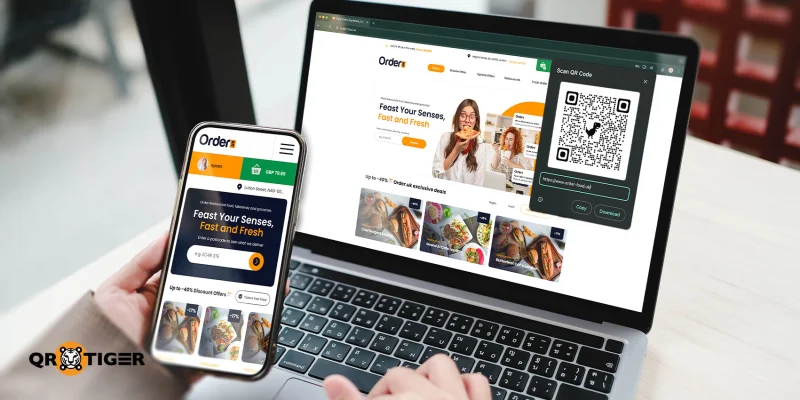
Google Chrome lets you generate a QR code for free.
Rolled out to the public in early February 2021, the Chrome QR Code Generator has since become a standard feature that allows users to instantly convert any webpage URL to QR code.
But with so many better QR code platforms available online, can Google Chrome be able to keep up?
We take a closer look at what Chrome’s built-in QR code function can do and whether it can beat the best QR code generator online.
Table of Contents
What is a Chrome QR code generator?
Chrome’s native QR code generator is a free, built-in tool that allows Google Chrome users to instantly create static QR codes for any webpage.
This feature makes sharing links much faster and convenient, as Users can instantly generate and share QR codes at any time while using the browser.
The tool also works on mobile versions of Google Chrome, making it especially useful when you need to share a webpage on the go.
How do I generate a QR code in Chrome?
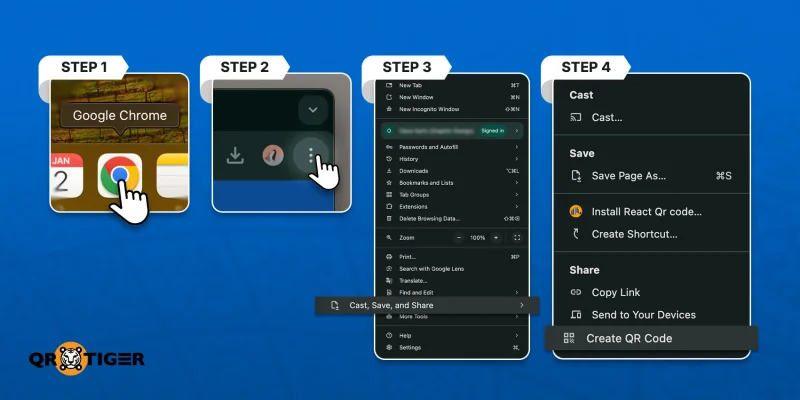
The free QR code generator by Chrome allows you to generate a QR code for any webpage. Here’s how to do it:
1. Open Google Chrome and go to the webpage you wish to share.
2. Click the three dots in the upper-right corner of the browser.
3. Hover the cursor over the “Cast, save and share” option.
4. Select the “Create QR code” option on the pop-up menu.
5. Option 2: Do a right click and select “Create QR code for this Page” from the menu.
Copy or download the dino QR code and share it directly or place it on printed materials for others to scan.
Disadvantages of the Google Chrome QR code generator
While the native Chrome QR code generator is a handy tool for creating a QR code for a website link, it has a few disadvantages.
One of the first issues is that the QR code generator in Chrome only allows you to create static QR codes. Meaning, the link they contain cannot be edited or replaced if it ever breaks. They are suitable for basic use only.
Another pitfall of creating a QR code on Chrome is the limited design tools available. It is only available in black and white, featuring the popular dinosaur logo in the center.
If you want to use the QR code professionally, such as in marketing campaigns or networking, we don’t recommend this platform at all.
To fully customize your QR code, you need to add a QR code generator to Chrome extensions or use a dedicated platform.
We recommend using a dynamic QR code generator with logo integration that offers the same accessibility, along with additional enhanced features.
Why a dedicated platform is better than a Chrome QR code generator
Dedicated QR code generators are packed with features that let you create customizable and durable QR codes, something that Chrome cannot keep up with.
The most popular option is QR TIGER generator, which offers a wide range of features that can help take your QR code to the next level.
Advanced options
Most Chrome Webstore QR code generators can only create static QR codes that are permanent and uneditable once generated.
Dedicated QR code platforms offer dynamic QR codes that give you more flexibility, as you can update the destination link at any time without needing to reprint it.
Beyond that, their robust software system allows them to provide far more advanced features, including customization, bulk generation, API integrations, and real-time QR code analysis. We will explore these in more detail later.
Customization
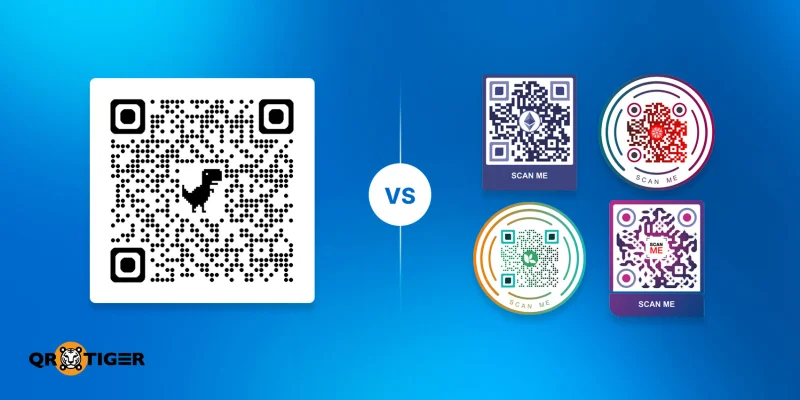
The Chrome URL QR code generator limits you to applying deep branding to your QR codes.
In contrast, a dedicated platform allows you to fully customize your QR code, ensuring each one is unique and visually appealing for your audience.
You can also save your designs as templates, allowing you to reuse or refine your designs at any time for consistent branding across all the QR codes you create.
Tracking and analytics
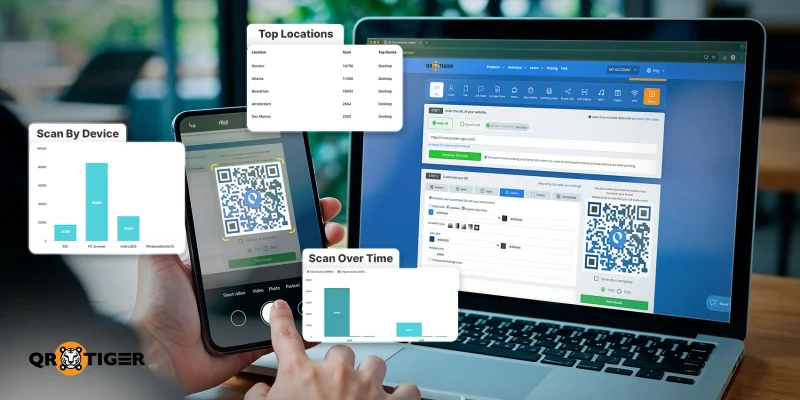
A free QR code generator Chrome extension at most will only allow you to customize the generated QR code.
But if you use a professional QR maker, you can easily track the performance of every custom QR code you generate.
These QR code analytics help you gain a better understanding of how effectively they’re being shared, while also keeping track of where the QR codes are being scanned from.
Variety of download options
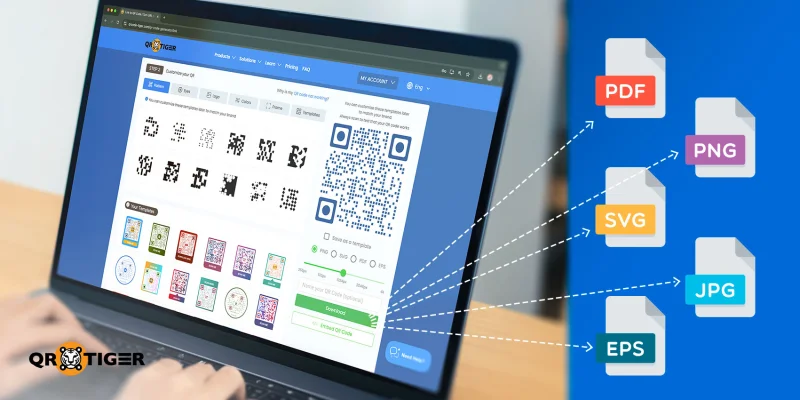
Having access to multiple QR code formats helps ensure high scanning quality and provides greater flexibility for use across various media, which a Chrome QR code generator extension doesn’t readily provide.
Whether you need PNG, SVG, PDF, or other formats, having the option for multiple formats can help users make a QR code suitable for digital sharing and printing.
Multiple QR code solutions
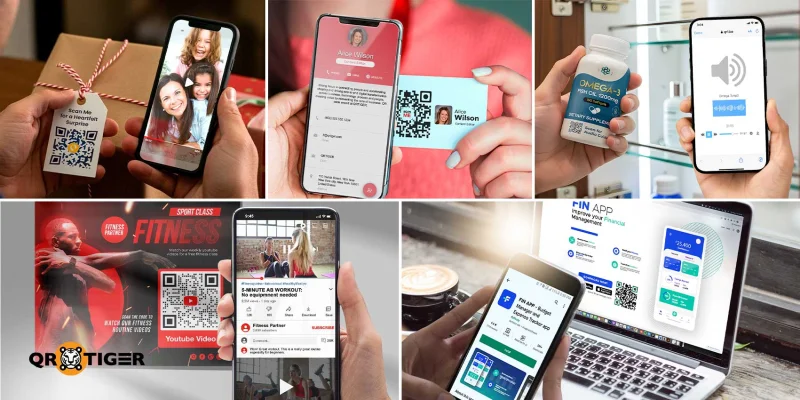
Instead of using a QR code generator Chrome plugin, an enterprise-grade QR code platform provides you with more opportunities to utilize the tool’s full potential.
It provides you with a variety of QR code solutions, offering greater flexibility in how you share your content and links.
Ranging from social media QR codes to vCards, these options enable you to tailor your QR codes to your specific goals and audience.
How to make a QR code better than Chrome’s
An online QR code generator like QR TIGER lets you easily convert a webpage URL to a QR code, but with better tools and features, which makes it a better choice, especially for business use.
Here is an easy step-by-step guide on how to make QR code:
1. Head straight to the best free QR code generator or sign up for a professional generator.
2. Select the convert link to QR code solution.
3. Paste the URL for the webpage you wish to share.
4. Select whether you want a static or dynamic QR code.
5. Select “Generate QR code”.
6. Customize your QR code’s design and then download it.
Share your web links with the best QR code generator
The native Chrome QR code generator is a fast and convenient tool for sharing webpages, but its limitations make it best suited for simple, one-off use.
But with the help of an online QR code platform, you can create fully branded, editable, and trackable QR codes that offer far more value than a basic Chrome add-on QR code generator.
In short, Chrome makes QR creation easy, but dedicated platforms like QR TIGER help make sure your free QR codes work for you.
Frequently asked questions
Are Google QR codes free to generate?
Yes, Google Chrome QR codes are completely free to create. You can use the browser’s function to generate an unlimited amount of static QR codes for webpages.
Is the Chrome QR code permanent?
Yes. Google Chrome’s native QR code generator only allows you to create static QR codes. This means that they contain uneditable data and do not expire.
However, the QR code may stop working if the link to the webpage is broken, if the site becomes unavailable, or if its link address changes.
This article is for general informational purposes only and does not constitute legal, financial, or other professional advice. For questions about QR TIGER's products or services, please contact our support team at [email protected].
Frequently Asked Questions (FAQ)
Are Google QR codes free to generate?
Is the Chrome QR code permanent?
Was this article helpful?
Maximize Scans with the Best QR Code Generator
Join thousands of global brands using QR TIGER to manage dynamic routing, bulk creation, and deep attribution analytics.
Get Started For Free
