
What Is a QR Code MCP Server? How AI Creates QR Codes
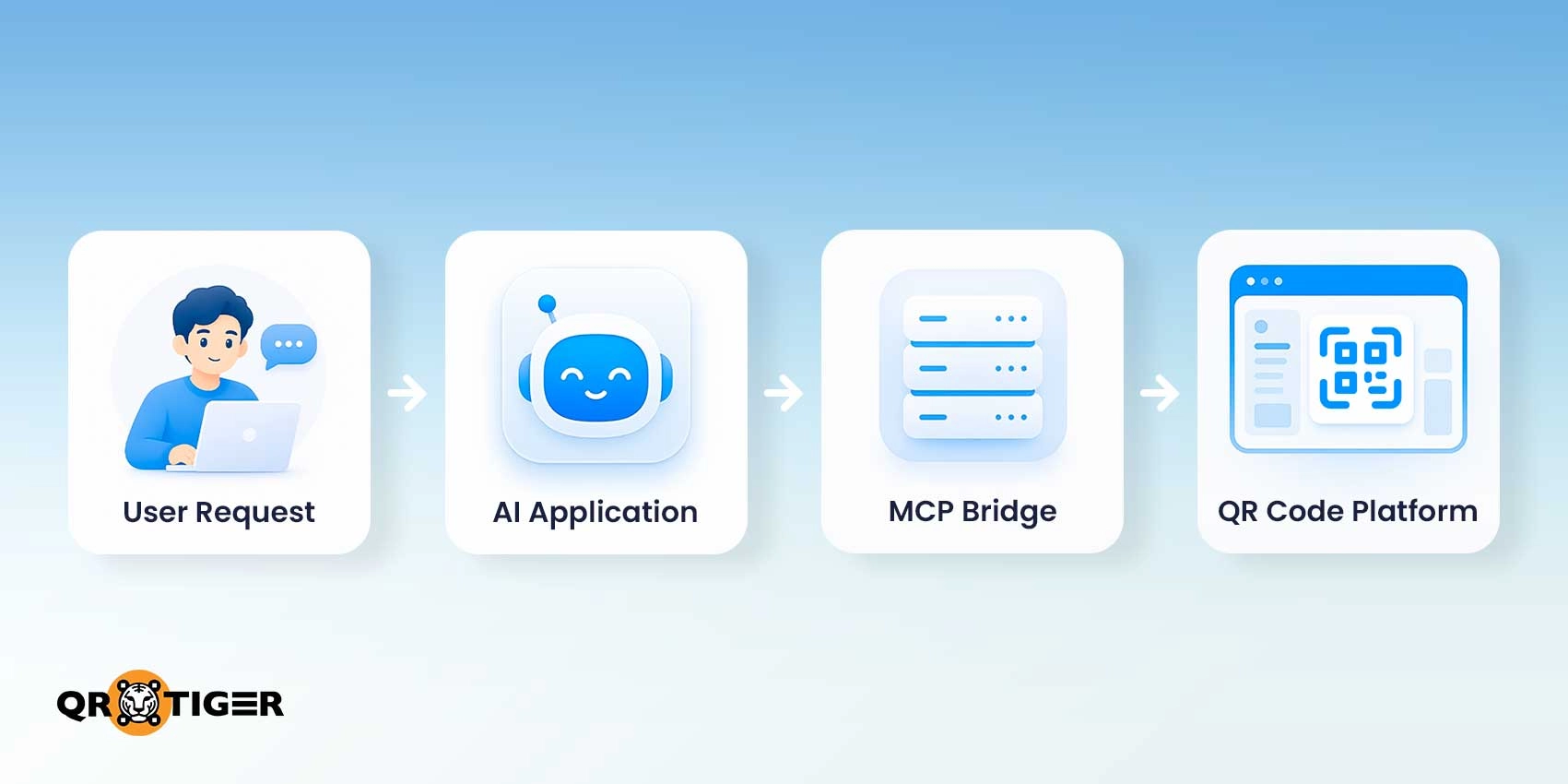
A QR code MCP refers to a Quick Response Model Context Protocol (MCP) server—a connector that lets an artificial intelligence model or application, such as Claude, Cursor, ChatGPT, or Gemini, interact with QR code generation, management, and analytics tools or systems.
The Model Context Protocol (MCP) is the standard command for AI and software interactions to happen. It’s like a universal adapter between AI and a software, helping them communicate.
For example, when you ask Claude (an AI client) to create a dynamic QR code for a summer campaign using your brand colors (e.g., red and white), it uses MCP to call the linked QR code platform’s functions, create the code, and display it to the user.
User enters a prompt in the AI client ↓ AI client sends the request to the AI model ↓ AI model identifies that a QR code tool is needed ↓ MCP connects the AI model/client to the QR code software's available tools ↓ AI model selects and calls the appropriate QR code tool ↓ QR code software generates the QR code ↓ AI client receives the result and displays it |
Without an MCP server or connection, an AI application can only tell you the steps on how to create one or give you a QR image that doesn’t work.
Table of Contents
What can a QR code MCP server actually do?
A QR code MCP server gives your AI agent access to an open-source utility or a dedicated QR code generator you’re using that it can actually use to create and manage QR codes.
- Create QR codes: You can prompt the AI to generate a QR code from a link or information, using the connected QR software.
- Find existing campaigns: You can ask the AI to look up a QR code campaign instead of searching through your files manually.
- Manage QR codes: You can use the AI agent to scan a code, view its settings, or fix a broken URL on a printed campaign without reprinting the code, since dynamic QR codes let you change where the code leads (when available).
- Get scan analytics: Request scan activity by date or location to see exactly how your campaigns are performing.
- Connect your business tools: The AI passes scan data to your CRM or spreadsheets, and to your marketing tools, depending on which tools are linked.
To whom does a QR code MCP server matter?
MCP server integrations make work easier for people who actually use it.
- Developers: Devs no longer have to code a custom AI integration for every single QR code action. MCP provides them with a standard blueprint for AI applications to find and use QR code creation or management tools.
- Teams: Someone can ask the AI assistant for a task in a natural way without the need to understand complex API endpoints or how the underlying integration works.
- AI applications and agents: The software or system can use approved tools to create, retrieve, manage, or analyze QR codes. It can move past answering questions about the codes.
Important note: A QR code MCP server doesn’t replace the reliable systems and APIs your business has built. It simply acts as a translator, changing how your existing platform speaks to AI agents.

MCP vs API: What’s the difference?
The MCP is designed for AI models and agents. It lets an AI application look and choose from the available tools.
The Application Programming Interface (API) is a set of protocols for application code that strictly follows the logic defined by the developers.
One important distinction: MCP can sit alongside existing APIs rather than replacing them. The MCP server may even use those APIs behind the scenes to carry out the functions selected by the model.
Both are structured communication gateways, but they target different audiences:
| Key area | QR code API | QR code MCP server |
| Main user | Application code | AI application or agent |
| How operations are chosen | Defined by developers | Selected by the model from available tools |
| Interface | API endpoints and schemas | MCP tools and resources |
| Natural-language requests | Requires an added AI layer | Built for AI tool use |
| Predictable automation | Strong fit | Not usually the main reason to use MCP |
| High-volume processing | Strong fit | Usually better handled outside the model |
| Conversational tasks | Requires additional implementation | Natural fit |
Adopting MCP can become a part of the API setup you already have. It enables your existing infrastructure to support AI-assisted tasks without discarding existing integrations.
For predictable or high-volume jobs, such as generating thousands of codes for product packaging, a QR code generator API is still the better fit.
First-party MCP vs MCP bridge vs independent MCP
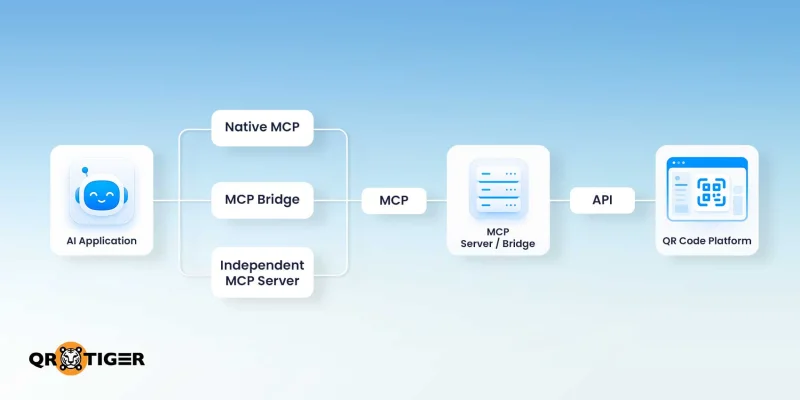
QR code MCP servers can connect to AI clients to your platform. They connect through a provider-operated MCP server, an MCP bridge, or an independently developed MCP server.
| Factor | First-party MCP | MCP Bridge | Independent MCP |
| Who operates it | QR/service provider | Third-party integration service | Independent developer or team |
| Connection path | AI client to QR provider | From AI client to bridge to QR provider | AI client to independent server to QR service/API |
| Integration depth | Can directly expose provider-specific tools | Limited to actions available through the bridge | Depends on the server and underlying service |
| Setup | Connect the AI client to the provider’s MCP server | Requires the bridge and the service connection | May require hosting and configuration |
| Operational overhead | Lower when provider-managed | Adds another service dependency | Usually highest when self-hosted |
| Best suited for | Direct, specific QR code access | Cross-app tasks | Custom or specialized MCP setups |
The right approach depends on your preference: direct platform access, an open app ecosystem, or more control over the server itself.
Don’t add a middle layer if it’s only for a simple one-to-one connection, unless you need to move between a CRM, a spreadsheet, a QR code generator, and other business tools.
What to consider before using a QR code MCP
Giving an AI agent more tools also increases its chances of making a costly mistake. This is already becoming a real concern as companies widen their use of MCP.
Cloudflare has already expanded the use of MCP across its engineering, sales, products, and finance teams, providing access to AI tools integrated with company systems.
As AI gets more access to company data, security can’t be an afterthought. Here are important considerations to make before giving AI access to your QR code data:
Permissions and authorization
Set clear boundaries on tools and accounts your AI agents can access. MCP now supports enterprise-managed authorization, enabling companies to centrally manage access to connected MCP servers.
Giving AI access to external systems can introduce risks such as prompt injection, particularly when it can modify company data. ChatGPT Developer Mode gives a similar reminder for connectors with elevated risks.
High-impact operations
Treat irreversible actions like deleting codes, updating links, or resetting data differently from low-risk ones. Add a human review for high-risk actions instead of feeding everything directly to AI.
Data exposure
Practice strict boundary-setting to protect your customer and campaign data. AI tools should only have access to the exact data they need for the task at hand. Nothing more.
Logging and observability
Keep a clear, unquestionable record of every single action your AI agent takes–who approved it, and what the results were. This is non-negotiable once the AI can actually overwrite the data.
Rate limits and cost
Keep in mind that AI still operates within the reality of your existing tools. API quota, token usage, and vendor limits can all affect how smoothly your automation scales.
Operational workflow
Connect your tools directly whenever possible to keep the path shorter and more secure. If you do use a middleman platform, make sure the time you save on setup is worth the cost of bringing another vendor into your app’s ecosystem.
Frequently asked questions about QR code MCP
Can you create a QR code using a QR code MCP server?
Yes. Once you connect your AI assistant with a QR code generator through MCP, you can ask the AI to create the QR code you want.
Can a QR code MCP server manage multiple QR codes?
Yes, if the server allows the AI to access and manage it. QR TIGER’s MCP lets you search for QR codes by name or date, organize them into folders, and archive or even restore old QR codes.
How can I connect my AI client to a QR code MCP server?
Open your AI client‘s configuration file, add the MCP server’s connection details in it, provide your API key, then restart the AI client. The exact setup depends on the server and AI client you are using.
Can an AI update an existing QR code using an MCP server?
Yes, if your MCP server supports that action. For example, you could ask your AI to change the content of a dynamic QR code without doing it yourself. QR TIGER's MCP supports changes to themes, frames, and branding.
Which AI assistant can connect to a QR code MCP server?
You need an AI client that supports the server’s MCP connection. QR TIGER currently lists Cursor, VS Code, Claude Desktop, and Windsurf, as well as other clients that support remote MCP servers.
Definition of terms
AI Agent: A system built on AI models that decides which digital tools to call and figures out the next steps needed to automate tasks for user queries.
AI Assistant: A software helper designed mainly to converse with and assist the user. They can help with writing, searching, and answering questions based on the user's instructions.
AI Application: The software platform (Cursor, VS Code, or Claude desktop) where users can interact with AI assistants and AI agents. It provides the interface through which the user and the AI interact. It can use multiple models for different purposes.
AI Client: It runs silently in the background and handles the connection of the AI mode and the MCP server. It analyzes the mcp.json file–the file that holds secret keys, security settings, and headers needed to safely communicate with your MCP server.
AI Model: The engine behind the AI apps like ChatGPT, Claude, and Gemini. It processes user prompts, reasons over information, and produces valuable responses.
Model Context Protocol (MCP): The standard language AI applications use to discover QR code tools. It acts as a bridge for AI concepts to access external systems.
MCP Server: It uses MCP to define tools and data available to AI apps. It safely bridges an AI to external systems like APIs and databases, but with limited access to the tools they can see.


