
7 Best Platforms to Create a QR Code with Logo in the Middle
 By Ashley P.
QR codes are no longer a novelty, so we need to ensure that our codes stand out, something that people can’t easily ignore.
Brands that understand their value create a custom QR code with their logo in the middle — a functional tool that also serves as effective branding.
Because our logo isn’t just a design; it’s our brand’s face, our digital signature, our “hey, that’s us!” icon.
So, if it’s on our products, social media, and campaigns, why leave QR codes out of the fun?
Whether you’re running a global campaign or just enhancing your daily promotions, a branded QR code featuring your company logo keeps your identity sharp, consistent, and completely scannable.
How do you make one of these snazzy, logo-studded QR codes?
This blog spills the beans on the best QR code generator to help you create your very own masterpiece.
Table of Contents
Top 7 tools to create a custom QR code with logo in the middle
There are plenty of online QR code software out there. But how do you know which one actually fits your needs?
Don’t worry, we’ve done the homework for you. Here’s a breakdown of the top-rated QR code creators we’ve tried, tested, and genuinely liked.
1. QR TIGER
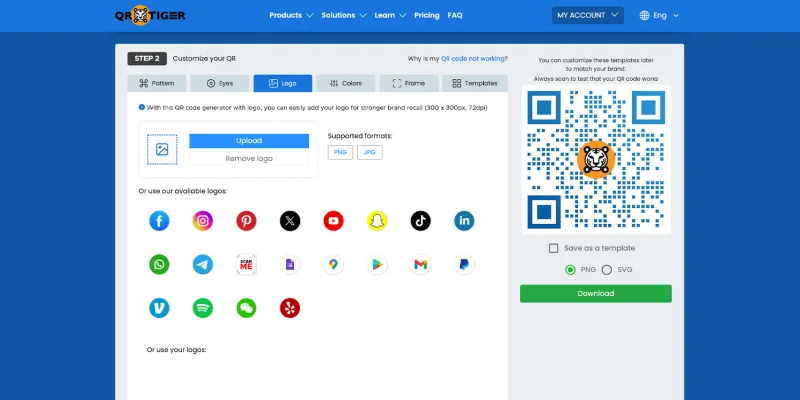
You can easily create a custom QR code with logo at QR TIGER. Unlike other platforms that lock their customization tools behind a paywall or a sign-up, the design tools of this QR code generator are free to access for all users.
Logo Integration
The website offers 20 pre-existing logos for you to choose from, ranging from social media platforms to payment app logos.
If you prefer to use your own logo, you can upload it in PNG or JPG format at 300 x 300px resolution, 72 dpi.
With QR TIGER, you can simply turn a link to QR code or create a QR code for your file and add a logo to it.
More Customization Options
QR TIGER offers several other customization options, such as:
- Custom color palettes: Paint your QR code in the color you like. This platform offers a range of color palettes for you to choose from. Splash your QR code with colors that scream, “This is so me!”
- Multiple pattern styles: With amazing patterns available on the platform, you can swap the usual dots for funky patterns that give your code some personality.
- Eye shape variations: The QR code eye always catches attention. Give the QR code’s corner eyes a makeover with cute or edgy shapes.
- Frames and call-to-action text: Frames make your QR code look compact and chic. Add a snazzy frame and a little CTA “hey, scan me!” nudge.
- Templates: The templates provided by QR TIGER are helpful in designing your QR code. You can either use it as it is or as a reference.
Verdict
QR TIGER is a generator that works for any campaign, big or small. The QR code style and designs you can produce are flexible for different purposes. In other words, you can make them professional-looking or super stylish.
You will notice that a lot of international brands rely on this website, so if you want your QR code with logo to match that level, this is a great pick.
However, because it offers numerous advanced features, the pricing leans toward the premium side.
Pricing
QR TIGER’s solutions and customization tools are generally accessible for free. For more advanced features, plans start at $7 per month.
2. QR Code Chimp
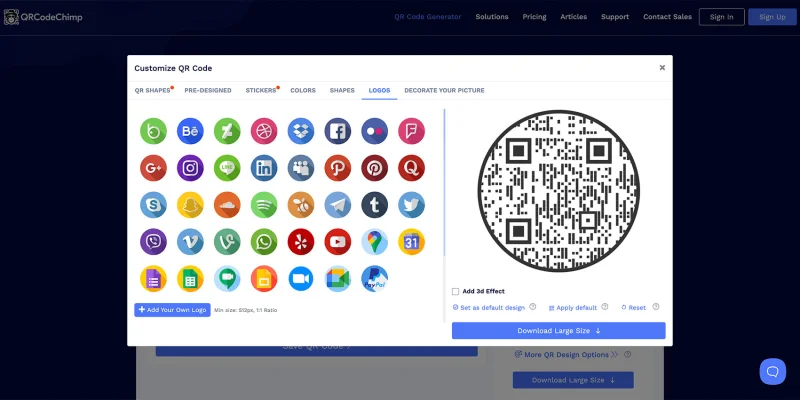
QR Code Chimp is a top recommendation, especially for creative marketers and freelancers. Unlike other platforms, this one’s collection of logos features a 3D effect.
Logo Integration
Use the pre-existing logos or add your own brand’s logo; QRCodeChimp offers you that choice. The platform features over 37 pre-existing logos for you to choose from.
If you would rather place your own brand’s logo, it’s extremely easy to upload it with the simple guidelines available on the platform.
More Customization Options
How to make a custom QR code with logo in QR Code Chimp is simple. Here are some of the features that allow you to do it. Do these after choosing the logo for your QR code.
- Logo Scaling: Adjust the logo size to your preference. Make it smaller, bigger, or leave it as it is–the choice is yours.
- Logo Background Scaling: Would you like the background of the logo to be the QR code pattern, or do you prefer a white space that will better highlight your logo? You can adjust the logo background using this feature.
- Logo Position Horizontal: If you don’t want the logo to be placed in the center, and want it to be moved towards left or right, use this feature.
- Logo Position Vertical: This option lets you reposition the QR code up or down.
Verdict
Adding a logo to the QR code looks great on QRCodeChimp. They’re high-quality, easy to design, and even beginners can create a polished custom QR code with logo in the middle.
Some key points to note are the watermark in the free QR codes, the fact that many features require a paid plan, and the interface can feel slow due to its heavy customization.
We recommend this mainly for brands or marketers seeking visually striking QR codes, rather than those requiring detailed, enterprise-level analytics.
The platform clearly cares about good design, so your QR code style really stands out.
Pricing
QR Code Chimp is available in both free and paid versions, starting at $6 per month.
3. QR Planet
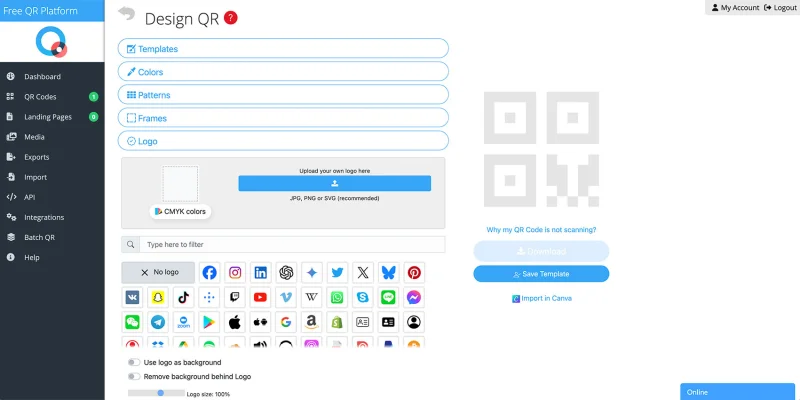
QR Planet lets you create uniquely customized and branded QR codes. The platform has different design options and palettes.
Logo Integration
The platform gives immense importance to design. Apart from offering design templates, it has more than 60 pre-existing logos for you to choose from. Some of the logo designs are available in both colored and black-and-white versions.
You will be interested to know that there are logos with animations: a heart that beats, a flower that blooms, and more. Using these logos for your online campaigns will make your code look more attractive.
More Customization Options
- Design templates: The platform offers a variety of pre-designed templates. They vary in colours, logo, size, dimension, and even have a call-to-action tag on them.
- Your colors: Choose from a variety of colors for the eyes, including gradient, transparent, and multi-color options. The colors you choose will define your QR code.
- Custom frames: Round, square, or even a movie frame. Choose from a wide variety of frames that will hold your QR code.
- Patterns: Apart from offering designs for the pattern, QR Planet also provides options for the eye shape.
- Background: Would you like to place a different background for your QR code? Upload one as per your desires.
Verdict
We found QR Planet really easy to use. You can upload your logo in PNG or JPEG and place it right into the QR code without messing up the design.
The color options also make it simple to match the code to your own brand palette, and the dedicated design feature lets you play with frames, image placement, and the overall QR code style, especially if you want a custom QR code with logo in the middle.
One thing we noticed while testing is that the QR codes can sometimes have visibility issues if the colors or patterns aren’t chosen carefully. The logo may not stand out.
Price
Static QR codes are free to create. Dynamic QR code plans start at $5 per month.
4. The QR Code Generator (TQRCG)
-logo-customizationjpg_800.jpeg "QR code generator with logo")
With TQRCG, you can create a QR code that’s specifically for your brand. They have a professional appearance because of the available design elements, making them powerful marketing tools.
Logo Integration
To create a QR code with a logo on TQRCG, you should first choose the solution type and then enter the basic details.
Logos can only be added to dynamic QR codes. And to create a dynamic QR code, you’ll have to sign up.
There are only three pre-existing logo options available. Even the available three are not very creative. Therefore, if you decide to use this platform for creating QR codes, it’s better if you upload your own logo.
More Customization Options
In comparison with other generators, TQRCG does not have much advanced customization options. The available few are basic in nature. Here are few customization options offered on the website:
- Frames: Only 11 frames for you to choose from.
- Default templates: These are basic default templates with colours already added.
- Pattern and style: You can choose from classic, rounded, thin, smooth, and circular patterns.
Verdict
When you create a QR code with a logo on this platform, it comes out polished and very corporate-ready.
No matter what your logo looks like, it blends neatly with the QR design without affecting the scan.
But compared to other platforms, the QR codes with custom logos here look basic. You can’t really finetune color contrasts or add detailed graphic elements.
TQRCG works best for brands, corporate teams, or marketers who want a clean, professional QR code style without spending too much time on design.
Pricing
Users can begin for free. Paid plans start at $5 per month for five dynamic QR codes.
5. Hovercode
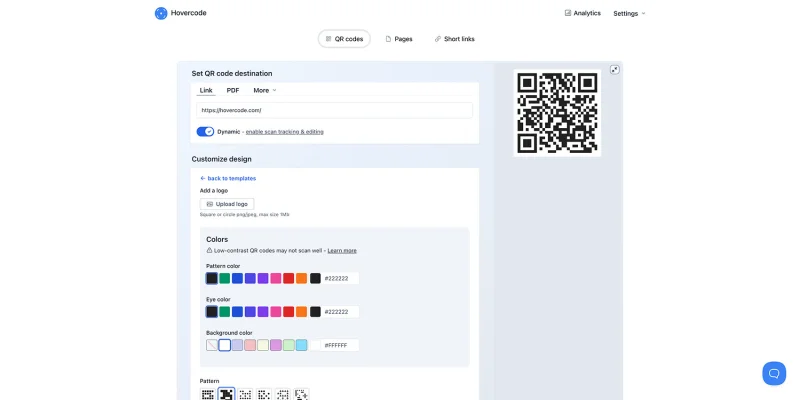
Hovercode is known for its sleek QR codes. It is a design-led, trackable, and brand-aligned platform, making it another solid choice for brands.
Logo Integration
To create a QR code with logo in the middle using Hovercode, you’ll have to upload your own brand’s logo. The platform doesn’t offer pre-existing QR codes with logos.
You don’t have to sign up to create. Uploading the logo is extremely easy.
More Customization Options
Although there are a few customization options available, they are not particularly advanced. Here are the available few:
- Colors: There are eight standard color options available. Apart from black and white, colors such as red, orange, purple, blue, and more are available.
- Eye color: The available eye colors match the colors of the QR code.
- Pattern: Six basic QR code patterns are available for you to choose from.'
- Eye style: You can choose from four basic eye styles and place them on your QR code.
Verdict
The logo customization options available to you on this platform are intuitive and beginner-friendly. It will help you design visually balanced QR codes.
The final look of the QR code with a logo will be sharp, print-ready, and professional.
However, it’s important to know that, unlike the other platforms on this list, Hovercode doesn’t offer predesigned logo templates. So everything you do, you’ll have to do it yourself.
Pricing
QR code generation and basic customization are free. Access to advanced features starts at $12 per month.
6. Flowcode
Flowcode is extremely popular among marketers and creators because it enables businesses to create dynamic, visually appealing QR codes that seamlessly integrate with their branding, enhancing their overall presence.
Logo Integration
Flowcode is best suited for industry use. Even the features provided by the platform are of a highly professional nature. In short, the platform lacks unconventional design features you can find in other websites.
To generate a QR code with a logo using Flowcode, you’ll need your own brand’s logo since it doesn’t offer pre-existing logo designs.
More Customization Options
Here are some basic, yet professional-looking options provided by Flowcode.
- Colors: You can choose a color you like from over 23 different options. The color palette is standard.
- Frame: The platform has a frame on or off option. If you enable this option, your QR code will have a black border.
- Square or circle: Choose a shape for your QR code. Since the platform is not designer-friendly, you can only make either a square or a circular QR code.
Verdict
When we tested it out, we found that the QR codes created using this platform will help users match their brand colors, shapes, and overall aesthetic perfectly.
Specifically, you can upload your logo with just a few clicks and fine-tune its placement for a clean, balanced look.
However, this is not the best choice if you want to experiment with your options. Flowcode is more professional, and to unlock its advanced features, you’ll have to subscribe.
Additionally, if you opt for the free tier feature, you may find the platform’s watermark restrictive.
Flowcode is ideal for businesses, influencers, and marketing teams that require a QR code for both printed and digital use. These codes can help in creating a successful marketing campaign.
Pricing
Starter plans begin at $25 per month.
7. QRFY
QRFY is a simple but powerful generator. The platform offers a clean interface, a variety of templates, and both static and dynamic code options.
Logo Integration
On the QRFY platform, select the solution you want to create and customize the QR code with your brand’s logo.
If you don’t want to use your brand’s logo, there is an array of preexisting logos for you to choose from.
The platform provides several advanced customization options, which will make your QR code more attractive.
More Customization Options
Here are some of the customization features offered by the platform:
- Frame: Choose from over 30 cute frame designs. You can add text and change the text color, QR code color, and background color as desired.
- Shape: The platform categorizes the shape into three for the QR code style, border style, and center style. You can experiment with more than 20 options of each type to create a unique QR code.
- Error Correction Level: The QRFY platform generates QR codes in four different levels: Q, H, M, and L. Choose from one of these levels to finish the look.
Verdict
The overall output provided by QRFY is of high quality and can be utilized for any campaign you prefer.
However, in comparison with other platforms, QRFY doesn’t offer many pre-designed layouts.
These custom QR codes will be most useful for you to get feedback from the audience after the campaign.
This custom QR code generator with logo is ideal for small businesses, startups, and freelancers who require a straightforward solution for generating QR codes without advanced design flexibility or data-rich campaign tracking.
Pricing
QRFY has unique pricing. You can save up to 50% if you choose its one-year plan for $19.99.
Wrapping up
There are plenty of QR code maker websites that let you create a custom QR code with logo in the middle.
The real trick is picking the one that actually fits your goals — whether that’s branding, design flexibility, or just something quick and easy. So look at what you need, match it with the right tool, and you’re set.
Ready to start? Pick the most advanced QR code generator from this list and create your first branded QR code today. 
FAQ
How to make a QR code with a logo in the middle?
You can create a QR code with a logo using an online QR code creator that offers logo customization options. Simply choose your QR code type, enter the required information, upload your logo, adjust its size and position, and download the finished design.
Can you put a logo inside a QR code?
Yes, you can! Many modern QR code generators let you add your brand’s logo inside the code without affecting its scannability, as long as the logo doesn’t cover too much of the QR pattern.
Does the middle of a QR code matter?
Yes, the middle of a QR code does matter. This is the part of the QR code where most people place logos or images. If this area is covered too much or designed incorrectly, it can interfere with the code’s ability to scan.
This article is for general informational purposes only and does not constitute legal, financial, or other professional advice. For questions about QR TIGER's products or services, please contact our support team at [email protected].
Was this article helpful?
Maximize Scans with the Best QR Code Generator
Join thousands of global brands using QR TIGER to manage dynamic routing, bulk creation, and deep attribution analytics.
Get Started For Free
