
8 Trusted QR Code Generators with Password Protection
 By Regie
Privacy-conscious brands and marketers go for password-protected QR codes to safeguard their confidential information from tampering or unauthorized access.
KeepNet’s research indicates that most QR code phishing or quishing attacks (90%) target login credentials and sensitive data from cloud storage platforms and email systems.
While QR codes may not be the primary threat (their unsecured destinations are), using one for sharing exclusive links, files, pages, or private content without additional security exposes them to cybersecurity threats.
Organizations must use trusted QR code generators with password protection to encrypt them, keeping their data safe from leaks.
We reviewed eight QR code providers that offer this security feature on QR codes. These platforms diligently follow data privacy protocols and have compliance certifications.
Let’s go over them.
Table of Contents
The most trusted QR code generators with password protection
Features | QR TIGER | Scanova | Uniqode | QR Code Chimp | QRFY | QRStuff | QR Code Kit | QR Planet |
| Password Protection | ✅ | ✅ | ✅ | ✅ | ✅ | ✅ | ✅ | ✅ |
| GDPR | ✅ | ✅ | ✅ | ✅ | ✅ | ✅ | ✅ | ✅ |
| CCPA | ✅ | ❌ | ❌ | ❌ | ❌ | ❌ | ❌ | ❌ |
| ISO/IEC 27001 | ✅ | ✅ | ✅ | ❌ | ❌ | ❌ | ✅ | ❌ |
| SOC 2 | ❌ | ❌ | ✅ | ❌ | ❌ | ❌ | ❌ | ❌ |
| HIPAA | ❌ | ❌ | ✅ | ❌ | ❌ | ❌ | ❌ | ❌ |
| SSL | ✅ | ✅ | ✅ | ✅ | ✅ | ✅ | ✅ | ✅ |
| AWS | ✅ | ✅ | ✅ | ❌ | ❌ | ❌ | ❌ | ❌ |
| TLS | ❌ | ✅ | ❌ | ❌ | ❌ | ❌ | ❌ | ❌ |
| 2FA | ✅ | ✅ | ❌ | ❌ | ❌ | ✅ | ❌ | ✅ |
| SSO | ✅ | ✅ | ✅ | ✅ | ✅ | ✅ | ✅ | ✅ |
| MFA | ❌ | ❌ | ✅ | ✅ | ❌ | ❌ | ❌ | ❌ |
Password protection is a non-negotiable feature that every QR code generator should have. If you can’t find it in the platform you’re using right now, it’s better to ditch it and find one that prioritizes data security above everything else.
We’ve rounded up the most secure QR code generators today, highlighting their strengths and data security features, to help you find the one most suited to you.
1. QR TIGER
⭐ Ratings
- G2: 4.8 stars
- Trustpilot: 5 stars
- SourceForge: 4.8 stars
- App Store: 4.8 stars
- Google Play: 4.6 stars
QR TIGER is one of the most trusted QR code generators with password protection for dynamic QR codes, ensuring the content remains secure and safe from breaches.
You can add passwords to QR codes for PDFs, videos, links, forms, landing pages, or even vCards. When someone scans your QR, they’ll be asked to enter the password you’ve set before they can view the file or link.
To enable password protection, log in and click “My Account” and then “Dashboard.” Under “MY QR CODES,” select the QR code or campaign, then click “Password.” Toggle off “Disable your password,” type your preferred password, then click “Save.”
You can also edit, change, or remove the password protection at any time.
The platform offers a free plan with basic features, while password protection and advanced analytics are available under its paid subscriptions.
QR TIGER maintains its clients’ QR code privacy by adhering to various data security protocols, including the General Data Protection Regulation (GDPR).
It’s also certified to ISO 27001:2022, which demonstrates that the platform has met the requirements for maintaining and protecting the confidentiality and security of its information assets.
It’s a smart pick for teams that highly prioritize privacy, brand control, and secure marketing campaigns.
- ISO Certifications: ISO 27001:2022
- Data Security Compliance: CCPA, GDPR, SSL
- Authentication System: Secure Sockets Layer (SSL), Single Sign-On (SSO), and two-factor authentication (2FA)
2. Scanova
⭐ Ratings
- G2: 4.6 stars
- Crozdesk: 4.6 stars
Scanova is a feature-packed generator that emphasizes control and security for organizations. It supports password protection for dynamic QR codes, allowing you to restrict access and change the password at any time without altering the printed code.
As you create or edit your QR code, you can add a passkey to it. Just toggle to “Password Protection.”
Advanced campaign management tools, such as password protection, are available under paid tiers.
Scanova is suitable for corporate teams, event organizers, and educators who value data security and professional tracking.
- ISO Certifications: ISO/IEC 27001:2022
- Data Security Compliance: GDPR and SOC2
- Authentication System: Secure Sockets Layer (SSL), Single Sign-On (SSO), and two-factor authentication (2FA)
3. Uniqode (Beaconstac)
⭐ Ratings
- G2: 4.8 stars
- Truspilot: 2.6 stars
Formerly called Beaconstac, Uniqode is also one of the most trusted QR code generators with password protection that focuses on enterprise-level security. According to its website, the company complies with SOC 2 Type 2, HIPAA, and GDPR, and is ISO 27001:2022 certified.
Its password protection feature works seamlessly with dynamic QR codes and includes options for changing passwords or setting expiration dates.
The platform uses encrypted links to ensure that even if someone accesses your QR code, they can’t view the content without authorization.
To set up password protection, create a dynamic QR code, and enable “Password Protection” under the “Advanced Settings” dropdown. Then, you can set a custom password for added security.
While it only offers a 14-day free trial, the paid plans justify the cost with enterprise-grade security, compliance features, and priority support.
Uniqode fits large companies, healthcare providers, and brands that prioritize security and detailed analytics.
- ISO Certifications: ISO/IEC 27001:2022
- Data Security Compliance: HIPAA, GDPR, and SOC2 Type 2
- Authentication System: Secure Sockets Layer (SSL), Single Sign-On (SSO), and multi-factor authentication (MFA)
4. QR Code Chimp
⭐ Ratings
- G2: 4.9 stars
- Trustpilot: 3.2 stars
QR Code Chimp provides a balance of simplicity and security.
The platform enables users to easily add passwords to some of their dynamic QR code solutions, ensuring that only permitted individuals can view the linked content.
To set up password protection, select the supported QR code solution and create your QR code. Then, during the setup process, find and enable “Passcode Protection.” From there, you can enter your preferred password and set a session timeout for added control.
You can use it for file sharing, event links, or private pages. Password-protected QR codes are available under free and paid plans.
QR Code Chimp is ideal for freelancers, small businesses, and educators who want a simple yet secure QR code generator that requires minimal learning curve.
- ISO Certifications: N/A
- Data Security Compliance: GDPR and SOC2 Type 2
- Authentication System: Secure Sockets Layer (SSL), Single Sign-On (SSO), and multi-factor authentication (MFA)
5. QRFY
⭐ Ratings
- G2: 4.7 stars
- Trustpilot: 4.1 stars
- Sourceforge: 1.1 stars
QRFY takes a straightforward approach to secure QR code sharing. It lets users create a free password-protected QR code for specific QR code solutions. This is particularly handy for sending confidential materials or hosting private promotions.
To enable password protection, look for the “Configuration” dropdown and click “Password. " Then toggle the “Activate password to access QR code” option and input your desired password.
QRFY offers a free seven-day trial; however, if you require password protection, you must upgrade to a paid plan.
Still, it’s a strong choice for small teams, educators, and personal users who need quick setup and reliable privacy features.
- ISO Certifications: N/A
- Data Security Compliance: GDPR
- Authentication System: Secure Sockets Layer (SSL) and Single Sign-On (SSO)
6. QRStuff
⭐ Ratings
- G2: 3.9 stars
- Trustpilot: 4.6 stars
QRStuff keeps things simple for users who want password protection. It offers a basic but functional way to create QR codes with password protection for different QR code solutions.
The setup process is fast. First, create a dynamic QR code and, under the “Advanced Settings” dropdown, toggle “Enable Password Protection”. Then, you can set a custom password.
While it doesn’t include advanced analytics or design customization, QRStuff is known for reliability and ease of use. It’s a solid choice for temporary or small-scale sharing where simplicity takes precedence over analytics.
The platform provides a free plan with core features, while premium subscriptions unlock advanced tracking and customization options.
QRStuff works well for teachers, small projects, or anyone who needs secure access control without complications.
- ISO Certifications: N/A
- Data Security Compliance: GDPR
- Authentication System: Secure Sockets Layer (SSL), Single Sign-On (SSO), and two-factor authentication (2FA)
7. QR Code Kit
⭐Ratings
- G2: 4.5 stars
- Trustpilot: 4.9 stars
QR Code Kit is an excellent option for users who want strong data protection with marketing-friendly features.
The platform lets you create dynamic QR codes with password access, keeping sensitive content private. You can also modify the password or linked content without creating a new QR code.
To enable password protection, just log in and select a QR code or campaign, then click the three-dot icon (• • •), choose “QR settings,” and enable “Password protection”. Enter your preferred password, then click “Save.”
The QR Code Kit offers both free and paid plans, with password protection available in higher-tier plans.
It’s ideal for marketers, agencies, and educators who need both secure sharing and audience tracking.
- ISO Certifications: ISO/IEC 27001, ISO 9001, ISO 14001, IEC 18004:2024
- Data Security Compliance: GDPR
- Authentication System: Secure Sockets Layer (SSL) and Single Sign-On (SSO)
8. QR Planet
⭐Ratings
- G2: 4.8 stars
- Trustpilot: 4.8 stars
QR Planet positions itself as a business-friendly QR code platform that prioritizes data security.
The platform offers password protection for dynamic QR codes, allowing only authorized users to access the content. It also lets you update the password, change the target link, and manage multiple campaigns simultaneously.
The setup is quick: create a dynamic QR code, go to the “Options” dropdown, select “Password,” toggle “Activated?”, enter your custom password, and click “Set New Password.”
The platform offers a free version, but with limited access. There’s also a 7-day free trial for the Pro version, which includes password protection. The premium plans unlock additional features like branded domains and expanded analytics.
QR Planet is ideal for businesses, agencies, and organizations seeking secure, manageable, and brand-consistent QR code solutions.
- ISO Certifications: N/A
- Data Security Compliance: GDPR
- Authentication System: Secure Sockets Layer (SSL), Single Sign-On (SSO), and two-factor authentication (2FA)
Why add password protection to QR codes?
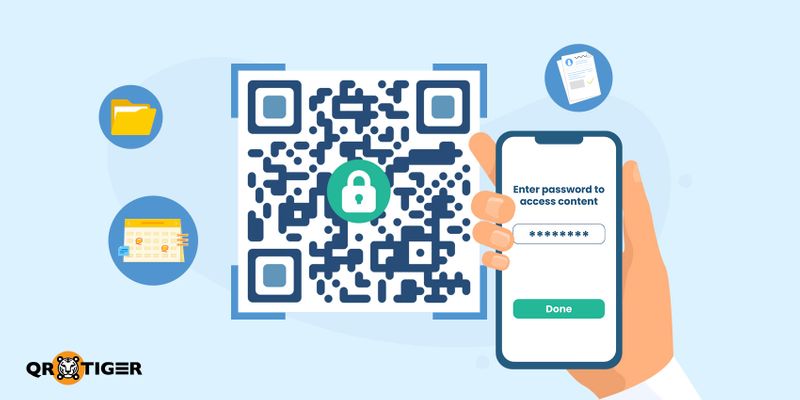
A typical QR code works like a door that’s constantly open. Meaning, anyone who scans it gains access. Adding a password to it is like installing a smart lock on that door. It keeps random scanners out and your private content safe.
Is a QR code generator safe? Yes, but it also depends on what platform you use and how you secure your QR code.
Using a reliable QR code software will allow you to:
- Protect sensitive files, such as contracts, reports, or class materials, to ensure confidentiality.
- Control access to event invites, links, or gated promotions.
- Avoid unwanted sharing when QR codes end up online.
- Add elements that verify the authenticity of QR codes to demonstrate your commitment to data security and integrity.
In short, you’re giving people the correct key, not just free entry.
Questions to ask yourself when choosing a QR code platform

Choosing the right QR code platform with password protection is crucial, but you also want something that is both secure and easy to use. You don’t want to sacrifice security for convenience (or the other way around).
Here’s a simple checklist to help you pick the best one for your needs.
Security features
- Does the platform offer password protection?
- Can you set access control options?
- Is the platform security compliant?
- Does the platform provide encryption?
User experience
- Is the platform easy to use and mobile-friendly?
- How fast and easy is the setup process?
- Does the platform offer reliable performance?
Access control
- Can you set access restrictions for different users?
- Does it support additional security layers (e.g., 2FA, SSO)?
Password setup
- Is it easy to create and set a password?
- Can you easily change or manage passwords?
End-user experience
- What does the password page look like for someone scanning the code?
- Is it clear, simple, and easy to use?
Tips for securing password-protected QR codes
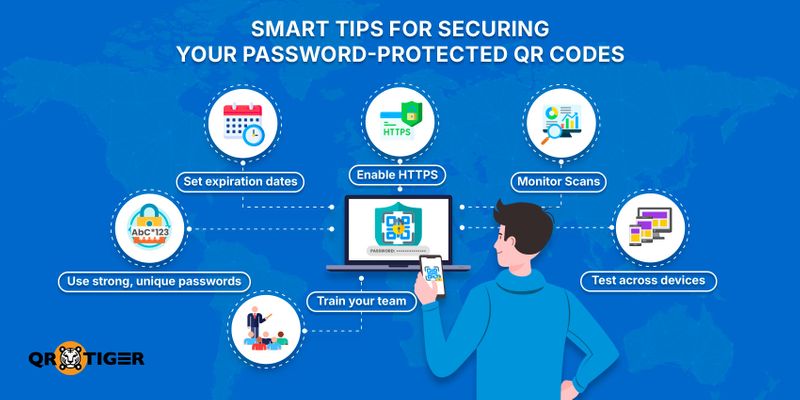
Password protection is a good start, but proper security requires a bit more attention to detail. Here are some smart habits to keep your QR code marketing campaigns safe and trustworthy:
- Use strong, unique passwords. Mix letters, numbers, and symbols, and avoid reusing the same password across campaigns.
- Update passwords regularly. Change them every few months or right away if you suspect a leak.
- Share passwords separately. Don’t print or display the password beside the QR code. Send it through a private message or email instead.
- Enable HTTPS. Ensure the pages or files your QR links point to use secure (https://) connections.
- Set expiration dates. For time-sensitive campaigns, schedule when the QR code stops working.
- Monitor scans. Check analytics for sudden spikes or unusual activity that may indicate unauthorized sharing.
- Avoid linking confidential data directly. Keep private information behind an additional layer, such as a login page or an encrypted file.
- Test across devices. Always scan using different phones, apps, and QR code scanners to make sure access and password prompts work smoothly.
- Keep backups. Save copies of your QR content and credentials in case you need to recover them.
- Train your team. If multiple people manage QR projects, ensure they follow the same security protocols.
These simple measures go a long way. Combine password protection with consistent monitoring and smart password habits, and you’ll have a solid, secure setup that keeps your shared content private.
TL;DR
- A NordVPN study found that nearly three-quarters of Americans scan QR codes without verifying them.
- A password-protected QR code ensures only authorized users can access its content.
- It is ideal to use when sharing sensitive files, event invites, or private promotions.
- Platforms like QR TIGER, Scanova, and Uniqode offer robust security features and analytics.
- The QR code generators are easy to use, mobile-friendly, and compliant with data security standards.
- They allow you to modify passwords, track scans, and customize branding for a professional touch.
- It is essential to set up strong, unique passwords for the QR codes and regularly update them to maintain security.
Wrapping up
Relying on trusted QR code generators with password protection is a wise choice to keep your content safe and secure while still making it easy for the right people to access.
By selecting the right platform, you can access all the necessary security features, including password protection, encryption, and compliance with data protection laws, without compromising on ease of use.
So, next time you need to share sensitive content, don’t just settle for any QR code. Choose one that offers the best security features, a user-friendly setup, and flexibility.
FAQ
What is the safest QR code generator?
QR TIGER is one of the safest QR code generators, offering password protection, 2FA, GDPR compliance, and ISO 27001-certified security.
How to create an encrypted QR code?
To create an encrypted QR code, choose a QR code generator that offers password protection or encryption, enter your content, enable the security option, set a password, and save the QR code.
This article is for general informational purposes only and does not constitute legal, financial, or other professional advice. For questions about QR TIGER's products or services, please contact our support team at [email protected].
Frequently Asked Questions (FAQ)
What is the safest QR code generator?
How to create an encrypted QR code?
Was this article helpful?
Maximize Scans with the Best QR Code Generator
Join thousands of global brands using QR TIGER to manage dynamic routing, bulk creation, and deep attribution analytics.
Get Started For Free
