
How to Generate a Customized Round QR Code

TL;DR
- Yes, QR codes can be round or circular: the code stays square for accuracy, but tools like QR TIGER let you customize a QR code with a rounded frame and dotted eyes and patterns for a circular look without breaking scannability.
- Creating a circle (or round) QR code is simple: Use a QR code generator with rounded corner designs or frames, choose a QR code solution and type, generate QR code, customize the QR code with a round design, test its scannability across devices, and download it in a high-quality format for digital or print use.
- Best practices for reliability: avoid unrelated design elements that hurt scannability, never invert colors, include a clear call to action, use a dynamic QR code for better code quality and design flexibility, and optimize content for mobile users.
Table of Contents
A round QR code or circle QR code gives your design a sleek, modern twist, helping your brand stand out while keeping it functional.
Unlike the usual square format, this stylish alternative blends seamlessly into packaging, business cards, and marketing materials without looking out of place.
The best part? You don’t need to be a designer to create one. With the right tools, you can generate a customized QR code that matches your brand’s style in just a few clicks.
Stick around as we walk you through the steps to effortlessly create one using the best QR code generator available!
QR code circle: Is it possible?
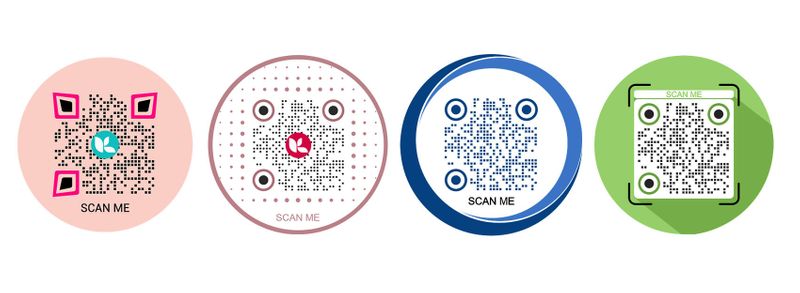
Absolutely. It is possible to make a circular QR code or a QR code with a round design.
All you have to do is use QR code software with an impressive customization tool that offers a wide range of QR code design elements.
It's super easy to make your QR code circle. Using QR TIGER, you can do so in just a few steps. Learn how to do it below using a circle QR code generator.
How to create a round QR code for free
Step 1. Go to QR TIGER
QR TIGER QR code generator allows you to customize and make circular QR codes. You can also add a logo, image, and icon to your QR code to make it branded and even more appealing.
Step 2. Choose your QR code solution
There are many types of QR solutions you can generate using an advanced circular QR code generator. For example, if you need to convert your PDF to a QR code, click the file category and upload your PDF.
Using QR TIGER's file QR code feature, you can convert any type of file into a QR code.
Step 3. Switch to dynamic QR code
Dynamic QR codes allow you to edit a QR code to a different landing page, even though your QR codes have been printed. This makes dynamic QR codes cost-efficient, as you don’t need to reprint them.
Step 4. Generate QR code
After you have entered the information in your corresponding QR code solution, click the “Generate QR code” button to start generating your QR code solution.
Step 5. Customize your QR code and select the round option
This is the time when you personalize your QR code. You can add colors, design the pattern of your QR code, add a logo, personalize your QR code shapes by modifying the frame, etc.
On the customization tool, navigate to Frame and select a rounded QR code frame to make your QR code circle.
Step 6. Do a scan test
Before you print your round QR code, always run a scan test first. This is to make sure that the QR code redirects the scanners to the correct information.
Step 7. Download your circle QR code and print
You can download your circular QR code in EPS, SVG, and PNG formats. If you need to print your QR code at a larger size without compromising quality, the EPS and SVG options are your best choices.
Best practices when making your round QR code
When creating your round QR code, keeping the design clean and focused is important. Here are key tips to ensure your QR code works effectively:
Avoid adding unrelated images
Since you need to customize your QR code into a circular image, you need a circle QR code maker that lets you do so.
When customizing your QR code, avoid adding unrelated images that may interfere with scanability. Customize your QR code within the elements available in the QR code software that you are using.
Don’t invert colors
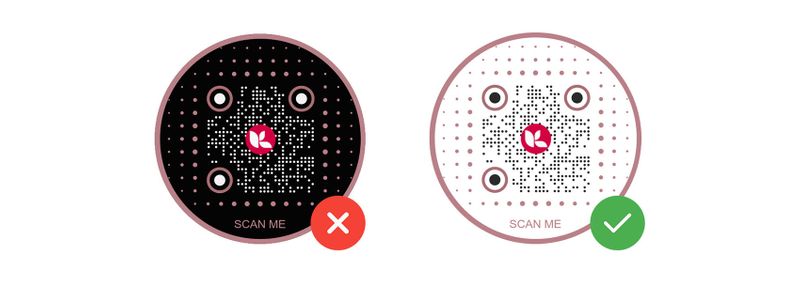
Never ever invert the colors of your QR code. That way, the QR code scanner detects it faster.
QR codes are set to scan QR codes faster if it is non-inverted in color. If you invert the color of your QR code, it might be hard to read, or worse, it might never be read at all.
You may also read: 12 Reasons Why Your QR Code is Not Working
Add a clear call to action
Your QR code should engage users with a clear call to action. Adding a call to action is one of the most important elements of your QR code, along with its design.
You need to instruct scanners to scan your QR code by using a CTA such as “Scan me” or “Scan to see a video!”
A QR code without a call to action hardly gets noticed or scanned. You need to give your target audience a preview of what they can expect when they scan your QR code.
Use dynamic QR codes
If you’re using your circle QR code for marketing, or in the long run, dynamic QR codes are always a better option for a flexible QR code campaign where you can edit and track your QR code scans.
Optimize your landing page for mobile
Most QR scans will come from mobile devices, so make sure your landing page (the information you have embedded in your QR) is mobile-friendly and not heavy to load.

Customize your QR codes with style
A round QR code adds a stylish, contemporary flair to your design while preserving full functionality. Modifying your QR codes can enhance their visual appeal and better align them with your brand or personal aesthetic.
Minor design adjustments, such as selecting the appropriate colors and incorporating a logo, can have a significant impact. Before using your QR code, test it to ensure it scans properly.
For the perfect blend of style and reliability, use the best QR code generator to create a design that truly stands out.
FAQ
Can a QR code be round?
Yes. Using a circle QR code generator, QR codes can be designed with rounded edges or a circular appearance while still maintaining full functionality. While the core structure of a QR code remains square for scanning accuracy, design tools let you customize its shape to better align with your branding.
How to shape a QR code?
You can customize the shape of a QR code using advanced QR code generators with design features. These tools let you round the edges, change patterns, and add colors or logos while ensuring the code remains scannable.
Can QR codes be curved?
While QR codes themselves are typically square, their design elements—such as dots and patterns—can be adjusted to create a curved or circular look. This is done through customization tools that modify the visual appearance without affecting scanability.


