
7 Top-Rated QR Code Generators with Expiry Features

QR codes have become a go-to solution for running a time-bound campaign. It’s especially beneficial if you use a QR code generator with expiry features, as you can activate and deactivate a QR code as needed.
Anyone scanning the QR code won’t land on outdated or irrelevant content once your campaign ends. This also serves as a security measure against further unauthorized access.
In this guide, we explore seven QR code generators designed for creating temporary QR codes to help you choose the right platform for your next project.
Table of Contents
- Do QR codes expire?
- How we compared QR code generators with expiry features
- Top 7 QR code generators with expiry features
- 1. QR TIGER
- 2. QR Code Dynamic
- 3. QRCodeChimp
- 4. Scanova
- 5. Bitly
- 6. Delivr
- 7. QR Code Matic
- Table summary of comparison
- Why do you need more than a free QR code generator with no expiration?
- TL;DR
- QR code expiration: The secret sauce to your campaign strategy
- FAQ
Do QR codes expire?
Many people commonly ask these two questions: Do free QR codes expire? How long do QR codes last?
And here’s the answer: A static QR code does not expire because it permanently stores the information. As long as the content remains accessible, it continues to function without issue.
A dynamic QR code, on the other hand, can be deactivated if the creator sets an expiration for it.
An expiry feature lets you control:
- When a QR code works
- When it stops working
- What users see after it expires
When the pre-set time or condition is reached, the QR code will either stop working or redirect users to a different link.
For example, a store running a Valentine’s Day sale may allow the QR code to work only on February 14. After that day, the code can show an “Offer expired” message instead.
How we compared QR code generators with expiry features
We based our assessment on the following factors to find the best QR code generator with expiry features.
- Expiry options: Can you set expiry by date, time, number of scans, or manual control?
- Ease of use: How easy is it to edit, pause, or turn off QR codes?
- Scalability: Can the tool handle small or large campaigns?
Top 7 QR code generators with expiry features
If you’re planning a time-bound promotional campaign, consider testing the following platforms:
1. QR TIGER
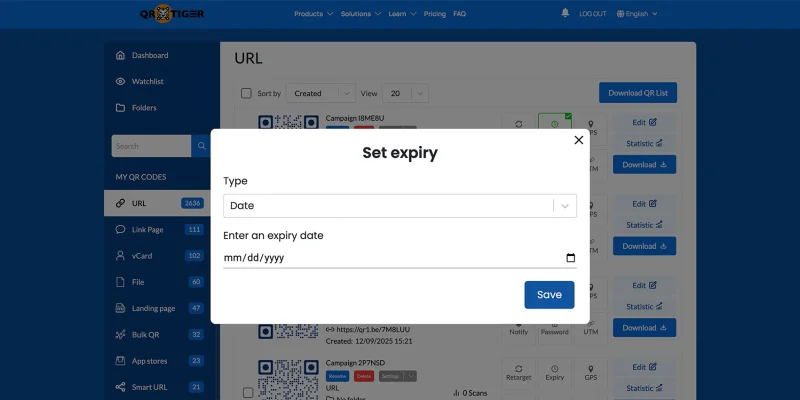
QR TIGER generates dynamic QR codes with an expiry setting, providing you with complete control over their activation and deactivation.
It is also the best free QR code generator with no expiry for converting a link to QR code in static or dynamic format under its Freemium version.
⭐ Rated 4.8 stars on G2, 5 stars on SourceForge, and 4.8 stars on Trustpilot
Pros
- You can set the expiration by specifying the date.
- The “number of scans” expiry option deactivates the code once the limit is reached.
- You can control the number of times a specific device (IP) can access the QR code.
- The Smart URL QR code solution allows you to automatically redirect users to new content when a specific condition is met.
Limitations
- The Smart URL QR code’s features may take time to learn.
- Expiry features require a paid plan.
Best for
High-stakes marketing campaigns where timing, access control, and analytics truly matter.
2. QR Code Dynamic
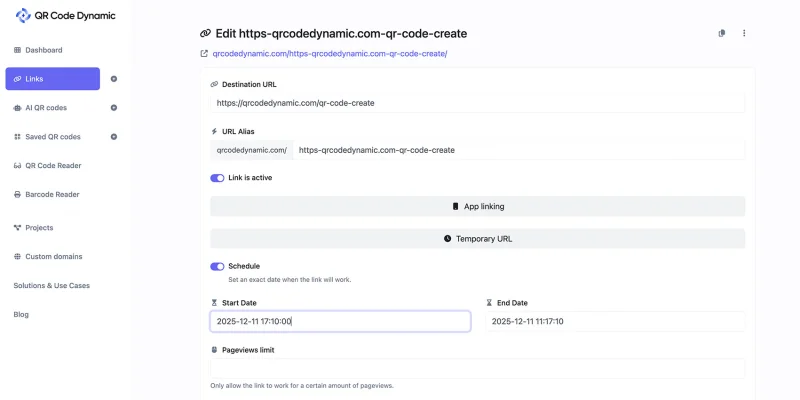
QR Code Dynamic’s expiration setting is quite unique. You only need to toggle “Link is active.” You can also schedule the activation and deactivation of the QR code by specifying the date and time.
⭐ Rated 3.8 stars on Trustpilot
Pros
- You can set activation and deactivation dates and times for dynamic QR codes.
- An option to limit the number of views to the linked content is available.
- You can add an additional link that will redirect visitors to a new page after the main link expires.
Cons
- The schedule setting is placed under “Temporary URL,” a label that may not clearly indicate its purpose to new users.
Best for
Time-scheduled, controlled campaigns where you want clear start and end points, and a fallback page once the campaign is over.
3. QRCodeChimp
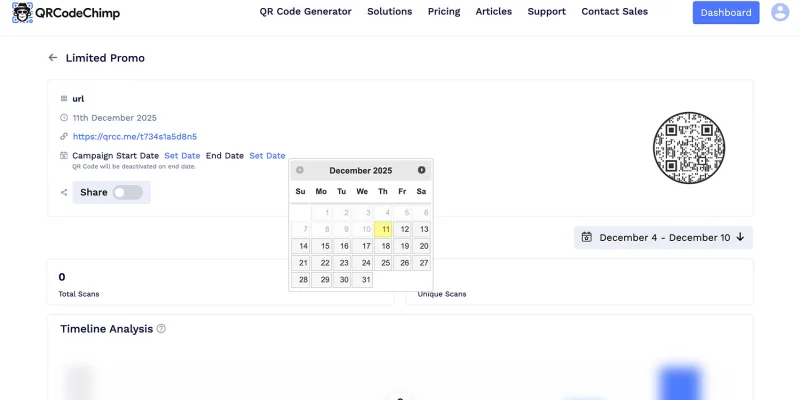
QRCodeChimp’s expiration control is easy. You can do it in two ways: pausing the QR code campaign yourself or scheduling a deactivation date.
⭐ Rated 4.9 stars on G2 and 4.6 stars on Trustpilot
Pros
- You can schedule a start date and an end date for activating your QR code.
- Accessible under a free account.
- It is suitable for mid-scale campaigns.
- SOC 2 Type II certified.
Cons
- The dashboard does not clearly display the “Pause” button for QR code campaigns, making it hard to locate.
- The schedule setting is located under “View Scan Analytics,” rather than being grouped with the related setting. It makes campaign control less intuitive.
Best for
Time-based campaigns that require simple, scheduled activation and deactivation of QR codes, particularly for mid-scale marketing efforts.
4. Scanova
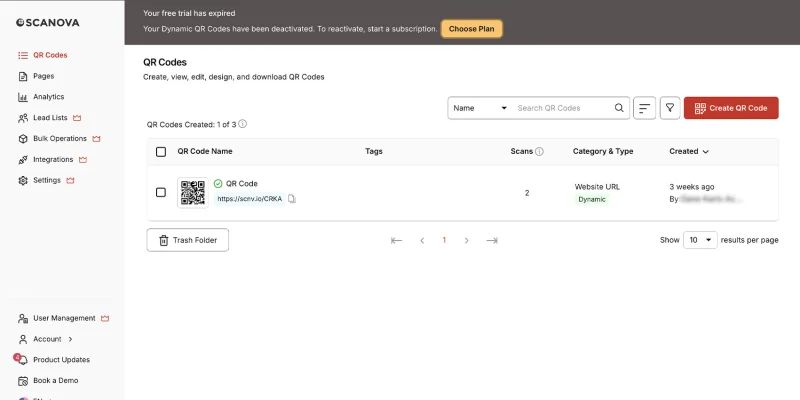
Scanova allows you to create QR codes with specific expiration dates if you have a Pro or Enterprise account.
⭐ Rated 4.6 stars on G2 and 4.7 stars on Trustpilot
Pros
- You can set an expiration date for your QR code.
- The platform gives a 14-day trial for dynamic QR codes during which you can test its features.
- The platform is easy to use.
Cons
- The expiry features of this platform are only accessible if you have an Enterprise or Pro account.
- The pricing for accessing QR code expiration features is high and may not be affordable for everyone.
Best for
It’s useful for campaigns that only require date and time-based expiration and where ease of use matters more than advanced expiry controls or lower pricing.
5. Bitly
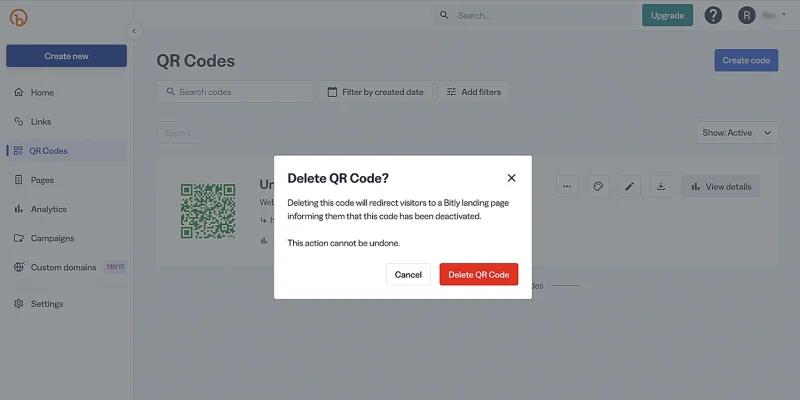
Bitly is primarily known for shortening links, but it also allows you to create QR codes.
⭐ Rated 4.5 stars on G2, 4.7 on SourceForge, and 1.6 stars on Trustpilot
Pros
- It allows you to create free static URL QR codes.
- The platform is suitable for temporary campaigns.
Limitations
- It has no built-in expiry feature. To deactivate, you need to delete the QR code campaign entirely.
- You will need to upgrade to a plan that allows you to create a dynamic QR code and edit the embedded link.
Best for
Small-scale or short-term campaigns where advanced expiry and control aren’t required.
6. Delivr
Delivr focuses on dynamic QR codes for connected packaging and media. It's pretty straightforward as it allows you to edit the code’s design and link, pause it, and archive the campaign.
⭐ Rated 4.8 stars on G2, 5 on SourceForge, and 4.8 stars on Trustpilot
Pros
- Pause or archive the QR code campaign easily.
- You can edit or change the designs and URLs at any time.
- They offer basic analytics for scans.
Cons
- Advanced analytics cost more.
Best for
This platform is suitable for creating and managing QR codes for product launches and other time-sensitive campaigns.
7. QR Code Matic
QR Code Matic provides dynamic QR codes that can be set to expire, making them ideal for time-sensitive campaigns and controlled communication.
⭐ No available ratings on G2, SourceForge, or Trustpilot
Pros
- Allows creation of dynamic QR codes with a basic expiry feature.
- You can set a time frame by which the QR code becomes inactive.
- Strong focus on design, with a wide range of customization options.
- Easy-to-navigate dashboard for quick QR code management.
Cons
- Expiry controls are limited compared to more advanced platforms.
- Not well-suited for large-scale or complex marketing campaigns.
Best for
Temporary campaigns or product launches that need good design and simple control.
Table summary of comparison
| Features | QR TIGER | QR Code Dynamic | QR Code Chimp | Scanova | Bitly | Delivr | QR Code Matic |
| Free Plan | ✅Yes | Trial | ✅Yes | Trial only | ✅Yes | Trial only | ✅Yes |
| QR code dynamics | ✅Yes | ✅Yes | ✅Yes | ✅Yes | ✅Yes | ✅Yes | ✅Yes |
| Expiration/deactivation | ✅Yes | ✅Yes | ✅Yes | ✅Yes | ✅Yes (Via Deletion) | ✅Yes | ✅Yes |
| Expiry based on date | ✅Yes | ✅Yes | ✅Yes | ✅Yes | ❌No | ✅Yes | ✅Yes |
| Expiry based on the number of scans | ✅Yes | ❌No | ❌No | ❌No | ❌No | ❌No | ❌No |
| Advanced analytics | ✅Yes | ✅Yes | ✅Yes | ✅Yes | ✅Yes | ✅Yes | ✅Yes |
| Privacy | GDPR Compliant | Standard Security | ✅Yes | Standard security | Standard security | Standard security | Standard security |
| User-friendly | ✅Yes | ✅Yes | ✅Yes | ✅Yes | ✅Yes | ✅Yes | ✅Yes |
| Best for | Pro marketers, seasonal & large-scale campaigns | Small scale, date-limited | Time-based campaigns | Time-based campaigns | Short-term campaigns | Product launches/media | Temporary/design-focused campaigns |
Why do you need more than a free QR code generator with no expiration?
You might think that an expiring QR code is a drawback, but it is actually helpful. QR code expiration is especially useful when running time-bound promotions or sharing limited-access information.
Here are some benefits of using a QR code generator with expiry features.
- Prevents access to outdated content: A QR code expiry feature automatically deactivates QR codes after a specified condition is met. This ensures that users don’t land on expired offers or irrelevant pages.
- Creates urgency and boosts engagement: Time-limited QR codes create a sense of urgency for action. When users know a code will expire soon, they’re more likely to scan immediately, increasing engagement and conversions.
- Eliminates manual deactivation: No need to track and manually disable QR codes. Once the campaign ends, codes expire automatically, saving time and reducing operational effort.
- Enhances security and data control: Expired QR codes prevent unauthorized access to sensitive or exclusive content, making them ideal for internal use, memberships, or digital tickets. These QR codes ensure data privacy in your digital marketing campaigns.
- Enables better analytics and campaign planning: Expiry-based timeframes help marketers measure engagement during active periods, making performance analysis and future planning more accurate.
- Reduces customer confusion: Instead of leading users to dead or outdated pages, expired QR codes can display a custom message, maintaining clarity and a positive user experience.
These factors make a free, permanent QR code generator with no expiry a significant drawback for use in time-sensitive campaigns.
TL;DR
- QR TIGER is the most feature-rich option for time-bound campaigns, offering flexible expiry controls (date, scans, and duration), SMART URL redirection, tracking, and robust data security for professional marketers and businesses.
- QR Code Dynamic supports basic date-based activation and deactivation, making it suitable for small-scale campaigns with simple expiry needs.
- QRCodeChimp works well for strictly time-based campaigns, with easy start and end scheduling.
- Scanova offers reliable expiration features and a user-friendly experience for users with Pro or Enterprise plans.
- Bitly is useful for short-term or student-led campaigns where basic QR codes are sufficient, as its expiry control requires manual link deletion.
- Delivr is ideal for product launches and connected packaging, allowing URL edits to control QR code validity.
- QR Code Matic suits temporary campaigns and design-focused use cases with its basic expiry options.
QR code expiration: The secret sauce to your campaign strategy
After exploring the top QR code generators with expiry features, ask yourself once again: Do you need date- or scan-based expiry, detailed analytics, or easy scalability? Once you know your needs, select the tool that aligns with your strategy.
Our top recommendation is QR TIGER. Its advanced expiry settings, SMART URL flexibility, and reliable performance make it the perfect choice for marketers running seasonal promotions, events, or time-sensitive campaigns.
Select the best QR code generator and maintain control over your campaigns to deliver a seamless experience that keeps your audience scanning, clicking, and converting.
FAQ
Can you renew an expired QR code?
Yes, you can renew an expired QR code, but it depends on the type of QR code and the platform you’re using.
If you are using a dynamic QR code, you can extend the expiry date, reactivate the code, or update the destination link through the dashboard by upgrading or renewing your subscription.
How to make a QR code that expires?
To create a QR code that expires, use a dynamic QR code generator with an expiry option and set it to deactivate after a specific date or number of scans. Once that condition is met, the code will automatically stop working or redirect to a custom page.

