
QR TIGER vs QR Code Generator Pro: A Detailed Comparison
 By Jaesny S.
Quick answer: QR TIGER stands out if you need an ongoing, non-expiring tier alongside robust tools for QR code campaigns. QR Code Generator Pro (QRCG) offers dynamic QR codes, hosted pages, and scan tracking across a 14-day trial period. Monthly billing begins at $7 for QR TIGER and $19.99 for QRCG.
This QR TIGER vs QR Code Generator Pro comparison covers free access, pricing, design, tracking, app connections, security, and what happens to your codes when a plan ends.
QR Code Generator Pro is now called QRCG by Bitly, after a rebrand in April 2026. We call it QRCG from here on.
Disclosure: This comparison is published by QR TIGER. We reviewed and tested free and trial plans, key features, and prices on October 22, 2026. Providers may change their offers after this date, so check each official website for the latest details.
Key takeaways
|
Which QR code generator is best for you?
Each dynamic QR code generator fits some uses better than others. Start with what you need the code to do, then pick the platform that fits.
| Your situation | Recommended choice | Trade-off |
| Ongoing free static and dynamic QR access | QR TIGER | Free dynamic codes have a 500-scan limit each and show a QR TIGER logo pop-up when scanned. |
| Short-term access to a wider paid feature set | QRCG | The trial lasts 14 days. |
| Lower-cost paid entry | QR TIGER | Its Regular plan doesn't include bulk creation, GA4, Zapier/HubSpot integrations, retargeting, or expiry controls. These require higher plans. |
| Customize QR code appearance | Either | Both offer plenty of design control, but the options differ. |
| QR-focused marketing campaigns | QR TIGER | Several campaign controls depend on the paid plan. |
| API-based QR workflows | Either | API limits and integrations vary by platform and subscription plan. |
| CRM, automation, and AI-assisted QR workflows | QR TIGER | Some integrations require supported paid plans. |
| Long-term printed dynamic QR codes | Either | Both remain tied to their service and subscription rules. |
Quick verdict: On paid plans, QR TIGER gives you more tools around each campaign: campaign tracking, app connections, and AI tools. Its Advanced plan adds retargeting, bulk generation, and more integrations.
QRCG covers the basics well, including editable dynamic codes, analytics, hosted pages, design, bulk code creation, and an API.
Features and limitations comparison
Note: QRCG features were checked on its website on October 22, 2026. Across the comparison tables, “Not listed” means we did not find the feature during our review.
| Feature | QR TIGER | QRCG |
| Static QR codes | Yes | Yes |
| Dynamic QR codes | Yes | Yes |
| Free static QR codes | Unlimited | Available through its free static generator |
| Free dynamic QR codes | 3 QR codes (500 scan limit each) upon signing up | Dynamic access starts with a 14-day trial |
| Edit the dynamic QR code destination after printing | Yes | Yes |
| Scan analytics and reporting | Yes | Yes |
| Customization features | Yes | Yes |
| Logo upload | Yes | Yes |
| Bulk QR code creation | Yes | Yes |
| API | Yes | Yes |
| Retargeting | Yes | Not listed |
| White-labeling and custom-domain support | Yes, on Premium (1 domain), Professional, and Enterprise plans | Yes, Professional plan and above |
| CRM/automation | Yes (Named integrations + API) | Yes, through API (Named integrations not listed) |
| QR code MCP (for AI workflows) | Yes (Native + Zapier MCP) | Not listed |
| Security certification/compliance | ISO/IEC 27001:2022 | SOC 2 Type 2 compliant |
The key differences to examine are free dynamic code allowances, integration options, white-labeling requirements, and available security assurances.
If you plan to manage multiple campaigns or integrate QR code activity with other tools, compare specific integrations and plan limits before choosing a platform.
Which platform gives you more control over QR code design?
Both QR TIGER and QRCG let you go well beyond a plain black-and-white code. They differ mostly in which settings you can save, reuse, or change later.
Both let you change colors, data patterns, eye shapes, frames, and frame text, and add your logo in QR code campaigns. The table shows only where they differ.
| Design control | QR TIGER | QRCG |
| Solid colors | Yes | Yes |
| Gradient colors | Yes | Not listed |
| Logo upload | Yes | Yes |
| Frames | Yes | Yes |
| Custom CTA/frame text | Yes | Yes |
| Pattern/pixel styles | Yes | Yes |
| Eye/posotion marker customization | Yes | Yes |
| Save design template | Yes | Yes |
| Edit dynamic QR design after creation | Yes, on Advanced and higher plans | Yes |
| High error correction | Yes (All QR codes set to H-level error correction) | Yes |
QR TIGER is a QR code generator with logo customization. It allows users to change colors, data patterns, eyes, frames, and call-to-action text of the code. Designs can also be saved as templates under paid accounts.
Quick definition: Error correction allows a code to still be scanned when part of it is damaged or covered.
The platform currently applies the highest-standard Level H correction to all its QR codes. It can recover up to about 30% of the code’s data if part of it is damaged or covered.
QRCG covers much of the same ground. It comes with ready-made frames, adjustable text and colors, background changes, and logo uploads.
QRCG also lets you pick the level before you download. It supports levels up to about 30%.
What types of QR codes or data types does each one support?
| QR code solution | QR TIGER | QRCG |
| Website/URL | Yes | Yes |
| vCard/digital business card | Yes | Yes |
| File/PDF | Yes | Yes |
| Social media/link page | Yes | Yes |
| Google Forms | Yes | Yes |
| Google Review | Yes | Yes |
| Menu | Yes | Yes |
| App stores | Yes | Yes |
| Landing/hosting options | Yes (dedicated Landing Page / H5 solution) | Yes (business page, feedback, rating, and similar dynamic types |
| Smart/Multi-URL routing | Yes | Not listed |
| GS1/2D barcode | Yes | Yes |
| Yes | Yes | |
| Wi-Fi | Yes | Yes |
| MP3 | Yes | Yes |
| Event | Yes | Yes |
| Video | Yes | Yes |
| Yes | Via website/wocial media | |
| Yes | Via website/wocial media | |
| TikTok | Yes | Via website/wocial media |
| X/Twitter | Yes | Via website/wocial media |
| YouTube | Yes | Via website/URL |
| Yes | Via website/URL | |
| Yes | Yes (listed solution) | |
| Text | Yes | Yes |
| SMS | Yes | Yes |
| Coupon | Via landing page/URL | Yes |
| Image | Via file/landing page | Via image gallery |
| Image gallery | Via landing page | Yes |
| Loaction | Yes | Via website/URL |
Date verified: October 22, 2026
QR TIGER also offers a multi-URL QR code solution on Premium and higher plans. It lets you create a single QR code for multiple page redirects.
Smart or multi-URL redirection can be based on one of the following:
- The number of scans
- The time of the scan
- The location of the scanner
- The device’s language
- Geofencing (a specific scanning area)
QR TIGER has dedicated solutions for Google Forms, Google Reviews, Smart URL, GS1 Digital Link, menu, location, and individual social media platforms.
Meanwhile, QRCG groups its QR code types around hosted destinations like business page, coupon, feedback, image gallery, social media, and video.
How can users generate QR codes in bulk?
For bulk QR code generation, QR TIGER lets you:
- Download the CSV template and add the data for each code.
- Choose static or dynamic QR codes.
- Change the design of a bulk batch from the dashboard.
- Create up to 3,000 QR codes at once on Advanced or higher plans.
- Download the finished QR codes as a single ZIP file.
For updating codes in bulk (dynamic QRs), you can use the same CSV file, edit its contents, and upload it again to change the stored information. No need to generate a new set of QR codes.
QRCG also follows a similar CSV-based bulk code generation process for Dynamic URL, Static URL, Text, and vCard QR codes. Dynamic codes’ destinations and design can also be updated in bulk.
Bulk creation isn't available on the Starter plan. The number allowed per upload depends on the plan: 5 during the trial, 100 on the Advanced plan, and 500 on the Professional plan.
What engagement metrics can you track?
QR TIGER includes total and unique scans, time, device or operating system, and scan location. Supported plans can also add precise geolocation and connect QR activity with other analytics tools.
QRCG tracks scans over time, by operating system, country, and city, and by unique scan. Its data can be viewed by day, week, or month and downloaded as a CSV file.
| Key metrics | QR TIGER | QRCG |
| Total scans | Yes | Yes |
| Unique scans | Yes | Yes |
| Scan time/date | Yes | Yes |
| Device/operating system | Yes | Yes |
| Location | Yes | Country and city |
| Real-time tracking | Yes | Yes |
| CSV export | Yes | Yes |
| Precise geolocation | Premium and higher plans; scanner permission required | Not listed |
| External analytics connections | GA4, GTM, and supported integrations | CSV and API |
| Account-level scan view | Dashboard reporting | Weekly scan counter |
QRCG’s 2026 dashboard update also added a Weekly Scans counter for dynamic QR codes, as well as time-saving features like folders, search filters, and faster redirect and pause controls.
QR TIGER’s dashboard has a similar organization layer, with folders, a watchlist, and a top-10 campaign view that can be filtered by day, week, or month. It also shows performance changes across tracked campaigns.
What campaign controls are available?
| Feature | QR TIGER | QRCG |
| Retargeting | Meta Pixel and Google Tag Manager on supported plans | Not listed |
| Geofencing | Restrict scans to a set geographic area on Premium and higher plans | Not listed |
| Precise geolocation | Tracks more exact scan locations when the scanner gives permission | Country and city scan location |
| Expiration controls | Set by date, number of scans, or one-time scan per IP address | No automatic expiry option listed. Codes can be paused and reactivated |
QR TIGER’s tracking goes beyond scan counts. Depending on the plan, users can work with retargeting, geofencing, precise geolocation, QR code expiration, and Google Tag Manager.
QRCG keeps its campaign management within the dashboard. You can edit destinations, organize code folders, pause or reactivate them, and review scan reports.
What white-labeling and branding options do both platforms offer?
QR TIGER provides white-label/custom-domain options on supported higher-tier plans.
QRCG offers white-labeling on its Professional plan. Users can point a subdomain to QRCG, then use it for short URLs, and SSL certificates for those white-label URLs are currently available on Enterprise.
Which business tools can QR TIGER and QRCG connect with?
Brand and app integrations
If your business uses a CRM platform, check whether the QR code generator connects to it directly or requires an API.
QR TIGER currently documents QR code integrations with HubSpot, Zapier, Canva, Google Analytics, Google Tag Manager, and Monday.com, as well as its API.
QRCG’s documentation covers its API and Canva integration. Its API can create and customize QR codes, update destination URLs, and retrieve scan data from another workflow.
| Business connection | QR TIGER | QRCG |
| API integration | Yes | Yes |
| HubSpot | Yes | Not listed |
| Zapier | Yes | Not listed |
| Canva | Yes | Yes (via Canva app) |
| Monday.com | Yes | Not listed |
| Google Analytics integration (GA4) | Yes | Scan data available through dashboard/API |
| Google Tag Manager | Yes | Not listed |
| MCP | Native + Zapier MCP | Not listed |
QR TIGER also supports a native QR code MCP server and Zapier MCP. Compatible AI tools can create, retrieve, update, and analyze QR codes without requiring every task to be handled from the dashboard.
How do they handle security and privacy?
QR code security matters when a platform handles sensitive or confidential information, which makes data protection an important consideration.
ISO/IEC 27001 is an international standard for information security management. QR TIGER states CCPA and GDPR compliance and is also ISO/IEC 27001:2022 certified.
The platform’s Privacy Policy also explains how it limits access to authorized personnel, collects and processes personal information, and uses safeguards like encryption and password-protected access.
QRCG also announced SOC 2 compliance following an independent audit of its controls.
| Privacy and security | QR TIGER | QRCG |
| ISO/IEC 27001 | Certified | Not listed as its current certification |
| SOC 2 | Not currently listed | States compliance |
| GDPR | States compliance | States compliance |
| CCPA | States compliance | States compliance |
| Team/account controls | 1 user on Regular-Premium; 2 on Professional; team permissions on Enterprise | Team users and permission controls available |
Note that the two standards should not be treated as interchangeable badges. ISO 27001 focuses on how an organization manages information security, while SOC 2 assesses controls against defined trust service criteria.
For businesses with formal procurement or regulatory compliance, the certification name alone is not enough. Its scope, user controls, data-handling terms, and your own requirements also matter.
What is the user experience like?
Translation
QRCG’s software interface is currently available in 6 languages: English, French, German, Italian, Portuguese, and Spanish.
Its public website is localized into additional languages, so the six-language figure specifically applies to the software itself.
However, QR TIGER supports 33 languages across its software experience:
- Afrikaans
- عربي
- Bangla/Bengali
- Dansk
- Deutsch
- English
- Español
- Greek
- Finnish
- Français
- हिन्दी
- Indonesian
- Italiano
- 日本語
- Javanese
- Hungarian
- 한국어
- Melayu
- Dutch
- Norsk
- Punjabi
- Polish
- Português
- Romanian
- Русский
- Svenska
- Tamil
- ไทย
- Türkçe
- Urdu
- Tiếng Việt
- 简体中文
- 繁體中文
Both generators provide multiple translations, which is especially convenient for speakers of diverse languages and for international teams working directly inside the software.
Interface and usability
Both QR code makers have modern interfaces for creating, customizing, and managing QR codes.
QR TIGER also offers a mobile app for Android and Apple devices. Its interface has clear navigation and simple menus for creating and managing the codes.
QRCG has also added folders, search filters, grid and list views, and quicker access to actions such as redirecting or pausing a code.
| User experience | QR TIGER | QRCG |
| Web-based generator | Yes | Yes |
| Static creation before paid signup | Yes | Yes |
| Dedicated mobile app | Yes | Not listed |
| Dashboard folders/organization | Yes | Yes |
| Search/filter QR codes | Yes | Yes |
| Post-creation destination editing | Dynamic codes | Dynamic codes |
Customer support
QR TIGER offers basic support on its Free plan and 24/7 assistance on paid plans, with priority support on Advanced and Premium. It also responds to concerns on its social media channels.
QRCG provides support via email and chat, while its Help Center offers self-service guides.
Pricing and plan limits
Note: Prices are listed in USD. The amount shown at checkout may vary depending on your location and applicable taxes.
QR TIGER pricing and limits
| Plan | Advertised price | Billing basis | QR code limitations |
| Free | $0 | Free | 3 dynamic QR codes with 500 scans each (Unlimited static QR codes) |
| Regular | $7/month | Monthly | 12 dynamic QR codes (Unlimited scans) |
| Advanced | $16/month | Annually | 200 dynamic QR codes (Unlimited scans) |
| Premium | $37/month | Annually | 600 dynamic QR codes (Unlimited scans) |
| Professional | $89/month | Annually | 1,200 dynamic QR codes (Unlimited scans) |
| Enterprise | Custom pricing | Custom | Depends on enterprise package |
Date verified: October 22, 2026
QR TIGER starts with a Free plan for basic QR code creation and management.
Paid plans remove the scan limit on dynamic QR codes while the subscription is active. Higher tiers mainly add more QR capacity and broader campaign, integration, bulk, geolocation, and white-label features, along with higher API request limits.
QRCG pricing and limits
| Plan | Advertised price | Billing basis | QR code limitations |
| Starter | $9.99/month | Annually | 2 dynamic QR codes with up to 10,000 scans each |
| Advanced | $18.99/month | Annually | 50 dynamic QR codes (unlimited scans) |
| Professional | $49.99/month | Annually | 250 dynamic QR codes (unlimited scans) |
| Enterprise | Custom pricing | Custom | Depends on enterprise package |
Date verified: October 22, 2026
QRCG keeps its entry plan fairly small, with two dynamic QR codes and a scan cap for each. From Advanced onward, that cap disappears, and the number of dynamic codes increases.
The Starter plan also has a monthly paid option at $19.99, while Enterprise pricing depends on the company’s needs.
How do the paid plans compare for different budget considerations?
| Billing detail | QR TIGER regular | QRCG starter |
| Monthly | $7/month | $19.99/month |
| Annual | $65/year | $119.88/year |
| Annual savings | $19 | $120 |
(This table compares QR TIGER’s Regular plan vs QRCG’s Starter plan)
QR TIGER offers a higher dynamic QR code allowance as you move up its plans. Advanced includes 200 dynamic codes, compared with 50 on QRCG Advanced, while Professional includes 1,200, compared with 250 on QRCG’s Professional plan.
QRCG's higher-tier plans put more of their increases into user, bulk, and API allowances. Meanwhile, QR TIGER also offers greater bulk creation capacity and higher API request limits, alongside integrations, automation, location tools, and MCP.
What happens when the subscription ends?
QR TIGER’s paid dynamic QR codes require an active subscription. If the plan expires, the dynamic codes stop working. Static codes remain independent of the subscription. Its Free plan remains separate from that paid subscription.
QRCG keeps paid dynamic codes active until the subscription period ends and for another 30 days afterward. During that extra 30-day period, they remain redirected, but users can no longer edit them, according to the platform’s cancellation policy.
Neither platform therefore makes a paid dynamic QR code completely independent of the service behind it. If the QR code is going onto thousands of printed packages, that detail matters more than it might during the first ten minutes inside the generator.
What does each platform offer for free?
Both generators offer free access, but with different inclusions. Here’s a breakdown:
| Free access | QR TIGER | QRCG |
| Static QR codes | Unlimited | Free static generator available |
| Dynamic QR code allowance | 3 free dynamic QR codes | Up to 250 dynamic QR codes shown during our trial |
| Free dynamic QR scan limit | 500 scans per free code | No trial scan limit confirmed during testing |
| Duration | Ongoing Free plan | 14 days |
| Credit card required to start | No | No |
| Scan analytics | Basic analytics for free dynamic codes | Included during trial |
| What happens afterward | The free account remains. Dynamic codes are subject to a 500-scan limit | Trial dynamic codes deactivate unless upgraded |
QRCG’s trial includes customization, scan statistics, bulk upload, and API access.
For short-term feature testing, QRCG opens more of its paid toolset at once. For ongoing free use, QR TIGER gives you more time to actually keep and use what you create.
A scan cap and a trial expiration create different risks. One can stop a code after enough people use it, while the other can stop it because enough time has passed.
When QRCG’s 14-day trial ends, its dynamic QR codes are deactivated and send scanners to a service page instead of the original destination. Static QR codes continue working.
The data from those dynamic codes is retained, but it cannot be viewed again until the account is upgraded. Upgrading later can reactivate the same dynamic QR codes, so users do not need to replace a code already printed solely because the trial expired.
QRCG’s Starter plan adds another type of limit: each dynamic code can receive up to 10,000 scans. After that, an upgrade is needed to keep the code active.
What we found out during code generation and dashboard testing (free trial/version)
We tested what each platform lets us do before we signed up, then checked what changed after we used its free account or trial.
QR TIGER
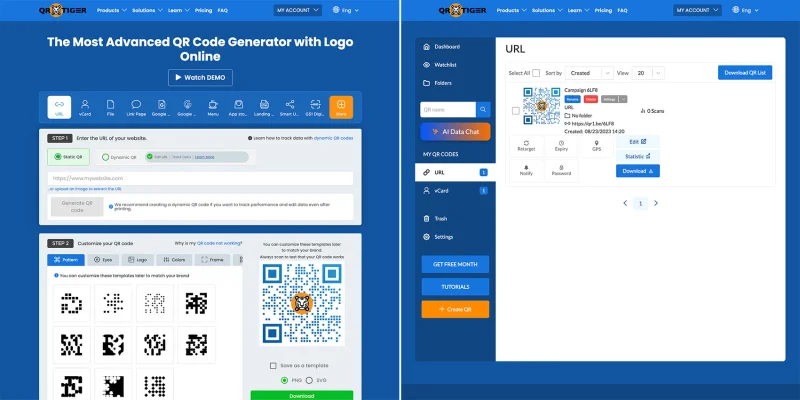
A screenshot of QR TIGER’s generator and dashboard during testing.
We first checked QR TIGER without creating an account, then signed up for its Free plan to see what changed.
What happened after we tested without an account?
QR TIGER lets us create a static QR code. We could customize the design, upload a logo, scan the finished code, and go with the available free download process.
The code itself could be generated without an account, but it could not be downloaded directly to the device at that stage. Instead, QR TIGER offered its free email-based download process.
Since it remained static, its destination could not be edited afterward, and no scan analytics were available.
What happened after we tested with an account (free plan)?
Once we signed up for the Free plan, both static and dynamic QR codes became available. Dynamic codes are stored in the dashboard, where we could update their destination and check basic scan data.
This plan gives three dynamic QR codes with 500 scans each and unlimited static QR codes. Some of the more advanced campaign controls only become available on paid plans.
What happened when we scanned the codes?
Both static and dynamic codes were scanned without issues. The static QR code went straight to the encoded destination, while the free dynamic code also reached the correct page.
That aside, QR TIGER’s logo appears during the dynamic scan, whereas paid plans remove it.
| What we checked | Result |
| Generate a static QR code with no account | Can create and customize a static QR code before signing up. |
| Download options without an account | Direct device download was not available. Free email-based download was offered instead. |
| Customize QR code design | Colors, patterns, frames, eyes, and other design settings could be changed. |
| Upload a logo | A custom logo could be added before download. |
| Create static QR codes on Free plan | Static QR codes remain available after signing up. |
| Create dynamic QR codes on Free plan | Dynamic QR codes became available under the Free plan. |
| Saved in dashboard | Dynamic QR codes were stored in the dashboard for later management. |
| Edit destination after creation | The destination could be changed for dynamic QR codes without creating a new code. |
| Scan analytics | The dashboard recorded total scans, device or operating system information, scan locations, and activity over time. |
| Retargeting | The option was visible but required a higher-tier plan. |
| Expiration controls | QR expiration settings required a higher-tier plan. |
| GPS/location controls | More precise location controls required a higher-tier plan. |
| Scan notifications | Scan notification settings required a higher-tier plan. |
| Password protection | Password protection required a higher-tier plan. |
| Scan experience | Both static and dynamic codes opened the right destination without issues. |
| File formats | PNG and SVG were the only ones available during the free plan. |
| Ads or branding during scan | A QR TIGER logo pop-up appeared when scanning the free dynamic code. Paid plans remove it. |
Features checked: October 22, 2026
The Free plan is enough to compare how its static and dynamic codes behave in actual use. The main limit on the dynamic side is 500 scans per code.
QRCG
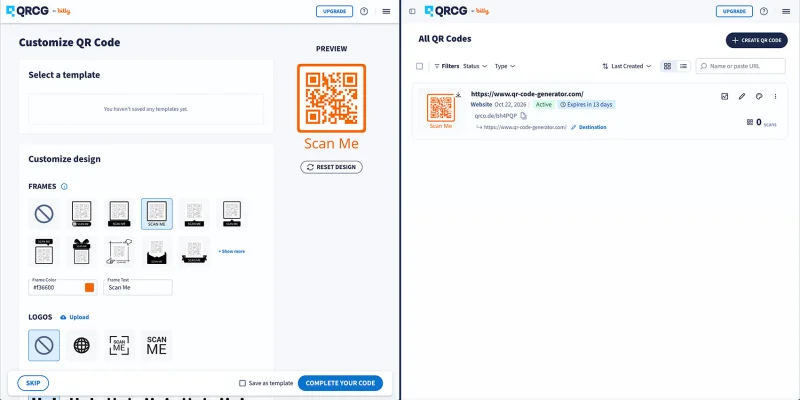
A screenshot of QRCG’s generator and dashboard during testing.
We tested QRCG first without an account, then signed up to see what changed once its 14-day trial was activated.
What could we do before signing up for QRCG?
The generator gave us several free static options. During our test, Website, digital business card, Text, and Wi-Fi were immediately visible.
There was no obvious “static” label during creation. Instead, the difference appeared in the Scan Tracking control. With tracking turned off, the code remained non-trackable. Turning it on changed the code to dynamic, since scan tracking relies on a redirect rather than storing the destination directly in the QR pattern.
We could change the colors, frame, eyes, and QR pattern without signing up. However, uploading a logo and downloading the finished code required an account.
What changed during QRCG's 14-day trial?
After signing up, our account automatically entered QRCG’s 14-day free trial. We chose “For personal use” during onboarding, although this appeared to be an account setup choice rather than a feature restriction.
The dashboard then opened up a much wider set of QR code types and management tools. Our trial account showed an allowance of up to 250 dynamic QR codes. We created a website QR code with a sample link and customized its design.
The dashboard could then track total scans, device or operating system data, location, and activity over time. Campaign details can also include start and end dates.
What happened when we scanned QRCG's codes?
The dynamic QR code opened the correct destination without any noticeable interruption. Once the scan was recorded, we could review it from the dashboard with the rest of the campaign data.
| What we checked | Result |
| Create a QR code without an account | Static QR code types could be created before signing up. |
| Free static QR code types | Website, digital business card, Text, and Wi-Fi were immediately visible during our test. |
| Scan tracking without an account | Optional (enabling it makes the code dynamic). |
| Customize frame | The frame style and frame text could be changed. |
| Change QR colors | Foreground and background colors could be adjusted. |
| Change QR shape | QR patterns and positioning-marker styles could be changed. |
| Upload a logo | A custom logo could be added only after signup. |
| Download without an account | Signup was required during our test. |
| Trial after signup | Signup automatically opened a 14-day free trial. |
| Dynamic QR allowance during trial | The trial dashboard showed an allowance of up to 250 dynamic QR codes. |
| Wider QR code type selection after signup | More code types and management tools became available after signup. |
| Saved in dashboard | Created codes appeared in the dashboard for later management. |
| Edit destination | Dynamic QR code destinations could be changed after creation. |
| Scan analytics | The dashboard recorded total scans, device or operating system information, scan locations, and activity over time. |
| Campaign start/end dates | Campaign start and end dates for tracking; automatic expiration not confirmed. |
| Scan experience | The code opened the intended destination without any noticeable interruption. |
| Ads or branding during scan | No ad appeared during testing. |
Features checked: October 22, 2026
Customer reviews online
Important note: These numbers will move as more reviews come in. They are better treated as a single signal alongside the actual product rules rather than as a verdict on their own.
G2 reviews
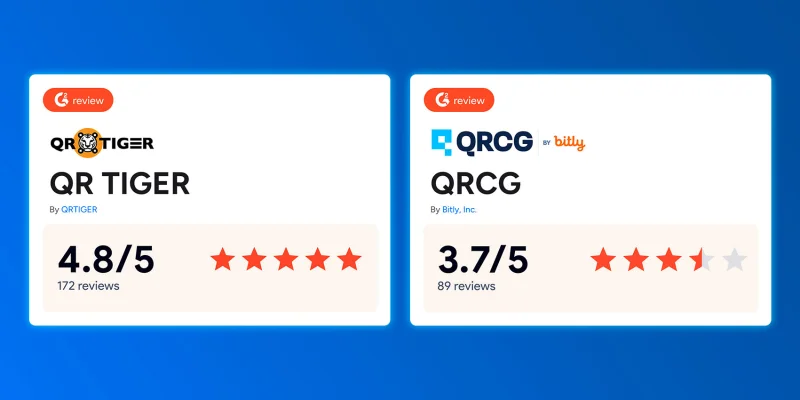
Last checked: October 22, 2026
QR TIGER currently has a 4.8 rating on G2 from 172 reviews. Feedback includes comments that the “dashboard is very easy to use” and that it makes it “very easy” to manage and update links.
QRCG received a 3.7 rating based on 89 reviews and was praised for its editing and tracking tools. One user praised its “very user-friendly and easy to navigate” interface and the ability to change URLs later, while another said the subscription cost was “extremely high.”
Trustpilot reviews
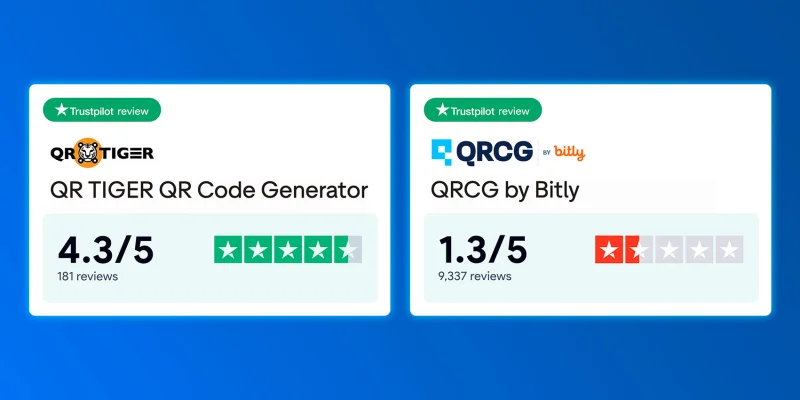
Last checked: October 22, 2026
QR TIGER is rated 4.3 on Trustpilot from 181 reviews, with more positive comments.
One verified comment described it as “Easy to use and good reporting,” while other feedback also praised its quick customer support.
QRCG gives a different picture with its 1.3 rating from 9,337 reviews. Some reviewers raised concerns about subscriptions, pricing, and dynamic QR codes becoming inactive.
One of the comments said the codes became “completely inoperable” without a paid plan. A long-time customer gave a more mixed take, saying “the service itself worked well for years” despite frustrations with billing support.
Verdict: QR TIGER offers more tools for managing QR campaigns
In this QR TIGER vs QR Code Generator Pro comparison, QR TIGER offers more campaign management tools for teams that expect their QR campaigns to scale.
Its retargeting, location controls, and app integrations give teams more ways to manage campaigns and connect with customers as their needs change.
QRCG is still a valid option for teams with simpler requirements. If its hosted pages, dashboard, and API already cover what they need, there may be little reason to add more.
The better choice is the one you are less likely to outgrow, and that can still support the campaign as its needs change. For long-term use of QR codes, that usually comes down to how much control you want to keep once the code is already printed and in circulation.
This article is for general informational purposes only and does not constitute legal, financial, or other professional advice. For questions about QR TIGER's products or services, please contact our support team at [email protected].
Frequently Asked Questions (FAQ)
Can I switch QR code providers without reprinting?
Who should own the QR code account when an agency creates codes for a client?
Can I move QR code analytics from one provider to another?
Is QRCG the same as QR Code Generator Pro?
Was this article helpful?
Maximize Scans with the Best QR Code Generator
Join thousands of global brands using QR TIGER to manage dynamic routing, bulk creation, and deep attribution analytics.
Get Started For Free