
A Guide to QR Code Equipment Maintenance Systems and Asset Management

A QR code equipment maintenance and asset management system ensures the business stays operational and achieves greater efficiency and productivity.
Effective maintenance is what keeps businesses running day in and day out. From tracking service logs to documenting repairs and equipment inspections, every single detail matters.
But as operations grow, so does the amount of information that needs to be managed. Service forms and inventory logs can pile up quickly, and missing even a single error or update could lead to more problems later.
Advanced QR code generators provide the tools to speed up and standardize maintenance workflows, improving accuracy and keeping operations running reliably.
In this guide, we’ll share some practical tips for using a QR code service to streamline maintenance and keep business operations running efficiently over the long term.
Table of Contents
What is QR code equipment maintenance?
A QR code for maintenance involves creating and attaching the two-dimensional barcodes to various work assets, tools, and equipment so teams can instantly scan and access maintenance histories, manuals, and work orders digitally.
In larger businesses, these QR codes often link to a Computerized Maintenance Management system (CMMS), which helps streamline preventive maintenance, reduce downtime, and minimize errors.
For many businesses, maintenance QR codes offer a smart solution to keep operations running smoothly and efficiently, allowing them to focus on growing the business without worrying about upkeep.
7 ways to use QR codes for management and maintenance
An advanced QR code generator helps simplify maintenance processes. It provides maintenance teams with a single dashboard to access all QR codes, their content, and usage insights, and to automate some maintenance tasks.
Below are some of the ways to use QR codes for asset management and maintenance:
1. Asset tracking
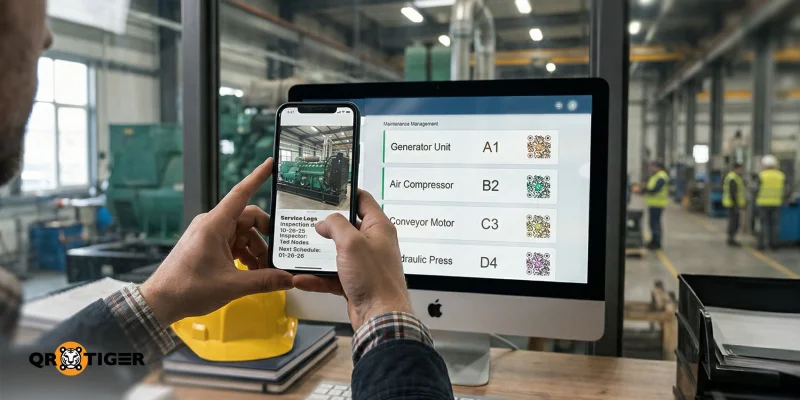
Assigning a unique ID and QR code to each piece of equipment allows maintenance teams to easily identify and track it with a simple scan.
Each QR code can link to an equipment’s identification details, custody, location, usage logs, and more. The QR code for equipment tracking makes it easier to monitor who is using the tool and maintain accurate documentation.
2. Troubleshooting guides
Another way to use QR codes in maintenance is to store resources on them, such as troubleshooting guides and equipment user manuals.
Providing instant access to these resources to maintenance technicians allows them to identify issues and follow recommended solutions, reducing downtime and allowing them to focus on larger issues.
3. Work order management
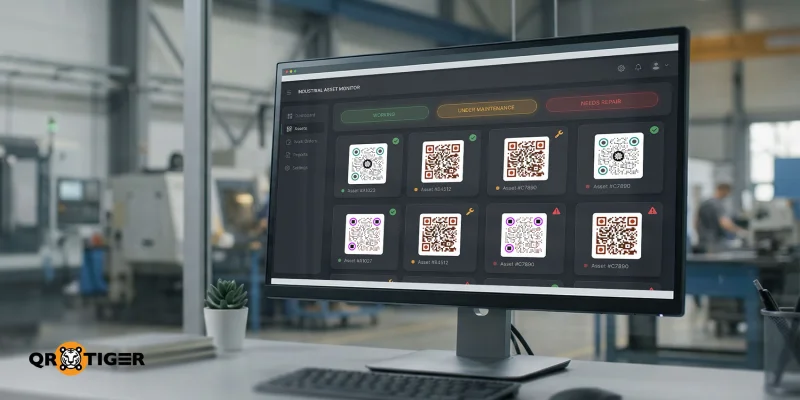
A QR code for equipment maintenance simplifies work order management by providing a fast, organized way to report or resolve equipment issues.
By scanning the QR code, technicians can update the equipment’s status, add new maintenance logs, or display existing tickets for that specific equipment.
This also makes assigning tasks easier, as maintenance teams can assign specific QR codes to individual team members, improving accountability and speeding up troubleshooting.
4. Inspection checklists
QR code maintenance tracking is useful for linking directly to preventive maintenance checklists or monthly inspection forms, helping standardize inspections and reduce the risk of unexpected breakdowns.
5. Maintenance history
QR codes make it easier to store and access maintenance logs for specific equipment, as users can view the asset’s full service history and inspection reports.
Technicians can also use a QR code maintenance app to scan the codes and review the equipment’s past repairs, identify recurring issues, and confirm whether it remains compliant and up to standard.
6. Spare parts and inventory lookup
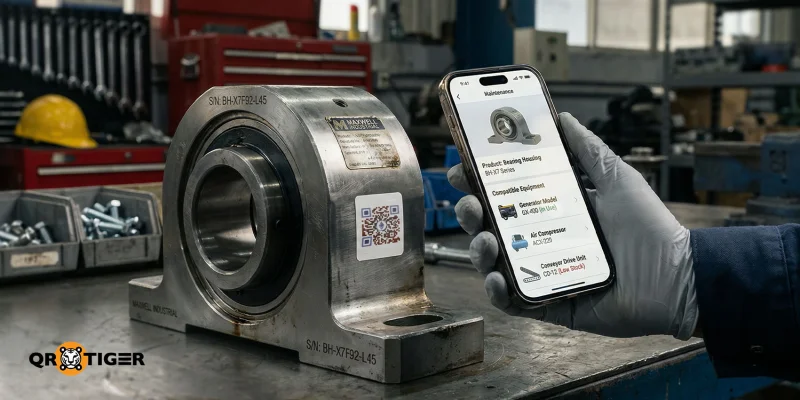
Using QR codes for asset management helps businesses keep track of spare parts and other available components by attaching them to specific equipment.
This allows technicians to scan the QR code and quickly check which parts are compatible and where they are stored, making it easier to log inventory usage and ensure the right parts are used for the right equipment.
7. Audit trail and warranty tracking
QR codes enhance quality and compliance inspections by quickly providing detailed records of reported issues, past repairs, and service timelines for specific models.
Additionally, since each action can be logged with a timestamp, it creates a reliable audit trail, which is invaluable for regulatory compliance, warranty claims, and long-term performance analysis.
Step-by-step guide to implement a QR code maintenance system
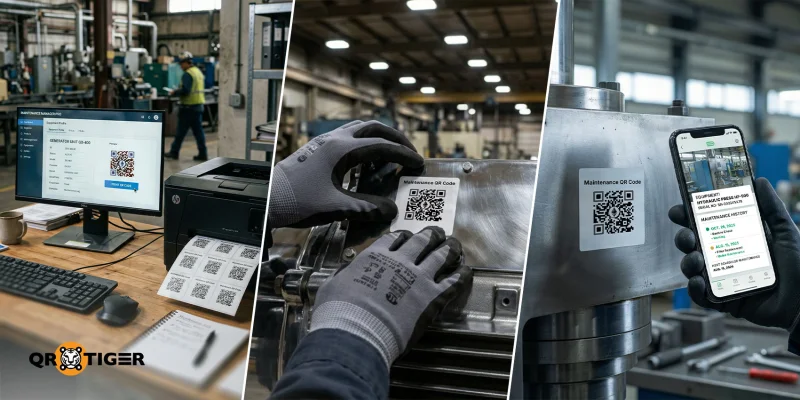
It's important to know how to implement QR codes in your business or integrate them into your existing systems.
Here’s an easy-to-follow guide for implementing QR codes for maintenance:
Step 1: Choose a system
Before anything else, teams must first select a CMMS that fits their business’s operational needs.
The right system should allow your team to track assets, monitor preventive maintenance schedules, and store important documentation.
Some popular CMMS platforms include:
- Fiix
- Limble
- MaintainX
- eMaint
- UpKeep
Step 2: Create asset records
After choosing a system, technicians can begin creating a database of asset records for each piece of equipment.
Enter all equipment into the system. And include all its maintenance logs, warranties, manuals, and any other information deemed important.
Once all the equipment is logged in the database, you can then begin assigning unique IDs for each piece of equipment to reduce errors.
Step 3: Generate QR codes
Once the database has been created and the unique IDs for each piece of equipment have been assigned, the team can then begin generating QR codes for each piece of equipment.
With your asset database and unique IDs in place, you can begin generating QR codes for each piece of equipment.
A bulk QR code generator like QR TIGER is especially useful in this regard, as it allows your team to manage 100+ assets, facility-wide rollouts, and even multiple buildings.
If you plan on using it for creating QR codes in one go, here is a quick guide:
1. Export asset list with asset URLs.
2. Open the QR bulk generator.
3. Upload CSV file (the website also provides a pre-filled template for URLs in case of incompatibility).
4. Customize the QR code design.
5. Test by scanning the QR code with the smartphone camera.
6. Download the QR image files.
Step 4: Print and attach
After printing the QR codes, begin attaching them to the designated equipment. When doing so, it's best to follow these practices to prevent QR codes from being damaged.
- Use durable, waterproof labels.
- Place them in visible but protected areas.
Step 5: Train your team
Once everything is set up, train your maintenance team on how to use the system effectively.
Show technicians how to scan QR codes, update records, create work orders, and log completed tasks within the CMMS.
Clear training and consistent processes are what turn QR codes into a reliable, long-term solution for asset management and maintenance..gif)
Why should maintenance use QR codes?
Depending on the industry, maintenance teams may face a wide range of issues. Thankfully, QR codes can help lighten that load by offering solutions to some of the more common problems:
- Organized Inventory - Placing dynamic QR codes on spare parts can help track them and identify which equipment they are compatible with.
- Better Documentation - Maintenance teams often get too busy troubleshooting issues that they forget to make log entries. QR codes help document each piece of equipment’s maintenance log by scanning it and filling out the form.
- Efficient scheduling - Scheduling maintenance can be a pain, and some industries either do it too much or too little. By placing QR codes on equipment, teams can easily track maintenance schedules for each equipment, ensuring no conflicts arise.
- Effective Root Cause Analysis - Teams often solve symptoms without recognizing the underlying issue affecting the equipment. In such cases, QR codes can offer a more efficient way for maintenance teams to access past logs and better diagnose issues.
- Observing Manufacturer Guidelines - Often, original manuals for equipment become lost to time. Using a QR code, teams can include a digital copy of the manual to ensure it is always on hand and can be referred to as intended.
Tips for managing asset and maintenance QR codes
QR codes can help businesses and maintenance teams prevent errors and avoid backlogs, keeping the gears of any well-oiled business running smoothly.
For those looking to optimize their maintenance tasks, here are practical tips to add to your QR code maintenance checklist:
Keep a QR code inventory
When using QR codes for equipment and maintenance tasks, it's important to create an organized inventory to track all the QR codes you’ve assigned to your items.
Additionally, teams can also check who is using certain equipment or tools by including a borrower form in the QR code or by checking scan analytics.
Using a dynamic QR code generator is also a good option, as it already includes a personal dashboard for all the QR codes, along with tracking and advanced analytics.
Test QR codes on a schedule
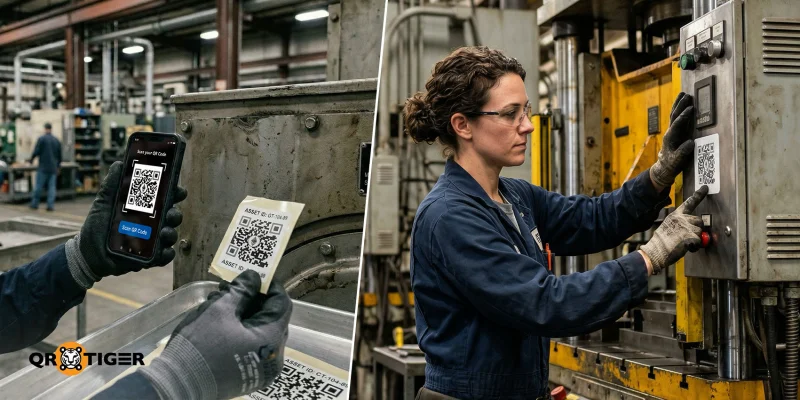
Regular testing is essential to ensure QR codes remain functional and the information they contain remains accessible.
In doing so, maintenance teams can catch issues early on and prevent them from becoming bigger problems down the line.
Before going live, it's best to scan the QR codes for the equipment in your company multiple times to make sure they work well.
Afterwards, you can set up a recurring monthly schedule to check that all QR codes remain functional and reliable.
Monitor expiration and billing
You should keep track of whether your QR codes are about to expire or need a renewal.
Using a dynamic QR code generator is a good option, as many of them send email alerts when a subscription is nearing expiration and offer an auto-renewal option, which is more preferable.
Additionally, it’s considered good practice to monitor invoices and receipts to ensure subscription billing is organized and transparent.
Update content
Make sure to maintain everything, from the link to QR code tags, to ensure that it's always available for access.
A dynamic QR code is especially useful for this, as it allows teams to update or replace embedded data without reprinting the code.
This feature keeps the QR code fresh and ensures that any important information remains accurate, up-to-date, and never lost.
Keep a copy of the embedded data
When using a QR code for equipment management, it's essential to keep a copy of the data it points to.
This is because if a link breaks or if a QR code is deleted, the stored information could be lost permanently.
To prevent this, keep a backup copy of the embedded data as backup. Doing so ensures that all the information remains accessible and reliable, no matter what happens.
Secure print quality and placement
For reliable QR code equipment maintenance, print quality and QR code placement are essential.
Always ensure the QR code is printed clearly to avoid scanning issues. If the QR code starts to fade, replace it to keep it scannable.
You should also paste the QR codes on equipment on large, flat surfaces where they are easily visible and not distorted by uneven surfaces.
Following these practices ensures that QR codes remain functional and accessible at all times.
Track performance anomalies
Most QR code equipment-tracking platforms include tracking and analytics tools that enable maintenance teams to monitor the performance of each QR code they deploy.
Because every piece of equipment or asset can have its own unique QR code and inventory tag ID, teams can then review scan data to spot unusual activity or recurring issues.
This makes it easier to identify patterns, determine whether a problem is isolated or widespread, and respond quickly with the right maintenance actions.
Application of automated integrations
Platforms like QR TIGER simplify the use of QR codes in maintenance by integrating it with your automated maintenance software. This automatically organizes information and generates unique QR codes for every new piece of equipment.
By reducing manual work and automatically keeping records up to date, maintenance teams can stay organized, save time, and a more efficient asset management.
Keep operations flawless with QR codes
An effective QR code equipment maintenance system is essential for maintaining daily operations that are organized, efficient, and reliable in the long term.
The best QR code generator for businesses helps you build a dependable QR code-based maintenance system that supports both current operations and future growth.
Ready to use QR codes for managing your assets and maintenance? Sign up to QR TIGER for free today.
FAQ
How much does it cost to maintain a QR code?
The cost of maintaining a QR code depends on its type and the software you plan to use.
QR code generators offer free static QR codes. For dynamic QR codes, plans and prices vary, typically ranging from $7 to $89 a month.
What are common QR code problems?
Some of the most common issues with QR codes are broken links and blurry or damaged QR codes. While these issues can be frustrating, you can avoid them by following the best practices and thorough testing before using it in live campaigns.
Do I have to pay to keep my QR code active?
Paying to keep a QR code active depends on the type you use. Static QR codes, which contain uneditable content, are typically free and do not expire. Dynamic QR codes, which allow users to edit links and track analytics, usually require a paid subscription to stay active.

