
QR TIGER vs QR.io: Comparing Features, Pricing, and Benefits
 By Ashley
Between QR TIGER vs. QR.io, which platform is essential for your business? The right decision can ensure a smooth user experience. The wrong one could result in QR codes that fail to meet expectations and frustrate users.
In this showdown, we’ll discuss everything from scan speed to customization, analytics, integrations, security, and more to help you decide which QR code maker deserves your trust.
Whether you're planning a marketing blitz or need a reliable dynamic QR code generator for your business needs, we’ve covered all the details.
Disclosure: We tested QR TIGER and QR.io on October 20, 2026, by comparing their QR code features, pricing, and user experience. Features, plans, and prices may have changed since. Check each provider’s website for the latest information.
Key takeaways
|
QR TIGER vs. QR.io overview
Choosing between QR TIGER and QR.io depends on your specific needs, whether advanced features or simplicity.
QR TIGER
Founded in 2018, QR TIGER offers economical and efficient QR code solutions. It has evolved into one of the most advanced and dependable QR code providers, relied upon by over 850,000 brands worldwide.
Many users often ask, "Is QR TIGER free?" The platform provides free basic QR code generation and advanced paid features designed for professionals and businesses.
QR TIGER caters to businesses of all sizes, marketers, educators, event organizers, and more. Industries such as retail, hospitality, real estate, marketing, and healthcare rely on its features to improve customer engagement, streamline operations, and enhance phygital interactions.
QR.io
This QR code tool was launched during the COVID-19 pandemic. It is a user-friendly platform that offers essential QR code services for personal and professional use.
The platform focuses on small- to medium-sized enterprises (SMEs), individual users, and startups seeking basic QR code solutions.
It appeals to those needing simple, cost-effective tools for marketing, event promotion, or personal projects without requiring advanced analytics or integrations.
QR TIGER and QR.io: Which QR code generator best fits your needs?

When comparing these two QR code providers, the decision ultimately hinges on speed, flexibility, and ease of use.
Here's a quick head-to-head comparison between QR TIGER and QR.io to help you choose the QR generator that fits your needs.
QR code solutions
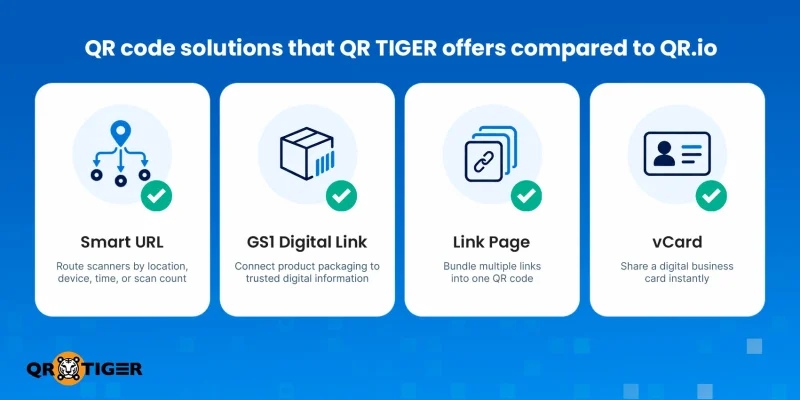
The more QR code solutions a platform offers, the more ways you can use QR codes across your business.
QR TIGER offers 26 QR code solutions, including the following advanced ones:
- Smart URL for routing scanners by location, device, time, or scan count
- GS1 Digital Link for product packaging
- Link Page for bundling multiple links into one code
- vCard for digital business cards
Meanwhile, QR.io offers 14 dynamic QR code solutions, including basic options like email, SMS, and Wi-Fi. It lacks Google Forms, Google Reviews, or a standalone Location QR code, and offers only a single all-in-one QR code solution for social media.
Dynamic vs. static codes
Here’s where flexibility shines:
QR TIGER’s dynamic codes let you update links and content on the fly without reprinting. With its Edit Design feature, creators can now change the QR codes' look, making them perfect for campaigns that evolve over time.
QR.io offers dynamic codes, too, and its paid plan lets you create as many as you need. The issue, however, is that free users can keep them active only during the 7-day trial. Once the trial ends, QR.io pauses your dynamic codes until you subscribe.
On both platforms, static QR codes continue to work, but they cannot be edited or tracked.
Want to know more about how dynamic QR codes work and why they’re essential for adaptability? Click the link to learn more.
Ease of use and user interface
QR TIGER’s dashboard is like a friendly guide: clean, intuitive, and full of helpful tools, including pre-designed templates and drag-and-drop functionality for uploading files and images.
The QR TIGER login system makes accessing features hassle-free. It is designed for simplicity and security, ensuring users can easily start creating their code. Beginners and pros alike can breeze through it.
QR.io’s dashboard is also easy to navigate. However, you need to create an account before you can download any QR code, which adds an extra step for first-time users.
Compatibility
A QR code should work everywhere, from the latest smartphones to older models.Both QR TIGER and QR.io delivers consistent scan performance across devices, even on older models.
However, QR TIGER takes this a step further with its mobile app, which is a QR code maker and scanner in one. Available for download on Android and iOS devices, the app provides quick, easy access to resources and tools that lets you generate, scan, and store QR codes.
Error correction levels
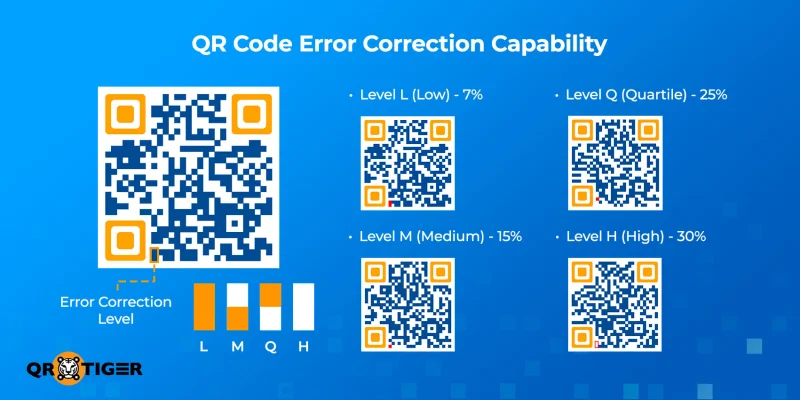
Accidents happen. Maybe your QR code gets scratched, smudged, or partially covered.
QR TIGER’s QR code error correction is level H (30% of the data can be retrieved even with damage), ensuring your codes remain functional, even with customization like gradients or logos.
QR.io’s error correction follows the same process, occurring automatically when you add a logo or edit your QR code’s design.
Customization options
QR codes aren’t just about function anymore; they’re branding opportunities.
QR TIGER stands out with options like gradient colors, custom frames, logos, and even shape adjustments. It’s perfect for businesses that want their QR codes to match their vibe.
In comparison, QR.io also offers solid design options, including gradient colors, patterns, eyes, logos, and CTAs. However, you can only download your customized QR code after creating an account, which automatically starts its 7-day free trial.
Learn how to color QR codes in a way that's both eye-catching and scannable, making them an effective branding tool.
Analytics and tracking
Data is king. Knowing how your QR codes perform can guide smarter decisions.
QR TIGER provides a treasure trove of insights, including scan numbers, unique visitors, timestamps, scan locations, and even device types.
It integrates smoothly with Google Analytics and Urchin Tracking Module (UTM) tracking codes, which means no guesswork, just actionable data.
QR.io tracks the essentials, like scan counts, time, and general locations. However, it doesn’t dig as deep into the metrics, which could leave marketers craving more information.
Are you curious about how much data a QR code can hold? Explore the details of QR code data size and its role in optimizing your tracking efforts.
Tools and features
Both platforms offer handy tools for managing and improving QR codes, but their strengths aren’t equal.
QR TIGER flexes its muscles with features like expiry settings, GPS (Global Positioning System) tracking, and retargeting tools, which are perfect for those who like fine-tuned campaigns and spot-on customer insights.
QR.io only offers core tools, including unlimited dynamic codes, landing pages, bulk creation, and API access. If you're after advanced tracking or retargeting, QR TIGER's campaign controls might be a better fit for your needs.
Security features
In today’s data-conscious world, QR code security is essential. QR TIGER is GDPR- and CCPA-ready and adheres to the ISO/IEC 27001:2022 standard, making your data even more secure.
QR TIGER also offers limited, password-protected codes and access, along with SSL encryption for secure data transport. It’s a safe bet for industries that handle sensitive information, such as healthcare and finance.
QR.io includes basic security measures, but advanced options like password protection for dynamic codes are missing. It’s secure but not fortified.
Customer support
Tech glitches happen, and how quickly they’re resolved can make or break your day.
QR TIGER offers 24/7 support through live chat and email, backed by a comprehensive knowledge base. QR TIGER reviews on Trustpilot frequently praise the support team’s professionalism and quick response times.
QR.io also provides 24/7 support; however, depending on your time zone, you might wait longer than you’d like.
Advanced features and API integrations
QR TIGER’s QR code API scales with your plan, from 500 requests per month on Regular to 3,000 on Advanced and 10,000 on Premium. That makes it a top choice for businesses managing complex campaigns.
It also supports bulk generation of up to 3,000 QR codes per batch, white-label domains, and a QR Code MCP Server that connects it with AI tools. That makes it a solid choice for enterprises or businesses managing many codes.
QR.io also includes API access and bulk creation, offering 2,000 API requests per month. For teams that need more room to grow, such as higher API limits, larger batches, and AI-ready integrations, the former offers more depth.
QR TIGER vs. QR.io: Performance metrics
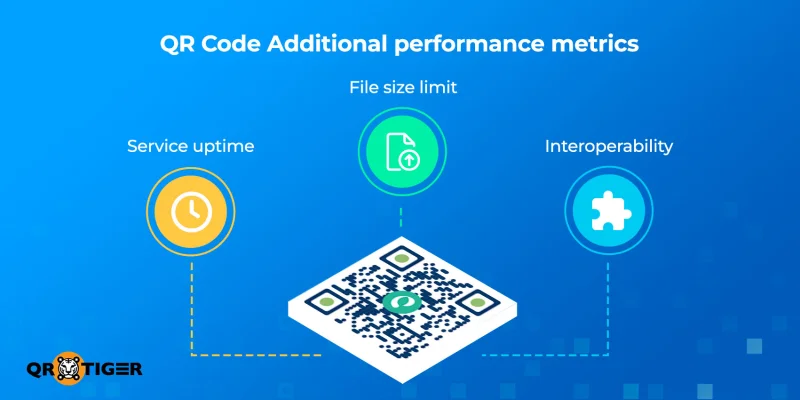
Additional performance metrics provide a closer look at reliability, integrations, and file-sharing capabilities to meet diverse business needs.
Service uptime
For businesses that rely on QR codes during high-traffic events or campaigns, reliable servers are essential.
Both QR TIGER and QR.io experience solid uptime, and each runs a public status page where anyone can monitor their services. Little to no incidents have occurred on either platform over the past year.
QR TIGER does stand out for its transparency, as unlike QR.io, its status page tracks six separate components, composed of the website, dashboard, QR code scanner, API bulk generator, and enterprise services.
This means QR TIGER users can check the status of the exact service they rely on, such as scanning, making it easier to rule out outages during live campaigns.
Interoperability
QR TIGER supports many file formats, including PDFs, videos, and audio files. It also integrates smoothly with various marketing tools, such as ERP and CRM systems, making it ideal for businesses seeking flexibility and ease of integration.
Integrations offered:
- Canva
- Google Analytics
- Google Tag Manager
- HubSpot CRM
- Meta Pixel
- Zapier
- Monday.com
QR.io handles standard file formats but doesn’t offer as many integrations with enterprise-level tools. This could be a limitation if you need your QR codes to work with specialized business systems.
Integrations offered:
- KonnectzIT
- Bitcoin
File size limit
QR TIGER allows for larger file uploads (up to 20 MB), making it suitable for businesses that need to share high-resolution images, documents, or media-heavy content.
This flexibility ensures you can create rich, complex QR codes without worrying about size constraints.
QR.io, on the other hand, has more limited file size capabilities. This could be a constraint for campaigns that require sharing large files or media-heavy content, which might not load as easily on their platform.
QR.io and QR TIGER pricing plans
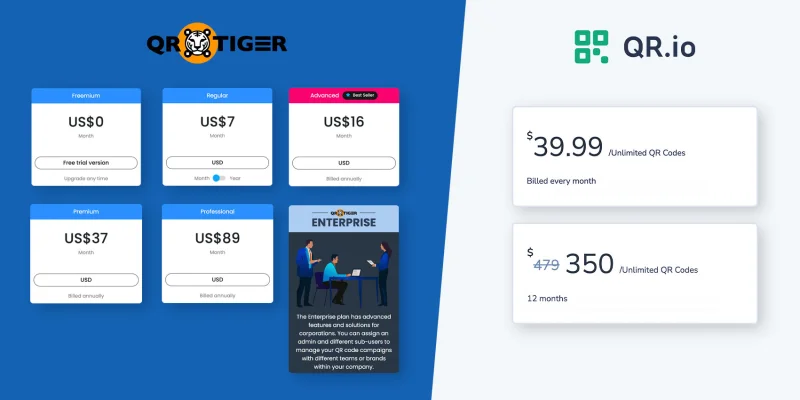
When choosing a QR code maker, it all comes down to affordability. Let’s be honest here: nobody wants to use an expensive service that doesn’t have an ROI (return on investment) to offer.
The good news is that QR TIGER offers flexible plans for individuals or businesses to fit various needs.
You’ll get three dynamic QR codes with a limit of up to 500 scans each and unlimited static QR code scans without spending a dime for the Freemium plan. They also offer promos to help you slash your bill if you actually plan on getting a paid subscription.
QR TIGER pricing plans include:
- Regular - $7/month or $65/year (save $19)
- Advanced - $16/month (billed annually)
- Premium - $37/month (billed annually)
- Professional - $89/month (billed annually)
- Enterprise - contact the account specialist.
On the other hand, QR.io offers only a free 7-day trial, and the basic features start at $39.99 per month and $350 per year (with 2 months free), making it harder to justify for businesses that need more bang for their buck.
QR.io and QR TIGER reviews
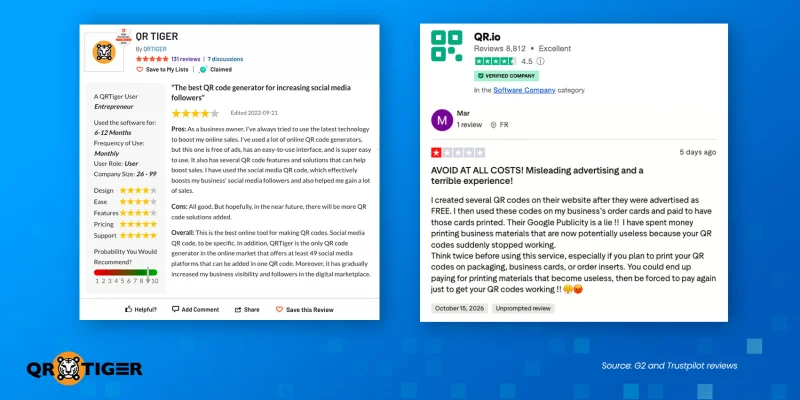
When hearing what real users say, QR TIGER generally gets glowing reviews. On review platforms like G2, Trustpilot, and SourceForge, users rate it highly for its ease of use, functionality, and quick customer service.
Currently, it has 4.8 stars on SourceForge and 4.3 on Trustpilot. One verified SourceForge reviewer called it an “excellent platform for creating and tracking use of QR codes,” adding that it’s easy to use and offers good reporting for their marketing team.
QR.io’s reviews are more mixed. It scores 4.2 stars on Trustpilot but just 1.0 on SourceForge, where users complain about its 7-day trial. A reviewer at Trustpilot warned that QR.io gives out codes without users even knowing it’s a free trial, then deactivates them until you subscribe.
See more: QR TIGER vs Other QR Code Generators
Firsthand testing of QR TIGER and QR.io (free trial version)
To discover what each platform had to offer, we tested both platforms based on what users could achieve without signing up and what they offer when users sign up.
QR TIGER
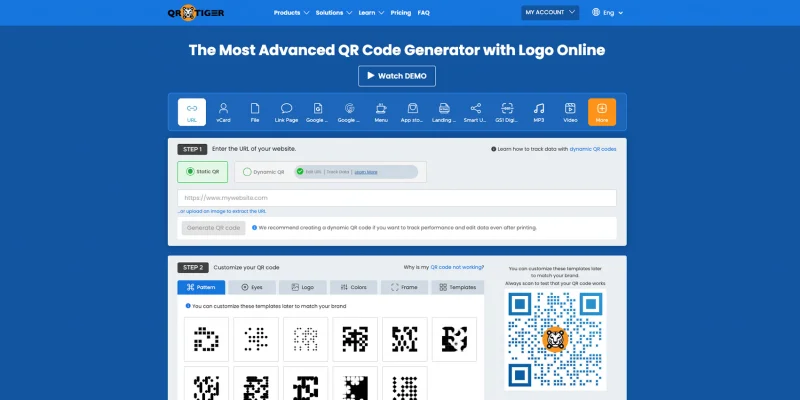
A screenshot of the QR TIGER dashboard during testing
QR TIGER does not require sign-ups for static QR codes. The platform is open to anyone, so we started without an account. We built a static QR code from scratch, added our own colors and logo, and scanned it to confirm it worked.
To save it, we entered an email address under the Freemium option, and the QR code was sent to our inbox. A free account skips this step entirely, letting you download QR codes straight to your device.
A free account unlocks three dynamic QR codes. Once signed in, we created dynamic QR codes and put the dashboard's editing and tracking tools to work. The only trade-off is a QR TIGER logo pop-up on scan, which disappears on any paid plan.
What we tested | Static QR code | Dynamic QR code |
Free plan availability | Verified | Verified |
QR code download (no sign-up) | Verified (sent through email) | Unavailable |
QR code download (free account) | Verified | Verified |
Customization options | Verified (supports custom logos) | Verified |
QR code management through the dashboard | Unavailable | Verified |
Edit QR code content | Unavailable | Verified |
Track scans and analytics | Unavailable | Verified |
No ads or branding | Verified | Unavailable (QR TIGER logo appears) |
Each dynamic QR code comes with its own set of controls for editing, statistics, retargeting, expiration, GPS tracking, password protection, and copying an embed code for a website. This means you can change a QR code’s destination at any time, without reprinting it.
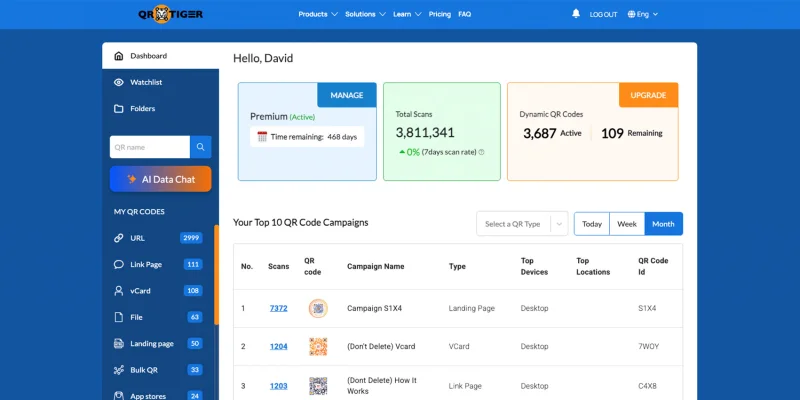
Inside the dashboard, every dynamic QR code has its own control panel. From there, we can edit the destination, set an expiration date, add password protection, turn on GPS tracking or retargeting, and copy an embed code for a website, all without reprinting the code.
Scan data is just as easy to reach. QR TIGER's analytics page breaks down each QR code by:
- Scan volume: Total and unique scans, which indicate how many people scanned it and how many times they scanned it.
- Timing: Scan activity over time to spot when a campaign performs best or not.
- Devices: The devices the audience uses to scan the code, making it easier to optimize landing pages and target people with ads and campaigns that match their interests.
- Locations: The top scan locations indicate high-performing areas. It allows you to determine which area to run tailored ads.
To keep things organized, folders group related QR codes, while a watchlist keeps your key campaigns within easy reach.
QR TIGER also provides 100 API request credits under its Freemium plan, so you can try how it works with CRM, ERP software, as well as AI agents.
One limitation: static QR codes aren't saved to the dashboard, so you'll need to store those files yourself. More advanced campaign tools also sit behind the paid plans.
QR.io
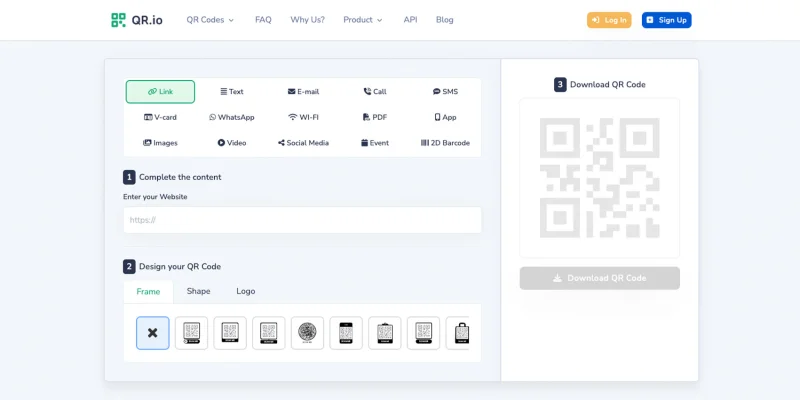
A screenshot of the QR.io dashboard during testing
We started without an account. QR.io lets you choose from seven QR code solutions: URL, text, email, SMS, call, WhatsApp, and vCard. You can also customize colors (including gradients), patterns, eyes, logos, and CTAs before signing up.
However, the final step changes everything. Instead of downloading your QR code, QR.io shows a notification saying the last step is to create an account. This means that after designing your QR code without signing up, you still need an account to get it, whether it’s static or dynamic.
On the plus side, sign-up doesn’t require payment details, and trial QR codes scan without any QR.io branding. We can download in five formats (JPG, PNG, EPS, SVG, and PDF), making it easy to prepare QR codes for both digital and print use.
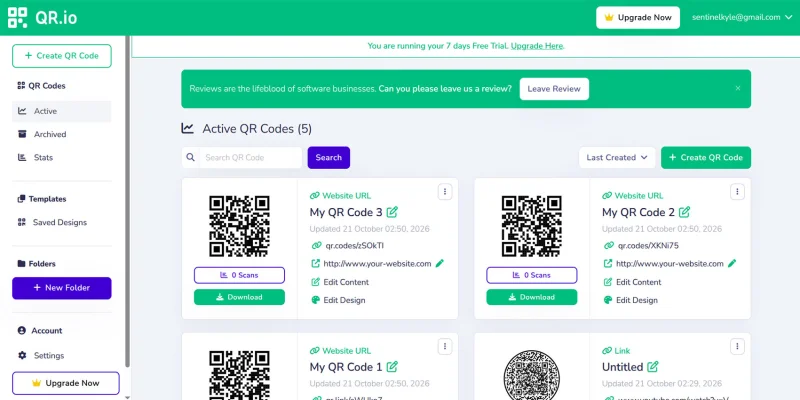
The dashboard neatly stores both static and dynamic QR codes and offers basic analytics during the trial.
Static codes allow design edits only. Meanwhile, dynamic codes let us change the destination instantly without changing the QR code itself.
- Unlimited QR codes beyond the trial: The dynamic QR codes stay active for as long as you’re subscribed.
- Unlimited scans: People can scan the QR codes without limits, making it easier to run large-scale campaigns.
- Unlimited scan statistics: Shows how many times, when, and where the QR codes were scanned, going beyond the trial’s basic analytics.
- API access: QR.io can be connected with other systems and streamline QR code creation.
- 5 team members: Enable teams to collaborate on QR code campaigns from a single account.
Like most platforms, QR.io tracks only dynamic QR codes, since static codes connect scanners directly to their content. It will stop tracking scans the moment the 7-day trial is over, requiring you to get a paid subscription to access analytics.
Date of testing: October 20, 2026
What we tested | Static QR | Dynamic QR |
Create a QR code before signing up | Unavailable (design steps only; account required at the final step) | Unavailable (design steps only; account required at the final step) |
Get the QR code before signing up | Unavailable | Unavailable |
Included in the free trial | Verified | Verified |
Download directly with a trial account | Verified (JPG, PNG, EPS, SVG, PDF) | Verified (JPG, PNG, EPS, SVG, PDF) |
Change colors, patterns, and upload a logo | Verified (including gradients, eyes, and CTA) | Verified (including gradients, eyes, and CTA) |
Stored and managed in the dashboard | Verified | Verified |
Edit the design after generating | Verified | Verified |
Edit the link after generating | Unavailable (design only) | Verified (free trial only) |
Create QR codes in bulk | Verified (free trial only) | Verified (free trial only) |
Track scans and activity | Unavailable (no tracking during the trial) | Verified (stops after the 7-day trial) |
No branding or ads when scanned | Verified | Verified |
Keeps working once the trial expires | Verified | Unavailable (paused after the 7-day trial) |

Final say: QR TIGER or QR.io for your QR needs?
In the QR TIGER vs. QR.io debate, we have seen that both platforms have strengths and weaknesses, so the choice comes down to your goals.
If you’re looking for a fast, reliable tool with creative and analytical features, QR TIGER is the trusty Swiss Army knife you’ll want by your side. It’s perfect for businesses and individuals who need their QR codes to do more than just sit there and look pretty.
QR.io, on the other hand, is suitable for basic needs. It could be a decent starting point if you’re dipping your toes into the QR world and prefer simplicity over advanced features.
But let’s be real, why settle for decent when you can aim for exceptional? Remember, a QR code generator isn’t just about spitting out a scannable box; it’s about creating meaningful interactions.
So, whether you're boosting your brand or enhancing customer engagement, choosing the right tool will make all the difference.
Make the smart choice, and let your QR codes speak volumes.
This article is for general informational purposes only and does not constitute legal, financial, or other professional advice. For questions about QR TIGER's products or services, please contact our support team at [email protected].
Frequently Asked Questions (FAQ)
Which one is better for my business?
Do both offer free plans?
Is QR code TIGER legit?
What happens to my QR codes after a free trial or subscription ends?
Was this article helpful?
Maximize Scans with the Best QR Code Generator
Join thousands of global brands using QR TIGER to manage dynamic routing, bulk creation, and deep attribution analytics.
Get Started For Free