
Methods to Version Control QR Codes: A Complete Guide
 By Lyle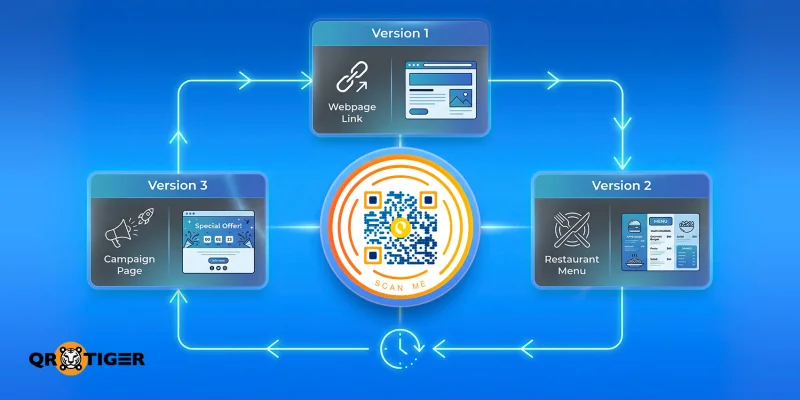
Version control QR codes are a dynamic type of quick-response codes that let users view the latest version of a document or piece of information, ensuring they access the most accurate, up-to-date details.
QR codes have become a permanent fixture in modern workflows, connecting physical touchpoints to frequently changing digital content. As teams move faster and campaigns evolve in real time, the content behind a QR code rarely stays the same.
Without a structured way to manage updates, QR codes can quickly become unreliable entry points rather than helpful connectors.
This guide shows how to manage QR codes with confidence using an advanced QR code generator. By applying version-control principles, organizations can update destinations without reprinting, maintain scan reliability, and scale workflows without risk.
Table of Contents
- How to implement version control QR codes (quick steps)
- What is version control?
- What does version control for QR codes mean?
- Why version control codes matter?
- Effective methods for version control QR codes
- Key elements and considerations for QR code version control
- Why manage QR codes in QR TIGER?
- Secure and easily track versions of your QR codes
- People also ask
How to implement version control QR codes (quick steps)
Version control QR codes use dynamic QR technology to ensure users always access the most up-to-date content, even as information changes over time.
Here’s how to implement version control using an advanced QR code generator:
- Create a dynamic QR code. Choose a dynamic QR type (URL, file, landing page, etc.) so the destination can be edited anytime
- Set a stable destination structure. Link your QR code to a central or regularly updated resource (e.g., a live document, menu, or campaign page).
- Update content as needed. Use the dashboard to edit the QR code’s destination without changing the printed code.
- Maintain version history internally. Keep records of updates to track changes, ensure accuracy, and roll back if needed.
- Track performance and usage. Monitor scans, locations, and engagement to ensure your QR code remains effective.
What is version control?
Version control is a way of tracking and managing changes to something over time.
Think of it like a “history log” that saves every update you make, so you can review past versions, fix mistakes, or go back to an earlier state if needed.
For an average user, it’s similar to how apps like Google Docs or Microsoft Word let you see revision history and restore previous edits.
What does version control for QR codes mean?
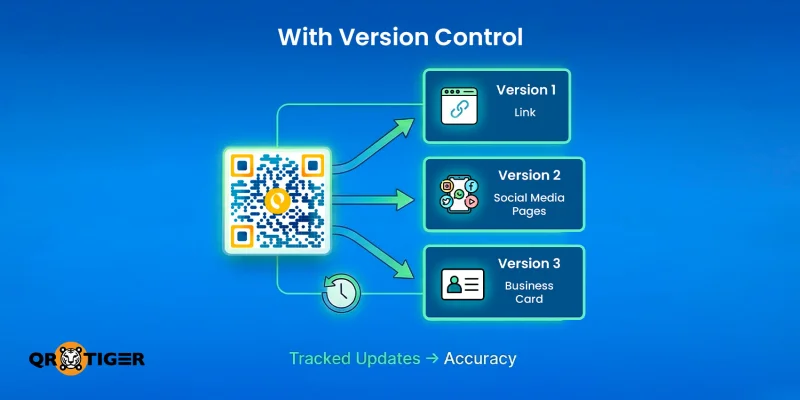
When QR codes aren’t properly managed, even minor updates can cause outsized problems, with small issues creating major problems, such as the following:
- Destination pages are moved or deleted without updating the QR code;
- Promotions expire and aren’t replaced;
- Content updates are applied inconsistently across campaigns;
- Users scanning the same QR code encounter broken links or outdated information, and
- Messaging no longer aligns with the brand.
Once QR codes are printed and distributed at scale, these risks multiply. A single unmanaged QR code update can affect thousands of touchpoints, such as packaging, posters, menus, or reports, that can’t be easily recalled or corrected.
Version control for QR codes solves this by treating them as living assets.
When you edit a QR code, the changes to destinations are documented, updates are intentional, and previous versions can be restored when needed, ensuring accuracy and reliability even as content evolves.
Why version control codes matter?
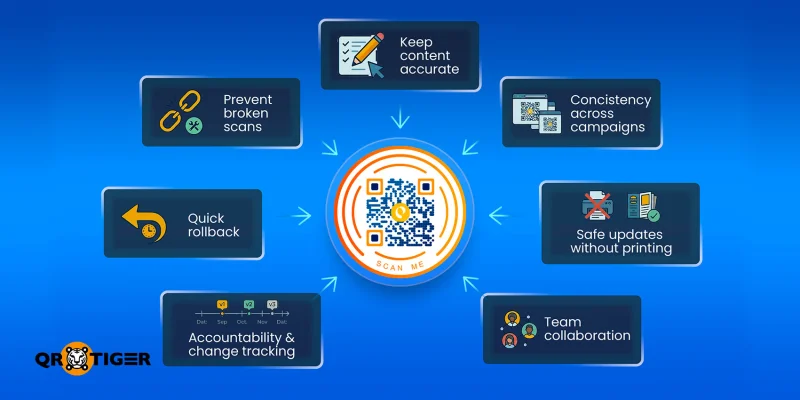
Version control is part of the technical best practices for QR codes. It’s also a safeguard for reliability, brand trust, and operational efficiency. Here’s why it matters:
- Prevents broken scans in printed and distributed materials: Once QR codes are incorporated on packaging, posters, menus, or reports, they can’t be recalled easily. Version control ensures destination updates don’t result in dead links or error pages.
- Keeps content accurate as campaigns evolve: Promotions, pricing, and messaging change frequently. Version control allows teams to update QR codes without risking outdated or conflicting information reaching users.
- Ensures consistency across campaigns and touchpoints: The same QR code may appear across multiple channels. Version control ensures every scan delivers the intended experience, regardless of where or when it happens.
- Enables safe updates without reprinting costs: Teams can update destinations confidently without redesigning or reprinting physical assets, saving time and budget.
- Supports collaboration across teams: Marketing, product, and operations teams can manage updates without overwriting each other’s work, thanks to controlled changes and clear ownership.
- Improves accountability and change tracking: Version history records what changed, when, and why, making it easier to audit updates and resolve issues quickly.
- Allows quick rollback when something goes wrong: If a new destination underperforms or contains errors, teams can instantly revert to a previous version, avoiding the scramble to fix live issues.
In practice, version control turns QR codes from one-off campaign tools into dependable infrastructure.
With the right processes, teams can update safely, move faster, and ensure every scan delivers reliably, laying the foundation for effective QR code versioning.
Effective methods for version control QR codes
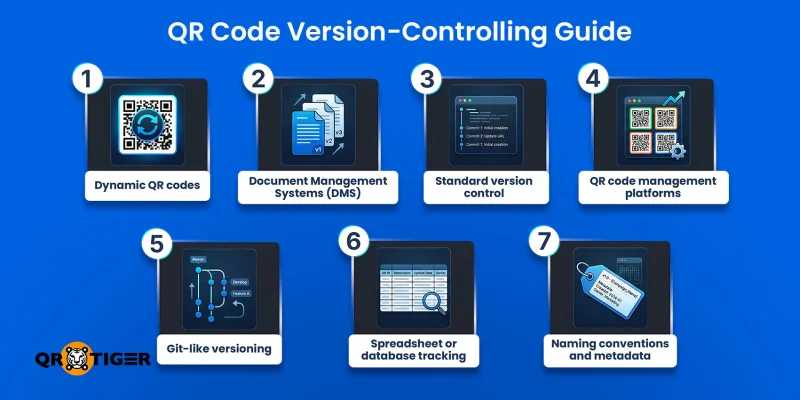
Managing QR codes effectively requires a structured approach to ensure updates are controlled, traceable, and reliable.
Below are seven key methods to implement version control for QR codes, along with practical details for each approach.
1. Dynamic QR codes
A dynamic URL QR code does not store the final content directly, such as a webpage or file. Instead, it stores a short redirect link that you control, allowing the destination to be updated without changing the QR code image.
When it's used:
Businesses often use dynamic QR codes in marketing campaigns, restaurant menus, event check-ins, and product manuals, where the linked content may change over time.
How it works:
When scanned, the QR code first opens a short redirect link such as:
https://qr.company.com/a7F3.
This link then forwards the user to the actual destination. Because the redirect link is controlled by a platform, you can update the destination at any time without modifying the QR code itself.
Why it’s called versioning:
Each time the destination content is updated, it effectively becomes a new version while the QR code remains unchanged. This allows teams to maintain a single printed code while managing multiple versions of the content.
Quick Note: If you’re wondering how do dynamic QR codes work, remember that the QR code itself doesn’t change. Updating the destination changes where that link points, allowing you to manage content dynamically without reprinting.
2. Document Management Systems (DMS)
A Document Management System stores files and automatically tracks revisions, making it useful for QR code version control when QR codes link to documents that require updates over time.
When it's used:
Organizations commonly use this approach for product manuals, compliance documents, internal training materials, or technical guides that require periodic updates.
How it works:
A QR code links to a document URL, such as:
https://docs.company.com/manual.pdf.
The DMS stores different versions of that document internally, for example:
v1 – manual.pdf
v2 – updated manual
When a new version is uploaded, the link remains the same, but the stored file version in the system changes.
Why is it called versioning:
The QR code always points to the same link, while the document evolves through multiple versions in the management system, allowing organizations to keep the link to QR code consistent while updating the underlying file.
3. Standard version control
Standard version control uses software development tools to track changes to QR code data, files, or generation scripts. This method is commonly used by technical teams that manage QR codes programmatically.
When it's used:
Development teams may use this approach when QR codes are generated automatically for digital products, software documentation, or campaigns that rely on automated workflows.
How it works:
QR code assets and related files are stored in a version-controlled project structure, such as:
qr-codes/
├── menu-url.txt
├── generate_qr.py
└── menu-qr.png
Version history in a system like Git may record updates such as:
v1 – QR points to /menu-v1
v2 – QR points to /menu-v2
v3 – QR updated for a new campaign
This approach tracks changes to the encoded URLs, QR code images, and the scripts that generate them.
Why is it called versioning:
Every change to the QR code content or generation process is recorded as a version. This creates a clear history of updates and allows teams to roll back to previous versions if necessary.
4. QR code management platforms
QR code management platforms like QR TIGER provide centralized tools to generate, monitor, and update QR codes at scale, supporting QR code content update workflows with built-in version tracking and collaboration features.
When it's used:
Marketing teams running multi-channel campaigns often rely on QR code platforms to manage dozens or hundreds of QR codes across printed materials, packaging, and digital promotions.
How it works:
Teams generate QR codes within the platform and manage updates through a dashboard. The system records changes to destinations, tracks scan analytics, and allows multiple users to collaborate without overwriting each other’s work.
How this supports version control:
Each update to a QR code’s destination or campaign setup is logged, creating a clear history of changes. This allows teams to track revisions, maintain accuracy, and revert to earlier versions when needed.
5. Git-like versioning for QR content
Some organizations apply Git-style workflows to manage QR code destinations and related content, particularly when QR codes are tied to software documentation or digital assets.
When it's used:
This approach is often used by development teams managing QR codes for software releases, API documentation, or developer portals.
How it works:
Content linked to the QR code is stored in a repository where updates are tracked through commits and branches. Teams can test new content versions before publishing them and revert changes if an issue occurs.
Versioning benefits:
Every update is recorded as a distinct version, creating a traceable history that allows teams to manage changes safely, test improvements, and revert to previous versions when needed.
6. Spreadsheet or database tracking
For smaller teams, spreadsheets or simple databases can serve as a lightweight way to track QR code destinations, updates, and ownership.
When it's used:
Small businesses or marketing teams managing a limited number of QR codes may use spreadsheets to keep track of where each code is used and what it links to.
How it works:
Teams create a record that logs each QR code along with its destination URL, campaign name, version number, update date, and responsible owner.
How this supports version control:
Each update to a QR code’s destination is logged as a new entry or revision, creating a clear history of changes that teams can review, manage, and reference when needed.
7. Naming conventions and metadata
Applying consistent naming conventions and metadata helps teams organize and identify QR codes across campaigns and versions.
When it's used:
Organizations running regional or seasonal campaigns may include identifiers such as campaign name, region, and version number in their QR code naming system.
How it works:
Teams assign structured names and metadata to each QR code, such as campaign identifiers, version numbers, or launch dates. This information helps categorize and track QR codes across different campaigns and materials.
Versioning benefit:
Including version identifiers in the naming structure makes it easier to distinguish between different iterations of QR codes and the content they reference, improving organization and traceability.
Tip: Combine methods for stronger control: for example, using dynamic QR codes with clear naming conventions and a management platform to keep updates documented and reversible.
Key elements and considerations for QR code version control
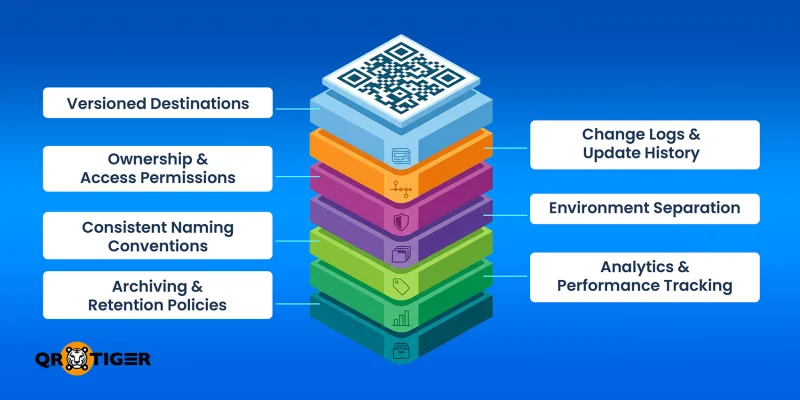
Effectively managing QR codes requires understanding the core elements that make the system reliable, scalable, and traceable.
Versioned destinations
Maintaining distinct versions of each QR code destination is fundamental to reliable version control. This ensures that updates can be applied safely without disrupting users’ access
Versioned destinations also allow teams to identify which content is currently live and maintain structured records of previous versions.
Change logs and update history
Recording all updates to QR code destinations creates accountability and transparency, making it easier to track changes over time.
A clear update history helps teams review modifications, identify when changes occurred, and maintain an organized audit trail for ongoing campaigns
Ownership and access permission
Clearly defining who can update QR codes helps prevent errors and maintain accountability within teams.
Assigning ownership and setting permission levels ensures that updates are handled responsibly and that only authorized individuals can modify destinations or campaign settings.
Environment separation
Separating draft, staging, and live environments ensures QR code version control can be applied safely before updates reach end users.
This approach reduces the risk of publishing incomplete or incorrect content and helps ensure that updates perform correctly before they are made publicly accessible.
Consistent naming conventions
Using a standardized naming system makes it easier to track QR codes and their versions across campaigns.
Consistent naming helps teams quickly identify the purpose, location, or campaign associated with each QR code, improving organization and reducing the risk of confusion.
Analytics and performance tracking
Monitoring how QR codes perform provides insight into user engagement and informs decisions for future updates.
Implementing QR code tracking enables teams to evaluate campaign performance, understand audience behavior, and identify opportunities for improvement.
Archiving and retention policies
Keeping a record of old QR code versions ensures teams can recover content and maintain organization.
Archiving older versions allows campaigns to remain structured while still preserving access to historical records when needed.
Understanding these considerations provides the foundation for implementing controlled, reliable, and traceable QR code management across campaigns and materials.
Why manage QR codes in QR TIGER?
When managing QR codes, choosing the right tool can make QR code data version control simple and reliable.
While basic QR code software can create static codes quickly, teams that rely on frequent updates or campaigns with multiple touchpoints benefit from platforms designed for version control.
These dynamic QR code generator features ensure that every QR code remains accurate, reliable, and easy to manage, even as campaigns evolve or scale:
- Dynamic QR codes - update destinations without reprinting, keeping campaigns flexible.
- Version history - track changes and roll back to previous versions if needed.
- Collaboration tools - allow multiple team members to manage updates safely and avoid conflicts.
- Analytics - measure scans, engagement, and content performance to monitor effectiveness.
- Naming conventions and metadata support - embed campaign, version, or regional information to simplify tracking and audits.
- Access control and permissions - assign roles to manage who can edit, approve, or publish updates.
- Integration with CMS or workflow tools - connect QR codes to existing systems for seamless updates and monitoring.
Secure and easily track versions of your QR codes
Version control QR codes are essential for keeping campaigns reliable and effective. Without a structured system, they can quickly become outdated, broken, or misdirected, undermining user trust.
Implementing the right version control system saves time, reduces costs, and protects your brand’s reputation.
Take control of your QR campaigns today with our advanced QR code generator, built for teams. Keep your campaigns accurate, scalable, and future-proof.
People also ask
How to manage a QR code?
Using QR TIGER, you can manage QR codes through a centralized dashboard where all your campaigns are stored. You can organize the codes into folders, monitor scan analytics (such as location and device data), and activate or pause campaigns as needed, giving you full control over performance and usage.
How to edit details in a QR code?
You can edit the details of a dynamic QR code. Go to your QR code generator’s dashboard, select the QR code, click Edit, and update the destination content, such as a URL, file, or landing page. The changes apply instantly without needing to reprint the QR code.
How to change QR code settings?
QR TIGER allows you to modify QR code settings anytime through the dashboard. You can adjust features like expiration dates, password protection, tracking integrations, and campaign labels
This article is for general informational purposes only and does not constitute legal, financial, or other professional advice. For questions about QR TIGER's products or services, please contact our support team at [email protected].
Frequently Asked Questions (FAQ)
How to manage a QR code?
How to edit details in a QR code?
How to change QR code settings?
Was this article helpful?
Maximize Scans with the Best QR Code Generator
Join thousands of global brands using QR TIGER to manage dynamic routing, bulk creation, and deep attribution analytics.
Get Started For Free
