What are the 7 basic tags of HTML?+
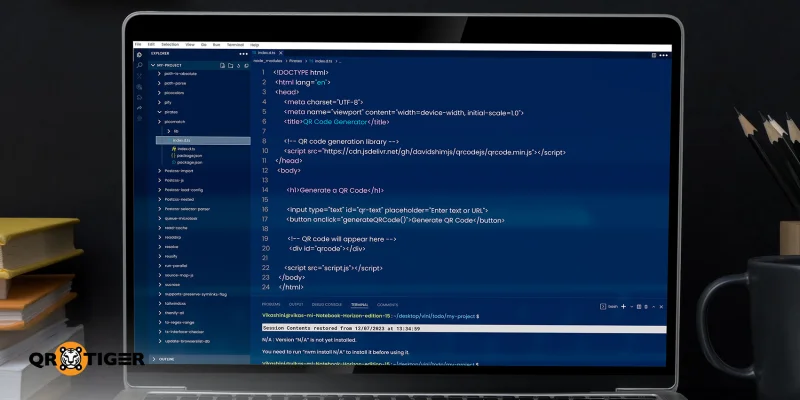
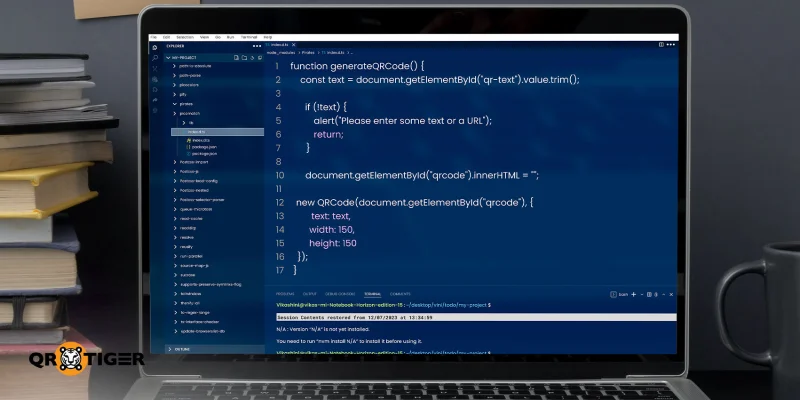
Some of the most basic and commonly used tags include , ,
<body>, <h1>, <p> and <a> .</div></details></div></section><section class="blog-feedback"><h3>Was this article helpful?</h3><div class="blog-feedback-actions"><button type="button">Yes, very helpful</button><button type="button">No, needs work</button></div></section><section class="blog-enterprise-cta"><span class="blog-enterprise-badge">Enterprise Ready</span><h2>Maximize Scans with the Best QR Code Generator</h2><p>Join thousands of global brands using QR TIGER to manage dynamic routing, bulk creation, and deep attribution analytics.</p><a class="blog-cta-btn blog-cta-btn--lg" href="/register?signup_source=blog_cta_btn">Get Started For Free</a></section><div class="blog-share"><span class="blog-share-label">Share this guide:</span><div class="blog-share-icons"><a href="https://www.linkedin.com/sharing/share-offsite/?url=https%3A%2F%2Fwww.qrcode-tiger.com%2Fhow-to-generate-a-qr-code-using-html" target="_blank" rel="noopener noreferrer" class="blog-share-icon" aria-label="LinkedIn"><i class="qr-linkedin" aria-hidden="true"></i></a><a href="https://www.facebook.com/sharer/sharer.php?u=https%3A%2F%2Fwww.qrcode-tiger.com%2Fhow-to-generate-a-qr-code-using-html" target="_blank" rel="noopener noreferrer" class="blog-share-icon" aria-label="Facebook"><i class="qr-facebook" aria-hidden="true"></i></a><a href="https://twitter.com/intent/tweet?url=https%3A%2F%2Fwww.qrcode-tiger.com%2Fhow-to-generate-a-qr-code-using-html&text=How%20To%20Generate%20a%20QR%20Code%20Using%20HTML%3A%20An%20Easy%20Guide" target="_blank" rel="noopener noreferrer" class="blog-share-icon" aria-label="X"><i class="qr-twitter" aria-hidden="true"></i></a></div></div><section class="blog-author-bio"><img class="blog-author-bio-avatar" src="https://media.qrtiger.com/blog/2026/10/ashleyjpg_800_71.jpeg" alt="Ashley P." width="72" height="72"/><div class="blog-author-bio-content"><a class="blog-author-bio-name" href="/blog/author/ashley">Ashley P.</a><p class="blog-author-bio-role">Content Writer at QR TIGER</p><p class="blog-author-bio-text">Ashley holds double degrees in Business and Social Science Studies, along with certifications in content marketing and copywriting. She brings more than eight years of publication experience and three years of expertise in digital marketing and QR code technology. Her work focuses on translating complex data and technical concepts into clear, actionable insights and developing practical solutions that deliver measurable results.</p></div></section></div></article><aside class="blog-sidebar" aria-busy="true"></aside></div></div></div><div class="footer"><div class="container"><div class="social-section"><div class="subscribe"><section>Stay in the loop</section><span class="footer-text footer-subscribe__desc">Sign up for our newsletter and be the first to hear about promos, updates, and tips</span><div class="input-group footer-subscribe__input"><input class="form-control" type="email" placeholder="Your email address" name="email"/><div class="input-group-append"><span class="input-group-text pointer"><i class="qr-icons qr-send" aria-hidden="true"></i></span></div></div></div><div class="social-community"><span class="footer-text mb-2">Join the community</span><div class="social-icons"><a target="_blank" rel="noopener noreferrer" class="icon linkedin-icon" aria-label="Follow Us: LinkedIn" href="https://www.linkedin.com/company/qrtiger/"><i class="qr-icons qr-linkedin" aria-hidden="true"></i></a><a target="_blank" rel="noopener noreferrer" class="icon" aria-label="Follow Us: YouTube" href="https://www.youtube.com/c/QRTiger"><i class="qr-icons qr-youtube" aria-hidden="true"></i></a><a target="_blank" rel="noopener noreferrer" class="icon" aria-label="Follow Us: Instagram" href="https://www.instagram.com/qrtiger"><i class="qr-icons qr-instagram" aria-hidden="true"></i></a><a target="_blank" rel="noopener noreferrer" class="icon" aria-label="Follow Us: Facebook" href="https://www.facebook.com/QRTIGERS/"><i class="qr-icons qr-facebook" aria-hidden="true"></i></a><a target="_blank" rel="noopener noreferrer" class="icon" aria-label="Follow Us: X" href="https://x.com/qrtigers"><i class="qr-icons qr-x-logo" aria-hidden="true"></i></a></div></div><div class="social-community download-app"><h4 class="footer-text">Download the QR TIGER App</h4><span class="footer-text mb-2">Create and scan QR codes on the go</span><div class="download-buttons"><a href="https://apps.apple.com/us/app/qr-tiger-qr-code-generator/id1509675463"><img src="https://qrtiger-fe.nyc3.cdn.digitaloceanspaces.com/static/img/MainFooter/appStore.webp" alt="Download on the App Store" width="139" height="46" loading="lazy" decoding="async"/></a><a href="https://play.google.com/store/apps/details?id=com.qrtiger&pli=1"><img src="https://qrtiger-fe.nyc3.cdn.digitaloceanspaces.com/static/img/MainFooter/googlePlay.webp" alt="Get it on Google Play" width="155" height="46" loading="lazy" decoding="async"/></a></div></div></div><div class="resources-wrapper mt-5 mb-5"><div class="resources-header">Resources</div><div class="row"><div class="col-md-6 col-lg-3 mb-1 mt-1"><div class="resource-item"><a class="text-white text-center" href="https://www.qrcode-tiger.com/how-do-dynamic-qr-codes-work">How do Dynamic QR codes work</a></div></div><div class="col-md-6 col-lg-3 mb-1 mt-1"><div class="resource-item"><a class="text-white text-center" href="https://www.qrcode-tiger.com/how-does-a-multi-url-qr-code-works-and-can-benefit-your-business-smart-qr-code">Multi URL QR Code</a></div></div><div class="col-md-6 col-lg-3 mb-1 mt-1"><div class="resource-item"><a class="text-white text-center" href="https://www.qrcode-tiger.com/digital-business-card-qr-code">Digital Business Card QR Code</a></div></div><div class="col-md-6 col-lg-3 mb-1 mt-1"><div class="resource-item"><a class="text-white text-center" href="https://www.qrcode-tiger.com/bulk-qr-code-generator">Bulk QR Code Generator</a></div></div><div class="col-md-6 col-lg-3 mb-1 mt-1"><div class="resource-item"><a class="text-white text-center" href="https://www.qrcode-tiger.com/how-to-make-a-qr-code-of-an-image">How to make a QR Code for an Image</a></div></div><div class="col-md-6 col-lg-3 mb-1 mt-1"><div class="resource-item"><a class="text-white text-center" href="https://www.qrcode-tiger.com/how-to-create-a-video-qr-code-">How to create a QR code for a video</a></div></div><div class="col-md-6 col-lg-3 mb-1 mt-1"><div class="resource-item"><a class="text-white text-center" href="https://www.qrcode-tiger.com/how-to-make-a-qr-code-for-a-google-form">How to create a QR Code for Google Form</a></div></div><div class="col-md-6 col-lg-3 mb-1 mt-1"><div class="resource-item"><a class="text-white text-center" href="https://www.qrcode-tiger.com/qr-code-with-logo">How to Create a QR Code with Logo</a></div></div><div class="col-md-6 col-lg-3 mb-1 mt-1"><div class="resource-item"><a class="text-white text-center" href="https://www.qrcode-tiger.com/track-qr-code-with-google-analytics">How to track QR code with Google Analytics</a></div></div><div class="col-md-6 col-lg-3 mb-1 mt-1"><div class="resource-item"><a class="text-white text-center" href="https://www.qrcode-tiger.com/how-to-make-your-qr-code-in-restaurant">How to make QR code for Restaurant Menu</a></div></div><div class="col-md-6 col-lg-3 mb-1 mt-1"><div class="resource-item"><a class="text-white text-center" href="https://www.qrcode-tiger.com/file-qr-code-converter">File QR Code Convertor</a></div></div></div></div><div class="main-menu"><div class="section text-lg-left text-left"><div><label class="text-white">Guides</label><ul><li class="faq"><a class="text-white" target="_blank" href="https://www.qrcode-tiger.com/faq">FAQ</a></li><li class="contactUs"><a class="text-white" target="_blank" href="https://www.qrcode-tiger.com/contact">Contact Us</a></li><li class="helpCenter"><a class="text-white" target="_self" href="https://www.qrcode-tiger.com/blog/help-center">Help Center</a></li></ul></div></div><div class="section text-lg-left text-right text-lg-left"><div><label class="text-white">Support</label><ul><li class="mailTo"><a class="text-white" target="_self" href="mailto:it@qrtiger.com">it@qrtiger.com</a></li></ul></div></div><div class="section text-lg-left text-left"><div><label class="text-white">Company</label><ul><li class="aboutUs"><a class="text-white" target="_blank" href="https://www.qrcode-tiger.com/about">About Us</a></li><li class="status"><a class="text-white" target="_blank" href="https://qrtiger.statuspage.io/">Status</a></li><li class="enterpriseSolutions"><a class="text-white" target="_blank" href="https://enterprise.qrcode-tiger.com/">Enterprise Solutions</a></li><li class="pricing"><a class="text-white" target="_self" href="https://www.qrcode-tiger.com/payment">Pricing</a></li></ul></div></div><div class="section text-lg-left text-right text-lg-left"><div><label class="text-white">Terms</label><ul><li class="termsAgreements"><a class="text-white" target="_blank" href="https://www.qrcode-tiger.com/terms-and-conditions">Terms and Conditions</a></li><li class="termsOfAcceptableUse"><a class="text-white" target="_blank" href="https://www.qrcode-tiger.com/term-acceptable-use">Terms of Acceptable Use</a></li><li class="privacyPolicy"><a class="text-white" target="_blank" href="https://www.qrcode-tiger.com/privacy-policy">Privacy Policy</a></li><li class="cookiesPolicy"><a class="text-white" target="_blank" href="https://www.qrcode-tiger.com/cookies-policy">Cookies Policy</a></li></ul></div></div></div><div class="vtline"></div><div class="d-flex justify-content-center m-3"><a class="main-logo" href="/"><img src="https://qrtiger-fe.nyc3.cdn.digitaloceanspaces.com/static/img/MainHeader/qrtiger_logo_s.svg" alt="qr code generator" width="200" height="59" loading="lazy" decoding="async"/></a></div><div class="text-center copy-right">This QR Code generator is a registered trademark of QR TIGER INCORPORATED LIMITED. <br/>'QR Code' is a trademark of DENSO WAVE INCORPORATED. © 2026 www.qrcode-tiger.com</div></div></div></div></div></div></div><script src="/_next/static/chunks/webpack-d70282bc4c82f720.js" crossorigin="" async=""></script><script>(self.__next_f=self.__next_f||[]).push([0]);self.__next_f.push([2,null])</script><script>self.__next_f.push([1,"1:I[12846,[],\"\"]\n4:I[4707,[],\"\"]\n7:I[36423,[],\"\"]\n8:I[59152,[\"1781\",\"static/chunks/app/%5Blocale%5D/(site)/layout-9ebccaf4a00b26a0.js\"],\"default\"]\nc:I[61060,[],\"\"]\n5:[\"locale\",\"en\",\"d\"]\n6:[\"slug\",\"how-to-generate-a-qr-code-using-html\",\"d\"]\nd:[]\n"])</script><script>self.__next_f.push([1,"0:[\"$\",\"$L1\",null,{\"buildId\":\"2ie17S_ah5dahdEoWdqSo\",\"assetPrefix\":\"\",\"urlParts\":[\"\",\"how-to-generate-a-qr-code-using-html\"],\"initialTree\":[\"\",{\"children\":[[\"locale\",\"en\",\"d\"],{\"children\":[\"(cms)\",{\"children\":[[\"slug\",\"how-to-generate-a-qr-code-using-html\",\"d\"],{\"children\":[\"__PAGE__\",{}]}]}]}]},\"$undefined\",\"$undefined\",true],\"initialSeedData\":[\"\",{\"children\":[[\"locale\",\"en\",\"d\"],{\"children\":[\"(cms)\",{\"children\":[[\"slug\",\"how-to-generate-a-qr-code-using-html\",\"d\"],{\"children\":[\"__PAGE__\",{},[[\"$L2\",\"$L3\",null],null],null]},[null,[\"$\",\"$L4\",null,{\"parallelRouterKey\":\"children\",\"segmentPath\":[\"children\",\"$5\",\"children\",\"(cms)\",\"children\",\"$6\",\"children\"],\"error\":\"$undefined\",\"errorStyles\":\"$undefined\",\"errorScripts\":\"$undefined\",\"template\":[\"$\",\"$L7\",null,{}],\"templateStyles\":\"$undefined\",\"templateScripts\":\"$undefined\",\"notFound\":\"$undefined\",\"notFoundStyles\":\"$undefined\"}]],null]},[[null,[[[\"$\",\"link\",null,{\"rel\":\"preload\",\"href\":\"/static/assets/styles/bundles/site.bundle.css?v=1791956706693\",\"as\":\"style\"}],[\"$\",\"link\",null,{\"rel\":\"stylesheet\",\"href\":\"/static/assets/styles/bundles/site.bundle.css?v=1791956706693\",\"precedence\":\"default\"}],[\"$\",\"$L8\",null,{\"href\":\"/static/assets/styles/bundles/site.bundle.css?v=1791956706693\"}]],[[\"$\",\"link\",null,{\"rel\":\"preload\",\"href\":\"/static/assets/styles/bundles/blog.bundle.css?v=1791956706693\",\"as\":\"style\"}],[\"$\",\"link\",null,{\"rel\":\"stylesheet\",\"href\":\"/static/assets/styles/bundles/blog.bundle.css?v=1791956706693\",\"precedence\":\"default\"}],[\"$\",\"$L8\",null,{\"href\":\"/static/assets/styles/bundles/blog.bundle.css?v=1791956706693\"}]],[\"$\",\"$L4\",null,{\"parallelRouterKey\":\"children\",\"segmentPath\":[\"children\",\"$5\",\"children\",\"(cms)\",\"children\"],\"error\":\"$undefined\",\"errorStyles\":\"$undefined\",\"errorScripts\":\"$undefined\",\"template\":[\"$\",\"$L7\",null,{}],\"templateStyles\":\"$undefined\",\"templateScripts\":\"$undefined\",\"notFound\":\"$undefined\",\"notFoundStyles\":\"$undefined\"}]]],null],null]},[[null,\"$L9\"],null],null]},[[null,\"$La\"],null],null],\"couldBeIntercepted\":false,\"initialHead\":[null,\"$Lb\"],\"globalErrorComponent\":\"$c\",\"missingSlots\":\"$Wd\"}]\n"])</script><script>self.__next_f.push([1,"f:I[6034,[\"2653\",\"static/chunks/2653-2c7d73a5b4d8fd48.js\",\"7774\",\"static/chunks/7774-b0a5d2d28f2682a5.js\",\"9441\",\"static/chunks/9441-6e162664b08a40d1.js\",\"8322\",\"static/chunks/8322-438db9bcf24bc73e.js\",\"3426\",\"static/chunks/3426-c2abb27e049260f9.js\",\"2420\",\"static/chunks/2420-6b15e0904dc5e4d4.js\",\"4281\",\"static/chunks/4281-df9a22eaa52cf3cd.js\",\"5124\",\"static/chunks/5124-85248a3cffe36581.js\",\"9708\",\"static/chunks/9708-d1b49845002480bf.js\",\"6851\",\"static/chunks/6851-7a3483c090d054ac.js\",\"6773\",\"static/chunks/6773-3e2bd4b98aff02a6.js\",\"4412\",\"static/chunks/4412-30315123d872f27c.js\",\"1629\",\"static/chunks/1629-d60dd2c128c78c82.js\",\"4613\",\"static/chunks/4613-14d82ab156e1d01f.js\",\"39\",\"static/chunks/39-62057ba9d3a0659e.js\",\"7322\",\"static/chunks/7322-39c70f38352e1e56.js\",\"3500\",\"static/chunks/app/%5Blocale%5D/(site)/page-a9dc76348c5c3686.js\"],\"default\"]\n10:I[34238,[\"2653\",\"static/chunks/2653-2c7d73a5b4d8fd48.js\",\"7774\",\"static/chunks/7774-b0a5d2d28f2682a5.js\",\"2420\",\"static/chunks/2420-6b15e0904dc5e4d4.js\",\"8003\",\"static/chunks/8003-01df224e05286a2d.js\",\"108\",\"static/chunks/108-b89c441db37c7d30.js\",\"4412\",\"static/chunks/4412-30315123d872f27c.js\",\"3185\",\"static/chunks/app/layout-02efb43790863941.js\"],\"default\"]\n11:I[74196,[\"2653\",\"static/chunks/2653-2c7d73a5b4d8fd48.js\",\"7774\",\"static/chunks/7774-b0a5d2d28f2682a5.js\",\"2420\",\"static/chunks/2420-6b15e0904dc5e4d4.js\",\"8003\",\"static/chunks/8003-01df224e05286a2d.js\",\"108\",\"static/chunks/108-b89c441db37c7d30.js\",\"4412\",\"static/chunks/4412-30315123d872f27c.js\",\"3185\",\"static/chunks/app/layout-02efb43790863941.js\"],\"default\"]\n12:I[88003,[\"2653\",\"static/chunks/2653-2c7d73a5b4d8fd48.js\",\"7774\",\"static/chunks/7774-b0a5d2d28f2682a5.js\",\"2420\",\"static/chunks/2420-6b15e0904dc5e4d4.js\",\"8003\",\"static/chunks/8003-01df224e05286a2d.js\",\"108\",\"static/chunks/108-b89c441db37c7d30.js\",\"4412\",\"static/chunks/4412-30315123d872f27c.js\",\"3185\",\"static/chunks/app/layout-02efb43790863941.js\"],\"\"]\n13:I[37187,[\"2653\",\"static/chunks/2653-2c7d73a5b4d8fd48.js\",\"7774\",\"static/chunks/7774-b0a5d2d28f2682a5.j"])</script><script>self.__next_f.push([1,"s\",\"9441\",\"static/chunks/9441-6e162664b08a40d1.js\",\"8322\",\"static/chunks/8322-438db9bcf24bc73e.js\",\"3426\",\"static/chunks/3426-c2abb27e049260f9.js\",\"2420\",\"static/chunks/2420-6b15e0904dc5e4d4.js\",\"4281\",\"static/chunks/4281-df9a22eaa52cf3cd.js\",\"5124\",\"static/chunks/5124-85248a3cffe36581.js\",\"9708\",\"static/chunks/9708-d1b49845002480bf.js\",\"6851\",\"static/chunks/6851-7a3483c090d054ac.js\",\"6773\",\"static/chunks/6773-3e2bd4b98aff02a6.js\",\"4412\",\"static/chunks/4412-30315123d872f27c.js\",\"1629\",\"static/chunks/1629-d60dd2c128c78c82.js\",\"4613\",\"static/chunks/4613-14d82ab156e1d01f.js\",\"39\",\"static/chunks/39-62057ba9d3a0659e.js\",\"7322\",\"static/chunks/7322-39c70f38352e1e56.js\",\"3500\",\"static/chunks/app/%5Blocale%5D/(site)/page-a9dc76348c5c3686.js\"],\"default\"]\n14:I[84704,[\"2653\",\"static/chunks/2653-2c7d73a5b4d8fd48.js\",\"7774\",\"static/chunks/7774-b0a5d2d28f2682a5.js\",\"9441\",\"static/chunks/9441-6e162664b08a40d1.js\",\"8322\",\"static/chunks/8322-438db9bcf24bc73e.js\",\"3426\",\"static/chunks/3426-c2abb27e049260f9.js\",\"4412\",\"static/chunks/4412-30315123d872f27c.js\",\"1629\",\"static/chunks/1629-d60dd2c128c78c82.js\",\"7968\",\"static/chunks/app/%5Blocale%5D/(cms)/%5Bslug%5D/page-047743a06f571c27.js\"],\"default\"]\n15:I[84393,[\"2653\",\"static/chunks/2653-2c7d73a5b4d8fd48.js\",\"9441\",\"static/chunks/9441-6e162664b08a40d1.js\",\"8322\",\"static/chunks/8322-438db9bcf24bc73e.js\",\"1449\",\"static/chunks/1449-f5cc50f5784ef500.js\",\"1203\",\"static/chunks/app/%5Blocale%5D/layout-a1736618a1bbbbd1.js\"],\"default\"]\n16:\"$Sreact.suspense\"\n17:I[26766,[\"2653\",\"static/chunks/2653-2c7d73a5b4d8fd48.js\",\"9441\",\"static/chunks/9441-6e162664b08a40d1.js\",\"8322\",\"static/chunks/8322-438db9bcf24bc73e.js\",\"1449\",\"static/chunks/1449-f5cc50f5784ef500.js\",\"1203\",\"static/chunks/app/%5Blocale%5D/layout-a1736618a1bbbbd1.js\"],\"default\"]\n18:I[96743,[\"2653\",\"static/chunks/2653-2c7d73a5b4d8fd48.js\",\"9441\",\"static/chunks/9441-6e162664b08a40d1.js\",\"8322\",\"static/chunks/8322-438db9bcf24bc73e.js\",\"1449\",\"static/chunks/1449-f5cc50f5784ef500.js\",\"1203\",\"static/chunks/app/%5Blocale%5D/layout-a1736618a1bbb"])</script><script>self.__next_f.push([1,"bd1.js\"],\"default\"]\ne:T3eb4,"])</script><script>self.__next_f.push([1,"@font-face {\n font-family: 'Poppins';\n font-style: normal;\n font-weight: 600;\n font-display: swap;\n src: url(/static/assets/fonts/Poppins/Poppins-SemiBold.woff2) format('woff2');\n unicode-range: U+0000-00FF, U+0131, U+0152-0153, U+02BB-02BC, U+02C6, U+02DA, U+02DC, U+2000-206F, U+2074, U+20AC, U+2122, U+2191, U+2193, U+2212, U+2215, U+FEFF, U+FFFD;\n}\n\n@font-face {\n font-family: 'Poppins';\n font-style: normal;\n font-weight: 500;\n font-display: swap;\n src: url(/static/assets/fonts/Poppins/Poppins-Medium.woff2) format('woff2');\n unicode-range: U+0000-00FF, U+0131, U+0152-0153, U+02BB-02BC, U+02C6, U+02DA, U+02DC, U+2000-206F, U+2074, U+20AC,\n U+2122, U+2191, U+2193, U+2212, U+2215, U+FEFF, U+FFFD;\n}\n\n@font-face {\n font-family: 'Poppins';\n font-style: normal;\n font-weight: 400;\n font-display: swap;\n src: url(/static/assets/fonts/Poppins/Poppins-Regular.woff2) format('woff2');\n unicode-range: U+0000-00FF, U+0131, U+0152-0153, U+02BB-02BC, U+02C6, U+02DA, U+02DC, U+2000-206F, U+2074, U+20AC, U+2122, U+2191, U+2193, U+2212, U+2215, U+FEFF, U+FFFD;\n}\n\n@font-face {\n font-family: 'Poppins';\n font-style: normal;\n font-weight: 700;\n font-display: swap;\n src: url(/static/assets/fonts/Poppins/Poppins-Bold.woff2) format('woff2');\n unicode-range: U+0000-00FF, U+0131, U+0152-0153, U+02BB-02BC, U+02C6, U+02DA, U+02DC, U+2000-206F, U+2074, U+20AC, U+2122, U+2191, U+2193, U+2212, U+2215, U+FEFF, U+FFFD;\n}\n\n@font-face {\n font-family: 'Lato';\n font-style: normal;\n font-weight: 400;\n font-display: swap;\n src: url(https://fonts.gstatic.com/s/lato/v23/S6uyw4BMUTPHjx4wXg.woff2) format('woff2');\n unicode-range: U+0000-00FF, U+0131, U+0152-0153, U+02BB-02BC, U+02C6, U+02DA, U+02DC, U+2000-206F, U+2074, U+20AC, U+2122, U+2191, U+2193, U+2212, U+2215, U+FEFF, U+FFFD;\n}\n\n@font-face {\n font-family: 'QrTiger';\n src: url('/static/assets/fonts/QrTiger/fonts/QrTiger.eot?3rhkpx');\n src: url('/static/assets/fonts/QrTiger/fonts/QrTiger.eot?3rhkpx#iefix') format('embedded-opentype'),\n url('/static/assets/fonts/QrTiger/fonts/QrTiger.ttf?3rhkpx') format('truetype'),\n url('/static/assets/fonts/QrTiger/fonts/QrTiger.woff?3rhkpx') format('woff'),\n url('/static/assets/fonts/QrTiger/fonts/QrTiger.svg?3rhkpx#QrTiger') format('svg');\n font-weight: normal;\n font-style: normal;\n font-display: swap;\n ascent-override: 90%;\n descent-override: 10%;\n line-gap-override: 0%;\n}\n\n[class^=\"qr-\"], [class*=\" qr-\"] {\n /* use !important to prevent issues with browser extensions that change fonts */\n font-family: 'QrTiger' !important;\n speak: never;\n font-style: normal;\n font-weight: normal;\n font-variant: normal;\n text-transform: none;\n line-height: 1;\n\n /* Better Font Rendering =========== */\n -webkit-font-smoothing: antialiased;\n -moz-osx-font-smoothing: grayscale;\n}\n\n.qr-warning:before {\n content: \"\\e900\";\n}\n.qr-stoplight_logo:before {\n content: \"\\e901\";\n}\n.qr-email:before {\n content: \"\\e902\";\n}\n.qr-instagram:before {\n content: \"\\e903\";\n}\n.qr-pdf:before {\n content: \"\\e904\";\n}\n.qr-html:before {\n content: \"\\e905\";\n}\n.qr-facebook-thin:before {\n content: \"\\e906\";\n}\n.qr-email1:before {\n content: \"\\e907\";\n}\n.qr-app-store:before {\n content: \"\\e908\";\n}\n.qr-facebook-like:before {\n content: \"\\e909\";\n}\n.qr-pinterest:before {\n content: \"\\e90a\";\n}\n.qr-mp3:before {\n content: \"\\e90b\";\n}\n.qr-vcard:before {\n content: \"\\e90c\";\n}\n.qr-url:before {\n content: \"\\e90d\";\n}\n.qr-text:before {\n content: \"\\e90e\";\n}\n.qr-event:before {\n content: \"\\e90f\";\n}\n.qr-youtube:before {\n content: \"\\e910\";\n}\n.qr-star-inside-circle:before {\n content: \"\\e911\";\n}\n.qr-open-menu:before {\n content: \"\\e912\";\n}\n.qr-twitter:before {\n content: \"\\e913\";\n}\n.qr-caret-up:before {\n content: \"\\e914\";\n}\n.qr-caret-down:before {\n content: \"\\e915\";\n}\n.qr-sns:before {\n content: \"\\e916\";\n}\n.qr-wechat:before {\n content: \"\\e917\";\n}\n.qr-multi:before {\n content: \"\\e918\";\n}\n.qr-search:before {\n content: \"\\e919\";\n}\n.qr-alipay:before {\n content: \"\\e91a\";\n}\n.qr-social-media:before {\n content: \"\\e91b\";\n}\n.qr-forms:before {\n content: \"\\e91c\";\n}\n.qr-check-circle:before {\n content: \"\\e91d\";\n}\n.qr-more:before {\n content: \"\\e91e\";\n}\n.qr-line:before {\n content: \"\\e91f\";\n}\n.qr-tiktok:before {\n content: \"\\e920\";\n}\n.qr-close:before {\n content: \"\\e921\";\n}\n.qr-question-circle:before {\n content: \"\\e922\";\n}\n.qr-angle-down:before {\n content: \"\\e923\";\n}\n.qr-angle-up:before {\n content: \"\\e924\";\n}\n.qr-plus:before {\n content: \"\\e925\";\n}\n.qr-user:before {\n content: \"\\e926\";\n}\n.qr-qrcode:before {\n content: \"\\e927\";\n}\n.qr-double-arrow-left:before {\n content: \"\\e928\";\n}\n.qr-double-arrow-right:before {\n content: \"\\e929\";\n}\n.qr-question:before {\n content: \"\\e92a\";\n}\n.qr-paint-brush:before {\n content: \"\\e92b\";\n}\n.qr-trash:before {\n content: \"\\e92c\";\n}\n.qr-linkedin:before {\n content: \"\\e92d\";\n}\n.qr-wechat-main:before {\n content: \"\\e92e\";\n}\n.qr-whatsapp:before {\n content: \"\\e92f\";\n}\n.qr-tumblr:before {\n content: \"\\e930\";\n}\n.qr-messenger:before {\n content: \"\\e931\";\n}\n.qr-reddit:before {\n content: \"\\e932\";\n}\n.qr-qq:before {\n content: \"\\e933\";\n}\n.qr-medium:before {\n content: \"\\e934\";\n}\n.qr-yelp:before {\n content: \"\\e935\";\n}\n.qr-quora:before {\n content: \"\\e936\";\n}\n.qr-meetup:before {\n content: \"\\e937\";\n}\n.qr-snapchat:before {\n content: \"\\e938\";\n}\n.qr-check:before {\n content: \"\\e939\";\n}\n.qr-exchange:before {\n content: \"\\e93a\";\n}\n.qr-facebook:before {\n content: \"\\e93b\";\n}\n.qr-play:before {\n content: \"\\e93c\";\n}\n.qr-kakao-talk:before {\n content: \"\\e93d\";\n}\n.qr-viber:before {\n content: \"\\e93e\";\n}\n.qr-high-signal:before {\n content: \"\\e93f\";\n}\n.qr-telegram:before {\n content: \"\\e940\";\n}\n.qr-twitch:before {\n content: \"\\e941\";\n}\n.qr-phone-call:before {\n content: \"\\e942\";\n}\n.qr-global:before {\n content: \"\\e943\";\n}\n.qr-postmates:before {\n content: \"\\e944\";\n}\n.qr-foodpanda:before {\n content: \"\\e945\";\n}\n.qr-ebay:before {\n content: \"\\e946\";\n}\n.qr-rakuten:before {\n content: \"\\e947\";\n}\n.qr-menulog:before {\n content: \"\\e948\";\n}\n.qr-podcast:before {\n content: \"\\e949\";\n}\n.qr-zomato:before {\n content: \"\\e94a\";\n}\n.qr-shopify:before {\n content: \"\\e94b\";\n}\n.qr-ubereats:before {\n content: \"\\e94c\";\n}\n.qr-etsy:before {\n content: \"\\e94d\";\n}\n.qr-bilibili:before {\n content: \"\\e94e\";\n}\n.qr-streamlabs:before {\n content: \"\\e94f\";\n}\n.qr-soundcloud:before {\n content: \"\\e950\";\n}\n.qr-patreon:before {\n content: \"\\e951\";\n}\n.qr-grubhub:before {\n content: \"\\e952\";\n}\n.qr-doordash:before {\n content: \"\\e953\";\n}\n.qr-kuaishou:before {\n content: \"\\e954\";\n}\n.qr-douban:before {\n content: \"\\e955\";\n}\n.qr-account:before {\n content: \"\\e956\";\n}\n.qr-settings:before {\n content: \"\\e957\";\n}\n.qr-refresh:before {\n content: \"\\e958\";\n}\n.qr-swiggy:before {\n content: \"\\e959\";\n}\n.qr-justeat:before {\n content: \"\\e95a\";\n}\n.qr-deliveroo:before {\n content: \"\\e95b\";\n}\n.qr-glovo:before {\n content: \"\\e95c\";\n}\n.qr-time:before {\n content: \"\\e95d\";\n}\n.qr-notification:before {\n content: \"\\e95e\";\n}\n.qr-lock:before {\n content: \"\\e95f\";\n}\n.qr-zhihu:before {\n content: \"\\e960\";\n}\n.qr-xiao-hongsu:before {\n content: \"\\e961\";\n}\n.qr-weibo:before {\n content: \"\\e962\";\n}\n.qr-wechat-mini:before {\n content: \"\\e963\";\n}\n.qr-soul:before {\n content: \"\\e964\";\n}\n.qr-himalaya:before {\n content: \"\\e965\";\n}\n.qr-meituan:before {\n content: \"\\e966\";\n}\n.qr-eleme:before {\n content: \"\\e967\";\n}\n.qr-pingduoduo:before {\n content: \"\\e968\";\n}\n.qr-jingdong:before {\n content: \"\\e969\";\n}\n.qr-taobao:before {\n content: \"\\e96a\";\n}\n.qr-xuexi:before {\n content: \"\\e96b\";\n}\n.qr-qq-music:before {\n content: \"\\e96c\";\n}\n.qr-k-song:before {\n content: \"\\e96d\";\n}\n.qr-hibixin:before {\n content: \"\\e96e\";\n}\n.qr-dianping:before {\n content: \"\\e96f\";\n}\n.qr-wechat-channel:before {\n content: \"\\e970\";\n}\n.qr-amazon:before {\n content: \"\\e971\";\n}\n.qr-applemusic:before {\n content: \"\\e972\";\n}\n.qr-yogiyo:before {\n content: \"\\e973\";\n}\n.qr-send:before {\n content: \"\\e974\";\n}\n.qr-open-box:before {\n content: \"\\e975\";\n}\n.qr-left-arrow:before {\n content: \"\\e976\";\n}\n.qr-xianyu:before {\n content: \"\\e977\";\n}\n.qr-tick-inside-circle:before {\n content: \"\\e978\";\n}\n.qr-reward:before {\n content: \"\\e979\";\n}\n.qr-template:before {\n content: \"\\e97a\";\n}\n.qr-location:before {\n content: \"\\e97b\";\n}\n.qr-fax:before {\n content: \"\\e97c\";\n}\n.qr-brief-case:before {\n content: \"\\e97d\";\n}\n.qr-phone:before {\n content: \"\\e97e\";\n}\n.qr-form:before {\n content: \"\\e97f\";\n}\n.qr-add-user:before {\n content: \"\\e980\";\n}\n.qr-documentation:before {\n content: \"\\e981\";\n}\n.qr-kesong:before {\n content: \"\\e982\";\n}\n.qr-cloud-computing:before {\n content: \"\\e983\";\n}\n.qr-rise:before {\n content: \"\\e984\";\n}\n.qr-box:before {\n content: \"\\e985\";\n}\n.qr-bolt:before {\n content: \"\\e986\";\n}\n.qr-shield:before {\n content: \"\\e987\";\n}\n.qr-circle-check-thin:before {\n content: \"\\e988\";\n}\n.qr-share:before {\n content: \"\\e989\";\n}\n.qr-link:before {\n content: \"\\e98a\";\n}\n.qr-hot-coffee:before {\n content: \"\\e98b\";\n}\n.qr-speech-bubble:before {\n content: \"\\e98c\";\n}\n.qr-shopping-bag:before {\n content: \"\\e98d\";\n}\n.qr-music:before {\n content: \"\\e98e\";\n}\n.qr-wifi:before {\n content: \"\\e98f\";\n}\n.qr-paper:before {\n content: \"\\e990\";\n}\n.qr-user-profile:before {\n content: \"\\e991\";\n}\n.qr-facebook-circle:before {\n content: \"\\e992\";\n}\n.qr-frame:before {\n content: \"\\e993\";\n}\n.qr-layout:before {\n content: \"\\e994\";\n}\n.qr-sliders:before {\n content: \"\\e995\";\n}\n.qr-image:before {\n content: \"\\e996\";\n}\n.qr-two-arrows-pointing-right-and-left:before {\n content: \"\\e997\";\n}\n.qr-lock-no-key-hold:before {\n content: \"\\e998\";\n}\n.qr-arrow-down-in-circle:before {\n content: \"\\e999\";\n}\n.qr-scan:before {\n content: \"\\e99a\";\n}\n.qr-star:before {\n content: \"\\e99b\";\n}\n.qr-embed-other:before {\n content: \"\\e99c\";\n}\n.qr-embed-video:before {\n content: \"\\e99d\";\n}\n.qr-meta-tags:before {\n content: \"\\e99e\";\n}\n.qr-store-hours:before {\n content: \"\\e99f\";\n}\n.qr-eyes:before {\n content: \"\\e9a0\";\n}\n.qr-pattern:before {\n content: \"\\e9a1\";\n}\n.qr-template-frame:before {\n content: \"\\e9a2\";\n}\n.qr-angle-right:before {\n content: \"\\e9a3\";\n}\n.qr-angle-left:before {\n content: \"\\e9a4\";\n}\n.qr-uber:before {\n content: \"\\e9a5\";\n}\n.qr-exclamation-circle:before {\n content: \"\\e9a6\";\n}\n.qr-circle-check-regular:before {\n content: \"\\e9a7\";\n}\n.qr-plus-circle:before {\n content: \"\\e9a8\";\n}\n.qr-colors:before {\n content: \"\\e9a9\";\n}\n.qr-logo:before {\n content: \"\\e9aa\";\n}\n.qr-close-circle:before {\n content: \"\\e9ab\";\n}\n.qr-trashcan:before {\n content: \"\\e9ac\";\n}\n.qr-arrow:before {\n content: \"\\e9ad\";\n}\n.qr-location-solid:before {\n content: \"\\e9ae\";\n}\n.qr-lock-circle:before {\n content: \"\\e9af\";\n}\n.qr-show-more:before {\n content: \"\\e9b0\";\n}\n.qr-register:before {\n content: \"\\e9b1\";\n}\n.qr-login:before {\n content: \"\\e9b2\";\n}\n.qr-user-add:before {\n content: \"\\e9b3\";\n}\n.qr-dashboard:before {\n content: \"\\e9b4\";\n}\n.qr-logout:before {\n content: \"\\e9b5\";\n}\n.qr-sms:before {\n content: \"\\e9b6\";\n}\n.qr-event2:before {\n content: \"\\e9b7\";\n}\n.qr-padlock:before {\n content: \"\\e9b8\";\n}\n.qr-profile-stack:before {\n content: \"\\e9b9\";\n}\n.qr-huawei:before {\n content: \"\\e9ba\";\n}\n.qr-apple:before {\n content: \"\\e9bb\";\n}\n.qr-android:before {\n content: \"\\e9bc\";\n}\n.qr-billing:before {\n content: \"\\e9bd\";\n}\n.qr-x-logo:before {\n content: \"\\e9be\";\n}\n.qr-micro:before {\n content: \"\\e9bf\";\n}\n.qr-pieces:before {\n content: \"\\e9c0\";\n}\n.qr-ebook:before {\n content: \"\\e9c1\";\n}\n.qr-edit-comment:before {\n content: \"\\e9c2\";\n}\n.qr-tiger:before {\n content: \"\\e9c3\";\n}\n.qr-group:before {\n content: \"\\e9c4\";\n}\n.qr-clound:before {\n content: \"\\e9c5\";\n}\n.qr-stacks:before {\n content: \"\\e9c6\";\n}\n.qr-frame-code:before {\n content: \"\\e9c7\";\n}\n.qr-audio:before {\n content: \"\\e9c8\";\n}\n.qr-facebook-solid:before {\n content: \"\\e9c9\";\n}\n.qr-share-link:before {\n content: \"\\e9ca\";\n}\n.qr-building:before {\n content: \"\\e9cb\";\n}\n.qr-gs1-link:before {\n content: \"\\e9cc\";\n}\n.qr-multi-url-v2:before {\n content: \"\\e9cd\";\n}\n.qr-url-v2:before {\n content: \"\\e9ce\";\n}\n.qr-event-v2:before {\n content: \"\\e9cf\";\n}\n.qr-text-v2:before {\n content: \"\\e9d0\";\n}\n.qr-menu-v2:before {\n content: \"\\e9d1\";\n}\n.qr-link-page:before {\n content: \"\\e9d2\";\n}\n.qr-email-v2:before {\n content: \"\\e9d3\";\n}\n.qr-file-v2:before {\n content: \"\\e9d4\";\n}\n.qr-landing-page:before {\n content: \"\\e9d5\";\n}\n.qr-wifi-v2:before {\n content: \"\\e9d6\";\n}\n.qr-sms-v2:before {\n content: \"\\e9d7\";\n}\n.qr-youtube-v2:before {\n content: \"\\e9d8\";\n}\n.qr-mp3-v2:before {\n content: \"\\e9d9\";\n}\n.qr-google-form:before {\n content: \"\\e9da\";\n}\n.qr-appstore-v2:before {\n content: \"\\e9db\";\n}\n.qr-location-v2:before {\n content: \"\\e9dc\";\n}\n.qr-vcard-v2:before {\n content: \"\\e9dd\";\n}\n.qr-pinterest-v2:before {\n content: \"\\e9de\";\n}\n.qr-tiktok-v2:before {\n content: \"\\e9df\";\n}\n.qr-instagram-v2:before {\n content: \"\\e9e0\";\n}\n.qr-facebook-v2:before {\n content: \"\\e9e1\";\n}\n.qr-x-logo-v2:before {\n content: \"\\e9e2\";\n}\n.qr-sms1:before {\n content: \"\\e9e3\";\n}\n.qr-gs1:before {\n content: \"\\e9e4\";\n}\n.qr-url1:before {\n content: \"\\e9e5\";\n}\n.qr-text-v3:before {\n content: \"\\e9e6\";\n}\n.qr-app-store-v3:before {\n content: \"\\e9e7\";\n}\n.qr-email-v3:before {\n content: \"\\e9e8\";\n}\n.qr-event-v3:before {\n content: \"\\e9e9\";\n}\n.qr-facebook-v3:before {\n content: \"\\e9ea\";\n}\n.qr-file:before {\n content: \"\\e9eb\";\n}\n.qr-google-form-v3:before {\n content: \"\\e9ec\";\n}\n.qr-instagram-v3:before {\n content: \"\\e9ed\";\n}\n.qr-landing-page-v3:before {\n content: \"\\e9ee\";\n}\n.qr-link-page-v3:before {\n content: \"\\e9ef\";\n}\n.qr-location-v3:before {\n content: \"\\e9f0\";\n}\n.qr-hot-coffee-v3:before {\n content: \"\\e9f1\";\n}\n.qr-music-v3:before {\n content: \"\\e9f2\";\n}\n.qr-murl:before {\n content: \"\\e9f3\";\n}\n.qr-pinterest-v3:before {\n content: \"\\e9f4\";\n}\n.qr-code:before {\n content: \"\\e9f5\";\n}\n.qr-tiger-v3:before {\n content: \"\\e9f6\";\n}\n.qr-sepa:before {\n content: \"\\e9f7\";\n}\n.qr-tiktok1:before {\n content: \"\\e9f8\";\n}\n.qr-vcard-v3:before {\n content: \"\\e9f9\";\n}\n.qr-wifi-v3:before {\n content: \"\\e9fa\";\n}\n.qr-x:before {\n content: \"\\e9fb\";\n}\n.qr-youtube-v3:before {\n content: \"\\e9fc\";\n}\n.qr-setting-v2:before {\n content: \"\\e9fd\";\n}\n.qr-video:before {\n content: \"\\e9fe\";\n}\n.qr-scan-check:before {\n content: \"\\e9ff\";\n}\n.qr-scan-chart:before {\n content: \"\\ea00\";\n}\n.qr-scan-settings:before {\n content: \"\\ea01\";\n}\n.qr-spotify:before {\n content: \"\\ea02\";\n}\n.qr-rounded-plus:before {\n content: \"\\ea03\";\n}\n.qr-rounded-minus:before {\n content: \"\\ea04\";\n}\n.qr-versus:before {\n content: \"\\ea05\";\n}\n.qr-neutral:before {\n content: \"\\ea06\";\n}\n.qr-dislike:before {\n content: \"\\ea07\";\n}\n.qr-like:before {\n content: \"\\ea08\";\n}\n.qr-color-picker:before {\n content: \"\\ea09\";\n}\n.qr-bulb:before {\n content: \"\\ea0a\";\n}\n.qr-eye:before {\n content: \"\\ea0b\";\n}\n.qr-print:before {\n content: \"\\ea0c\";\n}\n.qr-gift:before {\n content: \"\\ea0d\";\n}\n.qr-scissors:before {\n content: \"\\ea0e\";\n}\n.qr-diamond:before {\n content: \"\\ea0f\";\n}\n.qr-secure-shield:before {\n content: \"\\ea10\";\n}\n.qr-insecure-shield:before {\n content: \"\\ea11\";\n}\n.qr-email-notify:before {\n content: \"\\ea12\";\n}\n.qr-speed-meter:before {\n content: \"\\ea13\";\n}\n.qr-check-shield:before {\n content: \"\\ea14\";\n}\n.qr-slash-user:before {\n content: \"\\ea15\";\n}\n.qr-increase:before {\n content: \"\\ea16\";\n}\n.qr-ar:before {\n content: \"\\ea17\";\n}\n.qr-building-v2:before {\n content: \"\\ea18\";\n}\n.qr-business-report:before {\n content: \"\\ea19\";\n}\n.qr-bar-chart:before {\n content: \"\\ea1a\";\n}\n.qr-offer:before {\n content: \"\\ea1b\";\n}\n.qr-plug:before {\n content: \"\\ea1c\";\n}\n.qr-store:before {\n content: \"\\ea1d\";\n}\n.qr-grabfood:before {\n content: \"\\ea1e\";\n}\n.qr-card:before {\n content: \"\\ea1f\";\n}\n.qr-canvas-pencil:before {\n content: \"\\ea20\";\n}\n.qr-microscope:before {\n content: \"\\ea21\";\n}\n.qr-measuring-tape:before {\n content: \"\\ea22\";\n}\n.qr-touch:before {\n content: \"\\ea23\";\n}\n.qr-arrow-choose:before {\n content: \"\\ea24\";\n}\n.qr-shapes:before {\n content: \"\\ea25\";\n}\n.qr-outlined-star:before {\n content: \"\\ea26\";\n}\n.qr-checklist:before {\n content: \"\\ea27\";\n}\n.qr-circle:before {\n content: \"\\ea28\";\n}\n.qr-google-review:before {\n content: \"\\ea29\";\n}\n.qr-pip:before {\n content: \"\\ea2a\";\n}\n.qr-mcp:before {\n content: \"\\ea2b\";\n}"])</script><script>self.__next_f.push([1,"a:[\"$\",\"html\",null,{\"lang\":\"en\",\"children\":[[\"$\",\"head\",null,{\"children\":[[\"$\",\"link\",null,{\"rel\":\"manifest\",\"href\":\"/static/favicon/manifest.json\"}],[\"$\",\"link\",null,{\"rel\":\"shortcut icon\",\"href\":\"/static/favicon/favicon.ico\"}],[\"$\",\"meta\",null,{\"name\":\"mobile-web-app-capable\",\"content\":\"yes\"}],[\"$\",\"meta\",null,{\"httpEquiv\":\"X-UA-Compatible\",\"content\":\"IE=edge\"}],[\"$\",\"meta\",null,{\"name\":\"apple-itunes-app\",\"content\":\"app-id=id1509675463\"}],[\"$\",\"meta\",null,{\"name\":\"google-play-app\",\"content\":\"app-id=com.qrtiger\"}],[\"$\",\"link\",null,{\"rel\":\"apple-touch-icon\",\"href\":\"/static/favicon/icon.png\"}],[\"$\",\"link\",null,{\"rel\":\"android-touch-icon\",\"href\":\"/static/favicon/icon.png\"}],[\"$\",\"link\",null,{\"rel\":\"preconnect\",\"href\":\"https://qrtiger-fe.nyc3.cdn.digitaloceanspaces.com\",\"crossOrigin\":\"\"}],[\"$\",\"link\",null,{\"rel\":\"preconnect\",\"href\":\"https://fonts.gstatic.com\",\"crossOrigin\":\"anonymous\"}],[[\"$\",\"link\",\"preload-/static/assets/fonts/Poppins/Poppins-Regular.woff2\",{\"rel\":\"preload\",\"href\":\"/static/assets/fonts/Poppins/Poppins-Regular.woff2\",\"as\":\"font\",\"type\":\"font/woff2\",\"crossOrigin\":\"anonymous\"}],[\"$\",\"link\",\"preload-/static/assets/fonts/Poppins/Poppins-Bold.woff2\",{\"rel\":\"preload\",\"href\":\"/static/assets/fonts/Poppins/Poppins-Bold.woff2\",\"as\":\"font\",\"type\":\"font/woff2\",\"crossOrigin\":\"anonymous\"}]],[\"$\",\"style\",null,{\"id\":\"critical-fonts-inline\",\"dangerouslySetInnerHTML\":{\"__html\":\"$e\"}}],[\"$\",\"link\",null,{\"rel\":\"stylesheet\",\"href\":\"/static/assets/fonts/fontface.css\",\"media\":\"print\",\"id\":\"extended-fontface-css\",\"suppressHydrationWarning\":true}],[\"$\",\"script\",null,{\"dangerouslySetInnerHTML\":{\"__html\":\"\\n (function () {\\n function activateDeferredStylesheet(id) {\\n var link = document.getElementById(id);\\n if (!link) return;\\n link.onload = function () { this.media = \\\"all\\\"; };\\n if (link.sheet) link.media = \\\"all\\\";\\n }\\n activateDeferredStylesheet(\\\"extended-fontface-css\\\");\\n })();\\n \"}}],[\"$\",\"noscript\",null,{\"children\":[\"$\",\"link\",null,{\"rel\":\"stylesheet\",\"href\":\"/static/assets/fonts/fontface.css\"}]}],[[\"$\",\"meta\",null,{\"name\":\"subject\",\"content\":\"Qrtiger\"}],[\"$\",\"meta\",null,{\"name\":\"copyright\",\"content\":\"Qrtiger\"}],[\"$\",\"meta\",null,{\"name\":\"language\",\"content\":\"EN\"}],[\"$\",\"meta\",null,{\"name\":\"author\",\"content\":\"Benjamin Claeys, info@qrtiger.com\"}],[\"$\",\"meta\",null,{\"name\":\"url\",\"content\":\"https://qrcode-tiger.com\"}],false,[\"$\",\"meta\",null,{\"name\":\"facebook-domain-verification\",\"content\":\"tctmbaunwrxf1ru5bbwf8c85wcmpbl\"}]],[\"$\",\"script\",null,{\"dangerouslySetInnerHTML\":{\"__html\":\"\\n window.dataLayer = window.dataLayer || [];\\n \"}}]]}],[\"$\",\"body\",null,{\"children\":[[\"$\",\"$Lf\",null,{}],[\"$\",\"$L10\",null,{\"children\":[\"$\",\"$L11\",null,{\"children\":[\"$\",\"$L4\",null,{\"parallelRouterKey\":\"children\",\"segmentPath\":[\"children\"],\"error\":\"$undefined\",\"errorStyles\":\"$undefined\",\"errorScripts\":\"$undefined\",\"template\":[\"$\",\"$L7\",null,{}],\"templateStyles\":\"$undefined\",\"templateScripts\":\"$undefined\",\"notFound\":[[\"$\",\"title\",null,{\"children\":\"404: This page could not be found.\"}],[\"$\",\"div\",null,{\"style\":{\"fontFamily\":\"system-ui,\\\"Segoe UI\\\",Roboto,Helvetica,Arial,sans-serif,\\\"Apple Color Emoji\\\",\\\"Segoe UI Emoji\\\"\",\"height\":\"100vh\",\"textAlign\":\"center\",\"display\":\"flex\",\"flexDirection\":\"column\",\"alignItems\":\"center\",\"justifyContent\":\"center\"},\"children\":[\"$\",\"div\",null,{\"children\":[[\"$\",\"style\",null,{\"dangerouslySetInnerHTML\":{\"__html\":\"body{color:#000;background:#fff;margin:0}.next-error-h1{border-right:1px solid rgba(0,0,0,.3)}@media (prefers-color-scheme:dark){body{color:#fff;background:#000}.next-error-h1{border-right:1px solid rgba(255,255,255,.3)}}\"}}],[\"$\",\"h1\",null,{\"className\":\"next-error-h1\",\"style\":{\"display\":\"inline-block\",\"margin\":\"0 20px 0 0\",\"padding\":\"0 23px 0 0\",\"fontSize\":24,\"fontWeight\":500,\"verticalAlign\":\"top\",\"lineHeight\":\"49px\"},\"children\":\"404\"}],[\"$\",\"div\",null,{\"style\":{\"display\":\"inline-block\"},\"children\":[\"$\",\"h2\",null,{\"style\":{\"fontSize\":14,\"fontWeight\":400,\"lineHeight\":\"49px\",\"margin\":0},\"children\":\"This page could not be found.\"}]}]]}]}]],\"notFoundStyles\":[]}]}]}],[\"$\",\"$L12\",null,{\"id\":\"ahrefs-analytics\",\"strategy\":\"lazyOnload\",\"src\":\"https://analytics.ahrefs.com/analytics.js\",\"data-key\":\"kV0BskPB0ph96ZxJ/l9ygg\"}],[\"$\",\"$L13\",null,{\"containerId\":\"GTM-M753FHX\"}]]}]]}]\n"])</script><script>self.__next_f.push([1,"9:[\"$\",\"$L14\",null,{\"locale\":\"en\",\"messages\":{\"common\":{\"app\":{\"containers\":{\"LocaleToggle\":{\"af\":\"af\",\"afName\":\"Afrikaans\",\"ar\":\"ar\",\"arName\":\"العربية\",\"bn\":\"bn\",\"bnName\":\"বাংলা\",\"cn\":\"cn\",\"cnName\":\"简体中文\",\"cs\":\"cs\",\"csName\":\"Czech\",\"da\":\"da\",\"daName\":\"Dansk\",\"de\":\"de\",\"deName\":\"Deutsch\",\"el\":\"el\",\"elName\":\"Ελληνικά\",\"en\":\"en\",\"enName\":\"Eng\",\"es\":\"es\",\"esName\":\"Español\",\"fi\":\"fi\",\"fiName\":\"Suomi\",\"fr\":\"fr\",\"frName\":\"Français\",\"hi\":\"hi\",\"hiName\":\"हिन्दी\",\"hu\":\"hu\",\"huName\":\"Magyar\",\"id\":\"id\",\"idName\":\"Indonesia\",\"it\":\"it\",\"itName\":\"Italiano\",\"ja\":\"ja\",\"jaName\":\"日本語\",\"jv\":\"jv\",\"jvName\":\"Basa Jawa\",\"ko\":\"ko\",\"koName\":\"한국어\",\"ms\":\"ms\",\"msName\":\"Melayu\",\"nb\":\"nb\",\"nbName\":\"Norsk\",\"nl\":\"nl\",\"nlName\":\"Nederlands\",\"pa\":\"pa\",\"paName\":\"ਪੰਜਾਬੀ\",\"pl\":\"pl\",\"plName\":\"Polski\",\"pt\":\"pt\",\"ptName\":\"Português\",\"ro\":\"ro\",\"roName\":\"Română\",\"ru\":\"ru\",\"ruName\":\"Русский\",\"selectLanguage\":\"Select your language\",\"sv\":\"sv\",\"svName\":\"Svenska\",\"ta\":\"ta\",\"taName\":\"தமிழ்\",\"th\":\"th\",\"thName\":\"ไทย\",\"tr\":\"tr\",\"trName\":\"Türkçe\",\"ur\":\"ur\",\"urName\":\"اردو\",\"vi\":\"vi\",\"viName\":\"Tiếng Việt\",\"zh\":\"zh\",\"zhName\":\"简体中文\",\"zh-cn\":\"zh-cn\",\"zh-cnName\":\"简体中文\",\"zh-tw\":\"zh-tw\",\"zh-twName\":\"繁體中文\"},\"global\":{\"400\":\"Bad request\",\"404\":\"Link not found\",\"500\":\"Something went wrong\",\"bookDemo\":\"Book a demo\",\"faq\":\"Frequently asked questions\",\"more\":\"More\",\"less\":\"Less\",\"eventMenu\":\"Event\",\"scanMe\":\"Scan me\",\"success\":\"Success\",\"needPaidToUseFeature\":\"You need a paid plan to use this feature.\",\"needPremiumToUseFeature\":\"This feature only works with a Premium account.\",\"noMoreFreeTrial\":\"You have no more free trial dynamic qrcode to use. To continue, you can purchase a new plan or renew your plan.\",\"getNow\":\"Get now\",\"removeWatermark\":\"Remove watermark\",\"requireField\":\"Required field\",\"min\":\"Scan value must be greater than or equal to {number}\",\"invalidUrl\":\"Invalid url\",\"invalidGoogleReviewUrl\":\"Please enter a valid Google review link\",\"invalidEmail\":\"Invalid email\",\"invalidNumber\":\"Invalid number\",\"invalidFileSize\":\"Your file is to big, if people scan it will take a long time to load on their phone, please resize your file or upgrade!\",\"invalidImageSize\":\"Your image is too big! Please use the recommended image size.\",\"invalidFile\":\"Invalid file\",\"uploadFileSuccess\":\"Your file was uploaded successfully!\",\"showDemo\":\"Watch DEMO\",\"pleaseVerifyEmail\":\"Please verify your email to use this feature.\",\"qrCode\":\"QR code\",\"editUrl\":\"Edit URL\",\"trackData\":\"Track Data\",\"learnMore\":\"Learn More\",\"vCard\":\"vCard\",\"event\":\"Events\",\"file\":\"File\",\"menu\":\"Menu\",\"video\":\"Video\",\"settings\":\"Settings\",\"socialMedia\":\"Link Page\",\"socialMediaProfile\":\"Social media\",\"dashboard\":\"Dashboard\",\"titleH5Editor\":\"Title of your page\",\"descH5Editor\":\"Short description of your page\",\"htmlCategory\":\"Landing page\",\"smedia\":\"Link Page\",\"googleFormUrl\":\"Google Form\",\"googleReviewUrl\":\"Google Review\",\"googleReviewUrlDesc\":\"Get more Google reviews with a scannable QR code\",\"multiUrl\":\"Smart URL\",\"wechatMiniApp\":\"Wechat mini app\",\"wechatTaobao\":\"Wechat/Taobao\",\"wechatAlipayPayment\":\"Wechat/Alipay\",\"appStores\":\"App stores\",\"mp3\":\"MP3\",\"instagram\":\"Instagram\",\"pinterest\":\"Pinterest\",\"tiktok\":\"Tiktok\",\"youtube\":\"Youtube\",\"wifi\":\"Wifi\",\"gs1DigitalLink\":\"GS1 Digital\",\"yourUrl\":\"Your Url\",\"yourUrlDesc\":\"Store any links or resources online for easy sharing\",\"vCardDesc\":\"Share your contact info with a scannable digital business card\",\"fileDesc\":\"Share a PDF, JPEG, PNG, MP4, Excel, and Word file with a scan\",\"socialMediaProfileDesc\":\"Grow your audience, engagement, and impressions on social media\",\"googleFormUrlDesc\":\"Get more responses by converting Google Forms to QR\",\"gs1DigitalLinkDesc\":\"Easily create QRs for GTIN, GCN, SSCC, GLN, GDTI, GSRN, and more\",\"menuDesc\":\"Convert your digital menu to QR for a contactless option\",\"appStoresDesc\":\"Boost app downloads on Google Play, App Store, and AppGallery\",\"htmlCategoryDesc\":\"No-code page builder best for any campaigns\",\"multiUrlDesc\":\"Embed multiple links in one QR code to target diverse scanners\",\"emailDesc\":\"Store your email address and pre-composed email\",\"wifiDesc\":\"Share networks with a scan. Store Wi-Fi password, SSID, and encryption\",\"mp3Desc\":\"Upload audio files in WAV or MP3 format up to 60MB\",\"videoDesc\":\"Convert an mp4 or rich media for ease of sharing\",\"eventDesc\":\"Enter event details—title, venue, and duration\",\"facebookDesc\":\"Share your profile, page, group, post, reel, and event\",\"youtubeDesc\":\"Store your YouTube channel link, video, shorts, and other assets\",\"instagramDesc\":\"Boost reach by sharing your profile, page, post, or reel\",\"pinterestDesc\":\"Increase visibility by sharing your profile and well-crafted pins\",\"tiktokDesc\":\"Grow your audience and engagement by sharing your profile\",\"twitterDesc\":\"Share your X profile, page, or tweet to grow your community\",\"locationDesc\":\"Enter latitude and longitude to share exact, accurate location\",\"textDesc\":\"Share quotes, instructions, codes, plain texts, and more\",\"smsDesc\":\"Store your mobile number with pre-filled text message\",\"organizationDescription\":\"QR TIGER is an advanced online QR code generator providing static and dynamic QR code solutions for individuals and businesses worldwide.\",\"webApplicationName\":\"QR TIGER QR Code Generator\",\"webApplicationDescription\":\"Create free QR codes with logo, or dynamic QR codes with editable destinations and real-time scan tracking. Generate up to 3,000 codes in bulk and connect via API, Zapier, HubSpot, Canva and Google Analytics.\",\"webApplicationOperatingSystem\":\"Any (Web-based)\",\"webApplicationBrowserRequirements\":\"Requires JavaScript and a modern web browser\",\"webApplicationOfferFree\":\"Free plan\",\"webApplicationFeature1\":\"QR code types: URL, vCard, File, Link Page, Google Form, Google Review, Menu, App Stores, Landing Page, Smart URL, GS1 Digital, MP3, Video, WiFi, Email, WhatsApp, Event, Location, Text, SMS\",\"webApplicationFeature2\":\"Social media QR codes for Facebook, YouTube, Instagram, Pinterest, TikTok, Twitter\",\"webApplicationFeature3\":\"Dynamic QR codes with editable destination and real-time scan tracking\",\"webApplicationFeature4\":\"Scan analytics by time, location and device\",\"webApplicationFeature5\":\"QR code customization with logo, colors, patterns, eyes and frames\",\"webApplicationFeature6\":\"Bulk QR code generation up to 3,000 per batch\",\"webApplicationFeature7\":\"Sena AI campaign insights\",\"webApplicationFeature8\":\"White-label links and custom domain\",\"webApplicationFeature9\":\"Password protection, expiry and scan notifications\",\"webApplicationFeature10\":\"Geolocation tracking and geofencing\",\"webApplicationFeature11\":\"QR Code API\",\"webApplicationFeature12\":\"Integrations: Zapier, HubSpot, Canva, Google Analytics 4, Google Tag Manager, monday.com\",\"seoOgTitle\":\"Best QR code generator - QR Tiger - The QR code generator the create custom QR code with logo\",\"seoOgDescription\":\"Best QR code generator to create dynamic QR codes with logo and track data for professional use and marketing, free customized QR code generator with logo - QR Tiger\",\"home\":\"Home\",\"about\":\"About\",\"acceptAll\":\"Accept All\",\"acceptAllNote\":\"By clicking \\\"Accept All Cookies,\\\" you agree to our use of all cookies, as explained in our {link}.\",\"advertisingCookies\":\"Enable Advertising Cookies\",\"advertisingCookiesDesc\":\"These help show you ads that are more relevant and help us measure how well our ads are working.\",\"applyChanges\":\"Apply changes\",\"bulkQR\":\"Bulk QR codes\",\"cookieCategories\":\"Cookie Categories\",\"cookieDeclaration\":\"Cookie Declaration\",\"cookieNote\":\"Note: Essential cookies keep our website running smoothly and can't be turned off.\",\"cookiePolicy\":\"Cookie Policy\",\"cookieSettings\":\"Cookie Settings\",\"essentialCookies\":\"Essential Cookies (Always Active)\",\"essentialCookiesDesc\":\"These are always on. They're needed to make our site work, things like security, login, and basic functions.\",\"functionalCookies\":\"Enable Functional Cookies\",\"functionalCookiesDesc\":\"These remember your settings, like your language, location, or login details, to give you a smoother experience.\",\"manageYourCookie\":\"Manage your cookie preferences below. For more details, please check our {link}.\",\"performanceCookies\":\"Enable Performance Cookies\",\"performanceCookiesDesc\":\"These help us understand how people use our site so we can make it better.\",\"rejectCookies\":\"Reject Non-Essential Cookies\",\"whichCookies\":\"If you want to see exactly which cookies we use, visit our {link} page. There, you'll find a full list of cookies, who provides them, what they do, and how long they stay on your device.\",\"whyCookies\":\"We recommend reviewing this page to understand exactly how and why cookies are used on our website.\",\"whyUseCookie\":\"We use cookies to make your experience better, help us understand how our site is used, and show you content and ads that matter to you.\",\"twitter\":\"Twitter\",\"bulkSolution\":\"Bulk Solution\",\"login\":\"Log In\",\"longLogin\":\"Log in to your QR TIGER account\",\"loginWithSAML\":\"Log in using SAML\",\"backToLogin\":\"Back to Login\",\"back\":\"Back\",\"logout\":\"Log out\",\"emailAddress\":\"Email address\",\"phoneNumber\":\"Phone number\",\"password\":\"Password\",\"enterCaptcha\":\"Enter the Code\",\"confirmPassword\":\"Confirm password\",\"passwordNotMatch\":\"Password does not match\",\"rememberMe\":\"Remember me\",\"signin\":\"Sign in\",\"forgotPassword\":\"Forgot password\",\"dontHaveAnAccount\":\"Don't have an account?\",\"signUp\":\"Sign up\",\"register\":\"Register\",\"save\":\"Save\",\"generateQRCode\":\"Generate QR code\",\"CreateQRCode\":\"Create QR code\",\"generateDynamicQRCode\":\"Generate dynamic QR code\",\"logoFormat\":\"300 x 300 px, 72dpi\",\"noImage\":\"No image\",\"removeLogo\":\"Remove logo\",\"removeImage\":\"Remove image\",\"downloadSampleImage\":\"Download sample image\",\"logoCodeGuide\":\"You can customize these templates later to match your brand.\",\"logoCodeGuide2\":\"Always scan to test that your QR code works\",\"logoCodeHint\":\"Read why your QR code is not working\",\"noLogo\":\"No logo\",\"uploadImage\":\"Upload\",\"downloadSVG\":\"Download SVG\",\"downloadPNG\":\"Download PNG\",\"downloadEbook\":\"Download eBook\",\"singleColor\":\"Solid Color\",\"colorGradient\":\"Gradient\",\"backgroundImage\":\"Image\",\"backgroundImageFormat\":\"format 320 x 640 px, 72dpi\",\"backgroundImageFormat1\":\"(320 x 320 px, 72dpi)\",\"customEyeColor\":\"Custom Eye Color\",\"background\":\"Background\",\"pleaseSelect\":\"Please select\",\"leftRight\":\"Left - Right\",\"topBottom\":\"Top - Bottom\",\"bottomTop\":\"Bottom - Top\",\"NWSE\":\"NW - SE\",\"SWNE\":\"SW - NE\",\"radial\":\"Radial\",\"eyeColor\":\"Eye color\",\"color\":\"Color\",\"transparentBackground\":\"Transparent background\",\"frameText\":\"Frame text (limited to 15 characters)\",\"frameTextFont\":\"Frame text font\",\"name\":\"Your Name\",\"username\":\"User Name\",\"usernamePlaceholder\":\"username\",\"title\":\"Title\",\"organization\":\"Organization\",\"here\":\"here\",\"fullName\":\"Your full name\",\"phone\":\"Phone\",\"firstName\":\"First Name\",\"lastName\":\"Last Name\",\"email\":\"Email\",\"whatsapp\":\"WhatsApp\",\"website\":\"Website\",\"appstoreHeading\":\"Create a single QR code for both android and iOS devices\",\"appstoreBody\":\"One QR code that automatically links to the correct app store or play store link. Whatever device OS your scanner will use, they will land on the correct app.\",\"fileHeading\":\"You need a paid plan to use this feature\",\"fileBody\":\"Wherever you are, share all your digital assets with just a QR code and land that sale!\",\"googleFormHeading\":\"Create a Google form to get more information of your customers\",\"googleFormBody\":\"With Google Forms, you can create and analyze surveys right in your mobile or web browser—no special software required. You get instant results as they come in. And, you can summarize survey results at a glance with charts and graphs.\",\"googleReviewHeading\":\"Get more Google Reviews with a single scan\",\"googleReviewBody\":\"Guide customers straight to your review page in one scan, no searching required. Pair your QR code with ReviewCook to offer voice input and AI-assisted, SEO-optimized drafts that make leaving feedback effortless.\",\"htmlHeading\":\"Create a HTML5 page with your text, images, videos and files\",\"htmlBody\":\"One HTML5 page that contains all your text, images, files, mp3, videos to promote your product and services within one scan and track data!\",\"menuHeading\":\"Contactless solutions for your customers\",\"menuBody\":\"Create a digital menu in PDF or image that users can instantly see, no apps needed!\",\"mp3Heading\":\"Upload and share your audio to listeners with just a QR code\",\"mp3Body\":\"Create a QR code to share previews of your MP3 songs to fans.\",\"murlHeading\":\"This feature only works with a Premium account.\",\"murlBody\":\"Create a QR code that changes its URL depending on the user's location, time of day or language. Like a menu that switches from breakfast to lunch and evening cocktails.\",\"smediaHeading\":\"One QR code for all your social and business channels\",\"smediaBody\":\"Maximize your customer base and grow your followers all your social media and business pages, great to get more sales and followers.\",\"vcardHeading\":\"Create your digital business card\",\"vcardBody\":\"Now users can save your business information with just a scan and a tap.\",\"videoHeading\":\"Share video files in seconds\",\"videoBody\":\"Upload a video file and convert it to a QR code to boost views and visibility.\",\"urlHeading\":\"Change the URL, not the QR Code\",\"urlBody\":\"With dynamic QR Codes, don’t worry about reprinting when your URLs change.\",\"free\":\"Free\",\"generateBulkQR\":\"Generate Bulk QR\",\"noCreditRequire\":\"No credit card required\",\"supportedFormats\":\"Supported formats\",\"regular\":\"Regular\",\"advanced\":\"Advanced\",\"premium\":\"Premium\",\"professional\":\"Professional\",\"enterprise\":\"Enterprise\",\"contactUs\":\"Contact us\",\"support\":\"Support\",\"currency\":\"US$\",\"month\":\"Month\",\"year\":\"Year\",\"getOneMonth\":\"Get 1 month\",\"getOneYear\":\"Get 1 year\",\"copy\":\"Copy\",\"copied\":\"Copied\",\"canUploadOneFile\":\"You can only upload one file at a time\",\"uploadMenuFile\":\"Upload your MENU:\",\"uploadVideoFile\":\"Upload your Video:\",\"usageInstruction\":\"Usage instructions\",\"uploadYourFile\":\"Upload File\",\"uploadYourPaymentCode\":\"Upload payment code picture\",\"uploadMenu\":\"Upload Menu\",\"uploadVideo\":\"Upload Video\",\"trackDynamicQR\":\"Learn how to track data with {dynamicQR}\",\"finishQrCode\":\"No, continue editing\",\"switchToCategory\":\"Yes, switch to a new category\",\"dynamicQRCodes\":\"dynamic QR codes\",\"dynamicQRVcard\":\"Electronic Business Card QR Code Making Tutorial\",\"dynamicQRFile\":\"File QR Code Making Tutorial\",\"dynamicQRMurl\":\"The multi-link function only supports the generation of dynamic QR codes.\",\"dynamicQRWechatAlipay\":\"WeChat Alipay aggregation collection code production tutorial\",\"dynamicQRAppStore\":\"APP download QR code making tutorial\",\"dynamicQRHtml\":\"H5 editing QR code making tutorial\",\"dynamicQRMp3\":\"MP3 Audio QR Code Making Tutorial\",\"dynamicQRSmedia\":\"Social Media QR Code Making Tutorial\",\"dynamicQRUrl\":\"Website QR Code Making Tutoria\",\"buildWithMenuTiger\":\"An intuitive digital menu + sales dashboard in one for all types of restaurants.\",\"buildWithGiftlips\":\"Record and personalize video greeting cards for friends, family, and colleagues.\",\"tryForFree\":\"Try for Free\",\"buildWithGoogleForm\":\"Use our all-around form builder with customizable fields and analytics. It is powered by dynamic QR codes for more accessibility and flexibility.\",\"buildWithGoogleReview\":\"Use our all-around review tool with guided feedback, voice input, and AI-assisted, SEO-optimized review drafts users can edit before posting.\",\"createFreeForm\":\"Create a Form for FREE\",\"createAiReviewQR\":\"Create a AI Review QR\",\"or\":\"Or\",\"urlForIphone\":\"URL for Iphone\",\"urlForAndroid\":\"URL for Android\",\"urlForHarmony\":\"URL for Harmony\",\"facebook\":\"Facebook\",\"signUpFreeDynamicQr\":\"Sign up free for dynamic QR code\",\"benefitFreeOneYear\":\"Free for 1 year, no credit card required\",\"benefitEditDestination\":\"Edit your link destination anytime\",\"benefitTrackScansData\":\"Track scans, location, and device data\",\"createMyAccount\":\"Create my account\",\"location\":\"Location\",\"text\":\"Text\",\"ssid\":\"SSID\",\"ssidTooltip\":\"Check the bottom or side of your router\",\"type\":\"Type\",\"noEncryption\":\"No encryption\",\"time\":\"Time\",\"language\":\"Language\",\"geoFence\":\"Geo-Fencing\",\"latitude\":\"Latitude\",\"longitude\":\"Longitude\",\"minCoordinates\":\"{title} must be greater than or equal to {number}\",\"maxCoordinates\":\"{title} must be less than or equal to {number}\",\"radius\":\"Radius in Meter (1 Meter = 3.28 Feet)\",\"amountOfScans\":\"Number of scans\",\"urlForLanguage\":\"URL for language {number}\",\"addMore\":\"Add more\",\"startUrl\":\"Start URL\",\"defaultUrl\":\"Default URL\",\"urlForScan\":\"URL for number {number}\",\"url\":\"URL\",\"urlForLocation\":\"URL for location {number}\",\"urlForGeoFence\":\"URL for Geo-Fencing {number}\",\"country\":\"Country\",\"region\":\"Region\",\"city\":\"City\",\"optional\":\"Optional\",\"urlForTimezone\":\"URL for time {number}\",\"twentyFourHourFormat\":\"24 hour format\",\"startTime\":\"Start time\",\"endTime\":\"End time\",\"enterTimezone\":\"Enter timezone ( all time need to be following one timezone )\",\"endTimeMustBigger\":\"Time end must bigger than time start\",\"timeOverlap\":\"Your time has an overlap with a previous input. Please change it!\",\"yes\":\"Yes\",\"ok\":\"Ok\",\"error\":\"Error\",\"confirm2Fa\":\"Confirm 2FA\",\"confirm2FaCodeTooltip\":\"Please enter 6- digit verification code sent to your phone number\",\"authenticatorCodeTooltip\":\"Enter the 6-digit code from your authenticator app\",\"authenticatorApp\":\"Authenticator app\",\"phoneSms\":\"Phone SMS\",\"choose2FaMethod\":\"Choose verification method\",\"choose2FaMethodDesc\":\"Select how you want to verify your identity\",\"resendConfirm2FaCode\":\"Resend code\",\"seconds\":\"Seconds\",\"sms\":\"SMS\",\"call\":\"Call\",\"registerWithEmail\":\"Register with your email\",\"registerWithWechat\":\"Wechat Register\",\"loginWithEmail\":\"Mail Account Login\",\"loginWithWechat\":\"Wechat Login\",\"editPhoto\":\"Edit Photo\",\"zoom\":\"Zoom\",\"crop\":\"Crop\",\"skipCropping\":\"Skip cropping\",\"cancel\":\"Cancel\",\"verify\":\"Verify\",\"download\":\"Download\",\"share\":\"Share\",\"embedQR\":\"Embed QR Code\",\"embedQRTitle\":\"Embed QR code on your website\",\"embedQRDesc\":\"To embed the QR code on your website, use the following HTML code.\",\"embedQRNoti\":\"Commercial usage is allowed.\",\"dynamicQRRecommend\":\"We recommend creating a dynamic QR code if you want to track performance and edit data even after printing.\",\"dynamicQRProvide\":\"We only provide dynamic QR codes for {qrCategory}.\",\"appstoreTab\":\"App Stores Solution\",\"murlTab\":\"Multi URL Solution\",\"vcardTab\":\"vCards since they contain a lot of data\",\"taobaoTab\":\"Taobao QR code\",\"fileTab\":\"File Solution\",\"htmlTab\":\"HTML QR code\",\"zhifuTab\":\"Zhifu QR code\",\"smediaTab\":\"Social Media QR code\",\"mp3Tab\":\"MP3 QR code\",\"menuTab\":\"Menu QR code\",\"videoTab\":\"Video QR code\",\"search\":\"Search\",\"gradientType\":\"Gradient Type\",\"months\":\"Months\",\"years\":\"Years\",\"shareCode\":\"Share code - QR TIGER\",\"resetPassword\":\"Reset password - QR TIGER\",\"submit\":\"Submit\",\"changePasswordSuccess\":\"Your password was changed successfull!\",\"changePasswordError\":\"Unable to change password. Please try again or use a new reset link.\",\"clickOnGenerateQRCodeButton\":\"Click the generate QR code button in STEP 1.\",\"yourName\":\"Your name\",\"yourEmail\":\"Your email\",\"yourMessage\":\"Your message\",\"send\":\"Send\",\"registrationConfirm\":\"Registration confirm\",\"enterEmail\":\"Enter email\",\"enterYourEmail\":\"Enter your email\",\"newletterSubscribe\":\"Send me tips and tutorials\",\"help\":\"Help\",\"referFriend\":\"Get free month\",\"billing\":\"Billing\",\"gdprPrivacy\":\"Your privacy is important to us.\",\"gdprDescription\":\"We use cookies and similar technologies to enhance your website experience by storing and retrieving information. By clicking \\\"Accept All,\\\" you agree to our use of cookies and similar technologies.\",\"gdprAcceptAll\":\"Accept All\",\"gdprAcceptEssential\":\"Accept Essential\",\"formQR\":\"dynamic QR codes\",\"videoQR\":\"dynamic QR codes\",\"docVerifyDesc\":\"All new users of 2D Rainbow, after completing the payment process, need to complete the user record before using the \\\"file\\\", \\\"H5 editing\\\" and \\\"audio\\\" functions to create a QR code. And promise not to use the two-dimensional rainbow QR code to disseminate any illegal information.\",\"docVerifyHeading\":\"New user record\",\"docVerifyBtnText\":\"File now\",\"useMapForLocation\":\"Use the interactive map to set your desired location\",\"product\":\"Products\",\"solution\":\"Solutions\",\"learn\":\"Learn\",\"customQr\":\"Customize your QR code\",\"whyIsMy\":\"Why is my {qrCodeNotWorking}?\",\"qrCodeNotWorking\":\"QR code not working\",\"saveAsTemplate\":\"Save as a template\",\"yourTemplates\":\"Your Templates\",\"pattern\":\"Pattern\",\"eyes\":\"Eyes\",\"logo\":\"Logo\",\"colors\":\"Colors\",\"frame\":\"Frame\",\"template\":\"Templates\",\"patternCustom\":\"You can customize these templates later to match your brand\",\"patternWarning\":\"Please note: If you select this pattern, some older Android cameras may have difficulty scanning it. We recommend using an alternative pattern.\",\"eyeCustom\":\"Select eyes to make your QR code stand out. Eyes are what your camera recognizes when scanning\",\"eyeWarning\":\"Please note: If you select this eye, some older Android cameras may have difficulty scanning it. We recommend using an alternative eye design.\",\"framesCustom\":\"A quick response code with a frame and call-to-action gets 80% more scans\",\"logoCustom\":\"With this QR code generator with logo, you can easily add your logo for stronger brand recall\",\"logoSize\":\"(300 x 300px, 72dpi)\",\"bulkLogoMaxSize\":\"Max file size: 1MB\",\"invalidBulkLogoSize\":\"Logo file must be 1MB or smaller. Please resize your image and try again.\",\"colorsCustom\":\"Embellish your customized QR with your brand colors\",\"templatesCustom\":\"Choose a ready-made template (optional)\",\"availableLogos\":\"Or use our available logos\",\"yourLogos\":\"Or use your logos\",\"templates\":\"Templates\",\"enterPlace\":\"Search Google Maps\",\"nameYourQRCode\":\"Name your QR Code (optional)\",\"resend\":\"Resend Email Verification\",\"verifyYourEmail\":\"Verify your email {email} to improve your QR TIGER account security\",\"trustedBy\":\"Trusted by more than {brandNumber} since 2018\",\"brandNumber\":\"850,000 brands\",\"successStories\":\"Read our customer success stories\",\"enjoyCustomerSupport\":\"Enjoy 24/7 customer support on all plans\",\"registerFreeTrial\":\"Register your Free Trial Account\",\"gotoVCardEnterprise\":\"Need more than 500 vCards? Try Enterprise!\",\"step1\":\"Step 1\",\"step2\":\"Step 2\",\"step3\":\"Step 3\",\"urlFirstStep\":\"Enter the URL of your website.\",\"staticQR\":\"Static QR\",\"dynamicQR\":\"Dynamic QR\",\"dynamicQRTooltip\":\"lets you edit the URL and track scan data\",\"uploadQrCodeImageToExtractUrl\":\"...or upload an image to extract the URL\",\"socialMediaTitle\":\"Links and Connections\",\"whatsappTab\":\"WhatsApp QR code\",\"whatsappHeading\":\"Create a QR code for WhatsApp messages\",\"whatsappBody\":\"Scanning the QR instantly opens a new chat in WhatsApp with your contact number and a pre-filled message. Get notifications when once a chat is opened.\",\"no\":\"No\",\"advanceQR\":\"Advance QR\",\"confirm2FaAuthenticatorTooltip\":\"Please enter the 6-digit code from your authenticator app\",\"select2FaMethod\":\"Choose verification method\",\"change2FaMethod\":\"Change method\",\"continue\":\"Continue\",\"scanAuthenticatorQr\":\"Scan this QR code with your authenticator app, then enter the 6-digit code\",\"enableAuthenticatorApp\":\"Enable authenticator app\",\"disableAuthenticatorApp\":\"Disable authenticator app\",\"twoFaPaidPlanOnly\":\"Two-factor authentication is available on paid plans\"},\"Home\":{\"scanMe\":\"Scan me\"}},\"components\":{\"MainHeader\":{\"qrCodeApi\":\"QR code API\",\"pricing\":\"Pricing\",\"blog\":\"BLOG\",\"faq\":\"FAQ\",\"myAccount\":\"My account\",\"qrCodeGenerator\":\"QR Code Generator\",\"qrCodeGeneratorDesc\":\"Create a {customQr} for any purpose\",\"freeCustomQr\":\"free custom QR code\",\"bulkQrCodeGenerator\":\"Bulk QR Code Generator\",\"bulkQrCodeGeneratorDesc\":\"Generate up to 3,000 QR codes with a single file upload\",\"comparePlatform\":\"QR TIGER vs Other QR Code Generators\",\"comparePlatformDesc\":\"Compare the value we offer against similar platforms\",\"qrDecodedReport\":\"QR Decoded: 2026 QR Code Industry Insights Report\",\"qrDecodedReportDesc\":\"Get first dibs on QR code trends, insights, and key findings from our global survey\",\"qrCodeGeneratorApi\":\"QR Code Generator API\",\"qrCodeGeneratorApiDesc\":\"Find out why global brands choose QR TIGER as their QR Code partner\",\"qrCodeGeneratorEnterprise\":\"QR Code Generator for Enterprise\",\"qrCodeGeneratorEnterpriseDesc\":\"Custom solutions for large-scale campaigns\",\"qrCodevCardEnterprise\":\"Digital Business Cards for Enterprise\",\"qrCodevCardEnterpriseDesc\":\"Create and manage vCards for teams that can be customized by each user\",\"menuTiger\":\"MENU TIGER\",\"menuTigerDesc\":\"Try our QR code-powered interactive restaurant menu\",\"blogDesc\":\"Read QR code news, features, and tutorials\",\"ebookAndWebinars\":\"eBooks and Webinars\",\"ebookAndWebinarsDesc\":\"Our resource hub where you can learn all about QR code optimization\",\"appAndItegrations\":\"Apps and Integrations\",\"appAndItegrationsDesc\":\"Connect QR TIGER with your favorite tools\",\"podCasts\":\"Video Tutorials and Podcasts\",\"podCastsDesc\":\"Our compilation of Video Tutorials and Stay QRious podcast series\",\"marketing\":\"Marketing\",\"mcpServer\":\"MCP Server\",\"education\":\"Education\",\"realEstate\":\"Real Estate\",\"retail\":\"Retail\",\"logistics\":\"Logistics\",\"manufacturing\":\"Manufacturing\",\"restaurants\":\"Restaurants\",\"bookDesc\":\"Explore various types of QR codes and discover effective methods for integrating them into your business strategy.\",\"freeTrial\":\"Explore Our ebooks\",\"industry\":\"Industry\",\"qrCodesVsBarcodes\":\"QR Codes vs Barcodes\",\"videoQRCode\":\"Video QR Code\",\"dynamicQRCode\":\"Dynamic QR Code\",\"menuQRCode\":\"Menu QR Code\",\"bulkQRCode\":\"Bulk QR Code\",\"googleFormQRCode\":\"Google Form QR Code\",\"urlQRCode\":\"URL QR Code\",\"multiURLQRCode\":\"Multi URL QR Code\",\"vCardQRCode\":\"vCard QR Code\",\"appStoresQRCode\":\"App Stores QR Code\",\"pdfQRCode\":\"PDF QR Code\",\"analyticsQRCode\":\"Analytics QR Code\",\"fileQRCode\":\"File QR Code\",\"linkInBioQRCode\":\"Link Page QR Code\",\"imageQRCode\":\"Image QR Code\",\"socialMediaQRCode\":\"Social Media QR Code\",\"wiFiQRCode\":\"Wi-Fi QR Code\",\"whiteLabelQRCodeGenerator\":\"White Label QR Code Generator\",\"affiliates\":\"Affiliates\",\"tryItNow\":\"Try it Now!\",\"scanNow\":\"Scan Now!\",\"linkToQRCode\":\"Link to QR Code\",\"pdfToQRCode\":\"PDF to QR Code\",\"instagramToQRCode\":\"QR Code for Instagram\",\"locationToQRCode\":\"Location QR Code Generator\",\"youtubeToQRCode\":\"YouTube QR Code\",\"socialToQRCode\":\"Social Media QR Code Generator\",\"smsToQRCode\":\"SMS QR Code Generator\",\"emailToQRCode\":\"Email QR Code Generator\",\"mp3ToQRCode\":\"MP3 and Audio QR Code Generator\",\"facbookToQRCode\":\"Facebook QR Code\",\"pinterestToQRCode\":\"Pinterest QR Code\",\"textToQRCode\":\"Text QR Code Generator\",\"digitalBusinessCardQrCode\":\"Digital Business Card QR Code\",\"landingPageQrCode\":\"Landing Page QR Code\",\"mp3QrCode\":\"MP3 QR Code\",\"facebookQrCode\":\"Facebook QR Code\",\"youtubeQrCode\":\"Youtube QR Code\",\"instagramQrCode\":\"Instagram QR Code\",\"pinterestQrCode\":\"Pinterest QR Code\",\"emailQrCode\":\"Email QR Code\",\"textQrCode\":\"Text QR Code\",\"smsQrCode\":\"SMS QR Code\",\"eventQrCode\":\"Event QR Code\",\"locationQrCode\":\"Location QR Code\",\"qrCodeMCP\":\"QR Code MCP Server\",\"qrCodeMCPDesc\":\"Generate QR codes directly from AI assistants\",\"useCase\":\"Use case\"},\"MainFooter\":{\"privacyPolicy\":\"Privacy Policy\",\"cookiesPolicy\":\"Cookies Policy\",\"termAndConditions\":\"Term and conditions\",\"copyRight\":\"This QR Code generator is a registered trademark of QR TIGER INCORPORATED LIMITED. {br}{tradeMark} © {year} www.qrcode-tiger.com\",\"qrCodeTradeMark\":\"'QR Code' is a trademark of DENSO WAVE INCORPORATED.\",\"copyRightLink\":\"Link 1\",\"copyRightLink2\":\"Link 2\",\"homepage\":\"Home page\",\"learn\":\"Learn\",\"blog\":\"Blog\",\"videoTutorials\":\"Video Tutorials - QR Code Basics\",\"useCases\":\"Use cases\",\"resources\":\"Resources\",\"faq\":\"FAQ\",\"appsIntegrations\":\"Apps and Integrations\",\"qrInBulk\":\"QR codes in bulk\",\"apiSolutions\":\"API Solutions\",\"helpCenter\":\"Help Center\",\"company\":\"Company\",\"aboutUs\":\"About Us\",\"contactUs\":\"Contact Us\",\"support\":\"Support\",\"mailTo\":\"it@qrtiger.com\",\"status\":\"Status\",\"enterpriseSolutions\":\"Enterprise Solutions\",\"pricing\":\"Pricing\",\"terms\":\"Terms\",\"termsAgreements\":\"Terms and Conditions\",\"termsOfAcceptableUse\":\"Terms of Acceptable Use\",\"language\":\"Language\",\"stayInLoop\":\"Stay in the loop\",\"stayInLoopdesc\":\"Sign up for our newsletter and be the first to hear about promos, updates, and tips\",\"thanksSigningUp\":\"Thanks for signing up!\",\"community\":\"Join the community\",\"downloadApp\":\"Download the QR TIGER App\",\"downloadAppDesc\":\"Create and scan QR codes on the go\",\"faqText\":\"Frequently Asked Questions (FAQ)\",\"helpCenterBtnText\":\"Visit the Help Center\",\"enterEmailAddress\":\"Your email address\",\"podcasts\":\"Podcasts\",\"videoTutorialsBusiness\":\"Video Tutorials - QR Code for Businesses\",\"qrCodeForMarketing\":\"QR Codes for Marketing\",\"qrCodeForEducation\":\"QR Codes for Education\",\"qrCodeForLogistics\":\"QR Codes for Logistics\",\"qrCodeForEvents\":\"QR Codes for Events\",\"qrCodeForEcommerce\":\"QR Codes for eCommerce\",\"qrCodeForRealEstate\":\"QR Codes for Real Estate\",\"qrCodeForManufacturing\":\"QR Codes for Manufacturing\",\"qrCodeForGraphic\":\"Graphic and text QR code generation\",\"qrCodeForBusiness\":\"Business card QR code generation\",\"qrCodeForImages\":\"Image QR code generation\",\"qrCodesForRestaurants\":\"QR Codes for Restaurants\",\"qrCodesForHealthcare\":\"QR Codes for Healthcare\",\"qrCodesForTravel\":\"QR Codes for Travel\",\"qrCodeVsBarcode\":\"QR Code vs Barcode\",\"qrCodesVsBarcodes\":\"QR Codes vs Barcodes\",\"urlQrCode\":\"URL QR Code\",\"vcardQrCode\":\"vCard QR Code\",\"pdfQrCode\":\"PDF QR Code\",\"fileQrCode\":\"File QR Code\",\"imageQrCode\":\"Image QR Code\",\"wifiQrCode\":\"Wi-Fi QR Code\",\"videoQrCode\":\"Video QR Code\",\"menuQrCode\":\"Menu QR Code\",\"googleFormQrCode\":\"Google Form QR Code\",\"murlQrCode\":\"Multi URL QR Code\",\"appStoresQrCode\":\"App Stores QR Code\",\"guides\":\"Guides\",\"appsAndIntegrations\":\"Apps and Integrations\",\"bulkQrCodes\":\"Bulk QR Codes\",\"faqs\":\"FAQs\",\"followUs\":\"Follow Us\",\"exchangeLinks\":\"Exchange links\",\"autoHome\":\"Autohome\",\"gaiBang\":\"Gaibang Design\",\"quickDesign\":\"Quick Design Network Navigation\",\"fontSearch\":\"Font Search\",\"pptTemplates\":\"PPT Templates\",\"gifCreation\":\"GIF Creation\",\"ufoDesign\":\"UFO Design Station\",\"qrCodeLabel\":\"QR Code Label Printing\",\"siteMap\":\"Site Map\",\"dynamicQRCode\":\"How do Dynamic QR codes work\",\"multiUrlQRCode\":\"Multi URL QR Code\",\"digitalBusinessCard\":\"Digital Business Card QR Code\",\"bulkQRCode\":\"Bulk QR Code Generator\",\"imageQRCode\":\"How to make a QR Code for an Image\",\"videoQRCode\":\"How to create a QR code for a video\",\"googleFormQRCode\":\"How to create a QR Code for Google Form\",\"logoQRCode\":\"How to Create a QR Code with Logo\",\"analyticsQRCode\":\"How to track QR code with Google Analytics\",\"restaurantQRCode\":\"How to make QR code for Restaurant Menu\",\"fileQRCode\":\"File QR Code Convertor\"},\"RenderEditor\":{\"stylesLibrary\":\"Styles library\",\"title\":\"Title\",\"enterTitle\":\"Please enter title\",\"addTitle\":\"Please add title\",\"text\":\"Text\",\"titleBody\":\"Concise title body\",\"paragraph1\":\"Quietly under the small window, listening to the rain outside the pattered window, in this autumn night.\",\"paragraph2\":\"Siyu, mixed with distant thoughts, gently spread toward the fragmented lotus.\",\"paragraph3\":\"Once upon a time, it was the same green radish umbrella cover, but now, the green grass is yellow, the green leaves are scorched, and the\\\\n patches of pink have become skinny flowers, but they are still standing unyieldingly\",\"addText\":\"Add text here\",\"letter\":\"Letter\",\"letterHeader\":\"Dear\",\"letterBody\":\"We are determined to continue to work hard under the guidance of the spirit of the 15th National Congress of the\\\\n Communist Party of China, and thank you for your help and care with practical actions.\",\"letterFooter\":\"Sincerely\",\"style\":\"Style\",\"p\":\"Normal\",\"blockquote\":\"Quote\",\"pre\":\"Code\",\"h1\":\"Header 1\",\"h2\":\"Header 2\",\"h3\":\"Header 3\",\"h4\":\"Header 4\",\"h5\":\"Header 5\",\"h6\":\"Header 6\",\"buttons\":\"Buttons\",\"green\":\"Green\",\"cyan\":\"Cyan\",\"gray\":\"Gray\",\"red\":\"Red\",\"orange\":\"Orange\",\"dark\":\"Dark\",\"clickMe\":\"Click me\",\"recent\":\"Recent Color\",\"foreground\":\"Foreground Color\",\"setTransparent\":\"Set transparent\",\"reset\":\"Reset\",\"resetToDefault\":\"Reset to default\",\"cpSelect\":\"Select\",\"bold\":\"Bold\",\"italic\":\"Italic\",\"underline\":\"Underline\",\"clear\":\"Remove Font Style\",\"lineHeight\":\"Line Height\",\"fontFamily\":\"Font Family\",\"strikethrough\":\"Strikethrough\",\"subscript\":\"Subscript\",\"superscript\":\"Superscript\",\"fontSize\":\"Superscript\",\"horizonalLine\":\"Insert Horizontal Rule\",\"unorderedList\":\"Unordered list\",\"orderedList\":\"Ordered list\",\"insert\":\"Insert\",\"audio\":\"Audio\",\"audioUrl\":\"Audio URL\",\"info\":\"Info\",\"url\":\"Url\",\"needLoginToUseFeature\":\"Please login or register to use this feature\",\"maximumFileSize\":\"Maximum file size\",\"maximumFileSizeError\":\"Maximum file size exceeded.\",\"insertAudio\":\"Insert Audio\",\"selectFromFiles\":\"Select from files\",\"table\":\"Table\",\"tableMargin\":\"Table Margin\",\"addRowAbove\":\"Add row above\",\"addRowBelow\":\"Add row below\",\"addColLeft\":\"Add column left\",\"addColRight\":\"Add column right\",\"delRow\":\"Delete row\",\"delCol\":\"Delete column\",\"delTable\":\"Delete table\",\"borderColor\":\"border color\",\"merge\":\"cell merge\",\"colspan\":\"colspan\",\"rowspan\":\"rowspan\",\"split\":\"cell split\",\"paragraph\":\"Paragraph\",\"top\":\"top\",\"middle\":\"middle\",\"bottom\":\"bottom\",\"baseline\":\"baseline\",\"tableInfo\":\"table info\",\"margin\":\"margin\",\"apply\":\"apply\",\"addDeleteRowCol\":\"Row/Col(Add/Del)\",\"areaReset\":\"area Reset\",\"message\":\"\u003cb\u003eAvailable after unmerge\u003cbr/\u003ecurrent or surrounding cells\u003c/br\u003e\",\"more\":\"More Color\",\"background\":\"Background Color\",\"backgroundImg\":\"Background Image\",\"transparent\":\"Transparent\",\"left\":\"Align left\",\"center\":\"Align center\",\"right\":\"Align right\",\"justify\":\"Justify full\",\"outdent\":\"Outdent\",\"indent\":\"Indent\",\"link\":\"Link\",\"insertLink\":\"Insert Link\",\"unlink\":\"Unlink\",\"edit\":\"Edit\",\"textToDisplay\":\"Text to display\",\"goLink\":\"To what URL should this link go?\",\"goEmail\":\"Which email should this go to?\",\"openInNewWindow\":\"Open in new window\",\"tableStyle\":\"Table style\",\"tableBasic\":\"Basic\",\"tableBordered\":\"Bordered\",\"tableStriped\":\"Striped\",\"tableCondensed\":\"Condensed\",\"tableHoverable\":\"Hoverable\",\"file\":\"File\",\"support\":\"Support\",\"fileUrl\":\"File URL\",\"insertFile\":\"Insert File\",\"editImage\":\"Edit Image\",\"altText\":\"Alternative Text\",\"caption\":\"Caption\",\"width\":\"Width\",\"height\":\"Height\",\"lock\":\"Lock\",\"dialogTitle\":\"Change Image Attributes\",\"dialogSave\":\"Save\",\"resizeLabel\":\"Reset the size to orignal\",\"picture\":\"Picture\",\"videos\":\"Videos\",\"insertVideo\":\"Insert Video\",\"uploadVideo\":\"Upload Video\",\"video\":\"Video\",\"videoLink\":\"Video Link\",\"videoUrl\":\"Video URL\",\"videoProviders\":\"(YouTube, Vimeo, Vine, Instagram, DailyMotion or Youku)\",\"note\":\"Note: Platforms supported YouTube, Vimeo, Youku, Bilibili\",\"videoSize\":\"Video size\",\"videoOption0\":\"Responsive\",\"videoOption1\":\"1280x720\",\"videoOption2\":\"853x480\",\"videoOption3\":\"640x360\",\"videoOption4\":\"560x315\",\"alignment\":\"Alignment\",\"alignmentOption0\":\"None\",\"alignmentOption1\":\"Left\",\"alignmentOption2\":\"Right\",\"alignmentOption3\":\"Initial\",\"alignmentOption4\":\"Inherit\",\"suggested\":\"Show Suggested videos when the video finishes\",\"controls\":\"Show player controls\",\"autoplay\":\"Autoplay\",\"loop\":\"Loop\",\"ok\":\"OK\",\"notValidPlatform\":\"Platform not supported, select one of the following: YouTube, Vimeo, Youku, Bilibili\",\"emptyURL\":\"URL not set\",\"template\":\"Template\",\"error\":\"Error\",\"sliderImage\":\"Slider Images\",\"upload\":\"Upload\",\"noFile\":\"No file chosen\",\"insertImage\":\"Insert Image\",\"imageUrl\":\"Image URL\",\"resizeFull\":\"Resize full\",\"resizeHalf\":\"Resize half\",\"resizeQuarter\":\"Resize quarter\",\"resizeNone\":\"Original size\",\"floatLeft\":\"Float Left\",\"floatRight\":\"Float Right\",\"floatNone\":\"Remove float\",\"shapeRounded\":\"Shape: Rounded\",\"shapeCircle\":\"Shape: Circle\",\"shapeThumbnail\":\"Shape: Thumbnail\",\"shapeNone\":\"Shape: None\",\"dragImageHere\":\"Drag image or text here\",\"dropImage\":\"Drop image or Text\",\"removeImage\":\"Clear\",\"original\":\"Original\",\"loader\":\"Loading...\",\"addBtn\":\"Add\",\"resetBtn\":\"Reset\",\"imageSlider\":\"Images for Slider\",\"invalidExtensionError\":\"Extension not supported, please insert one of the following: jpg, png, svg, jpeg\",\"invalidVideoExtensionError\":\"Extension not supported, please insert one of the following: mp4, mov\",\"uploadImagesError\":\"Something went wrong, Please try again!\",\"Success\":\"SUCCESS\",\"SuccessMessage\":\"The templates were loaded successfully\",\"Error\":\"ERROR\",\"ErrorMessage\":\"Apparently there was an error\",\"selectTemplate\":\"Select a template\",\"popularTemplate\":\"More popular\",\"yourTemplates\":\"Your templates\",\"empty\":\"no there is data\",\"select\":\"Select\",\"delete\":\"Delete\",\"deleteTemplate\":\"Delete a template\",\"deleteConfirmation\":\"Do you want to delete the template?\",\"noDelete\":\"No\",\"yesDelete\":\"Yes, delete the template.\",\"saveYourTemplate\":\"Save your template\",\"saveThisTemplate\":\"Save this template\",\"saveTemplate\":\"Save Template\",\"nameOfTemplate\":\"Name of Template\",\"unsaved\":\"You have unsaved changes in the Editor. Do you want to leave this page and discard your changes or stay on this page?\",\"notLogged\":\"You need to be logged in in order to save a template\",\"undo\":\"Undo\",\"redo\":\"Redo\",\"copy\":\"Copy\",\"paste\":\"Paster\",\"print\":\"Print\",\"shortcuts\":\"Keyboard shortcuts\",\"close\":\"Close\",\"textFormatting\":\"Text formatting\",\"action\":\"Action\",\"paragraphFormatting\":\"Paragraph formatting\",\"documentStyle\":\"Document Style\",\"extraKeys\":\"Extra keys\",\"specialChar\":\"SPECIAL CHARACTERS\",\"selectChar\":\"Select Special characters\",\"insertParagraph\":\"Insert Paragraph\",\"helpUndo\":\"Undoes the last command\",\"helpRedo\":\"Redoes the last command\",\"tab\":\"Tab\",\"untab\":\"Untab\",\"helpBold\":\"Set a bold style\",\"helpItalic\":\"Set a italic style\",\"helpUnderline\":\"Set a underline style\",\"helpStrikethrough\":\"Set a strikethrough style\",\"removeFormat\":\"Clean a style\",\"justifyLeft\":\"Set left align\",\"justifyCenter\":\"Set center align\",\"justifyRight\":\"Set right align\",\"justifyFull\":\"Set full align\",\"insertUnorderedList\":\"Toggle unordered list\",\"insertOrderedList\":\"Toggle ordered list\",\"helpOutdent\":\"Outdent on current paragraph\",\"helpIndent\":\"Indent on current paragraph\",\"formatParagraph\":\"Change current block's format as a paragraph(P tag)\",\"formatH1\":\"Change current block's format as H1\",\"formatH2\":\"Change current block's format as H2\",\"formatH3\":\"Change current block's format as H3\",\"formatH4\":\"Change current block's format as H4\",\"formatH5\":\"Change current block's format as H5\",\"formatH6\":\"Change current block's format as H6\",\"insertHorizontalRule\":\"Insert horizontal rule\",\"linkDialog\":\"Show Link Dialog\",\"fontName\":\"Set Font Family\",\"help\":\"Help\",\"fullscreen\":\"Full Screen\",\"codeview\":\"Code View\",\"yourContent\":\"Your content\",\"limitOneFile\":\"You just allow upload 1 file per time\"}}}}},\"timeZone\":\"UTC\",\"children\":[[\"$\",\"$L15\",null,{}],[\"$\",\"$16\",null,{\"fallback\":null,\"children\":[\"$\",\"$L17\",null,{}]}],[\"$\",\"$L18\",null,{}],[\"$\",\"$L4\",null,{\"parallelRouterKey\":\"children\",\"segmentPath\":[\"children\",\"$5\",\"children\"],\"error\":\"$undefined\",\"errorStyles\":\"$undefined\",\"errorScripts\":\"$undefined\",\"template\":[\"$\",\"$L7\",null,{}],\"templateStyles\":\"$undefined\",\"templateScripts\":\"$undefined\",\"notFound\":\"$L19\",\"notFoundStyles\":[]}]]}]\n"])</script><script>self.__next_f.push([1,"1a:I[84704,[\"2653\",\"static/chunks/2653-2c7d73a5b4d8fd48.js\",\"7774\",\"static/chunks/7774-b0a5d2d28f2682a5.js\",\"9441\",\"static/chunks/9441-6e162664b08a40d1.js\",\"8322\",\"static/chunks/8322-438db9bcf24bc73e.js\",\"3426\",\"static/chunks/3426-c2abb27e049260f9.js\",\"4412\",\"static/chunks/4412-30315123d872f27c.js\",\"1629\",\"static/chunks/1629-d60dd2c128c78c82.js\",\"7968\",\"static/chunks/app/%5Blocale%5D/(cms)/%5Bslug%5D/page-047743a06f571c27.js\"],\"PageIntlClientBoundary\"]\n1b:I[70049,[\"2653\",\"static/chunks/2653-2c7d73a5b4d8fd48.js\",\"7774\",\"static/chunks/7774-b0a5d2d28f2682a5.js\",\"9441\",\"static/chunks/9441-6e162664b08a40d1.js\",\"8322\",\"static/chunks/8322-438db9bcf24bc73e.js\",\"3426\",\"static/chunks/3426-c2abb27e049260f9.js\",\"2420\",\"static/chunks/2420-6b15e0904dc5e4d4.js\",\"4281\",\"static/chunks/4281-df9a22eaa52cf3cd.js\",\"5124\",\"static/chunks/5124-85248a3cffe36581.js\",\"9708\",\"static/chunks/9708-d1b49845002480bf.js\",\"6851\",\"static/chunks/6851-7a3483c090d054ac.js\",\"6773\",\"static/chunks/6773-3e2bd4b98aff02a6.js\",\"4412\",\"static/chunks/4412-30315123d872f27c.js\",\"1629\",\"static/chunks/1629-d60dd2c128c78c82.js\",\"4613\",\"static/chunks/4613-14d82ab156e1d01f.js\",\"39\",\"static/chunks/39-62057ba9d3a0659e.js\",\"7322\",\"static/chunks/7322-39c70f38352e1e56.js\",\"3500\",\"static/chunks/app/%5Blocale%5D/(site)/page-a9dc76348c5c3686.js\"],\"PreloadCss\"]\n1c:I[41393,[\"2653\",\"static/chunks/2653-2c7d73a5b4d8fd48.js\",\"7774\",\"static/chunks/7774-b0a5d2d28f2682a5.js\",\"9441\",\"static/chunks/9441-6e162664b08a40d1.js\",\"8322\",\"static/chunks/8322-438db9bcf24bc73e.js\",\"3426\",\"static/chunks/3426-c2abb27e049260f9.js\",\"2420\",\"static/chunks/2420-6b15e0904dc5e4d4.js\",\"4281\",\"static/chunks/4281-df9a22eaa52cf3cd.js\",\"5124\",\"static/chunks/5124-85248a3cffe36581.js\",\"9708\",\"static/chunks/9708-d1b49845002480bf.js\",\"6851\",\"static/chunks/6851-7a3483c090d054ac.js\",\"6773\",\"static/chunks/6773-3e2bd4b98aff02a6.js\",\"4412\",\"static/chunks/4412-30315123d872f27c.js\",\"1629\",\"static/chunks/1629-d60dd2c128c78c82.js\",\"4613\",\"static/chunks/4613-14d82ab156e1d01f.js\",\"39\",\"static/chunks/39-62057ba9d3a0659e.js\","])</script><script>self.__next_f.push([1,"\"7322\",\"static/chunks/7322-39c70f38352e1e56.js\",\"3500\",\"static/chunks/app/%5Blocale%5D/(site)/page-a9dc76348c5c3686.js\"],\"default\"]\n1d:I[17857,[\"2653\",\"static/chunks/2653-2c7d73a5b4d8fd48.js\",\"7774\",\"static/chunks/7774-b0a5d2d28f2682a5.js\",\"9441\",\"static/chunks/9441-6e162664b08a40d1.js\",\"8322\",\"static/chunks/8322-438db9bcf24bc73e.js\",\"3426\",\"static/chunks/3426-c2abb27e049260f9.js\",\"2420\",\"static/chunks/2420-6b15e0904dc5e4d4.js\",\"4281\",\"static/chunks/4281-df9a22eaa52cf3cd.js\",\"5124\",\"static/chunks/5124-85248a3cffe36581.js\",\"9708\",\"static/chunks/9708-d1b49845002480bf.js\",\"6851\",\"static/chunks/6851-7a3483c090d054ac.js\",\"6773\",\"static/chunks/6773-3e2bd4b98aff02a6.js\",\"4412\",\"static/chunks/4412-30315123d872f27c.js\",\"1629\",\"static/chunks/1629-d60dd2c128c78c82.js\",\"4613\",\"static/chunks/4613-14d82ab156e1d01f.js\",\"39\",\"static/chunks/39-62057ba9d3a0659e.js\",\"7322\",\"static/chunks/7322-39c70f38352e1e56.js\",\"3500\",\"static/chunks/app/%5Blocale%5D/(site)/page-a9dc76348c5c3686.js\"],\"default\"]\n1e:I[81523,[\"2653\",\"static/chunks/2653-2c7d73a5b4d8fd48.js\",\"7774\",\"static/chunks/7774-b0a5d2d28f2682a5.js\",\"9441\",\"static/chunks/9441-6e162664b08a40d1.js\",\"8322\",\"static/chunks/8322-438db9bcf24bc73e.js\",\"3426\",\"static/chunks/3426-c2abb27e049260f9.js\",\"2420\",\"static/chunks/2420-6b15e0904dc5e4d4.js\",\"4281\",\"static/chunks/4281-df9a22eaa52cf3cd.js\",\"5124\",\"static/chunks/5124-85248a3cffe36581.js\",\"9708\",\"static/chunks/9708-d1b49845002480bf.js\",\"6851\",\"static/chunks/6851-7a3483c090d054ac.js\",\"6773\",\"static/chunks/6773-3e2bd4b98aff02a6.js\",\"4412\",\"static/chunks/4412-30315123d872f27c.js\",\"1629\",\"static/chunks/1629-d60dd2c128c78c82.js\",\"4613\",\"static/chunks/4613-14d82ab156e1d01f.js\",\"39\",\"static/chunks/39-62057ba9d3a0659e.js\",\"7322\",\"static/chunks/7322-39c70f38352e1e56.js\",\"3500\",\"static/chunks/app/%5Blocale%5D/(site)/page-a9dc76348c5c3686.js\"],\"BailoutToCSR\"]\n1f:I[83347,[\"2653\",\"static/chunks/2653-2c7d73a5b4d8fd48.js\",\"7774\",\"static/chunks/7774-b0a5d2d28f2682a5.js\",\"9441\",\"static/chunks/9441-6e162664b08a40d1.js\",\"8322\",\"static/chunks/8322-438db9bc"])</script><script>self.__next_f.push([1,"f24bc73e.js\",\"3426\",\"static/chunks/3426-c2abb27e049260f9.js\",\"2420\",\"static/chunks/2420-6b15e0904dc5e4d4.js\",\"4281\",\"static/chunks/4281-df9a22eaa52cf3cd.js\",\"5124\",\"static/chunks/5124-85248a3cffe36581.js\",\"4412\",\"static/chunks/4412-30315123d872f27c.js\",\"1629\",\"static/chunks/1629-d60dd2c128c78c82.js\",\"4613\",\"static/chunks/4613-14d82ab156e1d01f.js\",\"6082\",\"static/chunks/app/%5Blocale%5D/not-found-26c334290bd21bef.js\"],\"default\"]\n19:[[[\"$\",\"link\",null,{\"rel\":\"preload\",\"href\":\"/static/assets/styles/bundles/site.bundle.css?v=1791956706693\",\"as\":\"style\"}],[\"$\",\"link\",null,{\"rel\":\"stylesheet\",\"href\":\"/static/assets/styles/bundles/site.bundle.css?v=1791956706693\",\"precedence\":\"default\"}],[\"$\",\"$L8\",null,{\"href\":\"/static/assets/styles/bundles/site.bundle.css?v=1791956706693\"}]],[[\"$\",\"link\",null,{\"rel\":\"preload\",\"href\":\"/static/assets/styles/bundles/notfound.bundle.css?v=1791956706693\",\"as\":\"style\"}],[\"$\",\"link\",null,{\"rel\":\"stylesheet\",\"href\":\"/static/assets/styles/bundles/notfound.bundle.css?v=1791956706693\",\"precedence\":\"default\"}],[\"$\",\"$L8\",null,{\"href\":\"/static/assets/styles/bundles/notfound.bundle.css?v=1791956706693\"}]],[\"$\",\"$L1a\",null,{\"locale\":\"en\",\"messages\":{\"404\":{\"app\":{\"containers\":{\"NotFound\":{\"header\":\"Page not found - QR TIGER\",\"description\":\"The page you are looking for might have been removed had its name changed or is temporarily unavailable\",\"homepage\":\"Home page\"}}}}},\"timeZone\":\"UTC\",\"children\":[\"$\",\"div\",null,{\"className\":\"main-container app-container \",\"children\":[[\"$\",\"$16\",null,{\"fallback\":null,\"children\":[[\"$\",\"$L1b\",null,{\"moduleIds\":[\"containers/Layout/appLayout.js -\u003e @containers/Layout/gdprBanner\"]}],[\"$\",\"$L1c\",null,{}]]}],[\"$\",\"div\",null,{\"className\":\"relative\",\"children\":[[\"$\",\"$L1d\",null,{}],[\"$\",\"div\",null,{\"className\":\"main-container-body\",\"children\":[\"$\",\"div\",null,{\"className\":\"children\",\"children\":[\"$\",\"$16\",null,{\"fallback\":null,\"children\":[\"$\",\"$L1e\",null,{\"reason\":\"next/dynamic\",\"children\":[\"$\",\"$L1f\",null,{}]}]}]}]}],\"$L20\"]}]]}]}]]\n"])</script><script>self.__next_f.push([1,"21:I[12330,[\"2653\",\"static/chunks/2653-2c7d73a5b4d8fd48.js\",\"7774\",\"static/chunks/7774-b0a5d2d28f2682a5.js\",\"9441\",\"static/chunks/9441-6e162664b08a40d1.js\",\"8322\",\"static/chunks/8322-438db9bcf24bc73e.js\",\"3426\",\"static/chunks/3426-c2abb27e049260f9.js\",\"4412\",\"static/chunks/4412-30315123d872f27c.js\",\"1629\",\"static/chunks/1629-d60dd2c128c78c82.js\",\"7968\",\"static/chunks/app/%5Blocale%5D/(cms)/%5Bslug%5D/page-047743a06f571c27.js\"],\"default\"]\n"])</script><script>self.__next_f.push([1,"20:[\"$\",\"div\",null,{\"className\":\"footer\",\"children\":[\"$\",\"div\",null,{\"className\":\"container\",\"children\":[[\"$\",\"div\",null,{\"className\":\"social-section\",\"children\":[[\"$\",\"div\",null,{\"className\":\"subscribe\",\"children\":[[\"$\",\"section\",null,{\"children\":\"Stay in the loop\"}],[\"$\",\"span\",null,{\"className\":\"footer-text footer-subscribe__desc\",\"dangerouslySetInnerHTML\":{\"__html\":\"Sign up for our newsletter and be the first to hear about promos, updates, and tips\"}}],[\"$\",\"$L21\",null,{}]]}],[\"$\",\"div\",null,{\"className\":\"social-community\",\"children\":[[\"$\",\"span\",null,{\"className\":\"footer-text mb-2\",\"children\":\"Join the community\"}],[\"$\",\"div\",null,{\"className\":\"social-icons\",\"children\":[\"$L22\",\"$L23\",\"$L24\",\"$L25\",\"$L26\"]}]]}],[\"$\",\"div\",null,{\"className\":\"social-community download-app\",\"children\":[[\"$\",\"h4\",null,{\"className\":\"footer-text\",\"children\":\"Download the QR TIGER App\"}],[\"$\",\"span\",null,{\"className\":\"footer-text mb-2\",\"children\":\"Create and scan QR codes on the go\"}],[\"$\",\"div\",null,{\"className\":\"download-buttons\",\"children\":[\"$L27\",\"$L28\"]}]]}]]}],\"$L29\",[\"$\",\"div\",null,{\"className\":\"main-menu\",\"children\":[[\"$\",\"div\",\"footer-menu-col-0\",{\"className\":\"section text-lg-left text-left\",\"children\":[[\"$\",\"div\",\"guides\",{\"children\":[[\"$\",\"label\",null,{\"className\":\"text-white\",\"children\":\"Guides\"}],[\"$\",\"ul\",null,{\"children\":[[\"$\",\"li\",\"faq\",{\"className\":\"faq\",\"children\":\"$L2a\"}],[\"$\",\"li\",\"contactUs\",{\"className\":\"contactUs\",\"children\":\"$L2b\"}],[\"$\",\"li\",\"helpCenter\",{\"className\":\"helpCenter\",\"children\":\"$L2c\"}]]}]]}]]}],[\"$\",\"div\",\"footer-menu-col-1\",{\"className\":\"section text-lg-left text-right text-lg-left\",\"children\":[[\"$\",\"div\",\"support\",{\"children\":[[\"$\",\"label\",null,{\"className\":\"text-white\",\"children\":\"Support\"}],[\"$\",\"ul\",null,{\"children\":[[\"$\",\"li\",\"mailTo\",{\"className\":\"mailTo\",\"children\":\"$L2d\"}]]}]]}]]}],[\"$\",\"div\",\"footer-menu-col-2\",{\"className\":\"section text-lg-left text-left\",\"children\":[[\"$\",\"div\",\"company\",{\"children\":[[\"$\",\"label\",null,{\"className\":\"text-white\",\"children\":\"Company\"}],[\"$\",\"ul\",null,{\"children\":[[\"$\",\"li\",\"aboutUs\",{\"className\":\"aboutUs\",\"children\":\"$L2e\"}],[\"$\",\"li\",\"status\",{\"className\":\"status\",\"children\":\"$L2f\"}],[\"$\",\"li\",\"enterpriseSolutions\",{\"className\":\"enterpriseSolutions\",\"children\":\"$L30\"}],[\"$\",\"li\",\"pricing\",{\"className\":\"pricing\",\"children\":\"$L31\"}]]}]]}]]}],[\"$\",\"div\",\"footer-menu-col-3\",{\"className\":\"section text-lg-left text-right text-lg-left\",\"children\":[[\"$\",\"div\",\"terms\",{\"children\":[[\"$\",\"label\",null,{\"className\":\"text-white\",\"children\":\"Terms\"}],[\"$\",\"ul\",null,{\"children\":[[\"$\",\"li\",\"termsAgreements\",{\"className\":\"termsAgreements\",\"children\":\"$L32\"}],[\"$\",\"li\",\"termsOfAcceptableUse\",{\"className\":\"termsOfAcceptableUse\",\"children\":\"$L33\"}],[\"$\",\"li\",\"privacyPolicy\",{\"className\":\"privacyPolicy\",\"children\":\"$L34\"}],[\"$\",\"li\",\"cookiesPolicy\",{\"className\":\"cookiesPolicy\",\"children\":\"$L35\"}]]}]]}]]}]]}],[\"$\",\"div\",null,{\"className\":\"vtline\"}],[\"$\",\"div\",null,{\"className\":\"d-flex justify-content-center m-3\",\"children\":\"$L36\"}],[\"$\",\"div\",null,{\"className\":\"text-center copy-right\",\"children\":[\"This QR Code generator is a registered trademark of QR TIGER INCORPORATED LIMITED. \",[\"$\",\"br\",\"br\",{}],\"'QR Code' is a trademark of DENSO WAVE INCORPORATED. © 2026 www.qrcode-tiger.com\"]}]]}]}]\n"])</script><script>self.__next_f.push([1,"37:I[6641,[\"2653\",\"static/chunks/2653-2c7d73a5b4d8fd48.js\",\"7774\",\"static/chunks/7774-b0a5d2d28f2682a5.js\",\"9441\",\"static/chunks/9441-6e162664b08a40d1.js\",\"8322\",\"static/chunks/8322-438db9bcf24bc73e.js\",\"3426\",\"static/chunks/3426-c2abb27e049260f9.js\",\"4412\",\"static/chunks/4412-30315123d872f27c.js\",\"1629\",\"static/chunks/1629-d60dd2c128c78c82.js\",\"7968\",\"static/chunks/app/%5Blocale%5D/(cms)/%5Bslug%5D/page-047743a06f571c27.js\"],\"default\"]\n22:[\"$\",\"$L37\",null,{\"href\":\"https://www.linkedin.com/company/qrtiger/\",\"locale\":\"$undefined\",\"localeCookie\":{\"name\":\"NEXT_LOCALE\",\"sameSite\":\"lax\"},\"target\":\"_blank\",\"rel\":\"noopener noreferrer\",\"className\":\"icon linkedin-icon\",\"prefetch\":true,\"aria-label\":\"Follow Us: LinkedIn\",\"children\":[\"$\",\"i\",null,{\"className\":\"qr-icons qr-linkedin\",\"aria-hidden\":\"true\"}]}]\n38:{\"name\":\"NEXT_LOCALE\",\"sameSite\":\"lax\"}\n23:[\"$\",\"$L37\",null,{\"href\":\"https://www.youtube.com/c/QRTiger\",\"locale\":\"$undefined\",\"localeCookie\":\"$38\",\"target\":\"_blank\",\"rel\":\"noopener noreferrer\",\"className\":\"icon\",\"prefetch\":true,\"aria-label\":\"Follow Us: YouTube\",\"children\":[\"$\",\"i\",null,{\"className\":\"qr-icons qr-youtube\",\"aria-hidden\":\"true\"}]}]\n24:[\"$\",\"$L37\",null,{\"href\":\"https://www.instagram.com/qrtiger\",\"locale\":\"$undefined\",\"localeCookie\":\"$38\",\"target\":\"_blank\",\"rel\":\"noopener noreferrer\",\"className\":\"icon\",\"prefetch\":true,\"aria-label\":\"Follow Us: Instagram\",\"children\":[\"$\",\"i\",null,{\"className\":\"qr-icons qr-instagram\",\"aria-hidden\":\"true\"}]}]\n25:[\"$\",\"$L37\",null,{\"href\":\"https://www.facebook.com/QRTIGERS/\",\"locale\":\"$undefined\",\"localeCookie\":\"$38\",\"target\":\"_blank\",\"rel\":\"noopener noreferrer\",\"className\":\"icon\",\"prefetch\":true,\"aria-label\":\"Follow Us: Facebook\",\"children\":[\"$\",\"i\",null,{\"className\":\"qr-icons qr-facebook\",\"aria-hidden\":\"true\"}]}]\n26:[\"$\",\"$L37\",null,{\"href\":\"https://x.com/qrtigers\",\"locale\":\"$undefined\",\"localeCookie\":\"$38\",\"target\":\"_blank\",\"rel\":\"noopener noreferrer\",\"className\":\"icon\",\"prefetch\":true,\"aria-label\":\"Follow Us: X\",\"children\":[\"$\",\"i\",null,{\"className\":\"qr-icons qr-x-logo\",\"aria-h"])</script><script>self.__next_f.push([1,"idden\":\"true\"}]}]\n27:[\"$\",\"$L37\",null,{\"href\":\"https://apps.apple.com/us/app/qr-tiger-qr-code-generator/id1509675463\",\"locale\":\"$undefined\",\"localeCookie\":\"$38\",\"children\":[\"$\",\"img\",null,{\"src\":\"https://qrtiger-fe.nyc3.cdn.digitaloceanspaces.com/static/img/MainFooter/appStore.webp\",\"alt\":\"Download on the App Store\",\"width\":139,\"height\":46,\"loading\":\"lazy\",\"decoding\":\"async\"}]}]\n28:[\"$\",\"$L37\",null,{\"href\":\"https://play.google.com/store/apps/details?id=com.qrtiger\u0026pli=1\",\"locale\":\"$undefined\",\"localeCookie\":\"$38\",\"children\":[\"$\",\"img\",null,{\"src\":\"https://qrtiger-fe.nyc3.cdn.digitaloceanspaces.com/static/img/MainFooter/googlePlay.webp\",\"alt\":\"Get it on Google Play\",\"width\":155,\"height\":46,\"loading\":\"lazy\",\"decoding\":\"async\"}]}]\n2a:[\"$\",\"$L37\",null,{\"href\":\"https://www.qrcode-tiger.com/faq\",\"locale\":\"$undefined\",\"localeCookie\":\"$38\",\"className\":\"text-white\",\"target\":\"_blank\",\"children\":\"FAQ\"}]\n2b:[\"$\",\"$L37\",null,{\"href\":\"https://www.qrcode-tiger.com/contact\",\"locale\":\"$undefined\",\"localeCookie\":\"$38\",\"className\":\"text-white\",\"target\":\"_blank\",\"children\":\"Contact Us\"}]\n2c:[\"$\",\"$L37\",null,{\"href\":\"https://www.qrcode-tiger.com/blog/help-center\",\"locale\":\"$undefined\",\"localeCookie\":\"$38\",\"className\":\"text-white\",\"target\":\"_self\",\"children\":\"Help Center\"}]\n2d:[\"$\",\"$L37\",null,{\"href\":\"mailto:it@qrtiger.com\",\"locale\":\"$undefined\",\"localeCookie\":\"$38\",\"className\":\"text-white\",\"target\":\"_self\",\"children\":\"it@qrtiger.com\"}]\n2e:[\"$\",\"$L37\",null,{\"href\":\"https://www.qrcode-tiger.com/about\",\"locale\":\"$undefined\",\"localeCookie\":\"$38\",\"className\":\"text-white\",\"target\":\"_blank\",\"children\":\"About Us\"}]\n2f:[\"$\",\"$L37\",null,{\"href\":\"https://qrtiger.statuspage.io/\",\"locale\":\"$undefined\",\"localeCookie\":\"$38\",\"className\":\"text-white\",\"target\":\"_blank\",\"children\":\"Status\"}]\n30:[\"$\",\"$L37\",null,{\"href\":\"https://enterprise.qrcode-tiger.com/\",\"locale\":\"$undefined\",\"localeCookie\":\"$38\",\"className\":\"text-white\",\"target\":\"_blank\",\"children\":\"Enterprise Solutions\"}]\n31:[\"$\",\"$L37\",null,{\"href\":\"https://www.qrcode-tiger.com/payment\",\"locale\""])</script><script>self.__next_f.push([1,":\"$undefined\",\"localeCookie\":\"$38\",\"className\":\"text-white\",\"target\":\"_self\",\"children\":\"Pricing\"}]\n32:[\"$\",\"$L37\",null,{\"href\":\"https://www.qrcode-tiger.com/terms-and-conditions\",\"locale\":\"$undefined\",\"localeCookie\":\"$38\",\"className\":\"text-white\",\"target\":\"_blank\",\"children\":\"Terms and Conditions\"}]\n33:[\"$\",\"$L37\",null,{\"href\":\"https://www.qrcode-tiger.com/term-acceptable-use\",\"locale\":\"$undefined\",\"localeCookie\":\"$38\",\"className\":\"text-white\",\"target\":\"_blank\",\"children\":\"Terms of Acceptable Use\"}]\n34:[\"$\",\"$L37\",null,{\"href\":\"https://www.qrcode-tiger.com/privacy-policy\",\"locale\":\"$undefined\",\"localeCookie\":\"$38\",\"className\":\"text-white\",\"target\":\"_blank\",\"children\":\"Privacy Policy\"}]\n35:[\"$\",\"$L37\",null,{\"href\":\"https://www.qrcode-tiger.com/cookies-policy\",\"locale\":\"$undefined\",\"localeCookie\":\"$38\",\"className\":\"text-white\",\"target\":\"_blank\",\"children\":\"Cookies Policy\"}]\n36:[\"$\",\"$L37\",null,{\"href\":\"/\",\"locale\":\"$undefined\",\"localeCookie\":\"$38\",\"className\":\"main-logo\",\"children\":[\"$\",\"img\",null,{\"src\":\"https://qrtiger-fe.nyc3.cdn.digitaloceanspaces.com/static/img/MainHeader/qrtiger_logo_s.svg\",\"alt\":\"qr code generator\",\"width\":200,\"height\":59,\"loading\":\"lazy\",\"decoding\":\"async\"}]}]\n29:[\"$\",\"div\",null,{\"className\":\"resources-wrapper mt-5 mb-5\",\"children\":[[\"$\",\"div\",null,{\"className\":\"resources-header\",\"children\":\"Resources\"}],[\"$\",\"div\",null,{\"className\":\"row\",\"children\":[[\"$\",\"div\",\"dynamicQRCode\",{\"className\":\"col-md-6 col-lg-3 mb-1 mt-1\",\"children\":[\"$\",\"div\",null,{\"className\":\"resource-item\",\"children\":\"$L39\"}]}],[\"$\",\"div\",\"multiUrlQRCode\",{\"className\":\"col-md-6 col-lg-3 mb-1 mt-1\",\"children\":[\"$\",\"div\",null,{\"className\":\"resource-item\",\"children\":\"$L3a\"}]}],[\"$\",\"div\",\"digitalBusinessCard\",{\"className\":\"col-md-6 col-lg-3 mb-1 mt-1\",\"children\":[\"$\",\"div\",null,{\"className\":\"resource-item\",\"children\":\"$L3b\"}]}],[\"$\",\"div\",\"bulkQRCode\",{\"className\":\"col-md-6 col-lg-3 mb-1 mt-1\",\"children\":[\"$\",\"div\",null,{\"className\":\"resource-item\",\"children\":\"$L3c\"}]}],[\"$\",\"div\",\"imageQRCode\",{\"className\":\"col-md-6 col-lg-"])</script><script>self.__next_f.push([1,"3 mb-1 mt-1\",\"children\":[\"$\",\"div\",null,{\"className\":\"resource-item\",\"children\":\"$L3d\"}]}],[\"$\",\"div\",\"videoQRCode\",{\"className\":\"col-md-6 col-lg-3 mb-1 mt-1\",\"children\":[\"$\",\"div\",null,{\"className\":\"resource-item\",\"children\":\"$L3e\"}]}],[\"$\",\"div\",\"googleFormQRCode\",{\"className\":\"col-md-6 col-lg-3 mb-1 mt-1\",\"children\":[\"$\",\"div\",null,{\"className\":\"resource-item\",\"children\":\"$L3f\"}]}],[\"$\",\"div\",\"logoQRCode\",{\"className\":\"col-md-6 col-lg-3 mb-1 mt-1\",\"children\":[\"$\",\"div\",null,{\"className\":\"resource-item\",\"children\":\"$L40\"}]}],[\"$\",\"div\",\"analyticsQRCode\",{\"className\":\"col-md-6 col-lg-3 mb-1 mt-1\",\"children\":[\"$\",\"div\",null,{\"className\":\"resource-item\",\"children\":\"$L41\"}]}],[\"$\",\"div\",\"restaurantQRCode\",{\"className\":\"col-md-6 col-lg-3 mb-1 mt-1\",\"children\":[\"$\",\"div\",null,{\"className\":\"resource-item\",\"children\":\"$L42\"}]}],[\"$\",\"div\",\"fileQRCode\",{\"className\":\"col-md-6 col-lg-3 mb-1 mt-1\",\"children\":[\"$\",\"div\",null,{\"className\":\"resource-item\",\"children\":\"$L43\"}]}]]}]]}]\n"])</script><script>self.__next_f.push([1,"39:[\"$\",\"$L37\",null,{\"href\":\"https://www.qrcode-tiger.com/how-do-dynamic-qr-codes-work\",\"locale\":\"$undefined\",\"localeCookie\":\"$38\",\"className\":\"text-white text-center\",\"children\":\"How do Dynamic QR codes work\"}]\n3a:[\"$\",\"$L37\",null,{\"href\":\"https://www.qrcode-tiger.com/how-does-a-multi-url-qr-code-works-and-can-benefit-your-business-smart-qr-code\",\"locale\":\"$undefined\",\"localeCookie\":\"$38\",\"className\":\"text-white text-center\",\"children\":\"Multi URL QR Code\"}]\n3b:[\"$\",\"$L37\",null,{\"href\":\"https://www.qrcode-tiger.com/digital-business-card-qr-code\",\"locale\":\"$undefined\",\"localeCookie\":\"$38\",\"className\":\"text-white text-center\",\"children\":\"Digital Business Card QR Code\"}]\n3c:[\"$\",\"$L37\",null,{\"href\":\"https://www.qrcode-tiger.com/bulk-qr-code-generator\",\"locale\":\"$undefined\",\"localeCookie\":\"$38\",\"className\":\"text-white text-center\",\"children\":\"Bulk QR Code Generator\"}]\n3d:[\"$\",\"$L37\",null,{\"href\":\"https://www.qrcode-tiger.com/how-to-make-a-qr-code-of-an-image\",\"locale\":\"$undefined\",\"localeCookie\":\"$38\",\"className\":\"text-white text-center\",\"children\":\"How to make a QR Code for an Image\"}]\n3e:[\"$\",\"$L37\",null,{\"href\":\"https://www.qrcode-tiger.com/how-to-create-a-video-qr-code-\",\"locale\":\"$undefined\",\"localeCookie\":\"$38\",\"className\":\"text-white text-center\",\"children\":\"How to create a QR code for a video\"}]\n3f:[\"$\",\"$L37\",null,{\"href\":\"https://www.qrcode-tiger.com/how-to-make-a-qr-code-for-a-google-form\",\"locale\":\"$undefined\",\"localeCookie\":\"$38\",\"className\":\"text-white text-center\",\"children\":\"How to create a QR Code for Google Form\"}]\n40:[\"$\",\"$L37\",null,{\"href\":\"https://www.qrcode-tiger.com/qr-code-with-logo\",\"locale\":\"$undefined\",\"localeCookie\":\"$38\",\"className\":\"text-white text-center\",\"children\":\"How to Create a QR Code with Logo\"}]\n41:[\"$\",\"$L37\",null,{\"href\":\"https://www.qrcode-tiger.com/track-qr-code-with-google-analytics\",\"locale\":\"$undefined\",\"localeCookie\":\"$38\",\"className\":\"text-white text-center\",\"children\":\"How to track QR code with Google Analytics\"}]\n42:[\"$\",\"$L37\",null,{\"href\":\"https://www.qrcode-tiger."])</script><script>self.__next_f.push([1,"com/how-to-make-your-qr-code-in-restaurant\",\"locale\":\"$undefined\",\"localeCookie\":\"$38\",\"className\":\"text-white text-center\",\"children\":\"How to make QR code for Restaurant Menu\"}]\n43:[\"$\",\"$L37\",null,{\"href\":\"https://www.qrcode-tiger.com/file-qr-code-converter\",\"locale\":\"$undefined\",\"localeCookie\":\"$38\",\"className\":\"text-white text-center\",\"children\":\"File QR Code Convertor\"}]\n"])</script><script>self.__next_f.push([1,"48:I[4472,[\"2653\",\"static/chunks/2653-2c7d73a5b4d8fd48.js\",\"7774\",\"static/chunks/7774-b0a5d2d28f2682a5.js\",\"9441\",\"static/chunks/9441-6e162664b08a40d1.js\",\"8322\",\"static/chunks/8322-438db9bcf24bc73e.js\",\"3426\",\"static/chunks/3426-c2abb27e049260f9.js\",\"4412\",\"static/chunks/4412-30315123d872f27c.js\",\"1629\",\"static/chunks/1629-d60dd2c128c78c82.js\",\"7968\",\"static/chunks/app/%5Blocale%5D/(cms)/%5Bslug%5D/page-047743a06f571c27.js\"],\"default\"]\n47:{\"header\":\"Page not found - QR TIGER\",\"description\":\"The page you are looking for might have been removed had its name changed or is temporarily unavailable\",\"homepage\":\"Home page\"}\n46:{\"NotFound\":\"$47\"}\n45:{\"containers\":\"$46\"}\n44:{\"app\":\"$45\"}\n4a:T4c6,{\"@context\":\"https://schema.org\",\"@type\":\"Article\",\"publisher\":{\"@type\":\"Organization\",\"name\":\"How To Generate a QR Code Using HTML: An Easy Guide\",\"logo\":\"https://media.qrtiger.com/images/QRtiger/logo.png\"},\"author\":{\"@type\":\"Person\",\"name\":\"Ashley P.\",\"description\":\"Ashley holds double degrees in Business and Social Science Studies, along with certifications in content marketing and copywriting. She brings more than eight years of publication experience and three years of expertise in digital marketing and QR code technology. Her work focuses on translating complex data and technical concepts into clear, actionable insights and developing practical solutions that deliver measurable results.\",\"image\":\"https://media.qrtiger.com/blog/2026/10/ashleyjpg_800_71.jpeg\"},\"url\":\"https://www.qrcode-tiger.com/how-to-generate-a-qr-code-using-html\",\"headline\":\"How To Generate a QR Code Using HTML: An Easy Guide\",\"description\":\"Thinking of creating a QR code through coding? Discover how to generate a QR code using HTML and JavaScript.\",\"image\":\"https://media.qrtiger.com/blog/2026/06/how-to-generate-a-qr-code-using-htmljpg_800.jpeg\",\"datePublished\":\"2026-02-26T17:52:00.000Z\",\"dateModified\":\"2026-10-17T18:49:44.821Z\"}"])</script><script>self.__next_f.push([1,"3:[\"$\",\"$L1a\",null,{\"locale\":\"en\",\"messages\":{\"404\":\"$44\",\"blog\":{\"app\":{\"containers\":{\"Blog\":{\"header\":\"Blog - Free Custom QR Code Maker and Creator with logo | QR TIGER\",\"helpHeader\":\"Help Center - Free Custom QR Code Maker and Creator with logo | QR TIGER\",\"codeQrGenerator\":\"The QR code generator to create custom QR with logo\",\"home\":\"Home\",\"blog\":\"Blog\",\"qrHelp\":\"QRTIGER Help Center\",\"qrHelpDesc\":\"How can we help you?\",\"notHelpFound\":\"No help articles found for your search.\",\"helpPage\":\"Help Center\",\"bestQrCode\":\"Best QR code generator\",\"update\":\"Update\",\"by\":\"By\",\"reviewedBy\":\"Reviewed by\",\"author\":\"Author\",\"backToHome\":\"Back\",\"categoryFilters\":\"Category Filters:\",\"allArticles\":\"All Articles\",\"more\":\"More +\",\"hide\":\"Show less\",\"customQR\":\"Custom QR code\",\"emailQR\":\"Email QR code\",\"menuQR\":\"Menu QR code\",\"murlQR\":\"Multi-URL QR code\",\"smediaQR\":\"Social Media\",\"fileQR\":\"File QR code\",\"vCardQR\":\"vCard QR code\",\"latestArticle\":\"Latest Articles\",\"notFound\":\"No records found with provided search text\",\"qrBlog\":\"QRTIGER Blog\",\"qrBlogDesc\":\"Stay up-to-date on the latest QR Code innovations and practices.\",\"mostPopularArtical\":\"Most popular articles\",\"otherArticles\":\"Other articles to read\",\"articlesByAuthor\":\"Recent Articles by {name}\",\"writtenByHuman\":\"Written by a human\",\"contentWriter\":\"Content Writer at QR TIGER\",\"publishedOn\":\"Published on\",\"searchFilter\":\"Search \u0026 Filter\",\"searchArticles\":\"Search articles...\",\"filterGuides\":\"Guides\",\"filterUseCases\":\"Use Cases\",\"filterReports\":\"Reports\",\"filterProductUpdates\":\"Product Updates\",\"tableOfContents\":\"Table of Contents\",\"tocHide\":\"Hide\",\"tocShow\":\"Show\",\"createCustomQr\":\"Create Custom QR Codes\",\"ctaTabUrl\":\"URL\",\"ctaTabFile\":\"File\",\"ctaTabVcard\":\"vCard\",\"ctaTabApp\":\"App\",\"ctaDescUrl\":\"Turn any link into a trackable, editable QR code for campaigns and print.\",\"ctaDescFile\":\"Share PDFs, images, and documents instantly with a scannable File QR code.\",\"ctaDescVcard\":\"Create a digital business card QR so people can save your contact in one scan.\",\"ctaDescApp\":\"Direct users to the right app store with a smart App Store QR code.\",\"ctaBtnUrl\":\"Create URL QR Code\",\"ctaBtnFile\":\"Create File QR Code\",\"ctaBtnVcard\":\"Create vCard QR Code\",\"ctaBtnApp\":\"Create App Store QR Code\",\"qrTigerSolutions\":\"QR TIGER Solutions\",\"createFreeQRCode\":\"Create free QR code\",\"solutionEnterprise\":\"Enterprise Features\",\"subscribeNewsletter\":\"Subscribe to Newsletter\",\"subscribeNewsletterDesc\":\"Get QR tips, product updates, and campaign ideas in your inbox.\",\"emailPlaceholder\":\"Your email address\",\"signUp\":\"Sign Up\",\"faqHeading\":\"Frequently Asked Questions (FAQ)\",\"wasHelpful\":\"Was this article helpful?\",\"helpfulYes\":\"Yes, very helpful\",\"helpfulNo\":\"No, needs work\",\"thanksFeedback\":\"Thanks for your feedback!\",\"enterpriseReady\":\"Enterprise Ready\",\"enterpriseCtaTitle\":\"Maximize Scans with the Best QR Code Generator\",\"enterpriseCtaDesc\":\"Join thousands of global brands using QR TIGER to manage dynamic routing, bulk creation, and deep attribution analytics.\",\"getStartedFree\":\"Get Started For Free\",\"shareThisGuide\":\"Share this guide:\",\"previousArticle\":\"Previous Article\",\"nextArticle\":\"Next Article\",\"relatedGuides\":\"Related Marketing Guides\",\"pub\":\"Pub\",\"upd\":\"Upd\",\"minRead\":\"{minutes} Min Read\",\"disclaimerTitle\":\"Disclaimer\",\"disclaimerDescription\":\"This article is for general informational purposes only and does not constitute legal, financial, or other professional advice. For questions about QR TIGER's products or services, please contact our support team at \u003ca href='mailto:it@qrtiger.com'\u003eit@qrtiger.com\u003c/a\u003e.\"}}}}},\"timeZone\":\"UTC\",\"children\":[\"$\",\"div\",null,{\"className\":\"main-blog-container\",\"children\":[\"$\",\"div\",null,{\"className\":\"main-container blog-container single-blog\",\"children\":[\"$\",\"div\",null,{\"className\":\"relative\",\"children\":[\"$\",\"div\",null,{\"className\":\"main-blog-container-body\",\"children\":[[\"$\",\"$L48\",null,{\"onLanguageChange\":\"$undefined\",\"isBot\":\"$undefined\",\"isHomeBlog\":false,\"locales\":[\"en\",\"nl\",\"da\",\"sv\",\"de\",\"es\",\"id\",\"ms\",\"nb\",\"it\",\"ro\",\"zh-cn\",\"zh-tw\",\"fi\",\"ja\",\"ko\",\"hu\",\"ru\",\"vi\",\"ar\",\"el\",\"bn\"]}],[\"$\",\"div\",null,{\"className\":\"children\",\"children\":[\"$L49\",[[\"$\",\"script\",\"article-jsonld-0\",{\"id\":\"article-jsonld-0\",\"type\":\"application/ld+json\",\"dangerouslySetInnerHTML\":{\"__html\":\"$4a\"}}],[\"$\",\"script\",\"article-jsonld-1\",{\"id\":\"article-jsonld-1\",\"type\":\"application/ld+json\",\"dangerouslySetInnerHTML\":{\"__html\":\"{\\\"@context\\\":\\\"https://schema.org\\\",\\\"@type\\\":\\\"FAQPage\\\",\\\"mainEntity\\\":[{\\\"@type\\\":\\\"Question\\\",\\\"name\\\":\\\"What software do I need for HTML?\\\",\\\"acceptedAnswer\\\":{\\\"@type\\\":\\\"Answer\\\",\\\"text\\\":\\\"For HTML, all you need is a simple text editor such as Notepad or TextEdit, or more feature-rich editors like VS Code. Once the file is saved with an .html extension, you can open it in any web browser, such as Chrome, Firefox, or Safari, to see how it looks.\\\"}},{\\\"@type\\\":\\\"Question\\\",\\\"name\\\":\\\"What are the 7 basic tags of HTML?\\\",\\\"acceptedAnswer\\\":{\\\"@type\\\":\\\"Answer\\\",\\\"text\\\":\\\"Some of the most basic and commonly used tags include \\\\u003chtml\u003e, \\\\u003chead\u003e, \\\\u003ctitle\u003e \\\\n\\\\n\\\\u003cbody\u003e, \\\\u003ch1\u003e, \\\\u003cp\u003e and \\\\u003ca\u003e .\\\"}}]}\"}}],[\"$\",\"script\",\"article-jsonld-2\",{\"id\":\"article-jsonld-2\",\"type\":\"application/ld+json\",\"dangerouslySetInnerHTML\":{\"__html\":\"{\\\"@context\\\":\\\"https://schema.org\\\",\\\"@type\\\":\\\"HowTo\\\",\\\"step\\\":[{\\\"@type\\\":\\\"HowToStep\\\",\\\"position\\\":1,\\\"name\\\":\\\"Create an HTML file\\\",\\\"text\\\":\\\"First, you need an HTML to create QR code. Start by creating a file named index.html. This file will hold the structure of the QR code generator. \\\"},{\\\"@type\\\":\\\"HowToStep\\\",\\\"position\\\":2,\\\"name\\\":\\\"Add the JavaScript\\\",\\\"text\\\":\\\"Create a second file named script.js. This is the file that reads user input and generates the QR code. \\\"},{\\\"@type\\\":\\\"HowToStep\\\",\\\"position\\\":3,\\\"name\\\":\\\"Save and open the file\\\",\\\"text\\\":\\\"Now you should save both the files we generated earlier in the same folder. Next, open the index.html file in any web browser.\\\"}]}\"}}]],\"$L4b\"]}],\"$L4c\"]}]}]}]}]}]\n"])</script><script>self.__next_f.push([1,"b:[[\"$\",\"meta\",\"0\",{\"name\":\"viewport\",\"content\":\"width=device-width, initial-scale=1\"}],[\"$\",\"meta\",\"1\",{\"charSet\":\"utf-8\"}],[\"$\",\"title\",\"2\",{\"children\":\"How To Generate a QR Code Using HTML: An Easy Guide | QR Tiger\"}],[\"$\",\"meta\",\"3\",{\"name\":\"description\",\"content\":\"Thinking of creating a QR code through coding? Discover how to generate a QR code using HTML and JavaScript. - QR Tiger\"}],[\"$\",\"meta\",\"4\",{\"name\":\"robots\",\"content\":\"index, follow\"}],[\"$\",\"link\",\"5\",{\"rel\":\"canonical\",\"href\":\"https://www.qrcode-tiger.com/how-to-generate-a-qr-code-using-html\"}],[\"$\",\"link\",\"6\",{\"rel\":\"alternate\",\"hrefLang\":\"nl\",\"href\":\"https://www.qrcode-tiger.com/nl/how-to-generate-a-qr-code-using-html\"}],[\"$\",\"link\",\"7\",{\"rel\":\"alternate\",\"hrefLang\":\"da\",\"href\":\"https://www.qrcode-tiger.com/da/how-to-generate-a-qr-code-using-html\"}],[\"$\",\"link\",\"8\",{\"rel\":\"alternate\",\"hrefLang\":\"sv\",\"href\":\"https://www.qrcode-tiger.com/sv/how-to-generate-a-qr-code-using-html\"}],[\"$\",\"link\",\"9\",{\"rel\":\"alternate\",\"hrefLang\":\"de\",\"href\":\"https://www.qrcode-tiger.com/de/how-to-generate-a-qr-code-using-html\"}],[\"$\",\"link\",\"10\",{\"rel\":\"alternate\",\"hrefLang\":\"es\",\"href\":\"https://www.qrcode-tiger.com/es/how-to-generate-a-qr-code-using-html\"}],[\"$\",\"link\",\"11\",{\"rel\":\"alternate\",\"hrefLang\":\"id\",\"href\":\"https://www.qrcode-tiger.com/id/how-to-generate-a-qr-code-using-html\"}],[\"$\",\"link\",\"12\",{\"rel\":\"alternate\",\"hrefLang\":\"ms\",\"href\":\"https://www.qrcode-tiger.com/ms/how-to-generate-a-qr-code-using-html\"}],[\"$\",\"link\",\"13\",{\"rel\":\"alternate\",\"hrefLang\":\"nb\",\"href\":\"https://www.qrcode-tiger.com/nb/how-to-generate-a-qr-code-using-html\"}],[\"$\",\"link\",\"14\",{\"rel\":\"alternate\",\"hrefLang\":\"it\",\"href\":\"https://www.qrcode-tiger.com/it/how-to-generate-a-qr-code-using-html\"}],[\"$\",\"link\",\"15\",{\"rel\":\"alternate\",\"hrefLang\":\"ro\",\"href\":\"https://www.qrcode-tiger.com/ro/how-to-generate-a-qr-code-using-html\"}],[\"$\",\"link\",\"16\",{\"rel\":\"alternate\",\"hrefLang\":\"zh-cn\",\"href\":\"https://www.qrcode-tiger.com/zh-cn/how-to-generate-a-qr-code-using-html\"}],[\"$\",\"link\",\"17\",{\"rel\":\"alternate\",\"hrefLang\":\"zh-tw\",\"href\":\"https://www.qrcode-tiger.com/zh-tw/how-to-generate-a-qr-code-using-html\"}],[\"$\",\"link\",\"18\",{\"rel\":\"alternate\",\"hrefLang\":\"fi\",\"href\":\"https://www.qrcode-tiger.com/fi/how-to-generate-a-qr-code-using-html\"}],[\"$\",\"link\",\"19\",{\"rel\":\"alternate\",\"hrefLang\":\"ja\",\"href\":\"https://www.qrcode-tiger.com/ja/how-to-generate-a-qr-code-using-html\"}],[\"$\",\"link\",\"20\",{\"rel\":\"alternate\",\"hrefLang\":\"ko\",\"href\":\"https://www.qrcode-tiger.com/ko/how-to-generate-a-qr-code-using-html\"}],[\"$\",\"link\",\"21\",{\"rel\":\"alternate\",\"hrefLang\":\"hu\",\"href\":\"https://www.qrcode-tiger.com/hu/how-to-generate-a-qr-code-using-html\"}],[\"$\",\"link\",\"22\",{\"rel\":\"alternate\",\"hrefLang\":\"ru\",\"href\":\"https://www.qrcode-tiger.com/ru/how-to-generate-a-qr-code-using-html\"}],[\"$\",\"link\",\"23\",{\"rel\":\"alternate\",\"hrefLang\":\"vi\",\"href\":\"https://www.qrcode-tiger.com/vi/how-to-generate-a-qr-code-using-html\"}],[\"$\",\"link\",\"24\",{\"rel\":\"alternate\",\"hrefLang\":\"ar\",\"href\":\"https://www.qrcode-tiger.com/ar/how-to-generate-a-qr-code-using-html\"}],[\"$\",\"link\",\"25\",{\"rel\":\"alternate\",\"hrefLang\":\"el\",\"href\":\"https://www.qrcode-tiger.com/el/how-to-generate-a-qr-code-using-html\"}],[\"$\",\"link\",\"26\",{\"rel\":\"alternate\",\"hrefLang\":\"bn\",\"href\":\"https://www.qrcode-tiger.com/bn/how-to-generate-a-qr-code-using-html\"}],[\"$\",\"link\",\"27\",{\"rel\":\"alternate\",\"hrefLang\":\"x-default\",\"href\":\"https://www.qrcode-tiger.com/how-to-generate-a-qr-code-using-html\"}],[\"$\",\"meta\",\"28\",{\"property\":\"og:title\",\"content\":\"How To Generate a QR Code Using HTML: An Easy Guide | QR Tiger\"}],[\"$\",\"meta\",\"29\",{\"property\":\"og:description\",\"content\":\"Thinking of creating a QR code through coding? Discover how to generate a QR code using HTML and JavaScript. - QR Tiger\"}],[\"$\",\"meta\",\"30\",{\"name\":\"twitter:card\",\"content\":\"summary\"}],[\"$\",\"meta\",\"31\",{\"name\":\"twitter:title\",\"content\":\"How To Generate a QR Code Using HTML: An Easy Guide | QR Tiger\"}],[\"$\",\"meta\",\"32\",{\"name\":\"twitter:description\",\"content\":\"Thinking of creating a QR code through coding? Discover how to generate a QR code using HTML and JavaScript. - QR Tiger\"}]]\n"])</script><script>self.__next_f.push([1,"2:null\n"])</script><script>self.__next_f.push([1,"63:\"$Sreact.fragment\"\n69:I[53679,[\"2653\",\"static/chunks/2653-2c7d73a5b4d8fd48.js\",\"7774\",\"static/chunks/7774-b0a5d2d28f2682a5.js\",\"9441\",\"static/chunks/9441-6e162664b08a40d1.js\",\"8322\",\"static/chunks/8322-438db9bcf24bc73e.js\",\"3426\",\"static/chunks/3426-c2abb27e049260f9.js\",\"4412\",\"static/chunks/4412-30315123d872f27c.js\",\"1629\",\"static/chunks/1629-d60dd2c128c78c82.js\",\"7968\",\"static/chunks/app/%5Blocale%5D/(cms)/%5Bslug%5D/page-047743a06f571c27.js\"],\"default\"]\n6d:I[49691,[\"2653\",\"static/chunks/2653-2c7d73a5b4d8fd48.js\",\"7774\",\"static/chunks/7774-b0a5d2d28f2682a5.js\",\"9441\",\"static/chunks/9441-6e162664b08a40d1.js\",\"8322\",\"static/chunks/8322-438db9bcf24bc73e.js\",\"3426\",\"static/chunks/3426-c2abb27e049260f9.js\",\"4412\",\"static/chunks/4412-30315123d872f27c.js\",\"1629\",\"static/chunks/1629-d60dd2c128c78c82.js\",\"7968\",\"static/chunks/app/%5Blocale%5D/(cms)/%5Bslug%5D/page-047743a06f571c27.js\"],\"default\"]\n6e:I[78232,[\"2653\",\"static/chunks/2653-2c7d73a5b4d8fd48.js\",\"7774\",\"static/chunks/7774-b0a5d2d28f2682a5.js\",\"9441\",\"static/chunks/9441-6e162664b08a40d1.js\",\"8322\",\"static/chunks/8322-438db9bcf24bc73e.js\",\"3426\",\"static/chunks/3426-c2abb27e049260f9.js\",\"4412\",\"static/chunks/4412-30315123d872f27c.js\",\"1629\",\"static/chunks/1629-d60dd2c128c78c82.js\",\"7968\",\"static/chunks/app/%5Blocale%5D/(cms)/%5Bslug%5D/page-047743a06f571c27.js\"],\"default\"]\n4d:T811,"])</script><script>self.__next_f.push([1,"(function(){if(document.getElementById(\"cms-blog-default-jsonld\"))return;var s=document.createElement(\"script\");s.type=\"application/ld+json\";s.id=\"cms-blog-default-jsonld\";s.text=new TextDecoder().decode(Uint8Array.from(atob(\"eyJAY29udGV4dCI6Imh0dHBzOi8vc2NoZW1hLm9yZyIsIkBncmFwaCI6W3siQHR5cGUiOiJPcmdhbml6YXRpb24iLCJAaWQiOiJodHRwczovL3d3dy5xcmNvZGUtdGlnZXIuY29tLyNvcmdhbml6YXRpb24iLCJuYW1lIjoiUVIgVElHRVIiLCJhbHRlcm5hdGVOYW1lIjoiUVIgVGlnZXIgLSBRUiBDb2RlIEdlbmVyYXRvciIsInVybCI6Imh0dHBzOi8vd3d3LnFyY29kZS10aWdlci5jb20vIiwibG9nbyI6eyJAdHlwZSI6IkltYWdlT2JqZWN0IiwiQGlkIjoiaHR0cHM6Ly93d3cucXJjb2RlLXRpZ2VyLmNvbS8jbG9nbyIsInVybCI6Imh0dHBzOi8vcXJ0aWdlci1mZS5ueWMzLmNkbi5kaWdpdGFsb2NlYW5zcGFjZXMuY29tL3N0YXRpYy9pbWcvTWFpbkhlYWRlci9xcnRpZ2VyX2xvZ29fcy5zdmcifSwiZGVzY3JpcHRpb24iOiJRUiBUSUdFUiBpcyBhbiBhZHZhbmNlZCBvbmxpbmUgUVIgY29kZSBnZW5lcmF0b3IgcHJvdmlkaW5nIHN0YXRpYyBhbmQgZHluYW1pYyBRUiBjb2RlIHNvbHV0aW9ucyBmb3IgaW5kaXZpZHVhbHMgYW5kIGJ1c2luZXNzZXMgd29ybGR3aWRlLiIsImZvdW5kaW5nRGF0ZSI6IjIwMTgiLCJmb3VuZGVyIjp7IkB0eXBlIjoiUGVyc29uIiwibmFtZSI6IkJlbmphbWluIENsYWV5cyJ9LCJzYW1lQXMiOlsiaHR0cHM6Ly93d3cubGlua2VkaW4uY29tL2NvbXBhbnkvcXJ0aWdlci8iLCJodHRwczovL3d3dy5mYWNlYm9vay5jb20vUVJUSUdFUlMvIiwiaHR0cHM6Ly94LmNvbS9xcnRpZ2VycyIsImh0dHBzOi8vd3d3Lmluc3RhZ3JhbS5jb20vcXJ0aWdlciIsImh0dHBzOi8vd3d3LnlvdXR1YmUuY29tL2MvUVJUaWdlciIsImh0dHBzOi8vd3d3LnRydXN0cGlsb3QuY29tL3Jldmlldy93d3cucXJjb2RlLXRpZ2VyLmNvbSIsImh0dHBzOi8vd3d3LmcyLmNvbS9wcm9kdWN0cy9xci10aWdlci9yZXZpZXdzIiwiaHR0cHM6Ly9zb3VyY2Vmb3JnZS5uZXQvc29mdHdhcmUvcHJvZHVjdC9RUlRpZ2VyLyJdLCJjb250YWN0UG9pbnQiOnsiQHR5cGUiOiJDb250YWN0UG9pbnQiLCJjb250YWN0VHlwZSI6ImN1c3RvbWVyIHN1cHBvcnQiLCJlbWFpbCI6Iml0QHFydGlnZXIuY29tIiwidXJsIjoiaHR0cHM6Ly93d3cucXJjb2RlLXRpZ2VyLmNvbS9jb250YWN0In19LHsiQHR5cGUiOiJXZWJTaXRlIiwiQGlkIjoiaHR0cHM6Ly93d3cucXJjb2RlLXRpZ2VyLmNvbS8jd2Vic2l0ZSIsInVybCI6Imh0dHBzOi8vd3d3LnFyY29kZS10aWdlci5jb20vIiwibmFtZSI6IlFSIFRJR0VSIiwicHVibGlzaGVyIjp7IkBpZCI6Imh0dHBzOi8vd3d3LnFyY29kZS10aWdlci5jb20vI29yZ2FuaXphdGlvbiJ9fV19\"),function(c){return c.charCodeAt(0)}));(document.head||document.documentElement).appendChild(s);})();"])</script><script>self.__next_f.push([1,"49:[\"$\",\"script\",\"cms-blog-default-jsonld-loader\",{\"id\":\"cms-blog-default-jsonld-loader\",\"suppressHydrationWarning\":true,\"dangerouslySetInnerHTML\":{\"__html\":\"$4d\"}}]\n"])</script><script>self.__next_f.push([1,"4c:[\"$\",\"div\",null,{\"className\":\"footer\",\"children\":[\"$\",\"div\",null,{\"className\":\"container\",\"children\":[[\"$\",\"div\",null,{\"className\":\"social-section\",\"children\":[[\"$\",\"div\",null,{\"className\":\"subscribe\",\"children\":[[\"$\",\"section\",null,{\"children\":\"Stay in the loop\"}],[\"$\",\"span\",null,{\"className\":\"footer-text footer-subscribe__desc\",\"dangerouslySetInnerHTML\":{\"__html\":\"Sign up for our newsletter and be the first to hear about promos, updates, and tips\"}}],[\"$\",\"$L21\",null,{}]]}],[\"$\",\"div\",null,{\"className\":\"social-community\",\"children\":[[\"$\",\"span\",null,{\"className\":\"footer-text mb-2\",\"children\":\"Join the community\"}],[\"$\",\"div\",null,{\"className\":\"social-icons\",\"children\":[\"$L4e\",\"$L4f\",\"$L50\",\"$L51\",\"$L52\"]}]]}],[\"$\",\"div\",null,{\"className\":\"social-community download-app\",\"children\":[[\"$\",\"h4\",null,{\"className\":\"footer-text\",\"children\":\"Download the QR TIGER App\"}],[\"$\",\"span\",null,{\"className\":\"footer-text mb-2\",\"children\":\"Create and scan QR codes on the go\"}],[\"$\",\"div\",null,{\"className\":\"download-buttons\",\"children\":[\"$L53\",\"$L54\"]}]]}]]}],\"$L55\",[\"$\",\"div\",null,{\"className\":\"main-menu\",\"children\":[[\"$\",\"div\",\"footer-menu-col-0\",{\"className\":\"section text-lg-left text-left\",\"children\":[[\"$\",\"div\",\"guides\",{\"children\":[[\"$\",\"label\",null,{\"className\":\"text-white\",\"children\":\"Guides\"}],[\"$\",\"ul\",null,{\"children\":[[\"$\",\"li\",\"faq\",{\"className\":\"faq\",\"children\":\"$L56\"}],[\"$\",\"li\",\"contactUs\",{\"className\":\"contactUs\",\"children\":\"$L57\"}],[\"$\",\"li\",\"helpCenter\",{\"className\":\"helpCenter\",\"children\":\"$L58\"}]]}]]}]]}],[\"$\",\"div\",\"footer-menu-col-1\",{\"className\":\"section text-lg-left text-right text-lg-left\",\"children\":[[\"$\",\"div\",\"support\",{\"children\":[[\"$\",\"label\",null,{\"className\":\"text-white\",\"children\":\"Support\"}],[\"$\",\"ul\",null,{\"children\":[[\"$\",\"li\",\"mailTo\",{\"className\":\"mailTo\",\"children\":\"$L59\"}]]}]]}]]}],[\"$\",\"div\",\"footer-menu-col-2\",{\"className\":\"section text-lg-left text-left\",\"children\":[[\"$\",\"div\",\"company\",{\"children\":[[\"$\",\"label\",null,{\"className\":\"text-white\",\"children\":\"Company\"}],[\"$\",\"ul\",null,{\"children\":[[\"$\",\"li\",\"aboutUs\",{\"className\":\"aboutUs\",\"children\":\"$L5a\"}],[\"$\",\"li\",\"status\",{\"className\":\"status\",\"children\":\"$L5b\"}],[\"$\",\"li\",\"enterpriseSolutions\",{\"className\":\"enterpriseSolutions\",\"children\":\"$L5c\"}],[\"$\",\"li\",\"pricing\",{\"className\":\"pricing\",\"children\":\"$L5d\"}]]}]]}]]}],[\"$\",\"div\",\"footer-menu-col-3\",{\"className\":\"section text-lg-left text-right text-lg-left\",\"children\":[[\"$\",\"div\",\"terms\",{\"children\":[[\"$\",\"label\",null,{\"className\":\"text-white\",\"children\":\"Terms\"}],[\"$\",\"ul\",null,{\"children\":[[\"$\",\"li\",\"termsAgreements\",{\"className\":\"termsAgreements\",\"children\":\"$L5e\"}],[\"$\",\"li\",\"termsOfAcceptableUse\",{\"className\":\"termsOfAcceptableUse\",\"children\":\"$L5f\"}],[\"$\",\"li\",\"privacyPolicy\",{\"className\":\"privacyPolicy\",\"children\":\"$L60\"}],[\"$\",\"li\",\"cookiesPolicy\",{\"className\":\"cookiesPolicy\",\"children\":\"$L61\"}]]}]]}]]}]]}],[\"$\",\"div\",null,{\"className\":\"vtline\"}],[\"$\",\"div\",null,{\"className\":\"d-flex justify-content-center m-3\",\"children\":\"$L62\"}],[\"$\",\"div\",null,{\"className\":\"text-center copy-right\",\"children\":[\"This QR Code generator is a registered trademark of QR TIGER INCORPORATED LIMITED. \",[\"$\",\"br\",\"br\",{}],\"'QR Code' is a trademark of DENSO WAVE INCORPORATED. © 2026 www.qrcode-tiger.com\"]}]]}]}]\n"])</script><script>self.__next_f.push([1,"67:{\"className\":\"qr-angle-right\"}\n66:[\"$\",\"i\",null,\"$67\"]\n6b:T4ea5,"])</script><script>self.__next_f.push([1,"\u003cp\u003e\u003cb\u003eIs it possible to generate a QR code using HTML (Hyper Text Markup Language)?\u003c/b\u003e\u003c/p\u003e\u003cp\u003eThe short answer is yes, but HTML alone cannot create a QR code. You need JavaScript or another QR code software to generate the QR code itself.\u003c/p\u003e\u003cp\u003eIn this article, you’ll learn how to create a QR code using HTML with JavaScript and when it makes more business sense to use an advanced QR code generator for features like editing, tracking, and scalability.\u003c/p\u003e\u003cp\u003e\u003cb\u003eTable of Contents\u003c/b\u003e\u003c/p\u003e\u003col class=\"font-style: normal; font-variant-ligatures: normal; font-variant-caps: normal; font-weight: 400; font-family: Georgia, serif; font-size: 17px;\"\u003e\u003col\u003e\u003cli\u003e\u003ca href=\"#toc_what_is_a_qr_code_html_generator\"\u003eWhat is a QR code HTML generator?\u003c/a\u003e\u003c/li\u003e\u003cli\u003e\u003ca href=\"#toc_how_to_generate_a_qr_code_using_html_and_javascript\"\u003eHow to generate a QR code using HTML and JavaScript\u003c/a\u003e\u003cul\u003e\u003cli\u003e\u003ca href=\"#toc_step_1_create_an_html_file\"\u003eStep 1: Create an HTML file\u003c/a\u003e\u003c/li\u003e\u003cli\u003e\u003ca href=\"#toc_step_2_add_the_javascript\"\u003eStep 2: Add the JavaScript\u003c/a\u003e\u003c/li\u003e\u003cli\u003e\u003ca href=\"#toc_step_3_save_and_open_the_file\"\u003eStep 3: Save and open the file\u003c/a\u003e\u003c/li\u003e\u003c/ul\u003e\u003c/li\u003e\u003cli\u003e\u003ca href=\"#toc_where_htmlbased_qr_code_generation_falls_short\"\u003eWhere HTML-based QR code generation falls short\u003c/a\u003e\u003cul\u003e\u003cli\u003e\u003ca href=\"#toc_1_html_alone_cannot_generate_qr_codes\"\u003e1. HTML alone cannot generate QR codes\u003c/a\u003e\u003c/li\u003e\u003cli\u003e\u003ca href=\"#toc_2_knowledge_of_javascript_is_a_necessity_\"\u003e2. Knowledge of JavaScript is a necessity\u0026nbsp;\u003c/a\u003e\u003c/li\u003e\u003cli\u003e\u003ca href=\"#toc_3_limited_customization_options\"\u003e3. Limited customization options\u003c/a\u003e\u003c/li\u003e\u003cli\u003e\u003ca href=\"#toc_4_no_analytics_or_tracking\"\u003e4. No analytics or tracking\u003c/a\u003e\u003c/li\u003e\u003cli\u003e\u003ca href=\"#toc_5_html_can_create_static_qr_codes_only\"\u003e5. HTML can create static QR codes only\u003c/a\u003e\u003c/li\u003e\u003cli\u003e\u003ca href=\"#toc_6_security_limitations\"\u003e6. Security limitations\u003c/a\u003e\u003c/li\u003e\u003cli\u003e\u003ca href=\"#toc_7_difficulty_in_maintenance\"\u003e7. Difficulty in maintenance\u003c/a\u003e\u003c/li\u003e\u003c/ul\u003e\u003c/li\u003e\u003cli\u003e\u003ca href=\"#toc_why_do_you_need_an_advanced_qr_code_generator_for_html\"\u003eWhy do you need an advanced QR code generator for HTML\u003c/a\u003e\u003c/li\u003e\u003cli\u003e\u003ca href=\"#toc_landing_page_qr_code_a_nocode_solution\"\u003eLanding page QR code: A no-code solution\u003c/a\u003e\u003c/li\u003e\u003cli\u003e\u003ca href=\"#toc_how_to_create_an_html_qr_code_no_coding\"\u003eHow to create an HTML QR code (no coding)\u003c/a\u003e\u003c/li\u003e\u003cli\u003e\u003ca href=\"#toc_why_qr_tiger_is_the_best_qr_code_generator_with_html_code\"\u003eWhy QR TIGER is the best QR code generator with HTML code\u003c/a\u003e\u003c/li\u003e\u003cli\u003e\u003ca href=\"#toc_summing_up\"\u003eSumming up\u003c/a\u003e\u003c/li\u003e\u003cli\u003e\u003ca href=\"#toc_faq\"\u003eFAQ\u003c/a\u003e\u003c/li\u003e\u003c/ol\u003e\u003c/ol\u003e\u003ch2 id=\"toc_what_is_a_qr_code_html_generator\"\u003eWhat is a QR code HTML generator?\u003c/h2\u003e\u003cp\u003eAn \u003ca href=\"https://www.qrcode-tiger.com/html-qr-code-generator\"\u003eHTML QR code generator\u003c/a\u003e is a web-based solution that uses HTML and JavaScript or an API to create and display a QR code on a web page.\u0026nbsp;\u003c/p\u003e\u003cp\u003eFor quick, easy QR code generation, online platforms like QR TIGER let you make one without HTML coding.\u0026nbsp;\u003c/p\u003e\u003ch2 id=\"toc_how_to_generate_a_qr_code_using_html_and_javascript\"\u003eHow to generate a QR code using HTML and JavaScript\u003c/h2\u003e\u003cp\u003eYou can use HTML to create QR codes by combining it with a small JavaScript library.\u0026nbsp;\u003c/p\u003e\u003cp\u003eRemember, the \u003ca href=\"https://www.w3schools.com/html/html_intro.asp\" target=\"_blank\"\u003eHyper Text Markup Language\u003c/a\u003e is what builds your webpage, and JavaScript handles the QR code generation.\u003c/p\u003e\u003cp\u003eNow, let’s find out how you can create an HTML QR code using these tools.\u003c/p\u003e\u003ch3 id=\"toc_step_1_create_an_html_file\"\u003e\u003cb\u003eStep 1: Create an HTML file\u003c/b\u003e\u003c/h3\u003e\u003cpicture\u003e\u003csource srcset=\"https://media.qrtiger.com/blog/2026/02/create-an-html-filejpg_800.webp\" type=\"image/webp\"\u003e\u003csource srcset=\"https://media.qrtiger.com/blog/2026/02/create-an-html-filejpg_800.jpeg\" type=\"image/jpeg\"\u003e\u003cimg src=\"https://media.qrtiger.com/blog/2026/02/create-an-html-filejpg_800.jpeg\" width=\"800\" height=\"100%\" loading=\"lazy\" style=\"width: 100%;\" alt=\"Create HTML file\" title=\"Start by creating a file named index.html\"\u003e\u003c/picture\u003e\u003cp\u003eFirst, you need an HTML to create QR code. Start by creating a file named index.html. This file will hold the structure of the QR code generator.\u0026nbsp;\u003c/p\u003e\u003cp\u003eNext, in your file, add a text input where users can enter a URL or text, a button to generate the QR code, and an empty space where the QR code will appear. Here, you can also link to a library that actually generates the work.\u0026nbsp;\u003c/p\u003e\u003cp\u003eIn the end, your HTML file will look like this:\u0026nbsp;\u003c/p\u003e\u003cp\u003e\u003cspan style=\"font-family: \u0026quot;Courier New\u0026quot;;\"\u003e\u0026lt;!DOCTYPE html\u0026gt;\u003c/span\u003e\u003c/p\u003e\u003cp\u003e\u003cspan style=\"font-family: \u0026quot;Courier New\u0026quot;;\"\u003e\u0026lt;html lang=\"en\"\u0026gt;\u003c/span\u003e\u003c/p\u003e\u003cp\u003e\u003cspan style=\"font-family: \u0026quot;Courier New\u0026quot;;\"\u003e\u0026lt;head\u0026gt;\u003c/span\u003e\u003c/p\u003e\u003cp\u003e\u003cspan style=\"font-family: \u0026quot;Courier New\u0026quot;;\"\u003e\u0026nbsp; \u0026nbsp; \u0026lt;meta charset=\"UTF-8\"\u0026gt;\u003c/span\u003e\u003c/p\u003e\u003cp\u003e\u003cspan style=\"font-family: \u0026quot;Courier New\u0026quot;;\"\u003e\u0026nbsp; \u0026nbsp; \u0026lt;meta name=\"viewport\" content=\"width=device-width, initial-scale=1.0\"\u0026gt;\u003c/span\u003e\u003c/p\u003e\u003cp\u003e\u003cspan style=\"font-family: \u0026quot;Courier New\u0026quot;;\"\u003e\u0026nbsp; \u0026nbsp; \u0026lt;title\u0026gt;QR Code Generator\u0026lt;/title\u0026gt;\u003c/span\u003e\u003c/p\u003e\u003cp\u003e\u003cspan style=\"font-family: \u0026quot;Courier New\u0026quot;;\"\u003e\u0026nbsp; \u0026nbsp; \u0026lt;!-- QR code generation library --\u0026gt;\u003c/span\u003e\u003c/p\u003e\u003cp\u003e\u003cspan style=\"font-family: \u0026quot;Courier New\u0026quot;;\"\u003e\u0026nbsp; \u0026nbsp; \u0026lt;script src=\"https://cdn.jsdelivr.net/gh/davidshimjs/qrcodejs/qrcode.min.js\"\u0026gt;\u0026lt;/script\u0026gt;\u003c/span\u003e\u003c/p\u003e\u003cp\u003e\u003cspan style=\"font-family: \u0026quot;Courier New\u0026quot;;\"\u003e\u0026lt;/head\u0026gt;\u003c/span\u003e\u003c/p\u003e\u003cp\u003e\u003cspan style=\"font-family: \u0026quot;Courier New\u0026quot;;\"\u003e\u0026lt;body\u0026gt;\u003c/span\u003e\u003c/p\u003e\u003cp\u003e\u003cspan style=\"font-family: \u0026quot;Courier New\u0026quot;;\"\u003e\u0026nbsp; \u0026nbsp; \u0026lt;h1\u0026gt;Generate a QR Code\u0026lt;/h1\u0026gt;\u003c/span\u003e\u003c/p\u003e\u003cp\u003e\u003cspan style=\"font-family: \u0026quot;Courier New\u0026quot;;\"\u003e\u0026nbsp; \u0026nbsp; \u0026lt;input type=\"text\" id=\"qr-text\" placeholder=\"Enter text or URL\"\u0026gt;\u003c/span\u003e\u003c/p\u003e\u003cp\u003e\u003cspan style=\"font-family: \u0026quot;Courier New\u0026quot;;\"\u003e\u0026nbsp; \u0026nbsp; \u0026lt;button onclick=\"generateQRCode()\"\u0026gt;Generate QR Code\u0026lt;/button\u0026gt;\u003c/span\u003e\u003c/p\u003e\u003cp\u003e\u003cspan style=\"font-family: \u0026quot;Courier New\u0026quot;;\"\u003e\u0026nbsp; \u0026nbsp; \u0026lt;!-- QR code will appear here --\u0026gt;\u003c/span\u003e\u003c/p\u003e\u003cp\u003e\u003cspan style=\"font-family: \u0026quot;Courier New\u0026quot;;\"\u003e\u0026nbsp; \u0026nbsp; \u0026lt;div id=\"qrcode\"\u0026gt;\u0026lt;/div\u0026gt;\u003c/span\u003e\u003c/p\u003e\u003cp\u003e\u003cspan style=\"font-family: \u0026quot;Courier New\u0026quot;;\"\u003e\u0026nbsp; \u0026nbsp; \u0026lt;script src=\"script.js\"\u0026gt;\u0026lt;/script\u0026gt;\u003c/span\u003e\u003c/p\u003e\u003cp\u003e\u003cspan style=\"font-family: \u0026quot;Courier New\u0026quot;;\"\u003e\u0026lt;/body\u0026gt;\u003c/span\u003e\u003c/p\u003e\u003cp\u003e\u003cspan style=\"font-family: \u0026quot;Courier New\u0026quot;;\"\u003e\u0026lt;/html\u0026gt;\u003c/span\u003e\u003c/p\u003e\u003ch3 id=\"toc_step_2_add_the_javascript\"\u003e\u003cb\u003eStep 2: Add the JavaScript\u003c/b\u003e\u003c/h3\u003e\u003cpicture\u003e\u003csource srcset=\"https://media.qrtiger.com/blog/2026/02/add-the-javascriptjpg_800.webp\" type=\"image/webp\"\u003e\u003csource srcset=\"https://media.qrtiger.com/blog/2026/02/add-the-javascriptjpg_800.jpeg\" type=\"image/jpeg\"\u003e\u003cimg src=\"https://media.qrtiger.com/blog/2026/02/add-the-javascriptjpg_800.jpeg\" width=\"800\" height=\"100%\" loading=\"lazy\" style=\"width: 100%;\" alt=\"Add the JavaScript\" title=\"Create a second file named script.js\"\u003e\u003c/picture\u003e\u003cp\u003eCreate a second file named script.js. This is the file that reads user input and generates the QR code.\u0026nbsp;\u003c/p\u003e\u003cp\u003eWhen this second file is created, the script takes the entered text, clears any existing QR code, and creates a new one.\u003c/p\u003e\u003cp\u003eThis is how your script file will look:\u003c/p\u003e\u003cp\u003e\u003cspan style=\"font-family: \u0026quot;Courier New\u0026quot;;\"\u003efunction generateQRCode() {\u003c/span\u003e\u003c/p\u003e\u003cp\u003e\u003cspan style=\"font-family: \u0026quot;Courier New\u0026quot;;\"\u003e\u0026nbsp; \u0026nbsp; const text = document.getElementById(\"qr-text\").value.trim();\u003c/span\u003e\u003c/p\u003e\u003cp\u003e\u003cspan style=\"font-family: \u0026quot;Courier New\u0026quot;;\"\u003e\u0026nbsp; \u0026nbsp; if (!text) {\u003c/span\u003e\u003c/p\u003e\u003cp\u003e\u003cspan style=\"font-family: \u0026quot;Courier New\u0026quot;;\"\u003e\u0026nbsp; \u0026nbsp; \u0026nbsp; \u0026nbsp; alert(\"Please enter some text or a URL\");\u003c/span\u003e\u003c/p\u003e\u003cp\u003e\u003cspan style=\"font-family: \u0026quot;Courier New\u0026quot;;\"\u003e\u0026nbsp; \u0026nbsp; \u0026nbsp; \u0026nbsp; return;\u003c/span\u003e\u003c/p\u003e\u003cp\u003e\u003cspan style=\"font-family: \u0026quot;Courier New\u0026quot;;\"\u003e\u0026nbsp; \u0026nbsp; }\u003c/span\u003e\u003c/p\u003e\u003cp\u003e\u003cspan style=\"font-family: \u0026quot;Courier New\u0026quot;;\"\u003e\u0026nbsp; \u0026nbsp; document.getElementById(\"qrcode\").innerHTML = \"\";\u003c/span\u003e\u003c/p\u003e\u003cp\u003e\u003cspan style=\"font-family: \u0026quot;Courier New\u0026quot;;\"\u003e\u0026nbsp; \u0026nbsp; new QRCode(document.getElementById(\"qrcode\"), {\u003c/span\u003e\u003c/p\u003e\u003cp\u003e\u003cspan style=\"font-family: \u0026quot;Courier New\u0026quot;;\"\u003e\u0026nbsp; \u0026nbsp; \u0026nbsp; \u0026nbsp; text: text,\u003c/span\u003e\u003c/p\u003e\u003cp\u003e\u003cspan style=\"font-family: \u0026quot;Courier New\u0026quot;;\"\u003e\u0026nbsp; \u0026nbsp; \u0026nbsp; \u0026nbsp; width: 150,\u003c/span\u003e\u003c/p\u003e\u003cp\u003e\u003cspan style=\"font-family: \u0026quot;Courier New\u0026quot;;\"\u003e\u0026nbsp; \u0026nbsp; \u0026nbsp; \u0026nbsp; height: 150\u003c/span\u003e\u003c/p\u003e\u003cp\u003e\u003cspan style=\"font-family: \u0026quot;Courier New\u0026quot;;\"\u003e\u0026nbsp; \u0026nbsp; });\u003c/span\u003e\u003c/p\u003e\u003cp\u003e\u003cspan style=\"font-family: \u0026quot;Courier New\u0026quot;;\"\u003e}\u003c/span\u003e\u003c/p\u003e\u003ch3 id=\"toc_step_3_save_and_open_the_file\"\u003e\u003cb\u003eStep 3: Save and open the file\u003c/b\u003e\u003c/h3\u003e\u003cp\u003eNow you should save both the files we generated earlier in the same folder. Next, open the index.html file in any web browser.\u003c/p\u003e\u003cp\u003eNow, enter a URL or text, then click the generation button.\u0026nbsp;\u003c/p\u003e\u003cp\u003eThat’s how you generate a QR code using HTML.\u0026nbsp;\u003c/p\u003e\u003ch2 id=\"toc_where_htmlbased_qr_code_generation_falls_short\"\u003eWhere HTML-based QR code generation falls short\u003c/h2\u003e\u003cpicture\u003e\u003csource srcset=\"https://media.qrtiger.com/blog/2026/02/disadvantages-of-html-based-qr-code-generationjpg_800.webp\" type=\"image/webp\"\u003e\u003csource srcset=\"https://media.qrtiger.com/blog/2026/02/disadvantages-of-html-based-qr-code-generationjpg_800.jpeg\" type=\"image/jpeg\"\u003e\u003cimg src=\"https://media.qrtiger.com/blog/2026/02/disadvantages-of-html-based-qr-code-generationjpg_800.jpeg\" width=\"800\" height=\"100%\" loading=\"lazy\" style=\"width: 100%;\" alt=\"Disadvantages of HTML-based code\" title=\"Reasons why coded QR is not advisable\"\u003e\u003c/picture\u003e\u003cp\u003eGiven the complexity of generating a QR code by using HTML and JavaScript, it’s worth taking a moment to understand where this approach falls short. This will help you decide quickly and confidently what works best for your needs.\u003c/p\u003e\u003ch3 id=\"toc_1_html_alone_cannot_generate_qr_codes\"\u003e\u003cb\u003e1. HTML alone cannot generate QR codes\u003c/b\u003e\u003c/h3\u003e\u003cp\u003eAn HTML file alone cannot generate a QR code since it's only a markup language. You’ll have to combine HTML with JavaScript libraries or third-party APIs (Application Programming Interface) to turn the HTML file to QR code.\u003c/p\u003e\u003ch3 id=\"toc_2_knowledge_of_javascript_is_a_necessity_\"\u003e\u003cb\u003e2. Knowledge of JavaScript is a necessity\u0026nbsp;\u003c/b\u003e\u003c/h3\u003e\u003cp\u003eIn JavaScript, even minor mistakes in the script can break the entire process. This makes a good working knowledge of JavaScript absolutely necessary.\u003c/p\u003e\u003ch3 id=\"toc_3_limited_customization_options\"\u003e\u003cb\u003e3. Limited customization options\u003c/b\u003e\u003c/h3\u003e\u003cp\u003eQR codes generated using HTML and JavaScript offer very limited customization options. As a result, you can’t easily tailor the design to match your brand identity.\u003c/p\u003e\u003ch3 id=\"toc_4_no_analytics_or_tracking\"\u003e\u003cb\u003e4. No analytics or tracking\u003c/b\u003e\u003c/h3\u003e\u003cp\u003eWhen you generate a QR code using HTML, you can’t access analytics or tracking features. For large-scale brand campaigns, these insights are essential to maintain full control and measure performance effectively.\u003c/p\u003e\u003ch3 id=\"toc_5_html_can_create_static_qr_codes_only\"\u003e\u003cb\u003e5. HTML can create static QR codes only\u003c/b\u003e\u003c/h3\u003e\u003cp\u003eUnlike dedicated QR code generators that offer dynamic QR codes, HTML only lets you create static ones. Thus, if you need to make changes later, you’ll have to regenerate the QR code from scratch.\u003c/p\u003e\u003ch3 id=\"toc_6_security_limitations\"\u003e\u003cb\u003e6. Security limitations\u003c/b\u003e\u003c/h3\u003e\u003cp\u003eHTML-based QR codes do not offer encryption, access control, password protection, or compliance features like ISO certifications. Therefore, there is no guarantee that your embedded data is protected.\u003c/p\u003e\u003ch3 id=\"toc_7_difficulty_in_maintenance\"\u003e\u003cb\u003e7. Difficulty in maintenance\u003c/b\u003e\u003c/h3\u003e\u003cp\u003eIf you’re not quite familiar with coding or programming, managing an HTML-made QR code can be extremely difficult, as every update requires code changes, redeployment, and testing.\u003c/p\u003e\u003ch2 id=\"toc_why_do_you_need_an_advanced_qr_code_generator_for_html\"\u003eWhy do you need an advanced QR code generator for HTML\u003c/h2\u003e\u003cp\u003eUsing a specialized QR code software lets you create a QR code without coding or technical expertise.\u0026nbsp;\u003c/p\u003e\u003cp\u003eIt is compatible with automation platforms and provides a \u003ca href=\"https://www.qrcode-tiger.com/api-documentation\"\u003eQR code API documentation\u003c/a\u003e that developers can use to generate QR codes directly in software applications.\u0026nbsp;\u003c/p\u003e\u003cp\u003eSome readily provide an HTML code, so you can easily embed the QR code you created on your website or any webpage without the hassle of coding.\u003c/p\u003e\u003cp\u003eA dedicated QR code generator also offers full customization options, making it easy to design QR codes that align with your brand identity.\u003c/p\u003e\u003cp\u003eIn addition, it supports dynamic QR codes, enabling you to update their content after deployment and monitor their performance in real time.\u003c/p\u003e\u003cp\u003eThese features are especially valuable for long-term campaigns and ongoing promotional activities, where flexibility and control are essential.\u003c/p\u003e\u003ch2 id=\"toc_landing_page_qr_code_a_nocode_solution\"\u003eLanding page QR code: A no-code solution\u003c/h2\u003e\u003cpicture\u003e\u003csource srcset=\"https://media.qrtiger.com/blog/2026/02/landing-page-qr-code-a-no-code-solutionjpg_800.webp\" type=\"image/webp\"\u003e\u003csource srcset=\"https://media.qrtiger.com/blog/2026/02/landing-page-qr-code-a-no-code-solutionjpg_800.jpeg\" type=\"image/jpeg\"\u003e\u003cimg src=\"https://media.qrtiger.com/blog/2026/02/landing-page-qr-code-a-no-code-solutionjpg_800.jpeg\" width=\"800\" height=\"100%\" loading=\"lazy\" style=\"width: 100%;\" alt=\"Landing page QR code\" title=\"QR code solution for free landing page\"\u003e\u003c/picture\u003e\u003cp\u003eA \u003ca href=\"https://www.qrcode-tiger.com/qr-code-generator/landing-page\"\u003elanding page QR code\u003c/a\u003e is a flexible and practical way to share mobile-optimized content through a single scan. It’s a solution available in advanced QR code software like QR TIGER.\u003c/p\u003e\u003cp\u003eThis QR code opens a landing page that is hosted and managed directly within the QR code platform.\u0026nbsp;\u003c/p\u003e\u003cp\u003eYou can design the page with your desired text, images, videos, links, buttons, and other interactive elements without writing a single line of code. There is also a “Code View” option if you want to do some coding yourself.\u003c/p\u003e\u003cp\u003eThis makes it an ideal solution for marketers, business professionals, and campaign managers who want to align their QR codes with their brand’s image and communication goals.\u003c/p\u003e\u003ch2 id=\"toc_how_to_create_an_html_qr_code_no_coding\"\u003eHow to create an HTML QR code (no coding)\u003c/h2\u003e\u003cp\u003eTo create a no-code QR code for a landing page, follow these simple steps:\u003c/p\u003e\u003cp\u003e1. Visit a \u003ca href=\"https://www.qrcode-tiger.com\"\u003edynamic QR code generator\u003c/a\u003e online.\u003c/p\u003e\u003cp\u003e2. Select the H5 QR code option from the solution dashboard.\u003c/p\u003e\u003cp\u003e3. Add and design your H5 page using the available web design elements.\u003c/p\u003e\u003cp\u003e4. Optional: For direct coding or programming, switch to Code View \u0026lt;/\u0026gt;.\u003c/p\u003e\u003cp\u003e5. Once your page is ready, click generate to convert the HTML to QR code.\u0026nbsp;\u003c/p\u003e\u003cp\u003e6. Customize and download the QR code in high-quality image formats like PNG, SVG, or EPS.\u003c/p\u003e\u003cp\u003e7. To view the HTML code, click \u003cb\u003e\u003ci\u003e“Embed QR code”\u003c/i\u003e\u003c/b\u003e and copy.\u003c/p\u003e\u003cp\u003e\u003cb\u003eReminder:\u003c/b\u003e Before using a QR code in your campaigns or webpages, always test it to ensure it works smoothly across devices.\u003ca class=\"blog-bottom-create-a-qr-code\" href=\"https://www.qrcode-tiger.com/register\" target=\"_blank\"\u003e\u003cimg loading=\"lazy\" decoding=\"async\" src=\"https://qrtiger-banners.s3.amazonaws.com/qrtiger.gif\" style=\"width: 100%;\" alt=\"\" width=\"\" height=\"\" title=\"\"\u003e\u003c/a\u003e\u003c/p\u003e\u003ch2 id=\"toc_why_qr_tiger_is_the_best_qr_code_generator_with_html_code\"\u003eWhy QR TIGER is the best QR code generator with HTML code\u003c/h2\u003e\u003cp\u003eThere are several advanced generators that let you create QR codes. But when it comes to ones with built-in HTML codes, we highly recommend QR TIGER.\u0026nbsp;\u003c/p\u003e\u003cp\u003eIt’s a go-to choice for businesses and developers as their QR code generator for websites because of the following reasons:\u003c/p\u003e\u003cul\u003e\u003cli\u003e\u003cb\u003eTrue in-platform creation: \u003c/b\u003eAllows you to create a custom QR code landing page entirely within the platform without relying on a separate website, CMS, or hosting provider.\u003c/li\u003e\u003cli\u003e\u003cb\u003eEditable even after printing:\u003c/b\u003e Its dynamic QR code for landing pages lets you update the contents of the landing page anytime, even after the QR code has been printed or distributed.\u003c/li\u003e\u003cli\u003e\u003cb\u003eNo technical expertise required: \u003c/b\u003eA visual, section-based editor allows non-technical users to create and manage landing page QR codes with ease.\u003c/li\u003e\u003cli\u003e\u003cb\u003eEasy API integration: \u003c/b\u003e\u003ca href=\"https://www.qrcode-tiger.com/api-documentation\"\u003eAPI documentation\u003c/a\u003e makes generating QR codes in other software applications faster, smoother, and more scalable by automating the entire process.\u003c/li\u003e\u003cli\u003e\u003cb\u003eHTML code on the go:\u003c/b\u003e QR TIGER automatically generates HTML code for your QR code, letting you embed it directly on your website without the hassle of manual coding.\u003c/li\u003e\u003cli\u003e\u003cb\u003eGreater branding control: \u003c/b\u003eIt provides full control over both the landing page and the QR code design, including colors, layouts, and CTA tags that align with your brand identity.\u003c/li\u003e\u003cli\u003e\u003cb\u003eSecure and reliable hosting: \u003c/b\u003eQR TIGER prioritizes \u003ca href=\"https://www.ibm.com/think/security\" target=\"_blank\"\u003edata security\u003c/a\u003e by complying with ISO 27001, GDPR, CCPA, and SSO standards, making it a trusted platform for companies with large-scale, long-term campaigns.\u0026nbsp;\u003c/li\u003e\u003c/ul\u003e\u003ch2 id=\"toc_summing_up\"\u003eSumming up\u003c/h2\u003e\u003cp\u003eYou already know how to generate a QR code using HTML and JavaScript, and where it falls short in terms of features and scalability.\u003c/p\u003e\u003cp\u003eWe recommend using an advanced QR code generator with HTML code to make creating and managing your codes simple and stress-free.\u003c/p\u003e\u003cp\u003eYou get complete control over your QR codes, whether it’s updating content, customizing the design to match your brand, tracking performance over time, or embedding them on a website.\u003ca class=\"blog-free-ebooks-for-qr-codes\" href=\"https://www.qrcode-tiger.com/ebook\" target=\"_blank\"\u003e\u003cimg loading=\"lazy\" decoding=\"async\" src=\"https://qrtiger-banners.s3.amazonaws.com/free+ebook.gif\" style=\"width: 100%;\" alt=\"Free ebooks for QR codes\" width=\"\" height=\"\" title=\"\"\u003e\u003c/a\u003e\u003c/p\u003e\u003ch2 id=\"toc_faq\"\u003eFAQ\u003c/h2\u003e\u003ch3 id=\"toc_what_software_do_i_need_for_html\"\u003e\u003cb\u003eWhat software do I need for HTML?\u003c/b\u003e\u003c/h3\u003e\u003cp\u003eFor HTML, all you need is a simple text editor such as Notepad or TextEdit, or more feature-rich editors like VS Code. Once the file is saved with an .html extension, you can open it in any web browser, such as Chrome, Firefox, or Safari, to see how it looks.\u003c/p\u003e\u003ch3 id=\"toc_what_are_the_7_basic_tags_of_html\"\u003e\u003cb\u003eWhat are the 7 basic tags of HTML?\u003c/b\u003e\u003c/h3\u003e\u003cp\u003eSome of the most basic and commonly used tags include \u0026lt;html\u0026gt;, \u0026lt;head\u0026gt;, \u0026lt;title\u0026gt;\u0026nbsp;\u003c/p\u003e\u003cp\u003e\u0026lt;body\u0026gt;, \u0026lt;h1\u0026gt;, \u0026lt;p\u0026gt; and \u0026lt;a\u0026gt; .\u003c/p\u003e\u003ch3 id=\"toc_definition_of_terms\"\u003e\u003cb\u003eDefinition of terms\u003c/b\u003e\u003c/h3\u003e\u003cp\u003e\u003cb\u003eHTML\u003c/b\u003e - stands for Hyper Text Markup Language. It is the standard language that tells a web browser what content to show and how it is organized, such as text, images, links, buttons, and forms.\u003c/p\u003e\u003cp\u003e\u003cb\u003eJavaScript\u003c/b\u003e - a programming language that allows web pages to respond to user actions, update content in real time, and perform logic without reloading the page.\u003c/p\u003e\u003cp\u003e\u003cb\u003eAPI\u003c/b\u003e - stands for Application Programming Interface. It’s a set of rules and tools that let one application use features or data from another application without needing to know how it was built.\u003ca class=\"blog-company-banner\" href=\"https://www.qrcode-tiger.com\" target=\"_blank\"\u003e\u003cimg loading=\"lazy\" decoding=\"async\" src=\"https://qrtiger-banners.s3.amazonaws.com/blog-banner-company-logo.jpg\" style=\"width: 100%;\" alt=\"Brands using QR codes\" width=\"\" height=\"\" title=\"\"\u003e\u003c/a\u003e\u003c/p\u003e\n \u003cdiv class=\"article-disclaimer\"\u003e\n \u003cspan\u003eDisclaimer\u003c/span\u003e\n \u003cp\u003e\n This article is for general informational purposes only and does not constitute legal, financial, or other professional advice. For questions about QR TIGER's products or services, please contact our support team at \u003ca href='mailto:it@qrtiger.com'\u003eit@qrtiger.com\u003c/a\u003e.\n \u003c/p\u003e\n \u003c/div\u003e\n"])</script><script>self.__next_f.push([1,"4b:[\"$\",\"div\",null,{\"className\":\"site-main blog-article-page\",\"id\":\"site-main\",\"children\":[[\"$\",\"div\",null,{\"className\":\"blog-article-layout\",\"children\":[[\"$\",\"article\",null,{\"className\":\"post-full post-status-published blog-article-main\",\"children\":[[\"$\",\"div\",null,{\"className\":\"blog-article-topbar\",\"children\":[[\"$\",\"div\",null,{\"className\":\"breadcrumbs\",\"children\":[\"$\",\"nav\",null,{\"children\":[\"$\",\"ul\",null,{\"children\":[[\"$\",\"$63\",\"Home0\",{\"children\":[[\"$\",\"li\",\"Home\",{\"children\":\"$L64\"}],[\"$\",\"li\",null,{\"className\":\"separator\",\"children\":[\"$\",\"i\",null,{\"className\":\"qr-angle-right\"}]}]]}],[\"$\",\"$63\",\"Blog1\",{\"children\":[[\"$\",\"li\",\"Blog\",{\"children\":\"$L65\"}],[\"$\",\"li\",null,{\"className\":\"separator\",\"children\":\"$66\"}]]}],[\"$\",\"$63\",\"How To Generate a QR Code Using HTML: An Easy Guide2\",{\"children\":[\"$\",\"li\",\"How To Generate a QR Code Using HTML: An Easy Guide\",{\"children\":\"$L68\"}]}]]}]}]}],[\"$\",\"$L69\",null,{\"title\":\"How To Generate a QR Code Using HTML: An Easy Guide\"}]]}],[\"$\",\"header\",null,{\"className\":\"post-full-header\",\"children\":[[\"$\",\"h1\",null,{\"className\":\"post-full-title\",\"children\":\"How To Generate a QR Code Using HTML: An Easy Guide\"}],[\"$\",\"section\",null,{\"className\":\"post-full-meta\",\"children\":[[\"$\",\"div\",null,{\"className\":\"blog-people-row\",\"children\":[[\"$\",\"div\",null,{\"className\":\"blog-person\",\"children\":[[\"$\",\"img\",null,{\"src\":\"https://media.qrtiger.com/blog/2026/10/ashleyjpg_800_71.jpeg\",\"alt\":\"\",\"className\":\"blog-person-avatar\",\"width\":28,\"height\":28,\"loading\":\"lazy\",\"decoding\":\"async\"}],[\"$\",\"span\",null,{\"className\":\"blog-person-text\",\"children\":[[\"$\",\"span\",null,{\"className\":\"blog-person-label\",\"children\":\"By\"}],\" \",\"$L6a\"]}]]}],\"$undefined\"]}],[\"$\",\"div\",null,{\"className\":\"blog-meta-dates\",\"children\":[[\"$\",\"span\",null,{\"children\":[\"Pub\",\":\",\" \",\"Feb 26, 2026\"]}],[\"$\",\"span\",null,{\"className\":\"blog-meta-sep\",\"children\":\"•\"}],[\"$\",\"span\",null,{\"children\":[\"Upd\",\":\",\" \",\"Oct 17, 2026\"]}],[\"$\",\"span\",null,{\"className\":\"blog-meta-sep blog-meta-sep--dash\",\"children\":\"-\"}],[\"$\",\"span\",null,{\"className\":\"blog-read-time\",\"children\":[[\"$\",\"i\",null,{\"className\":\"qr-time\",\"aria-hidden\":\"true\"}],\" \",\"9 Min Read\"]}]]}]]}]]}],[\"$\",\"figure\",null,{\"className\":\"post-full-image blog-article-hero\",\"children\":[[\"$\",\"img\",null,{\"className\":\"home-cover\",\"alt\":\"How To Generate a QR Code Using HTML: An Easy Guide\",\"src\":\"https://media.qrtiger.com/blog/2026/06/how-to-generate-a-qr-code-using-htmljpg_800.jpeg\",\"id\":\"blog-image\",\"width\":800,\"height\":450,\"decoding\":\"async\"}],\"$undefined\"]}],[\"$\",\"section\",null,{\"className\":\"post-full-content\",\"children\":[\"$\",\"div\",null,{\"className\":\"\",\"dangerouslySetInnerHTML\":{\"__html\":\"$6b\"}}]}],\"$L6c\"]}],[\"$\",\"$L6d\",null,{\"toc\":[{\"id\":\"toc_what_is_a_qr_code_html_generator\",\"text\":\"What is a QR code HTML generator?\",\"level\":2},{\"id\":\"toc_how_to_generate_a_qr_code_using_html_and_javascript\",\"text\":\"How to generate a QR code using HTML and JavaScript\",\"level\":2},{\"id\":\"toc_step_1_create_an_html_file\",\"text\":\"Step 1: Create an HTML file\",\"level\":3},{\"id\":\"toc_step_2_add_the_javascript\",\"text\":\"Step 2: Add the JavaScript\",\"level\":3},{\"id\":\"toc_step_3_save_and_open_the_file\",\"text\":\"Step 3: Save and open the file\",\"level\":3},{\"id\":\"toc_where_htmlbased_qr_code_generation_falls_short\",\"text\":\"Where HTML-based QR code generation falls short\",\"level\":2},{\"id\":\"toc_1_html_alone_cannot_generate_qr_codes\",\"text\":\"HTML alone cannot generate QR codes\",\"level\":3},{\"id\":\"toc_2_knowledge_of_javascript_is_a_necessity_\",\"text\":\"Knowledge of JavaScript is a necessity\",\"level\":3},{\"id\":\"toc_3_limited_customization_options\",\"text\":\"Limited customization options\",\"level\":3},{\"id\":\"toc_4_no_analytics_or_tracking\",\"text\":\"No analytics or tracking\",\"level\":3},{\"id\":\"toc_5_html_can_create_static_qr_codes_only\",\"text\":\"HTML can create static QR codes only\",\"level\":3},{\"id\":\"toc_6_security_limitations\",\"text\":\"Security limitations\",\"level\":3},{\"id\":\"toc_7_difficulty_in_maintenance\",\"text\":\"Difficulty in maintenance\",\"level\":3},{\"id\":\"toc_why_do_you_need_an_advanced_qr_code_generator_for_html\",\"text\":\"Why do you need an advanced QR code generator for HTML\",\"level\":2},{\"id\":\"toc_landing_page_qr_code_a_nocode_solution\",\"text\":\"Landing page QR code: A no-code solution\",\"level\":2},{\"id\":\"toc_how_to_create_an_html_qr_code_no_coding\",\"text\":\"How to create an HTML QR code (no coding)\",\"level\":2},{\"id\":\"toc_why_qr_tiger_is_the_best_qr_code_generator_with_html_code\",\"text\":\"Why QR TIGER is the best QR code generator with HTML code\",\"level\":2},{\"id\":\"toc_summing_up\",\"text\":\"Summing up\",\"level\":2},{\"id\":\"toc_faq\",\"text\":\"FAQ\",\"level\":2},{\"id\":\"toc_what_software_do_i_need_for_html\",\"text\":\"What software do I need for HTML?\",\"level\":3},{\"id\":\"toc_what_are_the_7_basic_tags_of_html\",\"text\":\"What are the 7 basic tags of HTML?\",\"level\":3},{\"id\":\"toc_definition_of_terms\",\"text\":\"Definition of terms\",\"level\":3}],\"categorySlug\":null}]]}],[\"$\",\"$L6e\",null,{\"currentSlug\":\"how-to-generate-a-qr-code-using-html\"}]]}]\n"])</script><script>self.__next_f.push([1,"6f:I[55620,[\"2653\",\"static/chunks/2653-2c7d73a5b4d8fd48.js\",\"7774\",\"static/chunks/7774-b0a5d2d28f2682a5.js\",\"9441\",\"static/chunks/9441-6e162664b08a40d1.js\",\"8322\",\"static/chunks/8322-438db9bcf24bc73e.js\",\"3426\",\"static/chunks/3426-c2abb27e049260f9.js\",\"4412\",\"static/chunks/4412-30315123d872f27c.js\",\"1629\",\"static/chunks/1629-d60dd2c128c78c82.js\",\"7968\",\"static/chunks/app/%5Blocale%5D/(cms)/%5Bslug%5D/page-047743a06f571c27.js\"],\"default\"]\n4e:[\"$\",\"$L37\",null,{\"href\":\"https://www.linkedin.com/company/qrtiger/\",\"locale\":\"$undefined\",\"localeCookie\":\"$38\",\"target\":\"_blank\",\"rel\":\"noopener noreferrer\",\"className\":\"icon linkedin-icon\",\"prefetch\":true,\"aria-label\":\"Follow Us: LinkedIn\",\"children\":[\"$\",\"i\",null,{\"className\":\"qr-icons qr-linkedin\",\"aria-hidden\":\"true\"}]}]\n4f:[\"$\",\"$L37\",null,{\"href\":\"https://www.youtube.com/c/QRTiger\",\"locale\":\"$undefined\",\"localeCookie\":\"$38\",\"target\":\"_blank\",\"rel\":\"noopener noreferrer\",\"className\":\"icon\",\"prefetch\":true,\"aria-label\":\"Follow Us: YouTube\",\"children\":[\"$\",\"i\",null,{\"className\":\"qr-icons qr-youtube\",\"aria-hidden\":\"true\"}]}]\n50:[\"$\",\"$L37\",null,{\"href\":\"https://www.instagram.com/qrtiger\",\"locale\":\"$undefined\",\"localeCookie\":\"$38\",\"target\":\"_blank\",\"rel\":\"noopener noreferrer\",\"className\":\"icon\",\"prefetch\":true,\"aria-label\":\"Follow Us: Instagram\",\"children\":[\"$\",\"i\",null,{\"className\":\"qr-icons qr-instagram\",\"aria-hidden\":\"true\"}]}]\n51:[\"$\",\"$L37\",null,{\"href\":\"https://www.facebook.com/QRTIGERS/\",\"locale\":\"$undefined\",\"localeCookie\":\"$38\",\"target\":\"_blank\",\"rel\":\"noopener noreferrer\",\"className\":\"icon\",\"prefetch\":true,\"aria-label\":\"Follow Us: Facebook\",\"children\":[\"$\",\"i\",null,{\"className\":\"qr-icons qr-facebook\",\"aria-hidden\":\"true\"}]}]\n52:[\"$\",\"$L37\",null,{\"href\":\"https://x.com/qrtigers\",\"locale\":\"$undefined\",\"localeCookie\":\"$38\",\"target\":\"_blank\",\"rel\":\"noopener noreferrer\",\"className\":\"icon\",\"prefetch\":true,\"aria-label\":\"Follow Us: X\",\"children\":[\"$\",\"i\",null,{\"className\":\"qr-icons qr-x-logo\",\"aria-hidden\":\"true\"}]}]\n53:[\"$\",\"$L37\",null,{\"href\":\"https://apps.apple.com/us/app"])</script><script>self.__next_f.push([1,"/qr-tiger-qr-code-generator/id1509675463\",\"locale\":\"$undefined\",\"localeCookie\":\"$38\",\"children\":[\"$\",\"img\",null,{\"src\":\"https://qrtiger-fe.nyc3.cdn.digitaloceanspaces.com/static/img/MainFooter/appStore.webp\",\"alt\":\"Download on the App Store\",\"width\":139,\"height\":46,\"loading\":\"lazy\",\"decoding\":\"async\"}]}]\n54:[\"$\",\"$L37\",null,{\"href\":\"https://play.google.com/store/apps/details?id=com.qrtiger\u0026pli=1\",\"locale\":\"$undefined\",\"localeCookie\":\"$38\",\"children\":[\"$\",\"img\",null,{\"src\":\"https://qrtiger-fe.nyc3.cdn.digitaloceanspaces.com/static/img/MainFooter/googlePlay.webp\",\"alt\":\"Get it on Google Play\",\"width\":155,\"height\":46,\"loading\":\"lazy\",\"decoding\":\"async\"}]}]\n56:[\"$\",\"$L37\",null,{\"href\":\"https://www.qrcode-tiger.com/faq\",\"locale\":\"$undefined\",\"localeCookie\":\"$38\",\"className\":\"text-white\",\"target\":\"_blank\",\"children\":\"FAQ\"}]\n57:[\"$\",\"$L37\",null,{\"href\":\"https://www.qrcode-tiger.com/contact\",\"locale\":\"$undefined\",\"localeCookie\":\"$38\",\"className\":\"text-white\",\"target\":\"_blank\",\"children\":\"Contact Us\"}]\n58:[\"$\",\"$L37\",null,{\"href\":\"https://www.qrcode-tiger.com/blog/help-center\",\"locale\":\"$undefined\",\"localeCookie\":\"$38\",\"className\":\"text-white\",\"target\":\"_self\",\"children\":\"Help Center\"}]\n59:[\"$\",\"$L37\",null,{\"href\":\"mailto:it@qrtiger.com\",\"locale\":\"$undefined\",\"localeCookie\":\"$38\",\"className\":\"text-white\",\"target\":\"_self\",\"children\":\"it@qrtiger.com\"}]\n5a:[\"$\",\"$L37\",null,{\"href\":\"https://www.qrcode-tiger.com/about\",\"locale\":\"$undefined\",\"localeCookie\":\"$38\",\"className\":\"text-white\",\"target\":\"_blank\",\"children\":\"About Us\"}]\n5b:[\"$\",\"$L37\",null,{\"href\":\"https://qrtiger.statuspage.io/\",\"locale\":\"$undefined\",\"localeCookie\":\"$38\",\"className\":\"text-white\",\"target\":\"_blank\",\"children\":\"Status\"}]\n5c:[\"$\",\"$L37\",null,{\"href\":\"https://enterprise.qrcode-tiger.com/\",\"locale\":\"$undefined\",\"localeCookie\":\"$38\",\"className\":\"text-white\",\"target\":\"_blank\",\"children\":\"Enterprise Solutions\"}]\n5d:[\"$\",\"$L37\",null,{\"href\":\"https://www.qrcode-tiger.com/payment\",\"locale\":\"$undefined\",\"localeCookie\":\"$38\",\"className\":\"text-white\",\"target\":\"_self\""])</script><script>self.__next_f.push([1,",\"children\":\"Pricing\"}]\n5e:[\"$\",\"$L37\",null,{\"href\":\"https://www.qrcode-tiger.com/terms-and-conditions\",\"locale\":\"$undefined\",\"localeCookie\":\"$38\",\"className\":\"text-white\",\"target\":\"_blank\",\"children\":\"Terms and Conditions\"}]\n5f:[\"$\",\"$L37\",null,{\"href\":\"https://www.qrcode-tiger.com/term-acceptable-use\",\"locale\":\"$undefined\",\"localeCookie\":\"$38\",\"className\":\"text-white\",\"target\":\"_blank\",\"children\":\"Terms of Acceptable Use\"}]\n60:[\"$\",\"$L37\",null,{\"href\":\"https://www.qrcode-tiger.com/privacy-policy\",\"locale\":\"$undefined\",\"localeCookie\":\"$38\",\"className\":\"text-white\",\"target\":\"_blank\",\"children\":\"Privacy Policy\"}]\n61:[\"$\",\"$L37\",null,{\"href\":\"https://www.qrcode-tiger.com/cookies-policy\",\"locale\":\"$undefined\",\"localeCookie\":\"$38\",\"className\":\"text-white\",\"target\":\"_blank\",\"children\":\"Cookies Policy\"}]\n62:[\"$\",\"$L37\",null,{\"href\":\"/\",\"locale\":\"$undefined\",\"localeCookie\":\"$38\",\"className\":\"main-logo\",\"children\":[\"$\",\"img\",null,{\"src\":\"https://qrtiger-fe.nyc3.cdn.digitaloceanspaces.com/static/img/MainHeader/qrtiger_logo_s.svg\",\"alt\":\"qr code generator\",\"width\":200,\"height\":59,\"loading\":\"lazy\",\"decoding\":\"async\"}]}]\n64:[\"$\",\"$L37\",null,{\"href\":\"/\",\"locale\":\"$undefined\",\"localeCookie\":\"$38\",\"className\":\"breadcrumb-item\",\"children\":\"Home\"}]\n65:[\"$\",\"$L37\",null,{\"href\":\"/blog\",\"locale\":\"$undefined\",\"localeCookie\":\"$38\",\"className\":\"breadcrumb-item\",\"children\":\"Blog\"}]\n68:[\"$\",\"$L37\",null,{\"href\":\"/how-to-generate-a-qr-code-using-html\",\"locale\":\"$undefined\",\"localeCookie\":\"$38\",\"className\":\"breadcrumb-item\",\"children\":\"How To Generate a QR Code Using HTML: An Easy Guide\"}]\n6a:[\"$\",\"$L37\",null,{\"href\":\"/blog/author/ashley\",\"locale\":\"$undefined\",\"localeCookie\":\"$38\",\"className\":\"blog-person-name\",\"children\":\"Ashley P.\"}]\n"])</script><script>self.__next_f.push([1,"6c:[\"$\",\"div\",null,{\"className\":\"blog-article-extras\",\"children\":[[\"$\",\"section\",null,{\"className\":\"blog-faq\",\"children\":[[\"$\",\"h2\",null,{\"className\":\"blog-section-heading\",\"children\":\"Frequently Asked Questions (FAQ)\"}],[\"$\",\"div\",null,{\"className\":\"blog-faq-list\",\"children\":[[\"$\",\"details\",\"What software do I need for HTML?-0\",{\"className\":\"blog-faq-item\",\"children\":[[\"$\",\"summary\",null,{\"className\":\"blog-faq-question\",\"children\":[[\"$\",\"span\",null,{\"children\":\"What software do I need for HTML?\"}],[\"$\",\"span\",null,{\"className\":\"blog-faq-icon\",\"aria-hidden\":\"true\",\"children\":\"+\"}]]}],[\"$\",\"div\",null,{\"className\":\"blog-faq-answer\",\"dangerouslySetInnerHTML\":{\"__html\":\"For HTML, all you need is a simple text editor such as Notepad or TextEdit, or more feature-rich editors like VS Code. Once the file is saved with an .html extension, you can open it in any web browser, such as Chrome, Firefox, or Safari, to see how it looks.\"}}]]}],[\"$\",\"details\",\"What are the 7 basic tags of HTML?-1\",{\"className\":\"blog-faq-item\",\"children\":[[\"$\",\"summary\",null,{\"className\":\"blog-faq-question\",\"children\":[[\"$\",\"span\",null,{\"children\":\"What are the 7 basic tags of HTML?\"}],[\"$\",\"span\",null,{\"className\":\"blog-faq-icon\",\"aria-hidden\":\"true\",\"children\":\"+\"}]]}],[\"$\",\"div\",null,{\"className\":\"blog-faq-answer\",\"dangerouslySetInnerHTML\":{\"__html\":\"Some of the most basic and commonly used tags include \u003chtml\u003e, \u003chead\u003e, \u003ctitle\u003e \\n\\n\u003cbody\u003e, \u003ch1\u003e, \u003cp\u003e and \u003ca\u003e .\"}}]]}]]}]]}],[\"$\",\"$L6f\",null,{}],[\"$\",\"section\",null,{\"className\":\"blog-enterprise-cta\",\"children\":[[\"$\",\"span\",null,{\"className\":\"blog-enterprise-badge\",\"children\":\"Enterprise Ready\"}],[\"$\",\"h2\",null,{\"children\":\"Maximize Scans with the Best QR Code Generator\"}],[\"$\",\"p\",null,{\"children\":\"Join thousands of global brands using QR TIGER to manage dynamic routing, bulk creation, and deep attribution analytics.\"}],\"$L70\"]}],[\"$\",\"div\",null,{\"className\":\"blog-share\",\"children\":[[\"$\",\"span\",null,{\"className\":\"blog-share-label\",\"children\":\"Share this guide:\"}],[\"$\",\"div\",null,{\"className\":\"blog-share-icons\",\"children\":[[\"$\",\"a\",\"linkedin\",{\"href\":\"https://www.linkedin.com/sharing/share-offsite/?url=https%3A%2F%2Fwww.qrcode-tiger.com%2Fhow-to-generate-a-qr-code-using-html\",\"target\":\"_blank\",\"rel\":\"noopener noreferrer\",\"className\":\"blog-share-icon\",\"aria-label\":\"LinkedIn\",\"children\":[\"$\",\"i\",null,{\"className\":\"qr-linkedin\",\"aria-hidden\":\"true\"}]}],[\"$\",\"a\",\"facebook\",{\"href\":\"https://www.facebook.com/sharer/sharer.php?u=https%3A%2F%2Fwww.qrcode-tiger.com%2Fhow-to-generate-a-qr-code-using-html\",\"target\":\"_blank\",\"rel\":\"noopener noreferrer\",\"className\":\"blog-share-icon\",\"aria-label\":\"Facebook\",\"children\":[\"$\",\"i\",null,{\"className\":\"qr-facebook\",\"aria-hidden\":\"true\"}]}],[\"$\",\"a\",\"x\",{\"href\":\"https://twitter.com/intent/tweet?url=https%3A%2F%2Fwww.qrcode-tiger.com%2Fhow-to-generate-a-qr-code-using-html\u0026text=How%20To%20Generate%20a%20QR%20Code%20Using%20HTML%3A%20An%20Easy%20Guide\",\"target\":\"_blank\",\"rel\":\"noopener noreferrer\",\"className\":\"blog-share-icon\",\"aria-label\":\"X\",\"children\":[\"$\",\"i\",null,{\"className\":\"qr-twitter\",\"aria-hidden\":\"true\"}]}]]}]]}],[\"$\",\"section\",null,{\"className\":\"blog-author-bio\",\"children\":[[\"$\",\"img\",null,{\"className\":\"blog-author-bio-avatar\",\"src\":\"https://media.qrtiger.com/blog/2026/10/ashleyjpg_800_71.jpeg\",\"alt\":\"Ashley P.\",\"width\":72,\"height\":72}],[\"$\",\"div\",null,{\"className\":\"blog-author-bio-content\",\"children\":[\"$L71\",[\"$\",\"p\",null,{\"className\":\"blog-author-bio-role\",\"children\":\"Content Writer at QR TIGER\"}],[\"$\",\"p\",null,{\"className\":\"blog-author-bio-text\",\"children\":\"Ashley holds double degrees in Business and Social Science Studies, along with certifications in content marketing and copywriting. She brings more than eight years of publication experience and three years of expertise in digital marketing and QR code technology. Her work focuses on translating complex data and technical concepts into clear, actionable insights and developing practical solutions that deliver measurable results.\"}]]}]]}],null]}]\n"])</script><script>self.__next_f.push([1,"55:[\"$\",\"div\",null,{\"className\":\"resources-wrapper mt-5 mb-5\",\"children\":[[\"$\",\"div\",null,{\"className\":\"resources-header\",\"children\":\"Resources\"}],[\"$\",\"div\",null,{\"className\":\"row\",\"children\":[[\"$\",\"div\",\"dynamicQRCode\",{\"className\":\"col-md-6 col-lg-3 mb-1 mt-1\",\"children\":[\"$\",\"div\",null,{\"className\":\"resource-item\",\"children\":\"$L72\"}]}],[\"$\",\"div\",\"multiUrlQRCode\",{\"className\":\"col-md-6 col-lg-3 mb-1 mt-1\",\"children\":[\"$\",\"div\",null,{\"className\":\"resource-item\",\"children\":\"$L73\"}]}],[\"$\",\"div\",\"digitalBusinessCard\",{\"className\":\"col-md-6 col-lg-3 mb-1 mt-1\",\"children\":[\"$\",\"div\",null,{\"className\":\"resource-item\",\"children\":\"$L74\"}]}],[\"$\",\"div\",\"bulkQRCode\",{\"className\":\"col-md-6 col-lg-3 mb-1 mt-1\",\"children\":[\"$\",\"div\",null,{\"className\":\"resource-item\",\"children\":\"$L75\"}]}],[\"$\",\"div\",\"imageQRCode\",{\"className\":\"col-md-6 col-lg-3 mb-1 mt-1\",\"children\":[\"$\",\"div\",null,{\"className\":\"resource-item\",\"children\":\"$L76\"}]}],[\"$\",\"div\",\"videoQRCode\",{\"className\":\"col-md-6 col-lg-3 mb-1 mt-1\",\"children\":[\"$\",\"div\",null,{\"className\":\"resource-item\",\"children\":\"$L77\"}]}],[\"$\",\"div\",\"googleFormQRCode\",{\"className\":\"col-md-6 col-lg-3 mb-1 mt-1\",\"children\":[\"$\",\"div\",null,{\"className\":\"resource-item\",\"children\":\"$L78\"}]}],[\"$\",\"div\",\"logoQRCode\",{\"className\":\"col-md-6 col-lg-3 mb-1 mt-1\",\"children\":[\"$\",\"div\",null,{\"className\":\"resource-item\",\"children\":\"$L79\"}]}],[\"$\",\"div\",\"analyticsQRCode\",{\"className\":\"col-md-6 col-lg-3 mb-1 mt-1\",\"children\":[\"$\",\"div\",null,{\"className\":\"resource-item\",\"children\":\"$L7a\"}]}],[\"$\",\"div\",\"restaurantQRCode\",{\"className\":\"col-md-6 col-lg-3 mb-1 mt-1\",\"children\":[\"$\",\"div\",null,{\"className\":\"resource-item\",\"children\":\"$L7b\"}]}],[\"$\",\"div\",\"fileQRCode\",{\"className\":\"col-md-6 col-lg-3 mb-1 mt-1\",\"children\":[\"$\",\"div\",null,{\"className\":\"resource-item\",\"children\":\"$L7c\"}]}]]}]]}]\n"])</script><script>self.__next_f.push([1,"70:[\"$\",\"$L37\",null,{\"href\":\"/register?signup_source=blog_cta_btn\",\"locale\":\"$undefined\",\"localeCookie\":\"$38\",\"className\":\"blog-cta-btn blog-cta-btn--lg\",\"children\":\"Get Started For Free\"}]\n71:[\"$\",\"$L37\",null,{\"href\":\"/blog/author/ashley\",\"locale\":\"$undefined\",\"localeCookie\":\"$38\",\"className\":\"blog-author-bio-name\",\"children\":\"Ashley P.\"}]\n72:[\"$\",\"$L37\",null,{\"href\":\"https://www.qrcode-tiger.com/how-do-dynamic-qr-codes-work\",\"locale\":\"$undefined\",\"localeCookie\":\"$38\",\"className\":\"text-white text-center\",\"children\":\"How do Dynamic QR codes work\"}]\n73:[\"$\",\"$L37\",null,{\"href\":\"https://www.qrcode-tiger.com/how-does-a-multi-url-qr-code-works-and-can-benefit-your-business-smart-qr-code\",\"locale\":\"$undefined\",\"localeCookie\":\"$38\",\"className\":\"text-white text-center\",\"children\":\"Multi URL QR Code\"}]\n74:[\"$\",\"$L37\",null,{\"href\":\"https://www.qrcode-tiger.com/digital-business-card-qr-code\",\"locale\":\"$undefined\",\"localeCookie\":\"$38\",\"className\":\"text-white text-center\",\"children\":\"Digital Business Card QR Code\"}]\n75:[\"$\",\"$L37\",null,{\"href\":\"https://www.qrcode-tiger.com/bulk-qr-code-generator\",\"locale\":\"$undefined\",\"localeCookie\":\"$38\",\"className\":\"text-white text-center\",\"children\":\"Bulk QR Code Generator\"}]\n76:[\"$\",\"$L37\",null,{\"href\":\"https://www.qrcode-tiger.com/how-to-make-a-qr-code-of-an-image\",\"locale\":\"$undefined\",\"localeCookie\":\"$38\",\"className\":\"text-white text-center\",\"children\":\"How to make a QR Code for an Image\"}]\n77:[\"$\",\"$L37\",null,{\"href\":\"https://www.qrcode-tiger.com/how-to-create-a-video-qr-code-\",\"locale\":\"$undefined\",\"localeCookie\":\"$38\",\"className\":\"text-white text-center\",\"children\":\"How to create a QR code for a video\"}]\n78:[\"$\",\"$L37\",null,{\"href\":\"https://www.qrcode-tiger.com/how-to-make-a-qr-code-for-a-google-form\",\"locale\":\"$undefined\",\"localeCookie\":\"$38\",\"className\":\"text-white text-center\",\"children\":\"How to create a QR Code for Google Form\"}]\n79:[\"$\",\"$L37\",null,{\"href\":\"https://www.qrcode-tiger.com/qr-code-with-logo\",\"locale\":\"$undefined\",\"localeCookie\":\"$38\",\"className\":\"text-white text-c"])</script><script>self.__next_f.push([1,"enter\",\"children\":\"How to Create a QR Code with Logo\"}]\n7a:[\"$\",\"$L37\",null,{\"href\":\"https://www.qrcode-tiger.com/track-qr-code-with-google-analytics\",\"locale\":\"$undefined\",\"localeCookie\":\"$38\",\"className\":\"text-white text-center\",\"children\":\"How to track QR code with Google Analytics\"}]\n7b:[\"$\",\"$L37\",null,{\"href\":\"https://www.qrcode-tiger.com/how-to-make-your-qr-code-in-restaurant\",\"locale\":\"$undefined\",\"localeCookie\":\"$38\",\"className\":\"text-white text-center\",\"children\":\"How to make QR code for Restaurant Menu\"}]\n7c:[\"$\",\"$L37\",null,{\"href\":\"https://www.qrcode-tiger.com/file-qr-code-converter\",\"locale\":\"$undefined\",\"localeCookie\":\"$38\",\"className\":\"text-white text-center\",\"children\":\"File QR Code Convertor\"}]\n"])</script></body></html>
 By Ashley P.