Black Friday QR Code Guide: 17 Strategies for Your 2026 Sale

Reviewed by Blessie Rae, Copy Editor
Pub: Dec 1, 2025•Upd: Nov 16, 2026- 21 Min Read
Black Friday QR Code Guide: 17 Strategies for Your 2026 Sale

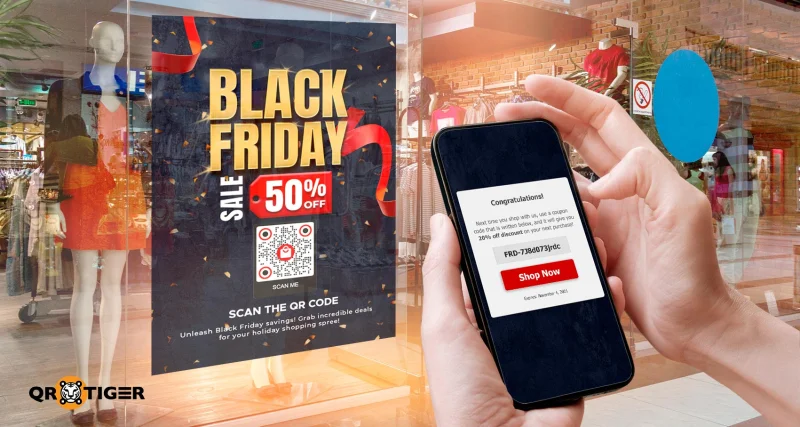
A Black Friday QR code turns your sale posters, shelf tags, and receipts into a direct path to your deals. One scan opens a coupon, product page, or checkout on the shopper’s phone. 

Black Friday 2026 falls on Friday, November 27, the day after Thanksgiving and the top shopping day of the holiday weekend. Cyber Monday follows on November 30.

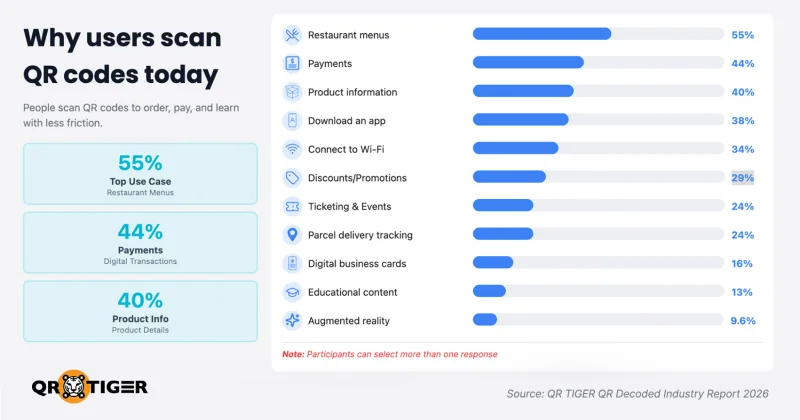
Shoppers already scan for deals. According to QR TIGER’s 2026 consumer report, 29% of people use QR codes for discounts or promotions.

Below are 17 ways to use QR codes for Black Friday, split between the stages of the sale. You'll also get tips on where to place your codes and how to track and protect them throughout your campaign.

Key takeaways

  • The best Black Friday QR code is a dynamic code with a clear reward, placed where shoppers pause, and checked every morning of the sale.
  • Black Friday 2026 falls on November 27, and Cyber Monday follows on November 30. Lock your offers, landing pages, and QR codes this week.
  • Print the reward on the sign, such as “Scan for 20% off today.” In QR TIGER’s 2026 report, 63% of people said they’ll scan a QR code when the value is evident.
  • Give each placement its own QR code and UTM tag, check scans every morning, and set up GA4 conversion tracking to count purchases.
  • Prevent QR scams: link only to your own HTTPS domain, print a short web address beside each code, and check printed codes for tampering daily.

What is a Black Friday QR code?

A Black Friday QR code is a two-dimensional barcode built for a sale campaign. The pattern stores a link, and a phone camera reads the pattern with no app or typing needed.

The link behind the code decides what shoppers get: a limited-time deal, a sign-up page for early access, or directions to your store. The code appears wherever shoppers meet your brand, from window decals and product packaging to emails and TV ads.

Why use QR codes for Black Friday 2026?

The benefits of QR codes on Black Friday 2026 come down to value, information, and convenience.

Black Friday shoppers buy through mobile devices

Black Friday shoppers show up in record numbers. According to the National Retail Federation, 202.9 million consumers shopped from Thanksgiving Day through Cyber Monday in 2025.

They spend big on online shopping, too. Cyber Week, the five days from Thanksgiving to Cyber Monday, brought in $44.2 billion in U.S. online sales, up 7.7% year over year, according to Adobe.

Day (2025)U.S. online spendChange vs 2024
Thanksgiving$6.4 billion+5.3%
Black Friday$11.8 billion+9.1%
Weekend (Nov. 29 to 30)$11.8 billion+8.7%
Cyber Monday$14.25 billion+7.1%

Black Friday grew faster than Cyber Monday for the second year in a row, as shoppers chased earlier deals.

Mobile purchases led the high-traffic days. The same report shows 57.5% of Cyber Monday online sales came through a mobile device, and mobile share crossed 60% on Thanksgiving for the first time.

People are scanning QR codes habitually

Most people are already scanning QR codes as a habit. Our research found that 47% now scan QR codes regularly, and 70% say their QR code use has increased since 2023.

They scan when the payoff is clear. The same survey found that 63% of consumers will scan a QR code if the value is evident.

Reasons why people scan QR codesShare of respondents
Save time with quick access and no typing55%
Access useful or exclusive content49%
Save money by redeeming discounts and deals45%

Source: QR TIGER QR Decoded 2026, Chapter 3. Totals exceed 100% because respondents selected more than one reason.

A Black Friday QR code campaign covers all three at once: a fast link, a clear deal, and content worth the scan.

Our take: A scan is a trade. If your campaign assets don’t say what the shopper gets when they scan the code, expect a quiet weekend.

What shoppers scan QR codes for

Chart of why users scan QR codes

Shoppers scan for two things: details and deals. After surveying 1,548 respondents across the US, Europe, and Asia Pacific, QR TIGER’s QR Decoded 2026 report found that 40% use QR codes to get product information. About 44% also use them for contactless payments.

Discounts rank high, too. The same study found that 29% use QR codes for discounts or promotions.

17 Black Friday QR code strategies by sale stage


Before the sale

1. Open early access for loyal customers

Give members of your loyalty programs a 24- to 48-hour head start before the public sale. Early access builds customer loyalty and gives everyone else a reason to join your list.

Point a QR code to your early-access page and protect it with a password. Send the password to members by email or SMS. Place the code at the point-of-sale counters, in member emails, and on receipts from now until the sale.

2. Tease your deals with a shop-window QR code

Your storefront can provide information about upcoming sales even after closing. Display a sign that says, “Scan to preview this week’s deals,” and link a dynamic QR code to a page listing five featured offers.

On Black Friday morning, update the destination to the live sale page without replacing the printed QR code.

Track scan times to identify when people are most likely to access the offers. This data can help you plan staffing and store operations for future sales.

3. Grow your email and SMS list before the rush

Your list powers the cheapest channel you own during Cyber Week: email marketing and SMS. Adobe’s 2025 holiday shopping data shows email and paid search stayed reliable drivers of online traffic and sales.

For lead generation, link a URL QR code to the signup page of your email or SMS tool. Offer small incentives for customers, such as a first pick on November 26.

Place the code at the checkout counter and in order packaging from now until the sale. Get clear opt-in consent before you send a single text.

4. Turn flyers and direct mail into trackable channels

Printed flyers rarely report back. A separate QR code for each mail batch, ZIP code, or design version lets you track scans by source.

Link each QR code to the same sales page. After the weekend, compare scan counts to see which batches or designs received the most scans. Use these results to inform print distribution and budget decisions for future campaigns.

For hundreds of codes, use a bulk QR code generator instead of creating each one by hand.

5. Drive app installs for app-only deals

For retailers with mobile apps, an app-only deal gives shoppers a reason to install your app. An App Store QR code removes the search step.

The code handles device compatibility for you, opening the App Store on iPhones, Google Play on Android devices, or AppGallery on Huawei devices. 

Print the code on bag inserts, counter signs, sale posters, and email footers.


During the sale

6. Deliver scan-to-redeem coupons

Black Friday shoppers come bargain hunting. Adobe tracked Cyber Monday 2025 discounts peaking at 31% off listed prices for electronics, 28% for toys, and 25% for apparel.

Link each code to a page showing the coupon in large type, the redemption steps, and the end date. Put the reward on the sign itself: “Scan for 20% off today.”

7. Run hourly flash deals with one dynamic QR code

Print one code under the line “Scan for the deal of the hour.” Repoint the destination on a fixed schedule, such as 8 a.m., noon, and 4 p.m.

Assign one staff member to the switch and provide a written schedule. A smart URL (multi-URL) QR code with time-based redirection automates the change.

Hourly flash sales give shoppers a reason to scan the same sign twice.

8. Replace printed catalogs with a digital sale catalog

A printed catalog goes stale the moment an item sells out. A digital catalog stays current.

Upload your sale catalog as a PDF to a File QR code converter. When inventory management flags a sold-out item, replace the file so the printed code reflects the new version.

Place the code at the entrance, on table tents, and in flyers.

9. Add product demos and reviews to shelf tags

Shoppers want proof on the shelf. Give them the details a sales associate would, without the wait.

Link each hero product’s shelf tag to a short page with a 30-second demo video, the review score, and the sale price. Use a video or file QR code for the demo.

For bigger purchases like TVs or laptops, link to short buying guides instead.

When a product sells out, repoint the code to similar deals.

10. Reveal mystery bundles and scan-to-win games

Mystery bundles and scan-to-win games create interactive experiences and a reason to scan beyond the discount. Each code reveals a different deal, such as a skincare set or a gadget bundle at a fixed price.

Set two or three prize levels, with a few jackpot deals at the top and the smallest prize the most common. Cap each prize by quantity, so the cost stays fixed.

Check your local sweepstakes and contest rules before launch. Many U.S. states require a “no purchase necessary” entry route.

11. Guide shoppers to your store and through the aisles

A crowded store loses shoppers who can’t find the deal. A QR code at the entrance fixes the problem.

Link an entrance sign to your store map by uploading it as an image or PDF via a file QR code. Mark doorbuster locations in red.

Local businesses with several branches benefit most: for flyers and emails, use a smart URL QR code set to redirect by location, so each scan opens directions to the nearest branch.

12. Speed up checkout with scan-to-pay

Put your payment QR code on queue signs, so shoppers pay while they wait. Long lines cost you Black Friday shoppers, and scan-to-pay speeds up the checkout process.

Display the same code at the counter for shoppers who skip the queue signs.

13. Send shoppers to all your social channels in one scan

Social media drove a growing slice of 2025 holiday sales. Social media’s share of Cyber Monday revenue reached 3.6%, up from 2.3% in 2024, per Adobe.

A Link Page QR code gives easy access to all your profiles on a single mobile page. Shoppers follow you on their preferred platform, which keeps brand engagement going after the sale.

Place the code on bags, receipts, and counter signs. Post your Cyber Monday deal on those channels first.


After the sale

14. Bring Black Friday buyers back on Cyber Monday

Your Black Friday buyers already trust you. Cyber Monday is your second chance with the same people.

Print a Cyber Monday QR code on Friday receipts and bag inserts with the line “Scan Monday for an online-only deal.” Point the code to a countdown page over the weekend.

On November 30, flip the destination to the live offer. Compare Monday scans with Friday receipt counts to gauge interest from Friday buyers. To count actual repeat purchases, track redemptions of the online-only coupon code.

15. Collect reviews through receipts and packaging

Reviews from sale buyers feed next year’s sales. A QR code makes feedback collection take five seconds.

Link a URL QR code straight to your Google review page or product review page. Print the code on packaging inserts and receipts with “Scan to rate your order.”

Time the ask after delivery for online orders.

16. Retarget shoppers who scanned but did not buy

A scan without a purchase still signals interest. Retargeting turns those scanners into a December audience and adds personalization to your ads.

Add your Meta Pixel or Google tag to your QR codes or landing pages. Run December ads to shoppers who scanned but skipped checkout.

Disclose data collection in your privacy notice, and follow consent rules in each market you sell to.

17. Reuse your QR codes for Christmas and January sales

Dynamic codes outlive Black Friday and carry your holiday marketing into January. After Cyber Monday, repoint the same printed codes to your Christmas gifting ideas, then to January clearance.

Keep “Black Friday” off the printed QR code frame if you plan to reuse the material. Put the event name on the poster instead.

How to create QR codes for your Black Friday campaign

These steps show you how to effectively create QR codes:

  1. Go to QR TIGER in your browser.
  2. Select a QR code solution, such as smart URL, file, landing page, or link page.
  3. Paste your sales landing page link, or upload your catalog file.
  4. Choose Dynamic QR, then generate the QR code.
  5. Use the design tools to make custom QR codes with your brand colors, logo, and a frame with a CTA.
  6. Test the code on at least one iPhone and one Android phone.
  7. Download as SVG for print or PNG for screens and email.


Static vs dynamic: Which QR code type to use for Black Friday sale campaigns

There are two types of QR codes you can use for a Black Friday campaign: static and dynamic. A static QR code permanently encodes information (such as a webpage URL or text) in its patterns. You cannot change the destination of the code once it’s printed.

A dynamic QR code, on the other hand, stores a short redirect link before it leads to the exact destination. It allows you to update the destination and analyze the engagement metrics after you print the QR code.

Between the two, dynamic QR codes are better suited for sales events like Black Friday. You can use them for multiple campaigns on different dates by simply redirecting to different pages.

For example, one QR code on your store window poster can promote the early-bird sale (open on November 20) on one day and the Black Friday sale (November 27) on another.

FeaturesStatic QR codeDynamic QR code
Edit destination after printingNoYes, change the offer anytime
Scan statsNoYes
GPS trackingNoYes, see where scans happen
ExpiryNoYes, end the QR code when the sale ends
Password protectionNoYes, lock early-access pages
Scan notificationsNoYes, get email alerts
RetargetingNoYes, build ad audiences from scanners
UTM trackingNoYes, see which placement sent traffic in GA4
Reuse for Cyber Monday and ChristmasNo, same destinationYes
Best forFixed info, such as Wi-Fi or plain textCoupons, flash deals, campaign pages

Available on supported QR TIGER plans. GPS tracking requires the scanner’s permission.

When should you launch your QR code campaign?

Shoppers start earlier than most campaigns. According to the National Retail Federation, as of early November 2025, holiday shoppers had already finished about 26% of their planned purchases.

By Thanksgiving weekend, 84% of consumers had begun their holiday shopping. A QR code printed in late November meets a shopper who has already bought about a quarter of the list.

Date (2026)What to do with your QR codes
As soon as possibleLock offers, build landing pages, create dynamic QR codes, test print samples
November 14 to 19Run awareness campaigns, tease deals, grow your email and SMS list, and point window codes to a preview page
November 20 to 25Open early access for loyalty members
November 26 (Thanksgiving)Switch codes to early online deals
November 27 (Black Friday)Run the live sale and check every code each morning
November 28 to 29 (weekend)Add a second offer for shoppers who haven’t bought
November 30 (Cyber Monday)Repoint receipt and bag-insert codes to your online-only offer
December 1 to 7Launch follow-up campaigns for scanners, repoint codes to Christmas, review scan data

Where to place QR codes

Place QR codes where shoppers pause: in store windows, on shelf tags, at checkout counters, on receipts, and in flyers.

For multi-channel campaigns, give each placement its own code and its own offer, so your data shows which spot pulled its weight.

Stores and products lead the list. In our 2026 survey, 65% of respondents most often scan QR codes on products and in stores, while print reached 16%.

Print media still earns a spot, but the code needs a stronger reason to scan. Pair every flyer and receipt code with an offer the shopper won’t get anywhere else.

PlacementBest momentLink the code toWhat to track
Store windowAfter hours, before the saleEarly-access or preview pageScans by hour
Shelf tagAt the shelf, mid-decisionDemo video, reviews, bundle priceScans per product
Checkout counterBuyer is already in the storeEmail or SMS signupSignups
Receipt or bag insertAfter purchaseCyber Monday offerScans on November 30
Flyer or direct mailBefore the saleSale landing pageScans per batch
Product packagingAfter an online orderReview page or reorder linkScans per product
Email or social postAny timeSale page with UTM tagScans and traffic per channel

How big should your QR code be?

Use a 10-to-1 rule of thumb: one inch of code width for every ten inches of scanning distance. Always test the printed sample from the shoppers' perspective.

PlacementTypical scan distanceMinimum code width
Flyer or receipt8 inches0.8 inch (2 cm)
Shelf tag12 inches1.2 inches (3 cm)
Counter poster3 feet3.6 inches (9 cm)
Store window5 feet6 inches (15 cm)

How to track QR code scans and sales

Strong campaign tracking comes down to two habits: checking scans per placement every morning of the sale and tagging each destination URL with UTM parameters. If you wait until December, you lose the chance to act on the data while shoppers still buy.

Shopper traffic shifts from day to day, so yesterday's data should shape today's signs. According to the National Retail Federation, in-store traffic on Black Friday 2025 dipped slightly compared with 2024.

The Sunday after Thanksgiving, meanwhile, drew a record 32.6 million in-store shoppers, up 27%. A daily scan check shows shifts like this while you still have time to move staff, signs, and offers.

Each tool measures a different step:

  1. Scans measure QR engagement: how many times shoppers scanned each code.
  2. UTM tags identify campaign traffic: which placement sent each visit to your site.
  3. Conversion or e-commerce tracking measures purchases: which visits ended in a sale. Set this up in GA4 or your e-commerce platform before the sale starts.

Metrics to watch during the sale

  • Total scans show the overall reach for each code.
  • Unique scans show how many people scanned, closer to the real reach.
  • Scans by time show your peak hours and days.
  • Scans by location show which cities or regions respond.
  • Scans by device show whether iPhone or Android users dominate.

Connect scans to sales with UTM tags and GA4

A QR code counts the scan. A UTM tag labels the visit, so GA4 shows which placement sent the traffic. Without UTM tags, QR code visits often land in GA4 as direct traffic, hiding which sign worked.

Add a tag to each destination URL, such as utm_source=window or utm_source=flyer, with utm_campaign=bf2026.

With conversion tracking set up in GA4, you’ll also see purchases and conversion rates per placement. See our guide on how to track QR codes with Google Analytics.

Read your data each morning

Name each code by placement and store, such as "Window, Main Street." Then compare scans with coupon redemptions or tracked sales every morning, and change one thing per sign each day.

What you seeLikely causeWhat to try
Many scans, few redemptionsSlow page or unclear rewardLoad the page on cellular data; put the reward at the top
A few scans on one signPoor visibility or a weak CTAMove the sign, enlarge the code, or rewrite the CTA
Scans drop after day oneThe offer feels staleSwap the offer through the dynamic code
Scans from one channel, no checkoutsThe page doesn't match the signMatch the page headline to the sign's promise

QR code best practices and mistakes to avoid

A QR code for Black Friday earns scans when shoppers see the reward, scan without trouble, and land on the right page. Most failures come from basics, not technology.

Our survey data shows 4 in 10 users struggle to scan QR codes. Poor placement, camera limits, and unoptimized mobile pages top the list of reasons.

Three mistakes cause most failed Black Friday QR codes: a sign with no clear reward or end date for limited-time offers, a single code shared across every placement, and printed codes that nobody tests.

Send shoppers to the deal, not your homepage

Shoppers scanned for a specific offer. Link each code to the page showing that offer, with the buy button above the fold.

Cut heavy images and pop-ups for hassle-free shopping. Test the page on cellular data, not office Wi-Fi.

Keep branded designs scannable

Brand colors and a logo make your code recognizable. Too much styling makes the code unreadable.

Keep a dark code on a light background. Leave a blank margin, called the quiet zone, around all four sides, and size each code for its scan distance.

How to keep your QR codes safe from scams

Protect shoppers by linking every QR code to your own HTTPS domain, printing a readable web address next to each code, and checking printed codes for tampering daily.

How QR code fraud works during sales

Scammers swap or cover real codes with fake ones. In a January 2022 public service announcement, the FBI warned that cybercriminals tamper with digital and physical QR codes to redirect victims to sites designed to steal login credentials and financial details.

Black Friday adds pressure. Shoppers rush to grab deals, so fewer people check the web address before entering card details.

Shoppers know the risk. In our survey, 55% of users named security as their top QR code concern and said they’ll scan only when the source is recognizable or clearly identified. For 40% of users, security is the main reason they don’t scan at all.

Steps to protect your shoppers

  1. Link every code to a page on your own HTTPS domain.
  2. Print a short web address beside the code, such as yourstore.com/bf, so cautious shoppers type the link instead.
  3. Place codes behind glass or laminate, where a sticker is hard to add.
  4. Check every printed code each morning for stickers or swaps.
  5. Brief staff to report any unfamiliar code in the store.
  6. For app downloads, link only to the official App Store or Google Play page, and print the store badges beside the code.


Real Black Friday QR code campaign examples

Macy's: instant-win prizes through in-app scans (2014)

Macy's turned store visits into a game. According to MediaPost, shoppers using the Macy's app scanned in-store QR codes for digital gift codes and prizes, with $1 million in prizes awarded during the sale.

The lesson: scan-to-win games drive customer engagement by giving shoppers a reason to walk every aisle.

Mercado Libre: QR codes on live TV handshakes (2023)

Mercado Libre (Mercado Livre in Brazil) placed a QR code on screen whenever a handshake, the shape in its logo, appeared on Brazil's TV Globo. According to The Media Leader, the team tracked over 2,000 handshakes over 45 days leading up to Black Friday.

Each scan opened deals matched to the show on screen. The same report says Black Friday sales rose 80% on the day, and coupon use rose 283%.

The campaign won the Media Grand Prix at Cannes Lions 2024.

The lesson: a QR code turns TV airtime into effective advertising you measure scan by scan.

Walmart: QR codes on in-store displays (2025)

Walmart gave Walmart+ members five hours of early online access before each 2025 deals event. In stores, a holiday tree display featured a QR code that directed shoppers to more tree options in the Walmart app.

The lesson: a shelf holds a few products, and a QR code opens the full range.Free ebooks for QR codes

Plan your Black Friday QR code campaign today

Black Friday QR codes work when every scan delivers a clear reward on a fast mobile page. Dynamic codes give you the edit button and the scan data that a four-day sale demands.

Start with three codes: a window code for early access, a shelf code for coupons, and a receipt code for Cyber Monday. Check them each morning, and keep the winners for Christmas.

Sign up for QR TIGER and create your dynamic QR codes this week.Brands using QR codes

Disclaimer

This article is for general informational purposes only and does not constitute legal, financial, or other professional advice. For questions about QR TIGER's products or services, please contact our support team at [email protected].

Frequently Asked Questions (FAQ)

Are dynamic QR codes better than static ones for Black Friday?
Yes, for most sales campaigns. Dynamic QR codes beat static ones for Black Friday thanks to editable links, real-time scan tracking, and quick error fixes after printing. Static codes still suffice for fixed details, such as store Wi-Fi or a permanent store map.
Do Black Friday QR codes expire after the sale?
The answer depends on the type. Static QR codes never expire, but the code stops working if its linked page goes offline. A dynamic QR code usually stays active while your plan is active, unless you set an expiry date or reach a scan limit.
How much does a QR code cost?
Static QR codes are free, since the data sits in the pattern itself. Dynamic QR codes usually come with a paid plan, and prices vary by provider and features.
Do all phones scan QR codes?
Not all, but most modern smartphones do. iPhones on iOS 11 or later and most Android phones scan through the built-in camera, while older phones need a free scanner app.
How do I redeem a QR code?
Open your phone’s camera, point it at the code, and tap the pop-up link. Then follow the final prompt, such as tapping “Redeem Now” or showing the code to staff.

Was this article helpful?

Enterprise Ready

Maximize Scans with the Best QR Code Generator

Join thousands of global brands using QR TIGER to manage dynamic routing, bulk creation, and deep attribution analytics.

Get Started For Free


Share this guide:
Roselle V.
Roselle V.

Content Writer at QR TIGER

Roselle is a Software Engineer and Digital Marketing Specialist with over 10 years in the tech industry. She has led technical and marketing initiatives at multiple SaaS companies, creating smart digital solutions and content that drive business growth.