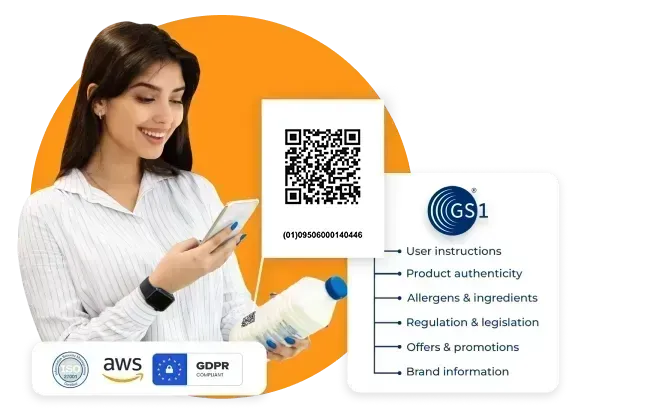
GS1 QR code + barcode in one
Create your own GS1-compliant 2D barcode that can be read by both POS systems and smartphone cameras. Give it your own brand identity with a host of online customization tools.
CREATE A GS1 QR
What is a GS1 2D barcode?
A QR code with a GS1 digital link is a special type of 2D barcode that complies with Global Standards 1—a non-profit organization that sets globally recognized standards for product information across industries.

All you need is 1
Think of it as a hybrid between traditional barcodes and QR codes. It’s a more efficient and accurate tool for product movement and promotion.

Stay future-proof
Gearing up for a future-proof product code system is only a few clicks away. With a dynamic QR code, you change the parameters any time.

About Sunrise 2027
By the end of 2027, all EAN/UPC barcodes will be replaced by GS1 QR codes. This transition, called Sunrise 2027, has been initiated by GS1 to improve transparency, tracking, and product authentication. As of 2024, at least 48 countries are already testing GS1 2D barcodes.
Why use a GS1 digital link QR code
It’s an 2-in-1 solution that addresses the needs of both product and marketing

Complete product data in one code
A digital link can contain primary identification key, data attributes, and key qualifiers. You can add more: gs1s, files, multiple links, and even app store links.
Cost-saving tool
Our GS1 codes can be edited anytime after creation, which means you don’t have to reprint and replace your existing QRs in case the data or links need updating.
Customize your QR
Your account comes with a built-in analytics dashboard. Keep track of consumer insights based on metrics such as number of scans, locations, time, and devices used.
Branding to the next level
Blend your brand kit into your QR codes. Get thematic by selecting colors, eyes, patterns, frames, and more.
Safe and secure
QR TIGER strictly complies with GDPR, ISO 27001, and CCPA to make sure user data and privacy are highly protected.
Trusted by Fortune 500 companies since 2018
QR TIGER has been at the forefront of QR code technology for customization, security, and reliability
More QR code design options
Get more scans with a branded QR. Insert your your logo, choose your brand’s colors, and make it your own to foster brand recall.
Advanced QR code maker
Our long list of advanced solutions and enterprise-level features suits all your business needs.Get access to 20 different QR code applications.
Real-time insights
Monitor each QR code in real-time and get accurate analysis directly from your dashboard. See which ones perform better and why.
Connects with a host of tools
Connect QR TIGER with other big CRM platforms like Zapier, HubSpot, Canva, Monday.com, GA4, Facebook Pixel, and more.
24/7 customer assistance
Our customer support team is always one chat away to make sure your QR code works from creation to deployment.
Unmatched Scan Performance
We take pride in our 99.9% service uptime and rapid auto-scaling server clusters to guarantee that your QR code works every time.
Frequently asked questions
How do I get my GS1 barcode?
You can get your GS1 barcode using the QR TIGER online. Make sure to have your product information ready.
Can I make my own GS1 barcode?
Use a GS1 2D barcode generator to make your own GS1 barcode online. Simply add all the crucial product data like the product identification key, data attributes, and key qualifiers to generate your own barcodes.
What is a GS1 QR code?
What can I store in my GS1 2D barcode?
You can store all the crucial product data in one code. The GS1 digital link can contain your product’s application identifier, value, serial number, key, variant, and batch/lot number.
Why should I use a GS1 digital link QR code?
GS1’s Sunrise 2027 aims to replace all barcodes with QR-style product codes to meet global standards and demands for better product transparency, improved global supply chain traceability, and quicker product authentication.
Is there a GS1 QR code specification?
Yes. The minimum and maximum QR code’s X dimension is 0.396mm to 0.990mm according to GS1’s General Specification for standard compliance. A GS1 QR with 29 modules should be 14.652mm x 14.652mm at minimum and 36.63mm x 36.63mm at maximum.
How can I create a GS1 QR code for my product?
How does a GS1 barcode work?
This type of 2D barcode stores product data by converting information into a single, smartphone-scannable code. Once scanned, people can access product-specific data, such as the product trade number, serial number, data attributes, variant, batch number, and more! Since it’s a dynamic QR, users can edit the stored information for up-to-date product codes.
Why do you need a GS1 QR code?
The demand for product transparency is rising. With the GS1 digital link QR, you can contain complete product data in just one code. Following GS1 standards and complying with the GS1 QR code guidelines allows your product codes to be globally accepted across systems and channels. To date, there are several countries rolling out GS1-compliant QR codes.
Is a GS1 QR code editable?
Yes. Our GS1 QR solution is editable. You can update the stored data directly from your dashboard whenever you want. With this feature, you no longer have to replace product codes manually saving you time and money.
Can I add a logo to my GS1 barcode?
How do I add a logo to my GS1 barcode?
Use a free QR code generator with logo integration to create your branded GS1 2D barcode. Upon customizing, click Logo and upload your logo image file. Once completed, click the image to attach it to your design.
Can I customize my GS1 QR design?
Can I track my GS1 2D barcode?
Yes, our GS1 QR solution is trackable. Its built-in tracking feature allows users to measure its effectiveness based on the scan activity.
How can I track my GS1 2D barcode?
Download the QR TIGER App



'QR Code' is a trademark of DENSO WAVE INCORPORATED. © 2026 www.qrcode-tiger.com