
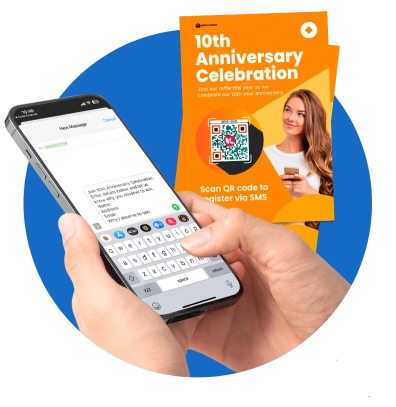
Advanced QR code generator for SMS
Use SMS QR code generator to create SMS QR codes for free. Store a mobile number and a pre-composed text message. Let your scanners send you messages with a scan.
What is an SMS QR code?
SMS QR code is a free QR code solution that allows people to send or receive text messages with a scan. It can store a mobile phone number and a pre-filled text message to automate text messaging.

Why use SMS QR codes?
An SMS QR code lets users communicate and connect with each other with a quick smartphone scan. It is a digital portal to a seamless flow of interactions between mobile devices. This practical solution has applications that span across marketing, customer support, event management, networking, and many more.

Scan and send a message
Thanks to our SMS QR code, text messaging is as convenient and fast as a scan. Once the code is scanned, it immediately leads scanners to their default messaging app and displays the mobile phone number with the pre-filled text message. With this, you’re one scan closer to your network, customers, friends, clients, and more.
Why use a QR code for SMS
SMS QR codes transform communication using QR technology. It streamlines text messaging, making it faster and easier. Start conversations and exchange contacts in just a scan. Connecting with people has never been this better.

Free SMS QR codes
Our SMS QRs are totally free. Users can generate their own without spending a penny. No need to register; use our free software with no strings attached.
Stunning QR code designs
Craft your own QR codes and make it known using our free QR code generator. Enjoy our platform’s wide range of design options to create QRs that perfectly match your brand.
Fast and easy QR code creation
Convert a text message to a QR code in just seconds with our free QR code generator. Simply enter a phone number and a text message and have your QR code SMS ready for sharing in no time.
Compatible with all devices
Our QR code for SMS works on all smart devices, allowing you to reach more people whenever and wherever you are.
Works even offline
Our free QR code solution works offline, which makes it the perfect tool for building strong connections that last. Scanners can use the QR code to text and connect with you effortlessly.
Conversation-starter
SMS QR codes are a brilliant tool for starting conversations. Use them to get in-depth insights, feedback, suggestions, and responses instantly via text.
Send the right message with QR TIGER
Here’s why we’re the best platform for text message QRs
Free QR Code Customization
You can make your own eye-catching QR codes for free. Use our platform’s customization tool to match your QR code design with your style.
Future-Ready QR Code Generator
Get a step ahead and come prepared for the ever-changing demands. Our comprehensive list of advanced QR code solutions will get you ready for the future. Keep your game up with our 20 need-specific solutions.
Precise QR Code Tracking
Track your QR codes in real time directly from your dashboard. Measure their success and see which strategies are more effective with your target market.
More Seamless Workflow
Take your customized QR codes from QR TIGER to other CRM software. Integrate your account with HubSpot, Canva, Zapier, and more.
Quick Customer Assistance
Our customer support team is ready 24/7 to answer your queries, making sure your QR codes work perfectly from creation to deployment.
Advanced System
Our QR code generator SMS has proven 99.9% service uptime and rapid auto-scaling server clusters for uninterrupted service.
Frequently asked questions
Can I use a QR code to text?
Yes, you can definitely use a QR code to text. Using an QR code generator SMS online, you can convert your text messages to a QR code.
What is an SMS QR code generator?
A text message QR code generator creates smartphone-scannable codes that store your phone number and specific text messages for quick mobile access.
How do I convert a text message to a QR code?
What is a QR code for SMS?
A QR code for SMS is a free QR code primarily for text messages. It can store a mobile phone number and a pre-composed text message. It’s a special type of QR that streamlines communication via text.
How does an SMS QR code work?
Our SMS QR solution works by storing a message and a mobile number. Once scanned, it opens the messaging app and displays the stored mobile number with the pre-filled message. Scanning the QR immediately opens your message app and displays the stored content, allowing the scanner to send a message with less effort.
How do I create a QR code for text messages?
How do I use a QR code generator SMS?
Our SMS QR code maker converts text messages to QR codes. You can use it for networking, customer support via text, and commercial uses.
How to make a QR code for SMS?
To make your own SMS QR, you can use our SMS QR solution. Click the SMS QR icon, enter details, generate QR, customize, and download.
Is there a free QR code generator for SMS?
Yes. QR TIGER is a free SMS QR code generator. Enjoy creating free QR codes for text messages that you can customize at zero cost.
What’s the best free QR code generator for SMS online?
Why do I need an SMS QR code?
This static solution improves communication. It fosters instant connection, encouraging more people to start a conversation with brands.
What can I store in an SMS QR code?
Our SMS QR can store a mobile phone number and a text message. Once the code is scanned, it instantly opens the messaging app and displays the stored content.
Can I edit the message in my QR code?
Can I add a logo to my QR code?
How do I add a logo to my QR code?
To add a logo to your QR, use a QR code generator with logo customization features. With our platform, it’s super easy. Upon QR code customization, click Logo. Upload your own logo image. Once complete, simply select the image to attach it to your QR code design.
Can I customize the design of my SMS QR code?
Absolutely. You can customize the design of your QR code for SMS messages. Using our QR code generator, choose styles to make your codes attractive.
Can I edit the design of my QR code?
How can I edit my current QR code design?
Make sure your code is dynamic. Once you have a dynamic QR code, simply modify your current QR design. Go to QR code > Settings > Edit QR design > Save.
Is the SMS QR code trackable?
How do I measure my QR code performance?
It’s simple to track QR codes using QR TIGER. Simply go to your account dashboard, select a QR code to track, and click Stats. Here, you can see the full view of the specific QR code performance.
Download the QR TIGER App



'QR Code' is a trademark of DENSO WAVE INCORPORATED. © 2026 www.qrcode-tiger.com