
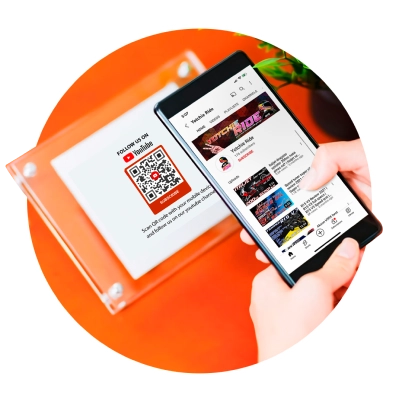
Advanced QR code generator for YouTube
Use a YouTube QR code to share your channel and videos. Boost views, reach, engagement, and subscribers with a scan. Generate a custom QR code for your YouTube content using our free QR code generator.
What is a YouTube QR code?
A YouTube QR code converts any YouTube video into a smartphone-readable code for instant video sharing. You can use it for sharing freshly-released YouTube videos, boosting views, and promoting your YouTube channel.

Why use a YouTube QR code?
A YouTube QR code makes you stand out in a world full of new and popular content creators. Connect with your viewers like never before. Take your YouTube channel and videos right at their fingertips and watch your video engagement skyrocket.

YouTube + QR code
It’s high time to hop on combined technology to meet the heightened demand for convenience and instant solutions. With QR TIGER’s QR code for YouTube, you’re just one scan away from your target viewers.
Why use a QR code for YouTube
Craft eye-catching QR codes for your YouTube assets for free with our QR code generator. Choose from a wide selection of QR code templates and customizations to fit your branding.
Here’s why QR TIGER is the best QR code generator for YouTube:

Free QR codes
Enjoy creating free QR codes for YouTube videos, channels, or music. You can choose between static or dynamic QR codes. Static QR codes are free and can be created at zero cost.
Modifiable QR code content
Share fresh YouTube content online and offline with our potent solution. Instantly boost newly released videos by replacing the stored YouTube link with a fresh one directly from your dashboard.
Track with confidence
Once you generate a dynamic YouTube QR code, you can measure its performance in real time. In just one place, you can see where each QR code’s engagements are coming from.
Watch party with one scan
Take your audience to an exciting watch party with our smart QR code solution. They can instantly access your YouTube content in just a snap. Organically grow your viewers, one scan at a time.
More features
Add your QR code to your watchlist, organize it to a specific folder, clone the code, change the QR code design in real-time, or reset your QR code.
Head-turning QR codes
Making your QR codes stand out is easy. You can create unique codes that you can fully customize from eyes, patterns, frames, and more.
What content creators love about QR TIGER
Why we’re the best QR code generator for YouTube
Complete QR code customization tools
Your QR codes deserve the spotlight. Make them stand out using our QR code generator with logo customization. Explore eye-catching design elements and integrate them into your QR codes.
Future-ready platform
Our platform constantly keeps up with the latest in tech so users can meet modern demands. We offer a long list of advanced QR code solutions with high-end features, allowing you to stay one step ahead of the game.
Comprehensive QR code analytics
Work smart, move sharp. Back up your future strategies with precise analytics and on-point insights with our QR code generator. Easily track and monitor your growth from your dashboard.
Smooth platform switch
Move swiftly from one platform to another by integrating your account with other CRM platforms—HubSpot, Canva, Zapier, Monday.com, and more.
All-time ready customer support
Our customer support team is dedicated to providing 24/7 assistance to ensure QR codes work perfectly, especially after deployment.
Superior system
Our QR code generator is built with 99.9% service uptime and rapid auto-scaling server clusters for an uninterrupted experience and maximum productivity.
Frequently asked questions
What is a YouTube QR code generator?
Can I convert a YouTube video or channel to QR code?
Yes, you can convert your channel or any video from YouTube to QR code using a QR code generator for YouTube.
How to convert a YouTube link to a QR code?
You can convert any YouTube link to QR code in just a few steps with QR TIGER. It’s simple—just copy the link from YouTube, select the YouTube QR code solution from our platform, and paste the link.
How to convert a YouTube channel to a QR code?
What is a QR code for YouTube?
A QR code for YouTube is a dedicated quick response code solution for YouTube assets like videos, music, and channels. It “automates” the process of sharing YouTube content from one mobile device to another.
How does a YouTube QR code work?
Our YouTube QR code converts any link from YouTube (videos, music, channels) into a smartphone-scannable code for instant mobile viewing. Scanning the code using a smartphone or a YouTube QR code scanner instantly takes the audience to the YouTube content.
How to scan a YouTube QR code?
Can I use any YouTube QR code scanner?
You can use a free QR code scanner to scan the code. You can get one from Google Play Store or App Store for free.
How do I create a QR code for a YouTube video?
You can create a unique QR code for any YouTube video using our QR code software in just a few steps. To create, head to QR TIGER and select YouTube QR solution > Enter the YouTube video link > Select Static or Dynamic > Generate QR > Customize and add a logo to your QR > Save and Share.
How do I create a QR code for a YouTube channel?
To create a QR code for your YouTube channel, head to a QR code generator online and select YouTube QR code. Then, enter your YouTube channel link, generate QR, customize, and save.
How do I create a QR code for YouTube music?
It’s simple. Use a QR code generator for YouTube to create your own QR code for any YouTube music. Then, add the YouTube music link, generate the QR code, customize it, and download it.
Is there a free QR code generator for YouTube?
How do I use a QR code generator for YouTube?
You can use our free QR code generator for personal or commercial use. If you’re an influencer or digital marketer, it’s definitely a must-have in your modern toolbox. Use it to share your YouTube channel, videos, and music to maximize reach and engagement.
How to make a QR code for a YouTube video?
Make your YouTube video QR code in seconds with QR TIGER. Use our YouTube QR solution, enter the link, generate, customize, save, and share.
Can I create a YouTube QR code for free?
Yes, you can definitely create a free YouTube QR code using our free QR code generator. You can choose Static QR (free QR code). You can also sign up for the freemium plan to generate free dynamic QR codes for YouTube.
What’s the best QR code generator for YouTube?
Why do I need a YouTube QR code?
YouTube is becoming saturated. More and more rising content creators are joining the space, making it very competitive. Using a YouTube QR code, you can maximize your reach and engagement among the sea of content creators, influencers, and marketers on YouTube.
What can I store in a YouTube QR code?
Our YouTube QR code solution can store any YouTube link, whether it’s a video, channel, or music. And when you generate it in dynamic QR, you can replace the stored link with a new one.
Can I edit the stored video link in my QR code?
Can I add a logo to my QR code for YouTube?
Yes, you can add a logo to your YouTube QR code with our QR code generator with a logo. Simply upload your own logo image on your platform to attach it to your code.
How do I add a logo to my YouTube QR code?
It’s simple to add a logo to your YT QR code using our QR code creator. When customizing your QR, click Logo and upload your logo image. Once successful, simply click the image to add it to your QR code design.
Can I customize the design of my YouTube QR code?
Yes, you can personalize the design of your YT QR code with our QR code software. When generating static or dynamic QR, you’re free to customize your QR code design with the available design elements.
Can I change the design of my QR code?
Is the YouTube QR code trackable?
How do I track my YouTube QR code?
It’s simple to track QR codes with QR TIGER. Go to Dashboard > Select a QR code > Stats. Here, you can see the overall QR code analytics, allowing you to gather valuable QR code insights for future campaigns.
Download the QR TIGER App



'QR Code' is a trademark of DENSO WAVE INCORPORATED. © 2026 www.qrcode-tiger.com